1
MSC CXC-GS45 User's Manual
BIOS
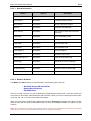
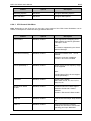
Feature
Options
Description
Always enable PEG
Disabled, Enabled
To enable PEG.
Force X1
Disabled, Enabled
Limits the width to X1.
PEG Port ASPM Support
Auto, Disabled
Control ASPM for the PEG Device
Auto= will set APMC to the highest
common supported ASPM between
the Port and Endpoint.
Extended Synch
Disabled, Enabled
Enable PCIe Extended
Synchronization for Logic analyser
use.
MDA Support
Disabled, Enabled
Control MDA support for the PEG
Device.
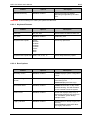
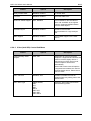
6.2.4.3 Video (Intel IGD) Control Sub-Menu
Feature
Default Primary Video
Adapter
Options
PEG, IGD
Description
Select PEG to have PCI Express
Graphics. If supported and enabled, be
used for the boot display device. If
selected and no PEG card is found,
Internal Graphics will be used
automatically.
Select IGD to have Internal Graphics.
If supported and enabled, be used for
the boot display device. Select also to
use PCI video.
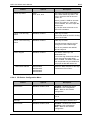
IGD – Device 2
Disabled, Auto
Enables or Disable the Internal
Graphics Device by setting item to the
desired value.
IGD – Boot Type
VBIOS default,
CRT,
LFP,
EFP,
EFP2,
CRT+LFP,
CRT+EFP,
CRT+EFP2
Select the Video Device that will be
activated during POST.
45