1
NOTICES:
Video output in HD requires cables and an HD- compatible display, both sold
separately. Voice chat requires a headset, sold separately. Compatible with
most Bluetooth and USB wired headsets. Some limitations apply.
W
Q
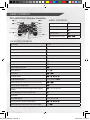
directiona
GETTING STARTED
left stick / B
PlayStation®3 SYSTEM
Starting a game: Before use, carefully read the instructions supplied with the PlayStation®3
computer entertainment system. The documentation contains information on setting up and
using your system as well as important safety information.
Check that the MAIN POWER switch (located on the system rear) is turned on. Insert the
DARKSIDERS ® II disc with the label facing up into the disc slot. Select the icon for the
software title under Ç in the XMB™ menu, and then press the S button. Refer to this
manual for information on using the software.
Quitting a game: During gameplay, press and hold down the p button on the wireless
controller for at least 2 seconds. Then select “Quit Game” from the screen that is displayed.
Hint
To remove a disc, touch the eject button after quitting the game.
Trophies: Earn, compare and share trophies that you earn by making specific ingame accomplishments. Trophies access requires a PlayStation®Network account.
SAVED DATA
Saved data is saved on the system’s hard disk. The data is displayed under
“Saved Data Utility” in the Ç menu.
2
DS2_PS3_MANUAL_US.indd 2
24.01.2014 11:25:15
]