1
Installation
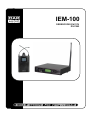
Remove all packing materials from the IEM-100. Check that all foam and plastic padding is removed.
Always disconnect from electric mains power supply before cleaning or servicing.
Damages caused by non-observance are not subject to warranty.
Set Up and Operation
Before plugging the unit in, always make sure that the power supply matches the product specification
voltage. Do not attempt to operate a 120V specification product on 230V power, or vice versa.
Transmitter Control
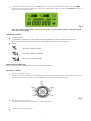
Fig. 3
1.
2.
3.
4.
5.
6.
Level audio left/ channel 1
Level audio right/ channel 2
Transmission power
Limiter on/ off
Channel
Frequency
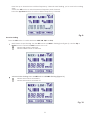
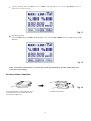
Frequency setting: Press the SET button to enter the setting state. Now press the MENU button until
the display of frequency/channel is flashing (see Figure 4). Use the up/down buttons to set the
proper frequency.
Fig. 4
Volume limiter setting: Press the SET button to enter the seting state. Hold down the MENU
button until the Limit indicator is flashing (see Figure 5). Now use the up / down button to switch
the limiter on or off.
Indicates that the limiter function is switched in.
Indicates that the limiter function is switched off.
Fig. 5
6