1
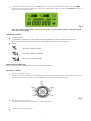
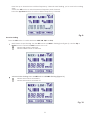
Transmission power setting: Press the SET button to enter the seting state. Hold down the MENU
button until the transmission power indicator is flashing (see Figure 6). Use the up/down buttons to
adjust the transmission power.
Fig. 6
Note: If no button is pressed for 3 seconds, the system will automaticly exit the setting state and
save the current setting.
Transmitter Functions
Limiter function:
If the limiter is switched on, the volume will automatically be decreased if the value rises
above the set threshold. This in order to avoid distortion and protect your ears.
Power:
RF-power 10dBM (10mW)
RF-power 15dBM (31,62mW)
RF-power 20dBM (100mW)
Gain control of input level:
Set the switch in the +10dB position for low output equipement.
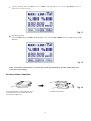
Receiver control
Audio Left/ Right Control.
Rotate the Audio Control knob for adjusting the balance between Audio Left/ Right or Channel
1/2. In Mid position the Audio Left and Right are set to the same volume level.
Fig. 7
ON/OFF/VOLUME Control.
Rotate the ON/OFF/VOLUME knob to adjust the volume.
Frequency/ Channel Setting.
7