1
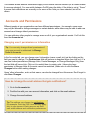
License Agreement About Command Center Command Center is software that runs on your computer, and lets you manage your fleet of road safety equipment. Command Center currently supports: SolarTech message boards (running TRAFIX© 2.0 or later) SolarTech arrow boards SolarTech traffic cameras A variety of message board addons such as radar guns and debris clearing units Install & Setup How do I get started? 1. Make sure you have Java installed, version 7.0 or later. (If you're not sure, go to java.com). 2. Download Command Center for Windows from solartechnology.com. (If you need to run Command Center on an Apple or Linux computer, contact customer service.) 3. Open the installer and follow the prompts. 4. Proceed to Running Command Center for the first time. Tip: Supported assets include SolarTech arrow boards, traffic cameras, and message boards that run TRAFIX 2.7.3 or later. Running Command Center for the first time Start Command Center, and log in with the credentials you were given. This will include an organization, username, and password: