1
DigiMano 2500
Back Light Setting
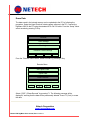
The display Back Light is set to be ON as default. In order to save the battery drain the
Back Light can be turned off after a preselected time as shown in the screen shot below.
From the “Setup” Menu select “Back Light” using the > Key. Select “Back Light” Menu by
pressing F1 Key.
Records
Clock Settings
Back Light
Pressure Control Settings
Sel’
<
>
Exit
The default Back Light setting is always ON. Back Light utilizes consumes more power
than the rest of the electronics. In order to prevent the Battery drain, the Back Light can
be turned off at the priest times as shown below. To change, the power turn off time,
select the desired time using the > Key. The back light will be turned off after the set
time till the next power up.
Always ON
1 Minute
10 Minute
20 Minute
Sel’
<
>
Netech Corporation
www.PressureMeter.com
Manual P/N DigiMano User-manual, Rev 3/19/2014
Exit