1
DigiMano 2500
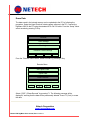
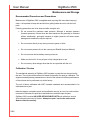
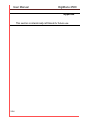
The pressure settings can be changed in increments by selecting the Digit (X)
and using arrow keys.
00.00
PSI
Select Digit (X)
< > to Change
X1
X5
X.1
X.10
For example to change the pressure setting in increment of “1” select digit “X1”
by pressing F1 and use right arrow (>). To decrease by “1” use the left arrow key.
To change the settings in increment of “5” select “X5” by pressing F2 and right
arrow (>). To decrease by “5” digits select.
To change the decimal values select F3 or F4 and use arrow keys. When done
press “ESC” key.
For setting the pressure values for the Relay 2 follow the same procedure as
above.
The pressure settings for the Relay 1 and Relay 2 (if already set) are saved in
the memory. When the pressure reading is equal to the setting the relay output is
enabled.
For the detailed specification of the relay and external power supply interface
please refer to the wiring diagram and instructions provided with the optional
relay interface box (PN:250-OUTPUT-INT).
Netech Corporation
www.PressureMeter.com
Manual P/N DigiMano User-manual, Rev 3/19/2014