1
HFB_400manualGB.qxd
15-05-2008
16:01
Pagina 19
ENGLISH
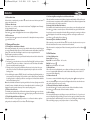
Table 3: Call Functions
FUNCTION
Table 6: Advanced Call Functions
CURRENT STATUS
HANDSET
Answer Call
Standby
OPERATION
HF
HANDSFREE INDICATOR
AUDIO TONE
Standby
Press button
Press and hold button - Key tone
for 3 seconds
Press button
Key tone
Reject Call
Standby
Standby
Talk
Talk
Redial
Standby
Standby
Voice Dialing
Standby
Standby
Cancel Voice
Dialing
Volume Up
Voice Dialing
Voice Dialing
Press and hold button + Key Tone
for 3 seconds
Press and hold button - Key Tone
for 3 seconds
Press button Key Tone
Talk
Talk
Press button +
Volume Down
Talk
Talk
Press button -
Mute
Talk
Talk
Press button
Key Tone
Unmute
Talk
Mute
Press button
Key Tone
Display current volume
for 2 seconds
Display current volume
for 2 seconds
Display icon indicator
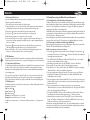
CURRENT STATUS
HANDSET
Call transfer
(handsfree to
handset)
Call transfer
(handset to
handsfree)
HF
HANDSFREE INDICATOR
AUDIO TONE
Talk
Talk
Press and hold button
for 3 seconds
Key tone
Talk
Talk
Press button
Key tone
Talk
Call Waiting
Press and hold button +
for 3 seconds
End active call
and answer
new call
Talk
Call Waiting
Press button
Reject the new
call
Talk
Call on hold
Press button
Toggle held call
and active call
Talk
Call on hold
Press and hold button +
for 3 seconds
End active call
Talk
and accept hold
call
Call on hold
Press button
Conference
Call on hold
Press and hold button for 3 seconds
FUNCTION
OLED INDICATOR
Pause
HANDSET
17
HF
Except power
off
Talk
Volume down
OPERATION
HANDSFREE INDICATOR
AUDIO TONE
Beep every 20 seconds
OLED INDICATOR
CURRENT STATUS
HANDSET
Play
Volume up
Low power
warning
AUDIO TONE
Held active
call and accept
incoming call
Stop
CURRENT STATUS
HF
HANDSFREE INDICATOR
OLED INDICATOR
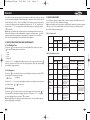
Table 7:Work in with IVT and Windows Media Player
OPERATION
Table 5: Low Power Indication
FUNCTION
OPERATION
Icon indicator
disappears.
Table 4: Call Transfer Functions
FUNCTION
CURRENT STATUS
HANDSET
OLED INDICATOR
Key tone
End Call
FUNCTION
Forward
Backward
IVT/Media
player on
IVT/Media
player on
IVT/Media
player on
IVT/Media
player on
IVT/Media
player on
IVT/Media
player on
IVT/Media
player on
OPERATION
HF
HANDSFREE INDICATOR
AUDIO TONE
OLED INDICATOR
Press button
Press button
Press button
Press button +
Press button Press and hold button for 3 seconds
Press and hold button +
for 3 seconds
Display 'Low Power' on
the screen
18