1
DYNASIM© - USER MANUAL v. 3.2.5 - 7.093
DYNAFLOW, INC.
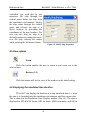
controlled type such that he can
maneuver the ship through the
control panel, delete the ship from
the simulation environment, display
the ship status through the control
panel, and relocate the ship to a
desire location by providing the
coordinates of the new location. The
user can also drag the ship to a
desired position by putting the cursor
over the ship, moving the mouse
while pressing the left mouse button.
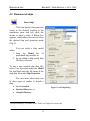
Figure 15. Modify Ship Properties.
4.5 View options
Zoom
Click this button enables the user to zoom in and zoom out in the
selected area.
Restore (1:1)
Click this button will set the view of the window to the initial setting.
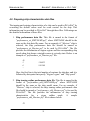
4.6 Displaying the simulated time duration
DYNASIM© can display the duration of a ship simulated time, i.e. from
the time it is launched into the simulation environment until the current time.
This is shown in the Simulation Time Display window (Fig. 16). The time is
displayed in HH:MM:SS format (HH for hours, MM for minutes, and SS for
20