1
6.3.3.2.2.6 Reporting Document Length
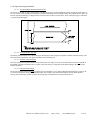
The length is measured, stored and reported in 1/100 inch increments. If a document has been measured (auto sized) then that
dynamically acquired, volatile memory data, will be the length reported as status to the host. If the printer has the fixed size mode
selected, the data which is stored in nonvolatile EEPROM memory will be the data reported. The reported length will be the
measured (or stored length) minus the unprintable margins. Typically this will be 1/4" less than the physical length. This reported
length is the printable length of the document. When entering or displaying the document length, locally, at the printer, the
physical size will be used. A manually entered 11.00" document will return 10.75" to the host as status data. If the printer is setup
for continuous forms, the length reported will always be zero. Zero is not a value which can be returned by a registration mark,
fixed length printer (limited to the minimum document size). This zero value can be used by the host to determine if a continuous
form printer (roll mode) is connected to the system or a non-zero value represents a fixed size document printer.
6.3.4 Host Determination of Form Size – Registration Marked Forms
When printing on fixed sized documents, the host system application program needs to know the length of the document being
printed. This information can be implicitly known where an application is designed to print on forms of a specific size. It can also
be explicitly obtained by a number of techniques:
-1- the application can request that the operator enters the data at the system console
-2- the data can be read from the printer as part of the status data, refer to sections 11.1.4 for general information and
11.2.3.2.3 for the status field information.
The printer is therefore the source of the print length data and the host is the receiver. The printer does not explicitly use the length
when printing the document, however, the host must use it when forming documents to send to the printer. The printer will print
data received and at the end of the document seek the registration mark as the method of length management. If the host does not
use the correct print area the data might overflow the form and not print correctly.
ITK 38 User’s Manual Version V1.03
Date: (7/2/09)
File: UMITK103.pdf
35 of 79