1
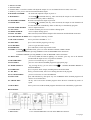
4. PRESET B LEDS
5. SCENES LEDS
6. Channel sliders 13-24: these sliders will adjust the output of 13 to 24 channel from 0 to 100% or 0 to 255.
7. Flash key 13-24: press to activate maximum channel output.
8. MASTER A SLIDER:
the slider will adjust the output of preset A..
9. BLIND KEY:
in CHASE
SCENES this key, when activated, the output of each channel will
be controlled only by slider or flash key
10. MASTER B SLIDER:
the slider will adjust the output of preset B.
11. HOME KEY:
in CHASE
SCENES, this key, when activated, the output of each channel will
be come back from controlled by slider or flash key to controlled by program.
12. FADE TIME SLIDER:
move to adjust fade time.
13. TAP SYNC:
in AUTO CHASE, press it twice to define chasing speed.
14. SPEED SLIDER:
move to adjust chasing speed.
15. FULL ON KEY:
when activated, whole channel output will be maximum and disable BLACK OUT.
16. AUDIO LEVEL SLIDER: move to adjust the sensitivity of audio
17. BLACK OUT KEY:
the key will force all DMX to"0".
18. STEP KEY:
press it once and the program go one step
19. AUDIO KEY:
press it to get into audio control.
20. HOLD KEY:
press and hold it, whole output will be hold.
21. PARK: in CHASE
SCENES mode, press it to select SINGLE CHASE or MIX CHASE.
in DOUBLE PRESET, pressing PARK B is same as MASTER B at the maximum.
in SINGLE PRESET, pressing PARK A is same as MASTER A at the maximum.
22. REC EXIT:
exit record, When the LED is lighting, it is in KILL, press any one of all channel
FLASH and all output is zero except the one channel.
23. RECORD KEY:
press it to record the step of program.
24. PAGE KEY:
press it to select desired SCENE program in appropriate page.
25. MODE SELECT:
By pressing the key you can select CHASE
SCENES DOUBLE RESET or
SINGLE PRESET.
26. DARK KEY:
press it to pause whole output, including FULL ON and FLASH.
27. ALL REV:
the key, when activated, will reverse chasing direction of all program.
28. 0% OR 0-255 KEY:
press it to select 0% or 0-255 on DISPLAY.
29. REV ONE:
press and hold the key, then press any one of PRESET B the SCENE program will
chase in reversed direction.
30. CHASE REV:
the key will reversed the SCENE program chase direction controlled by slider of
speed .
31. BEAT REV:
the key will reversed the SCENE program chase direction controlled by regular beat.
REAR PANEL
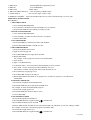
1. POWER INPUT:
2. MIDI THRU:
DC-12-18V 500mA .
Use to transmit MIDI data received on the MIDI IN connector.
2 of 2 pages