1
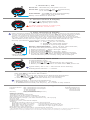
1. Power On / Off
a
Power On - Hold ANY Key until power turns on.
0
0
Hz
+
Power Off - Push & Hold a and
simultaneously
for 2 seconds, then release.
10
Auto Shutoff - Your One will shut off automatically
after preset auto shutoff time.
Battery Level flashes at Power Off
2. Volume Control & Display
0
0
i
+
Hz
Click
or
to adjust Volume Level.
Hold keys to step quickly up or down.
10
! To reduce risk of tinnitus or hearing loss,
listen at moderate volume levels.
3. Filter Selection & Display
▪ Filters selectively amplify low,medium or high-pitched sounds, to select for low-pitched heart
sounds, mid-range murmurs or high-pitched lung sounds. One has multiple filters for greater
control over sound than stethoscopes limited to the choice between Bell or Diaphragm.
▪ Pitch (i.e. frequency) is measured in Hertz (Hz) and displayed graphically on a low-to-high
Hz Scale, which shows relative frequency range - filters that amplify low-pitched sounds show
LEDs towards the left, filters for higher pitched sounds show LEDs towards the right.
▪ See http://thinklabsone.com/filters for further explanations and details.
Select Filter - a . Hold f Key for ~2 seconds.
b . Release Key when LEDs change.
c . Repeat to cycle through filters.
f
0
0
Set two “Favorite Filters” - select 1st filter, select 2nd filter,
then alternate easily between the two selections:
Hz
Low
High
+
1.
2.
3.
4.
5.
10
Hz Scale
shows pitch range
of filter selection
4. Battery Level Check
a
0
0
To Check Battery Level:
1. Push any key to Power On.
2. Push & Hold a and
simultaneously for 2 seconds.
3. Battery Level flashes across 0-10 Scale when One powers off.
Hz
+
10
Select 1st Favorite - Steps a through c above.
Click (do not hold) f Key.
Select 2nd Favorite - Steps a through c again.
Click (do not hold) f Key to alternate between Favorites.
To use any other filter, simpy do Steps a through c anytime
and the Favorite you’re currently using will be changed.
i
Typical battery life in use ~ 240 minutes active listening.
Standby/Power Off time > 4 weeks.
5. Setting Auto Shutoff Time
Start with One in the Power Off condition.
1. Turn Power On.
2. Click a Key once for each minute of the desired auto shutoff time.
For example, click a Key 3 times for a 3 minute shutoff time.
3. Push and HOLD a Key until One shuts off (~10 seconds).
i
▪ Factory Default = 2 minute auto shutoff time.
▪ Allowable range is one to ten minutes (1 - 10 clicks).
▪ To DISABLE Auto Shutoff (unit stays on), do 12 Clicks in step 2 above.
For Detailed User’s Manual, Support & Warranty
Complete Manual
Support
Warranty
http://thinklabsone.com/manual
http://thinklabsone.com/support
+1.800.918.1088
+1.303.525.3458
2 Years Limited Warranty
http://thinklabsone.com/warranty
Thinklabs Medical LLC
http://thinklabs.com
1.800.918.1088
1.303.525.3458
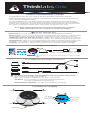
Package Contents
Thinklabs One Digital Stethoscope
Thinklabs In Ear studio quality headphones
Spare Eartips (Small, Medium, Large pairs provided)
USB Style Battery Charger (100-240V worldwide use), US style plug
Carrying Case
Charger Cable (white)
Headphone (10cm) male-female adapter
Thinklink:
Thinklink switching system for recording and monitoring
Male-Male long cable (1m, black)
- Connects One to Thinklink switch.
Male-Male right angle connector
- Connects Thinklink to mobile device.
Male-Male - short cable (10cm)
- Alternative to right angle connector.
Quick Reference (this document)
Regulatory and Warning Information (accompanying document)
© 2014 Thinklabs Medical LLC. All Rights Reserved. Thinklabs is a Registered Trademark and Thinklabs One is a Trademark of Thinklabs Medical LLC.
Quick Reference V1.0 Visit http://thinklabs.com for more information. Thinklabs products are protected by US and foreign patents.