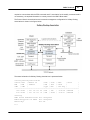
1
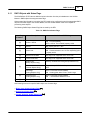
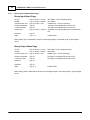
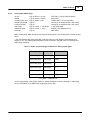
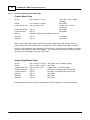
SCADAPack E DNP3 Technical
Reference
2
SCADAPack E DNP3 Technical Reference
Table of Contents
Part I DNP3 Technical
4
1 Technical
...................................................................................................................................
Support
4
2 Safety ...................................................................................................................................
Information
5
3 Preface
................................................................................................................................... 7
4 Introduction
................................................................................................................................... 9
5 DNP3...................................................................................................................................
Protocol Structure and Configuration
10
5.1 DNP3 Data Link..........................................................................................................................................................
Layer Configurations
12
5.2 DNP3 Application
..........................................................................................................................................................
Layer Configurations
14
6 SCADA
...................................................................................................................................
Master DNP3 Interaction
16
6.1 SCADA Master..........................................................................................................................................................
Data Requests and Events
17
6.2 SCADA Master..........................................................................................................................................................
Data Configuration
18
......................................................................................................................................................... 20
6.2.1 Binary Points
......................................................................................................................................................... 21
6.2.2 Analog Points
.........................................................................................................................................................
& Octet String Objects
23
6.2.3 Counter Points
6.3 Event Generation
.......................................................................................................................................................... 24
6.4 Event Buffering
.......................................................................................................................................................... 25
6.5 Event Count System
..........................................................................................................................................................
Points
27
6.6 Event Transm..........................................................................................................................................................
ission
29
6.7 Event Settings.......................................................................................................................................................... 31
Response transmission timing
33
6.7.1 Unsolicited.........................................................................................................................................................
6.8 Event Objects.......................................................................................................................................................... 35
Counter Event Objects
36
6.8.1 Binary and.........................................................................................................................................................
.........................................................................................................................................................
Objects
38
6.8.2 Analog Event
6.9 Control Objects
.......................................................................................................................................................... 40
.........................................................................................................................................................
Interlock
41
6.9.1 Remote Control
......................................................................................................................................... 42
6.9.1.1 Interlock Alarm Timeout
.........................................................................................................................................................
Objects
43
6.9.2 Binary Control
.........................................................................................................................................................
Objects & Floating Point Analog Control Objects
44
6.9.3 Analog Control
6.10 DNP3 IIN Internal
..........................................................................................................................................................
Indication Flags
45
6.11 DNP3 Objects ..........................................................................................................................................................
w ith Status Flags
47
& Output Status Flags
48
6.11.1 Binary Input.........................................................................................................................................................
.........................................................................................................................................................
Status Flags
49
6.11.2 Analog Input
.........................................................................................................................................................
Output Status Flags
50
6.11.3 Counter & Analog
6.12 Virtual Term inal
..........................................................................................................................................................
Support
51
.........................................................................................................................................................
Debugging (VT Port 0)
52
6.12.1 ISaGRAF Remote
.........................................................................................................................................................
Line (VT Port 20)
52
6.12.2 Remote Command
.........................................................................................................................................................
Object Data Sizes
52
6.12.3 Virtual Terminal
.........................................................................................................................................................
Ports (VT Ports 10 - 19)
53
6.12.4 DNP3 VT Service
6.12.4.1 Processing of VT Request Transactions, VT Service Port Event
Buffers, & RTU Serial
.........................................................................................................................................
Port Configurations
54
Response Transactions
55
6.12.4.2 Processing of VT.........................................................................................................................................
6.12.4.2.1 Enabling / Disabling Unsolicited Responses On Object 113 & VT
Response Transaction
...................................................................................................................................
in DNP3 Unsolicited Response (FC 130)
56
‘Packet’
Determination
for
Responses
&
VT
Response
Transaction
6.12.4.2.2
in DNP3 Request...................................................................................................................................
Response (FC 129)
58
6.12.4.3 Error Conditions ......................................................................................................................................... 59
Contents
3
6.13 Resetting and..........................................................................................................................................................
Presetting Counters
60
6.14 DNP3 Multi-Master
..........................................................................................................................................................
Feature & Events
61
6.15 DNP3 Operation
..........................................................................................................................................................
Using TCP/IP, Routing for TCP/IP
64
6.16 DNP3 Link Layer
..........................................................................................................................................................
Settings for TCP/IP
65
6.17 DNP3 - TCP/IP ..........................................................................................................................................................
Settings
67
6.18 DNP3 TCP/IP End-Node
..........................................................................................................................................................
Operation
67
6.19 Controlling DNP3
..........................................................................................................................................................
Master Com m unications
69
7 DNP3...................................................................................................................................
Networking
70
7.1 Static & Fixed ..........................................................................................................................................................
Routing
72
7.2 Dynam ic Routing
..........................................................................................................................................................
& Routing Rules
74
7.3 DNP3 TCP/IP Netw
..........................................................................................................................................................
orking
76
7.4 STATUS ASSOCIATIONS
.......................................................................................................................................................... 78
.........................................................................................................................................................
STATES
82
7.4.1 ASSOCIATION
8 SCADAPack
...................................................................................................................................
E DNP3 Driver Status Codes
83
9 Common
...................................................................................................................................
DNP3 Protocol Codes
84
3
4
I
SCADAPack E DNP3 Technical Reference
DNP3 Technical
©2013 Control Microsystems Inc.
All rights reserved.
Printed in Canada.
Version: 8.05.4
The information provided in this documentation contains general descriptions and/or technical
characteristics of the performance of the products contained herein. This documentation is
not intended as a substitute for and is not to be used for determining suitability or reliability of
these products for specific user applications. It is the duty of any such user or integrator to
perform the appropriate and complete risk analysis, evaluation and testing of the products
with respect to the relevant specific application or use thereof. Neither Schneider Electric nor
any of its affiliates or subsidiaries shall be responsible or liable for misuse of the information
contained herein. If you have any suggestions for improvements or amendments or have
found errors in this publication, please notify us.
No part of this document may be reproduced in any form or by any means, electronic or
mechanical, including photocopying, without express written permission of Schneider
Electric.
All pertinent state, regional, and local safety regulations must be observed when installing and
using this product. For reasons of safety and to help ensure compliance with documented
system data, only the manufacturer should perform repairs to components.
When devices are used for applications with technical safety requirements, the relevant
instructions must be followed. Failure to use Schneider Electric software or approved
software with our hardware products may result in injury, harm, or improper operating results.
Failure to observe this information can result in injury or equipment damage.
1
Technical Support
Support related to any part of this documentation can be directed to one of the following
support centers.
DNP3 Technical
5
Technical Support: The Americas
Available Monday to Friday 8:00am – 6:30pm Eastern Time
Toll free within North America
1-888-226-6876
Direct Worldwide
+1-613-591-1943
Email
[email protected]
Technical Support: Europe
Available Monday to Friday 8:30am – 5:30pm Central European Time
Direct Worldwide
+31 (71) 597-1655
Email
[email protected]
Technical Support: Asia
Available Monday to Friday 8:00am – 6:30pm Eastern Time (North America)
Direct Worldwide
+1-613-591-1943
Email
[email protected]
Technical Support: Australia
2
Inside Australia
1300 369 233
Email
[email protected]
Safety Information
Read these instructions carefully, and look at the equipment to become familiar with the
device before trying to install, operate, or maintain it. The following special messages may
appear throughout this documentation or on the equipment to warn of potential hazards or to
call attention to information that clarifies or simplifies a procedure.
The addition of this symbol to a Danger or Warning safety label
indicates that an electrical hazard exists, which will result in personal
injury if the instructions are not followed.
This is the safety alert symbol. It is used to alert you to potential
personal injury hazards. Obey all safety messages that follow this
symbol to avoid possible injury or death.
6
SCADAPack E DNP3 Technical Reference
DANGER
DANGER indicates an imminently hazardous situation which, if not avoided, will
result in death or serious injury.
WARNING
WARNING indicates a potentially hazardous situation which, if not avoided, can
result in death or serious injury.
CAUTION
CAUTION indicates a potentially hazardous situation which, if not avoided, can
result in minor or moderate.
CAUTION
CAUTION used without the safety alert symbol, indicates a potentially hazardous
situation which, if not avoided, can result in equipment damage..
PLEASE NOTE
Electrical equipment should be installed, operated, serviced, and maintained only by qualified
personnel. No responsibility is assumed by Schneider Electric for any consequences arising
out of the use of this material.
A qualified person is one who has skills and knowledge related to the construction and
operation of electrical equipment and the installation, and has received safety training to
recognize and avoid the hazards involved.
BEFORE YOU BEGIN
Do not use this product on machinery lacking effective point-of-operation guarding. Lack of
effective point-of-operation guarding on a machine can result in serious injury to the operator
of that machine.
CAUTION
EQUIPMENT OPERATION HAZARD
Verify that all installation and set up procedures have been completed.
Before operational tests are performed, remove all blocks or other temporary
holding means used for shipment from all component devices.
DNP3 Technical
7
Remove tools, meters, and debris from equipment.
Failure to follow these instructions can result in injury or equipment
damage.
Follow all start-up tests recommended in the equipment documentation. Store all equipment
documentation for future references.
Software testing must be done in both simulated and real environments.
Verify that the completed system is free from all short circuits and grounds, except those
grounds installed according to local regulations (according to the National Electrical Code in
the U.S.A, for instance). If high-potential voltage testing is necessary, follow
recommendations in equipment documentation to prevent accidental equipment damage.
Before energizing equipment:
Remove tools, meters, and debris from equipment.
Close the equipment enclosure door.
Remove ground from incoming power lines.
Perform all start-up tests recommended by the manufacturer.
OPERATION AND ADJUSTMENTS
The following precautions are from the NEMA Standards Publication ICS 7.1-1995 (English
version prevails):
Regardless of the care exercised in the design and manufacture of equipment or in the
selection and ratings of components, there are hazards that can be encountered if such
equipment is improperly operated.
It is sometimes possible to misadjust the equipment and thus produce unsatisfactory or
unsafe operation. Always use the manufacturer’s instructions as a guide for functional
adjustments. Personnel who have access to these adjustments should be familiar with the
equipment manufacturer’s instructions and the machinery used with the electrical
equipment.
Only those operational adjustments actually required by the operator should be accessible
to the operator. Access to other controls should be restricted to prevent unauthorized
changes in operating characteristics.
3
Preface
The purpose of this document is to describe the DNP3 Slave implementation for the SCADAPack E
RTU. It covers interaction of the SCADAPack E with a DNP3 master station, DNP3 networking, DNP3 TCP/IP communication, and brief descriptions of the DNP3 protocol.
This document does not describe SCADAPack E communication as a DNP3 Master (see the
8
SCADAPack E DNP3 Technical Reference
SCADAPack E Data Concentrator Technical Reference Manual).
Target Audience
Systems Engineers
Commissioning Engineers
Maintenance Technicians
References
SCADAPack E Configurator User Manual
SCADAPack E Reference Manuals
ICS Triplex ISaGRAF Manuals
SCADAPack E Hardware Manuals
Assumed Knowledge
Exposure to the DNP3 protocol is recommended. It is also recommended that the readers familiarize
themselves with the Schneider Electric SCADAPack E Configurator tool required to configure the
SCADAPack E RTUs.
DNP3 Technical
4
9
Introduction
What is DNP3?
DNP3 (Distributed Network Protocol) is an industry standard SCADA communications protocol. It
originated in the Electricity Industry in North America and was based on drafts of the IEC870-5 SCADA
protocol standards (now known as IEC60870-5). DNP3 is now in widespread use in many industries
across the world and is managed by the DNP User Group.
DNP3 describes standards for SCADA protocol facilities such as data requests, polling, controls, and
report by exception (RBE). Master-slave and Peer-to-Peer communication architectures are supported
by DNP3.
Inter-operability is one of the key aspects of DNP3. It is enforced by way of minimum implementation
subsets to which vendors need to adhere. Currently, the DNP3 standard is supplemented by Subset
Definitions document describing 4 minimum subset levels. In addition, a vendor’s DNP3 implementation
needs to be provided with a Device Profile document describing information required by the DNP User
Group, including details of the implementation of one of the four minimum subset levels, and other
protocol information. The Device Profile is now required in machine readable XML format.
The DNP3 protocol also caters for expansion & evolution of the standard without detracting from the
strengths of inter-operability that it promotes. This is achieved by an object-oriented approach to the
data. Data objects can be added to the DNP3 Standard without affecting the way that devices interoperate.
The DNP3 User Group has published definitions for the operation of DNP3 protocol over TCP/IP LAN and
WAN networks.
What does the SCADAPack E RTU Provide when using the DNP3 Protocol?
The SCADAPack E RTU supports DNP3 to Subset Level 4 slave implementation with a range of
additional features from the DNP3 standard.
In summary the SCADAPack E RTU provides the following facilities for use of DNP3:
SCADA data configuration
Simultaneous DNP3 operation on Multiple Ports
Networking DNP3 frames
Peer-to-Peer communication
DNP3 over TCP/IP LAN & WAN networks
10
5
SCADAPack E DNP3 Technical Reference
DNP3 Protocol Structure and Configuration
The Standard DNP3 protocol structure is:
OBJECT LIBRARY
APPLICATION LAYER
TRANSPORT FUNCTIONS
DATALINK LAYER
PHYSICAL LAYER
A data link layer (DLL) packet is referred to as a FRAME.
SCADAPack E RTU Data link layer Transmitted Frame
frames
Size:
Max. Transmitted:
SCADAPack E Default
Frame Transmit size:
Max. Receive Frame
Size:
Adjustable
292 bytes
249 bytes
292 bytes
An application layer packet is referred to as a FRAGMENT.
DNP3 Application layer fragment size:
Max. 2048 bytes
SCADAPack E Application layer
fragments
Transmitted Fragment
Adjustable
Size:
2048 bytes
Max. Transmitted:
SCADAPack E Default 2048 bytes
Frame Transmit size:
Max. Received Fragment 2048 bytes
size:
The job of the Data link layer is to:
Transmit DNP3 data frames on the physical medium.
Receive and frame DNP3 data from the physical medium.
The job of the Transport function is to:
sub-divide a transmitted application fragment into DLL frames
re-assemble received DLL frames into an application fragment
The SCADAPack E RTUs add a transparent networking facility to DNP3. With minimal overhead and no
affect on inter-operability, this allows these devices to forward DNP3 frames to other DNP3 nodes,
transparent to the protocol.
The SCADAPack E RTU DNP3 structure is as follows:
OBJECT LIBRARY
APPLICATION LAYER
TRANSPORT FUNCTIONS
NETWORK FUNCTIONS
DATALINK LAYER
DNP3 Technical
11
PHYSICAL LAYER
The job of the RTU’s DNP3 network functions is to:
pass DLL frames for this DNP Node address to the Transport layer
determine if the destination node for received DLL frames appears in the network routing table to be
passed back to the DLL layer for transmission on a DNP physical channel
discard DLL frames not for this node & not to be forwarded to another node
The job of the Application layer is to:
process received fragments for this DNP node. It determines the type of operation requested (e.g.
Read, Operate, etc.) and decodes references to objects for processing in the object library.
build and manage outgoing data such as peer requests and unsolicited responses.
The Object library determines which objects are processed, and how they are processed for this DNP
device. (e.g., Binary Input, 32-bit Analog Input, Files, Floating point Analog Output, Binary Change
Event, 16-bit Analog Change Event, or 32-bit Counter).
Configuration for the DNP3 communication parameters is described in the following sections:
DNP3 Data Link Layer Configurations 12
DNP3 Application Layer Configurations
Related Topics
STATUS ASSOCIATIONS
ASSOCIATION STATES
78
82
14
12
5.1
SCADAPack E DNP3 Technical Reference
DNP3 Data Link Layer Configurations
The lowest level of DNP3 communication on the physical channel is DNP data-link communication. This
level of communication operates independently on each RTU serial port channel configured for DNP3.
Therefore each DNP3 communication channel on the SCADAPack E RTU can be independently
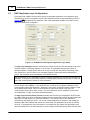
configured for a certain mode of operation.
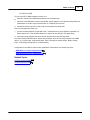
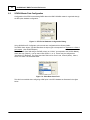
Data link confirmation can be requested by DNP3 nodes as a means of synchronizing & guaranteeing
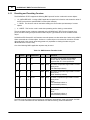
the delivery of frames. The Data Link Confirm Mode parameter, referred to as DL Confirm Mode in
SCADAPack E Configurator DNP3 Comms page determines how frames that are transmitted from this
node should be confirmed by the receiving node. A screen capture of the DL Confirm field from
SCADAPack E Configurator is presented below.
Figure 5.1: SCADAPack E Configurator DL Confirm Mode
The options are defined as follows:
NEVER
Never set data-link confirm required for a transmitted frame. This mode should be
used where single frame messages are the only messages transmitted, or where
transmission is on a highly robust medium (e.g. local serial connection between two
devices), improving communication throughput
ALWAYS
Always require a data link confirm to a transmitted frame. This mode should be
used on unreliable links to improve communication delivery.
SOMETIMES
Only require a data link confirm for frames where multiple frames are transmitted to
a node. This mode is applicable on devices using a range of message sizes, from
DNP3 Technical
13
single to multi-frame messages, on potentially unreliable links. The use of this
mode improves data delivery by being able to re-transmit individual frames rather
than entire multi-framed messages.
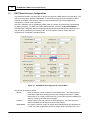
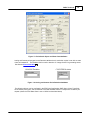
Where a data link confirmation is requested on a transmitted frame (ALWAYS or SOMETIMES modes)
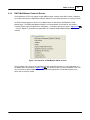
the RTU waits a certain time interval for the requested confirmation. The maximum length of this time
interval is determined by a DL Confirm Timeout parameter accessible from the DNP3 Comms page of
SCADAPack E Configurator as illustrated below. The DL Confirm Timeout period is independently
adjustable on each RTU serial port and can take a value from 0 to 65535 seconds.
Figure 5.2: SCADAPack E Configurator Data Link Confirm Timeout Field
If a data link confirmation is requested but not received within the timeout period specified, the data-link
frame is resent, up to the number of retries configured by the DL Retries parameter. If the number of
retries is exceeded, then the frame is undeliverable and the application layer generating the message is
notified. The DL Retries parameter may have a value between 0 and 255.
14
5.2
SCADAPack E DNP3 Technical Reference
DNP3 Application Layer Configurations
The highest level of DNP3 communication having user adjustable parameters is the application layer.
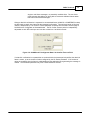
The settings at this layer are global to the RTU and dictate the behavior of data generated by this RTU.
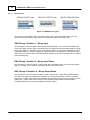
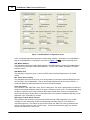
Figure 5.3 14 below presents the Application Layer setup parameters available on the DNP Comms
page of SCADAPack E Configurator.
Figure 5.3: SCADAPack E Configurator Application Layer Setup
The Appl Layer Attempts parameter determines the number of times the RTU will attempt to send and
resend a request if a matching response is not received. This parameter sets the total number of
attempts between 1 and 255 (if this value is set to zero, the RTU will still perform one attempt). After
each transmission, the RTU waits for the Complete Fragment Timeout period before attempting to
resend. This parameter may be set between 0 and 65535 seconds.
These parameters are only applicable to Request messages generated from this RTU and not response
messages, for example, an unsolicited response containing events (see Min Unsol Event TX Delay and
Appl Layer Confirm (Event) Timeout for more information).
Another example of an application layer request generated by an RTU is the peer-to-peer communication
function blocks within ISaGRAF. In this particular case, a timeout can be applied individually to each
communication request (DT parameter). Where DT is zero (0) the Complete Fragment Timeout is used
as the default timeout value. Where a communication function block timeout is non-zero, the
communication function block value is used. (For more information see the ISaGRAF Technical and
the SCADAPack E Target 5 Technical Reference Manuals).
The Appl Layer Confirm (Event) Timeout parameter sets the time for an SCADAPack E RTU to wait
for a DNP3 Application Layer Confirmation message from the master after the RTU has transmitted event
data (either in a poll response or unsolicited response). The minimum value of this parameter is
automatically calculated by the RTU. You can set a value greater than the minimum, and reading this
parameter after a Warm Restart will indicate its current value. This parameter may be set up to 65535
seconds. If an Application Layer Confirmation is not received from the master, then the greater of this
value and the Min Unsol TX Delay parameter is used to delay the RTU transmitting new unsolicited event
DNP3 Technical
15
data to the master (including retries of unsolicited event data).
If data link confirmations are used to acknowledge successful transmission of frames to the master (see
Data Link Confirm Mode above), the minimum application layer confirm timeout is calculated by the RTU
so that all data link retries can be completed. The minimum value is calculated as follows:
Min.Timeout = ((Data Link Retries + 1) * Data Link Confirm Timeout) + 1,
where Data Link Retries and Data Link Confirm Timeout are those specified for the Master Port (or port
communicating with the master RTU). The Appl Layer Confirm (Event) timer is restarted when a data link
confirmation is received from the master. This allows the transmission of a complete fragment without
the application layer timing out.
Other Application Layer parameters include the Complete Fragment Timeout, Select Arm Timeout, Time
Update Request Rate, and Maximum Transmit Fragment Size.
The Complete Fragment Timeout (Seconds) parameter sets the time, in seconds, that the RTU will
wait for an Application Layer Response before re-attempting the transmission (or discarding) of an
Application Layer Request.
A typical example of an Application Layer Request generated by the RTU is the peer-to-peer
communication function blocks within ISaGRAF. For these function blocks, the Complete Fragment
Timeout is used as the default timeout, which may be over-ridden by the function block. For more
information refer to the ISaGRAF Technical and the SCADAPack E Target 5 Technical Reference
Manuals.
The File Transfer Timeout (Seconds) parameter extends the RTU's application layer timing when
waiting for fragments dealing with File Transfer operations. File transfer transactions typically take longer
than other DNP3 communication transactions. The default value for this field is 120 seconds.
The Select Arm Timeout (Seconds) parameter sets the timeout, in seconds, before which an Operate
command needs to be received after the Select command is received for a two-phase Select/Operate
DNP3 Control. If an Operate command (matching a recently received Select command) is not received
within this period then the Control operation is aborted. A select arm timeout status is returned in a
DNP3 Control Relay Output Block (operate) response to the sender, in this case. If an Operate
command (matching a recently received Select command) is received within this period then the Control
operation is performed.
When receiving two-phase Select/Operate DNP3 controls, an Operate command needs to be received
within this period after the Select command is received. If a DNP3 Operate command (matching a
recently received Select command) is not received within this period then the control operation is aborted
and a select arm timeout status (1) is returned in a Control Relay Output Block (operate) response to
the sender. If an Operate command (matching a recently received Select command) is received within
this period then the control operation is performed.
The Time Update Request (Minutes) Internal Indications (IIN) returned with each DNP3
communications response. The next outgoing RTU response (due to a request from the master to the
RTU, or due to an unsolicited response from the RTU to the master) will contain this request indication.
A value of zero (0) in this field disables time update requests.
The Maximum Transmit Fragment Size parameter sets the size of the application layer fragment
transmitted by the RTU. The allowable range for this field is 1 to 2048. The default value for this field is
2048 bytes.
To be compatible with existing SCADAPack E controllers, the default is 2048 bytes.
DNP3-TCP Keep Alive parameter is implemented as described by the DNP User Group’s “Transporting
16
SCADAPack E DNP3 Technical Reference
DNP3 over Local and Wide Area Network s” standard. It is a configurable Keep-Alive timer is used for
each active DNP3 - TCP socket connection. This configuration parameter specifies how often a DNP3
Link Status test message is sent across active TCP sockets for the purpose of verifying an active TCP
link. This timer may be set to “0” to de-activate the DNP-TCP Keep-Alive timer.
The Security Reply Timeout parameter is the time after which a device will stop waiting for a reply. It
is settable in hundreds of milliseconds.
6
SCADA Master DNP3 Interaction
SCADA Master Data Requests & Events
SCADA Master Data Configuration
Event Generation
Event Buffering
18
18
24
25
Event Counter Points
Event Transmission
27
29
Event Settings 31
Event Objects 35
Control Objects
40
DNP3 IIN Internal Indication Flags
DNP3 Objects with Status Flags
47
Resetting and Presetting Counters
Virtual Terminal Support
45
60
51
DNP3 Multi-Master Feature
61
DNP3 Operation Using and Routing for TCP/IP and TCP/IP Settings
DNP3 Link Layer Settings for TCP/IP
DNP3 TCP/IP Settings
65
67
DNP3 TCP/IP End-Node Operation
67
Controlling DNP3 Master Communications 69
64
DNP3 Technical
6.1
17
SCADA Master Data Requests and Events
SCADA Master Data Requests
A DNP3 SCADA master may request static (current value) data from an RTU in one of two ways:
1.
2.
Read request for data objects with specific point index ranges
Class 0 object as part of a read request
The specific data enquiry requires no RTU configuration as the DNP3 master knows what it is going to
request. The RTU returns a response for requests to data specified in a start/stop DNP3 point index
range for particular DNP3 object/variations (this is a minimum requirement of the Level 3 DNP3 subset).
Request including a Class 0 Object
A general read request that includes a “Class 0” object causes the RTU to respond with data according
to its configuration. Class 0 is typically included in a request along with Class 1,2 and 3 event data; this
type of request is known as an Integrity Poll. The data that is returned by the RTU in response to a
Class 0 object in a read request is a configured subset of the RTU’s STATIC data. See Section
SCADA Master Data Configuration 18 .
Events
Events are generated by the SCADAPack E RTU based on the configuration of points in the RTU
database.
Three different event classes are defined “Class 1, Class 2, and Class 3 events”. Each point in the
SCADA table can be selected as not being an event (class 0 static or Local point), or an event being in
one of the three event classes. Event class 1 is nominally the highest priority, and class 3 is nominally
the lowest. The DNP3 SCADA master can enforce event priorities, e.g., request Class 1 events more
often than Class 2 or 3 events.
DNP3 Masters may request events buffered in the RTU a single class at a time, or in combinations of
classes. The RTU may also perform unsolicited reporting of events.
Each point configured with an event (i.e., having an event class of 1,2, or 3) has a corresponding static
data value (class 0). Events are generated from changes in the static data point. Points configured with
“Class 0 static” in the CLASS field report data in response to a SCADA poll, but events are not
generated.
18
6.2
SCADAPack E DNP3 Technical Reference
SCADA Master Data Configuration
Configuration of the RTU for transmitting DNP3 data to the DNP3 SCADA master is organized through
the RTU point database configuration.
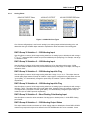
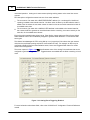
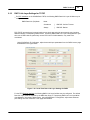
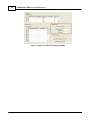
Figure 7.1: RTU Point Database Configuration Dialog
Using SCADAPack E Configurator, point records are configured with the following fields:
The DNP3 Static Object Type field describes the object type to be reported in a response to a Class 0
poll request. (See SCADA Objects)
The Point Data Class field assigns the DNP point(s) as “LOCAL” (not reported to the SCADA Master),
static data only (Class 0), or as an event class (Class 1,2, or 3). Events may be configured as
"Unsolicited" or "Buffered". The Point Data Class field can be set to Local, Class 0 (Static), Class 1,
Class 2 or Class 3 as illustrated below:
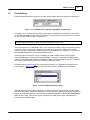
Figure 7.2: Point Data Class Field
This field is accessible when configuring a DNP point in the RTU database as illustrated in the figure
below.
DNP3 Technical
19
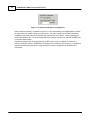
Figure 7.3: Point Static Object and Data Class Attributes
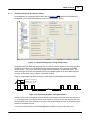
Analog and Counter points types have a Deviation attribute that is used when a point is set with an event
class as illustrated in . The Deviation field is used in detection of “change-of-value” for generating events.
See Section Event Generation 24 .
ANALOG Deviation
COUNTER Deviation
Figure 7.4: Analog and Counter Point Deviation Attributes
The following objects can be configured in the RTU Point Configuration DNP Static Object Type fields
for the various point types, and are returned to the DNP SCADA master in a response to a Class 0 poll
request (unless the Point Data Class is set to LOCAL as described above).
20
6.2.1
SCADAPack E DNP3 Technical Reference
Binary Points
BINARY INPUT Points
BINARY OUTPUT Points
BINARY DERIVED Points
Figure 7.5: BINARY Point Types
One of these configurations is set for each binary input, binary output and derived binary point, and
determines the type of DNP3 object returned to represent the status of the binary point.
DNP3 Group 1 Variation 1 – Binary Input
Use this object to return the state of binary inputs and derived points. The minimum transmitted data
size for this object is 8 bits. Eight consecutive binary input objects are the same data length as a single
binary input object. It is beneficial to group binary objects together in consecutive addresses to improve
transmission efficiency. If the point quality for a particular point is not indicated as "good quality" the a
DNP3 Group 1 Variation 2 object will be automatically reported by the RTU for that point (this is a DNP3
protocol requirement).
DNP3 Group 1 Variation 2 – Binary Input Status
Use this object to return the status of a binary point where the DNP3 master can process point quality
flags, for example, on-line, off-line or downstream device communication lost.
DNP3 Group 10 Variation 2 – Binary Output Status
Use this object to return the status of a binary output or derived point. Some DNP3 SCADA masters
may require this object to be defined and returned in an integrity poll response in order for the output
point to be controlled. Other DNP SCADA masters may not require this object to be returned to control
a DNP point. In both cases it can be used to notify the DNP SCADA master if the point state is
modified elsewhere (e.g. internal state validation and point quality).
DNP3 Technical
6.2.2
21
Analog Points
ANALOG INPUT Points
ANALOG OUTPUT
ANALOG DERIVED Points
Figure 7.6: ANALOG Point Types
One of these configurations is set for each analog input, analog output and derived analog point, and
determines the type of DNP3 object returned to represent the value and status of the analog point.
DNP3 Group 30 Variation 1 – 32-Bit Analog Input
Use this object to return a 32-bit integer analog value from an analog input or derived point with a range –
231 to +231-1 where the DNP3 master can process additional point quality flags, for example, over-range
or calibration check.
DNP3 Group 30 Variation 2 – 16-Bit Analog Input
Use this object to return a 16-bit integer analog value from I/O or data points with a range –32768
to +32767 where the DNP3 master can process additional point quality flags, for example, over-range or
calibration check.
DNP3 Group 30 Variation 3 – 32-Bit Analog Input No Flag
Use this object to return a 32-bit integer analog value with a range –231 to +231-1. This object does not
include quality flags however If Group 30 Variation 3 object type is configured but a point does not have
"good quality", it is automatically changed to report Group 30 Variation 1 (this is a DNP3 protocol
requirement).
DNP3 Group 30 Variation 4 – 16-Bit Analog Input No Flag
Use this object to return a 16-bit integer analog value from an analog input or derived point with a range –
32768 to +32767. This object does not include quality flags, however If Group 30 Variation 4 object type
is configured but a point does not have "good quality", it is automatically changed to report Group 30
Variation 2 (this is a DNP3 protocol requirement).
DNP3 Group 30 Variation 5 – Short Floating Point Analog Input
Use this object to return the value and status of analog input or derived points, in 32-bit IEEE floating
point format.
DNP3 Group 40 Variation 1 – 32-Bit Analog Output Status
This object returns the value and status of a 32-bit analog output or derived point. Some DNP3 SCADA
masters may require this object to be defined in the RTU SCADA table for it to be controlled. Some
22
SCADAPack E DNP3 Technical Reference
DNP3 SCADA masters may require this object to be defined and returned in an integrity poll response in
order for the output point to be controlled. Other DNP SCADA masters may not require this object to be
returned to control a DNP point. In both cases it can be used to notify the DNP SCADA master if the
point value is modified elsewhere (e.g. internal state validation and point quality).
DNP3 Group 40 Variation 2 – 16-Bit Analog Output Status
This object returns the value and status of a 16-bit analog output or derived point. Some DNP3 SCADA
masters may require this object to be defined and returned in an integrity poll response in order for the
output point to be controlled. Other DNP SCADA masters may not require this object to be returned to
control a DNP point. In both cases it can be used to notify the DNP SCADA master if the point value is
modified elsewhere (e.g. internal state validation and point quality).
DNP3 Group 40 Variation 3 – Short Floating Point Analog Output Status
Use this object to return the value and status of floating point control data. Some DNP3 SCADA
masters may require this object to be defined and returned in an integrity poll response in order for the
output point to be controlled. Other DNP SCADA masters may not require this object to be returned to
control a DNP point. In both cases it can be used to notify the DNP SCADA master if the point value is
modified elsewhere (e.g. internal state validation and point quality).
DNP3 Technical
6.2.3
23
Counter Points & Octet String Objects
Counter Points
Figure 7.7: COUNTER Point Types
One of these configurations is set for each physical counter input and derived analog point used as a
counter. It determines the type of DNP3 object returned to represent the value and status of the counter
point.
DNP3 Group 20 Variation 1 – 32-Bit Counter
Use this object to return data for a counter with 32-bit resolution in the range 0 to +232-1 where the DNP3
master can process additional point quality such as counter offline. The point may be a physical
counter, or a derived analog point that is used as a counter point.
DNP3 Group 20 Variation 2 – 16-Bit Counter
Use this object to return data for a counter with 16-bit resolution in the range 0 to 65535 where the DNP
master can process additional point quality such as counter offline. The point may be a physical
counter, or a derived analog point that is used as a counter point.
DNP3 Group 20 Variation 5 – 32-Bit Counter No Flag
Use this object to return data for a counter with 32-bit resolution in the range 0 to +232-1. This object
does not include quality flags however If Group 20 Variation 5 object type is configured but a point does
not have "good quality", it is automatically changed to report Group 20 Variation 1 (this is a DNP3
protocol requirement).
DNP3 Group 20 Variation 6 – 16-Bit Counter No Flag
Use this object to return data for a counter with 16-bit resolution in the range 0 to 65535.This object does
not include quality flags however If Group 20 Variation 6 object type is configured but a point does not
have "good quality", it is automatically changed to report Group 20 Variation 2 (this is a DNP3 protocol
requirement).
Octet String Objects
The SCADAPack E RTU String System points are provided for setting and viewing text configurations.
The following objects are accessible, but not necessarily used for data reporting to the SCADA Master.
1.
DNP3 Object - Group 110 – Octet String
The Variation of this object represents the length of the string. Use this object to set or read the
value of RTU system string points.
24
6.3
SCADAPack E DNP3 Technical Reference
Event Generation
Events are generated by the SCADAPack E RTU based on changes in static data points. The RTU will
scan for changes on points configured in the SCADA point tables with event classes (i.e. Class 1,2, or
3).
Timestamps are applied to events generated by the RTU, representing the RTU’s real time clock at the
time of occurrence. I.e. The timestamp is in either UTC or Standard Time format depending upon how
the clock is set. For more information see SCADAPack E Operational Reference Manual. Daylight
savings time does not affect event timestamps.
A change in state of a binary point will result in the generation of an event of the configured class for that
point, timestamped at the time of occurrence of the change.
A change in value of an analog, floating point analog, or counter point by a value greater than or equal to
the point’s configured deviation will result in the generation of an event. The event will be of the
configured class for that point, timestamped at the time of occurrence of the change.
Analog “change-of-value” (for integer and floating point analogs and counter points) is calculated based
on the absolute difference between the last transmitted and current value. The calculation is as follows:
change-of-value = ABS (last transmitted event value – current value)
If this value is greater or equal to the analog deviation value, an event is generated i.e.
if (change-of-value >= deviation) then generate a point event
Generated events are stored in the SCADAPack E Smart RTU memory and are retained through a
power cycle (Run mode startup). See the Startup Modes section of the SCADAPack E Smart RTU
Hardware Manual for further information on Startup Modes.
DNP3 Technical
6.4
25
Event Buffering
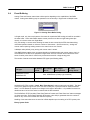
Analog, Float and Counter events have a further option depending on the capabilities of the DNP3
master. Analog event buffering may be operated in one of two ways: Single mode or Multiple mode.
Figure 7.8: Analog Event Buffer Dialog
In Single mode, only the recent instance of an event for a particular DNP analog point will be recorded in
the event buffer. Some older DNP3 masters cannot process more than a single analog event (the
recent), so in these cases use Single Mode.
Only new analog or counter events entering the event list are counted by the RTU when determining
unsolicited operation based on minimum number of class events. (See next section). Analog and
counter events replacing existing events on the event lists are not counted.
In Multiple mode (default), every analog and counter event is stored.
If the DNP3 Master station does not support decoding of multiple analog and counter events, then it is
more efficient for the RTU to be operated in Single mode. The RTU can then store and transmit more
events for other points than it could if many events were stored for a single analog point.
The number of events stored varies between RTU types (see following table).
RTU Type
No. Binary
Events
No. Counter
Events
No. Integer
Analog Events
No. Float
Analog Events
SCADAPack ES and
SCADAPack ER
Max. 40000 Events (of every type combined)
SCADAPack 300E
Max. 20000 Events (of every type combined)
SCADAPack E RTUs provide a “Unsol. Max. Event Storage” analog system point at 50362. The value
of this point defines an upper limit on the size of the event pool, up to the maximum values described
above. An RTU Restart is required for a change in this value to take effect. It is possible for stored nonvolatile events to be lost if this value is reduced and the RTU restarted.
The SCADAPack E RTU provides “Event Data Threshold” status and “Event Data Lost” status messages
on these event lists. “Event Data Threshold” (RTU status code 1030) is generated when the number of
events on any of the lists exceeds 80% event list capacity.
Handling of new event data once an event list is filled depends upon the setting of an RTU system point.
Binary System Point
26
SCADAPack E DNP3 Technical Reference
DNP Point Index
Description
Comment
50304
Stop Data Storage if Full
ON = Stop storing events
OFF = Discard oldest events (default)
This system point also affects the storage of Trend Data by the Sampler. See the SCADAPack E Trend
Sampler Technical Reference manual.
“Event Data Lost” (RTU status code 1031) is generated when the number of events on any of the lists
exceeds the list capacity. In this case, the oldest event (of the same type as the new event) is
discarded. The SCADA Master is also notified through the DNP3 “Event Buffer Overflow” IIN flag in the
next DNP3 response.
SCADAPack E ISaGRAF supports the GEN_EVT and GENMSEVT function blocks which provides a
mechanism to force generation of DNP3 events on appropriately configured DNP3 points. The value
included in the forced DNP3 event will be the current point database value of the point in question.
These function blocks also have Time (gen_evt) or msTime (genmsevt) input parameters that
optionally allows a timestamp to be included in the forced DNP3 event. See the SCADAPack E
ISaGRAF Function Block s Reference and SCADAPack E Target 5 Function Block Reference
manuals for more information on the GEN_EVT and GENMSEVT function blocks.
DNP3 Technical
6.5
27
Event Count System Points
Firmware versions 7.5-1 and later supports a range of 16-bit analog system points to represent the
current number of buffered DNP3 events for each event type, for each DNP3 Master. This range of points
is not configurable and cannot be returned in a class poll. The range of points can be read with a DNP3
qualifier 01 read (e.g. ClearSCADA Level 3 scan), by using the SCADAPack E Configurator or from an
ISaGRAF application. See the following table for further details:
Table 7.1: Event Count System Points
System Point Description
DNP3 Analog System
Point No. (16-bit)
Binary Input Event Count – Master 1
58000
Counter Input Event Count – Master 1
58001
Analog Input Event Count – Master 1
58002
Float Input Event Count – Master 1
58003
Binary Output Event Count – Master 1
58004
Analog Output Event Count – Master 1
58005
Float Output Event Count – Master 1
58006
Binary Output Command Event Count – Master 1
58007
Analog Output Command Event Count – Master 1
58008
Float Output Command Event Count – Master 1
58009
Binary Event Count – Master 2
58015
Counter Event Count – Master 2
58016
Analog Event Count – Master 2
58017
Float Event Count – Master 2
58018
Binary Output Event Count – Master 2
58019
Analog Output Event Count – Master 2
58020
Float Output Event Count – Master 2
58021
Binary Output Command Event Count – Master 2
58022
Analog Output Command Event Count – Master 2
58023
Float Output Command Event Count – Master 2
58024
Binary Event Count – Master 3
58030
Counter Event Count – Master 3
58031
Analog Event Count – Master 3
58032
Float Event Count – Master 3
58033
28
SCADAPack E DNP3 Technical Reference
Binary Output Event Count – Master 3
58034
Analog Output Event Count – Master 3
58035
Float Output Event Count – Master 3
58036
Binary Output Command Event Count – Master 3
58037
Analog Output Command Event Count – Master 3
58038
Float Output Command Event Count – Master 3
58039
DNP3 Technical
6.6
29
Event Transmission
Each event generated by the SCADAPack E RTU is buffered in the internal RTU event list. The RTU can
send an event transmission to the SCADA in one of several ways:
1.
2.
3.
In response to a DNP3 SCADA master request for a quantity of events for one, every, or a
combination of event classes.
An unsolicited transmission of events may occur if the number of events on the list exceeds a preset
maximum for that event class.
An unsolicited transmission of events may occur if an UNSOLICITED EVENT occurs on an event
class enabled by the master for unsolicited reporting.
A minimum number of events for each event class can be set individually from the DNP3 Events page of
the SCADAPack E Configurator as illustrated in Figure 7.9 29 below. Once the number of events
generated exceeds this minimum amount for any of the event classes, the RTU will send an unsolicited
transmission of every event in the enabled event classes. (See Section Event Settings 31 ).
Figure 7.9: SCADAPack E Configuration of Buffered Events
The Class X Min Events parameters refer to event classes and are independent of the event buffer list
sizes (see table below). Events removed from overflowing event lists are not decremented from the count
of class events, i.e. the Min Events count is a minimum number of new events generated.
A slightly different behavior occurs if the RTU is in Single ANALOG EVENT BUFFER MODE, where only
analog or counter events on a new point entering the list count toward this minimum when determining
30
SCADAPack E DNP3 Technical Reference
unsolicited operation. Analog and counter events replacing existing events on the event lists are not
counted.
RTU data points configured as events have one of two event attributes.
The occurrence of an event with a BUFFERED EVENT attribute (i.e. not selected for Unsolicited
reporting) is added to the internal event list. No direct action is taken by the RTU after the event is
added to the list unless the new event causes an event list size to exceed the transmission limit for
an enabled event class.
The occurrence of an event with a UNSOLICITED attribute is also added to the internal event list,
but causes the RTU to generate an unsolicited transmission containing the events currently on the
event list, for the enabled event classes.
Each of the eight enabled Analog Alarm Limits, Point Quality change events and Point Current Value/
State Deviation events can be individually assigned to generate either “Buffered” or "Unsolicited" DNP
event types.
This feature has advantages for RTU’s using dial-up or on “pay-per-byte” links where the user wants to
minimize the unsolicited reporting and hence communications costs. For example, an RTU may be
configured to Buffer all Current Value Deviation events, but to send Triggered DNP events if a certain
Alarm limit is transgressed.
The screen capture in Figure 7.10 30 below illustrates some of the Analog Point attributes that can be
configured to generate a triggered event. Triggered events are enabled with the fields containing a check
mark.
Figure 7.10: Analog Event Triggering Enabled
For more information about these fields, refer to the SCADAPack E Configuration Technical Reference
manual.
DNP3 Technical
6.7
31
Event Settings
Unsolicited transactions from the RTU to the DNP SCADA master require the following configurations:
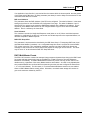
Figure 7.11: SCADAPack E Configurator DNP Master Configuration
This dialog can be accessed from the DNP Comms page of SCADAPack E Configurator. These fields
set the DNP node address of the DNP SCADA master, and the RTU port that the master can be found
on (one of: DIAG, PORT0, PORT1, PORT2, FSK).
The default DNP Master Addr is 30000 and default DNP Master Port is Port 1.
If the port selected as the “DNP Master Port” is not configured for “DNP3” protocol on the RTU, then the
configuration will be automatically modified to be the first port found that is configured with “DNP3”
protocol. If the user re-reads the configuration page in the SCADAPack E Configurator, it will report the
selected “DNP Master Port” if it was automatically modified.
Unsolicited Event Transmission can be controlled by the DNP SCADA master issuing “Disable
Unsolicited Messages” & “Enable Unsolicited Messages” commands. These allow the DNP SCADA
master to selectively enable & disable CLASSES of events from being reported by the RTU. If disabled
from sending unsolicited events, the RTU continues to buffer the events.
The default start-up state of an RTU’s Unsolicited Event Classes is configurable as illustrated in the
screen capture in Figure 7.12 31 taken off the DNP Events page of SCADAPack E Configurator.
Figure 7.12: Default Enabled Event Classes
The SCADAPack E RTU firmware supports an “Unsolicited Allowed” control to satisfy recently revised
DNP User Group DNP3 operational requirements. When Unsolicited responses are off, the RTU will not
support any unsolicited operation, and will reject the “ENABLE/DISABLE UNSOLICITED RESPONSES”
DNP3 function codes. This function is also configured on the DNP Events page of SCADAPack E
Configurator as illustrated below.
32
SCADAPack E DNP3 Technical Reference
Figure 7.13: Unsolicited Response Configuration
When unsolicited operation is enabled on the RTU, it is the responsibility of the DNP3 Master to enable
the event classes in the RTU following an RTU restart. The Class settings are provided for backward
compatibility with older masters not automatically enabling RTU event classes. When supporting the
Unsolicited Allowed mode, it is recommended that Class settings should not be used with a DNP3 Level
2 compliant master station.
Unsolicited responses will not be generated by the RTU unless it has a configuration loaded into it.
Writing configuration values in SCADAPack E Configurator is insufficient for this purpose. A configuration
needs to be loaded using the restart config command or writing a configuration via SCADAPack E
Configurator.
DNP3 Technical
6.7.1
33
Unsolicited Response transmission timing
The SCADAPack E Configurator DNP3 Events page in Figure 7.14 33 presents the SCADAPack E
Configuration of the Unsolicited Response timing on the SCADAPack E RTU.
Figure 7.14: Unsolicited Response Timing Configuration
The Event Notification Delay field allows the RTU to continue collecting events for the configured period
AFTER the occurrence of a TRIGGER EVENT but before transmission of the event list to the DNP
SCADA master. This can be useful where a trigger event is followed by consequential events. This
allows the trigger event and consequential events to be reported together in the same DNP3 fragment.
The value of this period may be between 0 and 65535 seconds.
There are 5 parameters that affect the timing of subsequent Unsolicited Response transmissions.
Min. Unsol. Event TX Delay Time
Application Layer Confirm Timeout
Unsolicited Message TX Time
Unsol. Attempts per Burst
Quiet Time Delay
Figure 7.15: Unsolicited Response Timing Parameters
The Min. Unsol Event Tx Delay field stops the RTU from transmitting unsolicited events too frequently e.
g., a new trigger event occurring outside the event notification delay will have to wait this period of time
from the transmission of the previous event, before it will be transmitted. The value of this period may be
between 0 and 65535 seconds.
In conjunction with the APPL LAYER CONFIRM (Event) TIMEOUT, this time also sets the re-
34
SCADAPack E DNP3 Technical Reference
transmission rate for events if the RTU does not receive an application confirm from the DNP3 SCADA
master to its event transmission.
The Quiet Time Delay parameter is the “offline” value for the Min. Unsol. Event Tx Delay time. This value
is applied when the number of timed-out Unsolicited Responses reaches the Unsol. Attempts per burst
count. These parameters allow the RTU to implement “burst-mode” where the RTU retries several times,
waits for an extended time period, and then begins another burst of Unsolicited retries. This behavior is
repeated indefinitely until an Application Layer confirmation is received. The benefit of using this scheme
is that an RTU does not give up trying to notify the Master of a change, but the RTU pauses for extended
period to allow time for “data storms” to clear. See Figure 7.15 33 .
DNP3 Technical
6.8
35
Event Objects
The objects reported by the RTU when communicating with the DNP3 SCADA master are configurable
for each type of event. A range of objects is provided allowing a choice of suitable data type and choice
of timestamp for each of the event types. The DNP Events page of SCADAPack E Configurator
presents each of the event object types.
36
6.8.1
SCADAPack E DNP3 Technical Reference
Binary and Counter Event Objects
Binary Input Event Objects
One of the following event object types is configured for Generate Binary Input Events selection on the
SCADAPack E Configurator DNP3 Events page.
Generate Binary Input Events - No Time
Use this selection to generate DNP3 Group 2 Variation 1 binary input event objects when timestamps
aren't required or the DNP3 SCADA master does not support timestamp binary events.
Generate Binary Input Events - With Absolute Time
Use this selection to generate DNP3 Group 2 Variation 2 binary input event objects when the DNP3
SCADA master does support timestamp binary events, but does not support Relative Time objects (see
SCADA Master's DNP3 Device Profile document).
Generate Binary Input Events - With Relative Time
Use this selection to generate DNP3 Group 2 Variation 3 binary input events when the DNP3 SCADA
master supports Relative Time timestamps and DNP3 Group 51 Variation 1 and Variation 2 CTO objects
(see SCADA Master DNP3 Device Profile document). Where multiple RTU binary events tend to occur
in close succession and need to be transmitted together, this is a more transmission efficient object
than DNP3 Group 2 Variation 2.
Binary Output Event Objects
One of the following event object types is configured for Generate Binary Output Events selection on the
SCADAPack E Configurator DNP3 Events page.
Generate Binary Output Events - No Time
Use this selection to generate DNP3 Group 11 Variation 1 binary output event objects when timestamps
aren't required or the DNP3 SCADA master does not support timestamp binary events. If the DNP3
SCADA master does not support binary output event objects, set each binary output or binary derived
point configuration to Local or Class 0 only (i.e. not configured as Class 1,2 or 3 event classes to the
output points).
Generate Binary Output Events - With Time
Use this selection to generate DNP3 Group 11 Variation 2 binary output event objects when the DNP3
SCADA master does support binary output events with timestamp (see SCADA Master's DNP3 Device
Profile document).
Generate Counter Input Events - No Time
Use this selection for counter events when the DNP3 SCADA master does not support or does not
require timestamp counter events.
DNP3 Technical
37
For firmware versions prior to 7.80 only, select "No Time (16-bit)" events if the DNP3 static object
configuration for counters is 16-bit. If any points are configured for 32-bit DNP3 static counter objects,
select "No Time (32-bit)".
For firmware versions 7.80 and later, the RTU automatically determines 16-bit or 32-bit event size for
each counter point, based on its configured DNP3 static object data size. Select either "No Time (16bit)" or "No Time (32-bit)".
32-bit counter events with no time are sent as DNP3 Group 22 Variation 1 objects.
16-bit counter events with no time are sent as DNP3 Group 22 Variation 2 objects.
Generate Counter Input Events - With Time
Use this selection for counter events when the DNP3 SCADA master does support timestamp counter
events.
For firmware versions prior to 7.80 only, select "With Time (16-bit)" events if the DNP3 static object
configuration for counter points is 16-bit. If any points are configured for 32-bit DNP3 static objects,
select "With Time (32-bit)".
For firmware versions 7.80 and later, the RTU automatically determines 16-bit or 32-bit event size for
each point, based on its configured DNP3 static object data size. Select either "With Time (16-bit)" or
"With Time (32-bit)".
32-bit counter events with time are sent as DNP3 Group 32 Variation 5 objects.
16-bit counter events with time are sent as DNP3 Group 32 Variation 6 objects.
38
6.8.2
SCADAPack E DNP3 Technical Reference
Analog Event Objects
Generate Analog Input Events - No Time
Use this selection for analog events when the DNP3 SCADA master does not support or does not
require timestamp analog events.
For firmware versions prior to 7.80 only, select "No Time (16-bit)" events if the DNP3 static object
configuration for integer analog points is 16-bit. If any points are configured for 32-bit DNP3 static
objects, select "No Time (32-bit)".
For firmware versions 7.80 and later, the RTU automatically determines 16-bit or 32-bit event size for
each point, based on its configured DNP3 static object data size. Select either "No Time (32-bit)" or "No
Time (16-bit)".
32-bit events with no time are sent as DNP3 Group 32 Variation 1 objects.
16-bit events with no time are sent as DNP3 Group 32 Variation 2 objects.
Generate Analog Input Events - With Time
Use this selection for analog events when the DNP3 SCADA master does support timestamp analog
events.
For firmware versions prior to 7.80 only, select "With Time (16-bit)" events if the DNP3 static object
configuration for integer analog points is 16-bit. If any points are configured for 32-bit DNP3 static
objects, select "With Time (32-bit)".
For firmware versions 7.80 and later, the RTU automatically determines 16-bit or 32-bit event size for
each point, based on its configured DNP3 static object data size. Select either "With Time (16-bit)" or
"With Time (32-bit)".
32-bit events with time are sent as DNP3 Group 32 Variation 3 objects.
16-bit events with time are sent as DNP3 Group 32 Variation 4 objects.
Generate Float Input Events - No Time
Use this selection for float events when the DNP3 SCADA master does not support timestamp float
events. The RTU will report DNP3 Group 32 Variation 5 events for floating-point analog input and analog
derived point types.
Generate Float Input Events - With Time
Use this selection for float events when the DNP3 SCADA master does support timestamp float events.
The RTU will report DNP3 Group 32 Variation 7 events for floating-point analog input and analog derived
point types.
Generate Analog Output / Float Output Events - No Time
Use this selection when the DNP3 SCADA master supports analog output event objects but does not
support or require timestamp analog output events.
The RTU generates events compatible with the analog output point's or analog derived point's DNP3
Static Object Type.
DNP3 Group 42 Variation 1 events for 32-bit analog output data
DNP3 Group 42 Variation 2 events for 16-bit analog output data
DNP3 Group 42 Variation 5 events for 32-bit Short Floating Point analog output data
DNP3 Technical
39
Generate Analog Output / Float Output Events - With Time
Use this selection when the DNP3 SCADA master supports analog output event objects with timestamp.
The RTU generates events compatible with the analog output point's or analog derived point's DNP3
Static Object Type.
DNP3 Group 42 Variation 3 events for 32-bit analog output data
DNP3 Group 42 Variation 4 events for 16-bit analog output data
DNP3 Group 42 Variation 7 events for 32-bit Short Floating Point analog output data
40
6.9
SCADAPack E DNP3 Technical Reference
Control Objects
A SCADA Master, or peer DNP3 node may control DNP points within the SCADAPack E RTU. Some
Master stations may have different requirements with respect to knowledge of RTU output points. A
Master station’s requirement, or otherwise, for output status points to be returned in a Class 0 poll
response is independent of the RTUs ability to accept a control request. The following data objects may
be sent to an SCADAPack E RTU for control.
The RTU supports DNP3 controls using the following control methods:
DIRECT OPERATE
SELECT / OPERATE
DIRECT OPERATE NO ACKNOWLEDGE
See Section DNP3 Application Layer Configurations 14 for information on the “Select Arm Timeout”
parameter that affects the operation of the RTU using the DNP3 SELECT / OPERATE controls.
Some restrictions apply to control of the RTU data. Physical RTU Inputs are read-only and cannot be
controlled. An attempt to control a physical binary input or physical analog input point results in a
returned control status “Control not supported for this point” (4).
Physical RTU Outputs and RTU User points may only be controlled when an ISaGRAF application is not
controlling the point, or if a Remote Interlock point is defined and is active. An attempt to control a
binary output or analog output point while ISaGRAF is controlling the point and a Remote Interlock point
is not present, or not active, results in a returned control status “Automation Inhibit” (10).
An attempt to control a Physical RTU output or RTU User point that has its "Point is Failed' attribute set
(e.g. open loop Physical AO) will return a control status "Hardware Error" (6).
Controlling a Physical RTU output or RTU User point that does not exist will result in a control status
“Control not supported for this point” (4).
Control of user points (internal to the RTU) may be performed at any time, subject to same restrictions
as physical output points, i.e. may not be controlled via DNP3 if an ISaGRAF application is controlling
the point, unless a remote interlock point is present and active.
DNP3 Technical
6.9.1
41
Remote Control Interlock
The purpose of control interlocks is to arbitrate control of physical output points and user RTU points
(digital and analog) between an ISaGRAF user application, and remote DNP3 control requests.
The Remote Control Interlock attribute of a point associates a separate RTU binary point with a point to
be controlled. Remote Control Interlock points can be associated with Physical Digital Output points,
Physical Analog Output points, user Digital points and user Analog points. The remote control interlock
point itself may be a Physical Digital Input point or a user Digital point. The Remote Control Interlock
attribute for each physical or user output point is configured from the property dialog of the corresponding
point as illustrated in Figure 7.17 41 below.
If the Remote Control Interlock point value is zero, then there will be no interlock on the controlled point.
Where a DNP3 control request is received for a point without a defined control interlock point, and the
point is not on an ISaGRAF output board, the point will be controlled successfully. Where a DNP3
control request is received for a point without a control interlock point, and the controlled point is on an
ISaGRAF output board, the DNP3 control will be rejected as described in Section Control Objects 40 .
Where an interlock point is specified, the Remote Interlock Point can be controlled externally via DNP3.
When the interlock point is inactive (OFF) and the controlled point is on an ISaGRAF Output Board,
external DNP3 control requests for the physical output point will be rejected as described in Section
Control Objects 40 . Controls asserted through an ISaGRAF application Output Board control the
physical output point. When the interlock point is active (ON), external DNP3 control of the physical
output point is allowed, and controls through an ISaGRAF Output board will be ignored.
Figure 7.17: Configuring Remote Control Interlock
As the Interlock Point is writeable (Remote Control Interlock set to ON), either external DNP3 requests
or an ISaGRAF application may control its state. ISaGRAF control of the interlock point requires a
specific function block call, e.g. WR1BIN to Local_Data. If potentially controlled from an ISaGRAF
application and DNP3, the interlock point should not be on an ISaGRAF output board.
EXAMPLE:
User defined analog point 1000 is controlled via a user application variable attached to an ISaGRAF
Analog Output Board. Analog point 1000 has an associated Remote Control Interlock user digital point
1107. If digital point 1107 is activated, changes to the ISaGRAF variable will no longer control analog
point 1000. Instead, DNP3 controls may be sent to analog point 1000 to change its value.
42
6.9.1.1
SCADAPack E DNP3 Technical Reference
Interlock Alarm Timeout
The Data Processor tracks the period of time that the Interlock binary point is in an Active (ON) state.
Each time the Interlock point is set ON, the timer is restarted. If the timer period exceeds the value of
the interlock “Alarm Timeout” attribute, the RTU generates a DNP3 event on the Interlock user binary
point if the Interlock point has an event class configuration. The DNP binary change event generated will
contain the current state of the Interlock point (ON). The DNP event will be regenerated every 10 mins
thereafter, whilst the Interlock point is still active (ON). When the Interlock point is deactivated (OFF),
the 10 min and “Interlock alarm timeout” timers are cleared and a change event will be generated for the
Interlock point (with point state OFF). An “Alarm Timeout” value of zero indicates no interlock alarm
timeout.
DNP3 Technical
6.9.2
43
Binary Control Objects
ISaGRAF applications and remote-control interlocks may affect the control of RTU points. For more
information see SCADAPack E Data Processing Technical Reference manual.
1.
DNP Object - Group 10 Variation 1 – Binary Output
Use this object with a DNP Write function code for controlling one, or multiple binary points. These
points may be physical binary outputs, RTU user points, or system binary points.
The minimum transmitted data size for this object is 8 bits. 8 consecutive binary output objects is
the same data length as 1 single binary output object. Group binary objects together to improve
transmission efficiency. The DNP Write function code does not return a control result. It is
recommended that the result of this operation is check by another means such as feedback of the
controlled state to a binary input point.
2.
DNP Object - Group 12 Variation 1 – Control Relay Output Block
Use this object (also known by the acronym CROB) with a Select/Operate pair of control messages,
a Direct Operate, or a Direct Operate No Acknowledge DNP function code. The use of Direct
Operate No Acknowledge is not recommended. This object may control physical binary outputs,
RTU user points, or system binary points.
The RTU supports CROB latch-on, latch-off and trip / close pulse controls. On-time / Off-time /
Count fields are supported for pulse controls. See SCADAPack E DNP3 Device Profile. The
operation of RTU points using a pulse control is further described in SCADAPack E Configuration
Technical Reference manual.
The transmitted data size for each point using this object is 11 bytes. For multiple point operation in a
single transaction, packet sizes can become large when using this object type. For large numbers of
binary controls, use of Binary Output object 10 variation 1 is suggested if available in the master station.
For object 1- variation 1, the returned DNP response does NOT return a control result for each point
controlled.
Trip Close Support
SCADAPack E RTUs support TRIP/PULSE ON and CLOSE/PULSE ON control codes in Control Relay
Output Block (CROB) controls .
Extended support for TRIP CLOSE requests such that complementary control functions may be provided
for a single index, i.e. a TRIP/PULSE ON request for a specific DNP index may map to a specific relay
output, whereas a CLOSE/PULSE ON request for the same DNP index may map to another different
relay output. This functionality requires configuration of the TRIP CLOSE PARTNER point attribute for a
binary output point in the RTU’s point database. Refer to the SCADAPack E Configuration Technical
Reference manual for more information.
44
6.9.3
SCADAPack E DNP3 Technical Reference
Analog Control Objects & Floating Point Analog Control Objects
Analog Control Objects
ISaGRAF applications and remote-control interlocks may affect the control of RTU points.
For more information see the SCADAPack E Data Processing Technical Reference manual.
1.
DNP Object - Group 41 Variation 1 – 32-bit Analog Output Block
This object may be sent with a DNP Select/Operate pair of control messages, a Direct Operate, or a
Direct Operate No Acknowledge DNP function code. The use of Direct Operate No Acknowledge is
not recommended. Use this object when controlling internal RTU data requiring 32-bit signed integer
values. This object may control physical analog outputs, RTU user points or analog system points.
For this object, the returned DNP response returns a control result for each point controlled.
2.
DNP Object - Group 41 Variation 2 – 16-bit Analog Output Block
This object may be sent with a DNP Select/Operate pair of control messages, a Direct Operate, or a
Direct Operate No Acknowledge DNP function code. The use of Direct Operate No Acknowledge is
not recommended. Use this object when controlling internal or physical RTU data requiring 16-bit
signed integer values. This object may control physical analog outputs, RTU user points, or analog
system points.
For this object, the returned DNP response returns a control result for each point controlled.
Floating Point Analog Control Objects
ISaGRAF applications and remote-control interlocks may affect the control of RTU points.
For more information see the SCADAPack E Data Processing Technical Reference manual.
DNP Object - Group 41 Variation 3 – Short Floating Point Analog Output Block
This object may be sent with a DNP Select/Operate pair of control messages, a Direct Operate, or a
Direct Operate No Acknowledge DNP function code. The use of Direct Operate No Acknowledge is not
recommended. Use this object when controlling internal RTU data requiring 32-bit floating point (real)
values.
For this object, the returned DNP response returns a control result for each point controlled.
DNP3 Technical
6.10
45
DNP3 IIN Internal Indication Flags
The DNP3 IIN Internal Indication flags are utilized by the RTU to indicate the status regarding operation
of the RTU.
DNP3 IIN flags are returned by the RTU to the DNP3 Master Station in all response messages including
Unsolicited Response messages.
IIN Flags First Byte (RTU status)
Bit #
IIN1.0
All stations (broadcast) message received by RTU
The RTU sets this IIN flag when it receives a broadcast message. This flag is cleared
automatically after having been reported in a response fragment.
IIN1.1
Class 1 event data available in RTU
The RTU sets this IIN flag in a response when there is buffered Class 1 event data present on
one or more of the RTU’s event lists. This IIN flag is cleared when all Class 1 events have
been cleared from the event lists.
IIN1.2
Class 2 event data available in RTU
The RTU sets this IIN flag in a response when there is buffered Class 2 event data present on
one or more of the SCADAPack E event lists. This IIN flag is cleared when all Class 2 events
have been cleared from the event lists.
IIN1.3
Class 3 event data available in RTU
The RTU sets this IIN flag in a response when there is buffered Class 3 event data present on
one or more of the SCADAPack E event lists. This IIN flag is cleared when all Class 3 events
have been cleared from the event lists.
IIN1.4
Time synchronization required
The RTU sets this IIN flag when the Time Update Request Rate timer has expired on the RTU.
This IIN flag is cleared when the RTU time is set via a DNP3 Write request. if NTP Network
Time Synchronization is enabled in the RTU, the RTU will NOT set this IIN flag.
IIN1.5
RTU digital outputs in local state
This IIN flag is not used by the RTU.
IIN1.6
RTU device trouble
This IIN flag is not used by the RTU.
IIN1.7
RTU device has restarted
The RTU sets this IIN flag when the RTU starts, or when the DNP3 driver in the RTU is
restarted. The Master is responsible for clearing this flag via a DNP3 Write request.
IIN Flags Second Byte (Request Errors)
Bit #
IIN2.0
Function Code not implemented
The RTU sets this IIN flag in a response when the corresponding request message used a
DNP3 Function Code that is not supported by the RTU. For more information see the
SCADAPack E DNP3 Slave Device Profile.
IIN2.1
Requested object(s) unknown
The RTU sets this IIN flag in a response when the corresponding request message used a
46
SCADAPack E DNP3 Technical Reference
DNP3 Object or Variation that is not supported by the RTU. For more information see
SCADAPack E DNP3 Slave Device Profile.
IIN2.2
Qualifier, range or data parameters invalid or out of range
The RTU sets this IIN flag in a response when the corresponding request message used a
DNP3 Qualifier Code, or an invalid DNP3 point index or point index range that is not supported
by the RTU. For more information see SCADAPack E DNP3 Slave Device Profile.
IIN2.3
Event buffer or application buffer overflow
The RTU sets this IIN flag when event data has been removed from the RTU due to event list
overflow. This flag is cleared automatically after having been reported in a response fragment.
IIN2.4
Requested operation is already executing
This IIN flag is not used by the SCADAPack E RTU.
IIN2.5
Configuration corrupt
The RTU sets this IIN flag under one of the following conditions:
The RTU has no configuration
The “CLEAR CONFIG” command is executed
If the Profiler cannot find profile files required in the RTU point
configuration
If the RTU detects an error while reconfiguring the point database after a
“RESTART CONFIG” command
If the RTU detects an error while verifying the point database during RTU
start-up
IIN2.6
Reserved (0)
This IIN flag is not used by the SCADAPack E RTU.
IIN2.7
Reserved (0)
This IIN flag is not used by the SCADAPack E RTU.
DNP3 Technical
6.11
47
DNP3 Objects with Status Flags
The SCADAPack E RTU returns additional point information from the point database to the SCADA
Master in DNP3 objects that support status flags.
Where status flag information is required, the RTU needs to be configured to send the appropriate DNP3
objects with status flags to the SCADA Master, and the SCADA Master needs to be capable of
processing those objects.
The following DNP3 Object Status Flag bits are used by the RTU.
Table 7.2: DNP3 Point Status Flags
Status Flag
Bit Number
Description
SCADAPack E RTU Usage
[0]
On-line / Off-line
ON = On-line (Default)
OFF = Off-line: “Point Failed” property active
[1]
Restart
Not used by the RTU. OFF
[2]
Comm Lost
OFF = Point Communication OK (Default)
ON = Communication Lost: “I/O not responding” point
property active
[3]
Remote Forced Data
This flag is not supported and is set to OFF.
[4]
Local Forced Data
This flag is not supported and is set to OFF.
Chatter Filter
[Binary Objects Only]
Used by SCADAPack ER Digital Input Module only
Roll-over
[Counter Objects Only]
Not used as per DNP User Group recommendations.
OFF
Over-range
[Analog Objects Only]
OFF = Point state normal (Default)
ON = Analog point value is Over / Under range
[6]
Reference Error
[Analog Objects Only]
OFF = Point state normal (Default)
ON = A/D Hardware Reference Error
[7]
Reserved
[5]
See following sections for specific DNP3 object use of status flags:
Binary Input & Output Status Flags 48
Analog Input Status Flags
49
Counter & Analog Output Status Flags
50
48
6.11.1
SCADAPack E DNP3 Technical Reference
Binary Input & Output Status Flags
Binary Input Status Flags
On-line
Restart
Communication lost
Remote forced data
Local forced data
Chatter filter
=
=
=
=
=
=
[0]
[1]
[2]
[3]
[4]
[5]
<0,off-line; 1,on-line>
<0,normal; 1,restart>
<0,normal; 1,lost>
<0>
<0>
<0,normal; 1, filter on>
Reserved
State
= [6] <0>
= [7] <0, 1>
OFF-LINE = Point Is Failed (Property)
NOT USED
COMM LOST = I/O not responding
This flag is not supported and is set to OFF.
This flag is not supported and is set to OFF.
Supported on physical digital inputs of SCADAPack
ER
POINT STATE
DNP3 “Binary Input” Data Objects access Physical Digital Inputs, User Digital points, System Digital
points
Binary Output Status Flags
On-line
Restart
Communication lost
Remote forced data
Local forced data
=
=
=
=
=
[0]
[1]
[2]
[3]
[4]
<0,off-line; 1,on-line>
<0,normal; 1,restart>
<0,normal; 1,lost>
<0>
<0>
Reserved
= [5] <0>
Reserved
State
= [6] <0>
= [7] <0, 1>
OFF-LINE = Point Is Failed (Property)
NOT USED
COMM LOST = I/O not responding
This flag is not supported and is set to OFF.
This flag is not supported and is set to OFF.
POINT STATE
DNP3 “Binary Output” Data Objects access Physical Digital Outputs, User Digital points, System Digital
points.
DNP3 Technical
6.11.2
49
Analog Input Status Flags
On-line
Restart
Communication lost
Remote forced data
Local forced data
Over-range
Reference check
Reserved
=
=
=
=
=
=
=
=
[0]
[1]
[2]
[3]
[4]
[5]
[6]
[7]
<0,off-line; 1,on-line>
<0,normal; 1,restart>
<0,normal; 1,lost>
<0>
<0>
<0, normal; 1, over-range>
<0, normal; 1, error>
<0>
OFF-LINE = Point Is Failed (Property)
NOT USED
COMM LOST = I/O not responding
This flag is not supported and is set to OFF.
This flag is not supported and is set to OFF.
** see Table below
ERROR = A/D Reference Error
NOT USED
DNP3 “Analog Input” Data Objects access Physical Analog Inputs, User Analog points, System Analog
points
**The Over-Range analog input status flag is set when either an Over-Range or Under-Range point
property is set. The following table describes the value returned in the DNP object for over-range and
under-range conditions:
Table 7.3: Under and Over Range Conditions for Analog Inputs Types
Point Object Type
Condition
Value Returned
16-bit Analog Input
Under-Range
-32768
16-bit Analog Input
Over-Range
+32767
32-bit Analog Input
Under-Range
-231
32-bit Analog Input
Over-Range
+231-1
Float Analog Input
Under-Range
–FLT_MAX*
Float Analog Input
Over-Range
FLT_MAX*
* FLT_MAX = 3.402823e+38
It is the responsibility of the SCADA master to determine whether an actual over-range or under-range
has occurred based on the DNP3 Over-range flag and point value.
50
6.11.3
SCADAPack E DNP3 Technical Reference
Counter & Analog Output Status Flags
Counter Status Flags
On-line
= [0] <0,off-line; 1,on-line>
Restart
Communication lost
= [1] <0,normal; 1,restart>
= [2] <0,normal; 1,lost>
Remote forced data
Local forced data
Roll-over
= [3] <0>
= [4] <0>
= [5] DNP3 Subset recommendation not to use
Reserved
Reserved
= [6] <0>
= [7] <0>
OFF-LINE = Point Is Failed
(Property)
NOT USED
COMM LOST = I/O not
responding
NOT USED
NOT USED
NOT USED
NOT USED
DNP3 Counter Data Objects access Counters on Physical Digital Inputs, User Analog points and
System Analog points whose DNP Object Type attribute is set to a DNP3 Counter Object / Variation.
Roll-over is not supported by the SCADAPack E RTU Counters, as per the recommendation in the DNP3
subset in order to promote counter inter-operability. It is up to the SCADA Master to determine counter
roll-over based on knowledge of previous counter value.
Analog Output Status Flags
On-line
Restart
Communication lost
Remote forced data
Local forced data
Reserved
Reserved
Reserved
=
=
=
=
=
=
=
=
[0]
[1]
[2]
[3]
[4]
[5]
[6]
[7]
<0,off-line; 1,on-line>
<0,normal; 1,restart>
<0,normal; 1,lost>
<0>
<0>
<0>
<0>
<0>
OFF-LINE = Point Is Failed (Property)
NOT USED
COMM LOST = I/O not responding
This flag is not supported and is set to OFF.
This flag is not supported and is set to OFF.
NOT USED
NOT USED
NOT USED
Output Data Objects access Physical Analog Outputs, User Analog points, System Analog points.
DNP3 Technical
6.12
51
Virtual Terminal Support
The RTU supports DNP3 Virtual Terminal objects (hereafter referred to as VT objects) as specified in the
SCADAPack E DNP3 Slave Device Profile. This section details how the Virtual Terminal objects are
supported in the RTU. The processing of transactions that contain VT objects is dependent on the VT
port number (point index) specified in the transaction.
In general, the DNP3 Virtual Terminal protocol allows passing of unstructured data between Master and
Slave sides of a DNP3 communication link, allowing local terminal interfaces on specific IEDs to be
accessed remotely using the DNP3 Virtual Terminal objects. The result is a transparent exchange of
data.
SCADAPack E RTUs also support TCP Service Ports. Information on these can be found in the
SCADAPack E TCP/IP Technical Reference manual.
Virtual Terminal Object Summary
Object Group
The DNP3 virtual terminal objects allow specification of an output block object (object group 112) that is
sent using a DNP3 WRITE (FC 2), and an event object (object group 113) that can be returned in an
UNSOLICITED RESPONSE (FC 130), or in RESPONSE (FC 129) to a READ (FC 1) request.
Variation
The DNP3 variation field specifies the length of the “user data” in the virtual terminal object. The
maximum user data sizes with respect to the SCADAPack E are detailed in Section Virtual Terminal
Object Data Sizes 52 .
Qualifier / Range
The qualifier to be supported for VT transactions is dependent on the object, where requests referencing
object 112 and object 113 shall use qualifier 0 (8-bit Start and Stop Indexes) or qualifier 0x17 (8-bit
quantity), and responses referencing object 113 shall use qualifier 0x17 (8-bit quantity). The index value
shall represent the VT port number. Valid VT port numbers range from 0 – 255.
The VT port numbers currently supported by the SCADAPack E RTU firmware are listed as follows
VT Port 0
(VT Port 0)
ISaGRAF Remote Debugging. Refer to Section ISaGRAF Remote Debugging
52
VT Ports 10 – 19
Ports 10 – 19) 53
DNP VT Service Port Functions. Refer to Section DNP3 VT Service Ports (VT
VT Port 20
20) 52
Remote Command Line. Refer to Section Remote Command Line (VT Port
52
6.12.1
SCADAPack E DNP3 Technical Reference
ISaGRAF Remote Debugging (VT Port 0)
ISaGRAF Remote Debugging (VT Port 0)
Virtual Terminal port 0 is reserved ISaGRAF Remote Debugging allowing ISaGRAF Workbench to
communicate with an ISaGRAF target kernel in a remote RTU over a DNP3 communications link
(consult the SCADAPack E Configurator Users Manual for more information).
6.12.2
Remote Command Line (VT Port 20)
Remote Command Line (VT Port 20)
Virtual Terminal port 20 is reserved for the “Remote Command Line” interface. This interface presents the
standard RTU command line interface to remote users across DNP3 communication links using virtual
terminal objects 112 and 113 (over VT port 20). The SCADAPack E Configurator provides a “Remote
Command Line (Virtual Terminal)” window to access this functionality in the RTU Consult the
SCADAPack E Operational Reference manual for more information regarding the “Remote Command
Line” functionality in the RTU.
6.12.3
Virtual Terminal Object Data Sizes
This section details the maximum “user data” sizes for inclusion in a single VT object (i.e. object 112 or
113). These sizes may determine any fragmentation and subsequent latencies of the request / response
messages.
Maximum Received User Data Size
The maximum request size, i.e. unstructured user data, supported in a single VT object has been based
around inclusion in a single DNP3 frame. The RTU will accept a maximum received frame size of 292
bytes (including frame header, CRCs, etc.). Therefore a maximum of 240 bytes of VT “user data”
can be sent in a single DNP3 frame to comply with the recommendations of the DNP3 standard. The
recommendation limits the size of VT user data to 240 bytes so the transmission can be received by
memory-limited devices.
Maximum Transmitted User Data Size
The maximum response size, i.e. unstructured user data, supported in a single VT object has been
based around inclusion in a single DNP3 frame, therefore the maximum response size that can be
transmitted in a single DNP3 frame from the RTU is 249 bytes (including frame header, CRCs, etc.).
This corresponds to a maximum of 201 bytes of VT user data that can be included in a DNP3
frame. Due to this object size limitation, the maximum amount of VT user data that may be transmitted
(from the SCADAPack E RTU ) in a single DNP3 fragment is ~ 2010 bytes.
When using VT transactions with SCADAPack 300E controllers, individual transactions should be
limited to 1K bytes. Data may be missing for transactions larger than this.
DNP3 Technical
6.12.4
53
DNP3 VT Service Ports (VT Ports 10 - 19)
Virtual Terminal transactions received from the DNP3 protocol for VT port numbers 10-14 will be
forwarded to the appropriately configured serial port (Port 0 through Port 4) as shown below.
Data received on the serial port will be forwarded to the configured DNP3 master station either in a
READ response, a class 3 poll response or an Unsolicited Response (depending on RTU configuration).
The specified VT Port number will determine which serial port the data should be directed to.
NOTE: When using VT transactions with SCADAPack 300E controllers, individual transactions should
be limited to 1K bytes. Data may be lost for transactions larger than this.
VT port numbers for the DNP VT Service ports are as follows:
Virtual Terminal Port Numbers
As noted in Virtual Terminal Support 51 , the specified index for objects 112 and 113 represents the
Virtual Terminal Port Number. The Virtual Terminal Port Number is mapped to a configured RTU serial
port. The following VT port numbers are used for mapping to the SCADAPack E RTU serial ports
VT Port 10
<===>
RTU Port 0
VT Port 11
<===>
RTU Port 1
VT Port 12
<===>
RTU Port 2
VT Port 13
<===>
RTU Port 3
VT Port 14
<===>
RTU Port 4
VT Port 15 – 19 – Reserved for future use.
The following sections details the DNP3 transactions used to transport the “user data” on the virtual
terminal port.
A message originating from the DNP3 Master is referred to as a “VT request transaction”.
A message received on the DNP VT Service Port is referred to as a “VT response transaction”.
Processing of VT Request Transactions, VT Service Port Event Buffers, & RTU Serial Port
Configurations 54
Processing of VT Response Transactions
55
54
SCADAPack E DNP3 Technical Reference
6.12.4.1 Processing of VT Request Transactions, VT Service Port Event Buffers, & RTU Serial Port
Configurations
Processing of VT Request Transactions
The following analysis of a VT request transaction is based on a single DNP3 VT message from a DNP3
Master to an SCADAPack E RTU.
The inbound DNP3 message received by the RTU (for that RTU) from the DNP3 Master is a WRITE
(FC 2) for object 112.
The RTU responds to request with IINs in its response only, i.e. no data. If the index does NOT map
to an RTU “DNP VT Service” port, the RTU responds with a “parameter out of range” IIN.
If the specified index is for a DNP VT Service port, the RTU will send the user data included in the
request to the respective DNP VT Service port.
VT Service Port Event Buffers
The Virtual Terminal event buffers are volatile, i.e. a Warm or Cold Reset of the RTU will result in the
clearing of any buffered VT event data (received on a DNP VT Service Port).
The RTU allows for a maximum of 100 VT event objects to be stored, i.e. maximum user data storage of
approximately 20 KB.
If VT event data is lost, the RTU error code system point will be set with an error code as described in
Error Conditions 59 [Loss of Virtual Terminal Event Data] 59 .
The VT event buffers can be remotely purged using the RTU command “clear vt_events”.
This allows clearing of VT events without impacting the standard DNP3 event buffers, i.e. binary, analog
and counter events. This can be executed remotely using the DNP3 FILE EXEC command, or
alternatively, the VT event buffers can be purged by executing this command directly at the command
line (or TELNET).
RTU Serial Port Configurations
In order to support Virtual Terminals, the appropriate SCADAPack E RTU port function needs to be set
the DNP VT Service port. The RTU simultaneously supports multiple DNP VT Service ports, so any
combination of controller serial ports can be set for DNP VT Service mode.
The Virtual Terminal Port Numbers that map to controller serial ports are detailed in Section DNP3 VT
Service Ports (VT Ports 10 – 19) 53 .
DNP3 Technical
55
6.12.4.2 Processing of VT Response Transactions
The processing of the VT response transaction is depends on the configuration of Unsolicited
Responses for object 113. The processing of VT response transactions via solicited RESPONSEs (FC
129) or UNSOLICITED RESPONSEs (FC 130) are described separately in the following sections. By
default, object 113 events are internally assigned to be CLASS 3.
Enabling / Disabling Unsolicited Responses On Object 113 & VT Response Transaction in DNP3
Unsolicited Response (FC 130) 56
‘Packet’ Determination for Responses & VT Response Transaction in DNP3 Request Response
(FC 129) 58
56
SCADAPack E DNP3 Technical Reference
6.12.4.2.1 Enabling / Disabling Unsolicited Responses On Object 113 & VT Response Transaction in
DNP3 Unsolicited Response (FC 130)
Enabling/Disabling Unsolicited Responses on Object 113
The factory default (FC) configuration of the SCADAPack E RTU specifies that Unsolicited Responses
are disabled for every class / object. Unsolicited Responses can be enabled for VT event objects (object
113) in one of 2 ways.
An Enabled Event Class configuration value that includes “Class 3” enables Unsolicited Responses
for VT event objects.
An ENABLE UNSOLICITED RESPONSES (FC 20) message for object 113 enables Unsolicited
Responses for VT event objects. A DISABLE UNSOLICITED RESPONSES (FC 21) message for
object 113 disables Unsolicited Responses for VT event objects.
VT Response Transactions in DNP3 Unsolicited Response (FC 130)
The VT response transaction analysis detailed in this section assumes that UNSOLICITED
RESPONSES have been enabled in the SCADAPack E RTU.
Inbound data is received by the RTU on a DNP VT Service port.
The RTU “collects” this data which is buffered in VT event objects, i.e. obj 113.
The RTU will continue to collect this data until the criteria for generating an UNSOLICTED
RESPONSE has been satisfied. This criterion is specified in Section ‘Packet’ Determination for
Responses 58 .
On satisfying this criterion, the RTU will then attempt to generate an Unsolicited Response for the
VT event objects.
The appropriate application layer CONFIRM will delete the event objects that were transmitted in the
preceding Unsolicited Response.
The Unsolicited Response mechanism used for VT event objects does not conform to the standard rules
for the RTU. This is because the normal configurable timing parameters are inappropriate for
transmission of VT event object in Unsolicited Responses. The following rules apply to “VT event object”
Unsolicited Responses.
The “Min. Unsol. Event Tx Delay” or the “Event Notification Delay” are not used for VT
Unsolicited Responses. Collection of data before an Unsolicited Response is attempted, is based on
“the amount of data collected” and / or “time since last data received”.
The “Appl. Layer Confirm (Event) Timeout” will apply to VT Unsolicited Responses. The minimum
value for this configuration is dependent on the Data Link configurations of the Master Port.
If the RTU determines that an Unsolicited Response is to be generated because of standard event
data (i.e. binary, analog or counter events), then the VT event data may also be included in the
Unsolicited Response.
If the RTU determines that an Unsolicited Response is to be generated because of VT event data,
then any standard event data will only be included in the Unsolicited Response, if the “Min. Unsol.
Event Tx Delay” has transpired since the last Unsolicited Response containing standard event data
(i.e. normal criteria for generating Unsolicited Responses for standard event data).
No Unsolicited Responses will be generated if the RTU is waiting for an application CONFIRM from
the master.
The unsolicited response will be directed to the master DNP address, on the current Master
communication interface. Not that the Master communication interface is specified in the RTU’s
DNP3 Technical
configuration, though if the RTU ‘hears’ from the Master on another interface, it will then direct the
Unsolicited Responses on this “updated” interface.
57
58
SCADAPack E DNP3 Technical Reference
6.12.4.2.2 ‘Packet’ Determination for Responses & VT Response Transaction in DNP3 Request Response
(FC 129)
'Packet' Determination for Responses
The SCADAPack E RTU needs to decide what constitutes a ‘packet’, i.e. amount of data to include and
when to try and send it. To some degree it depends on the response type, i.e. Solicited or Unsolicited.
For a Solicited response (to an appropriate request), the RTU will return any buffered VT event data, up
to a complete response fragment. However if there are no outstanding requests for VT event data, and
data is being collected from the DNP VT Service serial port, the RTU needs to determine when an
Unsolicited Response should be generated (assuming Unsolicited Responses have been enabled for
object 113). The RTU will attempt to generate an Unsolicited Response based on either of the following
criteria (whichever occurs first)
A complete 2kB fragment of data has been collected.
An inactive period has transpired where no data collected from DNP VT Service port (e.g. time to
transmit 20 characters - dependent on baud rate).
VT Response Transaction in DNP3 Request Response (FC 129)
The application layer request may either be a READ (FC 1) request specifically for VT event objects (i.e.
object 113) or for class 3 event data (object 60 var 4).
Inbound data is received by the RTU on a DNP VT Service port.
The RTU “collects” this data which is buffered in VT event objects, i.e. obj 113.
Any response issued to the DNP3 master not including this data will have the class 3 data
available IIN set (due to object 113 event data).
An appropriate request (i.e. READ request for object 113 or class 3 event data) will invoke a
response which will include the object 113 event data. If the data spans more than 1 fragment, the
RTU will only return a single fragment. The class 3 data available IIN will be set to indicate that
there are more VT event objects (object 113) to be collected.
An application layer CONFIRM will be requested by the RTU response, as the response contains
event data. Arrival of the CONFIRM will cause the RTU to delete the event objects that were
transmitted in the preceding response.
The response fragment will be directed to the source DNP address specified in the request, on the same
communication interface on which the request message was received.
DNP3 Technical
59
6.12.4.3 Error Conditions
This section details any error conditions that may arise as a result of processing VT request
transactions and / or event buffer storage limitations.
VT Port Number Error
As noted in Section DNP3 VT Service Ports (VT Ports 10 – 19) 53 the VT port number maps to the
appropriately configured DNP VT Service port. If the VT port number specified in the “VT request
transaction” does NOT map to an appropriately configured serial port, the application layer response
issued to the WRITE request will have the “parameter out of range” IIN set.
Loss of Virtual Terminal Event Data
The maximum number of VT event objects that can be buffered is 100. If the VT event buffers are filled
and VT event is lost, the RTU Error Code System Point will be controlled with the value 1035, i.e. VT
EVENT DATA LOST. The Event Buffer Overflow IIN will also be set by the RTU in any application
layer responses.
60
6.13
SCADAPack E DNP3 Technical Reference
Resetting and Presetting Counters
The SCADAPack E RTU supports the following DNP3 protocol function codes with counter objects:
15 – INITIALIZE DATA. Issuing a DNP3 application request for this function code clears the value of
the RTU point with the specified DNP3 counter point index(es).
1 – READ. This function code is used when reading the current value (and statuses) of counter
objects.
2 – WRITE. This function code is used when presetting and/or clearing counter values.
The use of these function codes are supported on the SCADAPack E RTU Physical Counter Input
points, and RTU Analog user points whose “DNP3 Object Type” attribute is set as a DNP3 Counter
object.
SCADAPack ES Remote I/O unit Counters cannot be preset to a value other than 0 when using a DNP3
Write commands to a Counter object. A write to a counter object on a remote I/O unit with a non-zero
value will result in the counter value being preset to 0 (equivalent to clearing the value using the
INITIALIZE DATA function code).
One of the following DNP3 application requests may be used:
Table 7.4: DNP3 Counter Function Codes
FC
GROUP
VAR QUALIFIER
Comment
15
20
0
06
Clear value of RTU points set with DNP3
counter objects. Counter Point 0 is not
supported with FC 15 and qualifier 06.
15
20
0
00
Start
Stop
Clear value of specified range of DNP3 counter
object points
(8-bit Start/Stop Indexes)
15
20
0
01
Start
Stop
Clear value of specified range of DNP3 counter
object points
(16-bit Start/Stop Indexes)
2
20
1, 2,
5, 6
00, 01
Start
Stop
Set value of specified range of DNP3 counter
object points
(either:
8-bit Start/Stop Indexes or
16-bit Start/Stop Indexes)
1
20
1, 2,
5, 6
00, 01
Start
Stop
Read value of specified range of DNP3 counter
object points
(either:
8-bit Start/Stop Indexes or
16-bit Start/Stop Indexes)
The RTU Physical Counter points may also be configured to automatically reset upon restart of a Main
RTU. For more information see the SCADAPack E Data Processing Technical Reference.
DNP3 Technical
6.14
61
DNP3 Multi-Master Feature & Events
The SCADAPack E RTU can support multiple DNP3 masters, whereby each DNP3 master is identified
by the RTU with respect to DNP Master address, Master Port and Point Data Class on a per-point basis.
The RTU firmware supports a maximum of 3 DNP masters as indicated on SCADAPack E DNP
Masters page. The DNP3 Multi-Master firmware is a licensed feature as indicated on the General /
Controller Status page of SCADAPack E Configurator. A sample screen shot is given in Figure 7.18 61
. Only the “Master 1” parameters are applicable if the “Supports Multiple DNP3 Masters” feature is not
licensed.
Figure 7.18: Indication of DNP Multiple Master License
The Point Data Class common point attribute has been extended such that it is now configurable on a
per-Master basis as illustrated in Figure 7.19 62 . This allows the RTU to present a different “view” of its
non-local points to different DNP Masters. This may have applications in local HMI situations or for
RTUs used for custody transfer.
62
SCADAPack E DNP3 Technical Reference
Figure 7.19: Multi-Master Configuration points
Some configuration parameters applicable to Multi-master operation, and located on the DNP Masters
page of the SCADAPack E Configurator, are shown in Figure 7.19 62 and further explained below:
DNP Master Address
This parameter configures the DNP3 Node Address of the DNP3 Master (typically the SCADA Master),
to which the RTU may report Unsolicited Responses. A value of zero means “No Master” for Master
sessions 2 and 3.
DNP Master Port
This parameter configures the port on which the RTU sends Unsolicited Responses to the master
station.
Min. Unsol. Event Tx Delay
This parameter sets the minimum time (in seconds) between consecutive Unsolicited Responses sent
from the RTU to the SCADA Master. After an Unsolicited Response has been sent by the RTU, no
Unsolicited Response will be generated until this time period has elapsed.
Quiet Time Delay
This parameter is the “offline” Min. Unsol. Event Tx Delay time. This value is applied when the number of
timed-out Unsolicited Responses reaches the Unsol. Attempts per burst count. These parameters allow
the RTU to implement “burst-mode” where the RTU retries several times, waits for an extended time
period, and then begins another burst of Unsolicited retries. This behavior is repeated indefinitely until an
Application Layer confirmation is received.
Appl Layer Confirm (Event) Timeout
This parameter sets the time (in seconds) that the RTU expects a DNP Application Layer Confirm
message from the master after the RTU has transmitted event data (either in a poll response or
unsolicited response). The “Data-Link Layer Confirm Mode” and “Data Link Timeout” parameters are
used to calculate a minimum value for this timeout. The RTU will automatically apply the minimum
timeout if this parameter is set too low.
DNP3 Technical
63
If an Application Layer Confirm is not received from the master within the timeout period, then the greater
of this value and the Min Unsol TX Delay parameter (see above) is used to delay the transmission of new
unsolicited event data to the master.
DNP Local Address
This parameter allows the DNP Address of the RTU to be configured. The value for Master 1 is the same
setting as that found on the SCADAPack E Configurator Ports page. The values for Masters 2 and 3
allow the RTU to respond to the respective DNP Master address with a different local address. This is
required by some Master stations that can not configure different “logical” RTU’s with the same DNP
address. Zero is a valid entry for these fields.
Unsol. Allowed
This checkbox controls the Unsolicited Response mode (either on or off). When unsolicited response
operation is configured off, the RTU will not send an unsolicited response to the respective Master, but
otherwise responds to Master requests.
DNP3/TCP Keep-Alive
This parameter is implemented as described by the DNP User Group’s “Transporting DNP3 over Local
and Wide Area Network s” standard. It is a configurable Keep-Alive timer is used for each active DNP3 TCP socket connection. This configuration parameter specifies how often a DNP3 Link Status test
message is sent across active TCP sockets for the purpose of verifying an active TCP link. This timer
may be set to “0” to de-activate the DNP-TCP Keep-Alive timer.
DNP3 Multi-Master Events
The RTU’s IO Processor creates time stamped change events and passes them along to the DNP3 task
for storage and later transmission (see the SCADAPack E Data Processing Technical Reference
Manual for more details). The DNP3 Multi-Master firmware only stores one copy of each event in nonvolatile memory, regardless of how many Master sessions are enabled. An event is only deleted when
every enabled Master has confirmed the event (assuming that the point was configured as Event Class
1, 2 or 3 for each Master). For this reason, it is recommended that Master sessions are not enabled
where no DNP3 Master station actually exists. Otherwise, non-volatile event storage will continue to
grow to the maximum allowed by the RTU.
64
6.15
SCADAPack E DNP3 Technical Reference
DNP3 Operation Using TCP/IP, Routing for TCP/IP
DNP3 Operation Using TCP/IP
The SCADAPack E RTU’s DNP3 protocol operation over TCP/IP conforms with the requirements of the
DNP User Group’s “Transporting DNP3 over Local and Wide Area Network s” document. Assigned TCP
and UDP port number “20000” is used for DNP3 communications.
Both a UDP socket listener and TCP socket listener are installed on the RTU for DNP3 communications.
The sockets listened for are set by the “Default DNP3 Port” parameter (see below). Communication on
both UDP and TCP sockets may be active simultaneously, and multiple external TCP/IP devices may
concurrently request connections to the TCP socket, or send datagrams to the UDP socket.
PPP-TCP/IP processing and communication across local area and wide area networks may introduce
additional delays in transporting DNP3 frames. Increasing DNP3 Data Link Layer and Application Layer
time-outs in DNP3 devices, particularly across PPP links on WAN networks, may need to be
considered.
DNP3 Routing for TCP/IP
The SCADAPack E can behave as standard DNP3 slave devices and respond to DNP3 Master requests
on DNP3 serial channels, Ethernet-TCP/IP and PPP-TCP/IP channels.
HINT: In a network consisting of DNP3 nodes separated by IP networks, it is simplest to consider
Ethernet-TCP/IP and PPP-TCP/IP channels between RTU devices as transparent.
Where DNP3 frames are routed via TCP/IP on the SCADAPack E RTU, individual routing entries may be
added to the DNP3 Route Table which can specifically override the use of TCP transport, or UDP
transport including port numbers. These overrides are described further in Section DNP3 TCP/IP
Networking 76 (DNP3 Network Forwarding with TCP/IP) 76 . Where these overrides are not applied,
the parameters described in Section DNP3 - TCP Keep-Alive Timer 67 are used as the default
communication settings.
DNP3 Technical
6.16
65
DNP3 Link Layer Settings for TCP/IP
For PPP interfaces on the SCADAPack E RTU, the following DNP3 Data Link Layer facilities may be
configured:
DNP3 Data Link (DL) Mode:
Never
Sometimes
}
DNP3 DL Confirm Timeout
Always
}
DNP3 DL Retries
PPP-TCP/IP processing and communication across local area and wide area networks may introduce
additional delays in transporting DNP3 frames. Increasing DNP3 Data Link Layer and Application Layer
time-outs in DNP3 devices, particularly across PPP links on WAN networks, may need to be
considered.
Using SCADAPack E Configurator, adjust these serial port parameters from the DNP3 Comms page
as illustrated in the figure below.
Figure 7.20: Serial Port Data Link Layer Settings for DNP3
For the RTU Ethernet interface, the following DNP3 Link Layer facilities may be configured. The default
Data Link Layer mode as required by the DNP User Group’s “Transporting DNP3 over Local and Wide
Area Network s” document is Never mode. Using SCADAPack E Configurator, adjust these Ethernet
port settings from the Advanced TCP/P page as illustrated:
66
SCADAPack E DNP3 Technical Reference
Figure 7.21: Ethernet Data Link Settings for DNP3
DNP3 Technical
6.17
67
DNP3 - TCP/IP Settings
Default DNP3 Transport
Figure 7.22: Default DNP3 Transport Dialog
This parameter may be set to either “UDP” or “TCP” and sets the default transport protocol used for
conveying out-bound DNP3 protocol frames across LAN/WAN links. Where a DNP3 route table entry
does not contain override information, the setting of this parameter determines whether UDP or TCP
transport is used for out-bound DNP3 LAN/WAN communications. This parameter is configured from
the Advanced TCP/IP Page of the SCADAPack E Configurator.
Default DNP3 Port
This parameter sets the UDP Port Number and TCP Port Number that is used as the default for
transporting DNP3 protocol frames across LAN/WAN links. For in-bound access to SCADAPack E RTU
sockets for DNP3 communication, the setting of this parameter determines the port number used by the
TCP and UDP socket listeners for DNP3 LAN/WAN communications.
Where a DNP3 node route table entry does not contain override information for out-bound
communication, the setting of this parameter in conjunction with the “Default DNP3 Transport”
parameter, determines the port number and transport used for out-bound DNP3 LAN/WAN
communications. Normally this parameter is set to “20000”, being the DNP User Group’s assigned
number for DNP3 communications for internet networks.
DNP3-TCP Keep Alive Parameter
See DNP3 Application Layer Configurations
6.18
15
.
DNP3 TCP/IP End-Node Operation
Where a SCADAPack E RTU is an end-node in a TCP/IP network and DNP3 communication is used,
the following parameters need to be set for correct operation with a DNP Master Station.
RTU DNP Address
DNP Master Address
DNP Master Port
IP Address / Subnet
DNP3 node address of this RTU
DNP3 node address of Master station
IP interface port that has access to Master station network (e.g.
SCADAPack E RTU serial port enabled for PPP, or Ethernet
interface)
local SCADAPack E settings for IP interface(s)
68
SCADAPack E DNP3 Technical Reference
Mask
DNP Node Route Table
entry for Master Address including IP information in “Connect No.”
field*
Ethernet DNP/IP Data
data link settings for DNP3 over Ethernet
Link:
DL Confirm Mode usually 'Never'
DL Confirm Timeout - }
DL Retries - }
DNP/IP Default DNP3
Transport
DNP/IP Default DNP3
Port
Appl. Layer Confirm
(Event) Timeout
see Section DNP3 Data Link Layer Configurations 12
set same as Master station’s transport (TCP or UDP) unless the
“Connect No.” field overrides this.
set the same as Master station’s UDP or TCP port number unless
the “Connect No.” field overrides the UDP port number.
when sending events to the DNP Master, sets the timeout within
which time a confirm needs to be received from the DNP Master.
* For information on the use of “Connect No.” field for IP networking, see Section DNP3 TCP/IP
Networking 76 (DNP3 Network Forwarding with TCP/IP) 76 .
DNP3 Technical
6.19
69
Controlling DNP3 Master Communications
This sections describes specific functionality whereby communications to a configured DNP3 Master
station may be disabled or enabled in the RTU.
Disabling DNP3 Master Communications can be carried out analog system points as shown in the table
below, or by using the ISaGRAF RTUPARAM function block. Using the system points allows
communication to be inhibited on startup, as the ISaGRAF kernels will not run until the DNP3 driver is
fully initialized. DNP3 master communications may have already been established before the ISaGRAF
application may be used to disable DNP3 Master communication.
Enabling DNP3 Master Communications can be carried out using the ISaGRAF RTUPARAM Function
Block.
DNP3 Master Communications Control using ISaGRAF
Table 7.5: DNP3 Master Communications Disable System Points
Point Name
Point Type
Point Number
DISABLE MASTER 1 AT STARTUP
Analog
63420
DISABLE MASTER 2 AT STARTUP
Analog
63421
DISABLE MASTER 3 AT STARTUP
Analog
63422
Controlling these system points with a non-zero value will inhibit communications to the relevant DNP3
master station on the next restart of the RTU. The default values for these system points is 0.
If communications to a configured DNP3 Master has been inhibited (via these system points), the RTU
will NOT respond to any DNP3 messages received from that Master address, and the RTU will NOT
generate any Unsolicited Responses for that DNP3 Master.
70
7
SCADAPack E DNP3 Technical Reference
DNP3 Networking
Each SCADAPack E RTU node has a unique DNP3 Node Address, which needs to be set in the RTU
DNP Address field. A screen capture of this field from SCADAPack E Configurator Ports page is
displayed below.
Figure 6.1: SCADAPack E Configurator RTU DNP Node Field
The range of RTU DNP Node Address values is 0-65519. It is recommended, however, that node
address “0” not be used in field SCADAPack E RTUs for the following reasons:
“0” is the default node address when SCADAPack E RTUs are shipped from the factory and
after COLD BOOT initialization
“0” is the assumed node address in the SCADAPack E RTU when MAINTENANCE BOOT mode
is applied. (For more information see SCADAPack E Operational Reference manual)
The SCADAPack E RTU uses value “0” to terminate searches of some its internal lists
Communications to be sent from the RTU to a DNP Master are assigned a communication port by
putting an entry in the “DNP Master Port” field as described later in this section of the manual. Other
communications is directed to RTU communication ports based on routing.
Each DNP3 data-link layer frame contains both a Source and Destination DNP node address. This
addressing scheme allows peer-to-peer RTU communication, and allows DNP data-link layer frames to
be routed.
The SCADAPack E RTU DNP networking functions perform the following:
Pass a DLL frame with this DNP Node destination address to the Transport layer (including
DNP3 Technical
71
Broadcast frames – destination addresses 65520-65535 = FFF0-FFFF hex).
Determine if the destination node for a received DLL frame appears in the network routing table.
If so, pass frame back to the DLL layer for transmission on a given DNP physical channel.
Discard the DLL frame if not for this node & not to be forwarded to another node.
The SCADAPack E RTU determines how to route DNP3 data link frames by using a Network Routing
Table. Each RTU can be configured with a network routing table and route DNP packets. Typically,
though, only a small number of nodes in a DNP network are required to route frames. These nodes
usually have two or more DNP3 communication ports, and a unique routing table.
A screen capture of the DNP Node Routing Table located in the DNP Network page of SCADAPack E
Configurator is presented below.
Figure 6.2: SCADAPack E Configurator DNP Node Routing Table
The DNP Network Routing Table is organized in rows. Each row contains one route table entry and
describes one scenario for routing a DNP frame received at this node. Some routes may require
connection numbers.
The column headings in the routing table is explained below:
Static & Fixed Routing
72
Dynamic Routing & Routing Rules
DNP3 TCP/IP Networking
76
74
72
7.1
SCADAPack E DNP3 Technical Reference
Static & Fixed Routing
Static Routing
By default, entries manually added to the DNP Node Routing table are ONLINE STATIC route entries
and are maintained in non-volatile memory by the RTU.
The fields comprising each route table entry are:
Source Port:
The RTU port from which the DNP frame needs to arrive for this entry to be valid.
May be any of the following values:
Table End (End of Route Table)
Any (received on any port)
Port 0 ~ Port 8, Ethernet 1, Ethernet 2
Source DNP
Addr:
The range of DNP addresses from which the frame needs to have originated in
order for this entry to be valid. An entry of 0 – 65535 means the frame may
originate from ANY DNP3 node.
The Source Port & Source DNP Address fields are not required in many circumstances. Common
values are ANY and 0-65535, respectively meaning the packet may originate anywhere in the network
and be routed by this SCADAPack E RTU. Store & Forward routing in some network architectures, for
example, can make use of the source port & address facilities of the SCADAPack E DNP Network
Routing Table. They can also be used to partition networks and stop RTUs on different networks from
communicating with each other.
The following fields for each route table entry are used:
Destination DNPThe range of DNP addresses to which the frame needs to be destined in order for
Addr:
this entry to be valid.
Destination
Port:
The communication port that this RTU will route the received packet TO if the
source port, source address & destination address fields match the received
packet. It may have any of the following values:
Port 0 ~ Port 8, Ethernet 1, Ethernet, 2
Static routes may require connection numbers in order to connect to the required DNP device.
Connection numbers are required for the following Destination Port configurations
when the Destination Port is an IP Port (e.g. Ethernet or PPP), the Connect No. needs to
include the IP address of the target DNP device*.
when the Destination Port is a Hayes Modem port, the Connect No. field needs to include the
PSTN or GSM phone number.
*The Connect No. for IP Static routes will be updated when a DNP message is received from the target
DNP device. The updated Connect No. will include the IP address, IP transport (TCP or UDP), and the IP
port number.
TIP: If a fixed IP address and port number is required, use a FIXED route (see Fixed Routing
below).
Fixed Routing
FIXED routes are similar to STATIC routes except that the Connect No. field is not updated by the RTU.
FIXED routes can have either an OFFLINE or ONLINE status, though are considered ONLINE when the
DNP3 Technical
73
RTU is determining whether or not to add a DYNAMIC route entry (see Section Dynamic Routing &
Routing Rules (Dynamic Routing) 74 ), i.e. if the status of a route entry is OFF FIXED, a DYNAMIC
route entry will not be added to the DNP Route table.
74
7.2
SCADAPack E DNP3 Technical Reference
Dynamic Routing & Routing Rules
Dynamic Routing
The following fields are updated by the RTU network layer for maintaining DYNAMIC route entries:
Status:
The status & type of the route entry. The status may have the following values:
Online:
Offline:
This route entry is being serviced
This route entry is not being serviced
The type of route entry may be one of:
Static:
This route entry was manually entered
Dynamic: This route entry was automatically entered & has a lifetime before being
put offline
Lifetime:
The remaining time (in seconds) for an online dynamic route to be put offline. Each
time a packet is routed using this entry the lifetime field is reset. The default lifetime
for a dynamic route entry is 300 secs (5 mins).
The SCADAPack E RTU network layer automatically creates dynamic route entries under certain
circumstances. For example, if an outbound packet is routed to a known RTU, but no static route entry
exists for the return route path then the RTU’s network layer creates an online dynamic route entry for
the return route path. Without this entry the RTU would not normally be able to route the reply back to
the sender. This mechanism is used to route mobile DNP addresses, such as PC based configuration &
diagnostic packages.
Automatic route entry creation will also be used where return route entries for standard static routing are
not configured by the user. It is suggested that return routes are statically entered by the user. Static
routes are processed more efficiently by the SCADAPack E RTU than dynamic routes.
Dynamic route entries are added to the bottom of the route table. New dynamic entries replace older
offline dynamic entries.
A DYNAMIC route entry will not be added to the DNP Route table, if the status of an existing relevant
route entry is OFF FIXED.
Routing Rules
Where multiple route entries exist which may potentially route the same data link packet, the order of
priority in processing the route table is as follows:
1.
2.
3.
Route entries are processed in order from top of route table to bottom
Route entries with OFFLINE status are skipped in the processing order
Entries are processed in order regardless of Static or Dynamic status
To improve routing efficiency and simplify network configurations, Source Address ranges should be as
generalized as possible. Destination Address ranges should target specific sub-network groups.
Received DNP frames are routed according to the following rules:
1.
2.
3.
4.
If received frame matches this RTU’s DNP address, the frame is processed.
If frame is a broadcast (65535), it is processed locally.
Route table is searched for matching source address, source port and destination address. If a
matching route entry is found, frame is forwarded to the destination port.
If a frame is received on a local RTU port that is not the designated Master” port, and the route
DNP3 Technical
5.
table is empty, the frame is forwarded to the “Master” port.
If the above rules are not met, frame is discarded.
75
76
7.3
SCADAPack E DNP3 Technical Reference
DNP3 TCP/IP Networking
This section details specific TCP/IP conditions with respect to DNP3 Network Forwarding and Advanced
DNP3 TCP/IP Networking.
DNP3 Network Forwarding with TCP/IP
When configuring the network forwarding facilities of the SCADAPack E RTU and where serial ports are
set for PPP-TCP/IP transport rather than DNP3, treat the forwarding of DNP3 pack ets as if every port
were set to DNP3 on a standard RTU DNP3 RTU. Similarly, where an RTU Ethernet interface is used for
DNP3 communication, treat the port as another DNP3 protocol port. Each PPP-TCP/IP serial port and
the RTU Ethernet port provides a virtual DNP3 connection (both UDP and TCP sockets are active). The
PPP-TCP/IP and Ethernet interface transport of DNP3 frames is transparent to the DNP3 operation of
the RTU. I.e. DNP3 frame forwarding operates in the same way for PPP-TCP/IP serial ports and the
Ethernet interface as for conventional DNP3 serial ports.
Recall, the DNP Node Routing Table configuration describes how DNP3 frames are forwarded between
communication channels, and which frames a particular device should forward. IP information is added
to the routing table using the Connect No. field. Other than this field, the operation of other route entry
fields is the same as in a DNP3 only system. For more information see Section DNP3 Networking 70 .
It is recommended that RTU DNP Node number “0” not be used in remote RTUs as this is the default,
un-configured RTU DNP3 Node address. Use DNP3 node addresses in the range 1-65519.
Figure 8.1: DNP Network Routing Table
Connect Number
Null terminated string, Maximum 25 characters. Default value = Null.
Represents connection number relevant to destination port.
When routing using DNP3 over IP networks, valid IP Address Formats for “Connect No.” field are:
nnn.nnn.nnn.nnn
nnn.nnn.nnn.nnn:T
nnn.nnn.nnn.nnn:U
nnn.nnn.nnn.nnn:
pppppU
IP address
only*1:
use TCP
transport*2
use UDP
transport*2
use UDP port
number
e.g. 192.168.0.249
e.g. 192.168.0.249:T
e.g. 192.168.0.249:U
e.g. 192.168.0.249:7001U
*1 uses default transport and port number – see Section DNP3 Operation Using TCP/IP 64 .
*2 uses default port number – see Section DNP3 - TCP Keep-Alive Timer 67 (Default DNP3 Port)
67
.
DNP3 Technical
77
The SCADAPack E RTU DNP Network Routing Table is organized in rows. Each row contains one route
table entry and describes one scenario for routing of DNP frames received at this node.
Due to the connection oriented nature of TCP transport, specifying a TCP port number on an individual
“Connect No.” field string is not supported.
RTU routing table parameters may be adjusted dynamically via the SCADAPack E Configurator, or
manipulated by an RTU ISaGRAF application Changes take effect immediately.
Entries may be automatically added to this table by the RTU if a received IP packet is destined for a
known DNP address, but where the return path for a response is via an unknown IP address. Such
entries are known as DYNAMIC route entries and are used when roaming DNP addresses communicate
with static DNP addresses (such as a laptop accessing remote RTUs). While this mechanism can be
used to automatically determine return path communications for responses to request who have a
configured forward path entry, it is recommended that known static return path entries be configured by
the user.
The routing table STATUS field will contain one of the following values:
Static / Online - User entry
Static / Offline - User entry currently inactive
Fixed / Online - User entry (connect no. not updated by RTU – see Section Static & Fixed
Routing 72 [Fixed Routing] 72 )
Fixed / Offline - User entry currently inactive (onnect no. not updated by RTU – see Section
Static & Fixed Routing 72 [Fixed Routing] 72 )
Dynam /
- Automatically created entry
Online
Dynam /
- Automatically created entry with expired lifetime
Offline
Advanced DNP3 TCP/IP Networking
Additional networking features such as tracking IP & UDP/TCP information for multiple hosts is provided
by the RTU.
For more information on these and other advanced techniques for networking the RTU TCP/IP and/or
DNP3 see the SCADAPack E TCP/IP Technical Reference manual.
78
7.4
SCADAPack E DNP3 Technical Reference
STATUS ASSOCIATIONS
The STATUS command supports additional optional parameters for DNP3 IP associations tracking. (
ASSOCIATION).
Maximum number of associations. This will be normally be one hundred.
The following information is displayed for each association:
Association type (local, paired routing or solitary routing)
Local or Source DNP3 address (a valid DNP3 address. Local address will be the RTUs local
DNP3 address)
Remote or Destination DNP3 address (a valid DNP3 address)
Rem ote or Des tin ation IP addres s (a valid IP addres s )
IP connection type (TCP or UDP)
Socket or port number (The TCP socket number will vary depending on the current connection.
UDP port number will typically be 20000)
Time since last activity on the association (hours:minutes:seconds)
The current state of the association (ACTIVE, PAIR PENDING, INACTIVE, NO SOCKET)
NOTE: Further information about DNP3 IP Associations can be found in Annex "C", IEEE Standard for
Electric Power Systems Communications - Distributed Network Protocol (DNP3), IEEE STD 1815TM 2012.
This information is presented in addition to the standard status information and an example is shown as
follows. Note that the local DNP3 address in the example is 20:
C:\>status association
RTU Uptime:
0 days, 00:53:04
ISaGRAF Target 1: Stopped
ISaGRAF Target 2: Stopped
Reset Counter:
Reset Reason mask:
Task Watchdog mask:
Sys Last Error:
Sys Memory Free:
Sys Memory Size:
2
0x000E
0x0000
0
127696196 bytes
129049772 bytes
DNP IP Associations:
Limit of 100 associations
ASSOCIATION TYPES
Local Associations
Local Associations are associations between two nodes where one of the nodes is the local RTU. If the
DNP3 Technical
79
RTU has multi-master functionality enabled and configured, then the 'local' RTU is any of the configured
DNP3 slaves.
The Protocol Stack communications and connection management configuration for Local Associations
is shown in the figure, below:
The status information for Local Associations is presented below:
Local Associations
Local | Remote| Remote IP
| TCP/ | Sock/ | Time
| State
|
DNP
| DNP
| address
| UDP | Port | since
|
|
addr | addr |
| Type | Num
| last msg |
|
------------------------------------------------------------------------20<->32111 | 172. 20. 1.165 | TCP | -1
| 0:52:16 | INACTIVE
|
20<->2000 | 172. 20. 1.165 | TCP | 146
| 0:09:46 | ACTIVE
|
80
SCADAPack E DNP3 Technical Reference
Paired Routing Associations
Paired Routing Associations are routing associations between two other nodes, neither of which are the
local RTU. The local RTU performs DNP3 routing on behalf of the other RTUs. There are two
associations; one for each transmission direction between the other two RTUs.
The Protocol Stack communications and connection management configuration for Paired Routing
Associations is shown in the figure, below:
The status information for Paired Routing Associations is presented below:
Paired Routing Associations
Source| Dest | Remote IP
| TCP/ | Sock/ | Time
| State
|
DNP
| DNP
| address
| UDP | Port | since
|
|
addr | addr |
| Type | Num
| last msg |
|
------------------------------------------------------------------------100-->1300 | 172. 16. 29. 75 | UDP | 20000 | 0:02:16 | ACTIVE
|
1300-->100
| 172. 20. 1.165 | TCP | -1
| 0:02:16 | INACTIVE
|
800-->1600 | 172. 16. 29. 55 | TCP | 0
| 0:01:41 | NO SOCKET
|
1600-->800
| 172. 20. 1.165 | TCP | 142
| 0:01:41 | ACTIVE
|
Solitary Routing Associations
Solitary Routing
Solitary Routing Associations are similar to Paired Routing Associations. Solitary Routing Associations
apply to a single pair of nodes that are not the local RTU; one node in the pair is connected serially, and
the other node is connected over IP. The Solitary Routing Association stores the information that is
DNP3 Technical
81
required to communicate with the RTU connected over IP. Association for the serially connected node is
not necessary; the required information is currently stored in the DNP3 Route table.
The Protocol Stack communications and connection management configuration for Solitary Routing
Associations is shown in the figure, below:
The status information for Solitary Routing Associations is presented below:
Solitary Routing Associations
Source| Dest | Remote IP
| TCP/ | Sock/ | Time
| State
|
DNP
| DNP
| address
| UDP | Port | since
|
|
addr | addr |
| Type | Num
| last msg |
|
------------------------------------------------------------------------750-->1800 | 172. 16. 29. 55 | TCP | 148
| 0:00:04 | ACTIVE
|
375-->1252 | 172. 16. 29. 75 | UDP | 20000 | 0:00:07 | ACTIVE
|
Security:
DNP3 Secure Authentication: Not configured
AGA12 Encryption for DNP3: Not configured
Master Key:
Not set
C:\>
82
SCADAPack E DNP3 Technical Reference
Related Topics
ASSOCIATION STATES
7.4.1
82
ASSOCIATION STATES
There are a number of Association States that apply to these Association Types:
Local Associations
Paired Routing Associations
Solitary Routing Associations
Association States
The Association States are listed below:
Active
The association is complete and fully operational.
Pair Pending
This state is valid for paired routing associations, only. The first association of a pair of routing
associations is set to Pair Pending when the second association has not been set up correctly. After
the second association has been set up correctly, the pair pending association changes to an "active"
state.
Inactive
The association has become inactive; typically as a result of the socket being closed. New outgoing
traffic requiring this association, can usually trigger the negotiation of a new socket. This action moves
the association to the "no socket state". Incoming traffic must establish a new socket before being
received and this moves the association to the "active" state.
No Socket
The association has been set up, but is waiting for the TCP/IP stack to successfully negotiate with the
other device to establish a socket. After the socket has been established, the socket moves to the
"active" state.
DNP3 associations are applicable to both Ethernet and PPP connections. During variable connection
states, that is, when a connection is active/inactive over a keep-alive time interval, DNP3 TCP keep-alive
messages are sent only when a TCP connection over IP or PPP is involved.
The DNP3 TCP keep-alive messages are issued on active DNP3 channels according to the configured
keep-alive interval. Typically, there is a one-to-one correspondence between a DNP3 channel and a
DNP3 association.
Under certain circumstances, in addition to these regular keep-alive messages, an association that is
experiencing communication difficulties also triggers the transmission of a DNP3 keep-alive message.
When a DNP3 keep-alive message fails, it triggers the closure of an RTU DNP3 channel and this in turn
DNP3 Technical
83
prompts the deactivation of any associations using that channel.
Related Topics
STATUS ASSOCIATION
8
78
SCADAPack E DNP3 Driver Status Codes
The following status codes may appear in RTU Diagnostics (particularly DNP3 driver diagnostic output).
They may also appear in ISaGRAF Peer Function Block return status:
SCADAPack E DNP Driver Status Codes (dec)
1 - Success
2 - Function Code not supported in response fragment
3 - Sequence number in response fragment did not match recent request frag
4 - Response fragment received with no active request
5 - Object/Variation not supported
6 - Object/Qualifier combination not supported
7 - Qualifier code in response fragment not supported
8 - Timeout waiting for application layer response fragment or restart
9 - Object Variation not supported in read response fragment
10 - Object Variation not supported in operate response fragment
11 - Internal Indication (IIN) bits set relating to remote device parsing of last request
12 - Response fragment to “select before operate” does not match request fragment
13 - Response to restart message does not contain time object
14 - Object Variation not supported in write response fragment
15 - Data for application layer transmit queue contains invalid device index
16 - Response to delay measurement message does not contain time object
17 - Unsolicited Responses disabled, data in message not processed
18 - Invalid DNP point index
19 - Requested DNP data caused buffer overflow in application fragment
100 - Application Layer Confirm received with no matching response sequence number
111 - Timeout waiting for Application Layer Confirm to Read Response
112 - Timeout waiting for Application Layer Confirm to Unsolicited Response
113 - Aborted Multi-fragment Response (timeout on expected Confirm)
123 - Virtual Terminal object data invalid
124 - Request rejected due to insufficient user permissions
125 - File transfer failed
126 - DNP driver not ready, request not sent
127 - Could not transmit application request
128 - Memory has been freed due to a Warm Reset of the DNP driver
252 - Invalid DNP function code in ISaGRAF Function Block
253 - Invalid DNP point index in ISaGRAF Function Block
254 - Invalid DNP object in ISaGRAF Function Block
255 - Outstanding request in progress (waiting for response or timeout)
RTU DNP3 IIN errors (returned by remote device)
50 - Bad function, not implemented
51 - Requested object unknown
52 - Parameters are not valid or out of range
84
SCADAPack E DNP3 Technical Reference
RTU Control Block status errors (CROB or AO Block status)
61 62 63 64 65 66 -
9
Request not accepted as operate received after the arm timeout period
No previous matching select message
Request not accepted due to error in the control request
Control operation not supported for this point
Request not accepted as control queue filled or point already active
Request not accepted due to control hardware problems
Common DNP3 Protocol Codes
The following codes appear in SCADAPack E DNP3 messages, and are provided as a quick reference
guide.
DNP3 Function Codes
(dec)
(hex)
0
1
2
3
4
5
6
13
14
20
21
23
24
25
26
27
28
30
32
33
129
130
131
00
01
02
03
04
05
06
0D
0E
14
15
17
18
19
1A
1B
1C
1E
20
21
81
82
83
Confirm
Read
Write
Select
Operate
Direct Operate
Direct Operate no Acknowledge
Cold Restart
Warm Restart
Enable Unsolicited Messages
Disable Unsolicited Messages
Delay Measurement
Record Current Time
Open File
Close File
Delete File
Get File Information
Abort File
Authentication Request
Authentication Error
Response
Unsolicited Message
Authentication Response
DNP3 Qualifier Codes
(hex)
00
01
06
07
08
17
28
1B
5B
8 bit stop and start indices in the range field
16 bit stop and start indices in the range field
all objects of given type (no range field)
8 bit single field quantity
16 bit single field quantity
8 bit quantity of 8 bit indexes list
16 bit quantity of 16 bit indexes list
8 bit quantity of 8-bit no. of free format object headers (used in g70v1 legacy file object)
8 bit quantity of 16-bit length free format object headers
DNP3 Technical
85
DNP3 Control Relay Output Block (CROB) Codes
(hex)
01
02
03
04
41
81
Pulse On
Pulse Off
Latch On
Latch Off
Trip (Pulse On)} Trip & Close is used with different DNP point numbers
Close (Pulse } as per DNP Control Relay Output Block Minimum Implementation
On)
DNP3 Control Object Status
Control Object Status code values appear in DNP3 responses in the status byte of the following control
objects:
Group 12
Group 13
Group 13
Group 41
Group 41
Group 41
Group 43
Group 43
Group 43
Group 43
Group 43
Variation 1
Variation 1
Variation 2
Variation 1
Variation 2
Variation 3
Variation 1
Variation 2
Variation 3
Variation 4
Variation 5
- Control Relay Output Block (CROB)
- Binary Output Command Event without Time
- Binary Output Command Event with Time
- 32-bit Analog Output Block
- 16-bit Analog Output Block
- Short Floating Point Analog Output Block
- Analog Output Command Event - 32-bit without Time
- Analog Output Command Event - 16-bit without Time
- Analog Output Command Event - 32-bit with Time
- Analog Output Command Event - 16-bit with Time
- Analog Output Command Event - Single precision floating point without
Time
Group 43 Variation 7 - Analog Output Command Event - Single precision floating point with
Time
86
SCADAPack E DNP3 Technical Reference
Status:
0 Request accepted, initiated or queued
1 Request not accepted as Select Arm Timeout has expired
2 Request not accepted as no previous matching Select was Received to this Operate
3 Request not accepted as there were formatting errors in control request
4 Control operation not supported for this point
5 Request not accepted, as point is already active (e.g. attempting to control output point
when an ISaGRAF application has control of the point)
6 Request not accepted because of control hardware
7 Request not accepted because Local/Remote switch is in Local position
8 Request not accepted because too many objects appeared in the same request
9 Request not accepted because of insufficient authorization
10 Request not accepted because it was stopped by a local automation process
11 Request not accepted because the device cannot process any more activities than are
presently in progress
12 Request not accepted because the value is outside the acceptable range for this point
13- Undefined
127
DNP3 Technical
87