1
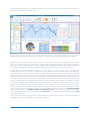
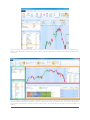
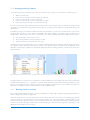
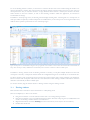
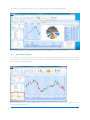
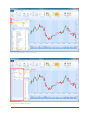
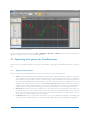
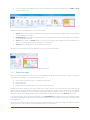
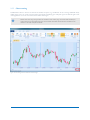
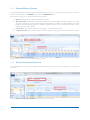
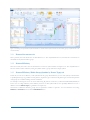
2 Basic interface operations I this section we describe the basics of CandleScanner which are used most often on a daily basis by users. 2.1 Main window interface CandleScanner is a highly customizable application which can be configured to meet user's specific requirements. The application is composed of several windows which can be managed in many ways. CandleScanner implements a so called docking system which is employed in other professional specialized software such as Microsoft Visual Studio and used to develop software. CandleScanner has the following features with regard to its windows management system: Containers for windows contain dockable windows. Containers can fill the entire CandleScanner area or can be limited to any rectangular area chosen by the user. Tabbed windows which can be switched between, resized, dragged to arrange in various configurations and closed. Windows from the main CandleScanner window can be dragged outside their containers (so called floating windows), dragged to other containers or collapsed and transformed to tabbed documents (this is possible only for so called tool windows). The user has complete control over sizing and layout behavior. CandleScanner remembers the recent layout and restores it when starting the application. CandleScanner provides the option to reset windows layout to its default settings. This may be helpful especially for less experienced users, who after several changes within CandleScanner windows layout, may want to go back to the original settings. To set CandleScanner default windows layout click VIEW»Windows Layout»Default Layout button on the ribbon bar. Please note that your current settings of the windows layout will be lost. 2.1.1 Understanding windows docking system There are two main types (classes) of windows within the main CandleScanner window: documents windows and tool windows, shown in Figure 2.1. They are used for different purposes. Document windows are mainly used to present some content in CandleScanner like candlestick charts, statistics or candlestick pattern dictionary. Tool windows are more auxiliary in nature and in CandleScanner are used mainly to change the current content(s) in the document window or to change the content of other tool windows. Both types have a separate types of containers within which they can be docked. Container are just a place in which a specific window can be docked (placed). The Container for tool windows can contain only tool windows. However, the document container can contain both namely, the document and tool windows. This means, for example, that the Symbols window (which is of type tool window) can be docked in the documents container, along with other documents like, for example, candlestick charts. The reverse is not possible, however. For example, when in CandleScanner there is a document window open with a candlestick chart, and we can click on the tool window and select different symbols from the list. By doing this, the document window with the candlestick chart will reload the content to display data for the newly selected symbol. If however, the currently opened document is of a different type, for example containing a candlestick patterns dictionary, then clicking on the same list of symbols in the tool window would not change anything. This is because not all documents have to be connected with tool windows – CANDLESCANNER USER GUIDE 10