1
Content
Projector Features …………………2
Preparation …………………………2
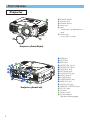
Part Names …………………………4
Projector ……………………………4
Control Buttons ……………………5
Remote control ……………………5
Setting Up ……………………………6
Arrangement ………………………6
Adjusting The Projector’s
Elevator ……………………………7
Using The Lens shift Buttons ……7
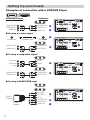
Connecting Your Devices…………8
Connecting The Power Supply …11
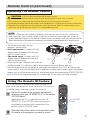
Remote Control ……………………12
About The Laser Pointer ………12
Loading Batteries ………………12
Operating The
Remote Control …………………13
Using The Remote
ID Feature…………………………13
Using The Mouse/Keyboard
Control Function …………………14
Power ON/OFF ……………………15
Turning On The Power …………15
Turning Off The Power …………15
Operating …………………………16
Selecting An Input Signal ………16
Selecting The Aspect Ratio ……17
Using The Automatic
Adjustment Feature………………17
Adjusting The Picture Position …18
Correcting The Keystone
Distortion …………………………18
Adjusting The Volume …………19
Muting The Sound ………………19
Temporarily Blanking
The Screen ………………………19
Freezing The Screen ……………20
Using The Magnify Feature ……20
Displaying The Child Window …21
Selecting An Audio Input ………21
Multifunctional Settings …………22
Using The Menu Functions ……22
MAIN Menu ………………………23
PICTURE-1 Menu ………………24
PICTURE-2 Menu ………………26
INPUT Menu ……………………27
AUTO Menu ………………………29
SCREEN Menu …………………31
OPTION Menu ……………………33
NETWORK Menu ………………35
Network Setting Up ………………36
Lamp ………………………………37
Replacing The Lamp ……………38
Air Filter ……………………………39
Caring For The Air Filter…………39
Other Care …………………………40
Caring For The Inside Of
The Projector ……………………40
Caring For The Lens ……………40
Caring For The Cabinet And
Remote Control …………………40
Troubleshooting …………………41
Related Messages ………………41
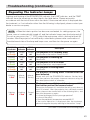
Regarding The Indicator
Lamps ……………………………43
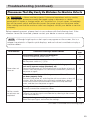
Phenomena That May Easily Be
Mistaken For Machine Defects …45
Warranty And After-Service ……47
Specifications ……………………47
TECHNICAL
3