1
• Bottom Grad Mid [4] - [Transparent Filter]
• Bottom Grad Light [4] - [Transparent Filter]
2.2.5
Title Shadow
Options to control the text shadow effect of the title and slogan.
• Off - [Default]
• Embed
• Emboss
2.2.6
Top Menu Text Shadow
Option to control the text shadow effect of the top menu.
• Off - [Default]
• Embed
• Emboss
2.2.7
Logo Options
Option to turn the Site Logo on or off.
• Off - [Default]
• On
2.2.8
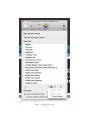
Navigation Options
A collection of colors and type options that pertain to each of the three navigation
areas of the theme. With regard to navigation types, you can choose a system that
is broken up into as many as three hierarchical parts for maximum architectural
control.
•
•
•
•
•
•
•
•
Hover Background (Top Menu) - [Color]
Text (Top Menu) - [Color]
Hover Text (Top Menu) - [Color]
Current Text (Top Menu) - [Color]
Border (Top Drop Menu) - [Color]
Text (Top Drop Menu) - [Color]
Bar Background (Sub Menu) - [Color]
Hover Background (Sub Menu) - [Color]
7