1
GDA Developer Guide, Release 8.24
To enable communication from scripts, a distributed object is used which acts as a middle-man between a specific
script and parts of the GUI interested in this script’s work. The gda.jython.scriptcontroller.ScriptController class is a
server-side object which fans out messages from a script to IObserver classes on the client-side. The GUI can then
report progress back to the users.
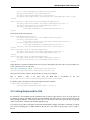
Example configuration:
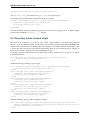
<bean id="MyScriptObserver" class="gda.jython.scriptcontroller.ScriptControllerBase"/>
Client-side Java classes would then implement the IObservable interface, register themselves as Observers of this object and receive events through the update(Object,Object) method. The script would send these messages by retrieving
this object from the finder and sending messages via the ScriptController’s update() method:
controller = Finder.getInstance().find("MyScriptObserver")
controller.update(None,ScriptProgressEvent("I have got to this point in the script"))
Although the IObserver/IObservable interfaces allow any serializable object to be passed to the GUI, communication
is clearer when specific event objects are used. There are some in the gda.jython.scriptcontroller.event package. New
event types, if generic enough, should be added there to give some form of standardisation to the system.
For example, scans initiated by the script can have their unique IDs broadcast to the script’s observers using the
ScanCreationEvent class:
myscan = ConcurrentScan(args)
scan_id = myscan.getName()
controller.update(None,ScriptProgressEvent("Starting scan..."))
controller.update(None,ScanCreationEvent(scan_id)
myscan.runScan()
controller.update(None,ScanFinishEvent(scan_id,ScanFinishEvent.FinishType.OK))
A simple way to start a script from the client is to use the gda.jython.scriptcontroller.ScriptExecutor class. See the
Javadoc for more details:
ScriptExecutor.Run("MyScriptObserver", this, null, "myscript()",null);
This would run the script, which would send progress messages back to the Java class via its update() method, and
block until the script has finished.
14
Chapter 3. Jython Script types