1
Chapter 2. Function Operation
7-7. Update BIOS
You can update the system’s firmware in this function.
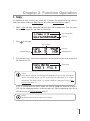
1. Place manufacturer certified update file CD into any drive
2.Pressing
/
to select 7.Utility and sub menu 7.Update BIOS and then press
start the process.
to
3. The system will detect the update file and execute update task automatically.
4. Once the update job has done, the system will require you to reboot the system.
**Note:
Do NOT save the firmware in a folder. The system can not detect the file if you save it in
a folder.
7-8. PRINT LS Label
This function will let you using the Lightscribe technology to print your own image on discs.
The operation process please refer to Appendix Lightscribe Operation.
17