1
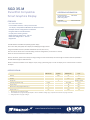
SGD 35-M PanelPilot Compatible Smart Graphics Display
HARDWARE
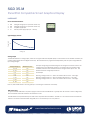
Screw Terminal Functions
1 IN2 Analogue voltage input 2 (maximum of 40V d.c.)
2 IN1 Analogue voltage input 1 (maximum of 40V d.c.)
3 0V
0V power supply input
4 V+
Positive power supply input (4V – 30V d.c.)
Typical Supply Current
Current (mA)
300
150
0
4
30
13
Voltage (V)
Voltage Input
The SGD 35-M features 2 voltage inputs, which use a Programmable Gain Amplifier (PGA) to make the best use of available resolution (the
smallest voltage range offers the highest resolution). Each channel can be programmed independently, with the option of eight different
input voltage ranges:
The input voltage range is decided using the two voltages that the user enters in the
scaling section of the Panel Pilot software. The software uses the smallest range
available, which can accommodate both of the voltages entered by the user. The
absolute maximum voltage input is 40V d.c.
Voltage Range (V)
Resolution (mV)
0 - 1.25
0.3
0 - 2.5
0.6
0-4
0-5
1.0
1.2
For example:
0-8
2.0
0 - 10
2.4
0 - 20
4.9
Entering a voltage scale of 0 – 30V in the software will use the 0 – 40V range.
Entering a voltage scale of 0 – 3V in the software will use the 0 – 4V range.
Entering a voltage scale of 5 – 15V in the software will use the 0 – 20V range.
0 - 40
9.8
Note: V+, IN1 and IN2 share a common ground (i.e. not floating or isolated from each other).
USB connection
A ‘Type A to Mini-B’ USB cable is required to program and customise the SGD 35-M. It typically takes 10 seconds to send a configuration,
with an additional 5 seconds needed for the hardware to reset.
The SGD 35-M can be powered directly from USB and is compatible with both USB 1.1 and USB 2.0. The screw terminals and advanced
connector can remain connected whilst using USB, but it is not necessary for V+ to be powered.
www.lascarelectronics.com Specifications liable to change without prior warning Issue 2 12/2011 S.L Applies to SGD 35-M
Page 2 of 5