1
g)
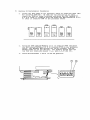
Replace the drawer into the base unit and position the two
power supply cables along the speaker tray channel to prevent
chaffing of the cables. Reconnect the power supply cables to
J8 on the processor board and JI on the memory board.
h)
Reconnect any tap cables or interface cards originally within the
drawer.
i)
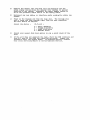
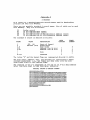
Power on the display and then the base unit. The Concept will
emit a beep, and then request input from the user regarding
the boot device as follows:
Select the device :
(D,F,L,O) :
D - Debug (MACSbug)
F - Floppy Disk Drive
L - Local Disk Drive
o - Omninet Drive
j)
Select your normal disk boot option to run a quick check of the
unit.
k)
If the unit does not complete the boot, check the ROM locations and
that all pins of the ROMs are installed correctly. Repeat the
procedure until the system boots. If problems persist, contact
your local servicing dealer or Corvus Customer Service.