1
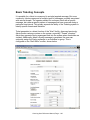
Generally, most SQL databases are case sensitive; hence the table names
(including the table prefix, if any) should be typed in the exact upper and lower
case letters. The "select" and other SQL keywords are not case sensitive.
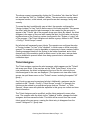
In addition to supporting the "select" command, the ODBC tool permits any other
SQL query, useful for an "ad hoc" examination of report data. More information
on database support can be found in the CorreLog "Sigma Web Framework"
Users Manual.
Other Report Types
This section has concentrated on the Excel reporting facility, but it is worthwhile
noting the other reporting capabilities of CorreLog.
More formal types of reporting are also available, in addition to Excel reporting.
Each of these report types auto-execute at midnight, or on demand, and
generate reports for users describing information subsequent to their time of
execution. CorreLog supports the following additional reporting facilities.
•
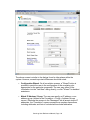
E-Mail Reports. The user can send raw-email messages (up to some
arbitrary number, by default 500 messages) as an attachment to an e-mail
message. This is a useful type of reporting when messages occur only
occasionally, such as to support file integrity monitoring, logins to specific
devices, or other anomalous types of messages. The user configures a
particular thread, and optional match patterns that further qualify the
message, precisely targeting specific message content.
•
Pivot Reports. The user can analyze "regular" field limited data using the
Pivot report capability. This type of report is especially useful for analyzing
and reporting on web servers, firewalls, or other message sources where
each message consists of regular columns of data. The user can define
specific fields of different message types and the Pivot report generator
will automatically parse these fields
•
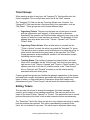
Graph Reports. The "Graphing" facility is provided in the "Reports" area,
and can be used to capture message rates by minute, hour, and day. The
user can configure specific "Graph" reports, save these reports, and then
access the reports for printing. Most web browsers will provide reasonable
printouts of graphs using the browser "Print" function. (Some browsers
may require landscape mode to capture all the data.)
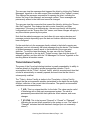
Finally, it is useful to note that each screen of CorreLog can be regarded as a
separate printable report (available via the standard web browser "Print"
function.) Because CorreLog will operate on an 800 pixel wide browser, all
information on all types of screens can be captured on demand, saved, and / or
CorreLog User Reference Manual, Page - 157