1
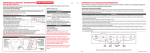
CONNECTION AND LED DISPLAY LAYOUT
The PSA5BT1E has two user viewable LED’s for indicating conditions and status for the adapter. Do
not confuse these with the amber and green Ethernet activity LEDs below the Ethernet port. Further
details are described in the manual.
TOP LED (PSA5BT1E status)
Red - blinking
PSA5BT1E is booting / starting
Red - solid
PSA5BT1E has detected an error and the systems is not running
Amber – solid
PSA5BT1E is running INSECURE - no PIN programmed
Green – solid
PSA5BT1E is running SECURE – PIN programmed
BOTTOM LED ( Bluetooth status)
OFF
Bluetooth not ready
Blue - solid
Bluetooth ready, no connections
Blue - blinking
Bluetooth connected – blinking per connection. (1,2,3,4,5)
If the BOTTOM LED remains off for more than 1 minute, ensure the bluetooth USB dongle is fully in
place.
Ethernet Activity LEDs ( located below Ethernet port)
LEFT - Link LED
Green - Blinks to show Ethernet activity
OFF no Ethernet link
RIGHT - Speed LED
YELLOW indicates 100Mbps transfer rate,
OFF indicates 10Mbps
NOT CONNECTED
CONNECTED INSECURE
CONNECTED SECURE
Procedures for operation, May 2015, r1