1
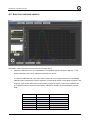
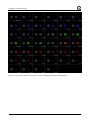
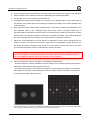
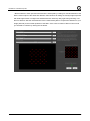
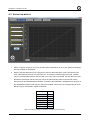
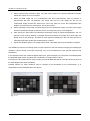
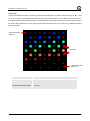
camSPECS / camSPECS express 3.2.3 CAMERA POSITION AND LENSES USED Place the camera in front of the filter plate. The principal axis of the lens shall be aligned perpendicular to the center of the filter plane. The distance between the lens and the filter plane depends on the focal length. The picture of the filter array shall cover all filters with some distance to the margins of the picture. Avoid using wide-angle lenses, since there is a slight angle dependence of the radiance power and the peak wavelength of the interference filters. Using lenses with higher focal distances ensures a minimum viewing angle - viewing angles below 15° do not cause noticeable impacts on the resulting spectral responses. Note: Ensure that the filters are the only light sources that are captured by the camera. To avoid stray light or other light hitting the camera sensor the pictures should be taken in a dark room or the space between camera and the camSPECS express box should be shielded. 3.2.4 EXPOSURE To get correct results the image of the filters may not be overexposed. Take a picture with reasonable exposure settings. Check the brightest filters for the highest intensity in all RGB channels. There shall be no filter saturated in one of the channels. Choose exposure values so that there is no saturated RGB channel in any filter and that at the same time the brightest channel has a reasonably high digital value. 3.3 SPECTRAL MEASUREMENT Start the camSPECS software and switch to module Spectral response. Check the advanced settings menu (see chapter 4.2) for the default values to comply with your needs. Add the master calibration file delivered on the CD. You may add and delete files from the menu using the corresponding buttons. Calibration files created with the software itself are automatically added to this menu. Check all other settings to comply with your needs (e.g. 'use EXIF data' or choose a dark image). Select and add images with the '+' button. Click the Start button. Check the result of the automatic detection and confirm by double clicking on the image outside the displayed Regions Of Interest (ROI). The rectangles may be rearranged here if necessary. The result of the measurement is displayed and a text file with the name of the first image (camSPECS) or the name of the image (camSPECS express) is saved to the same directory as the images. For documentation purposes the spectral curves can be saved as an image file. See detailed information on this module in chapter 4.2. 8