1
Immobilize: Used in countries where immobilization is allowed. You need to
add the commands in production. The default command is just the Version
command to prevent accidental immobilization while testing.
Monitor: Used for valuable cargo or whenever detailed tracking is needed.
Turns on Trip and Distance commands. This is a good option for the
breadcrumb trail.
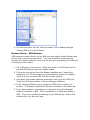
Note: The Apply and Cancel buttons at the bottom of the screen do not apply
to Smart Track – once you press a smart track buttons the commands are
immediately sent to the Tramigo you have selected.
Breadcrumb Trail
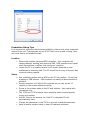
To activate turn on Trip Start, Trip reporting, and Periodic Find with a Distance
of 1km. Now your will receive reports when a trip starts and ends, and plot
locations every 1km.
To view the Breadcrumb Trail simply click on the Trip End report. Note that
with locations 1 km apart your trip will not reflect exactly the route taken, but
can highlight the areas Tramigos are travelling in.
Tracking
Trip: Turns on/off reporting at the end of a Trip
Trip Start: Sends a report at the start of a Trip
Periodic Find:
Distance: Sends a Location report every x km/mi selected. Minimum 1
km/mile. In version 1.40 firmware you can select as small as 0.5 km/mile.
Time: Sends a Location report every x minutes, based on the time selected.
Minimum is 1 munute.
Buttons:
Trip Now Requests the last Trip report if the unit is parked or the Trip in
progress if the unit is moving
Find: Requests the current location
Safety
Zone Activates the Zone report. A Zone is a circle around the location (either
current or named) with a radius based on the parameter. When the T22
crosses this circle a Zone report is sent.