1
VHF Wireless Microphones
Extend the 2 VHF antennas at the rear of the unit on the PA (these are detachable when not in use) Insert the supplied 9V batteries into
corresponding contacts inside the microphone body, taking care to observe the correct polarity.
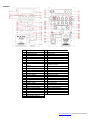
With the wireless mic volume controls turned down, press the VHF wireless system on/off power button to ensure it is in on position.
Switch on each wireless mic in turn the RF LEDs should light as a result. If the LED on the transmitter lights dimly, change the battery.
Gradually increase the VHF VOL control, testing each microphone in turn for output through the speaker. Take care not to incur
screeching sound through the speaker) by keeping the microphone a sensible distance from the speaker and
hear the speaker output.
Turning the ECHO control clockwise introduces an echo function for singing and special effects. The time parameter of this effect can be
adjusted using the REV TIME control.
Master BASS and TREBLE can be cut by turning the relevant control anti-clockwise or boosted by turning clockwise. When not in use,
switch the wireless microphones off.
External Inputs
In addition to the APS PA
which are both governed by the MIC VOL control.
Also, twin RCA input are provided for line input sources such as CD player or digital audio player. To use these, set
The line input is governed by the main VOLUME control at the top of the panel.
Adjacent to the twin RCA input is a twin RCA line output carrying the overall main mix. This can be fed on to further active speakers or
portable PA units via a twin RCA lead.
Internal USB/SD/FM player
Insert a USB memory stick or an SD card with compressed digital audio files stored on it into the relevant slot on the rear panel.
Increasing the VOLUME control should result in the audio being played through the speaker.
APS12PA media player
MODE
C
APS15PA media player
switches input between internal USB/SD/FM and AUX input
press and hold to decrease volume
momentary press for previous track / FM station
press and hold to increase volume
momentary press for next track / FM station
Enter record mode
Play / pause track
Repeat all / Random / Repeat one
EQ preset select
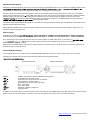
In addition to the panel controls, an infra-red remote control is provided for the USB/SD player which adds some further functions to allow
greater control over the media player. To operate, remove the clear plastic tab from the remote to activate the battery.
www.pulse-audio.co.uk | APS PA Series User Manual