1
Troubleshooting
����������������
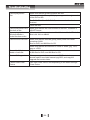
If you experience any of the following difficulties while using this unit, check the list below
before consulting your nearest dealer.
Problem
Tip
No reaction to the
remote
control.
Connect the product to the power outlet.
Point the remote control at the product.
Insert the batteries correctly.
Insert new batteries in the remote control.
No video signal on the
display device.
Turn on the TV.
Set the TV to the correct external input.
Select the correct video resolution
No audio / video signal
on the display device
via HDMI cable.
If the unit is connected to the unauthorized display device with
an HDMI cable, the audio/video signal may not be output.
No high-definition video
signal on the TV.
Does the disc contain high-definition video High-definition video
is not available when the disc does not contain it.
Does the TV support high-definition video? High-definition video
is not available when the TV does not support it.
No audio signal from
the loudspeakers of the
TV.
Assign the audio input of the TV to the corresponding video
input.
No audio signal from
the loudspeakers of the
audio system.
Turn on the audio system.
Set the audio system to the correct external input.
Increase the volume level of the audio system.
-23-