1
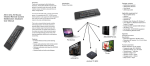
keyboard. The USB receiver does not need to pull out from the device for facilitate the next time working. Charging the battery The device is built-in the lithium-ion battery, please use only approved data lines and chargers. Note: Fully charge the unit before operating for the first time. This device can be used when charging, but will extend the charging time; When the battery is low, the low-voltage light will flash to warn the user. The keyboard will automatically turn off if the battery has been depleted. Package Contents The retail package contains: Mini Air mouse keyboard Nano 2.4G Dongle Power USB2.0 Cable User Manual Features Mini keyboard with Air mouse Mini keyboard with backlit The perfect companion for your device Ideal for typing words for email, chat and playing games Pocket sized, sleek, slim design Extended battery life for hours of typing Compatible with 2.4G wireless Available in AZERTY,QWERTY,QWERTZ Appendix Technical parameters