1
Pairing Procedure
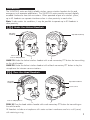
1. Press and hold the pairing button on the front panel of the base station for approximately
5-7 seconds until the yellow LED(s) on the front panel of the base station start flashing,
indicating that the base station has entered pairing mode. Once the base station is placed
in pairing mode, the user has approximately15 seconds to place the headset in pairing mode.
2. Press and hold the PTT button, turn on power to the headset. After approximately 5 seconds,
the green and red LEDs on the outside of the left ear dome will start flashing in a relatively
fast alternating pattern. Release the PTT button.
3. Monitor the green and red LEDs on the left ear dome of the headset. After about 5-7
seconds, the alternating flashing pattern ends, the green LED will flash rapidly for two seconds
and then the green and red LEDs resume normal operation (as stated in the section titled
“LED Indicators”) to indicate that the headset is paired and connected to the base station.
The respective LINK LED on the base station will illuminate steadily after flashing rapidly for
two seconds to indicate that connection to the headset has been established.
Charging
All headsets have a 2.1mm panel mounted charger jack located on the right ear dome.
A charger cable assembly with a 2.1mm x 5.5mm plug is provided with the headset. The
unterminated end of the charger cable can be wired to nominal 12V (11-16V) from the
vehicle. Plug the terminated end of the charger cable into the headset charger jack (refer to
the “LED Indicators” section for proper operation of the battery charging red LED indicator.
NOTES:
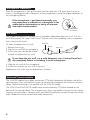
1. Observe correct polarity when connecting the charger cable
to12V from the vehicle. Connect the white striped black wire
to +12V and the solid black wire to GND. This will result in a
positive center terminal of the 2.1mm charger jack as shown
in the illustration.
+
–
2. Firecom does not recommend operating the headset while the headset is being
charged. It is recommended that the headset be charged only when it’s not
being operated and with the power switch on the headset turned off.
Reset
In rare cases, resetting the headset may become necessary.
With the power switch turned on, plug the charger plug into the charger jack on the right ear
dome. The system will reset, both red and green LEDs will illuminate for approximately two
seconds after which the headset will resume normal operation.
NOTES:
1. In case the battery is deeply discharged, no LED indication will be possible until
the battery is partly charged to an operable voltage level.
2. Plugging the charger plug into the headset at anytime will cause the headset
to reset even when the headset is linked to a base station. Resetting a
connected headset will result in losing the link for about 10-12 seconds.
5