1
Fashion · Science & Technology · Taste
Enjoy Intelligent Life - “KIVOS”
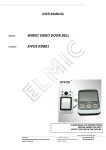
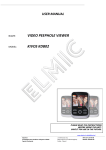
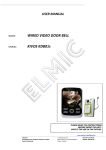
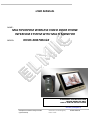
“KiVOS” is dedicating to equipping modern fashion life with high-tech products, its KDB700mk2 wireless video
door phone is a 2.4G wireless high-tech household intelligent product integrating doorbell, photo-taking, videorecording, intercom, monitor and unlocking functions into one. Adopting the latest energy saving technology, its
stable performance and fashionable appearance design make it the first choice of your high-quality intelligent
life. This product is convenient to install, and simple to use. It is specifically designed for villa users and
supporting the use of two outdoor units and three indoor monitors. Indoor monitors can communicate to each
other,communica:on range can reach 150 meters in open space. Battery equipped outdoor unit’s proper
monitoring function can replace Baby Monitor. Adopting the latest energy saving technology, its stable
performance and fashionable appearance design make it the first choice of your high-quality intelligent life.
Safety Warning & Attention ........................................................................................................................................................................... 3
1.
Attention .......................................................................................................................................................................................... 3
2.
Attention for operation of this product............................................................................................................................................ 3
3.
Attentions for operation of charger ................................................................................................................................................. 3
4.
Operation and maintenance ............................................................................................................................................................ 4
Product Overview - Model: KDB700mk2 ........................................................................................................................................................ 4
1.
Characteristics and application........................................................................................................................................................ 4
2.
Performance parameters: ................................................................................................................................................................ 5
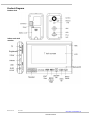
Product Diagram ............................................................................................................................................................................................ 6
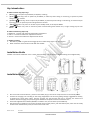
Key introduction: ............................................................................................................................................................................................ 7
Installation Guide ........................................................................................................................................................................................... 7
Installation Steps ............................................................................................................................................................................................ 7
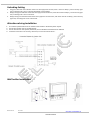
Unlocking Setting ........................................................................................................................................................................................... 8
Attentions during Installation......................................................................................................................................................................... 8
Wall holder Installation .................................................................................................................................................................................. 8
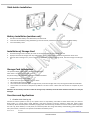
Table holder Installation................................................................................................................................................................................. 9
Battery Installation (outdoor unit) ................................................................................................................................................................. 9
Installation of Storage Card............................................................................................................................................................................ 9
Storage Card Introduction .............................................................................................................................................................................. 9
Functions and Applications............................................................................................................................................................................. 9
1.
Outdoor Unit Starting Up ................................................................................................................................................................. 9
2.
Indoor Monitor Starting Up ........................................................................................................................................................... 10
3.
Outdoor unit CALL handset ............................................................................................................................................................ 10
4.
Indoor Monitor CALL Outdoor Unit (Monitoring) ........................................................................................................................... 10
5.
Indoor Monitor CALL Indoor Monitor (Intercom) ........................................................................................................................... 11
6.
Night-vision .................................................................................................................................................................................... 11
7.
Bright / Colour / Volume Adjustment ............................................................................................................................................ 11
8.
Tamper Alarm Function ................................................................................................................................................................. 11
9.
USB Function Description ............................................................................................................................................................... 11
10. Indoor Monitor Menus ................................................................................................................................................................... 11
a.
Video .............................................................................................................................................................................................. 11
b.
Auto-vd .......................................................................................................................................................................................... 12
c.
Photo ............................................................................................................................................................................................. 12
d.
Record ............................................................................................................................................................................................ 12
e.
Language setup ............................................................................................................................................................................. 12
f.
ID ................................................................................................................................................................................................... 12
g.
Standby .......................................................................................................................................................................................... 12
h.
Time ............................................................................................................................................................................................... 12
i.
Password........................................................................................................................................................................................ 13
j.
Sense .............................................................................................................................................................................................. 13
k.
Ring ................................................................................................................................................................................................ 13
l.
Reset .............................................................................................................................................................................................. 13
m.
Code ............................................................................................................................................................................................... 13
n.
Format ........................................................................................................................................................................................... 14
o.
Version ........................................................................................................................................................................................... 14
p.
Exit ................................................................................................................................................................................................. 14
Battery and Charge ...................................................................................................................................................................................... 15
Configuration ............................................................................................................................................................................................... 15
Statement..................................................................................................................................................................................................... 15
General faults and solutions ......................................................................................................................................................................... 16
Strona 2 z 16
rev. 1.0.1
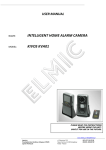
USER MANUAL:
www.elmic.pl, [email protected]
KIVOS KD700mk2
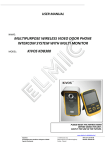
MULTIPURPOSE WIRELESS VIDEO DOOR PHONE INTERCOM SYSTEM
WITH MULTI MONITOR