1
DINPAD-M
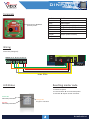
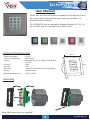
Connecting DINPAD-M with DINMTPX
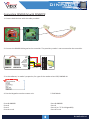
1. Connect both devices with the cable provided.
DINMTPX-M
tamp LR- LG- D1 D0 gnd +12V
2. Connect the DINPAD-M keypad to the controller. The proximity reader is not connected to the controller.
L11
ZD5
C6
A
C33 Free R55
Led A2 LD16
R9
LD14
Free R46
Led 1
D1
D0
12V out
GND
C32
A
LD13
Free
R47 Led 1A
LD15
Free Led 2
C28
IC7
D1
D0
12V out
GND
ZD2
L6
ZD1
R1
R13
R2
L7
C27
led1 led2 GND+12V D0 D1
FUSE1
R45
C29
IC8
R2
GND+12V
L1
D13
D3
ICN2
FUSE3
Fuse
R1
max. 50m
C18
L8
ZD4
R3
R14
R4
ZD3
L9
DINPAD-M
led1 led2 GND+12V D0 D1
DINMTPX
12V
GND
Codix
D1/ data
D0/ clock
LED Green LED Red Tamper
Tamper
L2
EWS
LD5 R32
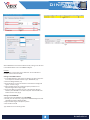
3. In the software, in reader’s properties, for type of the reader select LCSP, DINPAD-M.
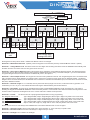
4. Put the Keypad to work as master unit.
5. EWS Mode.
Press B+000000
Press 0
Press 1
Press A to exit
Press B+000000
Press 6
Press 4 (or “3” for Wiegand34)
Press A to exit
4
DINPAD-M