1
Description
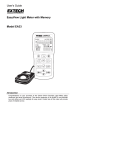
Meter Description
1.
Sensor cable plug shown connected to meter
jack
2.
USB jack for PC interface (under the flip-down
cover)
3.
LCD Display
4.
Upper Push Button set
5.
Lower Push Button set
6.
Sensor’s light collector dome
7.
Sensor housing (protective cover not shown)
8.
Power ON-OFF button
1
2
3
4
5
8
NOTE: The battery compartment, tripod mount, and
tilt stand are located on the rear of the
instrument and are not pictured
6
7
Display Description
1.
Digital measurement reading
2.
Bargraph measurement reading
3.
Auto Power OFF active icon
4.
MANU icon
5.
DATA HOLD icon
6.
RELATIVE mode icon
7.
MAXIMUM and MINIMUM reading mode
8.
PEAK HOLD mode
9.
Low Battery symbol
4
5 6 7 8
3
2
1
10. PC connection icon
11. Range units of measure
9
3
10
11
HD400 – V2.0 – 5/08