1
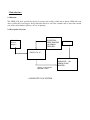
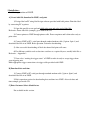
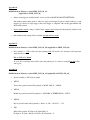
4 Operation:4.1 State Diagram: (This is the common menu only for key reference updates in this menu are
available in concurrent appendix)
"Futura Apsol Pvt Ltd"
"Ldsp Version xx"
Enter Key
Accept Command
Esc Key
Previous Menu
Up Key
Increment Key
Down Key
Decrement Key
"
" represents displays of LDSP_LCD
"Label Data xx"
Containts in boxes represents functions
Displays previous selected location
"Receive trigger ?"
enter key
up/down key
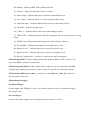
"Waiting for trigger?"
"Set Up?"
Set up
Menus
Ldsp will wait for
trigger
"Select Label Data?"
"Pc to label Data?"
"Pc to Date and time?" "Operator codes?"
Selection
of label
location
Label Data
Reception
Mode
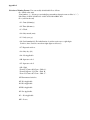
"Selected"
"Receiving"
"Receiving"
Waiting for data
from pc
Waiting for data
from pc
Date and Time
Reception
Mode
Operator code
Reception Mode
"Lot No?"
Lot no Menu
"change serial no?" "select cheker type?"
Not Available in
this version
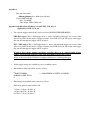
"Operator code 1"
Waiting for data from barcode
code scannar 2 times
"Trial?"
"PP?"
"4 Digit Lot no?"
Select
Trial as
lot no
Select
Trial as
lot no
Enter 4 digit
lot no & select
it
Key board flow for operation
"8 Digit Lot no?"
Enter 8 digit
lot no & select
it
Not Available in
this version