1
4.3.3 Altering an existing recipe
4.3.3.1
Recipe
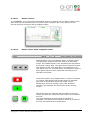
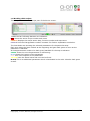
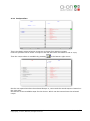
In the recipe editor window the operator sees the selected recipe with its steps on the right
and all available steps for the device which recipe the operator is editing on the left.
The steps are being marked by clicking on them.
To add a step just select one on the left and then select a step on the right the position the
new step is supposed to be.
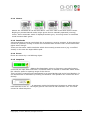
By clicking on this button
right. This button
available steps.
the step on the left is inserted above the selected one on the
replaces the selected step in the recipe with your selection from
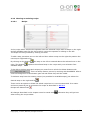
To be able to delete steps and recipes you must first to unlock the delete buttons with
. This is a safety feature proven by working with beraBREW. After a
click the background of this button gets red and delete keys will be visible.
To delete a step from the existing recipe (not possible for available steps) just select the
desired step on the right and hit
.
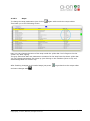
There is also an option to delete the whole recipe but it is not recommended. It is easier
and more practical just to overwrite the recipe as described in 4.3.1.1.
Recipes are deleted with
.
All changes described in this chapter must be saved with
when exiting the recipe editor.
BeraBrew_User_Manual.docx.doc
Version
Copyright ©, a-on AG, München, All rights reserved
0.1
otherwise they will get lost
Seite 21/23