1
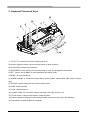
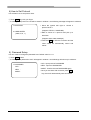
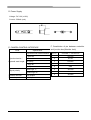
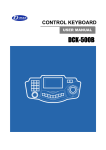
C. Keyboard Functional Keys
12
13
5
2
1
4
3
6
7
11
10
15
9
8
14
1), 2) F/N, F/F: controls focus while using Zoom lens
3) Numeric keypad: used to input numerical value or other functions
4) CLR(CLEAR): used to input number.
5) ENT(ENTER): press this key to input command or save, run designated commands.
6) SET : used to set up Matrix or enter keyboard user setup mode
7) MENU : as a functional key .
8) ALARM: activate or release the alarm when gearing dome camera with ARU (alarm receiver
unit)
9) STATUS : used to enter camera & matrix setup menu.
10) MON: selects monitor.
11) CAM : selects camera
12) Joystick: helps you control the camera up/ down, left/ right, zoom in/ out
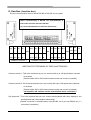
13) Touch Screen: support setup button of each function
14) Sensor: allows to remotely control keyboard with remote controller (soon be released)
15) Jog-shuttle: controls DVR(to be released).
4