1
Powering and activating
In order to work properly a SIM-card must be inserted in the central unit. SIM must be
activated, PIN request must be turned on and SIM PIN must be set as "0000".
SIM must be inserted before central unit is turned on.
Central unit can be powered in two different ways:
1. Using power supply that provides 10-15V voltage and 250 мА current. Power supply is
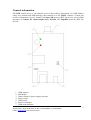
connected to the power socket (5). To use this option jumper on the power selection
block (4) must connect central pin and ADAPT pin (Default option).
2. USB-port is used as a power supply. To use this option jumper on the power selection
block (4) must connect central pin and USB pin.
Attention! It is strictly recommended to use the first option to power the device.
After powering up, GSM indicator (8) will start to flash. First 10-15 seconds it will flash
constantly (flash and pause approximately 1 second each). During this time Receiver indicator
should flash two times. This will mean that SIM is initialized successfully and all the settings are
loaded. After that GSM indicator should start flashing once every three seconds. If that didn't
happen than the probable troubles are following:
− SIM-card is not activated
− PIN request is turned off
− PIN is different from "0000" карточки отличается от «0000»
− Central unit is out of GSM coverage of the current mobile operator
Connecting to WinSC software
When first connected to the computer, CU-GSM requires a MM232R driver to be installed.
After installing the driver, CU-GSM should be recognized by the operating system as USB
serial port and can be connected to the WinSC software.
To do so, open receiver settings window - Service/Receiver settings. In that window you
must specify channel number and corresponding COM-port in the Slot field. In the Receiver
Type field you have to select CU-GSM. After that, press Port settings button and set the COMport preferences. They must be the following:
Baud rate
9600
Data bits
8
Parity
None
Stop bits
1
Flow control
None
Time of heartbeat test
01:30
© Korteks 2012
Liksnas street 7, Riga, Latvia, Phone nr./fax: (+371)67505604, (+371)67505603
E-mail: [email protected], http://www.cortex.lv
3