1
FREE Application Notes
code 9IS24300-1 - rel. 13.03.13
RS485 serial
There is only one RS485 serial communication interface: connection to the target is not possible
with Modbus RTU active.
If the target is empty, the serial connection will be set to Slave mode.
If there is a PLC application running, there will be a pause of 5 seconds before execution occurs,
during which a connection can be made through FREE Studio by forcing Slave mode.
Once the 5 seconds have elapsed without any connection to the target, the serial connection
defaults to Modbus Master mode
In any event, Modbus Master mode can always be enabled/disabled by means of the IEC code,
using the relative function sysMbMRTU_Enable() described in Appendix - Libraries
First Start-up
1. Click the Launch FREE Studio icon located on the Desktop
2. Click the FREE Studio Application icon.
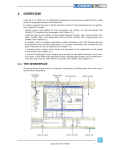
The program appears as illustrated below:
The following options will now be available:
• Create a new project ‘New Project ...’
• the program will prompt selection of the FreeSmart or the FreeSmart Modbus target
• in this case select FreeSmart Modbus
• the numbers at the side indicate the firmware version (mask)
• Open an existing project ‘Open project …’
• Open recent projects ‘Open an existing project ...’ by selecting from a list.
Existing projects have the extension .ppjs
Eliwell Controls s.r.l.
Via dell’Industria, 15 • Zona Industriale Paludi • 32010 Pieve d’Alpago (BL) ITALY
Telephone +39 0437 986 111 • Fax +39 0437 989 066
Technical helpline +39 0437 986 250 • E-mail [email protected]
www.eliwell.com
page 3