1
13
03/08 Rev. 4.04-01
USER MANUAL
Setup Printer
AP 7.t
Adjusting the ribbon tautness
The braking torque of the ribbon unwind
mandrel [17B] and the ribbon roll up
mandrel [17A] can be set from the front
using the red plastic hexagonal nuts [18A]
on the ribbon mandrels. The braking torque
is increased by turning them in a clockwise
direction.
A
B
During feeding, the ribbon must run
between the mandrels evenly and without
folds over the entire length. The following
hints facilitate adjustment:
•
Ribbon is slack or has folds, or is not
wound up tightly enough on the roll-up
mandrel.
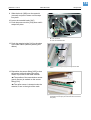
[17] A Ribbon roll up mandrel
B Ribbon unwind mandrel
« Remove caps [18B]. Increase the
unwinding/roll-up torque (Turn red hex nut
clockwise).
•
•
B
The ribbon stretches visibly or tears during
printing.
Ribbon is not transported properly.
« Remove caps [18B]. Decrease the
unwinding/roll-up torque (Turn red hex nut
counter clockwise).
A
Factory setting
Although the factory settings cover a large
range of varying ribbon widths, slight
adjustment may be necessary when using
very narrow or very wide ribbon.
[18] A Red hex nut (Cap removed)
B Cap