1
®
®
QNX Neutrino RTOS
User’s Guide
For release 6.4 or later
© 2008, QNX Software Systems GmbH & Co. KG.
© 2004–2008, QNX Software Systems GmbH & Co. KG. All rights reserved.
Published under license by:
QNX Software Systems International Corporation
175 Terence Matthews Crescent
Kanata, Ontario
K2M 1W8
Canada
Voice: +1 613 591-0931
Fax: +1 613 591-3579
Email: [email protected]
Web: http://www.qnx.com/
Electronic edition published 2008
QNX, Neutrino, Photon, Photon microGUI, Momentics, and Aviage are trademarks, registered in certain jurisdictions, of QNX Software Systems GmbH & Co. KG. and are
used under license by QNX Software Systems International Corporation. All other trademarks belong to their respective owners.
Contents
About This Guide
xvii
What you’ll find in this guide xix
Typographical conventions xxi
Note to Windows users xxii
Technical support xxii
1
Getting to Know the OS
1
How QNX Neutrino compares to other operating systems
UNIX
3
Microsoft Windows
4
Limitations
4
How Neutrino is unique
5
Resource managers
6
2
3
Logging In, Logging Out, and Shutting Down
root or non-root?
9
11
Logging in
11
Photon mode
11
Text mode
11
Once you’ve logged in
12
Logging out
12
Photon mode
12
Text mode
13
Shutting down and rebooting
13
3
Managing User Accounts
15
What does a user account do?
17
User accounts vs user IDs: login, lookup, and permissions
What happens when you log in?
18
Account database
19
/etc/passwd
20
/etc/group
20
/etc/shadow
21
September 30, 2008
18
Contents
iii
© 2008, QNX Software Systems GmbH & Co. KG.
21
Managing your own account
22
Changing your password
22
Forgot your password?
22
Managing other accounts
23
Adding users
24
Removing accounts
25
Defining groups
26
Troubleshooting
27
/etc/.pwlock
4
Using the Command Line
29
Command line or GUI?
31
Processing a command
31
Character-device drivers
31
Input modes
32
Terminal support
32
Telnet
32
The keyboard at a glance
32
Physical and virtual consoles
33
Shell
34
Editing the command line
35
Command and filename completion
36
Reserved words
37
Entering multiple commands
37
Aliases
37
Substitutions
38
Redirecting input and output
40
Pipes
41
Quoting special characters
41
History: recalling commands
42
Shell scripts
43
Utilities
43
Understanding command syntax
44
Displaying online usage messages
45
Executing commands on another node or tty
45
Priorities
45
Basic commands
46
International keyboards
46
Neutrino for MS-DOS users
47
DOS commands and their Neutrino equivalents
47
MS-DOS local command-interpreter variables
49
iv
Contents
September 30, 2008
© 2008, QNX Software Systems GmbH & Co. KG.
Troubleshooting
5
50
Using the Photon microGUI
53
Overview of Photon
55
Why is it called “Photon”?
55
Why is it called a “microGUI”?
55
Your workspace
55
Modifying the shelf
58
Modifying the Launch menu
60
Creating items and submenus
60
Target files
61
Controlling the order of items
62
Additional menu control
62
Troubleshooting
64
Modifying the Desktop menu
65
Starting applications automatically
65
Configuration tools
65
Browsing files with the File Manager
66
Getting help with the Helpviewer
67
Searching for a topic or keyword
68
Bookmarking a topic to view it again later
Navigating around help files
70
Viewing more than one topic at once
70
Surfing the web
71
Connecting to other systems
71
Phditto
71
Phindows
71
Hotkeys and shortcuts
73
pterm
73
Text field
73
Window
74
Workspace
74
Exiting Photon
75
Photon environment variables
75
Troubleshooting
77
6
Working with Files
81
Everything is a file
83
Types of files
83
Filenames and pathnames
84
Absolute and relative pathnames
September 30, 2008
69
84
Contents
v
© 2008, QNX Software Systems GmbH & Co. KG.
Dot and dot-dot directories
85
No drive letters
86
Pathnames that begin with a dot
86
Extensions
87
Pathname-space mapping
87
Filename rules
88
Where everything is stored
89
/
89
/bin
90
/boot
90
/dev
90
/etc
93
/fs
96
/home
96
/lib
96
/proc
96
/root
97
/sbin
97
/tmp
97
/usr
97
/var
98
File ownership and permissions
98
Setuid and setgid 100
Sticky bit 100
Default file permissions 101
Filename extensions 101
Troubleshooting 103
7
Using Editors 105
Choosing an editor 107
Supported editors 108
vi 108
ped 109
Third-party editors 110
AbiWord 111
Emacs 111
JED 112
Vim 113
Workspace (ws) 113
Specifying the default editor
vi
Contents
114
September 30, 2008
© 2008, QNX Software Systems GmbH & Co. KG.
8
Controlling How Neutrino Starts 115
What happens when you boot? 117
Loading a Neutrino image 119
Power-Safe filesystem 119
QNX 4 filesystem 120
diskboot 121
.diskroot 123
/etc/system/sysinit 124
Device enumeration 126
oem file or directory 127
overrides file or directory 127
Host-specific enumerators 128
/etc/rc.d/rc.sysinit 128
rc.local 129
tinit 130
Updating disk drivers 130
Applying a driver update patch after you’ve installed QNX Neutrino
Troubleshooting 132
9
Configuring Your Environment 133
What happens when you log in? 135
Customizing your home 135
Configuring your shell 136
/etc/profile 136
$HOME/.profile 136
ksh’s startup file 137
Environment variables 137
Setting PATH and LD_LIBRARY_PATH
Configuration strings 138
Setting the time zone 140
Caveats 142
Examples 142
Programming with time zones 144
Customizing Photon 145
Starting applications automatically 145
The right fonts 145
Input methods 146
Terminal types 146
Troubleshooting 146
10
September 30, 2008
131
138
Writing Shell Scripts 149
Contents
vii
© 2008, QNX Software Systems GmbH & Co. KG.
What’s a script? 151
Available shells 151
Running a shell script 152
The first line 152
Arguments to a ksh script 153
Arguments to a gawk script 154
Arguments to a perl script 154
Example of a Korn shell script 154
Efficiency 156
Caveat scriptor 157
11
Working with Filesystems 159
Introduction 161
Setting up, starting, and stopping a block filesystem
Mounting and unmounting filesystems 161
Image filesystem 162
Configuring an OS image 162
/dev/shmem RAM “filesystem” 162
QNX 4 filesystem 163
Filesystem robustness 167
Power-Safe filesystem 168
Booting 168
Snapshots 169
DOS filesystem 171
CD-ROM filesystem 172
Linux Ext2 filesystem 172
Flash filesystems 173
CIFS filesystem 173
NFS filesystem 174
Setting up NFS 174
NFS server 174
NFS client 175
Universal Disk Format (UDF) filesystem 176
Inflator filesystem 176
Troubleshooting 176
12
Using Qnet for Transparent Distributed Processing 179
What is Qnet? 181
When should you use Qnet? 181
Conventions for naming nodes 182
Software components for Qnet networking
viii
Contents
161
183
September 30, 2008
© 2008, QNX Software Systems GmbH & Co. KG.
Starting Qnet 184
Creating useqnet 184
Starting the network manager, protocols, and drivers
Checking out the neighborhood 185
Troubleshooting 186
Is Qnet running? 186
Are io-pkt* and the drivers running? 186
Is the network card functional? 187
How do I get diagnostic information? 188
Is the hostname unique? 188
Are the nodes in the same domain? 188
13
184
TCP/IP Networking 189
Overview of TCP/IP 191
Clients and servers 191
Hosts and gateways 191
Name servers 191
Routing 192
Software components for TCP/IP networking 193
Running the Internet daemons 194
Running multiple instances of the TCP/IP stack 196
Dynamically assigned TCP/IP parameters 197
Using PPPoE 197
Using DHCP 199
Using AutoIP 199
Troubleshooting 199
Are io-pkt* and the drivers running? 200
What is the name server information? 200
How do I map hostnames to IP addresses? 200
How do I get the network status? 201
How do I make sure I’m connected to other hosts? 201
How do I display information about an interface controller?
14
Printing 203
Overview of printing 205
Printing with lpr 206
User interface 206
Spooling directories 209
Access control 210
Network manager 211
Printer capabilities: /etc/printcap
September 30, 2008
201
211
Contents
ix
© 2008, QNX Software Systems GmbH & Co. KG.
Some /etc/printcap examples 214
Remote printing to a printer on another network 218
Remote printing to a TCP/IP-enabled printer using lpr
Printing with spooler 219
Setting up spooler 220
Printing on a USB printer 221
Remote printing over Qnet 222
Remote printing over TCP/IP 222
Troubleshooting 223
Understanding lpr error messages 223
Troubleshooting remote printing problems 226
15
219
Connecting Hardware 227
Introduction 229
PCI/AGP devices 229
CD-ROMs 230
DVDs 231
Floppy disks 231
Hard disks 232
EIDE 232
SCSI devices 235
SCSI RAID 236
LS-120 237
ORB 237
Zip and Jaz disks 237
Input devices 238
Mice and keyboards 238
Touchscreens 239
Audio cards 239
ISA cards 239
PCI Cards 240
PCCARD and PCMCIA cards 240
USB devices 242
Printers 244
Mice and keyboards 244
Touchscreens 245
Ethernet adapters 245
Mass-storage devices 245
Character devices 246
General serial adapters 246
Multiport serial adapters 247
x
Contents
September 30, 2008
© 2008, QNX Software Systems GmbH & Co. KG.
Parallel ports 248
Terminals 248
I/O attributes 248
Network adapters 248
Identify your NIC 248
Start the driver 249
Make sure the driver is communicating properly with the hardware
Modems 257
Internal modems 258
PCI-based modems 259
External modems 259
Cable Modems / ISDN 259
Testing modems 260
Troubleshooting modems 260
Video cards 260
Changing video modes in Photon 260
Manually setting up your video card 261
Setting up multiple displays 261
16
Setting Up an Embedded Web Server 267
Where should you put the files?
Running Slinger 270
Dynamic HTML 270
CGI method 270
SSI method 271
Data server method 272
Security precautions 272
Examples 273
Configuration 273
Script 274
17
269
Using CVS 277
A crash course in CVS 279
CVS basics 279
Revisions 279
Basic operations 280
Repositories 280
Editors and CVS 280
Creating a repository 280
Getting files in and out of the repository
Putting changes back into the repository
September 30, 2008
249
281
282
Contents
xi
© 2008, QNX Software Systems GmbH & Co. KG.
Importing an existing source tree 283
Getting information on files 283
Changing files 283
More information on files: what changed and why 284
CVS and directory trees 285
Concurrent development: branching and merging 286
Branching 286
Merging 287
Removing and restoring files 287
Setting up a CVS server 288
18
Backing Up and Recovering Data 289
Introduction 291
Backup strategies 292
Choosing backup storage media and location
Choosing a backup format 293
Controlling your backup 293
Archiving your data 293
Creating an archive 294
Extracting from an archive 295
Compressing an archive 295
Decompressing the archive 296
Storage choices 296
CDs 296
Bootable CDs 297
Removable media 298
Backing up physical hard disks 298
Ghost Images 298
Remote backups 299
CVS 299
Remote filesystems 299
Other remote backups 299
QNX 4 disk structure 299
Partition components 300
Directories 303
Links 304
Extent blocks 305
Files 305
File-maintenance utilities 306
fdisk 307
dinit 307
xii
Contents
292
September 30, 2008
© 2008, QNX Software Systems GmbH & Co. KG.
chkfsys
dcheck
zap
307
308
308
308
Recovering disks and files 308
Using chkfsys 308
Recovering from a bad block in the middle of a file
What to do if your system will no longer boot 311
If the mount fails. . . 312
If the disk is unrecoverable 313
If the filesystem is intact 313
spatch
19
310
Securing Your System 315
General OS security 317
Remote and local attacks 317
Effects of attacks 318
Viruses 318
Neutrino security in general 319
Neutrino-specific security issues 319
Message passing 319
pdebug 320
qconn 320
Qnet 320
IPSec 320
Setting up a firewall 321
20
Fine-Tuning Your System 323
Getting the system’s status 325
Improving performance 325
Faster boot times 326
Filesystems 326
Performance and robustness 328
Metadata updates 328
Throughput 329
Configuration 330
How small can you get? 334
21
Understanding System Limits 335
The limits on describing limits
Configurable limits 337
Filesystem limits 338
September 30, 2008
337
Contents
xiii
© 2008, QNX Software Systems GmbH & Co. KG.
Querying filesystem limits 338
QNX 4 filesystem 339
Power-Safe (fs-qnx6) filesystem 339
Ext2 filesystem 340
DOS FAT12/16/32 filesystem 340
CD-ROM (ISO9660) filesystem 341
NFS2 and NFS3 filesystem 341
CIFS filesystem 341
Embedded (flash) filesystem 342
UDF filesystem 342
Other system limits 342
File descriptors 343
Synchronization primitives 343
TCP/IP limits 343
Shared memory 343
Message queues 344
Platform-specific limits 344
22
A
Technical Support 345
Examples 349
Buildfile for an NFS-mounting target 351
qnxbasedma.build 354
Buildfile that doesn’t use diskboot 356
.profile 357
.kshrc 357
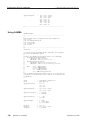
Configuration files for spooler 358
Using lpr 358
Using NCFTP 359
Using SAMBA 360
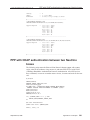
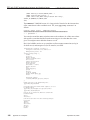
PPP with CHAP authentication between two Neutrino boxes
Glossary
Index
xiv
Contents
361
365
381
September 30, 2008
List of Figures
The QNX Neutrino architecture.
5
Photon’s workspace, including the taskbar, shelf, and desktop.
Desktop menu.
57
Shelf configuration dialog.
58
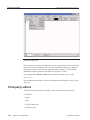
Photon File Manager.
67
The Photon helpviewer.
68
Navigation buttons in the online docs.
70
The Photon editor, ped. 110
Booting a Neutrino system. 117
Booting a Neutrino system with an x86 BIOS. 118
Initialization done by diskboot. 122
Initialization done by /etc/rc.d/rc.sysinit. 128
One file referenced by two links. 165
Symbolic links. 167
Components of Qnet. 183
Components of TCP/IP in Neutrino. 193
Printing with the lpr utilities. 207
Printing with spooler. 221
Branching a file in CVS. 286
Components of a QNX 4 filesystem in a disk partition. 300
Contents of the root directory, /. 302
A directory entry. 303
An inode entry. 304
An extent block. 305
QNX 4 file structure. 306
September 30, 2008
56
List of Figures
xv
About This Guide
September 30, 2008
About This Guide
xvii
What you’ll find in this guide
© 2008, QNX Software Systems GmbH & Co. KG.
What you’ll find in this guide
The QNX Neutrino User’s Guide is intended for all users of a QNX Neutrino system,
from system administrators to end users. This guide tells you how to:
• Use the QNX Neutrino runtime environment, regardless of the kind of computer
it’s running on (embedded system or desktop). Think of this guide as the
companion how-to doc for the Utilities Reference. Assuming there’s a Neutrino
system prompt or Photon login waiting for input, this guide is intended to help you
learn how to interact with that prompt.
• Perform such traditional system administration topics as setting up user accounts,
security, starting up a Neutrino machine, etc.
The Neutrino User’s Guide is intended for programmers who develop Neutrino-based
applications, as well as OEMs and other “resellers” of the OS, who may want to pass
this guide on to their end users as a way to provide documentation for the OS
component of their product.
• We assume that QNX Neutrino is already installed and running on your computer.
• If you’ve installed the QNX Software Development Platform (which includes the
QNX Momentics Tool Suite), see the Welcome to the QNX Software Development
Platform guide for an overview of the system and the documentation.
• Your system might not include all of the things that this guide describes, depending
on what software you’ve installed. For example, some utilities are included in the
QNX Momentics Tool Suite, and others are included in a specific Board Support
Package (BSP).
The online version of this guide contains links to various books throughout our
entire documentation set; if you don’t have the entire set installed on your system,
you’ll naturally get some bad-link errors (e.g. “File not found”).
• Disable PnP-aware OS in the BIOS.
The following table may help you find information quickly:
To find out about:
Go to:
How Neutrino compares to other operating systems
Getting to Know the OS
Starting and ending a session, and turning off a
Neutrino system
Logging In, Logging Out, and Shutting Down
Adding users to the system, managing passwords,
etc.
Managing User Accounts
continued. . .
September 30, 2008
About This Guide
xix
What you’ll find in this guide
© 2008, QNX Software Systems GmbH & Co. KG.
To find out about:
Go to:
The basics of using the keyboard, command line,
and shell (command interpreter)
Using the Command Line
Using Neutrino’s graphical user interface
Using the Photon microGUI
Files, directories, and permissions
Working with Files
How to edit files
Using Editors
Configuring what your machine does when it boots
Controlling How Neutrino Starts
Customizing your shell, setting the time, etc.
Configuring Your Environment
Creating your own commands
Writing Shell Scripts
The filesystems that Neutrino supports
Working with Filesystems
Accessing other machines with Neutrino’s native
networking
Using Qnet for Transparent Distributed Processing
Setting up TCP/IP
TCP/IP Networking
Adding printers to your system and using them
Printing
Adding USB devices, terminals, video cards, and
other hardware to your system
Connecting Hardware
Adding embedded HTTP services and dynamic
content to embedded web applications
Setting Up an Embedded Web Server
Keeping track of changes to your software and other
files
Using CVS
Backing up and restoring your files
Backing Up and Recovering Data
Making your Neutrino system more secure
Securing Your System
Analyzing and improving your machine’s
performance
Fine-Tuning Your System
How many processes, files, etc. your system can
support
Understanding System Limits
How to get help
Technical Support
Samples of buildfiles, profiles, etc.
Examples
Terms used in QNX docs
Glossary
For information about programming in Neutrino, see Getting Started with QNX
Neutrino: A Guide for Realtime Programmers and the Neutrino Programmer’s Guide.
xx
About This Guide
September 30, 2008
Typographical conventions
© 2008, QNX Software Systems GmbH & Co. KG.
Typographical conventions
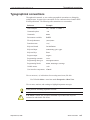
Throughout this manual, we use certain typographical conventions to distinguish
technical terms. In general, the conventions we use conform to those found in IEEE
POSIX publications. The following table summarizes our conventions:
Reference
Example
Code examples
if( stream == NULL )
Command options
-lR
Commands
make
Environment variables
PATH
File and pathnames
/dev/null
Function names
exit()
Keyboard chords
Ctrl-Alt-Delete
Keyboard input
something you type
Keyboard keys
Enter
Program output
login:
Programming constants
NULL
Programming data types
unsigned short
Programming literals
0xFF, "message string"
Variable names
stdin
User-interface components
Cancel
We use an arrow (→) in directions for accessing menu items, like this:
You’ll find the Other... menu item under Perspective→Show View.
We use notes, cautions, and warnings to highlight important messages:
Notes point out something important or useful.
!
September 30, 2008
CAUTION: Cautions tell you about commands or procedures that may have
unwanted or undesirable side effects.
About This Guide
xxi
Technical support
© 2008, QNX Software Systems GmbH & Co. KG.
WARNING: Warnings tell you about commands or procedures that could be
dangerous to your files, your hardware, or even yourself.
Note to Windows users
In our documentation, we use a forward slash (/) as a delimiter in all pathnames,
including those pointing to Windows files.
We also generally follow POSIX/UNIX filesystem conventions.
Technical support
To obtain technical support for any QNX product, visit the Support + Services area
on our website (www.qnx.com). You’ll find a wide range of support options,
including community forums.
xxii
About This Guide
September 30, 2008
Chapter 1
Getting to Know the OS
In this chapter. . .
How QNX Neutrino compares to other operating systems
How Neutrino is unique
5
September 30, 2008
3
Chapter 1 • Getting to Know the OS
1
© 2008, QNX Software Systems GmbH & Co. KG.
How QNX Neutrino compares to other operating systems
How QNX Neutrino compares to other operating systems
This section describes how the QNX Neutrino RTOS compares to UNIX and
Microsoft Windows, from a user’s (not a developer’s) perspective. For more details
about Neutrino’s design and the philosophy behind it, see the System Architecture
guide.
UNIX
If you’re familiar with UNIX-style operating systems, you’ll feel right at home with
QNX Neutrino — many people even pronounce “QNX” to rhyme with “UNIX” (some
spell it out: Q-N-X). At the heart of the system is the Neutrino microkernel, procnto,
surrounded by other processes and the familiar Korn shell, ksh (see the Using the
Command Line chapter). Each process has its own process ID, or pid, and contains
one or more threads.
To determine the release version of the kernel on your system, use the uname -a
command. For more information, see its entry in the Utilities Reference.
Neutrino is a multiuser OS; it supports any number of users at a time. The users are
organized into groups that share similar permissions on files and directories. For more
information, see Managing User Accounts.
Neutrino follows various industry standards, including POSIX (shell and utilities) and
TCP/IP. This can make porting existing code and scripts to Neutrino easier.
Neutrino’s command line looks just like the UNIX one; Neutrino supports many
familiar utilities (grep, find, ls, gawk) and you can connect them with pipes,
redirect the input and output, examine return codes, and so on. Many utilities are the
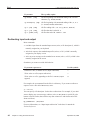
same in UNIX and Neutrino, but some have a different name or syntax in Neutrino:
UNIX
Neutrino
See also:
adduser
passwd
Managing User Accounts
at
cron
dmesg
slogger, sloginfo
fsck
chkfsys, chkqnx6fs,
chkdosfs
Backing Up and Recovering
Data
ifconfig eth0
ifconfig en0
TCP/IP Networking
lp
lpr
Printing
lpc
lprc
Printing
lpq, lpstat
lprq
Printing
continued. . .
September 30, 2008
Chapter 1 • Getting to Know the OS
3
How QNX Neutrino compares to other operating systems
© 2008, QNX Software Systems GmbH & Co. KG.
UNIX
Neutrino
See also:
lprm, cancel
lprrm
Printing
man
use
Using the Command Line
pg
less, more
Using the Command Line
For details on each command, see the Neutrino Utilities Reference.
Microsoft Windows
QNX Neutrino and Windows have different architectures, but the main difference
between them from a user’s perspective is how you invoke programs. Much of what
you do via a GUI in Windows you do in Neutrino through command-line utilities,
configuration files, and scripts, although Neutrino does support a powerful Integrated
Development Environment (IDE) to help you create, test, and debug software and
embedded systems.
Here are some other differences:
• QNX Neutrino and DOS use different end-of-line characters; Neutrino uses a
linefeed, while DOS uses a carriage return and a linefeed. If you need to transfer
text files from one OS to the other, you can use Neutrino’s textto utility to convert
the files. For example, to convert the end-of-line characters to Neutrino-style:
textto -l my_file
To convert the end-of-line characters to DOS-style:
textto -c my_file
• Neutrino uses a slash (/) instead of a backslash (\) to separate components of a
pathname.
• You can’t use DOS commands in Neutrino, but many have equivalent commands.
For more information, see “Neutrino for MS-DOS users” in the Using the
Command Line chapter of this guide.
Limitations
Although Neutrino is powerful enough to use as a desktop OS, we don’t provide
desktop applications such as word processing, spreadsheets, or email. Some of these
applications might be available from other sources, such as the third-party repository.
If you’re using Neutrino to support self-hosted development, you’ll likely require an
email solution of some sort. We suggest you consider using an email client or Mail
User Agent such as Mozilla, mutt, or elm, along with the sendmail delivery agent;
see the third-party repository.
You might find it useful to run an IMAP or POP server on another machine to host
your email if you don’t want to configure a local mail delivery using sendmail. Or,
you may avoid using a local email client entirely by using a web-based mail service
hosted on another machine.
4
Chapter 1 • Getting to Know the OS
September 30, 2008
How Neutrino is unique
© 2008, QNX Software Systems GmbH & Co. KG.
How Neutrino is unique
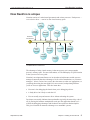
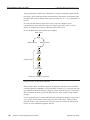
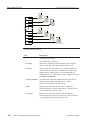
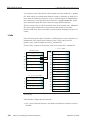
Neutrino consists of a microkernel (procnto) and various processes. Each process —
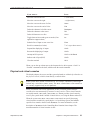
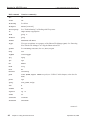
even a device driver — runs in its own virtual memory space.
QNX 4
file
manager
Process
manager
CD-ROM
file
manager
Flash
file
manager
NFS file
manager
DOS file
manager
Neutrino
microkernel
Software bus
Photon
GUI
manager
Character
manager
TCP/IP
manager
Application
Mqueue
manager
Qnet
network
manager
CIFS file
manager
The QNX Neutrino architecture.
The advantage of using virtual memory is that one process can’t corrupt another
process’s memory space. For more information, see The Philosophy of QNX Neutrino
in the System Architecture guide.
Neutrino’s most important features are its microkernel architecture and the resource
manager framework that takes advantage of it (for a brief introduction, see “Resource
managers,” below). Drivers have exactly the same status as other user applications, so
you debug them using the same high-level, source-aware, breakpointing IDE that
you’d use for user applications. This also means that:
• You aren’t also debugging the kernel when you’re debugging a driver.
• A faulty driver isn’t likely to crash the OS.
• You can usually stop and restart a driver without rebooting the system.
Developers can usually eliminate interrupt handlers (typically the most tricky code of
all) by moving the hardware manipulation code up to the application thread level —
with all the debugging advantages and freedom from restrictions that that implies.
This gives Neutrino an enormous advantage over monolithic systems.
September 30, 2008
Chapter 1 • Getting to Know the OS
5
How Neutrino is unique
© 2008, QNX Software Systems GmbH & Co. KG.
Likewise, in installations in the field, the modularity of Neutrino’s components allows
for the kind of redundant coverage expressed in our simple, yet very effective, High
Availability (HA) manager, making it much easier to construct extremely robust
designs than is possible with a more fused approach. People seem naturally attracted
to the ease with which functioning devices can be planted in the POSIX pathname
space as well.
Developers, system administrators, and users also appreciate Neutrino’s adherence to
POSIX, the realtime responsiveness that comes from our devotion to short
nonpreemptible code paths, and the general robustness of our microkernel.
Neutrino’s microkernel architecture lets developers scale the code down to fit in a very
constrained embedded system, but Neutrino is powerful enough to use as a desktop
OS. Neutrino runs on multiple platforms, including x86, ARM, PPC, and SH-4, and it
supports symmetric multiprocessing (SMP).
Neutrino also features the Qnet protocol, which provides transparent distributed
processing — you can access the files or processes on any machine on your network as
if they were on your own machine.
Some of the functionality that this guide describes is available in Technology
Development Kits (TDKs), kits that augment the base Neutrino OS platform with
specialized, value-added technologies. The TDKs currently include:
• Advanced Graphics (formerly 3D Graphics)
• Web Browser
We also supply Software Kits, such as the Transparent Distributed Processing (TDP)
SK.
Resource managers
A resource manager is a server program that accepts messages from other programs
and, optionally, communicates with hardware. All of the Neutrino device drivers and
filesystems are implemented as resource managers.
Neutrino resource managers are responsible for presenting an interface to various
types of devices. This may involve managing actual hardware devices (such as serial
ports, parallel ports, network cards, and disk drives) or virtual devices (such as
/dev/null, the network filesystem, and pseudo-ttys).
The binding between the resource manager and the client programs that use the
associated resource is done through a flexible mechanism called pathname-space
mapping. In pathname-space mapping, an association is made between a pathname
and a resource manager. The resource manager sets up this mapping by informing the
Neutrino process manager that it’s responsible for handling requests at (or below, in
the case of filesystems), a certain mountpoint. This allows the process manager to
associate services (i.e. functions provided by resource managers) with pathnames.
6
Chapter 1 • Getting to Know the OS
September 30, 2008
© 2008, QNX Software Systems GmbH & Co. KG.
How Neutrino is unique
Once the resource manager has established its pathname prefix, it receives messages
whenever any client program tries to do an open(), read(), write(), etc. on that
pathname.
For more detailed information on the resource manager concept, see Resource
Managers in System Architecture.
September 30, 2008
Chapter 1 • Getting to Know the OS
7
Chapter 2
Logging In, Logging Out, and Shutting
Down
In this chapter. . .
root or non-root?
Logging in
11
Logging out
12
11
Shutting down and rebooting
September 30, 2008
13
Chapter 2 • Logging In, Logging Out, and Shutting Down
9
root or non-root?
© 2008, QNX Software Systems GmbH & Co. KG.
Neutrino is a multiuser operating system; it lets multiple users log in and use the
system simultaneously, and it protects them from each other through a system of
resource ownership and permissions.
Depending on the configuration, your system boots into either Photon (i.e. graphical)
or text mode and prompts you for your user ID and password. For more details, see the
Controlling How Neutrino Starts chapter in this guide.
Your system might have been configured so that you don’t have to log in at all.
root or non-root?
When you first install Neutrino, the installation process automatically creates a single
user account called root. This user can do anything on your system; it has what
Windows calls administrator’s privileges. UNIX-style operating systems call root the
superuser.
Initially, the root account doesn’t have a password. To protect your system, you
should:
• Set a secure password for this account as soon as you’ve installed the OS.
• Create a non-root account (see Managing User Accounts) to use for your
day-to-day work, to help prevent you from accidentally modifying or deleting
system-level software.
You need to log in as root to do some things, such as starting drivers, performing
system-administration tasks, and profiling applications.
The default command-line prompt indicates which user ID you’re using:
• For root, it’s a number sign (#).
• For other users, it’s a dollar sign ($).
For information about changing the prompt, see “.kshrc” in the Examples appendix.
Logging in
Photon mode
If you’ve configured your system to start Photon, the system automatically starts
phlogin2 or phlogin to display a login dialog. Enter your user name or click your
user icon, enter your password, and then click Login.
Text mode
If your system is configured to boot into text mode, the system automatically starts the
login utility, which prompts you for your user name and then your password.
September 30, 2008
Chapter 2 • Logging In, Logging Out, and Shutting Down
11
Logging out
© 2008, QNX Software Systems GmbH & Co. KG.
If you type an invalid user name, the system prompts you for the password anyway.
This avoids giving clues to anyone who’s trying to break into the system.
Text mode on an x86 machine could be on a physical console supplied by devc-con
or devc-con-hid. On any other type of machine, you could be connecting to the
target via a serial port or TCP/IP connection.
Once you’ve logged in
After you’ve logged in, the system automatically runs the
/home/username/.profile script. This script lets you customize your working
environment without affecting other users. For more information, see Configuring
Your Environment.
To change your password:
Use the passwd command. This utility prompts you for your current and new
passwords; see “Managing your own account” in Managing User Accounts.
To log in as a different user:
Enter login at the command prompt, and then enter the user’s name and
password.
The su (switch user ID) utility also lets you run as another user, but temporarily. It
doesn’t run the user’s profiles or significantly modify the environment. For more
information, see the Utilities Reference.
To determine your current user name:
Use the id command.
Logging out
Photon mode
To log out of Photon:
1
Select Log Out from the Launch or Desktop menu, or enter phshutdown on
the command line. The shutdown dialog appears.
2
Select Logout (End Photon session) and click Ok. If your system is configured
to start Photon, the phlogin2 or phlogin dialog reappears. If you started
Photon manually from text mode, the system returns to text mode.
Even if your system started Photon automatically, you can exit your Photon session
and run in text mode.
To switch from Photon to text mode:
12
Chapter 2 • Logging In, Logging Out, and Shutting Down
September 30, 2008
Shutting down and rebooting
© 2008, QNX Software Systems GmbH & Co. KG.
1
In the login dialog, click Shutdown. The shutdown dialog appears.
2
Enable Exit to text mode and click Ok.
If you start a terminal session from within Photon — for example, by clicking
Terminal on the shelf — the pterm utility starts a shell that runs as the current Photon
user. You can log in and out as a different user, just as in text mode, but when you log
out, the pterm window closes.
Text mode
To log out of text mode:
Enter logout at the command prompt. You can also log out by terminating
your login shell; just enter the exit shell command or press Ctrl-D.
Shutting down and rebooting
You rarely need to reboot a Neutrino system. If a driver or other system process
crashes, you can usually restart that one process.
Don’t simply turn off a running Neutrino system, because processes might not shut
down properly, and any data that’s in a filesystem’s cache might not get written to the
disk. For information about reducing this effect, see “Filesystems” in the Fine-Tuning
Your System chapter.
To shut down or reboot the system in text mode, use the shutdown command. You can
do this only if you’re logged in as root. This utility has several options that let you:
• name the node to shut down (default is the current node)
• specify the type of shutdown (default is to reboot)
• shut down quickly
• list the actions taken while shutting down (i.e. be verbose)
In Photon, you can run phshutdown from the command line, or choose Shutdown
from the Launch or Desktop menu. By default, you don’t have to be root to do this.
Before shutdown and phshutdown shut down the system, they send a SIGTERM
signal to any running processes, to give them the opportunity to terminate cleanly. For
more information on these utilities, see in the Utilities Reference.
September 30, 2008
Chapter 2 • Logging In, Logging Out, and Shutting Down
13
Chapter 3
Managing User Accounts
In this chapter. . .
What does a user account do?
17
Account database
19
Managing your own account
22
Managing other accounts
23
Troubleshooting
27
September 30, 2008
Chapter 3 • Managing User Accounts
15
© 2008, QNX Software Systems GmbH & Co. KG.
What does a user account do?
This chapter explains how user accounts work, how users can change their password
by using the passwd utility, and how system administrators can use the passwd utility
and edit account database files to create and maintain users’ accounts.
In embedded systems, the designer may choose to eliminate the account-related files
from the system, disabling logins and references to users and groups by name, even
though the system remains fully multiuser and may have multiple numeric user IDs
running programs and owning system resources. If your system is configured this way,
most of this chapter won’t be relevant to you.
What does a user account do?
A user account associates a textual user name with a numeric user ID and group ID, a
login password, a user’s full name, a home directory, and a login shell. This data is
stored in the /etc/passwd and /etc/shadow files, where it’s accessed by login
utilities as well as by other applications that need user-account information.
User names and passwords are case-sensitive.
User accounts let:
• users log in with a user name and password, starting a session under their user ID
and group ID
• users create their own login environments
• applications determine the user name and account information relating to a user ID
and group ID if they’re defined in /etc/passwd and /etc/group (e.g. ls -l
displays the names — not the IDs — of the user and group who own each file)
• utilities and applications accept user names as input as an alternative to numeric
user IDs
• shells expand ˜username paths into actual pathnames, based on users’ home
directory information stored in their accounts
Groups are used to convey similar permissions to groups of users on the system.
Entries in /etc/passwd and /etc/group define group membership, while the
group ID of a running program and the group ownership and permission settings of
individual files and directories determine the file permission granted to a group
member.
When you log in, you’re in the group specified in /etc/passwd. You can switch to
another of your groups by using the newgrp utility.
September 30, 2008
Chapter 3 • Managing User Accounts
17
What does a user account do?
© 2008, QNX Software Systems GmbH & Co. KG.
User accounts vs user IDs: login, lookup, and permissions
Once you’ve logged in, the numeric user ID of your running programs and system
resources determines your programs’ ability to access resources and perform
operations, such as sending signals to other processes. Textual names are used only by
utilities and applications that need to convert between names and numeric IDs.
Changing user names, groups, user IDs, and so on in the account database has no
effect on your permission to access files, etc. until you next log in.
The root user (user ID 0) has permission to do nearly anything to files, regardless of
their ownership and permission settings. For more information, see “File ownership
and permissions” in Working with Files.
When the shell interprets a ˜username pathname, it gets the user’s home directory from
/etc/passwd. If you remove or change a user’s account, any shell running in the
system that had previously accessed that user’s home directory via ˜username may be
using the old home directory information to determine the actual path, because the
shell caches the data.
New shells read the data afresh from /etc/passwd. This may be a problem if a shell
script that uses ˜username invokes another shell script that also uses this feature: the
two scripts would operate on different paths if the home directory information
associated with the user name has changed since the first shell looked the information
up.
What happens when you log in?
You typically start a session on the computer by logging in (see Logging In, Logging
Out, and Shutting Down); the configuration of your account determines what happens
then.
When you log in, the system creates a user session led by a process that runs under
your user ID and default group ID, as determined from your account entry in
/etc/passwd.
The user ID and group ID determine the permission the process has to access files and
system resources. In addition, if the process creates any files and directories, they
belong to that user and group. Each new process that you start inherits your user ID
and group ID from its parent process. For more information about file permissions, see
“File ownership and permissions” in Working with Files.
18
Chapter 3 • Managing User Accounts
September 30, 2008
Account database
© 2008, QNX Software Systems GmbH & Co. KG.
For more information on characteristics that programs inherit from their parent
programs, see spawn() in the Neutrino Library Reference. For more information on
sessions and process groups, see IEEE Std 1003.1-2001 Standard for Information
Technology Portable Operating System Interface.
The text-mode login (login) handles a user’s login shell differently from the
graphical login (phlogin2 or phlogin):
• When you log in via the login utility, login changes directory to your HOME
directory; it also sets LOGNAME to your user name and SHELL to the login shell
named in your account. It then starts the login shell, which is typically a command
interpreter (/bin/sh), but could also be an application that gets launched as soon
as you log in.
• When you log in via Photon’s phlogin2 or phlogin, the utility also changes to
your HOME directory and sets your LOGNAME and SHELL environment
variables according to your user name and your account’s login shell.
However, the graphical login doesn’t start your login shell as an interactive
program; it runs your login shell with the arguments -c /usr/bin/ph.
!
CAUTION:
If your login shell is something other than /bin/sh or /bin/ksh, you might not be
able to log in at all using phlogin2 or phlogin.
The ph command launches the Photon desktop environment. From the Photon
desktop, you can start a command-line interpreter (i.e. shell) in a pterm window.
This shell is the one identified by the SHELL environment variable.
Account database
The account database consists of the following files (listed with the appropriate access
permissions):
September 30, 2008
File:
Owner:
Group:
Permissions:
/etc/passwd
root
root
rw- r-- r--
/etc/group
root
root
rw- r-- r--
/etc/shadow
root
root
rw- --- ---
/etc/.pwlock
root
root
rw- r-- r--
Chapter 3 • Managing User Accounts
19
Account database
© 2008, QNX Software Systems GmbH & Co. KG.
Note that anyone can read /etc/passwd. This lets standard utilities find information
about users. The encrypted password isn’t stored in this file; it’s stored in
/etc/shadow, which only root has permission to read. This helps prevent attempts
to decrypt the passwords.
To protect the security of your user community, make sure you don’t change these
permissions.
/etc/passwd
Each line in /etc/passwd is in this format:
username:has_pw:userid:group:comment:homedir:shell
The fields are separated by colons and include:
username
The user’s login name. This can contain any characters except a colon
(:), but you should probably avoid any of the shell’s special characters.
For more information, see “Quoting special characters” in Using the
Command Line.
has_pw
This field must be empty or x. If empty, the user has no password; if x,
the user’s encrypted password is in /etc/shadow.
userid
The numeric user ID.
group
The numeric group ID.
comment
A free-form comment field that usually contains at least the user’s real
name; this field must not contain a colon.
homedir
The user’s home directory.
shell
The initial command to start after login. The default is /bin/sh.
You can’t specify any arguments to the login program.
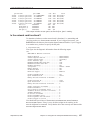
Here’s an sample entry from /etc/passwd:
fred:x:290:120:Fred L. Jones:/home/fred:/bin/sh
/etc/group
Each line in /etc/group is in this format:
groupname:x:group_ID:[username[,username]...]
The fields are separated by colons and include:
20
Chapter 3 • Managing User Accounts
September 30, 2008
Account database
© 2008, QNX Software Systems GmbH & Co. KG.
groupname
The name of the group. Like a user’s name, this can contain any
characters except a colon (:), but you should probably avoid any of
the shell’s special characters. For more information, see “Quoting
special characters” in Using the Command Line.
x
The password for the group. Neutrino doesn’t support group
passwords.
group_ID
The numeric group ID.
username[,username]...
The user names of the accounts that belong to this group, separated by
commas (,).
Here’s a sample entry:
techies:x:123:michel,ali,sue,jake
/etc/shadow
Each line in /etc/shadow is in this format:
username:password:0:0
The fields are separated by colons and include:
username
The user’s login name.
password
The user’s encrypted password.
/etc/.pwlock
The passwd utility creates /etc/.pwlock to indicate to other instances of passwd
that the password file is currently being modified. When passwd finishes, it removes
the lock file.
If you’re the system administrator, and you need to edit the account files, you should:
September 30, 2008
1
Lock the password database: if the /etc/.pwlock file doesn’t exist, lock the
account files by creating it; if it does exist, wait until it’s gone.
2
Open the appropriate file or files, using the text editor of your choice, and make
the necessary changes.
3
Unlock the password database by removing /etc/.pwlock.
Chapter 3 • Managing User Accounts
21
Managing your own account
© 2008, QNX Software Systems GmbH & Co. KG.
Managing your own account
As a regular (non-root) user, you can change your own password. You can also
customize your environment by modifying the configuration files in your home
directory; see Configuring Your Environment.
Changing your password
To change your password, use the passwd utility; if you’re using Photon, you can use
phuser. Either utility prompts you for your current password and then for a new one.
You have to repeat the new password to guard against typographical errors. In
phuser, you can also choose an icon to represent yourself when you log in.
Depending on the password rules that the system administrator has set, passwd may
require that you enter a password of a certain length or one that contains certain
elements (such as a combination of letters, numbers, and punctuation). If the password
you select doesn’t meet the criteria, passwd asks you to choose another.
If other users can access your system (e.g. it’s connected to the Internet, has a dial-in
modem, or is physically accessible by others), be sure to choose a password that will
secure your account from unauthorized use. You should choose passwords that:
• are more than 5 characters long
• consist of multiple words or numbers and include punctuation or white space
• you haven’t used on other systems (many systems, and websites in particular, don’t
store and communicate passwords in encrypted form; this lets people who gain
access to those systems see your password in plain text)
• incorporate both uppercase and lowercase letters
• don’t contain words, phrases, or numbers that other people can guess (e.g. avoid
the names of family members and pets, license plate numbers, and birthdays)
For more information on system security, see Securing Your System.
Forgot your password?
If you forget your password, ask the system administrator (root user) to assign a new
password to your account. Only root can do this.
In general, no one can retrieve your old password from the /etc/shadow file. If your
password is short or a single word, your system administrator — or a hacker — can
easily figure it out, but you’re better off with a new password.
If you’re the system administrator, and you’ve forgotten the password for root, you
need to find an alternate way to access the /etc/passwd and /etc/shadow files in
order to reset the root password. Some possible ways to do this are:
• Boot the system from another disk or device where you can log in as root (such as
from an installation CD), and, from there, manually reset the password.
22
Chapter 3 • Managing User Accounts
September 30, 2008
Managing other accounts
© 2008, QNX Software Systems GmbH & Co. KG.
• Access the necessary files from the root account of another Neutrino machine,
using Qnet. For more information, see Using Qnet for Transparent Distributed
Processing.
• Remove the media on which the /etc/passwd and /etc/shadow are stored and
install it on another Neutrino machine from which you can modify the files.
• In the case of an embedded system, build a new image that contains new passwd
and shadow files, and then transfer it to your target system.
Managing other accounts
As a system administrator, you need to add and remove user accounts and groups,
manage passwords, and troubleshoot users’ problems. You must be logged in as root
to do this, because other users don’t have permission to modify /etc/passwd,
/etc/shadow, and /etc/group.
!
CAUTION: While it’s safe at any time to use the passwd utility to change the
password of an existing user who already has a password, it isn’t necessarily safe to
make any other change to the account database while your system is in active use.
Specifically, the following operations may cause applications and utilities to operate
incorrectly when handling user-account information:
• adding a user, either by using the passwd utility or by manually editing
/etc/passwd
• putting a password on an account that previously didn’t have a password
• editing the /etc/passwd or /etc/group files
If it’s likely that someone might try to use the passwd utility or update the account
database files while you’re editing them, lock the password database by creating the
/etc/.pwlock file before making your changes.
As described below, you should use the passwd utility to change an account’s
password. However, you need to use a text editor to:
• change an existing user’s user name, full name, user ID, group ID, home directory,
or login shell
• create a new account that doesn’t conform to the passwd utility’s allowed
configuration
• remove a user account
• add or remove a group
• change the list of members of a group
If you’re using Photon, you can use phuser, which provides a graphical front end to
passwd and also lets you choose an icon or shell for a user and edit the groups.
September 30, 2008
Chapter 3 • Managing User Accounts
23
Managing other accounts
© 2008, QNX Software Systems GmbH & Co. KG.
The changes you make manually to the account files aren’t checked for conformance
to the rules set in the passwd configuration file. For more information, see the
description of /etc/default/passwd in the documentation for passwd in the
Utilities Reference.
Adding users
To add a user:
1
Log in as root.
2
Either use phuser if you’re using Photon, or use passwd:
passwd new_username
Make sure that the user name is no longer than 14 characters; otherwise, that user
won’t be able to log in.
If you specify a user name that’s already registered, passwd assumes you want to
change their password. If that’s what you want, just type in the new password and then
confirm it. If you don’t wish to change the user’s password, type Ctrl-C to terminate
the passwd utility without changing anything.
If the user name isn’t already registered, passwd prompts you for account
information, such as the user’s group list, home directory, and login shell. The
/etc/default/passwd configuration file specifies the rules that determine the
defaults for new accounts. For more information, see the description of this file in the
documentation for passwd.
The prompts include:
User id # (default)
Specify the numeric user ID for the new user. By default, no
two users may share a common user ID, because applications
won’t be able to determine the user name that corresponds to
that user ID.
Group id # (default)
Choose a numeric group ID that the user will belong to after
initially logging in.
The passwd utility doesn’t add the new user to the group’s entry in the /etc/group
file; you need to do that manually using a text editor. See “Defining Groups” for more
details.
Real name ()
24
Chapter 3 • Managing User Accounts
Enter the user’s real name. The real name isn’t widely used by
system utilities, but may be used by applications such as email.
September 30, 2008
Managing other accounts
© 2008, QNX Software Systems GmbH & Co. KG.
Home directory (/home/username)
Enter the pathname of the user’s home directory, usually
/home/username. The passwd utility automatically creates the
directory you specify. If the directory already exists, passwd by
default prompts you to select a different pathname. For
information on disabling this feature, see the description of
/etc/default/passwd in the documentation for passwd.
Login shell (/bin/sh)
This is the program that’s run once the user logs in.
Traditionally, this is the shell (/bin/sh), giving the user an
interactive command line upon logging in.
You can specify any program as the login shell, but you can’t pass command-line
arguments to it. Also, the phlogin2 or phlogin graphical login fails if the login
shell is anything but a POSIX-compatible shell.
Instead of specifying a custom program within the account
entry, you should customize the user’s .profile file in their
home directory; /bin/sh runs this profile automatically when
it starts up. For more information, see Configuring Your
Environment.
New password:
Specify the initial password for the account. You’re asked to
confirm it by typing it again.
Removing accounts
To remove a user account:
1
Lock the user account database: if the /etc/.pwlock file doesn’t exist, lock
the account files by creating it; if it does exist, wait until it’s gone.
2
Remove the account entry in /etc/passwd and /etc/shadow to disable
future logins, or change the login shell to a program that simply terminates, or
that displays a message and then terminates.
3
Remove references to the user from the /etc/group file.
4
Unlock the account database by removing /etc/.pwlock.
5
If necessary, remove or change ownership of system resources that the user
owned.
6
If necessary, remove or alter references to the user in email systems, TCP/IP
access control files, applications, and so on.
Instead of removing a user, you can disable the account by using the passwd utility to
change the account’s password. In this way, you can tell which system resources the
former user owned, since the user ID-to-name translation still works. When you do
September 30, 2008
Chapter 3 • Managing User Accounts
25
Managing other accounts
© 2008, QNX Software Systems GmbH & Co. KG.
this, the passwd utility automatically handles the necessary locking and unlocking of
the account database.
If you ever need to log into that account, you can either use the su (“switch user”)
utility to switch to that account (from root), or log in to the account. If you forget the
password for the account, remember that the root user can always change it.
What should you do with any resources that a former user owned? Here are some of
your options:
• If you’ve retained the user account in the account database but disabled it by
changing the password or the login shell, you can leave the files as they are.
• You can assign the files to another user:
find / -user user_name_or_ID -chown new_username
• You can archive the files, and optionally move them to other media:
find / -user user_name_or_ID |
pax -wf archivefile
• You can remove them:
find / -user user_name_or_ID -remove!
!
CAUTION: If you remove a user’s account in the account database but don’t remove
or change the ownership of their files, it’s possible that a future account may end up
with the same numeric user ID, which would make the new user the owner of any files
left behind by the old one.
Defining groups
A user’s account entry in /etc/passwd solely determines which group the user is
part of on logging in, while the groups a user is named in within the /etc/group file
solely determine the groups the user may switch to after logging in (see the newgrp
utility). As with user names and IDs, the numeric effective group ID of a running
program determines its access to resources.
For example, if you have a team of people that require access to /home/projects on
the system, but you don’t want the other users to have access to it, do the following:
1
Add a group called projects to the /etc/group file, adding all necessary
users to that group (for details, see “Creating a new group,” below).
2
If you want this group to be the default for these users, change their account
entries in /etc/passwd to reflect their new default group ID.
3
Recursively change the group ownership and permissions on
/home/projects:
chgrp -R projects /home/projects
chmod -R g+rw /home/projects
26
Chapter 3 • Managing User Accounts
September 30, 2008
Troubleshooting
© 2008, QNX Software Systems GmbH & Co. KG.
4
Remove access for all other users:
chmod -R o-rwx /home/projects
For more details on permissions, see “File ownership and permissions” in Working
with Files.
Creating a new group
To create a new group:
Open /etc/group in a text editor, then add a line that specifies the new
group’s name, ID, and members. For example:
techies:x:101:michel,jim,sue
For more information about the fields, see “/etc/group,” earlier in this chapter.
!
CAUTION: Do this work at a time when the system is idle. As your text editor writes
the /etc/group file back, any application or utility that’s trying to simultaneously
read the /etc/group file (e.g. ls -l, newgrp) might not function correctly.
Modifying an existing group
Each time you add a new user to a group (e.g. when you use passwd to create a new
user account), you need to edit the /etc/group file and add the user to the
appropriate group entry. For instance, if you have an existing group techies and
want to add zeke to the group, change:
techies:x:101:michel,jim,sue
to:
techies:x:101:michel,jim,sue,zeke
You should do this at a time when you’re certain no users or programs are trying to use
the /etc/group file.
Troubleshooting
Here are some problems you might encounter while working with passwords and user
accounts:
The passwd utility seems to hang after I change my password.
The passwd utility uses the /etc/.pwlock file as a lock while updating the
password database. If the file already exists, passwd won’t run.
If the system crashes during the update, and /etc/.pwlock still exists,
passwd refuses to work until the system administrator removes the file.
If the password files are left in an inconsistent state as a result of the crash, the
system administrator should also copy the backup files, /etc/oshadow and
September 30, 2008
Chapter 3 • Managing User Accounts
27
Troubleshooting
© 2008, QNX Software Systems GmbH & Co. KG.
/etc/opasswd, to /etc/shadow and /etc/passwd to prevent additional
problems.
Why can’t I log in in graphical mode?
If you enter your user name and password to the graphical login utility
(phlogin2 or phlogin), and it silently returns you to the blank login form,
then:
• Your user name and password don’t match an account in the system (user
names and passwords are both case-sensitive).
or:
• Your account has a login shell that isn’t a standard POSIX shell.
In either case, see your system administrator for help.
Why can’t I log in in text mode?
If you enter your user name and password to the text mode login prompt,
login, and it responds Login incorrect, it’s likely because your user name
doesn’t exist, or you’ve typed the wrong password. Both user names and
passwords are case-sensitive; make sure you don’t have Caps Lock on.
To avoid giving clues to unauthorized users, login doesn’t tell you whether it’s
the user name or the password that’s wrong. If you can’t resolve the problem
yourself, your system administrator (root user) can set a new password on your
account.
This symptom can also occur if one or more password-related files are missing.
If the system administrator is in the middle of updating the files, it’s possible
that its absence will be temporary. Try again in a minute or two if this might be
the case. Otherwise, see your system administrator for help.
If you are the system administrator and can’t access the system, try accessing it
from another Neutrino machine using Qnet, from a development machine using
the qconn interface, or boot and run from the installation CD-ROM to gain shell
access to examine and repair the necessary files.
My text-mode login fails with a message: command: No such file or
directory.
The system couldn’t find the command specified as your login shell. This might
happen because:
• The command wasn’t found in login’s PATH (usually /bin:/usr/bin).
Specify the full pathname to the program (e.g.
/usr/local/bin/myprogram) in the user’s /etc/passwd account entry.
• The account entry specifies options or arguments for your login shell. You
can’t pass arguments to the initial command, because the entire string is
interpreted as the filename to be executed.
28
Chapter 3 • Managing User Accounts
September 30, 2008
Chapter 4
Using the Command Line
In this chapter. . .
Command line or GUI?
31
Processing a command
31
Character-device drivers
31
Shell
34
Utilities
43
Basic commands
46
International keyboards
46
Neutrino for MS-DOS users
47
Troubleshooting
50
September 30, 2008
Chapter 4 • Using the Command Line
29
© 2008, QNX Software Systems GmbH & Co. KG.
Command line or GUI?
Command line or GUI?
Like QNX 4, UNIX, and DOS, Neutrino is based on a command-line interface.
Although Neutrino includes an easy-to-use graphical interface (see the Using the
Photon microGUI chapter), you’ll likely have to type a command sometime —
especially if you’re the system administrator. For information about choosing Photon
or text mode, see the Controlling How Neutrino Starts chapter in this guide.
For developing software, you don’t always have to use the command line; on Linux
and Windows, the QNX Momentics Tool Suite includes an Integrated Development
Environment (IDE) that provides a graphical way to write, build, and test code. The
IDE frequently uses Neutrino utilities, but “hides” the command line from you. For
more information, see the IDE User’s Guide.
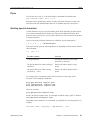
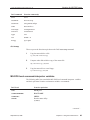
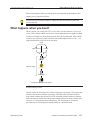
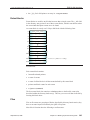
If you want to use command lines from Photon, you can start a pterm terminal by
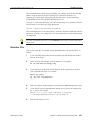
clicking on the Terminal icon:
on the Photon shelf (located at the right edge of your workspace). You can run many
terminals at once, each capable of running multitasking processes. Photon terminals
emulate character devices, so the information in this chapter applies to them as well as
to real character devices.
Processing a command
When you type a command, several different processes interpret it in turn:
1
The driver for your character device interprets such keys as Backspace and
Ctrl-C.
2
The command interpreter or shell breaks the command line into tokens,
interprets them, and then invokes any utilities.
3
The utilities parse the command line that the shell passes to them, and then they
perform the appropriate actions.
Character-device drivers
When you type a command, the first process that interprets it is the character-device
driver. The driver that you use depends on your hardware; for more information, see
the entries for the devc-* character I/O drivers in the Utilities Reference.
Some keys may behave differently from how they’re described here, depending on
how you configure your system.
For more information, see Character I/O in the System Architecture guide.
September 30, 2008
Chapter 4 • Using the Command Line
31
Character-device drivers
© 2008, QNX Software Systems GmbH & Co. KG.
Input modes
Character-device drivers run in either raw input mode, or canonical (or edited input)
mode. In raw input mode, each character is submitted to an application process as it’s
received; in edited input mode, the application process receives characters only after a
whole line has been entered (usually signalled by a carriage return).
Terminal support
Some programs, such as vi, need to know just what your terminal can do, so that they
can move the cursor, clear the screen, and so on. The TERM environment variable
indicates the type of terminal that you’re using, and the /usr/lib/terminfo
directory is the terminal database. In this directory, you can find subdirectories (a
through z) that contain the information for specific terminals. Some applications use
/etc/termcap, the older single-file database model, instead of
/usr/lib/terminfo.
The default terminal is qansi-m, the QNX version of an ANSI terminal. For more
information about setting the terminal type, see “Terminal types” in Configuring Your
Environment.
Telnet
If you’re using telnet to communicate between two QNX machines (QNX 4 or
Neutrino), use the -8 option to enable an eight-bit data path. If you’re connecting to a
Neutrino box from some other operating system, and the terminal isn’t behaving
properly, quit from telnet and start it again with the -8 option.
To telnet from Windows to a Neutrino machine, use ansi or vt100 for your
terminal type.
The keyboard at a glance
The table below describes how the character-device drivers interpret various keys and
keychords (groups of keys that you press simultaneously). The drivers handle these
keys as soon as you type them.
Your keyboard might not behave as indicated if:
• The driver is in raw input mode instead of edited input mode.
• You’re working with an application that has complex requirements for user
interaction (e.g. the application might take control over how the keyboard works).
or:
• You’re working at a terminal that has keyboard limitations.
32
Chapter 4 • Using the Command Line
September 30, 2008
Character-device drivers
© 2008, QNX Software Systems GmbH & Co. KG.
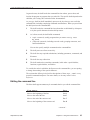
If you want to:
Press:
Move the cursor to the left
← (left arrow)
Move the cursor to the right
→ (right arrow)
Move the cursor to the start of a line
Home
Move the cursor to the end of a line
End
Delete the character left of the cursor
Backspace
Delete the character at the cursor
Del
Delete all characters on a line
Ctrl-U
Toggle between insert and typeover modes (if an
application supports them)
Ins
Submit a line of input or start a new line
Enter
Recall a command (see below)
↑ or ↓ (up or down arrow)
Suspend the displaying of output
Ctrl-S
Resume the displaying of output
Ctrl-Q
Attempt to kill a process
Ctrl-C or Ctrl-Break
Indicate end of input (EOF)
Ctrl-D
Clear the terminal
Ctrl-L
When you use the up or down arrow, the character-device driver passes a “back” or
“forward” command to the shell, which recalls the actual command.
Physical and virtual consoles
The display adapter, the screen, and the system keyboard are collectively referred to as
the physical console, which is controlled by a console driver.
Some systems don’t include a console driver. For example, embedded systems might
include only a serial driver (devc-ser*). The devc-con and devc-con-hid drivers
are currently supported only on x86 platforms.
To let you interact with several applications at once, Neutrino permits multiple
sessions to be run concurrently by means of virtual consoles. These virtual consoles
are usually named /dev/con1, /dev/con2, etc. Photon provides virtual consoles
even if your system doesn’t include a console driver; see Using the Photon microGUI.
When the system starts devc-con or devc-con-hid, it can specify how many
virtual consoles to enable by specifying the -n. In a desktop system, the buildfile
specifies four consoles when it starts diskboot. For more information, see the
description of diskboot in the Controlling How Neutrino Starts chapter. The
maximum number of virtual consoles is nine.
September 30, 2008
Chapter 4 • Using the Command Line
33
Shell
© 2008, QNX Software Systems GmbH & Co. KG.
The root user can also specify the program, if any, that’s initially launched on each
console. The terminal-initialization utility (tinit) reads /etc/config/ttys to
determine what to launch on the consoles. By default, tinit launches a login
command on the first console only, but tinit is “armed” to launch a login on any
other console on which you press a key. This means that while console 1 is always
available, the other consoles aren’t used unless you specifically switch to one of them
and press a key.
If you increase the number of consoles on your machine, make sure you edit
/etc/config/ttys so that tinit will know what to start on the additional
consoles.
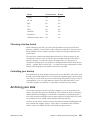
Each virtual console can be running a different foreground application that uses the
entire screen. The keyboard is attached to the virtual console that’s currently visible.
You can switch from one virtual console to another, and thus from one application to
another, by entering these keychords:
If you want to go to the:
Press:
Next active console
Ctrl-Alt-Enter or Ctrl-Alt-+
Previous active console
Ctrl-Alt-−
Use the + (plus) and − (minus) keys in the numeric keypad for these keychords.
You can also jump to a specific console by typing Ctrl-Alt-n, where n is a digit that
represents the console number of the virtual console. For instance, to go to
/dev/con2 (if available), press Ctrl-Alt-2.
When you terminate the session by typing logout or exit, or by pressing Ctrl-D, the
console is once again idle. It doesn’t appear when you use any of the cyclical
console-switching keychords. The exception is console 1, where the system usually
restarts login.
For more information about the console, see devc-con and devc-con-hid in the
Utilities Reference, and “Console devices” in the Character I/O chapter of the System
Architecture guide.
Shell
After the character-device driver processes what you type, the command line is passed
to a command interpreter or shell.
The default shell is sh, which, under Neutrino, is a link to the Korn shell, ksh. There
are other shells available, including small ones that are suitable for embedded systems;
see the Utilities Reference.
34
Chapter 4 • Using the Command Line
September 30, 2008
Shell
© 2008, QNX Software Systems GmbH & Co. KG.
In general terms, the shell breaks the command line into tokens, parses them, and
invokes the program or programs that you asked for. The specific details depend on the
shell that you’re using; this section describes what ksh does.
As you type, the Korn shell immediately processes the keys that you use to edit the
command line, including completing commands and filenames. When you press Enter
the shell processes the command line:
1
The shell breaks the command line into tokens that are delimited by whitespace
or by the special characters that the shell processes.
2
As it forms words, the shell builds commands:
• simple commands, usually programs that you want to run (e.g. less
my_file)
• compound commands, including reserved words, grouping constructs, and
function definitions
You can also specify multiple commands on the command line.
3
The shell processes aliases recursively.
4
The shell does any required substitutions, including parameters, commands, and
filenames.
5
The shell does any redirection.
6
The shell matches the remaining commands, in this order: special builtins;
functions; regular builtins; executables.
To override the order in which the shell processes the command line, you use quoting
to change the meaning of the special characters.
The sections that follow give the briefest descriptions of these steps — ksh is a very
powerful command interpreter! For more details, see its entry in the Utilities
Reference.
Editing the command line
The Korn shell supports emacs-style commands that let you edit the command line:
If you want to:
Press:
Move to the beginning of the line
Ctrl-A
Move to the end of the line
Ctrl-E
Move to the end of the current word
Esc F
Move to the beginning of the current word
Esc B
continued. . .
September 30, 2008
Chapter 4 • Using the Command Line
35
Shell
© 2008, QNX Software Systems GmbH & Co. KG.
If you want to:
Press:
Delete the character at the cursor
Ctrl-D
Delete the character before the cursor
Ctrl-H
Delete from the cursor to the end of the current word
Esc D
Delete from the cursor to the end of the line
Ctrl-K
Paste text
Ctrl-Y
As in emacs, commands that involve the Ctrl key are keychords; for commands that
involve Esc, press and release each key in sequence. For more information, see
“emacs interactive input-line editing” in the documentation for ksh.
In order to process these commands, ksh uses the character device in raw mode, but
emulates all of the driver’s processing of the keys. Other shells, such as esh, use the
character device in canonical (edited input) mode.
Command and filename completion
You can reduce the amount of typing you have to do by using command completion
and filename completion. To do this, type part of the command’s or file’s name, and
then press Esc twice (i.e. EscEsc) or Tab once. The shell fills as much of the name as
it can; you can then type the rest of the name — or type more of it, and then press
EscEsc or Tab again.
For example:
• If you type app followed by EscEsc or Tab, the shell can’t complete the command
name because what you’ve typed isn’t enough to distinguish between the
possibilities (appbuilder, appdebug, and approto).
• If you type appb followed by EscEsc or Tab, the system completes the command
name, appbuilder.
If you haven’t typed enough to uniquely identify the command or file, you can press
Esc= to get a list of the possible completions.
You can control which keys the shell uses for completing names by setting the shell’s
complete key binding. For example, the command that lets you use the Tab key is as
follows:
bind ’ˆI’=complete
You can use bind on the command line or in the ksh profile. For more information
about the bind command and the key bindings, see “emacs interactive input-line
editing” in the documentation for ksh in the Utilities Reference; for information about
the profiles for ksh, see also “Configuring your shell” in Configuring Your
Environment.
36
Chapter 4 • Using the Command Line
September 30, 2008
Shell
© 2008, QNX Software Systems GmbH & Co. KG.
Reserved words
The Korn shell recognizes these reserved words and symbols:
case
do
done
elif
else
esac
fi
for
function
if
in
select
then
time
until
while
!
[[
{
}
and uses them to build compound commands. For example, you can execute
commands in a loop:
for i in *.c; do cp $i $i.bak; done
Entering multiple commands
You can enter more than one command at a time by separating your commands with a
semicolon (;). For example, if you want to determine your current working directory,
invoke pwd. If you want to see what the directory contains, use ls. You could
combine the two commands as follows:
pwd; ls
As described in “Pipes,” you can also use pipes (|) to connect commands on the
command line.
Aliases
You can define an alias in the shell to create new commands or to specify your favorite
options. For example, the -F option to the ls command displays certain characters at
the end of the names to indicate that the file is executable, a link, a directory, and so
on. If you always want ls to use this option, create an alias:
alias ls=’ls -F’
If you ever want to invoke the generic ls command, specify the path to the executable,
or put a backslash (\) in front of the command (e.g. \ls).
Aliases are expanded in place, so you can’t put an argument into the middle of the
expanded form; if you want to do that, use a shell function instead. For example, if
you want a version of the cd command that tells you where you end up in, type
something like the following in ksh:
function my_cd
{
cd $1
pwd
}
For more information, see “Functions” in the entry for ksh in the Utilities Reference.
For information on adding an alias or shell function to your profile so that it’s always
in effect, see “ksh’s startup file” in Configuring Your Environment.
September 30, 2008
Chapter 4 • Using the Command Line
37
Shell
© 2008, QNX Software Systems GmbH & Co. KG.
Substitutions
The shell lets you use a shorthand notation to include the values of certain things in the
command line. The shell does the following substitutions, in this order:
• directories — tilde expansion
• parameters
• commands
• arithmetical expressions
• braces
• filename generation
Directories — tilde expansion
The shell interprets the tilde character (˜) as a reference to a user’s home directory.
The characters between the tilde and the next slash (if any) are interpreted as the name
of a user. For example, ˜mary/some_file refers to some_file in the home
directory of the user named mary.
If you don’t specify a user name, it’s assumed to be yours, so ˜/some_file refers to
some_file in your home directory.
Your home directory is defined in your entry in the password database; see the
description of /etc/passwd in Managing User Accounts.
Parameters
To include the value of a parameter on the command line, put a dollar sign ($) before
the parameter’s name. For example, to display the value of your PATH environment
variable, type:
echo $PATH
Commands
Sometimes, you might want to execute a command and use the results of the command
in another command. You can do it like this:
$(command)
or with the older form, using backquotes:
‘command‘
For example, to search all of your C files for a given string, type:
grep string $(find . -name "*.c")
The find command searches the given directory (. in this case) and any directories
under it for files whose names end in .c. The command substitution causes grep to
search for the given string in the files that find produces.
38
Chapter 4 • Using the Command Line
September 30, 2008
Shell
© 2008, QNX Software Systems GmbH & Co. KG.
Arithmetical expressions
To specify an arithmetical expression in a command line, specify it as follows:
$(( expression ))
For example:
echo $((5 * 7))
You’re restricted to integer arithmetic.
Braces
You can use braces to add a prefix, a suffix, or both to a set of strings, by specifying:
[prefix]{str1,...,strN}[suffix]
where commas (,) separate the strings. For example, my_file.{c,o} expands to
my_file.c my_file.o.
Filename generation
Instead of using a command to work on just one file or directory, you can use wildcard
characters to operate on many.
If you want to:
Use this wildcard:
Match zero or more characters
*
Match any single character
?
Match any characters (or range of characters separated by a
hyphen) specified within the brackets
[]
Exclude characters specified within brackets
!
Hidden files, i.e. files whose names start with a dot (e.g. .profile), aren’t matched
unless you specify the dot. For example, * doesn’t match .profile, but .* does.
The following examples show you how you can use wildcards with the cp utility to
copy groups of files to a directory named /tmp:
If you enter:
The cp utility copies:
cp f* /tmp
All files starting with f (e.g.frd.c, flnt)
continued. . .
September 30, 2008
Chapter 4 • Using the Command Line
39
Shell
© 2008, QNX Software Systems GmbH & Co. KG.
If you enter:
cp fred?
The cp utility copies:
/tmp
All files beginning with fred and ending with one other
character (e.g. freda, fred3)
cp fred[123] /tmp
All files beginning with fred and ending with 1, 2, or 3
(i.e. fred1, fred2, and fred3)
cp *.[ch] /tmp
All files ending with .c or .h (e.g.frd.c, barn.h)
cp *.[!o] /tmp
All files that don’t end with .o
cp *.{html,tex}
All files that end with .html or .tex
Redirecting input and output
Most commands:
• read their input from the standard input stream (stdin, or file descriptor 0), which is
normally assigned to your keyboard
• write their output to the standard output file (stdout, or fd 1), which is normally
assigned to your display screen
• write any error messages to the standard error stream (stderr, or fd 2), which is also
normally assigned to the screen
Sometimes you want to override this behavior.
If you want a process to:
Use this symbol:
Read from a file, or another device (input redirection)
<
Write stdout to a file (output redirection)
>
Write stdout to a file, appending to the file’s contents (output
append)
>>
For example, the ls command lists the files in a directory. If you want to redirect to
output of ls to a file called filelist, enter:
ls > filelist
You can specify a file descriptor for the above redirections. For example, if you don’t
want to display any error messages, redirect stderr to dev/null (a special file, also
known as the bit bucket, that swallows any data written to it and returns end-of-file
when read from):
my_command 2> /dev/null
For more information, see “Input/output redirection” in the docs for ksh in the
Utilities Reference.
40
Chapter 4 • Using the Command Line
September 30, 2008
Shell
© 2008, QNX Software Systems GmbH & Co. KG.
Pipes
You can also use a pipe (|) to to build complex commands from smaller ones:
grep ’some term’ *.html | sort -u | wc -l
Programs such as grep, sort, and wc (a utility that counts characters, words, and
lines) that read from standard input and write to standard output are called filters.
Quoting special characters
Certain characters may have special meaning to the shell, depending on their context.
If you want a command line to include any of the special characters that the shell
processes, then you may have to quote these characters to force the shell to treat them
as simple characters.
You must quote the following characters to avoid their special interpretation:
| $ ( " ) & ‘ ; \ ’ Tab Newline Space
You might need to quote the following characters, depending on their context within a
shell command:
* ?
[ # ˜ = %
In order to quote:
You can:
A single character
Precede the character with a single
backslash (\) character
All special characters within a string of
characters
Enclose the whole string in single
quotes
All special characters within a string,
except for $, ‘, and \
Enclose the whole string in double
quotes
For example, these commands search for all occurrences of the string “QNX
Neutrino” in the chapter1.html file:
grep QNX\ Neutrino chapter1.html
grep ’QNX Neutrino’ chapter1.html
grep "QNX Neutrino" chapter1.html
However, note that:
grep QNX Neutrino chapter1.html
doesn’t do what you might expect, as it attempts to find the string “QNX” in the files
named Neutrino and chapter1.html.
Depending on the complexity of a command, you might have to nest the quoting. For
example:
find -name "*.html" | xargs grep -l ’"QNX.*Neutrino"’ | less
September 30, 2008
Chapter 4 • Using the Command Line
41
Shell
© 2008, QNX Software Systems GmbH & Co. KG.
This command lists all the HTML files that contain a string consisting of QNX,
followed by any characters, followed by Neutrino. The command line uses find to
locate all of the files with an extension of html and passes the list of files to the xargs
command, which executes the given grep command on each file in turn. All of the
output from xargs is then passed to less, which displays the output, one screenful at
a time.
This command uses quoting in various ways to control when the special characters are
processed, and by which process:
• If you don’t put quotes around the *.html, the shell interprets the *, and passes to
find the list of files in the current directory with an extension of html. If you
quote the *.html, the shell passes the string as-is to find, which then uses it to
match all of the files in this directory and below in the filesystem hierarchy with
that extension.
• In a similar way, if you don’t quote the QNX.*Neutrino string at all, the shell
generates a list of files that match the pattern. Quoting it once
("QNX.*Neutrino") works for a single invocation of grep, but this example has
the added complexity of the xargs command.
• The xargs command takes a command line as its argument, and the shell interprets
this command line for each item that’s passed to xargs. If you don’t want the
QNX.*Neutrino string to be interpreted by the shell at all, you need to put nested
quotes around the pattern that you want to pass to grep:
xargs grep -l ’"QNX.*Neutrino"’
• The quoting also indicates when you want to execute the less command. As
given, the shell passes the output from all of the invocations of xargs to less. In
contrast, this command:
find -name "*.html" | xargs ’grep -l "QNX.*Neutrino" | less’
passes the command:
grep -l "QNX.*Neutrino" | less
to xargs, which will have quite different results — if it works at all.
For more information, see “Quoting” in the docs for ksh in the Utilities Reference.
History: recalling commands
The shell lets you recall commands that you’ve previously entered; use the ↑ and ↓
(up and down arrows) to move through the history buffer. You can edit the command,
if you wish, and then press Enter to reexecute it.
The shell also includes a builtin fc command that you can use to display and edit
previous commands, as well as an r alias to fc that reexecutes a previous command.
For example:
r string
42
Chapter 4 • Using the Command Line
September 30, 2008
Utilities
© 2008, QNX Software Systems GmbH & Co. KG.
reexecutes the last command that starts with the given string.
Shell scripts
You can enter shell commands into a text file, called a shell script, and then invoke the
commands in batch mode by executing (or shelling) the file. For more information, see
the Writing Shell Scripts chapter in this guide.
Utilities
Give us the tools, and we will finish the job.
— Sir Winston Churchill
Once the shell has processed all of its special characters, what remains typically
consists of commands and the arguments to them. Most commands correspond to
executable files somewhere on your system, although some — such as cd — are built
into the shell.
It’s possible for you to have more than one executable file with the same name on your
system. The shell uses the PATH environment variable to determine which version to
use.
The value of PATH is a list of directories, separated by colons (:), in the order in
which you want the shell to search for executables. To see the value of your PATH,
type:
echo $PATH
!
CAUTION:
You can put your current directory (.) in your PATH, but it can leave you vulnerable
to “Trojan horse” programs. For example, if . is at the beginning of your PATH, the
shell looks in the current directory first when trying to find a program. A malicious
user could leave a program called ls in a directory as a trap for you to fall into.
If you want to have your current directory in your PATH, make sure that you put it
after the directories that hold the common utilities.
For information about setting your PATH, see “Environment variables” in Configuring
Your Environment.
If you want to know which version of a command the shell will choose, use the which
command. For example:
$ which ls
/bin/ls
You can use command-line options to get more information:
$ which -laf ls
-rwxrwxr-x 1 root
root
19272 May 03
2002 /bin/ls
If you try this for a command that’s built into the shell, which can’t find it:
September 30, 2008
Chapter 4 • Using the Command Line
43
Utilities
© 2008, QNX Software Systems GmbH & Co. KG.
$ which cd
which: no cd in /bin:/usr/bin:/usr/photon/bin:/opt/bin
The whence command displays what the command means to the shell, including any
aliases in effect. For example, if you’ve created an alias for ls, the output might be:
$ whence ls
’ls -F’
Understanding command syntax
Whenever you look up a command in the Utilities Reference, you’ll see a syntax
statement that summarizes how you can use the command. For most commands, this
statement consists of:
command_name
The name of the command to be executed. This may be the
name of an executable program, such as a utility, or it may be
the name of a command built into the shell.
options
The specific behavior that you want to invoke for the command.
Options typically consist of an alphanumeric character preceded
by a hyphen (e.g. -c). Some options take an argument (e.g. -n
number). If you specify an option that takes an argument, you
must include its argument as well.
operands
Data the command requires (e.g. a filename). If a command lets
you enter multiple operands, they’re usually processed in the
order you list them. Unlike options, operands aren’t preceded by
a hyphen (e.g. more my_file).
The entries in the Utilities Reference use some special symbols to express the
command syntax:
...
You can specify one or more instances of the previous element. For example,
in the more utility syntax, the ellipsis after the operand file indicates that you
can specify more than one file on the command line:
more myfile1 myfile2
[ ]
The enclosed item is optional.
|
You can use only one of the items (e.g. -a|-f).
You don’t actually type these symbols when you invoke the command. For instance,
the syntax description for more, is given as follows:
more [-ceisu] [-n number] [-p pattern]
[-/ pattern] [-t tag] [-x tabstop] [file...]
44
Chapter 4 • Using the Command Line
September 30, 2008
Utilities
© 2008, QNX Software Systems GmbH & Co. KG.
You can combine multiple options that don’t take an argument. The -ceisu notation
is shorthand for -c -e -i -s -u.
If an argument to a command starts with a hyphen, you can signal the end of the
options by using a double hyphen:
ls -l -- -my_file
For more information, see Utility Conventions in the Utilities Reference.
Displaying online usage messages
If you want a detailed description of a utility, see the Utilities Reference. But if you
just want a quick reminder of the syntax and options, you can display the utility’s
online usage message by invoking the use command (it’s similar to man in UNIX and
Linux). For example, to display the message for more, type:
use more
If you request usage for a command, and the command either doesn’t have an
executable in the current path or doesn’t contain usage message records, use displays
an error message. For more information, see use in the Utilities Reference — or
simply type use use.
Executing commands on another node or tty
If the machines on your network are running Qnet (see Using Qnet for Transparent
Distributed Processing), you can execute commands on another machine. This is
known as remote execution. For example:
on -n /net/dasher date
where /net/dasher is the name of the node that you want to run the command on.
When you invoke a command on another node, the command’s standard input,
standard output, and standard error output are displayed on your console screen (or
terminal) unless you explicitly redirect them to another device.
To run a command on a specific tty, use the -t option, specifying the terminal name.
For example:
on -t con3 login root
For more information, see the on command in the Utilities Reference.
Priorities
By default, when you start a utility or other program, it runs at the same priority as its
parent. (Actually, priorities aren’t associated with a process, but with the process’s
threads.) You can determine the priority of a process’s threads by looking at the output
of the pidin (Process ID INformation) command.
If you want to run something at a specific priority, use on, specifying the -p option. If
you want to specify a relative priority, use the nice command.
September 30, 2008
Chapter 4 • Using the Command Line
45
International keyboards
© 2008, QNX Software Systems GmbH & Co. KG.
Basic commands
Here are some Neutrino commands that you’ll frequently use:
If you want to:
Use:
Determine your current directory
pwd (builtin ksh command)
Change directory
cd (builtin ksh command)
List the contents of a directory
ls
Rename (move) files and directories
mv
Delete (remove) files
rm
Copy files and file hierarchies
cp or pax
Create directories
mkdir
Remove directories
rmdir
Determine how much free space you
have on a filesystem
df
Concatenate and display files
cat
Display output on a page-by-page basis
less or more
Find files based on search criteria
find
Change a file’s permissions/attributes
chmod
Create hard and symbolic links
ln
Create a “tape archive”
tar or pax
Extract files from a .tar file
tar
Extract files from a .tar.gz or .tgz
file
gunzip filename | pax -r or tar
-xzf filename
For more information about these and other commands, see the Utilities Reference.
International keyboards
If you’re using Photon, you can use phlocale to change the keyboard mapping
(among other things). The choices are in /usr/photon/keyboard, and include
mappings for specific languages (e.g German, French), as well as for several versions
of the Dvorak keyboard layout (a layout that some people consider more efficient than
the standard QWERTY one).
If we don’t supply the mapping you need, you can use the mkkbd utility to create your
own.
Some keyboard layouts (e.g. for the French and German languages) use accent keys
which, by themselves, don’t generate a character. Neutrino treats these keys as “dead”
46
Chapter 4 • Using the Command Line
September 30, 2008
Neutrino for MS-DOS users
© 2008, QNX Software Systems GmbH & Co. KG.
keys. Pressing a dead key, followed by a second key, modifies the second key, creating
an accented character. For example, to create a Ü character if you’re using the French
keyboard layout, press Shift-[ followed by Shift-U.
You can also generate composed characters by pressing and releasing Alt followed by
two keys or keychords. For example, if you’re using the US English layout, you can
press and release Alt, followed by Shift-", and then Shift-U, to get a Ü character.
Neutrino for MS-DOS users
If you’re familiar with Microsoft Windows, you might need to know about the
Neutrino equivalents for the basic DOS commands and variables.
DOS commands and their Neutrino equivalents
The following table lists the Neutrino equivalents of some common MS-DOS
commands. For more information about the Neutrino commands, see the Utilities
Reference.
DOS command
Neutrino command(s)
attrib
ls -l, chmod, and ls -a
Batch files
Shell scripts; see Writing Shell Scripts in this guide, or the docs for ksh.
cacls
ls -l
call script
ksh script
If the script begins with #!/bin/sh, you can invoke it like a regular program e.g. script
(without prefixing it with sh or ksh).
chdir
chkdsk
cd (builtin ksh command)
For QNX 4 (Neutrino) disk filesystems, use chkfsys; for DOS FAT filesystems, use
chkdosfs.
cls
clear
cmd
ksh
command
ksh
comp
cmp or diff
copy
cp or pax
date
date and rtc
Note that you must use rtc to set the hardware clock to the new date and time.
del
rm
continued. . .
September 30, 2008
Chapter 4 • Using the Command Line
47
Neutrino for MS-DOS users
© 2008, QNX Software Systems GmbH & Co. KG.
DOS command
Neutrino command(s)
dir
ls
erase
rm
diskcomp
See below.
diskpart
fdisk [command]
driverquery
See “Troubleshooting” in Working with Filesystems.
fc
cmp or diff, as appropriate
find
grep -i
findstr
grep
format
fdformat and dinit
ftype
File type associations are a property of the Photon File Manager (pfm). See “Browsing
files with the File Manager” in Using the Photon microGUI.
getmac
See ifconfig, netstat; also ls /dev/io-pkt
help
use
logman
tracelogger
lpq
lprq
lpr
lpr
md
mkdir
mode
stty
move
mv
msiexec
tar unzip
path
echo $PATH, export PATH=new path (see “Utilities” in this chapter, or the docs for
ksh).
print
lpr
query
sin, pidin, and ps
rem
#
rename
mv
replace
cp -x
runas
su
schtasks
crontab
shutdown
shutdown
continued. . .
48
Chapter 4 • Using the Command Line
September 30, 2008
Neutrino for MS-DOS users
© 2008, QNX Software Systems GmbH & Co. KG.
DOS command
Neutrino command(s)
sort
sort
taskkill
kill or slay
tasklist
sin, pidin, and ps
time
date and rtc
tracerpt
traceprinter
tracert
traceroute
type
cat
ver
uname -a
xcopy
cp or pax
diskcomp
These steps are the Neutrino equivalent to the DOS diskcomp command:
1
Copy the master disk to a file:
cp /dev/fd0 referencecopy
2
Compare other disks with the copy of the master file:
cmp referencecopy /dev/fd0
3
Copy the master file to a new floppy:
cp referencecopy /dev/fd0
MS-DOS local command-interpreter variables
The following table lists some builtin MS-DOS local command-interpreter variables
and their equivalent Neutrino environment variables or commands:
DOS Local
Neutrino equivalent
%CD%
PWD, pwd
%COMPUTERNAME%
HOSTNAME
%COMSPEC%
SHELL
%DATE%
Run the date utility:
$(date)
continued. . .
September 30, 2008
Chapter 4 • Using the Command Line
49
Troubleshooting
© 2008, QNX Software Systems GmbH & Co. KG.
DOS Local
Neutrino equivalent
%ERRORLEVEL%
$? (see “Parameters” in the documentation for ksh)
%HOMEDRIVE%
Neutrino doesn’t use drive letters; see %HOMEPATH%
%HOMEPATH%
HOME
%OS%
Run the uname utility:
$(uname)
%PATH%
PATH
%PATHEXT%
Neutrino treats file extensions as part of the filename. Executable status
is a file permission. See chmod.
%PROCESSOR_ARCHITECTURE%
Run the uname utility:
$(uname -p)
%PROCESSOR_IDENTIFIER%
Run the sin utility:
$(sin info)
%PROMPT%
PS1, PS2 (see “Parameters” in the documentation for ksh, and
“.kshrc” in the Examples appendix)
%RANDOM%
RANDOM
%SYSTEMDRIVE%
Neutrino doesn’t use drive letters; the system root is always /.
%SYSTEMROOT%
The system root is always /.
%TEMP%
TMPDIR
%TMP%
TMPDIR
%TIME%
Run the date utility:
$(date)
%USERNAME%
LOGNAME
Troubleshooting
Here are some common problems you might encounter while working on the
command line:
Why can’t I run my program called test?
The shell has a builtin command called test. When the shell parses the
command line, it matches any builtin commands before it looks for executable
files.
You have two choices: rename your program, or specify the path to it (e.g.
./test).
50
Chapter 4 • Using the Command Line
September 30, 2008
Troubleshooting
© 2008, QNX Software Systems GmbH & Co. KG.
Why do I get a “not found” message when I try to run my program?
The program is likely in a directory that isn’t listed in your PATH. In particular,
your current directory isn’t in your PATH for security reasons.
Either add the executable’s directory to your PATH or specify the path to the
command (e.g. ./my_program). For more information, see “Utilities,” earlier
in this chapter.
Why does root have access to different commands?
The root user has a different PATH setting that includes such directories as
/sbin and /usr/sbin. These directories contain executables and managers
that (typically) only root can use.
If you aren’t logged in as root, you can still run some of the utilities in /sbin
if you have the right permission, but you’ll have to specify the full path (e.g.
/sbin/logger) or add the directory to your PATH.
When I list a directory, I don’t see files that start with a dot.
Files whose names start with a dot (.) are called hidden files. To list them, use
the -a option to ls.
Why am I getting a “No such file or directory” message?
The shell can’t find the file or directory that you specified. Here are some things
to check:
• Have you typed the name correctly? In Neutrino, the names of files and
directories are case-sensitive.
• Does the name contain spaces or other special characters?
If you have a file called my file and you don’t escape the meaning of the
space, the shell uses the space when breaking the command line into tokens,
so the command looks for one file called my and another called file.
Use quoting to escape the meaning of the special characters (e.g. less "my
file" or less my\ file). For information about the other characters that
you need to quote, see “Quoting special characters.”
How do I work with a file whose name starts with a hyphen?
Neutrino utilities use the hyphen (-) to denote an option (e.g. head -n 10
some_file). If you create a file whose name starts with a hyphen, and you pass
that filename as an argument to a utility, the utility parses the filename as one or
more options.
Most utilities recognize a double hyphen (--) to mean “end of options.” Put this
before your filename:
head -- -my_file
For more information, see the Utility Conventions chapter in the Utilities
Reference.
September 30, 2008
Chapter 4 • Using the Command Line
51
Troubleshooting
© 2008, QNX Software Systems GmbH & Co. KG.
Why do I get a “Unrecognized TERM type” message when I start programs such as
vi?
Either your TERM environment variable isn’t set correctly, or there isn’t an
entry for your terminal type in /usr/lib/terminfo/ (or possibly
/etc/termcap); see “Terminal support,” earlier in this chapter.
52
Chapter 4 • Using the Command Line
September 30, 2008
Chapter 5
Using the Photon microGUI
In this chapter. . .
Overview of Photon
55
Modifying the shelf
58
Modifying the Launch menu
60
Modifying the Desktop menu
65
Starting applications automatically
65
Configuration tools
65
Browsing files with the File Manager
66
Getting help with the Helpviewer
67
Surfing the web
71
Connecting to other systems
71
Hotkeys and shortcuts
73
Photon environment variables
75
Troubleshooting
77
September 30, 2008
Chapter 5 • Using the Photon microGUI
53
© 2008, QNX Software Systems GmbH & Co. KG.
Overview of Photon
Overview of Photon
The Photon microGUI is Neutrino’s graphical user interface, and you can use it as a
desktop environment, similar to other GUI desktop environments. This means you can
run applications in windows, use the mouse for point-and-click and dragging
operations, view directories and files graphically in a tree hierarchy, view multimedia
files, and so on. Photon also provides the framework for graphical applications in
embedded systems.
Many of the applications and utilities that come with Photon are documented in the
Neutrino Utilities Reference. For information about programming Photon
applications, see the Photon Programmer’s Guide.
Why is it called “Photon”?
Whenever you use your mouse or press a key, you’re giving input to a Photon
application. And whenever the application displays data in a window, it’s providing
output. All these interactions are processed as tiny packets of data called events. You
can think of all these input and output events traveling between you and Photon
applications as photons, particles of light.
Why is it called a “microGUI”?
We call Photon a “microGUI” because of its size and architecture. Photon is a very
small GUI. It’s designed to fit in embedded systems, but it’s also designed to be scaled
up. Photon is perfectly at home in high-end, high-performance distributed systems.
Like Neutrino itself, Photon is built around a small microkernel. This modular
architecture makes Photon fast, flexible, and inherently capable of network-distributed
computing.
Your workspace
When you start Photon for the first time, you’re prompted to set up your graphics card
and settings.
When Photon starts, you see your workspace, which is an area where you can run
applications. The workspace consists of the taskbar, the shelf, and the desktop:
September 30, 2008
Chapter 5 • Using the Photon microGUI
55
Overview of Photon
© 2008, QNX Software Systems GmbH & Co. KG.
Photon’s workspace, including the taskbar, shelf, and desktop.
The desktop is the main part of the screen. It’s where application windows appear. In
Photon, the desktop is actually a view, called a virtual console, into a much larger
desktop space, which is three desktops wide by three desktops high. You can run
applications in different consoles, and switch consoles by using keyboard shortcuts or
the World View in the shelf.
If you right-click anywhere on the desktop, you see the Desktop Menu, which lets you
easily run frequently used applications, configure Photon, or shut down. You can
customize this menu (see below).
56
Chapter 5 • Using the Photon microGUI
September 30, 2008
© 2008, QNX Software Systems GmbH & Co. KG.
Overview of Photon
Desktop menu.
The taskbar is the area at the very bottom of the screen. It includes, by default, the
Launch button, the date and time, and icons for applications that are currently running.
From the taskbar, you can:
• click an application icon on the taskbar to hide or show the application
• click the Launch button to launch an application, get help, or shut down the Photon
session
The shelf runs up the right side of your screen, and lets you easily launch frequently
used applications and utilities, configure your system, view system resource usage,
and switch consoles.
From the shelf, you can:
• toggle the appearance of shelf components by clicking on the component category.
An expanded component category appears with a + next to it, while a collapsed
category appears with a -.
• launch an application, utility, or configuration utility by clicking on its icon
• change the current console by clicking on a console in the World View
You can also switch your console by pressing Ctrl-Alt-1...9, where the number is the
console number.
• control the CD Player
Right-click anywhere on the taskbar or shelf to configure or exit the shelf
application. To run or restart shelf, type shelf & at a command line.
Drag the taskbar or shelf border to make it smaller or larger. If you drag the border to
the bottom or right of the screen, the taskbar or shelf is put in autoshow mode, which
means it appears only when you move the mouse over the edge of the screen.
September 30, 2008
Chapter 5 • Using the Photon microGUI
57
Modifying the shelf
© 2008, QNX Software Systems GmbH & Co. KG.
Modifying the shelf
You can configure the shelf by right-clicking on the shelf or taskbar and selecting
Setup, or by running shelf -c from the command line. The shelf’s configuration
dialog looks like this:
Shelf configuration dialog.
The shelf’s default configuration file is /etc/photon/shelf/shelf.cfg. When
you configure your shelf, the new settings are saved for your current user ID only, in
$HOME/.ph/shelf/shelf.cfg.
The items you can add or modify on the shelf include:
58
Group
A group of applications or utilities. A group can contain child groups.
Drawer
Like a group, but a drawer expands horizontally out of its parent
container rather than vertically in the shelf.
Separator
A space that visually separates two containers. Any space not used in
a shelf is occupied by a separator, so you always have at least one
separator per shelf. If you try to remove a separator, it’s repositioned.
World view
A world view plugin, which lets you see which consoles contain open
windows, and lets you set the current console.
CD player
A CD-player plugin.
Chapter 5 • Using the Photon microGUI
September 30, 2008
Modifying the shelf
© 2008, QNX Software Systems GmbH & Co. KG.
Volume
A volume-control plugin.
You can choose additional plugins by selecting the Browse button, including:
cdplayer.so
You can play a CD, stop, skip forward, and skip back. The
plugin displays the track information in its text box.
clock.so
You can choose the clock’s font and its size, whether or not to
show the date and the seconds, and the format of the date
(AM/PM).
If you select this plugin from the shelf, it opens a User
Configuration utility that lets you set and manage the time and
date.
launcher.so
A plugin that lets you create on the shelf an item that runs an
arbitrary command.
launchmenu.so
A plugin that supports the Launch menu. You can have only one
of these in your shelf at any given time. If you try to add a
second one into your shelf, it’s ignored. If you want to change
the location of the Launch menu, you must first remove the
original and then add the new one in the new location.
Note that this plugin doesn’t work in a drawer; it must be at the
top level in a shelf. For information about specifying the
contents of the Launch menu, see “Modifying the Launch
menu,” below.
September 30, 2008
led.so
A set of three “LEDs” that show which of the Num Lock, Caps
Lock, and Scroll Lock keys are on. The light is on when the key
is active.
pload.so
A CPU Load Monitor that displays bar graphs that indicate the
levels of CPU usage, memory usage, and disk and network
activity.
ptrcam.so
A “pointer cam” that magnifies the image directly under the
pointer. You can specify the horizontal and vertical radius, in
pixels.
taskbar.so
The taskbar that lets you switch between applications simply by
selecting their icons. You can change the font, font size, active
and inactive colors, and you can decide whether or not to
display balloons when you hover over an entry.
volume.so
A slider that controls the volume coming from the sound card.
To mute and unmute the volume, select the small speaker icon
in this plugin.
Chapter 5 • Using the Photon microGUI
59
Modifying the Launch menu
worldview.so
© 2008, QNX Software Systems GmbH & Co. KG.
A miniature version of your nine virtual consoles. You can
decide when to display window frames: always, never, or
depending on the size of the world view.
Modifying the Launch menu
The launchmenu.so plugin populates the Launch menu, based on the contents of the
$HOME/.ph/launchmenu and /etc/photon/launchmenu directories.
If there are conflicting items, the item found first prevails, so items encountered in
your home directory’s launchmenu directory take precedence over items encountered
in the global one.
Creating items and submenus
Inside $HOME/.ph/launchmenu and /etc/photon/launchmenu, each directory
corresponds to a submenu, and each file or symbolic link corresponds to a menu item,
with the following exceptions:
• Files named .menu contain special menu-formatting commands; see “Additional
menu control,” below.
• Items with a .tgt extension specify runnable targets within; see “Target files,”
below.
• Other items beginning with a period (.) are ignored.
For all other files, the plugin creates a menu item. Here’s what happens when you
select an item:
• If the file is a symbolic link, it’s resolved to the file that it points to.
• If the file is executable, the plugin executes it.
• If the file isn’t executable, the plugin tries to determine an appropriate viewer for
the file, using the Photon file-association mechanism (see pfm in the Utilities
Reference).
• Failing all else, selecting the item does nothing.
For all items (except *.tgt files), the launchmenu.so plugin uses the filename as
the text to display for that item. You can use any characters in the filename (within the
constraints of the underlying filesystem); the plugin assumes that these filenames use
UTF-8 encoding.
The ampersand (&) takes on special meaning; the plugin interprets the character that
follows as an accelerator key for that item. If you want to display a literal ampersand,
specify it as && in the filename.
60
Chapter 5 • Using the Photon microGUI
September 30, 2008
Modifying the Launch menu
© 2008, QNX Software Systems GmbH & Co. KG.
Target files
The launchmenu.so plugin uses target (*.tgt) files to give you more control than
simple files give over launchable targets and how they’re represented within the menu.
You can use target files to specify one (or more) runnable targets, where each target
corresponds to a single menu item. You specify the targets in this form:
[item1_text]
target = action
...
[item2_text]
target = action
...
Target files are organized into one or more sections, where each section specifies a
target. The square brackets are part of the syntax; the text in them is the menu item’s
default text, following the same conventions as discussed above for filenames.
Each target is described by key=value pairs within the section. You must specify the
target=action pair; it specifies what to do when the item is invoked. The action can
be one of:
• a full path to another file or directory. The launchmenu.so plugin examines that
file and treats it accordingly; it could be an executable, a regular file, directory, or
even another target file.
• a filename of an executable that can be found by searching the directories specified
in your PATH environment variable
• a shell-style command in the form:
env1=val1... command options
If you don’t specify the target key, the plugin ignores the section when it’s
generating menu items.
The optional keys are:
September 30, 2008
sicon
The full path of a small (maximum 24 × 18 pixels) icon to display for the
item. If you don’t specify this, the launchmenu.so plugin tries to find an
icon using the association mechanism, or from the executable if the item is
a PhAB application.
licon
The full path of a large (maximum 48 × 48 pixels) icon to display for the
item.
group
This entry lets you logically group items from different target files, for use
when ordering the items. For more information, see “Controlling the order
of items,” below.
order
This entry lets you specify the order of the items, generally in conjunction
with the group entry.
Chapter 5 • Using the Photon microGUI
61
Modifying the Launch menu
© 2008, QNX Software Systems GmbH & Co. KG.
As mentioned above, the section name specifies the default text displayed for the item.
If you want to provide items in multiple languages, you can specify an entry whose
key is a language code as used by the ABLANG environment variable (see the
International Language Support chapter of the Photon Programmer’s Guide), and
whose key is the text in that language. For example:
[Calculator]
target = phcalc
fr_FR = Calculatrice
Controlling the order of items
By default, the launchmenu.so plugin sorts items alphanumerically by the displayed
text. However, it also provides a degree of control over item ordering within the target
specification. If you’re shipping a package that includes a number of items to be
included in a menu and you want them to be ordered in a specific manner regardless of
their names (for instance, you deem some items to be more important and want to
ensure they appear first), you can control this ordering in one of these ways:
Multiple target files
If the targets are spread across multiple target files for any
reason, you need to establish a logical grouping to sort the items
in. You do this by specifying a group entry in the target. The
value for this entry may be any string, although we recommend
you follow this convention to avoid potential conflicts:
Company name:Product Family:Name
In most cases, the company name alone should suffice, although
you may wish to be more specific, depending on the number of
product lines you offer.
After the plugin groups the items logically via the group entry, it
sorts the items alphanumerically by the order entry. The order
can be any string; you can simply use numbers, or you can
choose a more elaborate scheme that will let you insert other
items in the future.
Single target file
Items specified in a single file can take advantage of implicit
ordering. That is, in absence of a group entry, they
automatically inherit a value that’s also available to all other
targets within the same file. In this case, you need to specify only
the order entry, as described above.
Additional menu control
Directories, files, and targets provide all the mechanisms necessary for populating
menus with content, and even allow for a degree of control in terms of ordering. You
62
Chapter 5 • Using the Photon microGUI
September 30, 2008
Modifying the Launch menu
© 2008, QNX Software Systems GmbH & Co. KG.
can also use menu format-control files (named .menu) to fine-tune overall menu
presentation and visually group related items.
Menu format is specified as a PxConfig-style file (see the Photon Library Reference),
with each section specifying some form of control. The types of control are:
• Item Placement — this lets you control the overall ordering of menu items further.
To do this, specify an item name (or pattern to match — see fnmatch() in the
Neutrino Library Reference) as the section name. You can provide a section name
in other languages by including an entry with a language code as the key, as
described earlier.
In the simplest case, the section has no entries, but you can also use the type entry
to further specify which type of item to apply the match to. By default, the
matching is applied to all items, but you may be more exclusive and supply specific
types by grouping one or more of the following symbols as this entry’s value:
a
All types (this is the default behavior).
c
Command-type items (shell-style command, as discussed above).
d
Directory items (submenus).
e
Executables (items that can be executed directly without parsing or use of a
third-party viewer).
f
Files (items that can’t be executed directly; they need a viewer).
For example, this code first groups all the submenu items, followed by everything
else:
[*]
type = d
[*]
type = cef
• Separators — these let you specify visual separations in your menus. The section
name must begin with a hyphen (-). The plugin ignores any additional text in the
name and any entries in the section.
For example, this code separates the submenus from the rest of the items:
[*]
type = d
[-]
[*]
type = cef
The launchmenu.so plugin won’t place a separator at the start or end of the menu, or
next to another separator.
• Inlined targets — as with target files, you can specify targets within the .menu file.
See the above section on target files for how to do this.
September 30, 2008
Chapter 5 • Using the Photon microGUI
63
Modifying the Launch menu
© 2008, QNX Software Systems GmbH & Co. KG.
Troubleshooting
How can I bind an icon to a submenu? How can I supply alternate text for a submenu
item (say, to translate it into a different language)?
The launchmenu.so plugin ignores files whose names begin with a period (.),
so the first step is to hide the directory by adding a period to the beginning of its
name. Next, create a file with an extension of .tgt (the name doesn’t matter, as
long as it doesn’t begin with a period). In the target field, specify the full path
to your new, hidden directory. You can then specify any additional information,
such as icons and translations.
Can I use files from elsewhere in the filesystem to build a menu?
Yes, you can. For example, you can put a symbolic link into
$HOME/.ph/launchmenu that points elsewhere in the filesystem. Note that
because the plugin has to scan the files and build a hierarchy based on the
contents, this can take a while to complete, depending on the number of files and
subdirectories that the plugin encounters.
I’ve edited a target file. How do I get the Launch menu to reflect the change?
The launchmenu.so plugin watches only directories for changes, because
watching all of the files could take too time. In addition, directories are typically
updated as items are installed and uninstalled, so if an entry is added or removed
from a directory, the plugin picks it up on-the-fly. If you’ve changed a file, and
you want the change to take effect immediately, you can:
• restart the shelf (type shelf & on the command line)
Or:
• touch the directory containing the item. The launchmenu.so plugin
refreshes the corresponding submenu.
What about packages installed with the old installer? Will they show up?
The launchmenu_notify utility creates a .tgt file that represents legacy and
third-party packages.
I’ve installed a package with the old installer, but I’m not getting a launchmenu item.
What should I do?
Try the following:
1
2
Run launchmenu_notify -vvv from the command line. This tells you
which third-party or legacy items exist, need to be added, and can be
removed.
Examine the list of existing items to see if one matches the missing item. If
an item doesn’t appear in the Launch menu, the target likely doesn’t
specify a valid file (e.g. the file doesn’t exist).
If this doesn’t help you solve the problem, please let us know.
I’ve created my own item, but it doesn’t appear in the Launch menu.
The target might not specify a valid, existing file. The launchmenu.so plugin
doesn’t display items that don’t have a target, or that have a target that can’t be
64
Chapter 5 • Using the Photon microGUI
September 30, 2008
Modifying the Desktop menu
© 2008, QNX Software Systems GmbH & Co. KG.
resolved. Make sure the target is either a full path or an executable that the shell
can find (use the which utility to determine this).
Modifying the Desktop menu
The Desktop menu is the one that pops up when you right-click anywhere on the
Photon desktop.
You can run phmenu from the command line by typing phmenu &. This utility lets
you drag and drop the menu items to the trash or to a new location. When the item is
selected, you can modify the label shown in the menu, the hotkey, and the command to
run. You can add new items by selecting the item you would like and dropping it into
the desired location in the tree.
For more information, see phmenu and pwm in the Utilities Reference.
Starting applications automatically
You can tell Photon to launch applications on startup. To do this, add the name of the
application’s executable to the $HOME/.ph/phapps configuration file. For example:
ped &
pterm &
helpviewer &
If the file doesn’t exist, you need to create it, and make it executable by changing its
properties with the File Manager, or by typing chmod +x ˜/.ph/phapps.
Configuration tools
Photon provides various configuration tools that let you change your Photon settings.
You can run them all from the command line, and some you can start from the shelf or
Launch menu.
Appearance: pwmopts, Appearance in the shelf, or
Launch→Configure→Appearance
Select the background colors, pattern, and image settings, as well
as title alignment and window behavior, including whether to:
• drag a full window or just its outline
• assign keyboard focus by clicking in a window or have focus
follow your pointer
• bring a window to the front by clicking in it
Select the Background tab to set the desktop color and pattern, or
to select an image for the desktop backdrop.
September 30, 2008
Chapter 5 • Using the Photon microGUI
65
Browsing files with the File Manager
Fonts: phfont
© 2008, QNX Software Systems GmbH & Co. KG.
Map font substitutions, set options such as anti-aliasing, and
configure Asian identification. For more information, see “The
right fonts” in Configuring Your Environment.
Graphics: phgrafx, Graphics in the shelf, or Launch→Configure→Graphics
Select graphics settings for Photon. When you run phgrafx, you
can select from a list of available graphics modes for each video
driver supported by your graphics card. The list is generated by a
hardware scan Photon performs during installation.
Localization: phlocale, Localization or Time & Date in the shelf, or
Launch→Configure→Localization
Set your machine’s time zone, language, keyboard (see
“International keyboards” in Using the Command Line), time, and
date.
Changing the language on your machine affects only the applications that support your
choice. Other applications continue to use their default language.
Mouse: input-cfg, Mouse in the shelf, or Launch→Configure→Mouse
Set the speed and acceleration of the mouse pointer. You can also
swap the buttons (to reduce the strain if you’re using the mouse
with your left hand) and enable the wheel if the mouse has one.
Network: phlip, Network in the shelf, or Launch→Configure→Network
Manage your network and modem settings.
Print manager: prjobs
View, start, or cancel jobs in the print queue.
Remote access: phrelaycfg
Create or delete the /etc/system/config/noditto file,
which prevents anyone from using phditto to access your
Photon workspace from a remote machine.
Screen saver: savercfg, Screen Saver in the shelf, or
Launch→Configure→Screen Saver
Configure the Photon screen saver. You can select from a list of
screen savers, and set the activation time, a password, and any
command-line options that the selected screen saver might have.
Browsing files with the File Manager
Photon comes with a file manager, pfm, that lets you browse directories and files using
a graphical interface. To open the Photon File Manager, click File Manager in the
Applications group on the shelf, or type pfm & on the command line.
66
Chapter 5 • Using the Photon microGUI
September 30, 2008
© 2008, QNX Software Systems GmbH & Co. KG.
Getting help with the Helpviewer
Photon File Manager.
The Photon File manager represents files and folders graphically. Double-click a
folder to open it and display its contents; double-click a file to open it in an associated
application (if an association exists). The File Manager also supports drag-and-drop
operations; for example, you can drag a file to a folder to move it there. You can
right-click a file or folder to view a shortcut menu that contains the available
commands.
At the top of the File Manager are two text boxes that you can use to navigate and
filter directory listings. You can type a path name directly into the Path box to jump to
that directory. To view only files of a certain type or that start with a specific character,
use the Filter box. For example, enter p* to view only files that start with the letter p,
or enter *.ps to view only files that have the .ps suffix.
You can use the Photon File Manager menus to perform many file-management tasks.
The toolbar at the top of the File Manager provides shortcuts for some commonly used
commands. For more information, see pfm in the Utilities Reference.
You can view a listing of the most common keyboard shortcuts in File Manager by
selecting Help→Quick Reference. You can also view all currently defined
bookmarks in a panel by clicking the Bookmarks toolbar shortcut.
Some of these commands are also available from the right-click menu in File Manager.
Getting help with the Helpviewer
You can use the Photon Helpviewer to display our product documentation. The
documentation is organized under the /usr/help/product directory.
September 30, 2008
Chapter 5 • Using the Photon microGUI
67
Getting help with the Helpviewer
© 2008, QNX Software Systems GmbH & Co. KG.
To open the Helpviewer, click the Help button in the Applications group on the shelf,
or select Help from the right-click shortcut menu on the desktop. You can also start
the helpviewer by typing helpviewer & on the command line.
The Photon helpviewer.
In the Topics list, click the arrow next to a topic to view the subtopics it contains, or
double-click a topic to make it the top topic in the list. Clicking on a topic displays its
content in the topic pane.
You can also browse to topics by clicking on hypertext links within the topic text.
Links are indicated by color and underline.
Searching for a topic or keyword
You can search for words in the help files by using the Find feature. The Find panel is
located under the Topics list. If it isn’t visible, select View→Topics, or press Ctrl-T.
Enter the word(s) in the Find box and click Go!. If you enter multiple terms,
helpviewer finds topics that contain all the terms.
68
Chapter 5 • Using the Photon microGUI
September 30, 2008
Getting help with the Helpviewer
© 2008, QNX Software Systems GmbH & Co. KG.
You might need to generate a full-text search index on a set of help files if one doesn’t
exist. To do so, select File→Generate Index. For large help sets, such as Neutrino’s,
this operation can take several minutes.
You can refine the search by selecting one or more of these find options:
Match Whole Words Check this box to match whole words. If unchecked, partial
word matches are found. For example, “grep” also matches
“egrep”.
Case Sensitive
Check this box to match the case in the search terms.
Search Topic Text
Check this box to search all the text in a topic. If unchecked,
only topic headings are searched.
Search All Topics
Check this box to search all the topics in the help set.
The pterm terminal window lets you select (highlight) a portion of text and then
invoke the Helpviewer by either:
• pressing the right mouse button to bring up the pterm menu and selecting Search
help
or:
• pressing Ctrl-Alt-H
The Helpviewer starts, then searches the table of contents for any topics that contain
the selected text. The first matching topic is automatically displayed.
You can also simply type something in a pterm window and then press Ctrl-Alt-H.
Most QNX documents include a keyword index that can also help you find what
you’re looking for. In the online docs, click the keyword-index button, which appears
at the top and bottom of each file:
A
Index
Bookmarking a topic to view it again later
If you find a topic that you want to view again later, you can bookmark it. This saves a
quick link to that topic in the bookmarks list. To bookmark your current topic, select
Bookmarks→Add Bookmarks.
To view the list, click the Bookmarks toolbar button. Click an item in the list to view
the topic. Bookmarks also appear in the Bookmark menu.
September 30, 2008
Chapter 5 • Using the Photon microGUI
69
Getting help with the Helpviewer
© 2008, QNX Software Systems GmbH & Co. KG.
You can remove bookmarks by viewing the bookmarked topic, and then selecting
Bookmarks→Remove Bookmark.
Navigating around help files
The Helpviewer provides the following ways to navigate through the documentation:
Task
Menu command
Shortcut
Go to the topmost help topic (“home” topic) in the help set
File→Home
Ctrl-H
Go to the previously viewed topic
File→Back
Alt-←
Return to the next topic (after using the File→Back command)
File→Forward
Alt-→
Move up a level if you’ve opened a folder
File→Up
Ctrl-U
Open the topics pane if it’s closed
View→View Topics
Ctrl-T
Open the search results panel if it’s closed
View→View Search Results
Ctrl-S
View where the currently displayed topic is located in the topics
list
View→Where?
View a list of previously viewed topics
View→History List
Ctrl-Y
The online documentation also includes some navigation buttons at the top and bottom
of each file:
Navigation buttons in the online docs.
The Contents button moves you “up” in the document:
• In a prose book, it typically takes you to About This Guide.
• In a reference book, it takes you to the listing of items that start with a given letter.
For example, if you’re looking at the docs for abs(), this button takes you to the list
of the functions that start with A.
Viewing more than one topic at once
You can view several topics at once by opening topics in a new topic window. Each
open topic window is indicated by a tab above the topic pane.
To open a new topic pane, select File→New Section, or press Ctrl-N. You can view
any open topic by clicking on its tab. To close the current topic, select File→Close
Section, or press Ctrl-D.
70
Chapter 5 • Using the Photon microGUI
September 30, 2008
Surfing the web
© 2008, QNX Software Systems GmbH & Co. KG.
Surfing the web
Photon ships with a web browser that you can use to browse local HTML files or to
browse the Internet. To start it, click on its button in the Internet group on the Photon
shelf.
Neutrino also includes an embedded web server called Slinger that you can use to
build Internet access into embedded systems. For more information, see the Setting
Up an Embedded Web Server chapter.
Connecting to other systems
Photon supports the following methods for connecting between computers running
Photon:
• Phditto — a self-hosted utility that lets you view and interact with another Photon
workspace in a network.
• Phindows — a connectivity tool that lets you connect a Microsoft Windows
platform to Photon and Photon applications on a remote Neutrino computer.
Phditto
The phditto utility lets you connect to a Photon session that’s running on another
computer. You can connect to an existing Photon session or start a new one. This
utility lets you interact with the remote Photon session as though you were working
directly on that node. In order to access the remote node using phditto, you must run
phrelay on the remote machine.
You can end the phditto session by selecting Close from Phditto’s window menu. To
view this menu, right-click the phditto label in the Taskbar.
Phindows
Phindows (“Photon in Windows”) is a connectivity tool that lets you use Windows
platforms to connect to and interact with graphical Photon applications running on a
remote Neutrino computer.
Configuring the Neutrino machine for TCP/IP use
If you’re using TCP/IP, make sure the configuration is correct before you use
Phindows:
• The remote Neutrino host must have TCP/IP installed and running.
• The remote host must also be running inetd, with the following items added to the
TCP/IP configuration files:
In /etc/inetd.conf, add the line:
phrelay stream tcp nowait root /usr/bin/phrelay phrelay
September 30, 2008
Chapter 5 • Using the Photon microGUI
71
Connecting to other systems
© 2008, QNX Software Systems GmbH & Co. KG.
In /etc/services, add the line:
phrelay 4868/tcp
These lines are already present in the configuration files, but they’re commented out.
Just remove the number sign (#) to add these entries.
These two entries cause inetd to listen for incoming requests to establish a new
Photon session. When a request is detected (from a remote Phindows client in our
case), inetd automatically establishes a full TCP/IP connection and launches
phrelay on that connection. Phindows is then fully connected to the local machine.
For more information about inetd, see the Utilities Reference.
Starting Phindows
To launch Phindows on your Windows machine, do one of the following:
• Click the Phindows icon, if you created one.
• Choose the Start→Programs→QNX Momentics→Phindows menu entry.
• Run the C:\Program Files\phindows\phindows.exe program.
Phindows displays a Connect dialog where you can specify the type of connection
(TCP/IP or direct-connect serial). Various connection options are available, but the
defaults usually work well.
If you request a TCP/IP connection, you must also specify the Internet address of the
Neutrino computer you’re connecting to (e.g. 198.53.31.1). If the remote computer
has been configured properly, you should see a Photon login prompt, at which point
you’re connected and running Photon.
If you request a serial connection, then you must specify the COM port (e.g. COM1 or
COM2). If you don’t specify a baud rate, Phindows uses the current Windows default
settings. With a serial connection, Phindows initially acts as a simple text terminal that
lets you type commands directly to the modem (e.g. ATDT1-613-591-0934). Once
connected, log into Neutrino and then issue the command:
/usr/bin/phrelay
This command causes Phindows to drop out of text-terminal mode and begin acting as
a Photon graphical terminal. A Photon login screen should appear at this point.
Additional options
You can use Phindows’s command-line options to:
• set compression and data-caching options
• connect to a remote Photon session
• use a nonstandard color palette
• span a single Photon session across multiple screens
72
Chapter 5 • Using the Photon microGUI
September 30, 2008
Hotkeys and shortcuts
© 2008, QNX Software Systems GmbH & Co. KG.
• share a Photon session with other users
• create a shortcut to a Photon application on a Windows desktop
For more information, see the Phindows User’s Guide.
Hotkeys and shortcuts
You can use many keyboard shortcuts and hotkeys to perform tasks quickly and easily.
The following tables show shortcuts for using pterm, editing text fields in Photon
applications, managing windows, working with the Photon workspace, and others.
pterm
The Photon terminal emulator is called pterm. It behaves like a character-device
driver; see “The keyboard at a glance” in Using the Command Line.
If you’re in typeover mode, and you press Enter, you return to insert mode.
The pterm program also supports the following shortcuts:
If you want to:
Press:
Copy selected text to the clipboard.
Ctrl-Alt-X or Ctrl-Alt-C
Paste selected text from the clipboard.
Ctrl-Alt-V or
Ctrl-right mouse button
Toggle text selection
Ctrl-Alt-R
Search help with selected text
Ctrl-Alt-H
Set pterm options
Ctrl-Alt-O
Scroll through buffered lines
Ctrl-Alt-↑, Ctrl-Alt-↓, Ctrl-Alt-Page Up,
Ctrl-Alt-Page Down, Ctrl-Alt-Home and
Ctrl-Alt-End
Increase or decrease font and window
size
Ctrl-Alt-[ and Ctrl-Alt-]
Increase or decrease font size only
Ctrl-Alt-, and Ctrl-Alt-.
Text field
September 30, 2008
Chapter 5 • Using the Photon microGUI
73
Hotkeys and shortcuts
© 2008, QNX Software Systems GmbH & Co. KG.
If you want to:
Press:
Cut selected text.
Ctrl-X or
Ctrl-Alt-X
Copy selected text to the clipboard.
Ctrl-C or
Ctrl-Alt-C
Paste selected text from the clipboard.
Ctrl-V or
Ctrl-Alt-V or
Ctrl-right mouse button
Window
The window manager, pwm, provides the following shortcuts:
If you want to:
Press:
Move the window to the front
Alt-F2
Move the window to the back
Alt-F3
Close the window
Alt-F4 or
double-click the window menu button
Restore the window to previous size if
it’s been maximized
Alt-F5 or
Move the window
Alt-F7
Resize the window (use the mouse or
cursor keys to choose the new size)
Alt-F8
Minimize the window
Alt-F9
Maximize the window
Alt-F10 or
double-click the title bar
double-click the title bar
Workspace
The window manager, pwm, provides the following shortcuts:
If you want to:
Press:
Move the backmost window to the front of
the window stack
Alt-Esc
Cycle through the windows
Alt-Shift-Esc
continued. . .
74
Chapter 5 • Using the Photon microGUI
September 30, 2008
Photon environment variables
© 2008, QNX Software Systems GmbH & Co. KG.
If you want to:
Press:
Cycle forward or backward through the
consoles
Ctrl-Alt-Enter or Ctrl-Alt-Backspace
Go to console n, where n is a digit from 1
through 9
Ctrl-Alt-n
Display the Desktop Menu
Alt-Enter
Photon skips any empty virtual consoles when you cycle through them.
The wmswitch process, which Photon starts automatically, provides these shortcuts:
If you want to:
Press:
Cycle through the applications
Alt-Tab
Cycle in reverse order though the applications
Alt-Shift-Tab
Exiting Photon
If you want to exit Photon, you can press Ctrl-Alt-Shift-Backspace.
!
CAUTION: Before entering this command, make sure that no applications or utilities
are running on your computer. If there are, files may be left open. Moreover, if you
reboot when a critical update is in progress, the filesystem might need maintenance.
If you don’t want anyone to be able to use this method to exit Photon, specify the -b
option on the input driver for your system. For more information, see the entries for
the devi-* input drivers in the Utilities Reference.
Photon environment variables
Environment variables set options and determine the behavior of your system. You can
use the command line to set environment variables that configure Photon, but the
command depends on the shell that you’re using. For ksh and esh, you can use the
export command.
Here’s a list of environment variable specific to Photon. For a general list of
environment variables, see Commonly Used Environment Variables in the Utilities
Reference.
ABLANG
September 30, 2008
A language code (e.g. en_CA for Canadian English) that a
multilingual Photon application uses to determine what
language to display.
Chapter 5 • Using the Photon microGUI
75
Photon environment variables
© 2008, QNX Software Systems GmbH & Co. KG.
For more information, see International Language Support in
the Photon Programmer’s Guide; for the currently supported
codes, see /usr/photon/appbuilder/languages.def.
ABLPATH
A list of directories where you want a multilingual Photon
application to search for translation files.
For more information, see International Language Support in
the Photon Programmer’s Guide, and ph in the Utilities
Reference.
AB_RESOVRD
A path variable that lists directories to search for resource
records for applications built with PhAB. See the Photon in
Embedded Systems appendix of the Photon Programmer’s
Guide.
AUTOCONNECT
In order to run /etc/autoconnect, you must set this
environment variable to 1. For more information, see
/etc/autoconnect in the Utilities Reference.
DISPLAY
The name of the physical display on which to draw.
IVE_HOME
Used by Java VM.
J9PLUGIN_ARGS
Arguments passed to Browser Java plugins.
PHEXIT_DISABLE
Set this environment variable to turn off the Photon Login
dialog’s Exit button so that users won’t be able to exit to text
mode. For more information, see phlogin2 and phlogin in
the Utilities Reference.
PHFONT
The registered name of the font server (e.g. /dev/phfont).
For more information, see ph in the Utilities Reference.
PHFONT_USE_EXTERNAL
If this environment variable exists, io-graphics runs the
font manager as a separate process (see phfont) instead of
using phfont.so. You should set this environment variable
for systems that have remote clients accessing font services on
the host machine (e.g. phindows, phditto).
76
PHFONTMEM
The size of an area in shared memory to set up between the
task and the Photon font server for returning text bitmaps
(normally required only by graphics drivers). For more
information, see PfAttach() in the Photon Library Reference.
PHFONTOPTS
Options to pass to the Photon font server. For more
information, see phfont.
Chapter 5 • Using the Photon microGUI
September 30, 2008
Troubleshooting
© 2008, QNX Software Systems GmbH & Co. KG.
PHGFX
The full command that you want the ph script to use instead of
the default commands to start the graphics driver.
PHINPUT
The full command that you want the ph script to use instead of
the default commands to start the input driver.
PHINSTANCE
The number of times that Photon has been instantiated. For
more information, see phlogin2 and phlogin in the Utilities
Reference.
PHOTON
The name of the Photon device (usually /dev/photon). For
more information, see ph in the Utilities Reference.
PHOTONOPTS
(Windows-hosted version only) Additional options you want to
pass to the Photon server when it starts.
PHOTON_PATH
The name of the root directory containing Photon files (usually
/usr/photon). For more information, see ph in the Utilities
Reference.
PHWM
The name of the Window Manager to start when you start
Photon. For more information, see ph in the Utilities
Reference.
PHWMEXIT
If you set this environment variable, Photon disables the
confirmation dialog when you exit Photon. For more
information, see pwm in the Utilities Reference.
PHWMOPTS
Options you want to pass to the window manager when it
starts. For more information, see pwm in the Utilities
Reference.
PTERMPAL
The pathname of the palette file for pterm.
PTERMRC
The name of a local configuration file for pterm.
PWMOPTS
(Windows-hosted version only) Options you want to pass to
the window manager when it starts. For more information, see
pwm in the Utilities Reference.
PWM_PRINTSCRN_APP
The application to start when the Print Scrn key is pressed. The
default is snapshot.
Troubleshooting
Here are some problems or questions that you might have concerning Photon:
September 30, 2008
Chapter 5 • Using the Photon microGUI
77
Troubleshooting
© 2008, QNX Software Systems GmbH & Co. KG.
How do I change the color scheme in Photon?
You can change the color of the title bars within Photon for any given state. To
do this, choose Launch→Configure→Appearance, then select the Window
tab. In this tab, you can choose one of the predefined schemes from the list, or
you can set each window state (active and inactive) and the title color
independently.
I’ve set an alias in my .profile, but it isn’t set in my Photon terminals.
The shell doesn’t export aliases. In Photon, the default pterm isn’t started as a
login shell and therefore doesn’t read your /etc/profile and ˜/.profile
configuration files.
If you want an alias to be defined in all of your shells (inside or outside a Photon
terminal), set the alias in your shell’s startup file. For more information, see
“ksh’s startup file” in the Configuring Your Environment chapter in this guide.
Alternatively, you can use the -l option to run pterm as a login shell, which
causes it to run .profile. If you want to, you can change the Terminal item on
the shelf so that it executes pterm -l. To do this, right-click the shelf and
choose Setup. Select the Terminal entry and change pterm to pterm -l.
You should also change the Desktop pop-up menu to match; edit
$HOME/.ph/wm/wm.menu (or run phmenu) and add the -l option to the pterm
entry.
I would like to bypass the login prompt when booting my computer into Photon. Is
this possible?
Yes; for more information, see “rc.local” in the Controlling How Neutrino
Starts chapter.
How can I change the language layout of my keyboard?
Choose the Localization item on the shelf. You can choose from several
different keyboard configurations; see “International keyboards” in Using the
Command Line.
How can I add files to the Helpviewer (such as help files for programs that I install, or
new documents found on the web)? I noticed that the File menu doesn’t let you bring
up a file requester and look for a help file.
The Helpviewer looks for files with an extension of .toc in the
/usr/help/product directory. Take a look at an existing .toc file as well as
the Context-Sensitive Help chapter in the Photon Programmer’s Guide.
To open an arbitrary file without creating the .toc files, use a web browser
instead of the helpviewer.
I tried to create new file associations with pfm, but they didn’t work correctly. For
example, based on the existing associations, I tried to associate .txt files with ped,
but ped doesn’t start.
Make sure you have /usr/photon/bin in your PATH environment variable,
then do the following:
1
78
Start pfm.
Chapter 5 • Using the Photon microGUI
September 30, 2008
Troubleshooting
© 2008, QNX Software Systems GmbH & Co. KG.
2
Press F11 or select Associations from the Edit menu.
3
Click Add to add a new file association.
4
Enter these settings:
•
•
•
•
Pattern: *.txt
Open: ped
View: ped
Edit: ped
5
Choose Done to close the New Association Type dialog.
6
Choose Done to close the Associate dialog.
How can I disable the Ctrl-Alt-1, 2, ... keychords that allow console switching in
Photon?
Place this line in your /etc/rc.d/rc.local file:
export PHWMOPTS="-S"
For more information, see pwm in the Utilities Reference.
If a mouse isn’t connected to my computer, how do I shut down Photon?
You can press Ctrl-Alt-Shift-Backspace to shut down Photon. If it doesn’t work,
the computer may be locked up, in which case, you might have to press the reset
button. To avoid using the reset button, run inetd, then telnet into the box
and slay the processes that Photon is using.
How do I change the text and background colors of the terminal?
There’s a -K option for pterm that lets you select the initial colors.
For example, pterm -K 17 sets the colors to blue text (1) on a light-gray
background (7). You can also define the exact RGB values for all the 16 colors
that pterm uses by creating a palette file. For more information, see pterm in
the Utilities Reference.
When I change the language setting under Localization, nothing changes. Why?
This setting sets the ABLANG environment variable, which some applications
use to determine what language they should use. Some applications may not
support the language you’ve selected. Changing the setting typically doesn’t
affect applications that are running, just new ones.
How can I disable the shelf?
If you just want to close the shelf in your current Photon session, you can shut
it down it using shelf -e.
A more permanent approach is to set the PHSHELF_DISABLE environment
variable to 1. You can do this in your .profile file, with export
PHSHELF_DISABLE=1.
For more information about shelf, see shelf in the Utilities Reference.
September 30, 2008
Chapter 5 • Using the Photon microGUI
79
Chapter 6
Working with Files
In this chapter. . .
Everything is a file
83
Filenames and pathnames
84
Where everything is stored
89
File ownership and permissions
98
Filename extensions 101
Troubleshooting 103
September 30, 2008
Chapter 6 • Working with Files
81
Everything is a file
© 2008, QNX Software Systems GmbH & Co. KG.
This chapter concentrates on working with files in the QNX 4 filesystem, which is the
default under Neutrino and is compatible with the older QNX 4 OS. For more
information, see the Working with Filesystems chapter in this guide.
Everything is a file
In a Neutrino system, almost everything is a file; devices, data, and even services are
all typically represented as files. This lets you work with local and remote resources
easily from the command line, or through any program that works with files.
Types of files
Neutrino supports the following types of files, and ls -l uses the character shown in
parentheses to identify the type:
Regular (-)
A file that contains user data, such as C code, HTML, and data.
For example, /home/fred/myprog.c.
Directory (d)
Conceptually, a directory is something that contains files and
other directories. For example, /home/fred.
A directory is implemented as a disk file that stores a list of the
names of files and other directories. Each filename is
associated with an inode (information node) that defines the
file’s existence. For more information, see “QNX 4 filesystem”
in Working with Filesystems.
Symbolic link (l)
An additional name for a file or directory. For example,
/usr/bin/more is a symbolic link to /usr/bin/less. For
more information, see “Symbolic links” in Working with
Filesystems.
Named special (n)
A shared memory region, such as,
/dev/shmem/Pg101e0001.
Character special files (c)
Entries that represent a character device. For example,
/dev/ser1 represents a serial port.
FIFO special files (p)
Persistent named pipes through which two programs
communicate. For example, PipeA
Block special files (b)
Entries that represent a block device, such as a disk. For
example, /dev/hd0 represents the raw block data of your
primary disk drive.
September 30, 2008
Chapter 6 • Working with Files
83
Filenames and pathnames
© 2008, QNX Software Systems GmbH & Co. KG.
Socket files (s)
Entries that represent a communications socket, especially a
UNIX-domain socket. For more information, see socket() and
the UNIX protocol in the Neutrino Library Reference.
Some files are persistent across system reboots, such as most files in a disk filesystem.
Other files may exist only as long as the program responsible for them is running.
Examples of these include shared memory objects, objects in the /proc filesystem,
and temporary files on disk that are still being accessed even though the links to the
files (their filenames) have been removed.
Filenames and pathnames
To access any file or directory, you must specify a pathname, a symbolic name that
tells a program where to find a file within the directory hierarchy based at root (/).
A typical Neutrino pathname looks like this:
/home/fred/.profile
In this example, .profile is found in the fred directory, which in turn resides in the
home directory, which is found in /, the root directory:
/
home
fred
.profile
Like Linux and other UNIX-like operating systems, Neutrino pathname components
are separated by a forward slash (/). This is unlike Microsoft operating systems,
which use a backslash (\).
To explore the files and directories on your system, use the ls utility. This is the
equivalent of dir in MS-DOS. For more information, see “Basic commands” in Using
the Command Line, or ls in the Utilities Reference.
Absolute and relative pathnames
There are two types of pathname:
84
Chapter 6 • Working with Files
September 30, 2008
Filenames and pathnames
© 2008, QNX Software Systems GmbH & Co. KG.
Absolute paths
Pathnames that begin with a slash specify locations that are
relative to the root of the pathname space (/). For example,
/usr/lib/libmalloc.so.2.
Relative paths
Pathnames that don’t begin with / specify locations relative to
your current working directory.
For example, if your current directory is /home/fred, a relative
path of .ph/helpviewer is the same as an absolute path of
/home/fred/.ph/helpviewer.
The pathname, /home/fred/.ph/helpviewer, actually specifies a directory, not a
regular file. You can’t tell by looking at a pathname whether the path points to a
regular file, a directory, a symbolic link, or some other file type. To determine the type
of a file, use file or ls -ld.
The one exception to this is a pathname that ends with /, which always indicates a
directory. If you use the -F option to ls, the utility displays a slash at the end of a
directory name.
Dot and dot-dot directories
Every directory in a QNX 4 filesystem contains these special links:
. (“dot”)
The current directory.
.. (“dot dot”)
The directory that this directory appears in.
So, for example, you could list the contents of the directory above your current
working directory by typing:
ls ..
If your current directory is /home/fred/.ph/helpviewer, you could list the
contents of the root directory by typing:
ls ../../../..
but the absolute path (/) is much shorter, and you don’t have to figure out how many
“dot dots” you need.
Flash filesystems don’t support . and .. entries, but the shell might resolve them
before passing the path to the filesystem. You can also set up hard links with these
names on a flash filesystem.
September 30, 2008
Chapter 6 • Working with Files
85
Filenames and pathnames
© 2008, QNX Software Systems GmbH & Co. KG.
A note about cd
In some traditional UNIX systems, the cd (change directory) command modifies the
pathname given to it if that pathname contains symbolic links. As a result, the
pathname of the new current working directory — which you can display with pwd —
may differ from the one given to cd.
In Neutrino, however, cd doesn’t modify the pathname — aside from collapsing ..
references. For example:
cd /home/dan/test/../doc
would result in a current working directory of /home/dan/doc, even if some of the
elements in the pathname were symbolic links.
No drive letters
Unlike Microsoft Windows, which represents drives as letters that precede pathnames
(e.g. C:\), Neutrino represents disk drives as regular directories within the pathname
space. Directories that access another filesystem, such as one on a second hard disk
partition, are called mountpoints.
Usually the primary disk-based filesystem is mounted at / (the root of the pathname
space). A full Neutrino installation (such as a self-hosted development installation)
mounts all additional disk filesystems automatically under the /fs directory. For
example:
/
fs
cd0
hd0-qnx4-2
So, while in a DOS-based system a second partition on your hard drive might be
accessed as D:\, in a Neutrino system you might access the second QNX 4 filesystem
partition on the first hard drive as /fs/hd0-qnx4-2.
For more information on where to find things in a typical Neutrino pathname space,
see “Where everything is stored,” later in this chapter. To learn more about mounting
filesystems, see Working with Filesystems and Controlling How Neutrino Starts.
Pathnames that begin with a dot
When you list the contents of a directory, the ls utility usually hides files and
directories whose names begin with a period. Programs precede configuration files
and directories with a period to hide them from view. The files (not surprisingly) are
called hidden files.
86
Chapter 6 • Working with Files
September 30, 2008
© 2008, QNX Software Systems GmbH & Co. KG.
Filenames and pathnames
Other than the special treatment by ls and some other programs (such as the Photon
file manager, pfm), nothing else is special about hidden files. Use ls -a to list all
files, including any hidden ones.
Extensions
Filename extensions (.something at the end of a filename) tell programs and users what
type of data a file contains. In the QNX 4 filesystem (the Neutrino native hard disk
filesystem), extensions are just an ordinary part of the filename and can be any length,
as long as the total filename size stays within the 505 byte filename length limit.
Most of the time, file extensions are simply naming conventions, but some utilities
base their behavior on the extension. See “Filename extensions” later in this chapter
for a list of some of the common extensions used in a Neutrino system.
Pathname-space mapping
You may have noticed that we’ve talked about files and directories “appearing in” their
parent directories, rather than just saying that the parent directories contain these files.
This is because in Neutrino, the pathname space is virtual, dictated not just by the
filesystem that resides on media mounted at root, but rather by the paths and pathname
aliases registered by the process manager.
For example, let’s take a small portion of the pathname space:
/
dev
ser1
In a typical disk-based Neutrino system, the directory / maps to the root of a
filesystem on a physical hard drive partition. This filesystem on disk doesn’t actually
contain a /dev directory, which exists virtually, adopted via the process manager. In
turn, the filename ser1 doesn’t exist on a disk filesystem either; it has been adopted
by the serial port driver.
This capability allows virtual directory unions to be created. This happens when
multiple resource managers adopt files that lie in a common directory within the
pathname space.
September 30, 2008
Chapter 6 • Working with Files
87
Filenames and pathnames
© 2008, QNX Software Systems GmbH & Co. KG.
In the interests of creating a maintainable system, we suggest that you create directory
unions as rarely as possible.
For more information on pathname-space management, see “Pathname Management”
in the Process Manager chapter of the System Architecture guide.
Filename rules
Neutrino supports a variety of filesystems, each of which has different capabilities and
rules for valid filenames. For information about filesystem capabilities, see Working
with Filesystems; for filesystem limits, see Understanding System Limits.
The QNX 4 filesystem is the normal hard-disk filesystem that Neutrino uses. In this
filesystem, filenames can be up to 48 bytes long, but you can extend them to 505 bytes
(see “Filenames” in Working with Filesystems). Individual bytes within the filename
may have any value except the following (all values are in hexadecimal):
• 0x00 through 0x1F (all control characters)
• 0x2F (/)
• 0x7F (rubout)
• 0xFF
If you’re using UTF-8 representations of Unicode characters to represent international
characters, the limit on the filename length will be lower, depending on your use of
characters in the extended range. For more information on UTF-8 and Unicode, see
the Unicode Multilingual Support appendix in the Photon Programmer’s Guide.
You can use international characters in filenames by using the UTF-8 encoding of
Unicode characters. If you’re using the Photon microGUI, this is done transparently
(you can enter the necessary characters directly from your keyboard, and the display
shows them correctly within the Photon file manager). Filenames containing UTF-8
characters are generally illegible when viewed from the command line.
You can also use the ISO-Latin1 supplemental and PC character sets for international
characters; however, the appearance of these 8-bit characters depends on the display
settings of your terminal, and might not appear as you expect from within Photon or in
other operating systems that access the files via a network.
Most other operating systems, including Microsoft Windows, support UTF-8/Unicode
characters, and their filenames appear correctly in the Photon microGUI environment.
Filenames from older versions of Microsoft Windows may be encoded using 8-bit
characters with various language codepage in effect. The DOS filesystem in Neutrino
can translate these filenames to UTF-8 representations, but you need to tell the
filesystem which codepage to use via a command-line option. For more information
see fs-dos.so in the Utilities Reference.
88
Chapter 6 • Working with Files
September 30, 2008
Where everything is stored
© 2008, QNX Software Systems GmbH & Co. KG.
Where everything is stored
The default Neutrino filesystem generally follows the Filesystem Hierarchy Standard,
but we don’t claim to be compliant or compatible with it. This standard describes
where files and directories should or must be placed in UNIX-style operating systems.
For more information, see http://www.pathname.com/fhs.
The Neutrino pathname space is extremely flexible. Your system may be configured
differently.
This section describes the contents of these directories:
/
bin
boot
dev
etc
fs
home
lib
proc
root sbin
tmp
usr
var
/
The / directory is the root of the pathname space. Usually your primary hard disk or
flash filesystem is mounted here. On a QNX 4 filesystem, this directory includes the
following files:
/.altboot
Contains an alternate OS image that’s loaded if you press ESC
during bootup; see Controlling How Neutrino Starts.
/.bitmap
A system file that contains a bitmap representing the disk regions in
use by the filesystem. Each block is represented by one bit; if the bit
is set, the filesystem is using the block.
You must preserve the integrity of this file to prevent disk
corruption. After an unexpected shutdown, run chkfsys to walk
through the entire filesystem and validate this file’s contents,
correcting them if necessary. For more information, see “QNX 4
filesystem” in Working with Filesystems, and chkfsys in the
Utilities Reference.
September 30, 2008
/.boot
On a bootable filesystem, this file contains the primary OS image
that’s loaded by the secondary boot loader on bootup. For more
information, see Controlling How Neutrino Starts, as well as “QNX
Neutrino and QNX 4 bootloader partitions” in the Neutrino
Technical Notes.
/.diskroot
A file that indicates which QNX 4 filesystem to mount as /. For
more information, see Controlling How Neutrino Starts.
/.inodes
Contains additional data pointing to extra inode blocks required by
files that occupy more than one extent (i.e. more than one
Chapter 6 • Working with Files
89
Where everything is stored
© 2008, QNX Software Systems GmbH & Co. KG.
contiguous region on the disk device). For more information, see
“QNX 4 filesystem” in Working with Filesystems.
The / directory also contains platform-specific directories (e.g. armle, ppcbe, x86),
as well as the directories described in the sections that follow.
/bin
The /bin directory contains binaries of essential utilities, such as chmod, ls, and
ksh.
To display basic utility syntax, type use utilityname from the command line. For more
information, see use in the Utilities Reference.
/boot
The /boot directory contains files and directories related to creating bootable OS
images (image filesystems). Image filesystems contain OS components, your
executables, and data files that need to be present and running immediately upon
bootup. For general information on this topic, see Making an OS Image in the
Building Embedded Systems guide, and mkifs in the Utilities Reference.
This directory includes:
/boot/build/
This directory contains the mkifs buildfiles used to build OS
images. The buildfiles for a standard x86-based Neutrino system
are qnxbase.build and qnxbasedma.build.
/boot/fs/
By convention, we use this directory to store image filesystems
built by mkifs. To boot from one of the images, you’ll need to
copy it to /.boot on a bootable QNX 4-filesystem device first.
/boot/sys/
IPL and startup code are located here. This is one of the paths
searched by the mkifs utility as it tries to resolve components
named in the buildfile.
/dev
As described earlier, the /dev directory belongs to the process manager. This
directory contains device files, possibly including:
90
/dev/cdn
CD-ROM block devices; see devb-* in the Utilities Reference
for driver information.
/dev/conn
Text mode console TTY device; see devc-con in the Utilities
Reference.
/dev/console
The device that’s used for diagnostic log messages; on a full x86
system, this is a write-only device managed by the system logger,
Chapter 6 • Working with Files
September 30, 2008
Where everything is stored
© 2008, QNX Software Systems GmbH & Co. KG.
slogger. Buildfiles for embedded systems may configure a link
from this path to another device, such as a serial port. See
slogger in the Utilities Reference.
/dev/fdn
Floppy disk block devices; see devb-fdc in the Utilities
Reference for driver details.
/dev/hdn
Hard disk block devices; data representing an entire drive,
spanning all partitions; see devb-* in the Utilities Reference.
/dev/hdntn
Hard disk partition block devices; the data in these devices is a
subset of that represented by the corresponding hdn file; see
devb-* in the Utilities Reference.
/dev/io-pkt/
A directory owned and operated by io-pkt*, under which you
can find files relating to the network devices for your various
LANs. C programs can perform devctl() operations on these files
to interact with the driver, e.g. to obtain driver statistics.
/dev/mem
A device that represents all physical memory.
/dev/mq, /dev/mqueue
A pathname space where entries for message queues appear; for
more information, see mq and mqueue in the Utilities Reference.
/dev/null
A “bit bucket” that you can direct data to. The data is discarded.
/dev/parn
Parallel ports e.g. for parallel printers; see stty for
configuration, and devc-par for driver details in the Utilities
Reference.
/dev/pci
Adopted by the PCI server on the machine, this device lets
programs communicate with the PCI server. See pci-* in the
Utilities Reference.
/dev/phfont
Adopted by the Photon font server, either io-graphics using
the phfont.so library, or phfont running as a separate process.
This file lets programs communicate with the font server. See
io-graphics and phfont in the Utilities Reference.
/dev/photon
A special file that programs use to attach to a Photon server
running on this machine. For more information, see Photon in
the Utilities Reference.
/dev/pipe
Adopted by the pipe manager. The presence of this file tells
other programs (such as a startup script built into an OS image)
that the Pipe manager is successfully running.
/dev/ptypx, /dev/ptyqx, /dev/ptyrx
The control side of a pseudo-terminal device pair. Pseudo-ttys are
numbered with a hexadecimal digit. When more than 16
September 30, 2008
Chapter 6 • Working with Files
91
Where everything is stored
© 2008, QNX Software Systems GmbH & Co. KG.
pseudo-ttys are present, devc-pty uses the additional prefixes,
/dev/ptyq, /dev/ptyr, and so on, as necessary, to
accommodate the additional ttys. See devc-pty in the Utilities
Reference.
/dev/random
Read from this device to obtain random data; see random in the
Utilities Reference.
/dev/sem
A pathname space where entries for named semaphores appear.
/dev/sern
Serial ports. See stty for configuration, and devc-ser* for
driver details in the Utilities Reference.
/dev/shmem/
Contains files representing shared memory regions on the system
(also sometimes used for generic memory-mapped files). For
more information, see the description of the RAM “filesystem” in
Working with Filesystems.
/dev/slog
A device managed by slogger, used to read or write system log
messages. Try sloginfo /dev/slog. See slogger and
sloginfo in the Utilities Reference for more information.
/dev/socket/
This directory is owned and managed through the TCP/IP stack,
which is included in io-pkt*. This directory contains
pathnames through which applications interact with the stack.
For more information, see the TCP/IP Networking chapter in this
guide.
/dev/text
This file is managed by procnto. Text written to this device is
output through debug output routines encoded in the startup code
for your system.
The actual result, therefore, varies from board to board. On a
standard PC (using startup-BIOS), the default is to write to the
PC console. For more information, see startup-* in the
Utilities Reference.
/dev/tty
A virtual device owned by the process manager (procnto) that
resolves to the controlling terminal device associated with the
session of any process that opens the file. This is useful for
programs that may have closed their standard input, standard
output, or standard error, and later wish to write to the terminal
device.
/dev/ttypx, /dev/ttyqx, /dev/ttyrx
The slave side of the corresponding /dev/ptypx file. The
program being controlled typically uses one of these files for its
standard input, standard output, and standard error.
/dev/zero
92
Chapter 6 • Working with Files
Supplies an endless stream of bytes having a value of zero.
September 30, 2008
Where everything is stored
© 2008, QNX Software Systems GmbH & Co. KG.
/etc
The /etc directory contains host-specific system files and programs used for
administration and configuration, including:
/etc/acl.conf
Specifies permitted operations on a defined SNMP context. See
/etc/acl.conf in the Utilities Reference.
/etc/autoconnect
Automatic TCP/IP connection-configuration script. See
/etc/autoconnect in the Utilities Reference.
/etc/bootptab
Network boot protocol server configuration file. See
/etc/bootptab in the Utilities Reference.
/etc/config/
A directory that contains system-configuration files, such as the
ttys file that tinit uses to configure terminal devices.
/etc/context.conf
Context definitions for SNMP v2. See /etc/context.conf
in the Utilities Reference.
/etc/country
Set by phlocale, this is used by applications to tailor behavior
for the country that you’re running the system in.
/etc/default/
A directory that contains default configuration files, primarily
for TCP/IP facilities.
/etc/dhcpd.conf
Dynamic Host Configuration Protocol configuration; see
/etc/dhcpd.conf in the Utilities Reference.
/etc/ftpd.conf
Specifies configuration options for ftpd that apply once
you’ve authenticated your connection. See /etc/ftpd.conf
in the Utilities Reference.
/etc/ftpusers
Defines users who may access the machine via the File Transfer
Protocol. See /etc/ftpusers in the Utilities Reference.
/etc/group
User account group definitions; see Managing User Accounts.
/etc/hosts
Network hostname lookup database; see also
/etc/nsswitch.conf and /etc/resolv.conf, below. See
/etc/hosts in the Utilities Reference.
September 30, 2008
/etc/inetd.conf
Internet super-server configuration file that defines Internet
services that inetd starts and stops dynamically as needed.
See /etc/inetd.conf in the Utilities Reference.
/etc/mib.txt
Defines the format for specifying variable names for SNMP
utilities; see /etc/mib.txt in the Utilities Reference.
Chapter 6 • Working with Files
93
Where everything is stored
/etc/motd
© 2008, QNX Software Systems GmbH & Co. KG.
Contains an ASCII message of the day that may be displayed
when users log in, as long as /etc/profile is configured to
display it.
The default /etc/profile displays this file only if the
/etc/motd file is more recent than the time you last logged in
to the system, as determined by the time your
$HOME/.lastlogin file was last modified. For more
information, see the description of /etc/profile in
Configuring Your Environment.
/etc/networks
Network name database file. For more information, see
/etc/networks in the Utilities Reference.
/etc/nsswitch.conf
Name-service switch configuration file. For more information,
see /etc/nsswitch.conf in the Utilities Reference.
/etc/opasswd
Backup of /etc/passwd file before its last change via the
passwd utility. See the Managing User Accounts chapter.
/etc/oshadow
Backup of /etc/shadow file before its last change via the
passwd utility. See Managing User Accounts.
/etc/party.conf
Configuration file for SNMP v2 party definitions. See
/etc/party.conf in the Utilities Reference for more details.
/etc/passwd
This file defines login accounts. See the chapter Logging In,
Logging Out, and Shutting Down, as well as Managing User
Accounts for more details; also, see passwd, login,
phlogin2, and phlogin in the Utilities Reference.
/etc/photon/
A directory that contains some Photon-related configuration
files, including:
pterm
Configuration files for pterm.
shelf/
A directory that contains the default configuration
file for the shelf, and the default layout of the
Launch menu.
shells/
An optional directory where you can put
configuration files for phlogin2 or phlogin.
wm
Configuration files for the window manager, pwm.
For more information, see Using the Photon microGUI.
/etc/printers/
94
Chapter 6 • Working with Files
A directory that contains printertype.cfg files and a fontmap
file used by the phs-to-ps utility. For more information, see
“Printing with spooler” in the Printing chapter.
September 30, 2008
© 2008, QNX Software Systems GmbH & Co. KG.
Where everything is stored
/etc/profile
The startup profile script executed by the shell when you log in;
it’s executed before $HOME/.profile. See Configuring Your
Environment.
/etc/profile.d/
A directory where the default /etc/profile script looks for
scripts to run when any user logs in. The /etc/profile
script runs each script in this directory that matches
*.$(SHELL##*/}. For example, if the value of the SHELL
environment variable is /bin/sh, the script runs the scripts
that match *.sh.
/etc/rc.d/
A directory where you usually keep local system-initialization
files. For more information, see the description of
/etc/system/sysinit in Controlling How Neutrino Starts.
/etc/resolv.conf
Resolver configuration file; see also /etc/hosts, above. See
/etc/resolv.conf in the Utilities Reference.
/etc/skel/
A directory that holds the default version of .profile. When
you add a new user to the system, this file is copied to the
user’s home directory. For more information, see the
description of /etc/default/passwd in the documentation
for passwd, and the description of .profile in Configuring
Your Environment.
/etc/system/
A directory that includes files and directories used when you
boot the system, including:
• /etc/system/sysinit — the main script for initializing
the system.
• /etc/system/config/nophoton — a file indicating that
you don’t want to start Photon.
• /etc/system/config/useqnet — a file indicating that
you want to start Qnet. For more information, see the Using
Qnet for Transparent Distributed Processing chapter.
• /etc/system/enum — the location of configuration files
for the enumerators. For more information, see the
Controlling How Neutrino Starts chapter.
For more information, see the Controlling How Neutrino Starts
chapter.
/etc/timezone/
September 30, 2008
A directory where phlocale looks for a list of possible time
zones; see “Setting the time zone” in Configuring Your
Environment.
Chapter 6 • Working with Files
95
Where everything is stored
© 2008, QNX Software Systems GmbH & Co. KG.
/fs
Additional filesystems are mounted under /fs. See Working with Filesystems in this
guide, and devb-* and mount in the Utilities Reference. This directory can include:
/fs/cdn/
CD-ROM filesystems.
/fs/fdn/
Floppy disk filesystems.
/fs/hdn-type[-number]/
Filesystems on hard disk partitions.
/home
The home directories of regular users are found here. The name of your home
directory is often the same as your user name.
/lib
A directory that contains essential shared libraries that programs need in order to run
(filename.so), as well as static libraries used during development. See also
/usr/lib and /usr/local/lib.
The /lib directory includes:
/lib/dll/
Contains additional shared libraries that implement OS drivers and
services, such as drivers, filesystem managers, and so on. For some
examples of how shared libraries are used for certain types of drivers
and services, see Filesystems, Native Networking (Qnet), and TCP/IP
Networking in the System Architecture guide. For details about
specific shared objects in the /lib/dll directory, see their
respective entries in the Utilities Reference.
/proc
Owned by the process manager (procnto), this virtual directory can give you
information about processes and pathname-space configuration.
The /proc directory contains a subdirectory for each process; the process ID is used
as the name of the directory. These directories each contain an entry (as) that defines
the process’s address space. Various utilities use this entry to get information about a
process.
The /proc directory also includes:
/proc/boot/
96
Chapter 6 • Working with Files
The image filesystem that comprises the boot image. For more
information, see Making an OS Image in Building Embedded
Systems.
September 30, 2008
Where everything is stored
© 2008, QNX Software Systems GmbH & Co. KG.
/proc/dumper
A special entry that receives notification when a process
terminates abnormally.
/proc/self/
The address space for yourself (i.e. for the process that’s making
the query).
/proc/mount/
Pathname-space mountpoints.
If you list the contents of the /proc directory, /proc/mount doesn’t show up, but
you can list the contents of /proc/mount.
/root
The /root directory is the home directory for the root user.
/sbin
This directory contains essential system binaries, including:
• drivers (e.g. devb-*, devc*, devf*, devp*, devu*)
• enumerators (e.g. enum-devices)
• initialization programs (e.g. diskboot, seedres)
• configuration utilities (e.g. dinit) and repair utilities (e.g. chkfsys, chkdosfs)
• managers (e.g. io-pkt*, mqueue, pipe)
Many of these files are used when you boot the system; for more information, see
Controlling How Neutrino Starts.
/tmp
This directory contains temporary files. Programs are supposed to remove their
temporary files after using them, but sometimes they don’t, either due to poor coding
or abnormal termination. You can periodically clean out extraneous temporary files
when your system is idle.
/usr
The /usr directory is a secondary file hierarchy that contains shareable, read-only
data, and includes:
/usr/bin/
A directory that contains most user commands, such as diff,
errno, and wc.
/usr/help/
September 30, 2008
A directory that contains the documentation (in the product
directory) and common images (in the lib/images directory).
For more information, see “Getting help with the Helpviewer”
in Using the Photon microGUI, and helpviewer in the
Utilities Reference.
Chapter 6 • Working with Files
97
File ownership and permissions
© 2008, QNX Software Systems GmbH & Co. KG.
/usr/include/
The top of a directory structure that contains the C and C++
header files. This directory includes sys, platform-specific,
and other directories.
/usr/info/
Documentation for various utilities.
/usr/lib/
Object files, libraries, and internal binaries that you shouldn’t
execute directly or in scripts. You’ll link against these libraries
if you write any programs.
/usr/libexec/
A directory that could contain system daemons and system
utilities; in general, these are run only by other programs.
/usr/local/
A directory where the system administrator can install software
locally. It’s initially empty.
/usr/man/
“Manual pages” for various utilities.
/usr/photon/
The top of a directory structure that contains executables, data
files, and so on, associated with Photon.
/usr/qde/
The top of a directory structure that contains executables, data
files, plugins, etc. associated with the Integrated Development
Environment (IDE), which is shipped as part of the QNX
Momentics Tool Suite on Linux and Windows.
/usr/sbin/
Nonessential system binaries, such as cron, dumper, and
nicinfo.
/usr/share/
Data that’s independent of the architecture, such as icons,
backdrops, and various gawk programs.
/usr/src/
A directory for source code.
/var
The /var directory contains variable data files, including cache files, lock files, log
files, and the following:
/var/dumps
The directory where dumper saves any dumps that result when a
program terminates abnormally.
File ownership and permissions
Each file and directory belongs to a specific user ID and group ID, and has a set of
permissions (also referred to as modes) associated with it. You can use these utilities
to control ownership and permissions:
98
Chapter 6 • Working with Files
September 30, 2008
File ownership and permissions
© 2008, QNX Software Systems GmbH & Co. KG.
To:
Use:
Specify the permissions for a file or directory
chmod
Change the owner (and optionally the group) for a file or directory
chown
Change the group for a file or directory
chgrp
For details, see the Utilities Reference.
You can change the permissions and ownership for a file or directory only if you’re its
owner or you’re logged in as root. If you want to change both the permissions and
the ownership, change the permissions first. Once you’ve assigned the ownership to
another user, you can’t change the permissions.
Permissions are divided into these categories:
u
Permissions for the user (i.e. the owner)
g
Permissions for the group.
o
Permissions for others (i.e. everyone who isn’t in the group).
Each set of permissions includes:
r
Read permission.
w
Write permission.
x
Execute permission. For a directory, this is permission to list or search the
directory.
s or S
Setuid or setgid (see below).
t or T
Sticky bit (see below).
For example, if you list your home directory (using ls -al), you might get output
like this:
total 94286
drwxr-xr-x 18
drwxrwxr-x 3
drwx------ 2
-rw-rw-r-- 1
-rw------- 1
drwxr-xr-x 2
-rw-rw-r-- 1
-rw-rw-r-- 1
drwxrwxr-x 3
drwxrwxr-x 11
-rw-r--r-- 1
drwxrwxr-x 2
-rw-rw-r-- 1
September 30, 2008
barney
root
barney
barney
barney
barney
barney
barney
barney
barney
barney
barney
barney
techies
root
techies
techies
techies
techies
techies
techies
techies
techies
techies
techies
techies
6144
2048
4096
185
34
2048
320
0
2048
2048
254
4096
3585
Sep
Jul
Jul
Oct
Jul
Feb
Nov
Oct
Oct
Sep
Nov
Jul
Dec
26
15
04
27
05
26
11
02
17
08
11
04
05
06:37
07:09
11:17
2000
2002
2003
2002
11:17
2002
09:08
2002
09:06
2002
./
../
.AbiSuite/
.Sig
.cvspass
.ica/
.kshrc
.lastlogin
.mozilla/
.ph/
.profile
.ws/
123.html
Chapter 6 • Working with Files
99
File ownership and permissions
© 2008, QNX Software Systems GmbH & Co. KG.
The first column is the set of permissions. A leading d indicates that the item is a
directory; see “Types of files,” earlier in this chapter.
You can also use octal numbers to indicate the modes; see chmod in the Utilities
Reference.
Setuid and setgid
Some programs, such as passwd, need to run as a specific user in order to work
properly:
$ which -l passwd
-rwsrwxr-x 1 root
root
21544 Mar 30 23:34 /usr/bin/passwd
Notice that the third character in the owner’s permissions is s. This indicates a setuid
(“set user ID”) command; when you run passwd, the program runs as the owner of the
file (i.e. root). An S means that the setuid bit is set for the file, but the execute bit
isn’t set.
You might also find some setgid (“set group ID”) commands, which run with the same
group ID as the owner of the file, but not with the owner’s user ID. If setgid is set on a
directory, files created in the directory have the directory’s group ID, not that of the
file’s creator. This scheme is commonly used for spool areas, such as
/usr/spool/mail, which is setgid and owned by the mail group, so that programs
running as the mail group can update things there, but the files still belong to their
normal owners.
If you change the ownership of a setuid command, the setuid bit is cleared, unless
you’re logged in as root. Similarly, if you change the group of a setgid command, the
setgid bit is cleared, unless you’re root.
When running on a Windows host, mkefs, mketfs, and mkifs can’t get the execute
(x), setuid (“set user ID”), or setgid (“set group ID”) permissions from the file. Use
the perms attribute to specify these permissions explicitly. You might also have to use
the uid and gid attributes to set the ownership correctly. To determine whether or not
a utility needs to have the setuid or setgid permission set, see its entry in the Utilities
Reference.
!
CAUTION:
Setuid and setgid commands can cause a security problem. If you create any, make
sure that only the owner can write them, and that a malicious user can’t hijack them —
especially if root owns them.
Sticky bit
The sticky bit is an access permission that affects the handling of executable files and
directories:
• If it’s set for an executable file, the kernel keeps the executable in memory for “a
while” after the program ends — the exact length of time depends on what else is
100
Chapter 6 • Working with Files
September 30, 2008
Filename extensions
© 2008, QNX Software Systems GmbH & Co. KG.
happening in the system. This can improve the performance if you run a program
(e.g. a compiler or linker) frequently.
• For a directory, it affects who can delete a file in the directory. You always need to
have write permission on the directory, but if the sticky bit is set for the directory,
you also need to be the owner of the file or directory or have write permission on
the file.
If the third character in a set of permissions is t (e.g. r-t), the sticky bit and execute
permission are both set; T indicates that only the sticky bit is set.
Default file permissions
Use the umask command to specify the mask for setting the permissions on new files.
The default mask is 002, so any new files give read and write permission to the user
(i.e. the owner of the file) and the rest of the user’s group, and read permission to other
users. If you want to remove read and write permissions from the other users, add this
command to your .profile:
umask 006
If you’re the system administrator, and you want this change to apply to everyone,
change the umask setting in /etc/profile. For more information about profiles, see
Configuring Your Environment.
Filename extensions
This table lists some common filename extensions used in a Neutrino system:
Extension
Description
Related programs/utilities
.1
Troff-style text, e.g. from UNIX “man”
(manual) pages.
man and troff in the third-party
.a
Library archive
ar
.awk
Awk script
gawk
.b
Bench calculator library or program
bc
.bat
MS-DOS batch file
For use on DOS systems; won’t run under
Neutrino. See Writing Shell Scripts and
ksh for information on writing shell scripts
for Neutrino.
.bmp
Bitmap graphical image
pv (Photon viewer)
.build
OS image buildfile
mkifs
.c
C program source code
qcc, make (QNX Momentics Tool Suite
repository
required)
continued. . .
September 30, 2008
Chapter 6 • Working with Files
101
Filename extensions
© 2008, QNX Software Systems GmbH & Co. KG.
Extension
Description
Related programs/utilities
.C, .cc, .cpp
C++ program source code
QCC, make (QNX Momentics Tool Suite
required)
.cfg
Configuration files, various formats
Various programs; formats differ
.conf
Configuration files, various formats
Various program; formats differ
.css
Cascading style sheet
Used in the QNX Momentics Tool Suite
for Eclipse documentation
.def
C++ definition file
QCC, make (QNX Momentics Tool Suite
required)
.dll
MS-Windows dynamic link library
Not used directly in Neutrino; necessary in
support of some programs that run under
MS-Windows, such as some of the QNX
Momentics tools. See .so (shared objects)
for the Neutrino equivalent.
.gif
GIF graphical image
pv (Photon viewer)
.gz
Compressed file
gzip; Backing Up and Recovering Data
.h
C header file
qcc, make (QNX Momentics Tool Suite
required)
.htm
HyperText Markup Language (HTML) file
for Web viewing
Web browser
.html
HyperText Markup Language (HTML) file
for Web viewing
helpviewer, web browser
.ifs, .img
A QNX Image filesystem, typically a
bootable image
mkifs; see also Making an OS Image in
.jar
Java archive, consisting of multiple java
files (class files etc.) compressed into a
single file
Java applications e.g. the QNX Momentics
IDE
.jpg
JPEG graphical image
pv (Photon viewer)
.kbd
Compiled Photon keyboard definition files
Photon, mkkbd
.kdef
Source Photon keyboard definition files
mkkbd
.mk
Makefile source, typically used within
QNX recursive makes
make (QNX Momentics Tool Suite)
.o
Binary output file that results from
compiling a C, C++, or Assembly source
file
qcc, make (QNX Momentics Tool Suite)
.pal
Photon palette file
Photon
Building Embedded Systems
continued. . .
102
Chapter 6 • Working with Files
September 30, 2008
Troubleshooting
© 2008, QNX Software Systems GmbH & Co. KG.
Extension
Description
Related programs/utilities
.pfr
Bitstream TrueDoc Portable Font Resource
file
phfont
.phf
Bitmapped font file
phfont
.S, .s
Assembly source code file
GNU assembler as (QNX Momentics Tool
Suite)
.so, .so.n
Shared object
qcc, make (QNX Momentics Tool Suite)
.tar
Tape archive
tar; Backing Up and Recovering Data
.tar.gz, .tgz
Compressed tape archive
gzip, tar; Backing Up and Recovering
Data
.toc
Helpviewer table of contents file
helpviewer
.TTF
TrueType fonts
phfont
.txt
ASCII text file
Many text-based editors, applications, and
individual users
.ttf
TrueType font file
phfont
.use
Usage message source for programs that
don’t embed usage in the program source
code (QNX recursive make)
make (QNX Momentics Tool Suite)
.wav
Audio wave file
.xml
Extensible Markup Language file; multiple
uses, including IDE documentation in a
QNX Momentics Tool Suite
.zip
Compressed archive file
gzip
If you aren’t sure about the format of a file, use the file utility:
file filename
Troubleshooting
Here are a few problems that you might have with files:
I’m trying to write a file, but I get a “permission denied” message.
You don’t have write permission for the file. If you’re the owner (or root) you
can change the permissions; see “File ownership and permissions,” above.
I’m trying to list a directory that I have write permission for, but I get a “permission
denied” message.
You need to have read or execute permission for a directory in order to list it.
See “File ownership and permissions,” above.
September 30, 2008
Chapter 6 • Working with Files
103
Troubleshooting
© 2008, QNX Software Systems GmbH & Co. KG.
I’m having trouble with a file that has a space in its name.
The command interpreter, or shell, parses the command line and uses the space
character to break the command into tokens. If your filename includes a space,
you need to “quote” the space so that the shell knows you want a literal space.
For more information, including other special characters that you need to watch
for, see “Quoting special characters” in Using the Command Line.
104
Chapter 6 • Working with Files
September 30, 2008
Chapter 7
Using Editors
In this chapter. . .
Choosing an editor 107
Supported editors 108
Third-party editors 110
Specifying the default editor
September 30, 2008
114
Chapter 7 • Using Editors
105
Choosing an editor
© 2008, QNX Software Systems GmbH & Co. KG.
Choosing an editor
An editor is a utility designed to view and modify files. Editors don’t apply any
persistent formatting to viewed text, although many use colors or styles to provide
additional contextual information, such as type information in source code files. For
example, if you’re editing C code, some editors use different colors to indicate
keywords, strings, numbers, and so on.
Which editor you use is largely a question of personal taste:
• Do you want to use a mouse or other pointer, or do you want to use just the
keyboard?
• Do you need to type international characters, accents, and diacritical marks, or just
ASCII?
• How do you like to invoke commands? In some editors, you type a single character,
in others, you press a keychord, and in yet others, you click a button or select an
item from a menu.
One important distinction between the editors is whether they’re text-based or
graphical. Text-based editors are more flexible because you can use them in text mode,
in a console window in Photon, remotely via telnet or qtalk, and so on; graphical
editors tend to be friendlier and easier to use, but can run only in a graphical window.
If you start a graphical editor from the command line, you’ll probably want to start it
as a background process — by adding an ampersand (&) to the command line — so
that you can continue to use the current window while the editor is still open. If you’re
using a text-based editor, start it as a foreground process by omitting the ampersand.
Neutrino includes these editors:
September 30, 2008
vi
A powerful, but somewhat cryptic text-based editor that you’ll find in most —
if not all — UNIX-style operating systems.
ped
The Photon editor, an easy-to-use graphical editor.
qed
The QNX editor, a fullscreen, text-based editor that has been around since the
time of QNX 2, and still has many devotees. We don’t recommend that you
use it, but you can find out more about it in the QED — Fullscreen Editor
guide in your online documentation.
Chapter 7 • Using Editors
107
Supported editors
© 2008, QNX Software Systems GmbH & Co. KG.
On Linux and Windows, the QNX Momentics Tool Suite features an Integrated
Development Environment (IDE) that incorporates various specialized editors for
creating C and C++ programs, buildfiles, and so on. For more information, see the
IDE User’s Guide.
You’ll find other editors in the third-party repository, including AbiWord, Emacs, JED,
Vim, and Workspace.
Supported editors
vi
You’ll find a version of vi on every UNIX-style operating system. It’s actually the
Visual Interface to an editor called ex. To start vi, type:
vi filename
The vi editor has two modes:
Command mode
The keyboard is mapped to a set of command shortcuts used to
navigate and edit text; vi commands consist of one or more
letters, but ex commands start with a colon (:).
Insert mode
Lets you type normally.
To switch to command mode, press Esc; to switch to input mode, press one of:
• I or i to insert at the beginning of the current line or before the cursor
• A or a to append text at the end of the current line or after the cursor
• O or o to open a new line above or below the cursor
The two modes can make vi very confusing for a new user; by default, vi doesn’t tell
you which mode you’re in. If you type this when you’re in command mode:
:set showmode
the editor indicates the current mode, in the lower right corner of the display. If you
always want this option set, you can add this command — without the colon — to the
profile for vi, $HOME/.exrc.
Here are some of the vi commands that you’ll use a lot:
108
Chapter 7 • Using Editors
September 30, 2008
Supported editors
© 2008, QNX Software Systems GmbH & Co. KG.
To:
Press:
Leave vi without saving any changes
:q!
Save the current file
:w
Save the current file and exit
:wq, :x, or ZZ
Move the cursor to the left
h (see below)
Move the cursor to the right
l (see below)
Move the cursor up one line
k (see below)
Move the cursor down one line
j (see below)
Move to the beginning of the next word
w
Move to the end of the current or next word (depending on the
cursor position)
e
Move to the beginning of the current or previous word (depending
on the cursor position)
b
Page back
Ctrl-B
Page forward
Ctrl-F
Yank (copy) the current line
yy
Yank from the cursor to the end of the current word
yw
Delete from the cursor to the end of the current word
dw
Delete the current line
dd
Paste text before the cursor
P
Paste text after the cursor
p
In some implementations of vi — including Neutrino’s — you can also use the arrow
keys to move the cursor, whether you’re in command or input mode.
You can combine the commands to make them even more useful; for example, type a
number before dd to delete several lines at once. In addition, vi has 26 named buffers
that let you easily cut or copy and paste different blocks of text.
You can find numerous resources, tutorials, and command summaries online. In
Neutrino, vi is actually a link to elvis; see the Utilities Reference.
ped
The Photon editor, ped, is a simple graphical editor that’s similar to editors that you’ll
find on other windowing systems. It runs in a Photon window, so you can’t access ped
through text consoles or console-only systems.
September 30, 2008
Chapter 7 • Using Editors
109
Third-party editors
© 2008, QNX Software Systems GmbH & Co. KG.
The Photon editor, ped.
If you need to type international characters, accents, and diacritical marks, you’ll find
ped useful, because it supports UTF-8. To type international characters in ped, use
the compose sequences described in “Photon compose sequences” in the Unicode
Multilingual Support appendix of the Photon Programmer’s Guide.
To start ped, choose Editors→Ped from the desktop’s Launch menu, or type:
ped [filename] &
in a pterm terminal window. For more information about using ped, see the Utilities
Reference.
Third-party editors
The Software Bazaar Project on Foundry 27 may include at least these editors:
• AbiWord
• Emacs
• JED
• Vim (vi IMproved)
• Workspace (ws)
110
Chapter 7 • Using Editors
September 30, 2008
Third-party editors
© 2008, QNX Software Systems GmbH & Co. KG.
Note that we don’t currently support these editors.
AbiWord
AbiWord is a free word-processing editor that you can use to edit Microsoft Word
documents. It’s supported on a variety of operating systems, including Neutrino.
To start this editor, choose Editors→AbiWord from the desktop’s Launch menu. The
interface looks like this:
For more information, see http://www.abisource.com.
Emacs
Emacs (Editor macros) is a powerful and extendable editor that’s available on many
systems. Although it can be initially confusing, Emacs offers a wide variety of useful
builtin features to supplement its text-editing capabilities, including searching and
mail. You can also expand Emacs’s core functionality by writing your own macros in
Emacs Lisp.
To start Emacs, type:
emacs [filename]
Emacs commands are usually keychords or a series of keychords. For example, if
you’re told to press Ctrl-X Ctrl-C, you should press Ctrl-X, release it, and then press and
September 30, 2008
Chapter 7 • Using Editors
111
Third-party editors
© 2008, QNX Software Systems GmbH & Co. KG.
release Ctrl-C. The Ctrl key is frequently abbreviated as simply C, so the above
command could be written as C-X C-C. If a command starts with Esc, you press and
release the Esc key, and then press the next key in the command.
Here are some of the commands:
To:
Press:
Leave Emacs
Ctrl-X Ctrl-C
Open a file
Ctrl-X Ctrl-F filename
or Ctrl-X 4 f filename
Save a file
Ctrl-X Ctrl-S
Move to the end of the current word
Esc F
Move to the beginning of the current
word
Esc B
Page back
Esc V
Page forward
Ctrl-V
Delete the current word
Ctrl-D
Delete to the end of the current line
Ctrl-K
Set a mark
Ctrl-@ (i.e. Ctrl-Shift-2)
Copy text from the mark to the cursor
Ctrl-W
Paste text
Ctrl-Y
To learn more about Emacs, see:
• www.gnu.org/manual/
• Cameron, Deborah, Bill Rosenblatt, and Eric S. Raymond. 1996. Learning GNU
Emacs. Sebastopol, CA: O’Reilly & Associates. ISBN 1-56592-152-6.
JED
JED is a lightweight implementation of Emacs designed to operate in a command
window. All of the commands and comments for Emacs apply to JED, but JED is
more flexible because it doesn’t require a windowing environment.
To start JED, choose Editors→JED from the desktop’s Launch menu, or type:
jed [filename]
For more information about JED, see www.jedsoft.org/jed/.
112
Chapter 7 • Using Editors
September 30, 2008
© 2008, QNX Software Systems GmbH & Co. KG.
Third-party editors
Vim
Vim (vi Improved) expands on the power and speed of vi, but makes the user
experience more comfortable, by including:
• a status line that indicates the current mode
• context-based coloring of displayed text
Vim has a gentler learning curve than vi and tolerates or minimizes the effects of
common mistakes, without losing any of vi’s speed, flexibility, or power.
To start Vim, choose Editors→Vim from the desktop’s Launch menu, or type:
vim [filename]
To learn more about Vim, see www.vim.org.
Workspace (ws)
Workspace is a Photon-based editor that accommodates many programming
languages, but is particularly useful for developing in C. Workspace uses the make,
gdb, and ctags utilities. The editor also incorporates terminals, web browsers, an
image viewer, a file manager, an archive viewer, and other extras:
Workspace provides font support and word-wrapping, and lets you edit hundreds of
files simultaneously. You can use regular expressions when searching.
Workspace supports context highlighting, and you can customize it. This can make
your code more readable and reduces the likelihood of coding errors. You can
configure individual colors for dozens of cases, but the interface can make
customizations time-consuming.
September 30, 2008
Chapter 7 • Using Editors
113
Specifying the default editor
© 2008, QNX Software Systems GmbH & Co. KG.
New users might find that the friendly interface “hides” some of the more powerful
features, although the basic features are intuitive.
Workspace supports various languages, including English, French, Japanese, Chinese,
and Russian. To type international characters, use the compose sequences described in
“Photon compose sequences” in the Unicode Multilingual Support appendix of the
Photon Programmer’s Guide.
To start Workspace, select Editors→Workspace from the desktop’s Launch menu, or
type:
ws [filename] &
on the command line. The basic commands are the same as ped’s.
For more information, or to download the latest version of Workspace, see
http://pages.infinit.net/micbel/.
Specifying the default editor
Some system processes ask you to use an editor to provide some information. For
example, if you check something into a version-control system such as CVS, you’re
asked to explain the changes you made. Such processes use the VISUAL or EDITOR
environment variable — or both — to determine which editor to use; the default is vi.
Historically, you used EDITOR to specify a line-oriented editor, and VISUAL to
specify a fullscreen editor. Applications might use one or or both of these variables.
Some applications that use both use VISUAL in preference to EDITOR when a
fullscreen editor is required, or EDITOR in preference to VISUAL when a
line-oriented editor is required.
Few modern applications invoke line-oriented editors, and few users set EDITOR to
one, so you can’t rely on applications to give preference one way or the other. For
most uses, we recommend that you set VISUAL and EDITOR to the same value.
Once you’ve tried various editors, you can set these environment variables so that your
favorite editor becomes the default. At the command-line prompt, type:
export VISUAL=path
export EDITOR=path
where path is the path to the executable for the editor. For example, if you want to use
jed as the default editor, type:
$ which jed
/usr/local/bin/jed
$ export VISUAL=/usr/local/bin/jed
$ export EDITOR=/usr/local/bin/jed
To check the value of the EDITOR environment variable, type:
echo $EDITOR
You’ll likely want to set these variables in your profile, $HOME/.profile, so that
they’re set whenever you log in. For more information, see “$HOME/.profile” in
Configuring Your Environment.
114
Chapter 7 • Using Editors
September 30, 2008
Chapter 8
Controlling How Neutrino Starts
In this chapter. . .
What happens when you boot? 117
Loading a Neutrino image 119
diskboot
121
.diskroot
123
/etc/system/sysinit 124
Device enumeration 126
/etc/rc.d/rc.sysinit 128
rc.local
129
tinit
130
Updating disk drivers 130
Troubleshooting 132
September 30, 2008
Chapter 8 • Controlling How Neutrino Starts
115
What happens when you boot?
© 2008, QNX Software Systems GmbH & Co. KG.
What exactly happens when you start up your system depends on the hardware; this
chapter gives a general description.
You need to log in as root in order to change any of the files that the system runs
when it starts up.
What happens when you boot?
When you boot your system, the CPU is reset, and it executes whatever is at its reset
vector. This is usually a BIOS on x86 boxes, but on other platforms it might be a ROM
monitor, or it might be a direct jump into some IPL code for that board. After a ROM
monitor runs, it generally jumps to the IPL, and a BIOS might do this as well — or it
might jump directly to the start of the OS image.
Reset
vector
ROM monitor
BIOS
IPL
Startup
OS boot image
procnto
Boot script
Initialization scripts and programs
Booting a Neutrino system.
The IPL copies the boot image into memory and jumps to the startup. The startup code
initializes the hardware, fills the system page with information about the hardware,
loads callout routines that the kernel uses for interacting with the hardware, and then
loads and starts the microkernel and process manager, procnto (which, starting with
release 6.3.0, also manages named semaphores). IPL and startup for a board are
generally part of a Board Support Package (BSP) for a particular board.
September 30, 2008
Chapter 8 • Controlling How Neutrino Starts
117
What happens when you boot?
© 2008, QNX Software Systems GmbH & Co. KG.
After procnto has completed its initialization, it runs the commands supplied in the
boot script, which might start further customization of the runtime environment either
through a shell script or through some program written in C, C++, or a combination of
the two.
On a non-x86 disk-booted system, that’s pretty well how it happens: most
customization is done in the boot script or in a shell script that it calls. For more
details, see Making an OS Image in Building Embedded Systems.
For an x86 BIOS boot, this becomes more complex:
Reset vector
BIOS
BIOS extension . . . BIOS extension
IPL
Startup
OS boot image
procnto
Boot script
Initialization scripts and programs
Booting a Neutrino system with an x86 BIOS.
After gaining control, the BIOS configures the hardware, and then it scans for BIOS
extension signatures (0x55AA). It calls each BIOS extension (e.g. a network card with
a boot ROM or hard disk controller) until one of them boots the system. If none of the
BIOS extensions boots the system, the BIOS presents some (usually strange) failure
message.
For the network boot case, the boot ROM (usually bootp) downloads an image from a
server, copies it into memory, then jumps to the start of the image. The boot image
generally needs to run a network stack, and starts some sort of network filesystem to
retrieve or access additional programs and files.
118
Chapter 8 • Controlling How Neutrino Starts
September 30, 2008
© 2008, QNX Software Systems GmbH & Co. KG.
Loading a Neutrino image
You can use the mkifs utility to create the OS image. For a sample buildfile for this
sort of image, see the Examples appendix.
For a disk-based boot of a Neutrino desktop system, the process of booting, and
especially system initialization, is more complex. After the BIOS has chosen to boot
from the disk, the primary boot loader (sometimes called the partition loader) is called.
This loader is “OS-agnostic;” it can load any OS. The one installed by Neutrino
installations displays the message:
Press F1-F4 to select drive or select partition 1,2,3? 1
After a short timeout, it boots whatever OS system is in the partition prompted for.
This loader is /boot/sys/ipl-diskpc1. You can write a loader onto a disk by
using dloader.
Loading a Neutrino image
When you choose a QNX partition, the secondary boot loader (sometimes called the
OS loader) starts. This loader is Neutrino-specific, resides on the QNX partition, and
depends on the type of filesystem.
Power-Safe filesystem
For a Power-Safe (fs-qnx6.so) filesystem, the secondary boot loader validates the
filesystem and locates the most recent stable snapshot. It then presents all appropriate
files from the .boot directory as a scrolling list, from which you can select the
required boot image.
If the .boot directory contains only a single applicable file, it’s booted immediately;
otherwise, the loader pauses for 3–4 seconds for a key press. You can use the up and
down arrows to move from one file to another, and press Enter to select it. You can
also press Home and End go to the extremes of the list. At most 10 files are displayed
on the screen; to see more files, keep pressing the up or down arrows to make the list
scroll.
If you don’t press a key, then after the timeout, the loader boots the default image.
This file is always displayed as the first item in the list, and is the file with the most
recent modification time (using the larger inode number as a tie-breaker). In general
this should be the image recently copied into the directory; you can use the touch
utility to change the default. To determine the default, type:
ls -t /.boot | head -1
You can update the boot loader to a newer version without reformatting (or losing the
the filesystem contents), by using mkqnx6fs -B.
You can boot only little-endian filesystems (i.e. those formatted with mkqnx6fs -el
on any machine, or natively formatted on a little-endian platform with an unspecified
endian-ness).
The boot loader supports only two indirect levels of block hierarchy; since with a
512-byte block, the cutover is at 128 KB, it is likely that filesystems formatted with
September 30, 2008
Chapter 8 • Controlling How Neutrino Starts
119
Loading a Neutrino image
© 2008, QNX Software Systems GmbH & Co. KG.
mkqnx6fs -b512 won’t be bootable. With a 1 KB block (the default), the cutover is
at 1 GB.
The boot loader may display the following error messages:
Unsupported BIOS
The BIOS doesn’t support INT13 LBA extensions.
Missing OS Image
The filesystem isn’t an fs-qnx6 one, or the .boot directory is
empty.
Invalid OS Image
The selected file isn’t an x86 startup boot image.
Disk Read Error
A physical I/O error occurred while reading the disk.
Ram Error
A physical RAM error occurred while copying the boot image.
QNX 4 filesystem
For a QNX 4 filesystem, the secondary boot loader displays the message:
Hit Esc for .altboot
If you let it time out, the loader loads the operating system image file from /.boot; if
you press Escape, the loader gets the image from /.altboot instead. As the loader
reads the image, it prints a series of periods. If an error occurs, the loader prints one of
the following characters, and the boot process halts:
S
No OS signature was found.
D or ?
An error occurred reading the disk.
The only difference between the default installed images is that /.boot uses DMA
for accessing the EIDE controller, while /.altboot doesn’t.
You can find the buildfiles for these images in /boot/build:
• qnxbasedma.build for .boot (see the Examples appendix)
• qnxbase.build for .altboot
You can’t rename, unlink, or delete /.boot and /.altboot, although you can
change the contents or copy another file to these files. For example, these commands
don’t work:
mv /.altboot oldaltboot
mv newboot /.altboot
120
Chapter 8 • Controlling How Neutrino Starts
September 30, 2008
diskboot
© 2008, QNX Software Systems GmbH & Co. KG.
but these do:
cp /.altboot oldaltboot
cp newboot /.altboot
If you modify your boot image, it’s a good idea to copy your working image from
/.boot to /.altboot, then put your new image in /.boot. That way, if you make a
mistake, you can press Escape when you next boot, and you’ll have a working image
for recovery.
diskboot
The buildfile for the default .boot image, qnxbasedma.build, includes these lines:
[+script] startup-script = {
# To save memory make everyone use the libc in the boot image!
# For speed (less symbolic lookups) we point to libc.so.2 instead
# of libc.so
procmgr_symlink ../../proc/boot/libc.so.3 /usr/lib/ldqnx.so.2
# Default user programs to priority 10, other scheduler (pri=10o)
# Tell "diskboot" this is a hard disk boot (-b1)
# Tell "diskboot" to use DMA on IDE drives (-D1)
# Start 4 text consoles buy passing "-n4" to "devc-con"
# and "devc-con-hid" (-o).
# By adding "-e", the Linux ext2 filesystem will be mounted
# as well.
[pri=10o] PATH=/proc/boot diskboot -b1 -D1 \
-odevc-con,-n4 -odevc-con-hid,-n4
}
This script starts the system by running diskboot, a program that’s used on
disk-based systems to boot Neutrino. For the entire qnxbasedma.build file, see the
Examples appendix.
• You can pass options to diskboot (to control how the system boots) and even to
device drivers. In this buildfile, diskboot passes the -n4 option to devc-con and
devc-con-hid to set the number of virtual consoles.
• You can set up your machine to not use diskboot. For a sample buildfile, see the
Examples appendix.
• The diskboot gives you the opportunity to update the devb-* drivers on your
system. For more information, see “Updating disk drivers,” later in this chapter.
When diskboot starts, it prompts:
Press the space bar to input boot options...
Most of these options are for debugging purposes. The diskboot program looks for a
Neutrino partition to mount, then runs a series of script files to initialize the system:
September 30, 2008
Chapter 8 • Controlling How Neutrino Starts
121
diskboot
© 2008, QNX Software Systems GmbH & Co. KG.
diskboot
/etc/system/sysinit
/etc/rc.d/rc.devices
/etc/rc.d/rc.rtc
/etc/rc.d/rc.sysinit
Initialization done by diskboot.
The main script for initializing the system is /etc/system/sysinit; you usually
keep local system initialization files in the /etc/rc.d directory. For example, if you
want to run extra commands at startup on a node, say to mount an NFS drive, you
might create a script file named rc.local, make sure it’s executable, and put it in the
/etc/rc.d directory. For more information, see the description of rc.local later in
this chapter.
Here’s what diskboot does:
1
It starts the system logger, slogger. Applications use slogger to log their
system messages; you can use sloginfo to view this log.
2
Next, diskboot runs seedres to read the PnP BIOS and fill procnto’s
resource database. For more information about this database, see
rsrcdbmr_attach() in the Neutrino Library Reference.
3
Then, diskboot starts pci-bios to support the PCI BIOS.
4
After that, diskboot starts devb-eide or other disk drivers.
If you want to pass any options to devb-eide or other drivers, pass them to
diskboot in your buildfile.
5
Next, diskboot looks for filesystems (i.e. partitions and CDs) to mount, which
it does by partition type. It recognizes:
•
•
•
•
122
CD-ROMs
types 1,4,6,11,12,14: DOS
type 131: Ext2 if the -e option is passed to diskboot
type 177, 178, 179: Power-Safe filesystem — 177 and 178 indicate
secondary partitions
Chapter 8 • Controlling How Neutrino Starts
September 30, 2008
.diskroot
© 2008, QNX Software Systems GmbH & Co. KG.
• type 77, 78, 79: QNX 4 — 77 and 78 indicate secondary partitions
These are mounted as /fs/cdx for CD-ROMs, and /fs/hdx-type-y, where x is
a disk number (e.g. /fs/cd0, /fs/hd1), and y is added for uniqueness as it
counts upwards. For example, the second DOS partition on hard drive 1 would
be /fs/hd1-dos-2.
By default, one QNX 4 partition is mounted as / instead. This is controlled by
looking for a .diskroot file on each QNX 4 partition. If only one such
partition has a .diskroot file specifying a mountpoint of /, that partition is
unmounted as /fs/hdx-type-y and is then mounted as /; if more than one is
found, then diskboot prompts you to select one.
The .diskroot file is usually empty, but it can contain some commands. For
more information, see below.
6
Optionally, diskboot runs the fat embedded shell, fesh.
7
Next, diskboot starts the console driver, devc-con-hid (QNX Momentics
6.3.0 Service Pack 3 or later), or devc-con (earlier releases). They’re similar,
but devc-con-hid supports PS2, USB, and all other human-interface devices.
8
Finally, diskboot runs the main system-initialization script,
/etc/system/sysinit.
.diskroot
The diskboot program uses the .diskroot file to determine which QNX 4 partition
to mount as /. The .diskroot file can be one of:
• a 0-length file. This is the default, which requests a mountpoint of /.
• a one-line file that specifies the requested mountpoint. For example:
/home
The line must not start with a number sign (#) or contain an equals sign (=). The
diskboot program ignores any leading and trailing whitespace.
• a multiple-line configuration file. In this case, it must contain a mountpoint
specification, and can contain additional specifications. All specifications are of the
form:
token = value
The diskboot program ignores any whitespace at the start and end of the line, and
on either side of the equals sign.
The recognized tokens are:
mount or mountpt Where to mount this partition. For example:
mount = /home
September 30, 2008
Chapter 8 • Controlling How Neutrino Starts
123
/etc/system/sysinit
© 2008, QNX Software Systems GmbH & Co. KG.
opt or options
Mount options, either specifically for this mountpoint, or
generic. Use commas (not spaces) to separate the options. For
example:
options = ro,noexec
For more information, see the documentation for mount and
specific drivers in the Utilities Reference, and mount() and
mount_parse_generic_args() in the Neutrino Library Reference.
desc or description
The diskboot program recognizes and parses these tokens, but
it currently ignores the information.
type
The diskboot program recognizes the strings qnx4, ext2, and
dos, but currently ignores this token. It determine the type based
on partition numbers, as described for diskboot, above.
/etc/system/sysinit
The /etc/system/sysinit file is a script that starts up the main system services. In
order to edit this file, you must log in as root.
Before you change the sysinit script, make a backup copy of the latest working
version. If you need to create the script, remember to make it executable before you
use it (see chmod in the Utilities Reference).
The sysinit script does the following:
1
It starts slogger, if it isn’t yet running.
2
The script starts the pipe manager, pipe. This manager lets you pass the output
from one command as input to another; for more information, see “Redirecting
input and output” in Using the Command Line.
3
Next, sysinit starts mqueue, which manages message queues, using the
“traditional” implementation. If you want to use the alternate implementation of
message queues that uses asynchronous messaging, you need to start the mq
server. For more information, see the Utilities Reference.
Starting with release 6.3.0, procnto* manages named semaphores, which mqueue
used to do (and still does, if it detects that procnto isn’t doing so).
4
124
If this is the first time you’ve rebooted after installing the OS, sysinit runs
/etc/rc.d/rc.setup-once, which creates various directories and swap
files.
Chapter 8 • Controlling How Neutrino Starts
September 30, 2008
© 2008, QNX Software Systems GmbH & Co. KG.
/etc/system/sysinit
5
Next, sysinit sets the _CS_TIMEZONE configuration string to the value
stored in /etc/TIMEZONE. If this file doesn’t exist, sysinit sets the time zone
to be UTC, or Coordinated Universal Time (formerly Greenwich Mean Time).
For more information, see “Setting the time zone” in Configuring Your
Environment.
6
If /etc/rc.d/rc.rtc exists and is executable, sysinit runs it to set up the
realtime clock.
We recommend that you set the hardware clock to UTC time and use the
_CS_TIMEZONE configuration string or the TZ environment variable to specify
your time zone. The system displays and interprets local times and
automatically determines when daylight saving time starts and ends.
This means that you can have dial-up users in different time zones on the same
computer, and they can all see the correct current local time. It also helps when
transmitting data from time zone to time zone. You stamp the data with the UTC
time stamp, and all of the computers involved should have an easy time
comparing time stamps in one time zone to time stamps in another.
Some operating systems, such as Windows, set the hardware clock to local time.
If you install Windows and Neutrino on the same machine, you should set the
hardware clock to local time by executing the following command as root and
putting it into /etc/rc.d/rc.rtc:
rtc -l hw
If you’re using Photon, you can just uncheck The hardware clock uses
UTC/GMT in phlocale; if you do that, the program creates a rc.rtc file for
you that contains the above command.
7
After setting up the clock, sysinit sets the HOSTNAME environment
variable to be the name of the host system. It gets this name from the hostname
command, or from /etc/HOSTNAME if that doesn’t succeed.
A hostname can consist only of letters, numbers, and hyphens, and must not start or
end with a hyphen. For more information, see RFC 952.
September 30, 2008
8
Then, sysinit runs /etc/rc.d/rc.devices to enumerate your system’s
devices (see “Device enumeration,” below). This starts io-pkt* as well as
various other drivers, depending on the hardware detected.
9
If /etc/system/config/useqnet exists and io-pkt is running, sysinit
initializes Neutrino native networking (see the Using Qnet for Transparent
Distributed Processing chapter in this guide, and lsm-qnet.so in the Utilities
Reference).
10
Next, sysinit runs the system-initialization script, /etc/rc.d/rc.sysinit
(see below).
11
If that fails, sysinit tries to become a sh or, if that fails, a fesh, so that you at
least have a shell if all else fails.
Chapter 8 • Controlling How Neutrino Starts
125
Device enumeration
© 2008, QNX Software Systems GmbH & Co. KG.
Device enumeration
Neutrino uses a device enumerator manager process, enum-devices, to detect all
known hardware devices on the system and to start the appropriate drivers and
managers. It’s called by the /etc/rc.d/rc.devices script, which
/etc/system/sysinit invokes.
The enum-devices manager uses a series of configuration files to specify actions to
take when the system detects specific hardware devices. After it reads the
configuration file(s), enum-devices queries its various enumerators to discover what
devices are on the system. It then matches these devices against the device IDs listed
in the configuration files. If the device matches, the action clauses associated with the
device are executed. You can find the enumerator configuration files in the
/etc/system/enum directory.
For example, the /etc/system/enum/devices/net file includes commands to
detect network devices, start the appropriate drivers, and then start netmanager to
configure the TCP/IP parameters, using the settings in /etc/net.cfg.
Here’s some sample code from a configuration file:
device(pci, ven=2222, dev=1111)
uniq(sernum, devc-ser, 1)
driver(devc-ser8250, "-u$(sernum) $(ioport1),$(irq)" )
This code directs the enumerator to do the following when it detects device 1111 from
vender 2222:
1
Set sernum to the next unique serial device number, starting at 1.
2
Start the devc-ser8250 driver with the provided options (the device
enumerator sets the ioport and irq variables).
To detect new hardware or specify any additional options, you can extend the
enumerator configuration files in the following ways:
• an oem file or directory
• an overrides file or directory
• a host-specific set of enumeration files
as described below.
The enumerator reads and concatenates the contents of all configuration files under the
chosen directory before it starts processing.
For details on the different command-line options and a description of the syntax for
the configuration files, see enum-devices in the Utilities Reference.
126
Chapter 8 • Controlling How Neutrino Starts
September 30, 2008
Device enumeration
© 2008, QNX Software Systems GmbH & Co. KG.
oem file or directory
If you’re an OEM, and you’ve written any device drivers, create an oem file or
directory under /etc/system/enum to contain the definitions for the devices.
overrides file or directory
If you need to set up devices or options that are specific to your particular system
configuration, create an overrides file or directory under /etc/system/enum. The
enumerator includes the overrides file or directory last and adds any definitions in it
to the set that enum-devices works with. If the overrides file has something that a
previously included file also has, the later definition wins.
For example:
• If you want to stop a particular device from running, or change how it starts, create
a /etc/system/enum/overrides file and add a device(...) entry for the
device:
device(pci, ven=1234, dev=2000)
device(pci, ven=1234, dev=2001)
requires( $(IOPKT_CMD), )
uniq(netnum, devn-en, 0)
mount(-Tio-pkt /lib/dll/devn-pcnet.so, "/dev/io-pkt/en$(netnum)")
device(pci, ven=1234, dev=2002)
device(pci, ven=1234, dev=2003)
The first block of this code specifies to do the following if the enumerator detects
devices 2000 and 2001 from vendor 1234:
1
2
3
If io-pkt* isn’t running, start it. IOPKT_CMD is a macro, defined in
/etc/system/enum/include/net, that specifies the default io-pkt*
command line.
Set netnum to the next unique network interface device number, starting at 0.
Mount the PCNET driver into io-pkt*.
The second block of code tells the enumerator to do nothing if it detects devices
2002 or 2003 from vendor 1234.
When you add device entries to prevent devices from being enumerated, make sure
that there aren’t any action clauses after them. Any group of actions clauses found
after any single or set of device entries is used for those devices. Place these device
entries at the end of your overrides configuration file.
• If you want to change the way the enumerator starts TCP/IP, you have to override
the definition of the basic io-pkt* command that’s defined in
/etc/systems/enum/include/net. By default, the command is:
io-pkt-v4-hc -ptcpip
If you want to enable IPSec, add this code to your overrides file:
all
set(IOPKT_CMD, io-pkt-v4-hc -ptcpip ipsec)
September 30, 2008
Chapter 8 • Controlling How Neutrino Starts
127
/etc/rc.d/rc.sysinit
© 2008, QNX Software Systems GmbH & Co. KG.
Host-specific enumerators
To further customize the enumerators for your system configuration, you can create a
/etc/host_cfg/$HOSTNAME/system/enum directory. If this directory structure
exists, the rc.devices script tells the enumerators to read configuration files from it
instead of from /etc/system/enum.
Even if you have a /etc/host_cfg/$HOSTNAME/system/enum directory, the
enumerator looks for an oem directory and overrides file under
/etc/system/enum.
An easy way to set up the directory is to copy the /etc/system/enum directory
(including all its subdirectories) to your /etc/host_cfg/$HOSTNAME/system
directory and then start customizing.
/etc/rc.d/rc.sysinit
The /etc/system/sysinit script runs /etc/rc.d/rc.sysinit to do local
initialization of your system.
/etc/rc.d/rc.sysinit
random
dumper
rc.local
tinit
Initialization done by /etc/rc.d/rc.sysinit.
The rc.sysinit script does the following:
128
1
It starts a secure random-number generator, random, to provide random
numbers for use in encryption and so on.
2
If the /var/dumps directory exists, rc.sysinit starts the dumper utility to
capture (in /var/dumps) dumps of processes that terminate abnormally.
3
If /etc/host_cfg/$HOSTNAME/rc.d/rc.local exists and is executable,
rc.sysinit runs it. Otherwise, if /etc/rc.d/rc.local exists and is
executable, rc.sysinit runs it. There isn’t a default version of this file; you
must create it if you want to use it. For more information, see “rc.local,”
below.
Chapter 8 • Controlling How Neutrino Starts
September 30, 2008
rc.local
© 2008, QNX Software Systems GmbH & Co. KG.
4
Finally, rc.sysinit runs tinit. By default, the system starts Photon, but if
you create a file called /etc/system/config/nophoton, then rc.sysinit
tells tinit to use text mode. For more information, see “tinit,” below.
rc.local
As described above, rc.sysinit runs
/etc/host_cfg/$HOSTNAME/rc.d/rc.local or /etc/rc.d/rc.local, if the
file exists and is executable.
You can use the rc.local file to customize your startup by:
• starting additional programs
• mounting libraries for processes that are already running
You can also use rc.local to slay running processes and restart them with different
options, but this is a heavy-handed approach. Instead of doing this, modify the device
enumeration to start the processes with the correct options. For more information, see
“Device enumeration,” earlier in this chapter.
For example, you can:
• run an NFS or CIFS client to mount a remote filesystem
• start inetd, to allow users on other machines to access your machine (see TCP/IP
Networking)
• start lpd or a specific instance of spooler — or both — to support printing (see
Printing)
• arrange to bypass the login prompt when booting into Photon, by adding this:
/usr/photon/bin/Photon -l ’/usr/photon/bin/phlogin -O -Uuser:password’
Note that you have to put your password as plain text in your rc.local, but
presumably you aren’t concerned with security if you want to bypass the login
prompt.
The -O option to phlogin brings you back to text mode when you terminate your
Photon session; without the -O, pressing Ctrl-Shift-Alt-Backspace simply logs you
in again.
Alternatively, you can set up a user’s .profile to start Photon (with the ph
command), and then add this command to your rc.local file:
login -f user_name
For more information, see login in the Utilities Reference.
Don’t use the rc.local file to to set up environment variables, because there’s
another shell that starts after this script is run, so any environment variable that you set
in this file disappears by the time you get a chance to log in.
September 30, 2008
Chapter 8 • Controlling How Neutrino Starts
129
tinit
© 2008, QNX Software Systems GmbH & Co. KG.
After you’ve created rc.local, make sure that you set the executable bit on the file
with the command:
chmod +x rc.local
tinit
The tinit program initializes the terminal, as follows:
1
If the -p option is specified, tinit starts Photon.
2
Otherwise, tinit looks at /etc/config/ttys and runs login or shells,
based on the contents of the file.
For more information, including a description of /etc/config/ttys, see tinit in
the Utilities Reference.
Updating disk drivers
The Neutrino boot process can dynamically add block I/O (i.e. disk) drivers, letting
you boot on systems with newer controllers. The mechanism is simple and not
proprietary to QNX Software Systems, so third parties can offer enhanced block
drivers without any intervention on our part.
The driver update consists of the drivers themselves (devb-* only) and a simple
configuration file. The configuration file is in plain text (DOS or UNIX line endings
accepted), with the following format:
drvr_name|type|timeout|add_args
The first three fields are mandatory. The fields are as follows:
drvr_name
The file name of the driver.
type
The string for the boot process to display when trying the driver.
timeout
The total time to wait for devices.
add_args
Any additional arguments to the driver (e.g. blk cache=512k).
The configuration file must be called drivers.cfg, and you must supply the update
on a physical medium, currently a CD-ROM or a USB flash drive. The boot process
looks in the root of the filesystem first, and then in a directory called qnxdrvr. This
can help reduce clutter in the root of the filesystem.
The source filesystem can be any of the supported filesystems. These filesystems are
known to work:
• standard ISO9660 filesystems on CD-ROM
130
Chapter 8 • Controlling How Neutrino Starts
September 30, 2008
Updating disk drivers
© 2008, QNX Software Systems GmbH & Co. KG.
• DOS (t7 partition) and QNX 4 (t79 partition) filesystems on a USB flash drive
If the update is distributed over the web in zip or tar format with the qnxdrvr
structure preserved, an end user simply has to download the archive, unzip it to a USB
drive, and insert the USB drive on booting.
You can apply a driver update by pressing Space during booting and selecting F2. The
system then completes the startup of the standard block drivers, giving a source
filesystem to apply the update from. You’re then prompted to choose the filesystem
and insert the update media.
If you need to rescan the partitions (for example, to find a USB drive that you inserted
after booting), press F12.
Once the files have been copied, you’re prompted to reinsert the installation CD if
applicable. The block drivers are then restarted.
This mechanism also lets you update existing drivers or simply modify their
arguments (e.g. PCI ID specification).
If you’re installing, then the installation program copies the updated drivers to /sbin
and the configuration file to /boot/sys. It then makes copies of the standard build
files in /boot/build (except multicore ones) and calls them
qnxbase-drvrup.build and qnxbasedma-drvrup.build. These files are then
used to create new image files called qnxbase-drvrup.ifs and
qnxbasedma-drvrup.ifs in /boot/fs. The DMA version of this new file is
copied to /.boot, and the non-DMA version is copied to /.altboot.
The installation program doesn’t rebuild multicore (SMP) images.
Applying a driver update patch after you’ve installed QNX Neutrino
If you’re updating or adding drivers to an already existing QNX Neutrino system using
this mechanism, you must manually copy the drivers to the correct directory, and you
must modify the boot image to use the new driver:
To modify the boot image:
1
Boot the machine and apply the driver updates.
2
Once the machine has booted, copy the following from the driver update disk
used in step 1:
3
September 30, 2008
2a
Copy the new devb-* drivers to /sbin.
2b
Copy drivers.cfg to somewhere under /. If you put it in a directory
that’s in the mkifs search path (e.g. /sbin, /boot/sys), mkifs will
find it automatically.
Copy the build file (typically qnxbasedma.build) to driverupdate.build.
Chapter 8 • Controlling How Neutrino Starts
131
Troubleshooting
© 2008, QNX Software Systems GmbH & Co. KG.
4
Edit the build file and do the following:
• Add the names of the new block drivers (devb-*) after devb-eide.
• Add the drivers.cfg file at the end. If the file is in the mkifs search path,
then just add the file name. Otherwise add the full path:
drivers.cfg=/path/drivers.cfg
5
As a safety precaution (so you’ll be sure to have at least one image that boots):
cp /.boot /.altboot
6
mkifs driverupdate.build /.boot
Troubleshooting
Here are some problems you might encounter while customizing how your system
starts up:
The applications I put in rc.local don’t run.
Check the following:
• Make sure that the file is executable; use the chmod command to correct this,
if necessary:
chmod +x /etc/rc.d/rc.local
• Make sure that the executable is in a directory that’s included in the PATH
environment variable as it’s defined when the system executes
/etc/rc.d/rc.local.
I messed up my rc.local file, and now I can’t boot.
You can:
• Boot from CD and correct your rc.local file.
Or:
• Boot your system into “debug shell” mode: press Space during booting up,
then press F5 to start the debug shell.
Once you’re in the debug shell ( fesh), enter the exit command, then wait
for the second shell prompt. Type this command:
export PATH=/bin:/usr/bin:/sbin:/usr/sbin
You can then correct your rc.local, or move it out of the way so that you
can boot without it:
cd /etc/rc.d
cp rc.local rc.local.bad
rm rc.local
132
Chapter 8 • Controlling How Neutrino Starts
September 30, 2008
Chapter 9
Configuring Your Environment
In this chapter. . .
What happens when you log in?
Customizing your home 135
Configuring your shell 136
Environment variables 137
Configuration strings 138
Setting the time zone 140
Customizing Photon 145
Terminal types 146
Troubleshooting 146
September 30, 2008
135
Chapter 9 • Configuring Your Environment
133
© 2008, QNX Software Systems GmbH & Co. KG.
What happens when you log in?
The Controlling How Neutrino Starts chapter describes what happens when you boot
your system, and what you can do to customize the system. This chapter describes
how you can customize the environment that you get when you log in, and then
describes some of the setup you might need to do.
What happens when you log in?
Before you start customizing your login environment, you should understand just what
happens when you log in, because the nature of the customization determines where
you should make it. You should consider these questions:
• Does this change apply to all users, or just to me?
• Do I need to do something only when I first log in, or whenever I start a shell?
When you log in, the system starts the login shell that’s specified in your entry in the
account database (see “/etc/passwd” in Managing User Accounts). The login shell
is typically sh, which is usually just a link to the Korn shell, ksh.
When ksh starts as a login shell, it executes these profiles, if they exist and are
executable:
• /etc/profile
• $HOME/.profile
Why have two profiles? Settings that apply to all users go into /etc/profile; your
own customizations go into your own .profile. As you might expect, you need to
be root to edit /etc/profile.
There’s actually a third profile for the shell. The special thing about it is that it’s
executed whenever you start a shell; see “ksh’s startup file,” below.
Customizing your home
Your home directory is where you can store all the files and directories that are relevant
to you. It’s a good place to store your own binaries and scripts. Your entry in the
password database specifies your home directory (see “/etc/passwd” in Managing
User Accounts), and the HOME environment variable stores this directory’s name.
Your home directory is also where you store information that configures your
environment when you log in. By default, applications pick this spot to install
configuration files. Configuration files are generally preceded by a period (.) and run
either when you log in (such as .profile) or when you start an application (such as
.jedrc).
Photon applications are a special case. Applications that are run in Photon generally
store their configurations in the $HOME/.ph directory. If you want to automatically
start any applications when you start Photon, put the commands in your
$HOME/.ph/phapps file.
September 30, 2008
Chapter 9 • Configuring Your Environment
135
Configuring your shell
© 2008, QNX Software Systems GmbH & Co. KG.
Configuring your shell
There are many files that configure your environment; this section describes some of
the more useful ones:
• /etc/profile
• $HOME/.profile
• ksh’s startup file
/etc/profile
The login shell executes /etc/profile if this file exists and is readable. This file
does the shell setup that applies to all users, so you’ll be interested in it if you’re the
system administrator; you need to log in as root in order to edit it.
The /etc/profile file:
• sets the HOSTNAME, PROCESSOR, and SYSNAME environment variables if
they aren’t already set
• adds the appropriate directories to the PATH environment variable (the root user’s
PATH includes directories such as /sbin that contain system executables)
• sets up the file-permission mask (umask); see “File ownership and permissions” in
Working with Files
• displays the date you logged in, the “message of the day” (found in /etc/motd),
and the date you last logged in
• sets the TMPDIR environment variable to /tmp if it isn’t already set.
• runs any scripts in the /etc/profile.d directory as “dot” files (i.e. instead of
executing them as separate shells, the current shell loads their commands into
itself). For more information about dot files, see “. (dot) builtin command” in the
documentation for ksh in the Utilities Reference.
If you have a script that you want to run whenever anyone on the system runs a login
shell, put it in the /etc/profile.d directory. You must have root-level privileges
to add a file to this directory.
For example, if you need to set global environment variables or run certain tasks when
anyone logs in, then this is the place to put a script to handle it. If you’re using sh as
your login shell, make sure that the script has a .sh extension.
$HOME/.profile
The system runs $HOME/.profile whenever you log in, after it runs
/etc/profile. If you change your .profile, the changes don’t go into effect until
you next log in.
You should use your .profile to do the customizations that you need to do only
once, or that you want all shells to inherit. For example, you could:
136
Chapter 9 • Configuring Your Environment
September 30, 2008
Environment variables
© 2008, QNX Software Systems GmbH & Co. KG.
• set environment variables; see “Environment variables,” below
• run any commands that you need
• set your file-permission mask; see “File ownership and permissions” in Working
with Files
If you want to create an alias, you should do it in your shell’s profile (see “ksh’s
startup file,” below), not in .profile, because the shell doesn’t export aliases. If you
do set an alias in .profile, the alias is set only in shells that you start as login shells,
using the -l option.
Don’t start Photon applications in .profile, because Photon isn’t running when this
script is executed; use the $HOME/.ph/phapps file instead.
For an example of .profile, see the Examples appendix.
ksh’s startup file
As described above, the login shell runs certain profiles. In addition, you can have a
profile that ksh runs whenever you start a shell — whether or not it’s a login shell.
This profile doesn’t have a specific name; when you start ksh, it checks the ENV
environment variable. If this variable exists, ksh gets the name of the profile from it.
To set up ENV, add a line like this to your $HOME/.profile file:
export ENV=$HOME/.kshrc
People frequently call the profile .kshrc, but you can give it whatever name you
want. This file doesn’t need to be executable.
Use ksh’s profile to set up your favorite aliases, and so on. For example, if you want
ls to always display characters that tell you if a file is executable, a directory, or a
link, add this line to the shell’s profile:
alias ls="ls -F"
Any changes that you make to the profile apply to new shells, but not to existing
instances.
For an example of .kshrc, see the Examples appendix.
Environment variables
Many applications use environment variables to control their behavior. For example,
less gets the width of the terminal or window from the COLUMNS environment
variable; many utilities write any temporary files in the directory specified by
TMPDIR. For more information, see the Commonly Used Environment Variables
appendix of the Utilities Reference.
When you start a process, it inherits a copy of its parent’s environment. This means
that you can set an environment variable in your .profile, and all your shells and
processes inherit it — provided that no one in the chain undefines it.
September 30, 2008
Chapter 9 • Configuring Your Environment
137
Configuration strings
© 2008, QNX Software Systems GmbH & Co. KG.
For example, if you have your own bin directory, you can add it to your PATH by
adding a line like this to your .profile:
export PATH=$PATH:/home/username/bin
If you’re the system administrator, and you want this change to apply to everyone,
export the environment variables from /etc/profile or from a script in
/etc/profile.d. For more information, see the discussion of /etc/profile
earlier in this chapter.
Setting PATH and LD_LIBRARY_PATH
The login utility doesn’t preserve environment variables, except for a few special
ones, such as PATH and TERM.
The PATH environment variable specifies the search paths for commands, while
LD_LIBRARY_PATH specifies the search paths for shared libraries for the linker.
The initial default values of PATH and LD_LIBRARY_PATH are specified in the
buildfile before procnto is started. Two configuration strings (see “Configuration
strings,” below), _CS_PATH and _CS_LIBPATH, take the default values of PATH and
LD_LIBRARY_PATH. The login utility uses _CS_PATH to set the value of PATH
and passes this environment variable and both configuration strings to its child
processes.
If you type set or env in a shell that was started from login, you’ll see the PATH
variable, but not LD_LIBRARY_PATH; _CS_LIBPATH works in the same manner as
LD_LIBRARY_PATH.
You can use the /etc/default/login file to indicate which environment variables
you want login to preserve. You can edit this file to add new variables, such as
LD_LIBRARY_PATH, but you can’t change existing variables such as PATH and
TERM.
If you use ksh as your login shell, you can edit /etc/profile and
$HOME/.profile to override existing variables and add new ones. Any environment
variables set in /etc/profile override previous settings in /etc/default/login;
and $HOME/.profile overrides both /etc/default/login and /etc/profile.
For more information on configuration strings, see “Configuration strings,” below.
Configuration strings
In addition to environment variables, Neutrino uses configuration strings. These are
system variables that are like environment variables, but are more dynamic.
When you set an environment variable, the new value affects only the current instance
of the shell and any of its children that you create after setting the variable; when you
set a configuration string, its new value is immediately available to the entire system.
138
Chapter 9 • Configuring Your Environment
September 30, 2008
Configuration strings
© 2008, QNX Software Systems GmbH & Co. KG.
Neutrino also supports configurable limits, which are variables that store information
about the system. For more information, see the Understanding System Limits
chapter.
You can use the POSIX getconf utility to get the value of a configurable limit or a
configuration string. Neutrino also defines a non-POSIX setconf utility that you can
use to set configuration strings if you’re logged in as root. In a program, call confstr()
to get the value of a configuration string.
The names of configuration strings start with _CS_ and are in uppercase, although
getconf and setconf let you use any case, omit the leading underscore, or the entire
prefix — provided that the rest of the name is unambiguous.
The configuration strings include:
_CS_ARCHITECTURE
The name of the instruction-set architecture.
_CS_DOMAIN
The domain of this node in the network.
_CS_HOSTNAME
The name of this node in the network.
A hostname can consist only of letters, numbers, and hyphens, and must not start or
end with a hyphen. For more information, see RFC 952.
If you change this configuration string, be sure you also change the HOSTNAME
environment variable. The hostname utility always gives the value of the
_CS_HOSTNAME configuration string.
_CS_HW_PROVIDER
The name of the hardware’s manufacturer.
September 30, 2008
_CS_HW_SERIAL
The serial number associated with the hardware.
_CS_LIBPATH
The default path for locating shared objects. For more
information, see “Setting PATH and LD_LIBRARY_PATH,”
below.
_CS_LOCALE
The locale string.
_CS_MACHINE
The type of hardware the OS is running on.
_CS_PATH
The default path for finding system utilities. For more
information, see “Setting PATH and LD_LIBRARY_PATH,”
below.
_CS_RELEASE
The current release level of the OS.
_CS_RESOLVE
An in-memory version of the /etc/resolv.conf file,
excluding the domain name.
Chapter 9 • Configuring Your Environment
139
Setting the time zone
© 2008, QNX Software Systems GmbH & Co. KG.
_CS_SRPC_DOMAIN
The secure RPC (Remote Procedure Call) domain.
_CS_SYSNAME
The name of the OS.
_CS_TIMEZONE
An alternate source to the TZ for time-zone information. For
more information, see “Setting the time zone,” below.
_CS_VERSION
The version of the OS.
Setting the time zone
If you’re running Photon, the easiest way to set the time zone is via phlocale. You
simply select the appropriate zone, and phlocale does everything else.
If you aren’t running Photon, you need to set the TZ environment variable or the
_CS_TIMEZONE configuration string. To set the time zone when you boot your
machine, you have to put the same information in the /etc/TIMEZONE file; see the
description of /etc/system/sysinit in Controlling How Neutrino Starts.
If TZ isn’t set, the system uses the value of the _CS_TIMEZONE configuration string
instead. The POSIX standards include the TZ environment variable; _CS_TIMEZONE
is a Neutrino implementation. The description below applies to both.
Various time functions use the time-zone information to compute times relative to
Coordinated Universal Time (UTC), formerly known as Greenwich Mean Time
(GMT).
You usually set the time on your computer to UTC. Use the date command if the time
isn’t automatically maintained by the computer hardware.
You can set the TZ environment variable by using the env utility or the export shell
command. You can use setconf to set _CS_TIMEZONE. For example:
env TZ=PST8PDT
export TZ=PST8PDT
setconf _CS_TIMEZONE PST8PDT
The format of the TZ environment variable or _CS_TIMEZONE string is as follows
(spaces are for clarity only):
std offset dst offset, rule
The expanded format is as follows:
stdoffset[dst[offset][,start[/time],end[/time]]]
The components are:
std and dst
140
Three or more letters that you specify to designate the standard or
daylight saving time zone. Only std is required. If you omit dst, then
daylight saving time doesn’t apply in this locale. Upper- and
Chapter 9 • Configuring Your Environment
September 30, 2008
Setting the time zone
© 2008, QNX Software Systems GmbH & Co. KG.
lowercase letters are allowed. Any characters except for a leading
colon (:), digits, comma (,), minus (-), plus (+), and ASCII NUL (\0)
are allowed.
offset
The value you must add to the local time to arrive at Coordinated
Universal Time (UTC). The offset has the form:
hh[:mm[:ss]]
Minutes (mm) and seconds (ss) are optional. The hour (hh) is
required; it may be a single digit.
The offset following std is required. If no offset follows dst, summer
time is assumed to be one hour ahead of standard time.
You can use one or more digits; the value is always interpreted as a
decimal number. The hour may be between 0 and 24; the minutes (and
seconds), if present, between 0 and 59. If preceded by a “-”, the time
zone is east of the prime meridian; otherwise it’s west (which may be
indicated by an optional preceding “+”).
rule
Indicates when to change to and back from summer time. The rule has
the form:
date/time,date/time
where the first date describes when the change from standard to
summer time occurs, and the second date describes when the change
back happens. Each time field describes when, in current local time,
the change to the other time is made.
The format of date may be one of the following:
Jn
The Julian day n (1 <= n <= 365). Leap days aren’t
counted. That is, in all years — including leap years —
February 28 is day 59 and March 1 is day 60. It’s
impossible to refer explicitly to the occasional February 29.
n
The zero-based Julian day (0 <= n <= 365). Leap years are
counted; it’s possible to refer to February 29.
Mm.n.d
The dth day (0 <= d <= 6) of week n of month m of the
year (1 <= n <= 5, 1 <= m <= 12, where week 5 means “the
last d day in month m”, which may occur in the fourth or
fifth week). Week 1 is the first week in which the dth day
occurs. Day zero is Sunday.
The time has the same format as offset, except that no leading sign
(“+” or “-”) is allowed. The default, if time is omitted, is 02:00:00.
September 30, 2008
Chapter 9 • Configuring Your Environment
141
Setting the time zone
© 2008, QNX Software Systems GmbH & Co. KG.
Caveats
• The phlocale utility gets its list of time zones from /etc/timezone/uc_tz_t,
but we don’t guarantee that this file defines all of the world’s time zones or that it’s
up-to-date; time zones depend on local legislation and may differ from those given
in this file. The abbreviated names in this file above aren’t necessarily standard and
might not uniquely identify the time zone.
• The USA changed its time zone rules, effective March 1, 2007, as part of the
Energy Policy Act of 2005. The change affected when daylight saving time starts
and ends:
Daylight Saving Time:
Old:
New:
Starts
The first Sunday in April
The second Sunday
in March
Ends
The last Sunday in October
The first Sunday in
November
While the standard rule changed across all states, US states still have the right not
to observe daylight saving time, as per the Uniform Time Act of 1966. For
information about American time zones, see http://www.time.gov.
• Canada changed its time zones in a similar way; for more information, see
http://inms-ienm.nrc-cnrc.gc.ca/faq_time_e.html.
• The calculation of local time in Neutrino isn’t sophisticated enough to apply the old
rules before March 1, 2007, and the new rules after that. The setting you use for
TZ applies to all local times.
• The library interprets a short time zone specification (e.g. EST5EDT) according to
the new rules.
Examples
This section examines some sample time-zone settings.
As mentioned above, the library interprets the short specifications of North American
time zones according to the rules that went into effect March 1, 2007.
Eastern time
The default time zone is Eastern time; the short specification is:
EST5EDT
The full specification is:
142
Chapter 9 • Configuring Your Environment
September 30, 2008
Setting the time zone
© 2008, QNX Software Systems GmbH & Co. KG.
EST5EDT4,M3.2.0/02:00:00,M11.1.0/02:00:00
Both are interpreted as follows:
• Eastern Standard Time is 5 hours earlier than Coordinated Universal Time (UTC).
Standard time and daylight saving time both apply to this locale.
• By default, Eastern Daylight Time (EDT) is one hour ahead of standard time (i.e.
EDT4).
• Daylight saving time starts on the second (2) Sunday (0) of March (3) at 2:00 A.M.
and ends on the first (1) Sunday (0) of November (11) at 2:00 A.M.
Pacific time
The short specification for Pacific time is:
PST8PDT
The full specification is:
PST08PDT07,M3.2.0/2,M11.1.0/2
Both are interpreted as follows:
• Pacific Standard Time is 8 hours earlier than Coordinated Universal Time (UTC).
• Standard time and daylight saving time both apply to this locale.
• By default, Pacific Daylight Time is one hour ahead of standard time (that is,
PDT7).
• Daylight saving time starts on the second (2) Sunday (0) of March (3) at 2:00 A.M.
and ends on the first (1) Sunday (0) of November (11) at 2:00 A.M.
Newfoundland time
The short specification for Newfoundland time is:
NST3:30NDT2:30
The full specification is:
NST03:30NDT02:30,M3.2.0/00:01,M11.1.0/00:01
Both are interpreted as follows:
• Newfoundland Standard Time is 3.5 hours earlier than Coordinated Universal Time
(UTC).
• Standard time and daylight saving time both apply to this locale.
• Newfoundland Daylight Time is 2.5 hours earlier than Coordinated Universal Time
(UTC).
• Daylight saving time starts on the second (2) Sunday (0) of March (3) at 12:01:00
A.M. and ends on the first (1) Sunday (0) of November (11) at 12:01:00 A.M.
September 30, 2008
Chapter 9 • Configuring Your Environment
143
Setting the time zone
© 2008, QNX Software Systems GmbH & Co. KG.
Central European time
The specification for Central European time is:
Central Europe Time-2:00
• Central European Time is 2 hours later than Coordinated Universal Time (UTC).
• Daylight saving time doesn’t apply in this locale.
Japanese time
The specification for Japanese time is:
JST-9
• Japanese Standard Time is 9 hours earlier than Coordinated Universal Time (UTC).
• Daylight saving time doesn’t apply in this locale.
Programming with time zones
Inside a program, you can set the TZ environment variable by calling setenv() or
putenv():
setenv( "TZ", "PST08PDT07,M3.2.0/2,M11.1.0/2", 1 );
putenv( "TZ=PST08PDT07,M3.2.0/2,M11.1.0/2" );
To obtain the value of the variable, use the getenv() function:
char *tzvalue;
...
tzvalue = getenv( "TZ" );
You can get the value of _CS_TIMEZONE by calling confstr(), like this:
confstr( _CS_TIMEZONE, buff, BUFF_SIZE );
or set it like this:
confstr( _CS_SET | _CS_TIMEZONE, "JST-9", 0 );
The tzset() function gets the current value of TZ — or _CS_TIMEZONE if TZ isn’t set
— and sets the following global variables:
daylight
Indicates if daylight saving time is supported in the locale.
timezone
The number of seconds of time difference between the local time zone
and Coordinated Universal Time (UTC).
tzname
A vector of two pointers to character strings containing the standard and
daylight time zone names.
Whenever you call ctime(), ctime_r(), localtime(), or mktime(), the library sets tzname,
as if you had called tzset(). The same is true if you use the %Z directive when you call
strftime().
For more information about these functions and variables, see the Neutrino Library
Reference.
144
Chapter 9 • Configuring Your Environment
September 30, 2008
Customizing Photon
© 2008, QNX Software Systems GmbH & Co. KG.
Customizing Photon
Starting applications automatically
If you want to run a Photon application whenever Photon starts, put it in your
$HOME/.ph/phapps file. Put each command on a separate line. For example, to start
the Photon editor when you start Photon, include this line:
ped &
This file isn’t a shell script, so don’t set any environment variables in it.
The right fonts
The Photon environment supports a wide variety of font types. Any Unicode font
should work inside of the Photon environment.
The font files on your system are stored in /usr/photon/font_repository. This
directory contains the following:
*.phf
Photon Font files. These are bitmapped font files. Each file
contains information for a single size and style of the font.
*.TTF, *.ttf
TrueType Font files.
*.pfr
Bitstream TrueDoc PFR (Portable Font Resource) files containing
hinted scalable definitions of fonts. Each file may contain multiple
fonts and multiple styles. This is an older technology supported for
legacy reasons.
fontdir
Directory of known fonts. Each entry in this file contains
information such as the name and type of the font, its size and
style, a textual description of the font family, and the range of
characters defined within the font. To be available to an
application, at least one font must be defined in this configuration
file. Entries in this file are static; they can’t be loaded dynamically.
fontext
A set of extension rules to handle character dropouts (i.e. missing
characters).
fontmap
Font mappings for the system. For detailed information about the
format of this file, see phfont.
fontopts
Command-line options, one option per line, for invoking the
appropriate font server.
To install a new font on your system, copy the font files into the font_repository
directory, and run the mkfontdir utility to create the new fontdir file. You then
need to restart your font manager, which is usually io-graphics. If you run a
standalone phfont server, restart it too.
September 30, 2008
Chapter 9 • Configuring Your Environment
145
Terminal types
© 2008, QNX Software Systems GmbH & Co. KG.
Input methods
Photon includes input methods for Chinese, Japanese, and Korean. You can launch
these applications by typing cpim (Chinese Input Method), vpim (Japanese), or kpim
(Korean). Using a standard keyboard, you can input characters in these languages to
any application that normally accepts text. For more information, see the Photon
Multilingual Input bookset.
Terminal types
You need to set the TERM environment variable to indicate to your console or pterm
what type of terminal you’re using. The /usr/lib/terminfo directory contains
directories that contain terminal database information. You can use the utilities tic
and infocmp to change the mappings in the database.
For example, you could run infocmp on /usr/lib/terminfo/q/qansi-m and this
would generate the source for this database. You could then modify the source and
then run the tic utility on that source to compile the source back in to a reconcilable
database. The /etc/termcap file is provided for compatibility with programs that
use the older single-file database model as opposed to the newer library database
model.
For more information, see:
Strang, John, Linda Mui, and Tim O’Reilly. 1988. termcap & terminfo. Sebastopol,
CA: O’Reilly and Associates. ISBN 0937175226.
Troubleshooting
Here are some common problems you might encounter while customizing your
environment:
A script I put in /etc/profile.d doesn’t run.
Check the following:
• Make sure that the script’s name has .ksh or .sh as its extension.
• Make sure the executable bit is set on the script.
• Make sure that the script begins with the line:
#! /bin/sh
How do I set the time so it’s right in Neutrino and Microsoft Windows?
If you have Windows in one partition and Neutrino in another on your machine,
you might notice that setting the clock on one OS changes it on the other.
Under Neutrino, you usually set the hardware clock to use UTC (Coordinated
Universal Time) and then set the time zone. Under Windows, you set the
hardware clock to use local time.
146
Chapter 9 • Configuring Your Environment
September 30, 2008
Troubleshooting
© 2008, QNX Software Systems GmbH & Co. KG.
To set the time so that it’s correct in both operating systems, set the hardware
clock to use local time under Neutrino. For more information, see the
description of /etc/system/sysinit in the Controlling How Neutrino Starts
chapter of this guide.
How can I properly check if .kshrc is being run as a script rather than as a terminal
session?
If the i option is set, then .kshrc is running in interactive mode. Here’s some
code that checks to see if this option is set:
case $- in
*i*)
set -o emacs
export EDITOR=vi
export VISUAL=vi
export PS1=’‘hostname -s‘:‘/bin/pwd‘ >’
bind ˆ[[z=list
bind ˆI=complete
...
esac
The $- parameter is a concatenation of all the single-letter options that are set
for the script. For more information, see “Parameters” in the entry for ksh in the
Utilities Reference.
September 30, 2008
Chapter 9 • Configuring Your Environment
147
Chapter 10
Writing Shell Scripts
In this chapter. . .
What’s a script? 151
Available shells 151
Running a shell script 152
The first line 152
Example of a Korn shell script
Efficiency 156
Caveat scriptor 157
September 30, 2008
154
Chapter 10 • Writing Shell Scripts
149
What’s a script?
© 2008, QNX Software Systems GmbH & Co. KG.
What’s a script?
Shell scripting, at its most basic, is taking a series of commands you might type at a
command line and putting them into a file, so you can reproduce them again at a later
date, or run them repeatedly without having to type them over again.
You can use scripts to automate repeated tasks, handle complex tasks that might be
difficult to do correctly without repeated tries, redoing some of the coding, or both.
Such scripts include:
• /etc/config/sysinit, which runs when you boot a Neutrino desktop system
(see Controlling How Neutrino Starts)
• /usr/bin/ph, which starts Photon (see Using the Photon microGUI)
Available shells
The shell that you’ll likely use for scripting under Neutrino is ksh, a public-domain
implementation of the Korn shell. The sh command is usually a symbolic link to ksh.
For more information about this shell, see:
• the Using the Command Line chapter in this guide
• the entry for ksh in the Utilities Reference
• Rosenblatt, Bill, and Arnold Robbins. 2002. Learning the Korn Shell, 2nd Edition.
Sebastopol, CA: O’Reilly & Associates. ISBN 0-596-00195-9
Neutrino also supplies or uses some other scripting environments:
• An OS buildfile has a script file section tagged by +script. The mkifs parses this
script, but it’s executed by procnto at boot time. It provides a very simple
scripting environment, with the ability to run a series of commands, and a small
amount of synchronization.
• The embedded shell, esh, provides a scripting environment for running simple
scripts in an embedded environment where the overhead of the full ksh might be
too much. It supports the execution of utilities, simple redirection, filename
expansion, aliases, and environment manipulation.
• The fat embedded shell, fesh, provides the same limited environment as esh, but
supplies additional builtin commands for commonly used utilities to reduce the
overhead of including them in an embedded system. The fesh shell includes
builtins for cp, df, ls, mkdir, rm, and rmdir, although in most cases, the builtin
provides only the core functionality of the utility and isn’t a complete replacement
for it.
• python is a powerful object-oriented language that you can use for processing
files, manipulating strings, parsing HTML, and much more.
• sed is a stream editor, which makes it most useful for performing repeated changes
to a file, or set of files. It’s often used for scripts, or as a utility within other scripts.
September 30, 2008
Chapter 10 • Writing Shell Scripts
151
Running a shell script
© 2008, QNX Software Systems GmbH & Co. KG.
• gawk (GNU awk) is a programming language for pattern matching and working
with the contents of files. You can also use it for scripting or call it from within
scripts.
• The third-party repository includes perl, which, like gawk, is useful for working
with files and patterns. The name perl stands for Practical Extraction and Report
Language.
In general, a shell script is most useful and powerful when working with the execution
of programs or modifying files in the context of the filesystem, whereas sed, gawk,
and perl are primarily for working with the contents of files. For more information,
see:
• the entries for gawk and sed in the Utilities Reference
• Robbins, Arnold, and Dale Dougherty. 1997. sed & awk, 2nd Edition. Sebastopol,
CA: O’Reilly & Associates. ISBN 1-56592-225-5
• Schwartz, Randal L., and Tom Phoenix. 2001. Learning Perl. Sebastopol, CA:
O’Reilly & Associates. ISBN 0-59600-132-0
Running a shell script
You can execute a shell script in these ways:
• Invoke another shell with the name of your shell script as an argument:
sh myscript
• Load your script as a “dot file” into the current shell:
. myscript
• Use chmod to make the shell script executable, and then invoke it, like this:
chmod 744 myscript
./myscript
In this instance, your shell automatically invokes a new shell to execute the shell
script.
The first line
The first line of many — if not most — shell scripts is in this form:
#! interpreter [arg]
For example, a Korn shell script likely starts with:
#! /bin/sh
The line starts with a #, which indicates a comment, so the line is ignored by the shell
processing this script. The initial two characters, #!, aren’t important to the shell, but
the loader code in procnto recognizes them as an instruction to load the specified
interpreter and pass it:
152
Chapter 10 • Writing Shell Scripts
September 30, 2008
The first line
© 2008, QNX Software Systems GmbH & Co. KG.
1
the path to the interpreter
2
the optional argument specified on the first line of the script
3
the path to the script
4
any arguments you pass to the script
For example, if your script is called my_script, and you invoke it as:
./my_script my_arg1 my_arg2 ...
then procnto loads:
interpreter [arg] ./my_script my_arg1 my_arg2 ...
• The interpreter can’t be another #! script.
• The kernel ignores any setuid and getuid permissions on the script; the child still
has the same user and group IDs as its parent. (For more information, see “Setuid
and setgid” in the Working with Files chapter of this guide.)
Some interpreters adjust the list of arguments:
• ksh removes itself from the arguments
• gawk changes its own path to be simply gawk
• perl removes itself and the name of the script from the arguments, and puts the
name of the script into the $0 variable
For example, let’s look at some simple scripts that echo their own arguments.
Arguments to a ksh script
Suppose we have a script called ksh_script that looks like this:
#! /bin/sh
echo $0
for arg in "$@" ; do
echo $arg
done
If you invoke it as ./ksh_script one two three, the loader invokes it as
/bin/sh ./ksh_script one two three, and then ksh removes itself from the
argument list. The output looks like this:
./ksh_script
one
two
three
September 30, 2008
Chapter 10 • Writing Shell Scripts
153
Example of a Korn shell script
© 2008, QNX Software Systems GmbH & Co. KG.
Arguments to a gawk script
Next, let’s consider the gawk version, gawk_script, which looks like this:
#!/usr/bin/gawk -f
BEGIN {
for (i = 0; i < ARGC; i++)
print ARGV[i]
}
The -f argument is important; it tells gawk to read its script from the given file.
Without -f, this script wouldn’t work as expected.
If you run this script as ./gawk_script one two three, the loader invokes it as
/usr/bin/gawk -f ./gawk_script one two three, and then gawk changes
its full path to gawk. The output looks like this:
gawk
one
two
three
Arguments to a perl script
The perl version of the script, perl_script, looks like this:
#! /usr/bin/perl
for ($i = 0; $i <= $#ARGV; $i++) {
print "$ARGV[$i]\n";
}
If you invoke it as ./perl_script one two three, the loader invokes it as
/usr/bin/perl ./perl_script one two three, and then perl removes itself
and the name of the script from the argument list. The output looks like this:
one
two
three
Example of a Korn shell script
As a quick tutorial in the Korn shell, let’s look at a script that searches C source and
header files in the current directory tree for a string passed on the command line:
#!/bin/sh
#
# tfind:
# script to look for strings in various files and dump to less
case $# in
1)
find . -name ’*.[ch]’ | xargs grep $1 | less
exit 0
# good status
esac
echo "Use tfind stuff_to_find
154
Chapter 10 • Writing Shell Scripts
"
September 30, 2008
Example of a Korn shell script
© 2008, QNX Software Systems GmbH & Co. KG.
echo
echo
echo
echo
echo
exit
"
where : stuff_to_find = search string
"
"e.g. tfind console_state looks through all files in
"
the current directory and below and displays all
"
instances of console_state."
1
# bad status
"
"
"
"
As described above, the first line identifies the program, /bin/sh, to run to interpret
the script. The next few lines are comments that describe what the script does. Then
we see:
case $# in
1)
...
esac
The case ... in is a shell builtin command, one of the branching structures
provided by the Korn shell, and is equivalent to the C switch statement.
The $# is a shell variable. When you refer to a variable in a shell, put a $ before its
name to tell the shell that it’s a variable rather than a literal string. The shell variable,
$#, is a special variable that represents the number of command-line arguments to the
script.
The 1) is a possible value for the case, the equivalent of the C case statement. This
code checks to see if you’ve passed exactly one parameter to the shell.
The esac line completes and ends the case statement. Both the if and case
commands use the command’s name reversed to represent the end of the branching
structure.
Inside the case we find:
find . -name ’*.[ch]’ | xargs grep $1 | less
This line does the bulk of the work, and breaks down into these pieces:
• find .
-name ’*.[ch]’
• xargs grep $1
• less
which are joined by the | or pipe character. A pipe is one of the most powerful things
in the shell; it takes the output of the program on the left, and makes it the input of the
program to its right. The pipe lets you build complex operations from simpler building
blocks. For more information, see “Redirecting input and output” in Using the
Command Line.
The first piece, find . -name ’*.[ch]’, uses another powerful and commonly
used command. Most filesystems are recursive through a hierarchy of directories, and
find is a utility that descends through the hierarchy of directories recursively. In this
case, it searches for files that end in either .c or .h — that is, C source or header files
— and prints out their names.
The filename wildcards are wrapped in single quotes (’) because they’re special
characters to the shell. Without the quotes, the shell would expand the wildcards in the
September 30, 2008
Chapter 10 • Writing Shell Scripts
155
Efficiency
© 2008, QNX Software Systems GmbH & Co. KG.
current directory, but we want find to evaluate them, so we prevent the shell from
evaluating them by quoting them. For more information, see “Quoting special
characters” in Using the Command Line.
The next piece, xargs grep $1, does a couple of things:
• grep is a file-contents search utility. It searches the files given on its command line
for the first argument. The $1 is another special variable in the shell that represents
the first argument we passed to the shell script (i.e. the string we’re looking for).
• xargs is a utility that takes its input and turns it into command-line parameters for
some other command that you give it. Here, it takes the list of files from find and
makes them command-line arguments to grep. In this case, we’re using xargs
primarily for efficiency; we could do something similar with just find:
find . -name ’*.[ch]’ -exec grep $i {} | less
which loads and runs the grep program for every file found. The command that we
actually used:
find . -name ’*.[ch]’ | xargs grep $1 | less
runs grep only when xargs has accumulated enough files to fill a command line,
generally resulting in far fewer invocations of grep and a more efficient script.
The final piece, less, is an output pager. The entire command may generate a lot of
output that might scroll off the terminal, so less presents this to you a page at a time,
with the ability to move backwards and forwards through the data.
The case statement also includes the following after the find command:
exit 0
# good status
This returns a value of 0 from this script. In shell programming, zero means true or
success, and anything nonzero means false or failure. (This is the opposite of the
meanings in the C language.)
The final block:
echo
echo
echo
echo
echo
echo
exit
"Use tfind stuff_to_find
"
where : stuff_to_find = search string
"
"e.g. tfind console_state looks through all files in
"
the current directory and below and displays all
"
instances of console_state."
1
# bad status
"
"
"
"
"
is just a bit of help; if you pass incorrect arguments to the script, it prints a description
of how to use it, and then returns a failure code.
Efficiency
In general, a script isn’t as efficient as a custom-written C or C++ program, because it:
• is interpreted, not compiled
• does most of its work by running other programs
156
Chapter 10 • Writing Shell Scripts
September 30, 2008
Caveat scriptor
© 2008, QNX Software Systems GmbH & Co. KG.
However, developing a script can take less time than writing a program, especially if
you use pipes and existing utilities as building blocks in your script.
Caveat scriptor
Here are some things to keep in mind when writing scripts:
• In order to run a script as if it were a utility, you must make it executable by using
the chmod command. For example, if you want anyone to be able to run your
script, type:
chmod a+x script_name
Your script doesn’t have to be executable if you plan to invoke it by passing it as a
shell argument:
ksh script_name
or if you use it as a “dot file,” like this:
. script_name
• Just as for any executable, if your script isn’t in one of the directories in your
PATH, you have to specify the path to the script in order to run it. For example:
˜/bin/my_script
• When you run a script, it inherits its environment from the parent process. If your
script executes a command that might not be in the PATH, you should either
specify the path to the command or add the path to the script’s PATH variable.
• A script can’t change its parent shell’s environment or current directory, unless you
run it as a dot file.
• A script won’t run if it contains DOS end-of-line characters. If you edit a Neutrino
script on a Windows machine, use the textto utility with the -l option to convert
the file to the format used by the QNX 4 filesystem.
September 30, 2008
Chapter 10 • Writing Shell Scripts
157
Chapter 11
Working with Filesystems
In this chapter. . .
Introduction 161
Setting up, starting, and stopping a block filesystem
Mounting and unmounting filesystems 161
Image filesystem 162
/dev/shmem RAM “filesystem” 162
QNX 4 filesystem 163
Power-Safe filesystem 168
DOS filesystem 171
CD-ROM filesystem 172
Linux Ext2 filesystem 172
Flash filesystems 173
CIFS filesystem 173
NFS filesystem 174
Universal Disk Format (UDF) filesystem 176
Inflator filesystem 176
Troubleshooting 176
September 30, 2008
161
Chapter 11 • Working with Filesystems
159
Introduction
© 2008, QNX Software Systems GmbH & Co. KG.
Introduction
Neutrino provides a variety of filesystems, so that you can easily access DOS, Linux,
as well as native (QNX 4) disks. The Filesystems chapter of the System Architecture
guide describes their classes and features.
Under Neutrino:
• You can dynamically start and stop filesystems.
• Multiple filesystems may run concurrently.
• Applications are presented with a single unified pathname space and interface,
regardless of the configuration and number of underlying filesystems.
A desktop Neutrino system starts the appropriate block filesystems on booting; you
start other filesystems as standalone managers. The default block filesystem is the
QNX 4 filesystem.
Setting up, starting, and stopping a block filesystem
When you boot your machine, the system detects partitions on the block I/O devices
and automatically starts the appropriate filesystem for each partition (see Controlling
How Neutrino Starts).
You aren’t likely ever to need to stop or restart a block filesystem; if you change any of
the filesystem’s options, you can use the -e or -u option to the mount command to
update the filesystem.
If you need to change any of the options associated with the block I/O device, you can
slay the appropriate devb-* driver (being careful not to pull the carpet from under
your feet) and restart it, but you’ll need to explicitly mount any of the filesystems on it.
To determine how much free space you have on a filesystem, use the df command.
For more information, see the Utilities Reference.
Mounting and unmounting filesystems
The following utilities work with filesystems:
mount
Mount a block-special device or remote filesystem.
umount
Unmount a device or filesystem.
For example, if fs-cifs is already running, you can mount filesystems on it like this:
mount -t cifs -o guest,none //SMB_SERVER:10.0.0.1:/QNX_BIN /bin
See the Utilities Reference for details on usage and syntax.
September 30, 2008
Chapter 11 • Working with Filesystems
161
Image filesystem
© 2008, QNX Software Systems GmbH & Co. KG.
Image filesystem
By an image, we refer to an OS image here, which is a file that contains the OS, your
executables, and any data files that might be related to your programs, for use in an
embedded system. You can think of the image as a small “filesystem” — it has a
directory structure and some files in it.
The image contains a small directory structure that tells procnto the names and
positions of the files contained within it; the image also contains the files themselves.
When the embedded system is running, the image can be accessed just like any other
read-only filesystem:
# cd /proc/boot
# ls
.script
cat
data1
data2
devc-ser8250
esh
ls
procnto
# cat data1
This is a data file, called data1, contained in the image.
Note that this is a convenient way of associating data
files with your programs.
The above example actually demonstrates two aspects of having the OS image
function as a filesystem. When we issue the ls command, the OS loads ls from the
image filesystem (pathname /proc/boot/ls). Then, when we issue the cat
command, the OS loads cat from the image filesystem as well, and opens the file
data1.
Configuring an OS image
You can create an OS image by using mkifs (MaKe Image FileSystem). For more
information, see Building Embedded Systems, and mkifs in the Utilities Reference.
/dev/shmem RAM “filesystem”
Neutrino provides a simple RAM-based filesystem that allows read/write files to be
placed under /dev/shmem. This filesystem isn’t a true filesystem because it lacks
features such as subdirectories. It also doesn’t include . and .. entries for the current
and parent directories.
The files in the /dev/shmem directory are advertised as “name-special” files
(S_IFNAM), which fools many utilities — such as more — that expect regular files
(S_IFREG). For this reason, many utilities might not work for the RAM filesystem.
If you want to use gzip to compress or expand files in /dev/shmem, you need to
specify the -f option.
This filesystem is mainly used by the shared memory system of procnto. In special
situations (e.g. when no filesystem is available), you can use the RAM filesystem to
store file data. There’s nothing to stop a file from consuming all free RAM; if this
happens, other processes might have problems.
162
Chapter 11 • Working with Filesystems
September 30, 2008
QNX 4 filesystem
© 2008, QNX Software Systems GmbH & Co. KG.
You’ll use the RAM filesystem mostly in tiny embedded systems where you need a
small, fast, temporary-storage filesystem, but you don’t need persistent storage across
reboots.
The filesystem comes for free with procnto and doesn’t require any setup or device
driver. You can simply create files under /dev/shmem and grow them to any size
(depending on RAM resources).
Although the RAM filesystem itself doesn’t support hard or soft links or directories,
you can create a link to it by using process-manager links. For example, you could
create a link to a RAM-based /tmp directory:
ln -sP /dev/shmem /tmp
This tells procnto to create a process-manager link to /dev/shmem known as /tmp.
Most application programs can then open files under /tmp as if it were a normal
filesystem.
In order to minimize the size of the RAM filesystem code inside the process manager,
this filesystem specifically doesn’t include “big filesystem” features such as file
locking and directory creation.
QNX 4 filesystem
The QNX 4 filesystem — the default for Neutrino — uses the same on-disk structure
as in the QNX 4 operating system. This filesystem is implemented by the
fs-qnx4.so shared object and is automatically loaded by the devb-* drivers when
mounting a QNX 4 filesystem.
You can create a QNX disk partition by using the fdisk and dinit utilities.
This filesystem implements a robust design, using an extent-based, bitmap allocation
scheme with fingerprint control structures to safeguard against data loss and to provide
easy recovery. Features include:
• extent-based POSIX filesystem
• robustness: all sensitive filesystem info is written through to disk
• on-disk “signatures” and special key information to allow fast data recovery in the
event of disk damage
• 505-character filenames
• multi-threaded design
• client-driven priority
• same disk format as the filesystem under QNX 4
• support for files up to 2G − 1 byte in size
For information about the implementation of the QNX 4 filesystem, see “QNX 4 disk
structure” in the Backing Up and Recovering Data chapter in this guide.
September 30, 2008
Chapter 11 • Working with Filesystems
163
QNX 4 filesystem
© 2008, QNX Software Systems GmbH & Co. KG.
Extents
In the QNX 4 filesystem, regular files and directory files are stored as a sequence of
extents, contiguous sequences of blocks on a disk. The directory entry for a file keeps
track of the file’s extents. If the filesystem needs more than one extent to hold a file, it
uses a linked list of extent blocks to store information about the extents.
When a file needs more space, the filesystem tries to extend the file contiguously on
the disk. If this isn’t possible, the filesystem allocates a new extent, which may require
allocating a new extent block as well. When it allocates or expands an extent, the
filesystem may overallocate space, under the assumption that the process will continue
to write and fill the extra space. When the file is closed, any extra space is returned.
This design ensures that when files — even several files at one time — are written,
they’re as contiguous as possible. Since most hard disk drives implement track
caching, this not only ensures that files are read as quickly as possible from the disk
hardware, but also serves to minimize the fragmentation of data on disk.
For more information about performance, see Fine-Tuning Your System.
Filenames
The original QNX 4 filesystem supported filenames no more than 48 characters long.
This limit has now increased to 505 characters via a backwards-compatible extension
that’s enabled by default. The same on-disk format is retained; new systems see the
longer name, but old ones see a truncated 48-character name.
Long filenames are supported by default when you create a QNX 4 filesystem; to
disable them, specify the -N option to dinit. To add long filename support to an
existing QNX 4 filesystem, login as root and create an empty, read-only file named
.longfilenames, owned by root in the root directory of the filesystem:
cd root_dir
touch .longfilenames
chmod a=r .longfilenames
chown root:root .longfilenames
After creating the .longfilenames file, you must restart the filesystem for it to
enable long filenames.
You can determine the maximum filename length that a filesystem supports by using
the getconf utility:
getconf _PC_NAME_MAX root_dir
where root_dir is the root directory of the filesystem.
You can’t use the characters 0x00-0x1F, 0x7F, and 0xFF in filenames. In addition, /
(0x2F) is the pathname separator, and can’t be in a filename component. You can use
spaces, but you have to “quote” them on the command line; you also have to quote any
wildcard characters that the shell supports. For more information, see “Quoting
special characters” in Using the Command Line.
164
Chapter 11 • Working with Filesystems
September 30, 2008
QNX 4 filesystem
© 2008, QNX Software Systems GmbH & Co. KG.
Links and inodes
File data is stored distinctly from its name and can be referenced by more than one
name. Each filename, called a link, points to the actual data of the file itself. (There are
actually two kinds of links: hard links, which we refer to simply as “links,” and
symbolic links, which are described in the next section.)
In order to support links for each file, the filename is separated from the other
information that describes a file. The non-filename information is kept in a storage
table called an inode (for “information node”).
If a file has only one link (i.e. one filename), the inode information (i.e. the
non-filename information) is stored in the directory entry for the file. If the file has
more than one link, the inode is stored as a record in a special file named /.inodes
— the file’s directory entry points to the inode record.
/home/giuseppe
my_file
File contents
/.inodes
name1
File contents
name2
One file referenced by two links.
Note that you can create a link to a file only if the file and the link are in the same
filesystem.
There are two other situations in which a file can have an entry in the /.inodes file:
• If a file’s filename is longer than 16 characters, the inode information is stored in
the /.inodes file, making room for a 48-character filename in the directory entry.
Filenames greater than 48 characters are stored within a .longfilenames file,
which has room for a 505-character name; a truncated 48-character name is also
placed in the directory entry, for use by legacy systems.
• If a file at one time had more than one link, and all links but one have been
removed, the file continues to have a separate /.inodes file entry. This is done
because the overhead of searching for the directory entry that points to the inode
entry would be prohibitive (there are no links from inode entries back to the
directory entries).
September 30, 2008
Chapter 11 • Working with Filesystems
165
QNX 4 filesystem
© 2008, QNX Software Systems GmbH & Co. KG.
Removing links
When a file is created, it is given a link count of one. As you add and remove links to
the file, this link count is incremented and decremented. The disk space occupied by
the file data isn’t freed and marked as unused in the bitmap until its link count goes to
zero and all programs using the file have closed it. This allows an open file to remain
in use, even though it has been completely unlinked. This behavior is part of that
stipulated by POSIX and common UNIX practice.
Directory links
Although you can’t create hard links to directories, each directory has two hard-coded
links already built in:
. (“dot”)
.. (“dot dot”)
The filename “dot” refers to the current directory; “dot dot” refers to the previous (or
parent) directory in the hierarchy.
Note that if there’s no predecessor, “dot dot” also refers to the current directory. For
example, the “dot dot” entry of / is simply / — you can’t go further up the path.
There’s no POSIX requirement for a filesystem to include . or .. entries; some
filesystems, including flash filesystems and /dev/shmem, don’t.
Symbolic links
A symbolic link is a special file that usually has a pathname as its data. When the
symbolic link is named in an I/O request—by open(), for example—the link portion of
the pathname is replaced by the link’s “data” and the path is reevaluated.
Symbolic links are a flexible means of pathname indirection and are often used to
provide multiple paths to a single file. Unlike hard links, symbolic links can cross
filesystems and can also link to directories.
In the following example, the directories /net/node1/usr/fred and
/net/node2/usr/barney are linked even though they reside on different
filesystems—they’re even on different nodes (see the following diagram). You can’t
do this using hard links, but you can with a symbolic link, as follows:
ln -s /net/node2/usr/barney /net/node1/usr/fred
Note how the symbolic link and the target directory need not share the same name. In
most cases, you use a symbolic link for linking one directory to another directory.
However, you can also use symbolic links for files, as in this example:
ln -s /net/node1/usr/src/game.c /net/node1/usr/eric/src/sample.c
166
Chapter 11 • Working with Filesystems
September 30, 2008
QNX 4 filesystem
© 2008, QNX Software Systems GmbH & Co. KG.
Node 1
Node 2
/usr
/usr
Symbolic
link
eric
src
src
game.c
fred
Symbolic
link
barney
hello.c
sam
my_file
sample.c
Symbolic links.
Removing a symbolic link deletes only the link, not the target.
Several functions operate directly on the symbolic link. For these functions, the
replacement of the symbolic element of the pathname with its target is not performed.
These functions include unlink() (which removes the symbolic link), lstat(), and
readlink().
Since symbolic links can point to directories, incorrect configurations can result in
problems, such as circular directory links. To recover from circular references, the
system imposes a limit on the number of hops; this limit is defined as
SYMLOOP_MAX in the <limits.h> include file.
Filesystem robustness
The QNX 4 filesystem achieves high throughput without sacrificing reliability. This
has been accomplished in several ways.
While most data is held in the buffer cache and written after only a short delay, critical
filesystem data is written immediately. Updates to directories, inodes, extent blocks,
and the bitmap are forced to disk to ensure that the filesystem structure on disk is
never corrupt (i.e. the data on disk should never be internally inconsistent).
Sometimes all of the above structures must be updated. For example, if you move a
file to a directory and the last extent of that directory is full, the directory must grow.
In such cases, the order of operations has been carefully chosen such that if a
catastrophic failure (e.g. a power failure) occurs when the operation is only partially
completed, the filesystem, upon rebooting, would still be “intact.” At worst, some
September 30, 2008
Chapter 11 • Working with Filesystems
167
Power-Safe filesystem
© 2008, QNX Software Systems GmbH & Co. KG.
blocks may have been allocated, but not used. You can recover these for later use by
running the chkfsys utility. For more information, see the Backing Up and
Recovering Data chapter.
Power-Safe filesystem
The Power-Safe filesystem, supported by the fs-qnx6.so shared object, is a reliable
disk filesystem that can withstand power failures without losing or corrupting data. It
has many of the same features as the QNX 4 filesystem, as well as the following:
• 510-byte (UTF-8) filenames
• copy-on-write (COW) updates that prevent the filesystem from becoming corrupted
by a power failure while writing
• a snapshot that captures a consistent view of the filesystem
For information about the structure of this filesystem, see “Power-Safe filesystem” in
the Filesystems chapter of the System Architecture guide.
To create a Power-Safe filesystem, use the mkqnx6fs utility. For example:
mkqnx6fs /dev/hd0t76
You can use the mkqnx6fs options to specify the logical blocksize, endian layout,
number of logical blocks, and so on.
Once you’ve formatted the filesystem, simply mount it. For example:
mount -t qnx6 /dev/hd0t76 /mnt/psfs
For more information about the options for the Power-Safe filesystem, see
fs-qnx6.so in the Utilities Reference.
To check the filesystem for consistency (which you aren’t likely to need to do), use
chkqnx6fs.
The chkfsys utility will claim that a Power-Safe filesystem is corrupt.
Booting
Current boot support is for x86 PC partition-table-based (the same base system as
current booting) with a BIOS that supports INT13X (LBA).
The mkqnx6fs utility creates a .boot directory in the root of the new filesystem.
This is always present, and always has an inode of 2 (the root directory itself is inode
1). The mkqnx6fs utility also installs a new secondary boot loader in the first 8 KB of
the partition (and patches it with the location and offset of the filesystem).
The fs-qnx6.so filesystem protects this directory at runtime; in particular it can’t be
removed or renamed, nor can it exceed 4096 bytes (128 entries). Files placed into the
.boot directory are assumed to be boot images created with mkifs. The name of the
168
Chapter 11 • Working with Filesystems
September 30, 2008
© 2008, QNX Software Systems GmbH & Co. KG.
Power-Safe filesystem
file should describe the boot image (e.g. 6.3.2SP3, 6.4.0_with_diskboot, or
SafeMode_1CPU).
The directory can contain up to 126 entries. You can create other types of object in this
directory (e.g. directories or symbolic links) but the boot loader ignores them. The
boot loader also ignores certain-sized regular files (e.g. 0 or larger than 2 GB), as well
as those with names longer than 27 characters.
The filesystem implicitly suspends snapshots when a boot image is open for writing;
this guarantees that the boot loader will never see a partially-written image. You
typically build the images elsewhere and then copy them into the directory, and so are
open for only a brief time; however this scheme also works if you send the output from
mkifs directly to the final boot file.
To prevent this from being used as a DOS attack, the default permissions for the boot
directory are root:root rwx------. You can change the permissions with chmod
and chown, but beware that if you allow everyone to write in this directory, then
anyone can install custom boot images or delete existing ones.
For information about booting from a Power-Safe filesystem, see the Controlling How
Neutrino Starts chapter in this guide.
Snapshots
A snapshot is a committed stable view of a Power-Safe filesystem. Each mounted
filesystem has one stable snapshot and one working view (in which copy-on-write
modifications to the stable snapshot are being made).
Whenever a new snapshot is made, filesystem activity is suspended (to give a stable
system), the bitmaps are updated, all dirty blocks are forced to disk, and the alternate
filesystem superblock is written (with a higher sequence number). Then filesystem
activity is resumed, and another working view is constructed on the old superblock.
When a filesystem is remounted after an unclean power failure, it restores the last
stable snapshot.
Snapshots are made:
• explicitly, when a global sync() of all filesystems is performed
• explicitly, when fsync() is called for any file in the Power-Safe filesystem
• explicitly, when switching to read-only mode with mount -ur
• periodically, from the timer specified to the snapshot= option to the mount
command (the default is 10 seconds).
You can disable snapshots on a filesystem at a global or local level. When disabled, a
new superblock isn’t written, and an attempt to make a snapshot fails with an errno of
EAGAIN (or silently, for the sync() or timer cases). If snapshots are still disabled when
the filesystem is unmounted (implicitly or at a power failure), any pending
modifications are discarded (lost).
September 30, 2008
Chapter 11 • Working with Filesystems
169
Power-Safe filesystem
© 2008, QNX Software Systems GmbH & Co. KG.
Snapshots are also permanently disabled automatically after an unrecoverable error
that would result in an inconsistent filesystem. An example is running out of memory
for caching bitmap modifications, or a disk I/O error while writing a snapshot. In this
case, the filesystem is forced to be read-only, and the current and all future snapshot
processing is omitted; the aim being to ensure that the last stable snapshot remains
undisturbed and available for reloading at the next mount/startup (i.e. the filesystem
always has a guaranteed stable state, even if slightly stale). This is only for certain
serious error situations, and generally shouldn’t happen.
Manually disabling snapshots can be used to encapsulate a higher-level sequence of
operations that must either all succeed or none occur (e.g. should power be lost during
this sequence). Possible applications include software updates or filesystem
defragmentation.
To disable snapshots at the global level, clear the FS_FLAGS_COMMITTING flag on
the filesystem, using the DCMD_FSYS_FILE_FLAGS command to devctl():
struct fs_fileflags
flags;
memset( &flags, 0, sizeof(struct fs_fileflags));
flags.mask[FS_FLAGS_GENERIC] = FS_FLAGS_COMMITTING;
flags.bits[FS_FLAGS_GENERIC] = disable ? 0 : FS_FLAGS_COMMITTING;
devctl( fd, DCMD_FSYS_FILE_FLAGS, &flags,
sizeof(struct fs_fileflags), NULL);
This is a single flag for the entire filesystem, and can be set or cleared by any superuser
client; thus applications must coordinate the use of this flag among themselves.
Alternatively, you can use the chattr utility (as a convenient front-end to the above
devctl() command):
# chattr
/fs/qnx6
...
# chattr
/fs/qnx6
-snapshot /fs/qnx6
-snapshot
+snapshot /fs/qnx6
+snapshot
To disable snapshots at a local level, adjust the QNX6FS_SNAPSHOT_HOLD count on
a per-file-descriptor basis, again using the DCMD_FSYS_FILE_FLAGS command to
devctl(). Each open file has its own hold count, and the sum of all local hold counts is
a global hold count that disables snapshots if nonzero. Thus if any client sets a hold
count, snapshots are disabled until all clients clear their hold counts.
The hold count is a 32-bit value, and can be incremented more than once (and must be
balanced by the appropriate number of decrements). If a file descriptor is closed, or
the process terminates, then any local holds it contributed are automatically undone.
The advantage of this scheme is that it requires no special coordination between
clients; each can encapsulate its own sequence of atomic operations using its
independent hold count:
struct fs_fileflags
flags;
memset( &flags, 0, sizeof(struct fs_fileflags));
170
Chapter 11 • Working with Filesystems
September 30, 2008
DOS filesystem
© 2008, QNX Software Systems GmbH & Co. KG.
flags.mask[FS_FLAGS_FSYS] = QNX6FS_SNAPSHOT_HOLD;
flags.bits[FS_FLAGS_FSYS] = QNX6FS_SNAPSHOT_HOLD;
devctl( fd, DCMD_FSYS_FILE_FLAGS, &flags,
sizeof(struct fs_fileflags), NULL);
...
memset( &flags, 0, sizeof(struct fs_fileflags));
flags.mask[FS_FLAGS_FSYS] = QNX6FS_SNAPSHOT_HOLD;
flags.bits[FS_FLAGS_FSYS] = 0;
devctl( fd, DCMD_FSYS_FILE_FLAGS, &flags,
sizeof(struct fs_fileflags), NULL);
In this case, chattr isn’t particularly useful to manipulate the state, as the hold count
is immediately reset once the utility terminates (as its file descriptor is closed).
However, it is convenient to report on the current status of the filesystem, as it will
display both the global and local flags as separate states:
# chattr /fs/qnx6
/fs/qnx6: +snapshot +contiguous +used +hold
If +snapshot isn’t displayed, then snapshots have been disabled via the global flag. If
+hold is displayed, then snapshots have been disabled due to a global nonzero hold
count (by an unspecified number of clients). If +dirty is permanently displayed (even
after a sync()), then either snapshots have been disabled due to a potentially fatal error,
or the disk hardware doesn’t support full data synchronization (track cache flush).
Enabling snapshots doesn’t in itself cause a snapshot to be made; you should do this
with an explicit fsync() if required. It’s often a good idea to fsync() both before
disabling and after enabling snapshots (the chattr utility does this).
DOS filesystem
The DOS filesystem provides transparent access to DOS disks, so you can treat DOS
filesystems as though they were Neutrino (POSIX) filesystems. This transparency lets
processes operate on DOS files without any special knowledge or work on their part.
The fs-dos.so shared object (see the Utilities Reference) lets you mount DOS
filesystems (FAT12, FAT16, and FAT32) under Neutrino. This shared object is
automatically loaded by the devb-* drivers when mounting a DOS FAT filesystem. If
you want to read and write to a DOS floppy disk, mount it by typing something like
this:
mount -t dos /dev/fd0 /fd
For information about valid characters for filenames in a DOS filesystem, see the
Microsoft Developer Network at http://msdn.microsoft.com. FAT 8.3 names
are the most limited; they’re uppercase letters, digits, and $%’-_@{}˜#(). VFAT
names relax it a bit and add the lowercase letters and [];,=+. Neutrino’s DOS
filesystem silently converts FAT 8.3 filenames to uppercase, to give the illusion that
lowercase is allowed ( but it doesn’t preserve the case).
For more information on the DOS filesystem manager, see fs-dos.so in the Utilities
Reference and Filesystems in the System Architecture guide.
September 30, 2008
Chapter 11 • Working with Filesystems
171
CD-ROM filesystem
© 2008, QNX Software Systems GmbH & Co. KG.
CD-ROM filesystem
Neutrino’s CD-ROM filesystem provides transparent access to CD-ROM media, so
you can treat CD-ROM filesystems as though they were POSIX filesystems. This
transparency lets processes operate on CD-ROM files without any special knowledge
or work on their part.
The fs-cd.so shared object provides filesystem support for the ISO 9660 standard as
well as a number of extensions, including Rock Ridge (RRIP), Joliet (Microsoft), and
multisession (Kodak Photo CD, enhanced audio). This shared object is automatically
loaded by the devb-* drivers when mounting an ISO-9660 filesystem.
The CD-ROM filesystem accepts any characters that it sees in a filename; it’s
read-only, so it’s up to whatever prepares the CD image to impose appropriate
restrictions. Strict adherence to ISO 9660 allows only 0-9A-Z_, but Joliet and
Rockridge are far more lenient.
For information about burning CDs, see Backing Up and Recovering Data.
Linux Ext2 filesystem
The Ext2 filesystem provided in Neutrino provides transparent access to Linux disk
partitions. Not all Ext2 features are supported, including the following:
• file fragments (subblock allocation)
• large files greater than 2 G
• filetype extension
• compression
• B-tree directories
The fs-ext2.so shared object provides filesystem support for Ext2. This shared
object is automatically loaded by the devb-* drivers when mounting an Ext2
filesystem.
!
CAUTION:
Although Ext2 is the main filesystem for Linux systems, we don’t recommend that
you use fs-ext2.so as a replacement for the QNX 4 filesystem. Currently, we don’t
support booting from Ext2 partitions. Also, the Ext2 filesystem relies heavily on its
filesystem checker to maintain integrity; this and other support utilities (e.g. mke2fs)
aren’t currently available for Neutrino.
If an Ext2 filesystem isn’t unmounted properly, a filesystem checker is usually
responsible for cleaning up the next time the filesystem is mounted. Although the
fs-ext2.so module is equipped to perform a quick test, it automatically mounts the
filesystem as read-only if it detects any significant problems (which should be fixed
using a filesystem checker).
172
Chapter 11 • Working with Filesystems
September 30, 2008
Flash filesystems
© 2008, QNX Software Systems GmbH & Co. KG.
This filesystem allows the same characters in a filename as the QNX 4 filesystem; see
“Filenames,” earlier in this chapter.
Flash filesystems
The Neutrino flash filesystem drivers implement a POSIX-compatible filesystem on
NOR flash memory devices. The flash filesystem drivers are standalone executables
that contain both the flash filesystem code and the flash device code. There are
versions of the flash filesystem driver for different embedded systems hardware as
well as PCMCIA memory cards.
Flash filesystems don’t include . and .. entries for the current and parent directories.
The naming convention for the drivers is devf-system, where system describes the
embedded system. For example, the devf-800fads driver is for the 800FADS
PowerPC evaluation board. For information about these drivers, see the devf-*
entries in the Utilities Reference.
For more information on the way Neutrino handles flash filesystems, see:
• mkefs and flashctl in the Utilities Reference
• Filesystems in the System Architecture guide
• Building Embedded Systems
CIFS filesystem
CIFS, the Common Internet File System protocol, lets a client workstation perform
transparent file access over a network to a Windows system or a UNIX system running
an SMB server. It was formerly known as SMB or Server Message Block protocol,
which was used to access resources in a controlled fashion over a LAN. File access
calls from a client are converted to CIFS protocol requests and are sent to the server
over the network. The server receives the request, performs the actual filesystem
operation, and then sends a response back to the client. CIFS runs on top of TCP/IP
and uses DNS.
The fs-cifs filesystem manager is a CIFS client operating over TCP/IP. To use it,
you must have an SMB server and a valid login on that server. The fs-cifs utility is
primarily intended for use as a client with Windows machines, although it also works
with any SMB server, e.g. OS/2 Peer, LAN Manager, and SAMBA.
The fs-cifs filesystem manager requires a TCP/IP transport layer, such as the one
provided by io-pkt*.
For information about passwords — and some examples — see fs-cifs in the
Utilities Reference.
If you want to start a CIFS filesystem when you boot your system, put the appropriate
command in /etc/host_cfg/$HOSTNAME/rc.d/rc.local or
September 30, 2008
Chapter 11 • Working with Filesystems
173
NFS filesystem
© 2008, QNX Software Systems GmbH & Co. KG.
/etc/rc.d/rc.local. For more information, see the description of
/etc/rc.d/rc.sysinit in Controlling How Neutrino Starts.
NFS filesystem
The Network File System (NFS) protocol is a TCP/IP application that supports
networked filesystems. It provides transparent access to shared filesystems across
networks.
NFS lets a client workstation operate on files that reside on a server across a variety of
NFS-compliant operating systems. File access calls from a client are converted to NFS
protocol (see RFC 1094 and RFC 1813) requests, and are sent to the server over the
network. The server receives the request, performs the actual filesystem operation, and
sends a response back to the client.
In essence, NFS lets you graft remote filesystems — or portions of them — onto your
local namespace. Directories on the remote systems appear as part of your local
filesystem, and all the utilities you use for listing and managing files (e.g. ls, cp, mv)
operate on the remote files exactly as they do on your local files.
This filesystem allows the same characters in a filename as the QNX 4 filesystem; see
“Filenames,” earlier in this chapter.
Setting up NFS
NFS consists of:
• a client that requests that a remote filesystem be grafted onto its local namespace
• a server that responds to client requests, enabling the clients to access filesystems
as NFS mountpoints
The procedures used in Neutrino for setting up clients and servers may differ from
those used in other implementations. To set up clients and servers on a non-Neutrino
system, see the vendor’s documentation and examine the initialization scripts to see
how the various programs are started on that system.
It’s actually the clients that do the work required to convert the generalized file access
that servers provide into a file access method that’s useful to applications and users.
If you want to start an NFS filesystem when you boot your system, put the appropriate
command in /etc/host_cfg/$HOSTNAME/rc.d/rc.local or
/etc/rc.d/rc.local. For more information, see the description of
/etc/rc.d/rc.sysinit in Controlling How Neutrino Starts.
NFS server
An NFS server handles requests from NFS clients that want to access filesystems as
NFS mountpoints. For the server to work, you need to start the following programs:
174
Chapter 11 • Working with Filesystems
September 30, 2008
NFS filesystem
© 2008, QNX Software Systems GmbH & Co. KG.
Name:
Purpose:
rpcbind
Remote procedure call (RPC) server
nfsd
NFS server and mountd daemon
The rpcbind server maps RPC program/version numbers into TCP and UDP port
numbers. Clients can make RPC calls only if rpcbind is running on the server.
The nfsd daemon reads the /etc/exports file, which lists the filesystems that can
be exported and optionally specifies which clients those filesystems can be exported
to. If no client is specified, any requesting client is given access.
The nfsd daemon services both NFS mount requests and NFS requests, as specified
by the exports file. Upon startup, nfsd reads the /etc/exports.hostname file (or,
if this file doesn’t exist, /etc/exports) to determine which mountpoints to service.
Changes made to this file don’t take affect until you restart nfsd.
NFS client
An NFS client requests that a filesystem exported from an NFS server be grafted onto
its local namespace. For the client to work, you need to start the version 2 or 3 of the
NFS filesystem manager (fs-nfs2 or fs-nfs3) first. The file handle in version 2 is a
fixed-size array of 32 bytes. With version 3, it’s a variable-length array of 64 bytes.
If possible, you should use fs-nfs3 instead of fs-nfs2.
The fs-nfs2 or fs-nfs3 filesystem manager is also the NFS 2 or NFS 3 client
daemon operating over TCP/IP. To use it, you must have an NFS server and you must
be running a TCP/IP transport layer such as that provided by io-pkt*. It also needs
socket.so and libc.so.
You can create NFS mountpoints with the mount command by specifying nfs for the
type and -o ver3 as an option. You must start fs-nfs3 or fs-nfs3 before creating
mountpoints in this manner. If you start fs-nfs2 or fs-nfs3 without any arguments,
it runs in the background so you can use mount.
To make the request, the client uses the mount utility, as in the following examples:
• Mount an NFS 2 client filesystem (fs-nfs2 must be running first):
mount -t nfs 10.1.0.22:/home /mnt/home
• Mount an NFS 3 client filesystem (fs-nfs3 must be running first):
mount -t nfs -o ver3 server_node:/qnx_bin /bin
In the first example, the client requests that the /home directory on an IP host be
mounted onto the local namespace as /mnt/home. In the second example, NFS
protocol version 3 is used for the network filesystem.
Here’s another example of a command line that starts and mounts the client:
September 30, 2008
Chapter 11 • Working with Filesystems
175
Universal Disk Format (UDF) filesystem
fs-nfs3
10.7.0.197:/home/bob
© 2008, QNX Software Systems GmbH & Co. KG.
/homedir
Although NFS 2 is older than POSIX, it was designed to emulate UNIX filesystem
semantics and happens to be relatively close to POSIX.
Universal Disk Format (UDF) filesystem
The Universal Disk Format (UDF) filesystem provides access to recordable media,
such as CD, CD-R, CD-RW, and DVD. It’s used for DVD video, but can also be used
for backups to CD, and so on.
The UDF filesystem is supported by the fs-udf.so shared object. The devb-*
drivers automatically load fs-udf.so when mounting a UDF filesystem.
Inflator filesystem
Neutrino provides an inflator virtual filesystem. It’s a resource manager that sits in
front of other filesystems and decompresses files that were previously compressed by
the deflate utility.
You typically use inflator when the underlying filesystem is a flash filesystem.
Using it can almost double the effective size of the flash memory.
For more information, see the Utilities Reference.
Troubleshooting
Here are some problems that you might have with filesystems:
How can I make a specific flash partition read-only?
Unmount and remount the partition, like this:
flashctl -p raw_mountpoint -u
mount -t flash -r raw_mountpoint /mountpoint
where raw_mountpoint indicates the partition (e.g. /dev/fs0px).
How can I determine which drivers are currently running?
1
Create a list of pathname mountpoints:
find /proc/mount \
-name ’[-0-9]*,[-0-9]*,[-0-9]*,[-0-9]*,[-0-9]*’ \
-prune -print >mountpoints
2
Show the drivers:
cut -d, -f2 <mountpoints | sort | uniq | \
xargs -i "pidin -P{} -FanQ" <pidlist | \
grep -v "pid name"
176
Chapter 11 • Working with Filesystems
September 30, 2008
Troubleshooting
© 2008, QNX Software Systems GmbH & Co. KG.
3
Show the mountpoints for the specified process ID:
grep pid mountpoints
4
Show the date of the specified driver:
use -i /drivername
This procedure (which approximates the functionality of the Windows XP
driverquery command) shows the drivers (programs that have mountpoints in
the pathname space) that are currently running; it doesn’t show those that are
merely installed.
September 30, 2008
Chapter 11 • Working with Filesystems
177
Chapter 12
Using Qnet for Transparent Distributed
Processing
In this chapter. . .
What is Qnet? 181
When should you use Qnet? 181
Conventions for naming nodes 182
Software components for Qnet networking
Starting Qnet 184
Checking out the neighborhood 185
Troubleshooting 186
September 30, 2008
183
Chapter 12 • Using Qnet for Transparent Distributed Processing
179
What is Qnet?
© 2008, QNX Software Systems GmbH & Co. KG.
What is Qnet?
A Neutrino native network is a group of interconnected workstations running only
Neutrino. In this network, a program can transparently access any resource — whether
it’s a file, a device, or a process — on any other node (a computer or a workstation) in
your local subnetwork. You can even run programs on other nodes.
The Qnet protocol provides transparent networking across a Neutrino network; Qnet
implements a local area network that’s optimized to provide a fast, seamless interface
between Neutrino workstations, whatever the type of hardware.
For QNX 4, the protocol used for native networking is called FLEET; it isn’t
compatible with Neutrino’s Qnet.
In essence, the Qnet protocol extends interprocess communication (IPC) transparently
over a network of microkernels — taking advantage of Neutrino’s message-passing
paradigm to implement native networking.
When you run Qnet, entries for all the nodes in your local subnetwork that are running
Qnet appear in the /net namespace. (Under QNX 4, you use a double slash followed
by a node number to refer to another node.)
For more details, see the Native Networking (Qnet) chapter of the System Architecture
guide. For information about programming with Qnet, see the Transparent Distributed
Networking via Qnet chapter of the Programmer’s Guide.
When should you use Qnet?
When should you use Qnet, and when TCP/IP or some other protocol? It all depends
on what machines you need to connect.
Qnet is intended for a network of trusted machines that are all running Neutrino and
that all use the same endianness. It lets these machines share all their resources with
little overhead. Using Qnet, you can use the Neutrino utilities (cp, mv, and so on) to
manipulate files anywhere on the Qnet network as if they were on your machine.
Because it’s meant for a group of trusted machines (such as you’d find in an embedded
system), Qnet doesn’t do any authentication of requests. Files are protected by the
normal permissions that apply to users and groups (see “File ownership and
permissions” in Working with Files), although you can use Qnet’s maproot and
mapany options to control — in a limited way — what others users can do on your
machine. Qnet isn’t connectionless like NFS; network errors are reported back to the
client process.
TCP/IP is intended for more loosely connected machines that can run different
operating systems. TCP/IP does authentication to control access to a machine; it’s
useful for connecting machines that you don’t necessarily trust. It’s used as the base
for specialized protocols such as FTP and Telnet, and can provide high throughput for
data streaming. For more information, see the TCP/IP Networking chapter in this
guide.
September 30, 2008
Chapter 12 • Using Qnet for Transparent Distributed Processing
181
Conventions for naming nodes
© 2008, QNX Software Systems GmbH & Co. KG.
NFS was designed for filesystem operations between all hosts, all endians, and is
widely supported. It’s a connectionless protocol; the server can shut down and be
restarted, and the client resumes automatically. It also uses authentication and controls
directory access. For more information, see “NFS filesystem” in Working with
Filesystems.
Conventions for naming nodes
In order to resolve node names, the Qnet protocol follows certain conventions:
node name
A character string that identifies the node you’re talking to. This
name must be unique in the domain and can’t contain slashes or
periods.
The default node name is the value of the _CS_HOSTNAME
configuration string. If your hostname is localhost (the
default when you first boot), Qnet uses a hostname based on
your NIC hardware’s MAC address, so that nodes can still
communicate.
node domain
A character string that lsm-qnet.so adds to the end of the
node name. Together, the node name and node domain must
form a string that’s unique for all nodes that are talking to each
other. The default is the value of the _CS_DOMAIN
configuration string.
fully qualified node name (FQNN)
The string formed by concatenating the node name and node
domain. For example, if the node name is karl and the node
domain name is qnx.com, the resulting FQNN is
karl.qnx.com.
network directory
A directory in the pathname space implemented by
lsm-qnet.so. Each network directory — there can be more
than one on a node — has an associated node domain. The
default is /net, as used in the examples in this chapter.
The entries in /net for nodes in the same domain as your machine don’t include the
domain name. For example, if your machine is in the qnx.com domain, the entry for
karl is /net/karl; if you’re in a different domain, the entry is
/net/karl.qnx.com.
182
name resolution
The process by which lsm-qnet.so converts an FQNN to a
list of destination addresses that the transport layer knows how
to get to.
name resolver
A piece of code that implements one method of converting an
FQNN to a list of destination addresses. Each network directory
Chapter 12 • Using Qnet for Transparent Distributed Processing
September 30, 2008
© 2008, QNX Software Systems GmbH & Co. KG.
Software components for Qnet networking
has a list of name resolvers that are applied in turn to attempt to
resolve the FQNN. The default is the Node Discovery Protocol
(NDP).
Software components for Qnet networking
You need the following software entities (along with the hardware) for Qnet
networking:
Client processes
Microkernel
lsm-qnet.so
io-pkt
Network drivers
(devnp-*.so)
Hardware
Components of Qnet.
io-pkt*
Manager to provide support for dynamically loaded networking
modules.
devn-*, devnp-*
Managers that form an interface with the hardware.
lsm-qnet.so
September 30, 2008
Native network manager to implement Qnet protocols.
Chapter 12 • Using Qnet for Transparent Distributed Processing
183
Starting Qnet
© 2008, QNX Software Systems GmbH & Co. KG.
Starting Qnet
You can start Qnet by:
• creating a useqnet file, then rebooting
or:
• explicitly starting the network manager, protocols, and drivers
as described below.
If you run Qnet, anyone else on your network who’s running Qnet can examine your
files and processes, if the permissions on them allow it. For more information, see:
• “File ownership and permissions” in the Working with Files chapter in this guide
• “Qnet” in the Securing Your System chapter in this guide
• “Autodiscovery vs static” in the Transparent Distributed Processing Using Qnet
chapter of the Neutrino Programmer’s Guide
Creating useqnet
To start Qnet automatically when you boot your system, log in as root and create an
empty useqnet file, like this:
touch /etc/system/config/useqnet
If this file exists, your /etc/system/sysinit script starts Qnet when you boot your
machine. If you need to specify any options to Qnet, edit sysinit and change these
lines:
# Enable qnet if user has enabled it.
if test -r /etc/system/config/useqnet -a -d /dev/io-net; then
mount -Tio-pkt lsm-qnet.so
fi
For example, if the hardware is unreliable, you might want to enable Cyclic
Redundancy Checking on the packets. Change the above lines to:
# Enable qnet if user has enabled it.
if test -r /etc/system/config/useqnet -a -d /dev/io-net; then
mount -Tio-pkt -o do_crc=1 lsm-qnet.so
fi
For more information about what happens when you boot your system, see
Controlling How Neutrino Starts.
Starting the network manager, protocols, and drivers
The io-pkt* manager is a process that assumes the central role to load a number of
shared objects. It provides the framework for the entire protocol stack and lets data
pass between modules. In the case of native networking, the shared objects are
184
Chapter 12 • Using Qnet for Transparent Distributed Processing
September 30, 2008
Checking out the neighborhood
© 2008, QNX Software Systems GmbH & Co. KG.
lsm-qnet.so and networking drivers, such as devn-ppc800-ads.so. The shared
objects are arranged in a hierarchy, with the end user on the top, and hardware on the
bottom.
!
CAUTION: The device enumerator starts io-pkt* automatically when you boot and
loads the appropriate drivers for the detected devices. For information about
customizing how the enumerator starts io-pkt*, see “Device enumeration” in the
Controlling How Neutrino Starts chapter in this guide.
It’s possible to run more than one instance of io-pkt, but doing so requires a special
setup. If you want to start io-pkt* “by hand,” you should slay the running
io-pkt* first.
You can start the io-pkt* from the command line, telling it which drivers and
protocols to load:
$ io-pkt-v4 -del900
-p qnet
&
This causes io-pkt-v4 to load the devn-el900.so Ethernet driver and the Qnet
protocol stack.
Or, you can use the mount and umount commands to start and stop modules
dynamically, like this:
$ io-pkt-v6-hc &
$ mount -Tio-pkt devn-el900.so
$ mount -Tio-pkt lsm-qnet.so
To unload the driver, type:
umount /dev/io-pkt/en0
You can’t unmount a protocol stack such as TCP/IP or Qnet.
Checking out the neighborhood
Once you’ve started Qnet, the /net directory includes an entry for all other nodes on
your local subnetwork that are running Qnet. You can access files and processes on
other machines as if they were on your own computer (at least as far as the
permissions allow).
For example, to display the contents of a file on another machine, you can use less,
specifying the path through /net:
less /net/alonzo/etc/TIMEZONE
To get system information about all of the remote nodes that are listed in /net, use
pidin with the net argument:
$ pidin net
September 30, 2008
Chapter 12 • Using Qnet for Transparent Distributed Processing
185
Troubleshooting
© 2008, QNX Software Systems GmbH & Co. KG.
You can use pidin with the -n option to get information about the processes on
another machine:
pidin -n alonzo | less
You can even run a process on another machine, using your console for input and
output, by using the -f option to the on command:
on -f alonzo date
Troubleshooting
All the software components for the Qnet network should work in unison with the
hardware to build a native network. If your Qnet network isn’t working, you can use
various Qnet utilities to fetch diagnostic information to troubleshoot your hardware as
well as the network. Some of the typical questions are:
• Is Qnet running?
• Are io-pkt* and the drivers running?
• Is the network card functional?
• How do I get diagnostic information?
• Is the hostname unique?
• Are the nodes in the same domain?
Is Qnet running?
Qnet creates the /net directory. Use the following command to make sure that it
exists:
$ ls /net
If you don’t see any directory, Qnet isn’t running. Ideally, the directory should include
at least an entry with the name of your machine (i.e. the output of the hostname
command). If you’re using the Ethernet binding, all other reachable machines are also
displayed. For example:
joseph/ eileen/
Are io-pkt* and the drivers running?
As mentioned before, io-pkt* is the framework used to connect drivers and
protocols. In order to troubleshoot this, use the following pidin command:
$ pidin -P io-pkt-v4-hc mem
Look for the Qnet shared object in the output:
186
Chapter 12 • Using Qnet for Transparent Distributed Processing
September 30, 2008
Troubleshooting
© 2008, QNX Software Systems GmbH & Co. KG.
pid tid name
118802
1 sbin/io-pkt-v4-hc
118802
2 sbin/io-pkt-v4-hc
118802
3 sbin/io-pkt-v4-hc
118802
4 sbin/io-pkt-v4-hc
118802
5 sbin/io-pkt-v4-hc
118802
6 sbin/io-pkt-v4-hc
libc.so.2
devnp-shim.so
devn-pcnet.so
lsm-qnet.so
prio STATE
21o SIGWAITINFO
21o RECEIVE
21r RECEIVE
21o RECEIVE
20o RECEIVE
10o RECEIVE
@b0300000
@b8200000
@b8208000
@b8213000
code data
876K 672K
876K 672K
876K 672K
876K 672K
876K 672K
876K 672K
436K
12K
28K 4096
40K 4096
168K
36K
stack
4096(516K)*
8192(132K)
4096(132K)
4096(132K)
4096(132K)
4096(132K)
If the output includes an lsm-qnet.so shared object, Qnet is running.
Is the network card functional?
To determine whether or not the network card is functional, i.e. transmitting and
receiving packets, use the nicinfo command. If you’re logged in as root, your
PATH includes the directory that contains the nicinfo executable; if you’re logged
in as another user, you have to specify the full path:
$ /usr/sbin/nicinfo
Now figure out the diagnostic information from the following output:
en0:
AMD PCNET-32 Ethernet Controller
Physical Node ID ...........................
Current Physical Node ID ...................
Current Operation Rate .....................
Active Interface Type ......................
Maximum Transmittable data Unit ............
Maximum Receivable data Unit ...............
Hardware Interrupt .........................
I/O Aperture ...............................
Memory Aperture ............................
Promiscuous Mode ...........................
Multicast Support ..........................
000C29 DD3528
000C29 DD3528
10.00 Mb/s
UTP
1514
1514
0x9
0x1080 - 0x10ff
0x0
Off
Enabled
Packets Transmitted OK ..................... 588
Bytes Transmitted OK ....................... 103721
Memory Allocation Failures on Transmit ..... 0
Packets Received OK ........................ 11639
Bytes Received OK .......................... 934712
Memory Allocation Failures on Receive ...... 0
Single Collisions on Transmit ..............
Deferred Transmits .........................
Late Collision on Transmit errors ..........
Transmits aborted (excessive collisions) ...
Transmit Underruns .........................
No Carrier on Transmit .....................
Receive Alignment errors ...................
Received packets with CRC errors ...........
Packets Dropped on receive .................
0
0
0
0
0
0
0
0
0
You should take special note of the Packets Transmitted OK and Packets
Received OK counters. If they’re zero, the driver might not be working, or the
network might not be connected. Verify that the driver has correctly auto-detected the
Current Operation Rate.
September 30, 2008
Chapter 12 • Using Qnet for Transparent Distributed Processing
187
Troubleshooting
© 2008, QNX Software Systems GmbH & Co. KG.
How do I get diagnostic information?
You can find diagnostic information in /proc/qnetstats. If this file doesn’t exist,
Qnet isn’t running.
The qnetstats file contains a lot of diagnostic information that’s meaningful to a
Qnet developer, but not to you. However, you can use grep to extract certain fields:
# cat /proc/qnetstats | grep "compiled"
**** Qnet compiled on Jun 3 2008 at 14:08:23 running on EAdd3528
or:
# cat
txd
txd
rxd
rxd
rxd
/proc/qnetstats | grep -e "ok" -e "bad"
ok
930
bad
0
ok
2027
bad dr
0
bad L4
0
If you need help getting Qnet running, our Technical Support department might ask
you for this information.
Is the hostname unique?
Use the hostname command to see the hostname. This hostname must be unique for
Qnet to work.
Are the nodes in the same domain?
If the nodes aren’t in the same domain, you have to specify the domain. For example:
ls /net/kenneth.qnx.com
188
Chapter 12 • Using Qnet for Transparent Distributed Processing
September 30, 2008
Chapter 13
TCP/IP Networking
In this chapter. . .
Overview of TCP/IP 191
Software components for TCP/IP networking 193
Running the Internet daemons 194
Running multiple instances of the TCP/IP stack 196
Dynamically assigned TCP/IP parameters 197
Troubleshooting 199
September 30, 2008
Chapter 13 • TCP/IP Networking
189
© 2008, QNX Software Systems GmbH & Co. KG.
Overview of TCP/IP
Overview of TCP/IP
The term TCP/IP implies two distinct protocols: TCP and IP. Since these protocols
have been used so commonly together, TCP/IP has become a standard terminology in
today’s Internet. Essentially, TCP/IP refers to network communications where the
TCP transport is used to deliver data across IP networks.
This chapter provides information on setting up TCP/IP networking on a Neutrino
network. It also provides troubleshooting and other relevant details from a
system-administration point of view. A Neutrino-based TCP/IP network can access
resources located on any other system that supports TCP/IP.
Clients and servers
There are two types of TCP/IP hosts: clients and servers. A client requests TCP/IP
service; a server provides it. In planning your network, you must decide which hosts
will be servers and which will be clients.
For example, if you want to telnet from a machine, you need to set it up as a client;
if you want to telnet to a machine, it has to be a server.
Hosts and gateways
In TCP/IP terminology, we always refer to network-accessible computers as hosts or
gateways.
Host
A node running TCP/IP that doesn’t forward IP packets to other to other
TCP/IP networks; a host usually has a single interface (network card)
and is the destination or source of TCP/IP packets.
Gateway
A node running TCP/IP that forwards IP packets to other TCP/IP
networks, as determined by its routing table. These systems have two or
more network interfaces. If a TCP/IP host has Internet access, there must
be a gateway located on its network.
In order to use TCP/IP, you need an IP address, and you also need the IP address of the
host you wish to communicate with. You typically refer to the remote host by using a
textual name that’s resolved into an IP address by using a name server.
Name servers
A name server is a database that contains the names and IP addresses of hosts. You
normally access a TCP/IP or Internet host with a textual name (e.g. www.qnx.com)
and use some mechanism to translate the name into an IP address (e.g.
209.226.137.1).
The simplest way to do this mapping is to use a table in the /etc/hosts file. This
works well for small to medium networks; if you have something a bit more
September 30, 2008
Chapter 13 • TCP/IP Networking
191
Overview of TCP/IP
© 2008, QNX Software Systems GmbH & Co. KG.
complicated than a small internal network with a few hosts, you need a name server
(e.g. for an ISP connection to the Internet).
When you use a name to connect to a TCP/IP host, the name server is asked for the
corresponding IP address, and the connection is then made to that IP address. You can
use either:
• a name server entry in the configuration string _CS_RESOLVE obtained from a
configuration file (default /etc/net.cfg)
or:
• a name server entry in the /etc/resolv.conf file. For example:
nameserver 10.0.0.2
nameserver 10.0.0.3
You can use phlip, the Photon TCP/IP and dialup configuration tool, to configure the
network and specify name servers; phlip sets the configuration string
_CS_RESOLVE. You can also set _CS_RESOLVE manually. This string, if it exists, is
always searched instead of /etc/resolv.conf.
For more information on finding TCP/IP hostnames and name servers, see
/etc/hosts, /etc/nsswitch.conf and /etc/resolv.conf in the Utilities
Reference.
If the name server isn’t responding, there’s a timeout of 1.5 minutes per name server.
You can’t change this timeout, but many TCP/IP utilities have a -n option that you can
use to prevent name lookups.
Routing
Routing determines how to get a packet to its intended destination. The general
categories of routing are:
Minimal routing
You will only be communicating with hosts on your own
network. For example, you’re isolated on your own network.
Static routing
If you’re on a network with a small (and static over time) number
of gateways, then you can use the route command to manually
manipulate the TCP/IP routing tables and leave them that way.
This is a very common configuration. If a host has access to the
Internet, it likely added one static route called a default route.
This route directs all the TCP/IP packets from your host that
aren’t destined for a host on your local network to a gateway that
provides access to the Internet.
Dynamic routing
192
Chapter 13 • TCP/IP Networking
If you’re on a network with more than one possible route to the
same destination on your network, you might need to use
September 30, 2008
Software components for TCP/IP networking
© 2008, QNX Software Systems GmbH & Co. KG.
dynamic routing. This relies on routing protocols to distribute
information about the changing state of the network. If you need
to react to these changes, run routed, which implements the
Routing Information Protocol (RIP) and RIPv2.
There’s often confusion between routing and routing protocols. The TCP/IP stack
determines the routing by using routing tables; routing protocols let those tables
change.
Software components for TCP/IP networking
To use TCP/IP, you need the following software components:
Client processes
io-pkt
Network drivers
(devn-*.so)
Hardware
Components of TCP/IP in Neutrino.
io-pkt*
Manager that provides support for dynamically loaded networking
modules. It includes a fully featured BSD TCP/IP stack.
devn-*, devnp-*
Managers that form an interface with the hardware.
To set configuration parameters, use the ifconfig and route utilities, as described
below.
If you’re using the Dynamic Host Configuration Protocol (DHCP), you can use
dhcp.client to set the configuration parameters for you as provided by the DHCP
server.
September 30, 2008
Chapter 13 • TCP/IP Networking
193
Running the Internet daemons
© 2008, QNX Software Systems GmbH & Co. KG.
The device enumerator starts io-pkt* automatically when you boot, loads the
TCP/IP stack, and starts the appropriate drivers for the detected devices. If you want to
specify any options (e.g. to enable IPSec) when you boot, you need to edit the
device-enumeration files. For more information and an example, see “Device
enumeration” in the Controlling How Neutrino Starts chapter in this guide.
The TCP/IP stack is based on the BSD TCP/IP stack, and it supports similar features.
If you aren’t using phlip (the Photon TCP/IP and dialup configuration tool) to
configure the stack, you have to use the ifconfig and route utilities as described
below.
To configure an interface with an IP address, you must use the ifconfig utility. To
configure your network interface with an IP address of 10.0.0.100, you would use
the following command:
ifconfig if_name 10.0.0.100
where if_name is the interface name that the driver uses.
If you also want to specify your gateway, use the route command:
route add default 10.0.0.1
This configures the gateway host as 10.0.0.1.
If you then want to view your network configuration, use the netstat command
(netstat -in displays information about the network interfaces):
Name
lo0
lo0
en0
en0
Mtu
32976
32976
1500
1500
Network
<Link>
127
<Link>
10
Address
Ipkts
0
127.0.0.1
0
00:50:da:c8:61:92 21
10.0.0.100
21
Ierrs
0
0
0
0
Opkts
0
0
2
2
Oerrs
0
0
0
0
Coll
0
0
0
0
To display information about the routing table, use netstat -rn; the resulting
display looks like this:
Routing tables
Internet:
Destination
default
10
10.0.0.100
127.0.0.1
Gateway
10.0.0.1
10.0.0.100
10.0.0.100
127.0.0.1
Flags
UGS
U
UH
UH
Refs
0
1
0
0
Use
0
0
0
0
Mtu
-
Interface
en0
en0
lo0
lo0
The table shows that the default route to the gateway was configured (10.0.0.1).
Running the Internet daemons
If a host is a server, it invokes the appropriate daemon to satisfy a client’s requests. A
TCP/IP server typically runs the inetd daemon, also known as the Internet
super-server. You can start inetd in your machine’s rc.local file; see the
description of /etc/rc.d/rc.sysinit in the Controlling How Neutrino Starts
chapter in this guide.
194
Chapter 13 • TCP/IP Networking
September 30, 2008
Running the Internet daemons
© 2008, QNX Software Systems GmbH & Co. KG.
!
CAUTION:
Running inetd lets outside users try to connect to your machine and thus is a
potential security issue if you don’t configure it properly.
The inetd daemon listens for connections on some well-known ports, as defined in
/etc/inetd.conf, in the TCP/IP network. On receiving a request, it runs the
corresponding server daemon. For example, if a client requests a remote login by
invoking rlogin, then inetd starts rlogind (remote login daemon) to satisfy the
request. In most instances, responses to client requests are handled this way.
You use the super-server configuration file /etc/inetd.conf to specify the
daemons that inetd can start. As shipped in the Neutrino distribution, the file
describes all currently shipped Neutrino TCP/IP daemons and some nonstandard
pidin services. Unless you want to add or remove daemon definitions, you don’t
need to modify this file. When it starts, inetd reads its configuration information
from this configuration file. It includes these commonly used daemons:
ftpd
File transfer.
rlogind
Remote login.
rftp
Remote file transfer.
rshd
Remote shell.
telnetd
Remote terminal session.
tftpd
DARPA trivial file transfer.
• Remember that you shouldn’t manually start the daemon processes listed in this
file; they expect to be started by inetd.
• Running rshd or rlogind can open up your machine to the world. Use the
/etc/hosts.equiv or ˜/.rhosts files (or both) to identify trusted users, but be
very careful.
You may also find other resident daemons that can run independently of inetd — see
the Utilities Reference for descriptions:
September 30, 2008
bootpd
Internet boot protocol server.
dhcpd
Dynamic Host Configuration Protocol daemon.
lpd
Line printer daemon (see Printing).
mrouted
Distance-Vector Multicast Routing Protocol (DVMRP) daemon.
Chapter 13 • TCP/IP Networking
195
Running multiple instances of the TCP/IP stack
© 2008, QNX Software Systems GmbH & Co. KG.
named
Internet domain name server
ntpd
Network Time Protocol daemon.
routed
RIP and RIPv2 routing protocol daemon
rwhod
System status database.
slinger
Tiny HTTP web server.
snmpd
SNMP agent.
nfsd
NFS server.
These daemons listen on their own TCP ports and manage their own transactions.
They usually start when the computer boots and then run continuously, although to
conserve system resources, you can have inetd start bootpd only when a boot
request arrives.
Running multiple instances of the TCP/IP stack
In some situations, you may need to run multiple instances of the TCP/IP stack.
To start multiple instances of the stack:
1
Start the first instance of the TCP/IP stack by invoking io-pkt* as follows:
io-pkt-v4 -del900 pci=0x0
2
Start the second instance of the TCP/IP stack by invoking io-pkt* as follows:
io-pkt-v4 -i1 -del900 pci=0x1 -ptcpip prefix=/sock2
You can get the PCI index of your NIC cards by using the pci -vvv command.
If you’re using different types of NIC cards, you don’t have to specify the PCI
index.
The -i option in the second instance of TCP/IP tells io-pkt-v4 to register itself as
/dev/io-pkt1. The prefix option to io-pkt causes the second stack to be
registered as /sock2/dev/socket instead of the default, /dev/socket. TCP/IP
applications that wish to use the second stack must specify the environment variable
SOCK. For example:
SOCK=/sock2 telnet 10.59
or:
SOCK=/sock2 netstat -in
or:
SOCK=/sock2 ifconfig if_name 192.168.2.10
where if_name is the interface name that the driver uses. If you don’t specify SOCK,
the command uses the first TCP/IP stack.
196
Chapter 13 • TCP/IP Networking
September 30, 2008
© 2008, QNX Software Systems GmbH & Co. KG.
Dynamically assigned TCP/IP parameters
Dynamically assigned TCP/IP parameters
When you add a host to the network or connect your host to the Internet, you need to
assign an IP address to your host and set some other configuration parameters. There
are a few common mechanisms for doing this:
• Dial-up providers use the Point-to-Point Protocol (PPP).
• Broadband providers, such as Digital Subscriber Line (DSL) or Cable, use
Point-to-Point Protocol over Ethernet (PPPoE) or DHCP.
• A typical corporate network deploys DHCP.
Along with your IP address, the servers implementing these protocols can supply your
gateway, netmask, name servers, and even your printer in the case of a corporate
network. Users don’t need to manually configure their host to use the network.
Neutrino also implements another autoconfiguration protocol called AutoIP (zeroconf
IETF draft). This autoconfiguration protocol is used to assign link-local IP addresses
to hosts in a small network. It uses a peer-negotiation scheme to determine the
link-local IP address to use instead of relying on a central server.
Using PPPoE
PPPoE stands for Point-to-Point Protocol over Ethernet. It’s a method of encapsulating
your data for transmission over a bridged Ethernet topology.
PPPoE is a specification for connecting users on an Ethernet network to the Internet
through a broadband connection, such as a single DSL line, wireless device, or cable
modem. Using PPPoE and a broadband modem, LAN users can gain individual
authenticated access to high-speed data networks.
By combining Ethernet and the Point-to-Point Protocol (PPP), PPPoE provides an
efficient way to create a separate connection to a remote server for each user. Access,
billing, and choice of service are managed on a per-user basis, rather than a per-site
basis. It has the advantage that neither the telephone company nor the Internet service
provider (ISP) needs to provide any special support.
Unlike dialup connections, DSL and cable modem connections are always on. Since a
number of different users are sharing the same physical connection to the remote
service provider, a way is needed to keep track of which user traffic should go to
where, and which user should be billed. PPPoE lets each user-remote site session learn
each other’s network addresses (during an initial exchange called discovery). Once a
session is established between an individual user and the remote site (for example, an
Internet service provider), the session can be monitored for billing purposes. Many
apartment houses, hotels, and corporations are now providing shared Internet access
over DSL lines using Ethernet and PPPoE.
A PPPoE connection is composed of a client and a server. Both the client and server
work over any Ethernet-like interface. It’s used to hand out IP addresses to the clients,
based on the user (and workstation if desired), as opposed to workstation-only
authentication. The PPPoE server creates a point-to-point connection for each client.
September 30, 2008
Chapter 13 • TCP/IP Networking
197
Dynamically assigned TCP/IP parameters
© 2008, QNX Software Systems GmbH & Co. KG.
Establishing a PPPoE session
Use the pppoed daemon to negotiate a PPPoE session. The io-pkt-* stack provides
PPP-to-Ethernet services. Start io-pkt* with the appropriate driver. For example:
io-pkt-v6-hc -del900
Then, make a session to any server using the file /etc/ppp/pppoe-up to start pppd:
pppoed
Make a session to the server with a name of PPPOE_GATEWAY:
pppoed name=PPPOE_GATEWAY
Once the PPPoE session is established, pppoed uses pppd to create a point-to-point
connection over the PPPoE session. The pppd daemon gets a local TCP/IP
configuration from the server (ISP).
Starting a point-to-point connection over PPPoE session
The pppoed daemon needs pppd to establish TCP/IP point-to-point links. When
starting pppd, there are a few pppd options that are specific to running pppd over a
pppoe session. Here’s an example of /etc/ppp/pppoe-up:
#!/bin/sh
pppd debug /dev/io-pkt/ppp_en -ac -pc -detach defaultroute \
require-ns mtu 1492 name username
The required pppd options for use with pppoed are:
/dev/io-pkt/ppp_en
The device that you want io-pkt to create.
-ac -pc
Required options that disable any packet compression.
-detach
Prevent pppd from becoming a daemon. This lets pppoed know when
the pppd session is finished. You can omit this option if you specify the
pppoed option scriptdetach.
mtu 1492
Set the interface MTU to the supported size for PPPOE. This is the
Ethernet MTU minus the overhead of PPPOE encapsulation.
If pppoed has problems connecting to certain sites on the Internet, see PPPOE and
Path MTU Discovery in the Neutrino technotes.
198
Chapter 13 • TCP/IP Networking
September 30, 2008
© 2008, QNX Software Systems GmbH & Co. KG.
Troubleshooting
Using DHCP
A TCP/IP host uses the DHCP (Dynamic Host Configuration Protocol) to obtain its
configuration parameters (IP address, gateway, name servers, and so on) from a DHCP
server that contains the configuration parameters of all the hosts on the network.
The Neutrino DHCP client, dhcp.client, obtains these parameters and configures
your host for you to use the Internet or local network.
If your DHCP server supplies options (configuration parameters) that dhcp.client
doesn’t know how to apply, dhcp.client passes them to a script that it executes.
You can use this script to apply any options you want to use outside of those that
dhcp.client sets for you. For more information, see the entry for dhcp.client in
the Utilities Reference.
Using AutoIP
AutoIP is a module that you must mount into io-pkt*. It is used for quick
configuration of hosts on a small network. AutoIP assigns a link-local IP address from
the 169.254/16 network to its interface if no other host is using this address. The
advantage of using AutoIP is that you don’t need a central configuration server. The
hosts negotiate among themselves which IP addresses are free to use, and monitor for
conflicts.
It’s common to have a host employ both DHCP and AutoIP at the same time. When
the host is first connected to the network, it doesn’t know if a DHCP server is present
or not. If you start dhcp.client with the -a option (apply IP address as an alias),
then both a link-local IP address and DHCP IP address can be assigned to your
interface at the same time. If the DHCP server isn’t present, dhcp.client times out,
leaving the link-local IP address active. If a DHCP server becomes available later,
dhcp.client can be restarted and a DHCP IP address applied without interfering
with any TCP/IP connections currently using the link-local IP address.
Having both a DHCP-assigned address and a link-local address active at the same time
lets you communicate with hosts that have link-local IP addresses and those that have
regular IP addresses. For more information, see lsm-autoip.so and dhcp.client
in the Utilities Reference.
Troubleshooting
If you’re having trouble with your TCP/IP network (i.e. you can’t send packets over
the network), you need to use several utilities for troubleshooting. These utilities
query hosts, servers, and the gateways to fetch diagnostic information to locate faults.
Some of the typical queries are:
• Are io-pkt* and the drivers running?
• What is the name server information?
• How do I map hostnames to IP addresses?
September 30, 2008
Chapter 13 • TCP/IP Networking
199
Troubleshooting
© 2008, QNX Software Systems GmbH & Co. KG.
• How do I get the network status?
• How do I make sure I’m connected to other hosts?
• How do I display information about an interface controller?
Are io-pkt* and the drivers running?
As mentioned before, io-pkt* is the framework used to connect drivers and
protocols. In order to troubleshoot this, use the pidin command:
$ pidin -P io-pkt-v4 mem
The output should be something like this:
pid tid name
126996
1 sbin/io-pkt-v4-hc
126996
2 sbin/io-pkt-v4-hc
126996
3 sbin/io-pkt-v4-hc
126996
4 sbin/io-pkt-v4-hc
126996
5 sbin/io-pkt-v4-hc
126996
6 sbin/io-pkt-v4-hc
libc.so.3
devnp-shim.so
devn-epic.so
lsm-qnet.so
prio STATE
21o SIGWAITINFO
21o RECEIVE
21r RECEIVE
21o RECEIVE
20o RECEIVE
9o RECEIVE
@b0300000
@b8200000
@b8209000
@b8214000
code data
872K 904K
872K 904K
872K 904K
872K 904K
872K 904K
872K 904K
444K
16K
28K 8192
40K 4096
168K
36K
stack
8192(516K)*
8192(132K)
4096(132K)
4096(132K)
4096(132K)
4096(132K)
You should see a shared object for a network driver (in this case the “shim” driver,
devnp-shim.so that lets io-pkt support the legacy io-net driver,
devn-epic.so). You can also use the pidin ar and ifconfig commands to get
more information about how the networking is configured.
What is the name server information?
Use the following command to get the name server information:
getconf _CS_RESOLVE
If you aren’t using the configuration string, type:
cat /etc/resolv.conf
How do I map hostnames to IP addresses?
The /etc/hosts file contains information regarding the known hosts on the network.
For each host, a single line should be present with the following information:
internet_address
official_host_name
aliases
Display this file by using the following command:
cat /etc/hosts
200
Chapter 13 • TCP/IP Networking
September 30, 2008
Troubleshooting
© 2008, QNX Software Systems GmbH & Co. KG.
How do I get the network status?
Use the following netstat commands to get the network status:
netstat -in
List the interfaces, including the MAC and IP addresses that
they’ve been configured with.
netstat -rn
Display the network routing tables that determine how the stack
can reach another host. If there’s no route to another host, you get
a “no route to host” error.
netstat -an
List information about TCP/IP connections to or from your
system. This includes the state of the connections or the amount of
data pending on the connections. It also provides the IP addresses
and ports of the local and remote ends of the connections.
For more information about netstat, see the Utilities Reference.
How do I make sure I’m connected to other hosts?
Use the ping utility to determine if you’re connected to other hosts. For example:
ping isp.com
On success, ping displays something like this:
PING isp.com (10.0.0.1): 56 data bytes
64 bytes from 10.0.0.1: icmp_seq=0 ttl=255
64 bytes from 10.0.0.1: icmp_seq=1 ttl=255
64 bytes from 10.0.0.1: icmp_seq=2 ttl=255
64 bytes from 10.0.0.1: icmp_seq=3 ttl=255
64 bytes from 10.0.0.1: icmp_seq=4 ttl=255
64 bytes from 10.0.0.1: icmp_seq=5 ttl=255
64 bytes from 10.0.0.1: icmp_seq=6 ttl=255
time=0
time=0
time=0
time=0
time=0
time=0
time=0
ms
ms
ms
ms
ms
ms
ms
This report continues until you terminate ping, for example, by pressing Ctrl-C.
How do I display information about an interface controller?
Use the nicinfo command:
/usr/sbin/nicinfo device
If you aren’t logged in as root, you have to specify the full path to nicinfo.
This utility displays information about the given network interface connection, or
/dev/io-pkt/en0 if you don’t specify one. The information includes the number of
packets transmitted and received, collisions, and other errors, as follows:
3COM (90xC) 10BASE-T/100BASE-TX Ethernet Controller
Physical Node ID ................. 000103 E8433F
Current Physical Node ID ......... 000103 E8433F
Media Rate ....................... 10.00 Mb/s half-duplex UTP
September 30, 2008
Chapter 13 • TCP/IP Networking
201
Troubleshooting
© 2008, QNX Software Systems GmbH & Co. KG.
MTU ..............................
Lan ..............................
I/O Port Range ...................
Hardware Interrupt ...............
Promiscuous ......................
Multicast ........................
1514
0
0xA800 -> 0xA87F
0x7
Disabled
Enabled
Total
Total
Total
Total
1585370
9
11492102
0
Packets Txd OK .............
Packets Txd Bad ............
Packets Rxd OK .............
Rx Errors ..................
Total Bytes Txd .................. 102023380
Total Bytes Rxd .................. 2252658488
Tx Collision Errors ..............
Tx Collisions Errors (aborted) ...
Carrier Sense Lost on Tx .........
FIFO Underruns During Tx .........
Tx deferred ......................
Out of Window Collisions .........
FIFO Overruns During Rx ..........
Alignment errors .................
CRC errors .......................
202
Chapter 13 • TCP/IP Networking
39598
0
0
0
99673
0
0
0
0.
September 30, 2008
Chapter 14
Printing
In this chapter. . .
Overview of printing 205
Printing with lpr 206
Printing with spooler 219
Troubleshooting 223
September 30, 2008
Chapter 14 • Printing
203
Overview of printing
© 2008, QNX Software Systems GmbH & Co. KG.
Overview of printing
The simplest way to print a text file is to send it directly to a printer. For example, if
your printer is attached to your computer’s parallel port, you could simply type:
cat file > /dev/par
but there are a few problems with this:
• You don’t get another command prompt until the file has been printed, unless you
add an ampersand (&) to the end of the command.
• If the printer is already printing something, or it can’t handle the type of file you’ve
sent, the output might be garbled, and you end up just wasting paper.
It’s better to use spooling. When you spool a print job, it’s placed in a queue until its
turn comes up to be printed.
Neutrino provides two separate mechanisms for print spooling:
• the standard UNIX-like lpr utility (see “Printing with lpr”)
• the spooler utility (see “Printing with spooler”)
If you want to use the lpr family, you have to set up the printer-configuration file,
/etc/printcap.
You can use lpr, spooler, or both, depending on how you’ve set up your machine
and network:
• If you’ve attached a USB printer to your machine, you need to run the USB stack
and devu-prn (see “USB devices” in the Connecting Hardware chapter), and then
you can use either the lpr family or spooler.
• If you’ve attached your printer to your machine’s serial port, you need to use the
lpr family.
• If you’ve attached your printer to your machine’s parallel port, you can use either
the lpr family or spooler.
In this case, the device enumeration that the system does when it boots
automatically starts spooler (see “Device enumeration” in Controlling How
Neutrino Starts). We supply configuration files, in /etc/printers, for the most
commonly used printers.
• If you want to use a network printer or a printer that’s attached to another node’s
parallel port, you need to use a TCP/IP network for the lpr family; spooler can
use Qnet, SAMBA, NCFTP, or even the lpr family to print on remote printers.
In order to print remotely, you have to set up some configuration files whether you
use the lpr family or spooler.
• If you want to print from a Photon application (e.g. helpviewer), you need to use
spooler.
September 30, 2008
Chapter 14 • Printing
205
Printing with lpr
© 2008, QNX Software Systems GmbH & Co. KG.
Another difference is that the lpd daemon manages all of the defined printers;
spooler manages one printer, but you can run more than one instance of spooler at
a time.
Printing with lpr
The lpr line-printer system supports:
• multiple printers
• multiple spooling queues
• both local and remote printers
• printers attached via serial lines that require line initialization (e.g. baud rate)
To print a file using the line-printer system, you need:
• a user interface and a method of organizing and preparing print jobs
• spooling directories, somewhere to store files waiting to be printed
• a way of preventing unauthorized access
• for remote printing, a network manager capable of delivering the files to be printed
• some knowledge about the printer being used
You need to log in as root to set up the lpr system.
User interface
The line-printer system consists mainly of the following files and commands:
206
Chapter 14 • Printing
September 30, 2008
Printing with lpr
© 2008, QNX Software Systems GmbH & Co. KG.
/etc/printcap
root
only
lprc
lpd
lpr
lprq
lprrm
Any user
Printing with the lpr utilities.
lpd
Printer daemon that does all the real work.
lpr
Program to enter a job in a printer queue.
lprq
Spooling queue examination program.
lprrm
Program to delete jobs from a queue.
lprc
Program to administer printers and spooling queues; only root
can use this utility.
/etc/printcap
A master database that describes printers directly attached to a
machine and printers accessible across a network. It describes
the available printers and how to communicate with them, and it
specifies the values for important items (e.g. the spooling
directory).
lpd — printer daemon
The lpd program, which you typically invoke at boot time from the
/etc/rc.d/rc.local file (see the Controlling How Neutrino Starts chapter), acts as
a master server for coordinating and controlling the spooling queues configured in the
/etc/printcap file. When it starts, lpd makes a single pass through the
/etc/printcap database, restarting any printers that have jobs. In normal operation,
lpd listens for service requests on a socket within the Internet domain (under the
“printer” service specification) for requests for printer access.
September 30, 2008
Chapter 14 • Printing
207
Printing with lpr
© 2008, QNX Software Systems GmbH & Co. KG.
The daemon spawns a copy of itself to process the request; the master daemon
continues to listen for new requests. The daemons use simple text files as lock files for
synchronization; the parent daemon uses /usr/spool/output/lpd.lock, while its
children use a .lock file in the printer’s spool directory, as specified in the printcap
file.
Clients communicate with lpd using a simple transaction-oriented protocol.
Authentication of remote clients is done based on the “privileged port” scheme
employed by rshd. See “Access control,” below.
lpr — start a print job
The lpr command lets you put a print job in a local queue and notifies the local lpd
daemon that new jobs are waiting in the spooling area. The daemon either schedules
the job to be printed locally, or if printing remotely, attempts to forward the job to the
appropriate machine. If the printer can’t be opened or the destination machine can’t be
reached, the job remains queued until the work can be completed.
lprq — show printer queue
The lprq program works recursively backwards, displaying the queue of the machine
with the printer and then the queue(s) of the machine(s) that lead to it. This utility has
these forms of output:
• short format (the default) — gives a single line of output per queued job
• long format (if you specify the -l option) — shows the list and sizes of files that
comprise a job
lprrm — remove jobs from a queue
The lprrm command deletes jobs from a spooling queue. If necessary, lprrm first
kills a running daemon that’s servicing the queue and restarts it after the required files
are removed. When removing jobs destined for a remote printer, lprrm acts like
lprq, except it first checks locally for jobs to remove and then tries to remove files in
queues off-machine.
You can remove only your own print jobs from the queue.
lprc — printer-control program
The lprc program is used to control the operation of the line-printer system. For each
printer configured in /etc/printcap, lprc may be used to:
• disable or enable a printer
• disable or enable a printer’s spooling queue
• rearrange the order of jobs in a spooling queue
• find the status of printers and their associated spooling queues and printer daemons
208
Chapter 14 • Printing
September 30, 2008
Printing with lpr
© 2008, QNX Software Systems GmbH & Co. KG.
The lprc program gives the root user local control over printer activity. Here are the
program’s major commands and their intended uses (see the Utilities Reference entry
for the command format and full list of commands).
start
Enable printing and ask lpd to start printing jobs.
abort
Terminate an active spooling daemon on the local host immediately and
then disable printing (preventing new daemons from being started by
lpr). You typically use the abort command to forcibly restart a hung
printer daemon (e.g. when lprq reports that a daemon is present, but
nothing is happening).
The abort command doesn’t remove any jobs from the spool queue;
for this, use lprrm.
enable and disable
Turn spooling in the local queue on or off, in order to allow or prevent
lpr from putting new jobs in the spool queue.
For example, you may want to use the disable command when
testing new printer filters, because this lets root print, but prevents
anyone else from doing so. The other main use of this option is to
prevent users from putting jobs in the queue when the printer is
expected to be unavailable for a long time.
restart
Allow ordinary users to restart printer daemons when lprq reports that
no daemon is present.
stop
Halt a spooling daemon after the current job completes; this also
disables printing. This is a clean way to shut a printer down for
maintenance. Note that users can still enter jobs in a spool queue while
a printer is stopped.
topq
Place selected jobs at the top of a printer queue. You can use this
command to promote high-priority jobs (lpr places jobs in the queue
in the order they were received).
Spooling directories
Each node you wish to print from must have a spooling directory to hold the files to be
printed. By default, the pathname for this directory is /usr/spool/output/lpd
(you can change the pathname of the spooling directory in the /etc/printcap file).
If this directory doesn’t exist, you must create it on all nodes.
September 30, 2008
Chapter 14 • Printing
209
Printing with lpr
© 2008, QNX Software Systems GmbH & Co. KG.
The lpd daemon doesn’t work without a spooling directory, and it doesn’t tell you
why. That’s why it’s a good idea to run the system logger (see syslogd in the
Utilities Reference) when you’re trying to debug printing problems; then you can
check for error messages in /var/log/syslog.
Access control
The printer system maintains protected spooling areas so that users can’t circumvent
printer accounting or remove files other than their own:
• Only the print-manager daemon can spool print jobs. The spooling area is writable
only by a daemon user and daemon group.
• The lpr program runs with the user ID, root, and the group ID, daemon. Running
as root lets lpr read any file required. Accessibility is verified by calling access()
(see the Library Reference). The group ID is used in setting up proper ownership of
files in the spooling area for lprrm.
• Users can’t modify control files. Control files in a spooling area are made with
daemon ownership and group ownership daemon. Their mode is 0660. This
ensures that users can’t modify control files and that no user can remove files
except through lprrm.
• Users may alter files in the spool directory only via the print utilities. The spooling
programs — lpd, lprq, and lprrm — run setuid to root and setgid to group
daemon to access spool files and printers.
• Local access to queues is controlled with the rg entry in the /etc/printcap file:
:rg=lprgroup:
Users must be in the group lprgroup to submit jobs to the specified printer. The
default is to allow all users access. Note that once the files are in the local queue,
they can be printed locally or forwarded to another host, depending on the
configuration.
• The print manager authenticates all remote clients. The method used is the same as
the authentication scheme for rshd (see the Utilities Reference).
The host on which a client resides must be present in /etc/hosts.equiv or
/etc/hosts.lpd, and the request message must come from a reserved port
number.
Other utilities, such as rlogin, also use /etc/hosts.equiv to determine which
hosts are equivalent. The /etc/hosts.lpd file is used only to control which hosts
have access to the printers.
To allow access only to those remote users with accounts on the local host, use the
rs field in the printer’s entry in /etc/printcap:
:rs:
210
Chapter 14 • Printing
September 30, 2008
Printing with lpr
© 2008, QNX Software Systems GmbH & Co. KG.
Network manager
If you want to print on a remote printer, you need to run the Neutrino network
manager, io-pkt*. This manager loads shared objects (DLLs) to provide the
protocols and device drivers needed.
For example, to load the TCP/IP stack and a device driver suitable for Ethernet
adapters compatible with NE-2000, devn-ne2000.so, start io-pkt* like this:
io-pkt-v4 -dne2000
If you’re using a TCP/IP stack like this, you might want to configure your network
interface to specify the type and number of your NIC, and the IP address and netmask
for your TCP/IP interface. For more information, see TCP/IP Networking.
Printer capabilities: /etc/printcap
Before you can print anything, the nodes must know something about the specific
printer being used (as a minimum, where the printer is located). A description of the
printer is kept in a file named /etc/printcap on each node. The /etc/printcap
database contains one or more entries per printer.
This file isn’t present when you first install Neutrino; you have to create one to suit
your printing needs.
This section describes the basic fields; for information on the others, see
/etc/printcap in the Utilities Reference.
A typical setup
Here’s a basic /etc/printcap file that you can modify:
lpt1|tpptr|printer in Docs department:\
:lp=/dev/par1:\
:sd=/usr/spool/output/lpt1:\
:lf=/usr/adm/lpd-errs:\
:mx#0:\
:sh:
Each entry in the /etc/printcap file describes a printer. Comments start with
number sign (#). An entry consists of a number of fields delimited by colons (:). In
the example above, each field is on a separate line, but you can string the fields
together on one line as long as they each start and end with a colon.
Here’s what each line means:
lpt1|tpptr|printer in Docs department:\
The known names for the printer, separated by | (bar) characters. The
last name is the only name that can include spaces; it’s a long name that
fully identifies the printer.
Entries may continue onto multiple lines by giving a \ (backslash) as
the last character of a line. Empty fields may be included for readability.
September 30, 2008
Chapter 14 • Printing
211
Printing with lpr
© 2008, QNX Software Systems GmbH & Co. KG.
:lp=/dev/par1:\
The name of the device to open for output (the default is /dev/lp).
:sd=/usr/spool/output/lpt1:\
The spooling directory (the default is /usr/spool/output/lpd).
Each printer should have a separate spooling directory; if it doesn’t,
jobs are printed on different printers, depending on which printer
daemon starts first. By convention, the name of the spooling directory
has the same name as its associated printer.
Make sure you create the named spooling directory before you print.
:lf=/usr/adm/lpd-errs:\
A file to take printing error messages (by default, errors are sent to the
console).
Sometimes errors that are sent to standard error output don’t appear in the log file. We
highly recommend that you use the system-logger daemon, syslogd.
:mx#0:\
Remove the default limits on the size of the spooling buffer.
:sh:
Suppress the printing of the burst header, a page that lists the user ID
and job information about the print job.
Printers on serial lines
When you connect a printer via a serial line, you must set the proper baud rate and
terminal modes. The following example is for a DecWriter III printer connected
locally via a 1200 baud serial line.
lp|LA-180 DecWriter III:\
:lp=/dev/lp:br#1200:fs#06320:\
:tr=\f:of=/usr/lib/lpf:lf=/usr/adm/lpd-errs:
lp
The name of the file to open for output.
br
The baud rate for the tty line.
fs
Flags that set CRMOD, no parity, and XTABS.
tr=\f
Print a formfeed character when the queue empties. This is handy when
the printer has continuous paper, because you can tear the paper off when
the print job finishes instead of first having to take the printer offline and
manually advance the paper.
of=/usr/lib/lpf
Use a filter program called lpf for printing the files (see “Filters,” below).
lf=/usr/adm/lpd-errs
Write any error messages to the file /usr/adm/lpd-errs, instead of to
the console.
212
Chapter 14 • Printing
September 30, 2008
Printing with lpr
© 2008, QNX Software Systems GmbH & Co. KG.
Remote printers
Printers that reside on remote hosts should have an empty lp entry. For example, the
following /etc/printcap entry directs output to the printer named lp on the
machine named ucbvax:
lp|default line printer:\
:lp=:rm=ucbvax:rp=lp:sd=/usr/spool/vaxlpd:
The rm entry is the name of the remote machine to connect to; this name must be a
known hostname for a machine on the network. The rp capability indicates that the
name of the remote printer is lp (you can leave it out in this case, because this is the
default value). The sd entry specifies /usr/spool/vaxlpd as the spooling directory
instead of the default pathname, /usr/spool/output/lpd.
Filters
Filters are used to handle device dependencies and accounting functions:
Output filters
Used when accounting isn’t needed or when all text data must be
passed through a filter.
An output filter isn’t suitable for accounting purposes because it’s
started only once, all text files are filtered through it, it doesn’t pass
owners’ login names, and it doesn’t identify the beginnings and ends
of jobs.
Input filters
Started for each file printed and do accounting if there’s an af field
in the printer’s printcap entry. If there are fields for both input and
output filters, the output filter is used only to print the banner page;
it’s then stopped to allow input filters to access the printer.
Other filters
Used to convert files from one form to another. For example:
va|varian|Benson-Varian:\
:lp=/dev/va0:sd=/usr/spool/vad:of=/usr/lib/vpf:\
:tf=/usr/lib/rvcat:mx#2000:pl#58:px=2112:py=1700:tr=\f:
The tf entry specifies /usr/lib/rvcat as the filter to use when
printing troff output. This filter is needed to set the device into
print mode for text and into plot mode for printing troff files and
raster images. Note that the page length is set to 58 lines by the pl
entry for 8.5″ by 11″ fanfold paper.
To enable accounting, add an af filter to the varian entry, like this:
va|varian|Benson-Varian:\
:lp=/dev/va0:sd=/usr/spool/vad:of=/usr/lib/vpf:\
:if=/usr/lib/vpf:tf=/usr/lib/rvcat:af=/usr/adm/vaacct:\
:mx#2000:pl#58:px=2112:py=1700:tr=\f:
September 30, 2008
Chapter 14 • Printing
213
Printing with lpr
© 2008, QNX Software Systems GmbH & Co. KG.
Neutrino doesn’t provide print filters; you have to either port them from another
UNIX-type OS or write your own. If you don’t want to do this, you can use the
spooling system, which provides print drivers for specific families of currently popular
printers. See spooler in the Utilities Reference and “Printing with spooler,”
below).
The lpd daemon spawns the filters; their standard input is the data to be printed; their
standard output is the printer. Standard error is attached to the lf file for logging
errors (or you can use syslogd). A filter must return an exit code of 0 if there were no
errors, 1 if the job should be reprinted, or 2 if the job should be thrown away.
When lprrm sends a SIGINT signal to the lpd process that controls the printing, lpd
sends a SIGINT signal to all filters and their descendants. Filters that need to do
cleanup operations, such as deleting temporary files, can trap this signal.
The arguments lpd passes to a filter depend on the filter type:
• Output (of) filters are called with the following arguments:
filter -wwidth -llength
The width and length values come from the pw and pl entries in the
/etc/printcap database.
• Input (if) filters are called with the following arguments:
filter [-c] -wwidth -llength -iindent -nlogin -hhost acct_file
The optional -c flag is used only when control characters are to be passed
uninterpreted to the printer (when using the -l option of lpr to print the file). The
-w and -l parameters are the same as for of filters. The -n and -h parameters
specify the login name and hostname of the job owner. The last argument is the
name of the accounting file from /etc/printcap.
• All other filters are called with these arguments:
filter -xwidth -ylength -nlogin -hhost acct_file
The -x and -y options specify the horizontal and vertical page size in pixels (from
the px and py entries in the /etc/printcap file). The rest of the arguments are
the same as for if filters.
Some /etc/printcap examples
This section gives you some examples to show you how to set up your printer
descriptions; see also /etc/printcap in the Utilities Reference.
USB printer
If you’ve attached a USB printer to your machine and started the USB stack and
devu-prn as described in “USB devices” in the Connecting Hardware chapter, you
should set up the /etc/printcap file to be something like this:
hpps: \
:lp=/dev/usbpar0
:sd=/usr/spool/output/hpps
214
Chapter 14 • Printing
September 30, 2008
Printing with lpr
© 2008, QNX Software Systems GmbH & Co. KG.
This file gives the name hpps to the USB printer, identifies the file to open as
/dev/usbpar0 (or whatever device devu-prn created), and identifies the spooling
directory as /usr/spool/output/hpps.
To access this printer, specify lpr -Phpps or set the PRINTER environment
variable to hpps.
Make sure that the spooling directory exists.
Single printer
Let’s assume we have two nodes, node1 and node2, and node1 has a printer
connected to /dev/par1:
/dev/par1
TCP/IP
node1
node2
The /etc/printcap file on node1 might be as follows:
lpt1:\
:lp=/dev/par1:
This file simply gives the name lpt1 to the printer connected to /dev/par1. It
doesn’t need to describe any other capabilities, because the default settings suffice. To
access this printer from node1, specify lpr -Plpt1 or set the PRINTER
environment variable to lpt1.
Make sure the spooling directory exists, and that there’s an entry for node2 in the
/etc/hosts.lpd file on node1.
The /etc/printcap file on node2 might be as follows:
rlpt1:\
:rm=node1:rp=lpt1:lp=:
This file specifies the remote host with the printer named lpt1 to be node1. The local
printer name, rlpt1, is used by local clients and could be the same as the remote
name, lpt1.
Make sure there’s an entry for node1 in /etc/hosts.
September 30, 2008
Chapter 14 • Printing
215
Printing with lpr
© 2008, QNX Software Systems GmbH & Co. KG.
Multiple printers
Now, let’s add another printer to node1, this time connected to /dev/par2:
/dev/par1
/dev/par2
TCP/IP
node1
node2
You should define multiple printers carefully because the default capabilities aren’t
suitable for all printers. For example, use the sd field to specify a unique spool
directory for each printer.
The /etc/printcap file on node1 now looks like this:
lpt1:\
:lp=/dev/par1:sd=/usr/spool/output/lpt1:
lpt2:\
:lp=/dev/par2:sd=/usr/spool/output/lpt2:
This specifies the following these printers:
• lpt1 (connected to /dev/par1 and using /usr/spool/output/lpt1 for
spooling)
• lpt2 (connected to /dev/par2 and using usr/spool/output/lpt2 for
spooling)
Make sure there’s an entry for node2 in the /etc/hosts.lpd file on node1.
To refer to these two printers remotely from node2, create a /etc/printcap file on
node2 that looks like this:
lpt1:\
:rm=node1:rp=lpt1:sd=/usr/spool/output/lpt1:lp=:
lpt2:\
:rm=node1:rp=lpt2:sd=/usr/spool/output/lpt2:lp=:
This specifies the two printers we just located on node1 with the names to be used on
node2. Make sure there’s an entry for node1 in /etc/hosts.
216
Chapter 14 • Printing
September 30, 2008
Printing with lpr
© 2008, QNX Software Systems GmbH & Co. KG.
Local and remote printers
What if we now want to move one of the two printers (say lpt2) from node1 to
node2?
/dev/par1
/dev/par1
TCP/IP
node1
node2
We have to change the /etc/printcap file on both nodes. Likewise, we need to
change /etc/printcap on any other network nodes we wished to print from:
• On node1:
lpt1:\
:lp=/dev/par1:sd=/usr/spool/output/lpt1:
lpt2:\
:rm=node2:rp=lpt2:sd=/usr/spool/output/lpt2:
• On node2:
lpt1:\
:rm=node1:rp=lpt1:sd=/usr/spool/output/lpt1:
lpt2:\
:lp=/dev/par1:sd=/usr/spool/output/lpt2:
• On other nodes:
lpt1:\
:rm=node1:rp=lpt1:sd=/usr/spool/output/lpt1:
lpt2:\
:rm=node2:rp=lpt2:sd=/usr/spool/output/lpt2:
Make sure you have entries for node1 and node2 in the /etc/hosts file on each
node. You also need entries in the /etc/hosts.lpd file on node1 and node2 for
each node that you want to be able to use the printers.
If you’ve set up your remote printing network according to the examples given, you
should be able to send a file in /tmp/test on node2 to the printer attached to node1
using a command like this:
lpr -h -Plpt1 /tmp/test
Here’s what happens:
1
September 30, 2008
You enter the lpr command to print a file remotely.
Chapter 14 • Printing
217
Printing with lpr
© 2008, QNX Software Systems GmbH & Co. KG.
2
The lpr utility requests printing service.
3
The lpd daemon on node2 hears the request, spawns a copy of itself to service
the request, and then creates a spooling subdirectory to hold the files to be
printed.
4
The spawned lpd daemon places the print job in the spooler as two files: a data
file containing the file to be printed and a header file containing information
about the print job (to be printed as an optional front sheet).
5
The spawned lpd daemon processes the spooled print jobs in the order they
were received; it starts sending data packets containing the print job to the
remote lpd daemon.
6
The lpd daemon on node1 receives the packets as a printing request, and after
checking that the request is from an approved node, spawns a copy of itself to
service the request and also creates a spooling subdirectory to hold the files to
be printed. (If the request isn’t from an approved source, a refusal message is
sent back to the source address.)
7
The spawned lpd collects the data packets, places the print job into the spooler
queue, and then sends the print jobs, in the order they were received, to the
printer you specified.
Remote printing to a printer on another network
Using TCP/IP and lpr, you can print a file on a remote printer connected to a server
on another network. You just have to set up your Neutrino network node for remote
printing and the remote server for TCP/IP and handling printers compatible with lpr.
For instance, let’s suppose you want to print /root/junk.ps, a PostScript file on a
node on your Neutrino network, but the only Postscript printer available
(windows_printer) is connected to a Windows server with an IP address of
10.2.1.8.
First, make sure that the Windows server is configured for TCP/IP printing and that the
printer is compatible with lpr. Then, as root, on your Neutrino node:
1
Add a printer description in /etc/printcap, like this:
rlpt4:\
:rm=windows_server:lp=:rp=windows_printer:\
:sd=/usr/spool/output/lpd/rlpt4:
2
Add a new line in /etc/hosts, like this:
10.2.1.8
3
windows_server
Create the spool directory:
mkdir /usr/spool/output/lpd/rlpt4
4
218
Chapter 14 • Printing
Start lpd.
September 30, 2008
Printing with spooler
© 2008, QNX Software Systems GmbH & Co. KG.
To print a PostScript file on the printer, type:
lpr -Prlpt4 junk.ps
Remote printing to a TCP/IP-enabled printer using lpr
A TCP/IP-enabled printer doesn’t need an attached computer to provide print services;
the printer itself provides the services. So, you use the same basic steps described
above, with the following minor alterations:
• Enter the remote printer name and IP address in the /etc/hosts file on the node
you want to print from. For example:
10.2.0.4
tcpip_printer
• Add an entry to describe the printer in the /etc/printcap file on the same node:
rlpt2:\
:rm=tcpip_printer:rp=/ps:sd=/usr/spool/output/lpd/rlpt2:
This example shows that the name of the remote machine (in this case, the actual
printer) is tcpip_printer and the spool directory is
/usr/spool/output/lpd/rlpt2. Note that the remote printer is specified as /ps,
which is the name some network printers use for accepting PostScript files. You need
to find out the name your printer wants you to use; it may require different names for
different types of print file format (e.g. PostScript and text files).
Make sure you’ve created your spool directory — that’s about it. Follow the usual
steps described in “Local and remote printers,” and you should be able to print to your
remote printer using a command line like this:
lpr -Prlpt2 /root/junk.ps
This sends a PostScript file named /root/junk.ps to the remote printer named
tcpip_printer located at the IP address, 10.2.0.4.
To keep it simple, we’ve taken the easy way out in this example by sending a
PostScript file to a PostScript printer. It’s easy because the formatting is embedded in
the PostScript text. You might have to filter the print file to get your printer to work
using lpr; you can specify the filter to use in the /etc/printcap entry for the
printer (for more information on this, see “Filters”).
Printing with spooler
Neutrino provides the spooler utility as an alternative printing mechanism to the
standard, UNIX-like lp* family. Photon applications use spooler for printing, and
use a filter to convert Photon draw-stream (phs) output into the form that the printer
understands.
September 30, 2008
Chapter 14 • Printing
219
Printing with spooler
© 2008, QNX Software Systems GmbH & Co. KG.
Setting up spooler
The spooler utility is usually started by an enumerator when you start Neutrino (see
Controlling How Neutrino Starts). The utility manages one printer, but you can run
more than one instance of spooler.
When you start spooler (or the system starts it):
• It sets up an entry for the printer in the /dev pathname space:
/dev/printers/printer_name/spool
• Next, spooler queries the printer to determine its type, constructs a properties file
for the specific printer from the system’s general printer-configuration files (see
below), and stores the file in the printer’s directory under /dev.
• Then, spooler creates a spooling directory:
/var/spool/printers/printer_name.host
• Next, spooler stores the printer-properties file in the spooling directory.
The /etc/printers directory includes general configuration files for the most
popular types of printers currently in use, including:
Printer(s)
Configuration file
Photon filter
Canon
bjc.cfg
phs-to-bjc
Epson
epson.cfg
phs-to-escp2
Epson IJS
epijs.cfg
phs-to-ijs
Hewlett-Packard
pcl.cfg
phs-to-pcl
PostScript
ps.cfg
phs-to-ps
There’s also a special filter, phs-to-bmp, that converts a Photon draw-stream file into
a BMP. The configuration files specify the possible and default settings for the printer,
as well as which filter is appropriate for it.
When you print from a Photon application, the application sends the file to be printed
to the /dev/printers/printer_name/spool directory. The Photon application may
construct another configuration file for the printer that you selected, depending on
optional information that you provide.
If you have a file that’s already in a form that the printer understands or for which
there’s a filter, you can print it by copying it into the raw spooling directory:
cp my_file /dev/printers/printer_name/raw
When the spooler sees the print job in /dev/printers/printer_name/raw, it copies
the job file to the spooling directory, /var/spool/printers/printer_name.host and
invokes the appropriate filter, which prepares the file and then sends it to the printer.
220
Chapter 14 • Printing
September 30, 2008
Printing with spooler
© 2008, QNX Software Systems GmbH & Co. KG.
Photon application
/dev/printers/printer_name/spool
spooler
/var/spool/printers/printer_name.host
File that needs to
be converted
Filter
/dev/par
File of the
correct type
Printing with spooler.
Normally, spooler stores a file to be printed in a directory on disk, then tells the filter
where to get the file. If you need to cut down on disk memory, you can use the -F
option of spooler to disable the spooling of print files. This option causes the
spooler to send sections of a file to be printed directly to a FIFO buffer in piecemeal
fashion; the filter receives data to be printed from the FIFO and prints that part of the
file. When the buffer has been emptied, spooler loads the next section of the file into
the buffer, and so on until the whole file has been printed.
If you ask a Photon application for a print preview, it sends the output to the preview
utility. If you want to view or manage the print queue, start prjobs from the
command line, or select Utilities→Print Manager from the Launch menu. For more
information, see the Utilities Reference.
Printing on a USB printer
If you’ve attached a USB printer to your machine and started the USB stack and
devu-prn as described in “USB devices” in the Connecting Hardware chapter, you
need to start an instance of spooler to manage it (for example in
/etc/rc.d/rc.local).
September 30, 2008
Chapter 14 • Printing
221
Printing with spooler
© 2008, QNX Software Systems GmbH & Co. KG.
QNX Neutrino doesn’t currently enumerate USB printers.
To set up your USB printer, do the following:
1
Create /usr/spool/output/device, where device is the device that
devu-prn created for the printer (e.g. usbpar0).
2
Start spooler, specifying the printer’s device. For example:
spooler -d /dev/usbpar0
Your printer should now appear in /dev/printers.
Remote printing over Qnet
To print across Qnet, print to /net/nodename/dev/printers/printer_name/spool.
The spooler program for the printer must be running on nodename.
Remote printing over TCP/IP
If you want to set up spooler to print on a remote printer, you can pipe the print job
to lpr. This takes advantage of the fact that the filter sends the print job to the printer;
you just name the remote printer in the filter command line of the configuration file
used by spooler.
To try it, first get your remote printer working using lpr (see “Remote printing to a
TCP/IP-enabled printer using lpr”), then do the following:
1
Copy the configuration file from the printer you want to use (in this case, a
PostScript printer):
cp /etc/printers/ps.cfg /etc/printers/test.cfg
2
Find the filter command lines in test.cfg; they look like this:
Filter
Filter
=
=
phs:$d:phs-to-ps
raw:$d:cat
These filter command lines are in the form:
source:destination:filter
The phs filter command line tells the filter to process .phs files by sending
them through a filter called phs-to-ps before sending them on to the
destination passed by spooler. The raw filter command is for utilities that
already produce the correct output for the printer.
3
Change the phs filter command line from this:
Filter
=
phs:$d:phs-to-ps
=
phs:ps:phs-to-ps
to this:
Filter
4
Add a line to tell the filter to send all PostScript files to the remote printer,
rlpt2:
Filter
222
Chapter 14 • Printing
ps:$d:lpr -Prlpt2
September 30, 2008
Troubleshooting
© 2008, QNX Software Systems GmbH & Co. KG.
What you’ve done is change the destination from that given by spooler to ps,
so that after the .phs file has been converted to a ps type by phs-to-ps, it
goes to the ps filter. Then the ps filter line you added sends PostScript files to
lpr, forcing output to the remote printer (just as you did in “Remote printing to
a TCP/IP-enabled printer using lpr”).
You might be wondering what happened to the destination passed by spooler
($d). Well, that is discarded because lpr (unlike phs-to-ps) doesn’t return
the job to the filter but completes it itself.
5
Finally, start a new instance of spooler, telling it the pathname of your new
configuration file (in this case /etc/printers/test.cfg) and the name of
the printer you want to use (in this case rlpt2), like this:
spooler -d /dev/null -c /etc/printers/test.cfg -n rlpt2 &
The -n option specifies the name of the printer, which appears in a Photon
application’s Print dialog.
6
If you want to start spooler like this whenever you boot your machine, add the
above command to your /etc/rc.d/rc.local file. For more information,
see Controlling How Neutrino Starts.
Now, you should be able to print your PostScript file on your remote TCP/IP-enabled
printer, either from Photon or from the command line.
• Remote printing from Photon:
Select the correct printer (in this example, rlpt2) in the Select Printer dialog box.
• Remote printing from the command line:
Copy the print file to the directory that spooler uses:
cp /root/my_file.ps /dev/printers/rlpt2/spool/
For configuration files for printing with lpr, SAMBA, and NCFTP, see the Examples
appendix.
Troubleshooting
Understanding lpr error messages
The following error messages from the lp* print utilities may help you troubleshoot
your printing problems:
lpr error messages
lpr:
filename:
copyfile is too large
The submitted file was larger than the printer’s maximum file size, as defined by
the mx capability in its printcap entry.
September 30, 2008
Chapter 14 • Printing
223
Troubleshooting
© 2008, QNX Software Systems GmbH & Co. KG.
lpr:
printer:
unknown printer
The printer wasn’t found in the /etc/printcap database, perhaps because an
entry is missing or incorrect.
lpr:
printer:
jobs queued, but cannot start daemon
The connection to lpd on the local machine failed, probably because the printer
server has died or isn’t responding. The superuser can restart lpd by typing:
/usr/bin/lpd
You can also check the state of the master printer daemon:
sin -P lpd
Another possibility is that the user ID for lpr isn’t root and its group ID isn’t
daemon. You can check by typing:
ls -lg /usr/bin/lpr
lpr:
printer:
printer queue is disabled
This means the queue was turned off with the lprc disable command (see
“lprc — printer-control program”) to prevent lpr from putting files in the
queue. This is usually done when a printer is going to be down for a long time.
The superuser can turn the printer back on using lprc.
lprq error messages
waiting for printer to become ready (offline ?)
The daemon couldn’t open the printer device. This can happen for several
reasons (e.g. the printer is offline or out of paper, or the paper is jammed). The
actual reason depends on the meaning of error codes returned by the system
device driver; some printers can’t supply enough information to distinguish
when a printer is offline or having trouble, especially if connected through a
serial line.
Another possible cause of this message is that some other process, such as an
output filter, has an exclusive open on the device: all you can do in this case is
kill off the offending program(s) and restart the printer with lprc.
printer is ready and printing
The lprq program checks to see if a daemon process exists for the printer and
prints the file status located in the spooling directory. If the daemon isn’t
responding, the root user can use lprc to abort the current daemon and start a
new one.
waiting for host to come up
This implies that there’s a daemon trying to connect to the remote machine
named host to send the files in the local queue. If the remote machine is up,
lpd on the remote machine is probably dead or hung and should be restarted.
224
Chapter 14 • Printing
September 30, 2008
Troubleshooting
© 2008, QNX Software Systems GmbH & Co. KG.
sending to host
The files should be in the process of being transferred to the remote host. If not,
root should use lprc to abort and restart the local daemon.
Warning:
printer is down
The printer has been marked as being unavailable with lprc.
Warning:
no daemon present
The lpd process overseeing the spooling queue, as specified in the lock file in
that directory, doesn’t exist. This normally occurs only when the daemon has
unexpectedly died. Check the error log file for the printer and the syslogd log
to diagnose the problem. To restart an lpd, type:
lprc restart printer
no space on remote; waiting for queue to drain
This implies that there isn’t enough disk space on the remote machine. If the file
is large enough, there will never be enough space on the remote (even after the
queue on the remote is empty). The solution here is to move the spooling queue
or make more free space on the remote machine.
lprrm error messages
lprrm:
printer:
cannot restart printer daemon
This case is the same as when lpr prints that the daemon can’t be started.
lprc error messages
couldn’t start printer
This case is the same as when lpr reports that the daemon can’t be started.
cannot examine spool directory
Error messages beginning with cannot are usually because of incorrect
ownership or protection mode of the lock file, spooling directory, or lprc
program.
lpd error messages
The lpd utility can log many different messages using syslogd. Most of these
messages are about files that can’t be opened and usually imply that the
/etc/printcap file or the protection modes of the files are incorrect. Files may also
be inaccessible if people bypass the lpr program.
In addition to messages generated by lpd, any of the filters that lpd spawns may log
messages to the syslog file or to the error log file (the file specified in the lf entry in
/etc/printcap). If you want to debug problems, run syslogd.
September 30, 2008
Chapter 14 • Printing
225
Troubleshooting
© 2008, QNX Software Systems GmbH & Co. KG.
Troubleshooting remote printing problems
If the file you send doesn’t print, you may get an error message from one of the lp*
print utilities; see “Understanding lpr error messages.” If you don’t get an error
message, check the following:
• Although the spawned lpd program creates spooler subdirectories as required to
hold print jobs, you must create the main spooling directory yourself: make sure
this directory (default /usr/spool/output/lpd) exists.
• Verify the contents of the /etc/printcap on each node.
• If lpd isn’t already running, but you can’t start it, check to see if the lock file,
/usr/spool/output/lpd.lock, exists. If this file exists when lpd isn’t
running (e.g after a power failure or system crash), remove it.
• Make sure that the /etc/hosts.lpd on the printing node contains the name of
the sending node.
• Make sure that io-pkt* is running with the appropriate shared objects.
• Run syslogd and examine the syslog file for logged system messages.
226
Chapter 14 • Printing
September 30, 2008
Chapter 15
Connecting Hardware
In this chapter. . .
Introduction 229
PCI/AGP devices 229
CD-ROMs 230
DVDs 231
Floppy disks 231
Hard disks 232
Input devices 238
Audio cards 239
PCCARD and PCMCIA cards
USB devices 242
Character devices 246
Network adapters 248
Modems 257
Video cards 260
September 30, 2008
240
Chapter 15 • Connecting Hardware
227
Introduction
© 2008, QNX Software Systems GmbH & Co. KG.
Introduction
When you boot a Neutrino desktop system, it starts a device enumerator, a manager
that detects most hardware devices. The enumerator loads a set of configuration files
from /etc/system/enum/devices that define what your system should do (e.g.
start a specific driver) when you add or remove hardware.
You can edit the enumerator’s configuration files, if necessary. For more information,
see Controlling How Neutrino Starts in this guide, and enum-devices in the Utilities
Reference.
An embedded Neutrino system typically has specific hardware, so when the system
boots, it’s likely to explicitly start the appropriate drivers.
You can find a list of currently supported hardware in the Community area of our
website, http://www.qnx.com. The website lists the chipsets and hardware that
we’ve tested with Neutrino. However, many times there are slight variants of chipsets
that will work with the drivers even if they aren’t listed. It’s often worth trying these
chipsets to see if the driver will work with your hardware, but note that the hardware
might not behave as expected.
Neutrino doesn’t currently support tapes.
You’ll use the information in this chapter if the enumerator can’t detect your system’s
devices, or if you want to manually configure static devices in an embedded system.
• You need to be logged in as root to start any drivers.
• Make sure that PnP-aware OS is disabled in the BIOS before you run Neutrino.
PCI/AGP devices
If you don’t know what type of controller you’re using, you can use the pci utility to
identify it:
pci -vvv | less
The output from this command looks something like this:
Class
= Mass Storage (IDE)
Vendor ID
= 8086h, Intel Corporation
Device ID
= 7111h, 82371AB/EB PIIX4 IDE Controller
PCI index
= 0h
Class Codes
= 010180h
Revision ID
= 1h
Bus number
= 0
Device number = 4
Function num
= 1
Status Reg
= 280h
Command Reg
= 5h
I/O space access enabled
September 30, 2008
Chapter 15 • Connecting Hardware
229
CD-ROMs
© 2008, QNX Software Systems GmbH & Co. KG.
Memory space access disabled
Bus Master enabled
Special Cycle operations ignored
Memory Write and Invalidate disabled
Palette Snooping disabled
Parity Checking disabled
Data/Address stepping disabled
SERR# driver disabled
Fast back-to-back transactions to different agents disabled
Header type
= 0h Single-function
BIST
= 0h Build-in-self-test not supported
Latency Timer = 20h
Cache Line Size= 0h
PCI IO Address = d800h length 16 enabled
Max Lat
= 0ns
Min Gnt
= 0ns
PCI Int Pin
= NC
Interrupt line = 0
Device Dependent Registers:
0x40: 07 c0 03 80 00 00 00 00 05 00 02 02 00 00 00 00
0x50: 00 00 00 00 00 00 00 00 00 00 00 00 00 00 00 00
0x60: 00 00 00 00 00 00 00 00 00 00 00 00 00 00 00 00
0x70: 00 00 00 00 00 00 00 00 00 00 00 00 00 00 00 00
0x80: 00 00 00 00 00 00 00 00 00 00 00 00 00 00 00 00
0x90: 00 00 00 00 00 00 00 00 00 00 00 00 00 00 00 00
0xA0: 00 00 00 00 00 00 00 00 00 00 00 00 00 00 00 00
0xB0: 00 00 00 00 00 00 00 00 00 00 00 00 00 00 00 00
0xC0: 00 00 00 00 00 00 00 00 00 00 00 00 00 00 00 00
0xD0: 00 00 00 00 00 00 00 00 00 00 00 00 00 00 00 00
0xE0: 00 00 00 00 00 00 00 00 00 00 00 00 00 00 00 00
0xF0: 00 00 00 00 00 00 00 00 30 0f 00 00 00 00 00 00
Find the entry for the device you want to locate and it’ll give you the details on the
manufacturer/vendor ID and device ID. You may need to search for keywords (e.g.
Audio) in order to identify your device.
You can search the manufacturer’s website for information, or use the vendor and
device IDs to cross-reference with /usr/include/hw/pci_devices.h. You can
also search http://www.pcidatabase.com//.
CD-ROMs
You usually attach CD drives to a SCSI or EIDE(ATA) bus; which driver you use
depends on the bus. Ensure that the hardware is set up correctly and that the BIOS
detects the hardware properly. If you attached the CD drive to an EIDE bus, simply
use the devb-eide driver. If the drive is on a SCSI bus, you need to determine the
proper driver for your SCSI interface; see “Hard disks,” below.
The cam-cdrom.so shared object provides a common access method for CD-ROM
devices. The drivers load the cam-cdrom.so and fs-cd.so shared objects by
default.
CD-ROM devices support the ISO-9660 filesystem, and appear in the /dev directory
as /dev/cdx, where x is the number of the drive, starting at 0. Simply mount the drive
using the mount utility, specifying cd as the type of filesystem:
mount -tcd /dev/cd1 /fs/cdrom
230
Chapter 15 • Connecting Hardware
September 30, 2008
DVDs
© 2008, QNX Software Systems GmbH & Co. KG.
You don’t need to remount the drive when you change CDs. For information about
specific options (e.g. disabling audio extensions, disabling multisession support), see
cam-cdrom.so and fs-cd.so in the Utilities Reference.
DVDs
Neutrino supports DVD ROMs and RAMs:
DVD ROM
You can treat DVD drives like CD-ROM drives. However, Neutrino
currently doesn’t support UDF format (DVD disks). You can use
DVD drives to read CDs, and the setup for a DVD ROM is the same
as for a CD-ROM. For more details, see “CD-ROMs,” above.
DVD RAM
You can treat DVD RAM drives like hard disks. They appear in the
/dev directory as a CD, but you can mount and treat them just like a
hard disk — see “Hard disks,” below.
Floppy disks
The driver for a floppy drive is devb-fdc. In order to use a floppy disk, you need to
ensure that the floppy controller is enabled in the BIOS, and that the BIOS is
configured to recognize the correct type of floppy drive (e.g. 1.44MB/2.88MB). The
driver uses these locations as default:
• I/O port 0x3f0
• IRQ 6
• DMA 2
If your controller is located at a different address, you can change these locations in
the driver’s options.
The default cache size specified by io-blk.so is 15% of system memory, which is
excessive for devb-fdc. You’ll probably want to reduce it to something more
reasonable:
devb-fdc blk cache=128K &
The driver creates a /dev/fdx entry, where x is the number of the floppy drive,
starting at 0. If no entry appears, the BIOS settings might be incorrect, or there could
be a problem with the controller. Check the output from sloginfo for clues.
Once you have an entry in the /dev directory, you need to mount the floppy disk. The
mount command detects the type of filesystem you’re using (e.g. DOS, QNX 4), but
you can also specify it on the command line.
• To mount a DOS-formatted floppy disk, type:
mount -tdos /dev/fd0 /fs/dos_floppy
September 30, 2008
Chapter 15 • Connecting Hardware
231
Hard disks
© 2008, QNX Software Systems GmbH & Co. KG.
Use mkdosfs to format DOS floppy disks and DOS hard drives. This utility
supports FAT 12/16/32.
• To mount a QNX 4-formatted floppy disk, type:
mount -tqnx4 /dev/fd0 /fs/qnx_floppy
You don’t need to remount the drive when you change floppy disks.
Don’t remove a floppy while the driver is still reading or writing data; floppies are
quite a bit slower than hard disks, so it can take a while. Make sure the drive light is
off.
Hard disks
A self-hosted system, by default, detects the disk controller that’s installed on the
system, and then starts the appropriate driver for it.
On a self-hosted system, the diskboot utility in the OS image starts the block I/O
drivers. If you want to change the way that the driver is started, you’ll need to change
the startup image and the options to diskboot. For example:
diskboot -o devb-eide,blk cache=30m
For more information, see Controlling How Neutrino Starts, and diskboot in the
Utilities Reference.
EIDE
EIDE interfaces use the devb-eide driver, which by default automatically detects the
interface and devices attached to it. This driver includes support for UDMA (Ultra
Direct Memory Access) modes, along with the generic PIO (Programmed
Input/Output) modes. The supported hardware list includes adapters and their
supported features; see the introduction to this chapter.
You can start the devb-eide driver without any options and, by default, it
automatically detects the EIDE controller on the system:
devb-eide &
When the driver starts, it detects all EIDE devices attached to the chain. For each
device, the driver creates an entry in the /dev directory (e.g. a hard drive appears as
hdx, where x is the number of the drive, starting from 0).
For example, suppose a system has two hard drives installed. The driver creates the
following entries in the /dev directory:
232
/dev/hd0
Usually the primary master.
/dev/hd1
Usually the primary slave, or the next drive on the system (the
secondary master).
Chapter 15 • Connecting Hardware
September 30, 2008
Hard disks
© 2008, QNX Software Systems GmbH & Co. KG.
If the system has one hard drive and a CD-ROM, the entries are:
/dev/hd0
The primary master.
/dev/cd0
The CD-ROM drive.
A slave drive must have a master drive.
When the driver starts, it displays on the console the type of detected hardware, along
with other debugging information that gets sent to the system logger, slogger. To
view the system log, run sloginfo.
When you view the output from sloginfo, there will likely be a number of
ASC_MEDIA_NOT_PRESENT entries. The driver logs these messages if there isn’t a
CD in the CD-ROM drive. You can generally ignore them.
Troubleshooting for devb-eide
If the driver doesn’t detect the interface or drives attached to it:
• Check the supported-hardware part of our website to see if the interface is
supported; see the introduction to this chapter.
Even if your interface isn’t listed as being supported, the EIDE controller can work
in a generic mode that uses programmed input/output (PIO) modes, which is
slower, but works in almost all cases.
• Ensure that the interface is correctly set up in the BIOS, and that the BIOS can see
the drives correctly.
• Check that the drives are set up correctly; each slave drive must have a
corresponding master as per the ATAPI specs. A single chain can’t have two master
drives or two slave drives.
• Ensure that the power connection is functioning correctly.
• Pass the device ID and vendor ID to the driver.
• Pass the I/O port and IRQ to devb-eide.
Here are some other problems that you might encounter and what you should try:
• If the driver hangs, disable busmastering (e.g. devb-eide eide nobmstr).
• If you see sloginfo entries of: eide_transfer_downgrade: UDMA CRC
error (downgrading to MDMA), reduce the transfer mode and check the
cables.
September 30, 2008
Chapter 15 • Connecting Hardware
233
Hard disks
© 2008, QNX Software Systems GmbH & Co. KG.
• If you see sloginfo entries of: eide_timer: timeout path XX, device
XX, verify that the driver is using the correct interrupt, reduce the transfer mode,
and check the cables.
• If a PCMCIA disk doesn’t work when configured in contiguous I/O mapped
addressing, i.e. 0x320 (not 0x1f0, 0x170), specify the interface control block
address. The control block address is offset 12 from the base. If a PCMCIA
interface is located at I/O port 0x320 and IRQ 7, specify:
devb-eide eide ioport=0x320:0x32c,irq=7,noslave
• If your devices support UDMA 4 or higher, but sloginfo reports that the driver is
using a lower mode, make sure you’re using an 80-conductor cable.
• If you have an 80-conductor cable and your devices support UDMA 4 or higher,
but sloginfo reports that the driver is using a lower mode, the device firmware
might be out-of-date.
The driver relies on the device firmware to detect the cable type. You can check to
see if the device manufacturer has a firmware upgrade or you can use the udma=xxx
command-line option to override the mode. For example:
devb-eide eide vid=0x8086,did=0x2411,pci=0,chnl=1,master=udma=4
If the drives are detected, but they’re running slowly:
• Use sloginfo to examine the devb-* driver output in the system log. It will tell
you the current speed of the driver (e.g. max udma 5, cur udma 3).
Neutrino automatically uses the maximum UDMA mode, unless you’ve specified a
maximum in the BIOS.
The following table shows the maximum mode and rate for each disk specification.
The PIO, MDMA, and lower UDMA modes use a 40-pin cable; higher UDMA
modes require an 80-pin cable:
Specification
PIO
MDMA
UDMA (40-pin)
UDMA (80-pin)
Maximum rate
ATA
0
0
N/A
N/A
4 M/s
ATA 2
4
2
N/A
N/A
16 M/s
ATA 3
4
2
N/A
N/A
16 M/s
ATA 4
4
2
2
N/A
33 M/s
ATA 5
4
2
2
4
66 M/s
ATA 6
4
2
2
5
100 M/s
continued. . .
234
Chapter 15 • Connecting Hardware
September 30, 2008
Hard disks
© 2008, QNX Software Systems GmbH & Co. KG.
Specification
PIO
MDMA
UDMA (40-pin)
UDMA (80-pin)
Maximum rate
ATA 7
4
2
2
6
133 M/s
The maximum rate is the maximum theoretical burst interface throughput. Sustained
throughput depends on many factors, such as the drive cache size, drive rotation speed,
PCI bus, and filesystem. Don’t expect a UDMA-6 drive to have a sustained throughput
of 100M/s.
• Check to make sure that the device you’re attempting to connect can operate at the
expected UDMA modes.
• Correct the assignment of primary/secondary and master/slave interfaces. For
example, putting two hard drives as primary/secondary rather than master/slave on
the primary may allow driver parallelism.
SCSI devices
A SCSI (Small Computer Systems Interface) bus is simply another bus that you can
attach multiple peripherals to. Neutrino supports many brands and varieties of SCSI
adapters; see the devb-* (block-oriented) drivers in the Utilities Reference.
When the SCSI driver starts up, it scans the bus for attached devices. When the driver
finds a supported device, it creates an entry in the /dev directory (e.g. a hard drive is
hdx, where x is the number of the drive, starting from 0).
If the driver doesn’t find any devices, it might not know the device ID of the adapter.
Passing the device ID and vendor ID to the driver often corrects this problem. On a
self-hosted system, you can pass these options to the driver via diskboot; see
Controlling How Neutrino Starts.
In the following example, the driver automatically scans for SCSI devices on the chain
and adds them into the /dev directory as they’re found. For example, if the system has
four hard drives in it, the entries in the /dev directory are as follows:
• /dev/hd0 — lowest SCSI ID first
• /dev/hd1
• /dev/hd2
• /dev/hd3 — the last SCSI hard drive detected
When the driver starts, it sends debugging information to the system log, which you
can view using sloginfo. This information is often very helpful when you’re trying
to debug a problem with a SCSI adapter or device.
If the driver doesn’t correctly detect a device, check the following:
• Is the SCSI chain terminated correctly? This is frequently the problem when a
device doesn’t show up correctly, shows up and then disappears, or doesn’t show
up at all.
September 30, 2008
Chapter 15 • Connecting Hardware
235
Hard disks
© 2008, QNX Software Systems GmbH & Co. KG.
• Is the SCSI adapter supported? Even if an adapter claims to be compatible with a
supported adapter, that doesn’t mean that the driver will work with it correctly.
Compatible doesn’t mean identical. To be certain, look for the device ID on our
website; see the introduction to this chapter.
• Does the SCSI BIOS see all the devices correctly?
If it does, then all the devices are set up correctly, and don’t have any conflicting
SCSI IDs. You can also check this by using another operating system; if it detects
the devices correctly and doesn’t display any problems, the setup is correct.
Remember that if a SCSI chain isn’t terminated correctly, a device may appear on
the chain, but will likely have problems after some use. Each device on a SCSI
chain needs to have a unique ID number between 1 and the maximum value
supported by the adapter (check the user manual for the adapter). If two devices
have the same ID, one or both may malfunction or not be recognized by the
computer.
• Is there a PCI-bridging problem? Try moving the SCSI card to another PCI slot.
Sometimes a PCI-bridging problem can prevent Neutrino from properly attaching
to the card. This can happen because Neutrino doesn’t support bridges of type
“other.”
• Is the BIOS set up for a PnP-aware OS? Neutrino isn’t a PnP-aware OS.
• Does the adapter or chain need an external power source? If so, even if the device
has power, it can’t communicate with your computer if the SCSI adapter doesn’t
have power.
• Check the type of SCSI cable. There are several types, and the type of adapter
you’re using determines the type of cable you need.
Also check to make sure that there are no bent pins on the cable. If you’re using an
adapter to convert between SCSI 2 and SCSI 3, for example, make sure you’re
using an adapter that’s recommended for your hardware. Not all adapters convert
the connections correctly.
Under QNX 4, the SCSI drivers didn’t support any device that had an ID greater than
6. This isn’t a problem under Neutrino.
The maximum rate given for a SCSI device is the maximum theoretical burst interface
throughput. Sustained throughput depends on many factors.
SCSI RAID
Currently, Neutrino supports only hardware RAID (Redundant Arrays of Independent
Disks) devices. There are many third-party solutions for SCSI RAID available for
Neutrino; search for them on the Internet.
236
Chapter 15 • Connecting Hardware
September 30, 2008
Hard disks
© 2008, QNX Software Systems GmbH & Co. KG.
LS-120
LS-120 is a SuperDisk drive that uses new technology to greatly improve head
alignment, enabling a much greater storage capacity (120 MB) than conventional
3.5-inch disks. Neutrino treats an LS-120 drive like an EIDE drive.
ORB
An ORB drive is a fast, large-capacity, removable storage disk drive that uses 3.5″
storage media and attaches to the EIDE (ATA) chain. Ensure that the hardware is set
up correctly and that the BIOS detects the hardware properly. An ORB drive is simple
to set up, and appears in the /dev directory as a hard disk. For example:
• The hard disk as a primary master appears as /dev/hd0.
• The ORB drive set up as a primary slave appears as /dev/hd1.
To mount an ORB drive:
mount /dev/hd1 /fs/orb_drive
You don’t need to remount the drive when you change disks.
Zip and Jaz disks
Zip and Jaz disks are large-capacity removable storage disks, used for backing up hard
disks and for transporting large files. These disks attach to the EIDE(ATA) chain.
Before you attempt to use them, ensure that the hardware is set up correctly and that
the BIOS detects the hardware properly. These drives are simple to set up, and they
appear in the /dev directory as a hard disk. For example:
• The hard disk set up as a primary master appears as /dev/hd0.
• The Zip disk set up as a primary slave appears as /dev/hd1.
To mount the drive, type:
mount /dev/hd1 /fs/zip_drive
You don’t need to remount the drive when you change disks.
Magnetic optical drives
Magnetic optical (MO) drives are usually attached to a SCSI or EIDE (ATA) bus.
Before you attempt to use the drive, ensure that the hardware is set up correctly and
that the BIOS detects the hardware properly.
The driver that you need depends on whether the drive is attached to a SCSI or EIDE
interface. If it’s SCSI, you’ll need to determine the proper driver for your SCSI
interface. If it’s EIDE, simply use the devb-eide driver. For more information, see
“Hard disks,” above.
The MO drive should appear in your /dev directory as /dev/mox, where x is the
number of the drive, starting at 0.
To mount the drive, type:
September 30, 2008
Chapter 15 • Connecting Hardware
237
Input devices
© 2008, QNX Software Systems GmbH & Co. KG.
mount /dev/mo0 /fs/mo_drive
You don’t need to remount the drive when you change disks.
Input devices
The devi-* set of drivers handles input under Photon. The type of input device
attached to your system determines which driver you need to use. Photon input can
consist of a single mouse, a mouse and a keyboard, or many mice at the same time
(provided you have the space).
The inputtrap utility automatically detects basic input devices (non-USB keyboards
and mice). The Photon startup script invokes this utility after starting the graphics
adapters.
You can override the automatic detection by creating an input trap file,
/etc/system/trap/input.hostname. (This is the default location; you can change
it if you want to.) Each line of this file invokes a driver:
• For devi-hirun, the line should contain only the arguments that you want to pass
to it. For example, this file starts a PS/2 keyboard and a PS/2 mouse:
kbd fd -d/dev/kbd ps2 mousedev
• For other input drivers, specify the name of the driver as well as the arguments.
Mice and keyboards
Mice and keyboards both use the devi-hirun driver. The type of mouse attached to
your system determines which options you need to use. For a serial mouse, you need
to specify the correct protocol (e.g. the Microsoft Mouse protocol).
Keyboards are detected on these interfaces:
• AT-style adapters appear as /dev/kbddev.
• PS/2 keyboards appear as /dev/kbd.
If inputtrap detects a serial Microsoft mouse and a keyboard interfaced through the
file descriptor provided by opening /dev/kbd, it invokes devi-hirun like this:
devi-hirun kbd fd -d/dev/kbd msoft fd &
If inputtrap detects a PS/2 mouse interfaced through the auxiliary port on the
keyboard controller (mousedev) and a keyboard interfaced through the primary
keyboard port on the keyboard controller (kbddev), it invokes devi-hirun like this:
devi-hirun kbddev ps2 mousedev &
Once the mouse has been started, you can change the behavior of the mouse by using
the Photon Input configuration utility. You can start it by typing input-cfg on the
command line, by selecting Mouse in the shelf, or by choosing
Launch→Configure→Mouse.
238
Chapter 15 • Connecting Hardware
September 30, 2008
Audio cards
© 2008, QNX Software Systems GmbH & Co. KG.
Currently, there’s no support for USB keyboards in text mode, but Intel machines can
use BIOS emulation to support them. Photon supports USB mice and keyboards; for
more information, see “USB devices” later in this chapter.
Touchscreens
Neutrino supports various touchscreens; check the list of supported hardware on our
website to determine which driver to use for yours. See also the devi-* input drivers
in the Utilities Reference. Determine which options are appropriate for your setup, and
then start the driver. For example, here’s how to start the driver for a Dynapro SC4
touchscreen:
devi-dyna dyna -4 fd -d/dev/ser1 &
This command starts the driver, devi-dyna, using the SC4 protocol (-4), and a file
descriptor that’s attached to serial port 1 (fd -d/dev/ser1).
When you start the driver for the first time, it returns an error stating that it can’t read
the calibration file. To calibrate the touch screen, use the calib utility, while running
Photon.
Audio cards
By default, the operating system detects your audio card. The enumerators identify the
card and use io-audio to start it. Audio drivers in Neutrino are very simple to
initialize. When you use io-audio, you can use the -d option to pass the driver:
io-audio -vv -d audiopc &
To see what other options you can use, see the documentation for io-audio in the
Utilities Reference and for your specific card.
If the operating system doesn’t detect your card properly, you can manually start the
driver. In order to do this, you need to identify the card. You can find a list of
supported hardware on our website; see the introduction to this chapter.
ISA cards
ISA cards are either Plug-and-Play or not. You typically have to manually set up
non-PnP ISA devices. In order to identify your device, you need to have the manual
for your device or have a way to contact your device’s manufacturer (e.g. via their
website). There isn’t currently a Neutrino utility that lists the ISA devices that are
installed on a system.
Non-PnP-based
With non-PnP cards, you can manually start the driver and specify the I/O port, IRQ,
and DMA channel. For example, this command starts the Sound Blaster driver:
io-audio -dsb ioport=port,irq=req,dma=ch,dma1=ch &
September 30, 2008
Chapter 15 • Connecting Hardware
239
PCCARD and PCMCIA cards
© 2008, QNX Software Systems GmbH & Co. KG.
To find out what to set the I/O port and IRQ to, manually open the system and look at
the card. Then, start the driver using the configuration settings that the card is set to.
Ensure that the I/O port and IRQ are reserved in the BIOS for non-PCI devices. If
you’re using a Sound Blaster card, check the following:
• If the driver rejects the card, make sure that the I/O port doesn’t conflict with
another piece of hardware. Try changing the I/O port to see if that helps.
• If you hear a bit of sound and then nothing, make sure that the IRQ isn’t conflicting
with another device and is reserved in the BIOS. You can also try changing the IRQ
as well.
• If the driver starts correctly, but there’s no sound, check the DMA settings on the
card and try changing them, if possible.
PnP-based
The device enumerator should configure and start ISA PnP cards. If it doesn’t, you
might need to obtain a copy of isapnp, which is used to initialize ISA PnP cards.
Neutrino doesn’t supply this utility, but it’s freely available on the Internet and has
been ported to Neutrino.
PCI Cards
The device enumerator should start PCI cards correctly. If your PCI card doesn’t
work, swap PCI slots. Sometimes the IRQ that’s assigned to the particular slot doesn’t
work well with the card.
For additional information about the card, use the pci utility. For a list of supported
hardware, see our website, as described in the introduction to this chapter.
PCCARD and PCMCIA cards
Neutrino supports PCMCIA 1.0/2.0 and CardBUS type cards. By default, the driver
detects the ISA/PCI based controller. If an adapter isn’t detected, check the supported
hardware page to ensure that your PC Card adapter’s chipset is supported. Currently
the driver doesn’t let you specify the adapter’s I/O port and IRQ, but you can specify
the card’s I/O port and IRQ.
If the driver fails to start:
• Ensure that the devp-pccard server has a free memory window at 0xD4000.
• Check the BIOS on the PC or Laptop to see that this memory isn’t cached or used
by another device.
• Check that the PC Card controller in the BIOS is set to CardBus/16bit, not PCIC
mode.
If the chipset is set up in PCIC compatible mode, the chip works like an Intel
82365-compatible PCMCIA controller and isn’t visible in the PCI space. If the
240
Chapter 15 • Connecting Hardware
September 30, 2008
PCCARD and PCMCIA cards
© 2008, QNX Software Systems GmbH & Co. KG.
chipset is set to CardBus/16bit, the chip is visible in the PCI space and operates
as a PC Card adapter.
To display PC Card information, use the pin utility. The output that appears on your
screen should look like this:
# pin
Sock
1
1
2
2
Func
Type
Empty
Empty
Network
Empty
0
Flags
-----MF----------MF-----C---I-+---------MF---------
PID Base
None
None
None 0x300
None
Size
32
IRQ
7
Each socket has two entries because the driver (devp-pccard) supports combination
cards that give room for two functions in each slot. The categories displayed in the
output example above are:
Sock
The slot where the PC Card is attached. In the example above, the Network
card appears in slot 2.
Func
Used when the card is a multifunction PC Card.
Type
A label for the PC Card’s function. If the card is a Network card, the Type
column displays Network.
Flags
Flags that aren’t set are marked as -. The following table lists possible set
flags:
This flag: Has a set value of:
C
Card in
B
Battery low
R
Scheduled to be configured
N
Not enough resources to configure card
I or M
I/O card or memory card
F
Not configured
+
Window is part of previous configuration
U
Window is an unlockable window
T
Window is a temporary window
B
Machine booted from this device
X or W
Locked exclusive / locked read/write
R
Locked read-only
L
Level-mode IRQs
continued. . .
September 30, 2008
Chapter 15 • Connecting Hardware
241
USB devices
© 2008, QNX Software Systems GmbH & Co. KG.
This flag: Has a set value of:
S
Shared IRQs
A
Attribute memory
W
Wide (16-bit) memory access
PID
The process ID of the process attached to the PC Card driver
(devp-pccard).
Base
The base address of the PC Card. This information is useful for starting
device drivers.
Size
The number of bytes in the I/O port range.
IRQ
The PC Card’s IRQ. This information is useful when starting the driver
manually.
USB devices
A Universal Serial Bus (USB) provides a hot-swappable, common interface for USB
devices (e.g network, input, character I/O, audio, and hubs). For more information on
USB, USB specifications, and a list of frequently asked questions, see www.usb.org.
If you don’t know what kind of USB device you’re using, you can use the usb utility
to identify it:
usb -vvv | less
The output from this command looks like this:
Device Address
: 1
Vendor
: 0x05c7 (QTRONIX)
Product
: 0x2011 (USB Keyboard and Mouse)
Device Release
: r1.12
USB Spec Release
: v1.00
Serial Number
: N/A
Class
: 0x00 (Independent per interface)
Max PacketSize0
: 8
Languages
: 0x0409 (English)
Current Frame
: 511 (1024 bytes)
Configurations
: 1
Configuration
: 1
Attributes
: 0xa0 (Bus-powered, Remote-wakeup)
Max Power
: 50 mA
Interfaces
: 2
Interface
: 0 / 0
Class
: 0x03 (HID)
Subclass
: 0x01 (Boot interface)
Protocol
: 0x01 (Keyboard)
Endpoints
: Control + 1
Endpoint
: 0
Attributes
: Control
Max Packet Size: 8
Endpoint
: 1
242
Chapter 15 • Connecting Hardware
September 30, 2008
USB devices
© 2008, QNX Software Systems GmbH & Co. KG.
Attributes
: Interrupt/IN
Max Packet Size: 8
Interval
: 20 ms
Interface
: 1 / 0
Class
: 0x03 (HID)
Subclass
: 0x01 (Boot interface)
Protocol
: 0x02 (Mouse)
Endpoints
: Control + 1
Endpoint
: 0
Attributes
: Control
Max Packet Size: 8
The vendor and product fields indicate the type of device, and possibly what chipset it
uses.
The common types of USB controllers are:
UHCI
Universal Host Controller Interface.
EHCI
Enhanced Host Controller Interface.
OHCI
Open Host Controller Interface (made by others).
The EHCI controller supports high speed signalling only. Either a OHCI or UHCI
controller(s) should be present to support low- or full-speed devices. If your system
doesn’t have an EHCI controller, the device will work at the slower speed.
The operating system needs to run the stack in order to know how to interact with
USB devices and controllers.
To start the USB stack, you need to:
1
Identify your controller.
The documentation for the hardware should describe the type of controller
(OHCI, UHCI, or EHCI). If you don’t know what type of controller you’re
using, you can identify it using:
pci -vvv
Find the entry for the USB controller to determine the manufacturer/vendor ID
and device ID. You can either find the information on the manufacturer’s
website (www.usb.org), or use the vendor and device IDs to cross-reference it
at http://www.pcidatabase.com//.
The class codes that appear in the output from pci -vvv are:
September 30, 2008
Class Code
Controller Type
0c0300
UHCI
0c0310
OHCI
0c0320
EHCI
Chapter 15 • Connecting Hardware
243
USB devices
© 2008, QNX Software Systems GmbH & Co. KG.
There might be multiple chips and therefore multiple drivers that you need to
load.
You can also try running just one of the USB stacks; if it fails, try running
another stack.
2
Log in as root and start the io-usb stack with the appropriate module:
• OHCI controller: devu-ohci.so
• UHCI controller: devu-uhci.so
• EHCI controller: devu-ehci.so
This should create an entry in /dev called /dev/io-usb/io-usb.
If you’re starting the USB stack and a driver in your startup scripts, make sure that you
use the waitfor command to make sure that /dev/io-usb/io-usb has appeared
before you start the driver. For example:
io-usb -dohci
waitfor /dev/io-usb/io-usb
devu-prn
3
When the stack is running, start the device drivers, as described below.
USB hubs don’t need a driver; the stack itself supports them.
Printers
For a USB printer, start the USB stack, and then devu-prn. For example:
io-usb -dohci
waitfor /dev/io-usb/io-usb
devu-prn
Once you’ve done this, follow the instructions in the Printing chapter in this guide.
Mice and keyboards
Currently, there’s no support for USB keyboards in text mode, but Intel machines can
use BIOS emulation to support them. Photon supports USB Human-Interface Devices
(HID) such as keyboards and mice.
To connect USB HIDs:
1
Start the USB stack, as described above.
2
Start io-hid, loading the devh-usb.so module:
io-hid -dusb
If your system also uses serial or PS/2 input devices, you can load the
devh-ps2ser.so module as well.
3
244
After starting Photon, start devi-hid for the USB HID devices as follows:
Chapter 15 • Connecting Hardware
September 30, 2008
USB devices
© 2008, QNX Software Systems GmbH & Co. KG.
devi-hid kbd [-u USB_device_number] mouse
You can start io-hid in your rc.local file, but not devi-hid, because Photon
hasn’t started when your system runs rc.local. Instead, add the devi-hid
command to the input trap file; see inputtrap in the Utilities Reference.
In Photon, once the devices are running, you can use the input-cfg utility to
configure the mouse. From the shelf, click Launch→Configure→Mouse. You can
use the hidview utility to get information about the human-interface devices.
Touchscreens
For USB touchscreens, start the USB stack, then io-hid, loading the devh-usb.so
driver. Then, start devi-microtouch:
io-hid -dusb
devi-microtouch microtouch touchusb
Ethernet adapters
For Ethernet adapters, start the USB stack, then io-pkt*, loading the appropriate
driver. For example, to start the driver for a Kawasaki-based USB Ethernet adapter, do
the following:
io-usb -dohci
waitfor /dev/io-usb/io-usb
io-pkt-v4 -dklsi [options]
Mass-storage devices
The devb-umass driver supports devices that follow the Mass Storage Class
Specification. You can determine that the device is suitable by looking for the
following information in the output from usb -vv:
Mass Storage Class
08h
SubClass Code
01h
02h
04h
05h
06h
Command Block Specification
Reduced Block Command (RBC)
SFF-8020i, MMC-2 (ATAPI)
UFI
SFF-8070i
SCSI transparent
Protocol Code
00h
Protocol Implementation
Control/Bulk/Interrupt
(with command completion interrupt)
Control/Bulk/Interrupt
(with no command completion interrupt)
Bulk-Only Transport
01h
50h
To use a USB mass-storage device on a Neutrino system, start io-usb as described
above, then the devb-umass driver. By default, this driver creates an entry for
September 30, 2008
Chapter 15 • Connecting Hardware
245
Character devices
© 2008, QNX Software Systems GmbH & Co. KG.
disk-based devices in /dev in the form /dev/hdn, where n is the drive number. Once
you’ve started the driver, you can treat the device like a disk.
For example, for a mass-storage device that uses the UHCI controller, type:
io-usb -d uhci
devb-umass cam pnp
Troubleshooting
No device is created in /dev.
The device might not conform to the Mass Storage Class Specification. Check
the output from usb -vv.
No fdn device was created in /dev for a floppy drive.
The default name is /dev/hdn. You can use the name command-line option to
cam-disk.so to override the prefix.
Character devices
General serial adapters
By default, a serial port driver automatically detects the I/O port and IRQ. A standard
PC system uses the devc-ser8250 driver; the BSP documentation indicates the
drivers specific to your target hardware.
If the driver doesn’t detect all the serial ports, ensure that the ports are enabled in the
BIOS. If the ports are enabled, try specifying the I/O port and IRQ of the ports when
you start the driver. Use a comma to separate the I/O port and the IRQ; use a space to
separate each port-IRQ pair in the command. For example:
devc-ser8250 3f8,4 2f8,3
If you start a serial driver for a UART or modem when another serial driver is already
running, you need to use the -u option to give the new driver a number to append to
the device name so that it doesn’t conflict with any existing /dev/ser entry.
The standard devc-ser8250 driver supports only the RS-232 protocol. The
Character Driver Development Kit (DDK) includes the source to devc-ser8250,
which you can use to implement any additional protocols or features.
The serial drivers support software and hardware flow control:
• To enable software flow control, start the serial driver with the -s option, or use
stty after starting the driver:
stty +osflow +isflow < /dev/ser1
• To disable software flow control, start the driver with the -S option, or use:
246
Chapter 15 • Connecting Hardware
September 30, 2008
Character devices
© 2008, QNX Software Systems GmbH & Co. KG.
stty -osflow -isflow < /dev/ser1
• To enable hardware flow control, start the driver with the -f option, or use:
stty +ohflow +ihflow < /dev/ser1
• To disable hardware flow control, start the driver with the -F option, or use:
stty -ohflow -ihflow < /dev/ser1
In edited mode (-e), flow control is disabled. Don’t enable software and hardware
flow control at the same time.
Heavy serial port usage can be very taxing on some systems; by default, the serial
adapter triggers an interrupt for each character transmitted or received. You can use
these options to reduce the number of interrupts:
-T number
Enable the transmit FIFO and set the number of characters to be
transmitted at each TX interrupt to 1, 4, 8, or 14. The default is 0
(FIFO disabled).
-t number
Enable the receive FIFO and set its threshold to 1, 4, 8, or 14
characters. The default is 0 (trigger disabled).
A receive timeout guarantees that the characters won’t remain buffered too long. For
example, imagine that the device receives:
This sentence is coming across the serial port.
By default, the system has to service 47 interrupts to receive this sentence. If you set
the receive trigger level to 14, the number of interrupts is reduced to four. This helps
the overall system performance, but you’re trading off reliability; the higher the
receive trigger (-t), the higher the possibility of losing data.
Multiport serial adapters
For multiple serial adapters, you may need to specify the I/O port and IRQs manually
in the driver for each port (see “General serial adapters” for examples). By default, the
driver should detect the ports and IRQs, but with some multiport adapters, the
enumerators don’t detect the ports correctly.
You can edit the enumerators to detect your multiport card and have it set up each port
for you. You need to edit the /etc/system/enum/devices/overrides file; see
the Controlling How Neutrino Starts chapter in this guide, and enum-devices in the
Utilities Reference.
September 30, 2008
Chapter 15 • Connecting Hardware
247
Network adapters
© 2008, QNX Software Systems GmbH & Co. KG.
Parallel ports
On a standard PC and some x86 systems, parallel ports use the devc-par driver; see
the BSP documentation for the driver for your target hardware.
By default, the driver detects the parallel port. If you need to, you can use the -p
option to specify the location of the parallel port.
If the driver fails to detect your parallel port, ensure that the port is enabled in the
BIOS. If that fails, try specifying the I/O port when you start the driver.
Terminals
On a standard PC and some x86 systems, the devc-con or devc-con-hid driver
controls the physical console, which consists of the display adapter, the screen, and the
system keyboard. By default, the driver is configured for up to four virtual consoles,
/dev/con1 .../dev/con4. The devc-con driver is also the keyboard driver for
non-USB keyboards in text mode. You can start the driver with this command:
devc-con &
The devc-con-hid manager is similar to devc-con, but works in conjunction with
io-hid and supports PS2, USB, and all other human-interface devices.
For more information, see devc-con and devc-con-hid in the Utilities Reference.
I/O attributes
To set or display the I/O attributes for a character device (tty), use the stty utility. For
more information about setting up your terminal, see “Terminal support” in Using the
Command Line.
Network adapters
The main steps in setting up a network adapter are:
• identifying your Network Interface Card (NIC)
• starting the driver
• making sure the driver and hardware communicate
Identify your NIC
The documentation for the hardware should describe the type of chipset used.
If you don’t know what type of chipset you’re using, you can identify it using pci
-vvv.
Find the entry for the Network controller and it’ll give you details on the
manufacturer/vendor ID and device ID. Either find the information on the
manufacturer’s website, or use the vendor ID and device ID to cross-reference it with
this online site:
248
Chapter 15 • Connecting Hardware
September 30, 2008
Network adapters
© 2008, QNX Software Systems GmbH & Co. KG.
http://www.pcidatabase.com//.
With the information you get from that site, you can visit the QNX supported
hardware site; see the introduction to this chapter.
In the Network section, locate your chipset and its associated driver.
Start the driver
Once you’ve located the correct driver for your hardware, use io-pkt* to start the
driver. You can either start the driver as an option to io-pkt*, or you can mount the
driver into an already running copy of io-pkt*. For example, to start
io-pkt-v4-hc with the devn-el900.so (3Com 905) module, type:
io-pkt-v4-hc -d el900 -t tcpip &
To mount the module, type:
io-pkt-v4-hc -t tcpip &
mount -T io-pkt devn-el900.so
The driver automatically detects similar network adapters for multiple networks. You
can use the mount utility to mount different adapters.
Make sure the driver is communicating properly with the hardware
Use the nicinfo utility to check if you’re receiving and sending packets. If you
aren’t receiving packets on a high-traffic network, the driver and the hardware might
not be communicating. Here’s some typical output from this command:
Physical Node ID ...........................
Current Physical Node ID ...................
Current Operation Rate .....................
Active Interface Type ......................
Active PHY Address .........................
Power Management State .....................
Maximum Transmittable data Unit ............
Maximum Receivable data Unit ...............
Receive Checksumming Enabled ...............
Transmit Checksumming Enabled ..............
Hardware Interrupt .........................
DMA Channel ................................
I/O Aperture ...............................
ROM Aperture ...............................
Memory Aperture ............................
Promiscuous Mode ...........................
Multicast Support ..........................
000102 C510D4
000102 C510D4
100.00 Mb/s full-duplex
MII
3
Active
1514
1514
TCPv6
TCPv6
0x5
0
0xd400 - 0xd47f
0
0xe6000000 - 0xe6000FFF
Off
Enabled
Packets Transmitted OK .....................
Bytes Transmitted OK .......................
Broadcast Packets Transmitted OK ...........
Multicast Packets Transmitted OK ...........
Memory Allocation Failures on Transmit .....
104
10067
6
1
0
Packets Received OK ........................
Bytes Received OK ..........................
Broadcast Packets Received OK ..............
Multicast Packets Received OK ..............
Memory Allocation Failures on Receive ......
1443
168393
427970
37596
0
Single Collisions on Transmit .............. 0
September 30, 2008
Chapter 15 • Connecting Hardware
249
Network adapters
© 2008, QNX Software Systems GmbH & Co. KG.
Multiple Collisions on Transmit ............
Deferred Transmits .........................
Late Collision on Transmit errors ..........
Transmits aborted (excessive collisions) ...
Transmits aborted (excessive deferrals) ....
Transmit Underruns .........................
No Carrier on Transmit .....................
Jabber detected ............................
Receive Alignment errors ...................
Received packets with CRC errors ...........
Packets Dropped on receive .................
Ethernet Headers out of range ..............
Oversized Packets received .................
Frames with Dribble Bits ...................
Total Frames experiencing Collision(s) .....
0
0
0
0
0
0
0
0
0
0
0
0
0
0
0
The output from nicinfo depends on what the driver supports; not all fields are
included for all drivers. However, the output always includes information about the
bytes and packets that were transmitted and received.
The categories shown in the above example are described below. When dealing with a
network problem, start with these:
• Physical Node ID
• Hardware Interrupt
• I/O Aperture
• Packets Transmitted OK
• Total Packets Transmitted Bad
• Packets Received OK
• Received packets with CRC errors
Physical Node ID
The physical node ID is also known as the Media Access Control (MAC) address. This
value is unique to every network card, although some models do let you assign your
own address. However, this is rare and generally found only on embedded systems.
If the value represented is FFFFFF FFFFFF or 000000 000000, there’s likely
something wrong with the setup of the hardware, or you need to assign a MAC address
to the card. Check the hardware manual to see whether or not this is the case.
250
Chapter 15 • Connecting Hardware
September 30, 2008
© 2008, QNX Software Systems GmbH & Co. KG.
Network adapters
If the hardware didn’t get set up correctly, the MAC address may not always appear as
shown above.
The first six digits of the MAC address are the vendor ID. Check the entries against the
list at http://www.cavebear.com/CaveBear/Ethernet/vendor.html to see
if the vendor ID is valid. Then check the card ID (the last 6 digits). The card ID should
be something semi-random. A display similar to 444444 is likely incorrect.
Current Physical Node ID
The current physical node ID is shown if a card has been set up to “spoof” the ID of
another card. Basically, a parameter is passed to the driver telling it that the node’s ID
is actually the value that appears. Depending on the card, some drivers will accept
this. What spoofing does on a higher (software) level, is filter out the packets that were
meant for this node ID. This method is considerably slower than if you let the card
filter out the packets on a hardware level. Because the card is set in promiscuous
mode, it has to accept all packets that come in and use a software mode to sort them.
Another way of thinking about this is to compare it to a postal system, where if we
wanted to “pretend” to be someone else, we would accept all mail from the Post
Office. However, we would then have to sort all the mail. This would take a much
longer time compared with the amount of time the Post Office would take to presort
the mail, and give us only the mail addressed to us. For more information, see
“Promiscuous Mode,” below.
Current Operation Rate
The media rate is the speed at which the network card operates. On most cards, it’s
either 10Mb/s or 100 Mb/s. This display also shows what form of duplex the card
uses. Most cards run at half or full-duplex transmission:
• Full-duplex transmission means that data can be transmitted in both directions
simultaneously.
• Half-duplex data transmission means that data can be transmitted in both
directions, but not at the same time.
The easiest way to illustrate this is to think of a road. If the road has two lanes, it’s
full-duplex, because cars can drive in both directions at the same time without
obstructing the other lane. If the road has only a single lane, it’s half-duplex, because
there can be only one car on the road at a time.
When you examine the media rate, check the speed, the form of duplex, and what the
hub supports. Not all hubs support full-duplex.
Active Interface Type
This is the type of interface used on the Ethernet adapter. This is usually UTP
(unshielded twisted pair), STP (shielded twisted pair), Fiber, AUI (Attachment Unit
Interface), MII, or BNC (coaxial).
September 30, 2008
Chapter 15 • Connecting Hardware
251
Network adapters
© 2008, QNX Software Systems GmbH & Co. KG.
Active PHY Address
This is an identifier that tells you which of the physical PHYs were used to interface to
the network. The numbers range from 0 - 31 and change, depending on whether or not
you specified a specific PHY or if you let the driver select the default (which varies
from card to card).
Power Management State
This value tells you the NIC’s current power status: Off, Standby, Idle, or Active. If
you can’t send or receive packets, make sure the status is Active; if it isn’t, there may
be a problem with power management on your system.
Maximum Transmittable data Unit
The Maximum Transmittable data Unit (MTU) is the size of the largest frame length
that can be sent on a physical media. This isn’t commonly used for debugging;
however, it may be useful for optimizing a network application. A value of 0 is invalid
and is a good indicator that the card isn’t set up correctly. The default value is 1514.
Maximum Receivable data Unit
This is the MTU’s complement; it affects the largest frame length that can be received.
The default value is 1514.
Receive Checksumming Enabled, Transmit Checksumming Enabled
Not all cards support these options. If your adapter supports them, they tell your card
which check-summing method to use: IPv4, TCPv4, UDPv4, TCPv6, or UDPv6.
Hardware Interrupt
The hardware interrupt is the network card’s interrupt request line (IRQ). How an IRQ
is assigned depends on whether the card is a PCI or an ISA card. In the case of a PCI
card, pci-bios assigns the IRQ; for an ISA card, the IRQ is hard-wired.
Two ISA devices can’t share the same IRQ, but two PCI devices can.
DMA Channel
This is the DMA channel used for the card. This varies, depending on the card and on
the channels it has available.
I/O Aperture
The I/O aperture is a hexadecimal value that shows the address in I/O space where the
card resides. The I/O aperture uses the I/O address between the given values to locate
and map the I/O ports. The range depends on the platform.
252
Chapter 15 • Connecting Hardware
September 30, 2008
Network adapters
© 2008, QNX Software Systems GmbH & Co. KG.
Memory Aperture
The memory aperture is a hexadecimal value that shows the address in memory where
the card’s memory is located. The memory aperture uses the memory address between
the given values to locate and map memory. The range depends on the platform.
ROM Aperture
The ROM aperture is a hexadecimal range that shows the address of the card’s ROM.
The ROM aperture uses the memory address between the displayed values to locate
and map memory.
Promiscuous Mode
When a card is placed in promiscuous mode, the card accepts every Ethernet packet
sent on the network. This is quite taxing on the system but is a common practice for
debugging purposes.
Also, when a card is placed in promiscuous mode, a network MAC address can be
spoofed, i.e. the card accepts all packets whether they’re addressed to it or not. Then
on a higher (software) level, you can accept packets addressed to whomever you
please. Promiscuous mode is disabled by default.
Multicast Support
When you enable multicast mode, you can mark a packet with a special destination, so
that multiple nodes on the network may receive it. Multicast packets are also accepted.
Packets Transmitted OK
Before you look at this value, determine that some form of network transfer (ping,
telnet, file transfer) was attempted. If a card isn’t set up properly, the number of sent
packets shown here is either very small or zero. If the card isn’t displaying any sent
packets, the cause is probably a driver problem. Check all the options you’re passing
to the driver; one or more may be incorrect.
Bytes Transmitted OK
This is the number of bytes of data sent on the network. This value increases with the
number of packets transmitted on the network.
Total Packets Transmitted Bad
You can use this statistic to determine if you have faulty hardware. If all the sent
packets are reported as bad, there’s likely a hardware problem, but you might be using
the wrong driver. Check the hardware for compatibility. If it looks as if it’s
hardware-related, try switching the hardware to see if the problem disappears.
Broadcast Packets Transmitted OK
This is the number of broadcast packets transmitted from the NIC.
September 30, 2008
Chapter 15 • Connecting Hardware
253
Network adapters
© 2008, QNX Software Systems GmbH & Co. KG.
Multicast Packets Transmitted OK
This is the number of multicast packets transmitted from the NIC.
Memory Allocation Failures on Transmit
Before transmitting data, the driver reserves system memory for a buffer to hold the
data to be transmitted. Once the card is ready, the buffer is sent to it.
When a memory-allocation error occurs, the system is likely very low on memory.
Make sure that there’s sufficient memory on the system; if you continuously get this
error, consider adding more memory. Another thing to check for is memory leaks on
the system, which may be slowly consuming system memory.
Packets Received OK
This value states how many packets were successfully received from the network card.
If a card is having problems receiving data, check the cables and the hub connection.
Problems receiving data might be related to the driver. It’s possible the driver can be
properly set up and able to send data, but may not be able to receive. Usually when
data is received but doesn’t get sent, the driver is the cause. Check the driver’s setup to
make sure it’s initialized correctly. Use sloginfo to check the system log for clues.
Bytes Received OK
This is the number of bytes of data received from the network. This value increases
with the number of packets received.
Single Collisions on Transmit
This is the number of collisions that were encountered while trying to transmit frames.
The NIC checks for a carrier sense when it knows that the network hasn’t been used
for a while, and then starts to transmit a frame of data. The problem occurs when two
network cards check for the carrier sense and start to transmit data at the same time.
This error is more common on busy networks.
When the NICs detect a collision, they stop transmitting and wait for a random period
of time. The time periods are different for each NIC, so in theory, when the wait time
has expired, the other NIC will have already transmitted or will be still waiting for its
time to expire, thus avoiding further collisions.
You can reduce this type of problem by introducing a full-duplex network.
Multiple Collisions on Transmit
This error is due to a attempted transmission that has had several collisions, despite
backing off several times. This occurs more frequently on busy half-duplex networks.
If there are a lot of these errors, try switching to a full-duplex network, or if the
network is TCP/IP based, try introducing a few switches instead of hubs.
254
Chapter 15 • Connecting Hardware
September 30, 2008
© 2008, QNX Software Systems GmbH & Co. KG.
Network adapters
Deferred Transmits
Commonly found on half-duplex networks, this value doesn’t mean that there are
problems. It means that the card tried to send data on the network cable, but the
network was busy with other data on the cable. So, it simply waited for a random
amount of time. This number can get high if the network is very busy.
Late Collision on Transmit errors
Late-collision errors that occur when a card has transmitted enough of a frame that the
rest of the network should be aware that the network is currently in use, yet another
system on the network still started to transfer a frame onto the line. They’re the same
as regular collision errors, but were just detected too late.
Depending on the protocol, these types of errors can be detrimental to the protocol’s
overall throughput. For example, a 1% packet loss on the NFS protocol using the
default retransmission timers is enough to slow the speed down by approximately
90%. If you experience low throughput with your networking, check to make sure that
you aren’t getting these types of errors. Typically, Ethernet adapters don’t retransmit
frames that have been lost to a late collision.
These errors are a sign that the time to propagate the signal across the network is
longer than the time it takes for a network card to place an entire packet on the
network. Thus, the offending system doesn’t know that the network is currently in use,
and it proceeds to place a new frame on the network.
The nodes that are trying to use the network at the same time detect the error after the
first slot time of 64 bytes. This means that the NIC detects late collisions only when
transmitting frames that are longer than 64 bytes. The problem with this is that, with
frames smaller than 64 bytes, the NIC can’t detect the error. Generally, if you
experience late collisions with large frames on your network, you’re very likely also
experiencing late collisions with small frames.
These types of errors are generally caused by Ethernet cables that are longer than that
allowed by the IEEE 802.3 specification, or are the maximum size permitted by the
particular type of cable, or by an excessive amount of repeaters on the network
between the two nodes.
Another thing to note is that these errors may actually be caused by a node on the
network that has faulty hardware and is sending damaged frames that look like
collision fragments. These damaged frames can sometimes appear to a network card
to be a late collision.
Transmits aborted (excessive collisions)
This error occurs if there are excessive collisions on the network. The network card
gives up on transmitting the frame after 16 collisions. This generally means that the
network is jammed and is too busy.
September 30, 2008
Chapter 15 • Connecting Hardware
255
Network adapters
© 2008, QNX Software Systems GmbH & Co. KG.
Routers also give up on transmitting a frame if they experience excessive collisions,
but instead of alerting the original transmitter, routers simply discard the frame.
If these sort of errors are being experienced, see if the network can be reduced, or
introduce a strategically placed switch into the network to help eliminate the number
of packets that are being placed on the entire network. Switching to a full-duplex
network also resolves these problems.
Transmits aborted (excessive deferrals)
Aborted transmissions due to excessive deferrals mean that the NIC gave up trying to
send the frame, due to an extremely busy network. You can resolve this type of
problem by switching to a full-duplex network.
Transmit Underruns
Chips with a DMA engine may see this error. The DMA engine copies packet data
into a FIFO, from which the transmitter puts the data on the wire. On lower-grade
hardware, the DMA might not be able to fill the FIFO as fast as the data is going on
the wire, so an underrun occurs, and the transmit is aborted.
No Carrier on Transmit
When the NIC is about to transfer a frame, it checks first to make sure that it has
carrier sense (much like before you dial the phone, you check to make sure you have a
dial tone). While the NIC is transmitting the frame, it listens for possible collisions or
any errors. These errors occur when a NIC is transmitting a frame on the network, and
it notices that it doesn’t see its own carrier wave (much like when you are dialing a
number on the phone and you can hear the dial tones being pressed).
These errors are caused by plugging and unplugging cables on the network and by
poor optical power supplied to the Fiber Optic Transceiver (FOT).
Jabber detected
You typically see this error only on a 10Mbit network. It means that a network card is
continuing to transmit after a packet has been sent. This error shouldn’t occur on faster
networks, because they allow a larger frame size.
Receive Alignment errors
A receive-alignment error means that the card has received a damaged frame from the
network. When one of these errors occurs, it also triggers an FCS (Frame Check
Sequence) error. These errors occur if the received frame size isn’t a multiple of eight
bits (one byte).
These errors are commonly due to faulty wiring, cable runs that are out of the IEEE
802.3 specification, a faulty NIC, or possibly a faulty hub or switch. To narrow down
this problem, do a binary division of the network to help eliminate the source.
256
Chapter 15 • Connecting Hardware
September 30, 2008
© 2008, QNX Software Systems GmbH & Co. KG.
Modems
Received packets with CRC errors
An entry in this field indicates the number of times, on a hardware level, the card
received corrupt data. This corruption could be caused by a faulty hub, cable, or
network card.
The best way to try to solve Cyclic Redundancy Check (CRC) errors is to do a binary
division of the systems on the network to determine which system is sending bad data.
Once you’ve done that, you can start replacing the hardware piece by piece. Because
this error is on the receiving end, it’s difficult to determine if the CRC is bad on a sent
packet.
Packets Dropped on receive
This usually means you got an overrun while receiving a packet. This has to do with
DMA and the FIFO, like a Transmit Underrun, except in this case, the DMA engine
can’t copy the packet into memory as fast as the data is coming from the network, and
the packet gets dropped. Like the Transmit Underrun, this is generally due to poor
hardware.
Ethernet Headers out of range
This entry indicates the number of packets whose Ethernet type/length field isn’t valid.
Oversized Packets received
An oversized packet is simply a received packet that was too big to fit in the driver’s
Receive buffer.
Frames with Dribble Bits
Dribble bits are extra bits of data that were received after the Ethernet CRC. They’re
commonly caused by faulty hardware or by Ethernet cabling that doesn’t conform to
the 802.3 specifications.
Total Frames experiencing Collision(s)
This is the total number of frames that have experienced a collision while trying to
transmit on the network. This can sometimes be high, depending on how busy the
network is. A busy network experiences these types of errors more often than a quiet
one.
Modems
You can have any of the following types:
• Internal (ISA Plug-and-Play or not)
• PCI-based
• External
• Cable
September 30, 2008
Chapter 15 • Connecting Hardware
257
Modems
© 2008, QNX Software Systems GmbH & Co. KG.
Internal modems
Internal modems can be ISA and are either Plug-and-Play (PnP) or not. You have to
manually set up non-PnP ISA devices.
In order to identify your device, you need to have the documentation for the device, or
be able to contact the device manufacturer to have it identified. Currently, there is no
utility within Neutrino to obtain a list of ISA devices installed on your system.
ISA non-PnP
Configure the modem to use an I/O port and IRQ that don’t conflict with anything else
in the system.
The devc-ser8250 driver should autodetect the modem and it should appear in the
/dev directory as serx, where x is an integer.
There may be more than one entry under the name. Assume that the first two entries
represent the comm ports of the system. Any additional entry is likely the modem. If in
doubt, try all ser entries with qtalk. For more information, see “Testing Modems,”
below.
Entries will usually appear in this fashion:
Comm1 is enabled in the BIOS
Comm2 is disabled
Modem is configured to Comm2’s ioport and IRQ
In the /dev directory you’ll see:
• ser1 — Comm1
• ser2 — Modem
ISA PnP
If you have an ISA PnP modem that can be manually assigned an IRQ and I/O port via
jumpers, we recommend that you use the manual method rather than Plug-and-Play.
The devc-ser8250 driver should automatically detect the modem, which should
appear in the /dev directory as serx, where x is an integer.
There may be more than one entry in /dev under the name ser. Assume that the first
two represent the comm ports of the system. Any additional entry is likely the modem.
However, if in doubt, try all ser entries with qtalk. For more information, see
“Testing Modems,” below.
If the modem isn’t detected, seek out the isapnp utility to configure the modem’s I/O
port and IRQ, and then specify them when you start devc-ser8250.
258
Chapter 15 • Connecting Hardware
September 30, 2008
Modems
© 2008, QNX Software Systems GmbH & Co. KG.
If you start a serial driver for a UART or modem when another serial driver is already
running, you need to use the -u option to give the new driver a number to append to
the device name so that it doesn’t conflict with any existing /dev/ser entry.
PCI-based modems
The devc-ser8250 driver should automatically detect the modem, which should
appear in the /dev directory as serx, where x is an integer.
If no entry is created, check the output from pci -vvv and see what I/O port and IRQ
are assigned to the modem. Use the correct I/O port and IRQ from pci -vvv to start
devc-ser8250. When you use the appropriate I/O port and IRQ, the /dev directory
entry gets created for you.
External modems
External modems are easy to set up. Look in the /dev directory for the serial port that
the modem is attached to. You’ll attach this at the back of the system. If you know the
modem is attached to serial port 1, then look in the /dev directory for ser1.
Cable Modems / ISDN
We assume that your cable modem is attached to your system via a network card and
that the driver for your card has been started and is running properly. If this isn’t the
case, see “Network adapters,” earlier in this chapter.
To set your configuration:
1
Start the TCP/IP configuration tool by typing phlip on the command line, by
selecting Network from Photon’s shelf, or by choosing
Launch→Configure→Network.
2
Go to the Devices tab and use these settings:
• Choose en0.
• Choose DHCP for the connection.
• In the Server field, enter the machine ID given by the cable network operator.
3
Go to the Network tab and use these settings:
•
•
•
•
•
4
September 30, 2008
Use the machine ID as the hostname.
Set the domain name to be the domain name of your cable network operator.
Set the gateway to be the IP address of your cable network operator.
The default netmask (0.0.0.0) is filled in automatically.
In the Name Servers field, add any IP addresses you know (there may be
more than one). The first entry should be the IP address of your cable
operator.
Reboot your machine. DHCP will start automatically.
Chapter 15 • Connecting Hardware
259
Video cards
© 2008, QNX Software Systems GmbH & Co. KG.
Testing modems
You can use qtalk to test your modem:
1
Make sure the modem is plugged into the phone line.
2
Use the stty command to set the modem’s baud rate. For example, to set the
speed of the modem on /dev/ser1 to 57600 (56K modems use this speed),
type:
stty baud=57600 < /dev/ser1
3
Type qtalk -mdevice, where device is the name of the serial port (e.g.
/dev/ser1).
4
Type at. The modem should reply OK.
Troubleshooting modems
If you followed the instructions above, but the modem doesn’t reply OK, check the
following:
• Make sure your baud rate settings are correct.
• Is the modem plugged in?
• Is the modem a software modem?
Neutrino doesn’t support Win modems or HSP (Host Signal Processor) modems
(otherwise known as soft modems). Neutrino works with PnP modems, but you
must specify in the BIOS that you aren’t running a PnP-aware OS.
• Does the modem conflict with another device at the same I/O port and IRQ? If the
modem is an internal ISA modem, you may need to reserve an I/O port range and
IRQ in the BIOS so that the PCI doesn’t use it.
• Have you disabled the comm port in the BIOS if you’re using the same I/O port and
IRQ of a comm port? This applies only to internal modems.
Video cards
Our website includes a list of the video cards Neutrino supports; see the introduction
to this chapter.
Changing video modes in Photon
To change the video modes of your graphics adapter in Photon, use the Display
Configuration tool. You can start it by typing phgrafx on the command line, by
selecting Graphics from the shelf, or by choosing Launch→Configure→Graphics.
To change the video modes:
1
260
Select the configuration that you want to use.
Chapter 15 • Connecting Hardware
September 30, 2008
Video cards
© 2008, QNX Software Systems GmbH & Co. KG.
2
Click Apply.
The screen turns black, and then should go into the new mode. If the mode you
selected didn’t work properly, you can wait for 15 seconds, at which point the
display automatically reverts to the previous settings, or you can press Esc or
Enter.
3
When the mode has changed and seems to be working properly, click Accept.
This utility also lets you change the driver, resolution, refresh rate, and palette (8-bit
color mode only), and disable the hardware cursor.
If you want to edit the command line that’s used to start the adapter, click the
Advanced button. This is the same as editing the top line in the graphics-modes file.
Manually setting up your video card
To manually set up your video card:
1
Identify your video adapter. The documentation for the hardware should
describe the chipset used on your adapter.
2
Identify which driver you should be using. Use the list of supported hardware to
determine which driver is appropriate for your adapter; see the introduction to
this chapter.
3
Test the driver by using io-graphics to start it manually:
io-graphics -drage \
vid=0x1002,did=0x4755,index=0,xres=1024,photon,yres=768,bitpp=16,refresh=80 \
-pphoton
For information about the options, see the devg-* graphics drivers in the
Utilities Reference, as well as the entry for io-graphics.
You’ll also need to start Photon and other utilities to ensure that this is working
correctly. The best thing to do is create a script that starts Photon. See the ph
script for ideas and examples. You can also manually add this command to the
graphics-modes file at the top line to test it out.
Setting up multiple displays
You can use the io-graphics configuration file to set up a dual- or multiple-monitor
display. You can configure either two or more separate cards for multiple displays, or a
single device to support multiple displays. These graphics device drivers support
multiple displays:
devg-radeon.so
Graphics driver for ATI RADEON chipsets
devg-matroxg.so
Graphics driver for Matrox Millenium G-series chipsets
September 30, 2008
Chapter 15 • Connecting Hardware
261
Video cards
© 2008, QNX Software Systems GmbH & Co. KG.
For specific chipsets and the number of displays supported, see the documentation for
devg-radeon.so and devg-matroxg.so in the Utilities Reference.
For information about the io-graphics configuration file format and the options you
can set, see “The io-graphics configuration file” in the documentation for
io-graphics in the Utilities Reference.
• You can use the phgrafx utility to configure only single displays, not multiple
displays.
• We don’t guarantee support for arbitrary combinations of video cards.
To create a configuration file for a Radeon 9700 Pro video card for dual-headed
display:
1
Create the [GLOBAL] section. This has a single entry, devices, that lists all the
video cards supported. In this example, there’s one device:
[GLOBAL]devices = radeon
2
For each device, create a [DEVICE.name] section. This section configures the
hardware-specific settings. In this example, we set the:
• graphics driver DLL, which is typically in the form devg-device_name.so,
or in this case devg-radeon.so
• hardware vendor and device ID and the PCI index; see “PCI/AGP devices,”
earlier in this chapter
• number of displays supported by the device; 2 in this case
• plugins, which in this case is the Photon plugin
• Photon server, which we leave blank to use the default Photon server
specified by the PHOTON environment variable (/dev/photon by default)
[DEVICE.radeon]
dllpath
= devg-radeon.so
pci_vendor_id
pci_device_id
pci_index
= 0x1002
= 0x4e44
= 0
displays
= 2
plugins
= photon
photon
3
262
=
For each display, create a [DEVICE.name.number] section. These sections
configure each display. In this example, each display has the same resolution
(1024 × 768), color depth (16 bit color), and refresh rate (60 Hz). Notice that
the second display Photon region is offset by 1024, the width of the first display.
Chapter 15 • Connecting Hardware
September 30, 2008
Video cards
© 2008, QNX Software Systems GmbH & Co. KG.
[DEVICE.radeon.0]
xres = 1024
yres = 768
bitpp = 16
refresh = 60
[DEVICE.radeon.1]
xres = 1024
yres = 768
bitpp = 16
refresh = 60
region_x = 1024
4
For each plugin, create a [PLUGIN.name] section. In this example, we set the
Photon plugin DLL:
[PLUGIN.photon]dllpath
= gri-photon.so
Save the configuration file, in this case as /usr/photon/config/radeon.conf.
Load the configuration file and start the graphics driver by using the -c option of
io-graphics:
io-graphics -c/usr/photon/config/radeon.conf
Here’s the complete example:
[GLOBAL]
devices = radeon
[DEVICE.radeon]
dllpath
= devg-radeon.so
pci_vendor_id
pci_device_id
pci_index
= 0x1002
= 0x4e44
= 0
displays
= 2
plugins
= photon
photon
=
[DEVICE.radeon.0]
xres = 1024
yres = 768
bitpp = 16
refresh = 60
[DEVICE.radeon.1]
xres = 1024
yres = 768
bitpp = 16
refresh = 60
September 30, 2008
Chapter 15 • Connecting Hardware
263
Video cards
© 2008, QNX Software Systems GmbH & Co. KG.
region_x = 1024
[PLUGIN.photon]
dllpath
= gri-photon.so
Additional Examples
Here’s a second example that shows how to use two different devices for two displays:
[GLOBAL]
devices = banshee rage128
[DEVICE.banshee]
dllpath
=
pci_vendor_id
=
pci_device_id
=
pci_index
=
plugins
=
devg-banshee.so
0x121a
0x5
0
photon
photon =
xres = 1280
yres = 1024
bitpp = 32
[DEVICE.rage128]
dllpath
= devg-ati_rage128.so
pci_vendor_id
= 0x1002
pci_device_id
= 0x5050
pci_index
= 0
plugins
= photon
photon =
xres = 1024
yres = 768
bitpp = 16
region_x = 1280
[PLUGIN.photon]
dllpath
= gri-photon.so
Here’s a third example that shows how to use two devices of the same type for two
displays:
[GLOBAL]
devices = rage_card1 rage_card2
[DEVICE.rage_card1]
dllpath
= devg-ati_rage128.so
pci_vendor_id
= 0x1002
pci_device_id
= 0x5050
pci_index
= 0
264
Chapter 15 • Connecting Hardware
September 30, 2008
Video cards
© 2008, QNX Software Systems GmbH & Co. KG.
plugins
= photon
photon =
xres = 1024
yres = 768
bitpp = 16
[DEVICE.rage_card2]
dllpath
= devg-ati_rage128.so
pci_vendor_id
= 0x1002
pci_device_id
= 0x5050
pci_index
= 1
plugins
= photon
photon =
xres = 1024
yres = 768
bitpp = 16
region_x = 1024
[PLUGIN.photon]
dllpath
September 30, 2008
= gri-photon.so
Chapter 15 • Connecting Hardware
265
Chapter 16
Setting Up an Embedded Web Server
In this chapter. . .
Where should you put the files?
Running Slinger 270
Dynamic HTML 270
Security precautions 272
Examples 273
September 30, 2008
269
Chapter 16 • Setting Up an Embedded Web Server
267
Where should you put the files?
© 2008, QNX Software Systems GmbH & Co. KG.
Neutrino ships with Slinger, a very small web server optimized for embedded
applications. Since it supports Common Gateway Interface (CGI) 1.1, HTTP 1.1, and
dynamic HTML (via SSI commands), it lets you easily add embedded HTTP services
and dynamic content to your embedded applications.
For example, you can write an application that monitors a printer and uses Slinger to
update a remote client that displays the printer’s status:
External
app
Data
server
Slinger
SSI token
Remote
client
Device (e.g. a printer)
HTML page
Where should you put the files?
Before you start the Slinger web server and begin creating your web pages, you need to
determine what directory structure is appropriate, and where you should put your files.
!
CAUTION: Be careful not to place your files in a location where your system is open
to outsiders, thereby exposing your system to undue risk. For example, don’t place
your CGI scripts in the same directory as your regular system binaries, because doing
so could let people run any command on the machine that supports your web server.
Use these environment variables to configure Slinger:
HTTPD_ROOT_DIR
The name of the directory where Slinger looks for data files. The default is
/usr/local/httpd.
HTTP_ROOT_DOC
The name of the root document. When a web client requests the root document,
HTTPD_ROOT_DOC is appended to HTTPD_ROOT_DIR to build the full
pathname of the root document. The default is index.html.
For example, if HTTPD_ROOT_DOC is defined as index.html, and
HTTPD_ROOT_DIR is defined as /usr/www, Slinger appends index.html to
/usr/www to build /usr/www/index.html.
September 30, 2008
Chapter 16 • Setting Up an Embedded Web Server
269
Running Slinger
© 2008, QNX Software Systems GmbH & Co. KG.
Once you’ve decided on a directory structure, you need to export these environment
variables before starting Slinger:
export HTTPD_ROOT_DIR=/usr/local/httpd
export HTTPD_ROOT_DOC=index.html
For information on setting environment variables when you login to your machine, see
Configuring Your Environment.
Running Slinger
To run Slinger, simply type:
slinger &
The Slinger web server communicates over TCP sockets, so you need to have socket
runtime support. This means you need to have a TCP/IP stack running. For more
information, see the TCP/IP Networking chapter in this guide.
The Slinger server listens on the TCP port 80. Since this port number is less than
1024, Slinger needs to run as root. As soon as it has attached to the HTTP port, it
changes itself to run as user ID -2, by calling (setuid (-2)).
Many embedded servers force the user to relink the server in order to add pages, which
compromises reliability because vendor and user code compete in a shared memory
space. Despite its size, Slinger provides enough functionality to support accessing
generated (dynamic) HTML via CGI or SSI.
Dynamic HTML
The embedded web server lets you use create dynamic HTML in various ways:
• CGI
• SSI
• Data server
CGI method
The embedded web server supports the Common Gateway Interface (CGI) 1.1, a
readily available means of handling dynamic data. The downside of CGI is that it’s
resource-heavy because it often involves an interpreted language.
If you’re using the CGI method, you need to decide where to locate your cgi-bin
directory, which contains all your CGI scripts.
To tell the embedded web server that you want to use the CGI method, you need to use
the HTTPD_SCRIPTALIAS environment variable to tell it where to find the CGI
scripts and executables. For example:
270
Chapter 16 • Setting Up an Embedded Web Server
September 30, 2008
Dynamic HTML
© 2008, QNX Software Systems GmbH & Co. KG.
export HTTPD_SCRIPTALIAS=/usr/www/cgi-bin
If you define HTTPD_SCRIPTALIAS, anybody can run scripts or processes that
reside in that directory on your machine. Therefore, make sure you create a separate
directory for these scripts to reside in. Not defining HTTPD_SCRIPTALIAS turns
CGI functionality off, causing all CGI requests to fail.
!
CAUTION:
Don’t use /bin or /usr/bin as your CGI directory. Don’t place any sensitive files in
the cgi-bin directory, because doing so exposes them to anyone who uses the web
server.
Make sure that the files in the cgi-bin directory can be executable by anybody, but
modifiable only by root, by running chmod 755 on the files in the directory.
For example, suppose HTTPD_SCRIPTALIAS contains /usr/www/cgi-bin as
the name of the directory. If Slinger gets a request for the resource
www.qnx.com/cgi-bin/get_data.cgi/foo, the get_data.cgi script found in
/usr/www/cgi-bin is executed, and foo is sent as pathname information to
get_data.cgi. The foo directory is stored in the PATH_INFO environment
variable, which is used to send extra path information.
Slinger sets several environment variables, which can be used by CGI scripts. For
more information, see slinger in the Utilities Reference.
SSI method
Server Side Includes (SSI) is a type of command language that can be embedded in
HTML files. With SSI, you can add dynamic content to your HTML. Slinger uses the
PATH and CMD_INT environment variables to provide information to the SSI
command, exec. Using dynamic HTML, clients can offer interactive realtime features
on their web pages.
Clients can create dynamic HTML by placing SSI tokens in the HTML code of their
web pages. The SSI token contains a command that’s handled by Slinger. While
transmitting the HTML code, Slinger replaces a token with HTML data, based on the
tag contained in the SSI token.
For example, the embedded server can:
• execute utilities at user-defined points in an HTML document (the output of these
utilities can be optionally inserted into the document)
• insert contents of other HTML files at a user-defined point
• handle conditional statements (e.g. if, break, goto), so you can define what parts
of an HTML file are transmitted
For Slinger to process SSI tokens, the HTML file must have .shtml as its file
extension.
You can use SSI tags to interact with a data server.
September 30, 2008
Chapter 16 • Setting Up an Embedded Web Server
271
Security precautions
© 2008, QNX Software Systems GmbH & Co. KG.
Syntax for SSI Commands
Here are some examples of SSI commands that you can use in your scripts.
<!-- #echo var="DATE_LOCAL" -->
Display the time and date.
<!-- #echo var="DATE_GMT" -->
Display the time and date using Greenwich Mean Time.
<!-- #echo var="REMOTE_ADDR" -->
Display the visitor’s IP address.
<!-- #echo var="HTTP_USER_AGENT" -->
Display the visitor’s browser information.
<!-- #config timefmt = "%A %B %d, %y" --> This file last
modified <!-- #echo vars="LAST_MODIFIED"-->
Display the date the page was last modified.
<!-- #include virtual = "myfile.shtml" -->
Include the file myfile.shtml as inline HTML in the web page.
<!-- #exec cgi = "counter.pl" -->
Execute the CGI script, counter.pl, and put the output on the web page.
<!-- #config cmdecho = "on" --><!--# exec cmd = "cd /tmp; ls"
-->
Display the contents of the /tmp directory on the web page.
Data server method
You can also handle dynamic HTML by using a data server process, ds. A data server
lets multiple threads share data without regard for process boundaries. Since the
embedded web server supports SSI, we’ve extended this support by adding the ability
to talk to the data server.
Now you can have a process updating the data server about the state of a hardware
device while the embedded web server accesses that state in a decoupled but reliable
manner.
For more information about the data server process and an example device monitoring
application, see the documentation for ds in the Utilities Reference.
Security precautions
When you choose the directory for your data files, we recommend that you:
• Don’t place any sensitive files in the document directory.
272
Chapter 16 • Setting Up an Embedded Web Server
September 30, 2008
Examples
© 2008, QNX Software Systems GmbH & Co. KG.
• Isolate your data files directory from the system files directory. For example,
/usr/www is much safer than the root directory /. The root directory / opens up
your whole system to be served by Slinger.
If you configure Slinger to support CGI:
• Place the CGI scripts in a directory isolated from your normal system binaries.
Don’t use /bin or /usr/bin as your CGI directory.
• Avoid setting your CGI script file permissions to “set user ID when executing”
when the file is owned by a privileged user (for example, root).
• Keep your CGI scripts and documents in separate directories. This prevents people
from accessing your scripts.
Don’t expose your machine to undue risk. Make sure that:
• The permissions on all the files and directories are read-only.
• No files are owned by user ID (-2) because Slinger runs at user ID (-2), and you
don’t want Slinger to own the files.
These precautions will help prevent anybody from giving your machine a new
password file or tampering with your web pages.
For more information, see the Securing Your System chapter in this guide.
Examples
Configuration
We recommend that you put your documents and scripts in separate directories. In this
example, the documents are in the /usr/local/httpd directory, the root document
is index.html, and the CGI scripts are in /usr/www/cgi-bin.
export HTTPD_ROOT_DIR=/usr/local/httpd
export HTTPD_ROOT_DOC=index.html
export HTTPD_SCRIPTALIAS=/usr/www/cgi-bin
slinger &
The following example is the wrong way to configure Slinger. Anyone can download
the scripts because the documents and scripts are in the same directory:
export HTTPD_ROOT_DIR=/usr/www
export HTTPD_ROOT_DOC=index.html
export HTTPD_SCRIPTALIAS=/usr/www
slinger &
To configure Slinger to start with SSI and enable debugging, you can use these
commands:
export HTTPD_ROOT_DIR=/usr/local/httpd
export HTTPD_ROOT_DOC=index.shtml
export HTTPD_SCRIPTALIAS=/usr/www/cgi-bin
slinger -des&
September 30, 2008
Chapter 16 • Setting Up an Embedded Web Server
273
Examples
© 2008, QNX Software Systems GmbH & Co. KG.
Script
Here are two examples of a simple CGI script that displays a randomly selected image
on a web page. The same script is presented here in C and perl, so that you can see
how to implement scripts in either language.
You should put the executable C program (rand_images.cgi) and the perl script
(rand_images.pl) in /usr/www/cgi-bin. Use chmod to make sure that both files
have 755 permissions.
The images that they access are actually located in /usr/local/httpd/images.
The web pages access the images in their local directory; the CGI script just figures
out which one it wants to load.
To run these scripts from a web page, use the following HTML with SSI commands:
<H2>Here is a random image</H2>
<P>
Perl Script: <!--#exec cgi="rand_images.pl" --><BR>
C Program: <!--#exec cgi="rand_images.cgi" --><BR>
rand_images.c
To compile this application, run:
cc -o rand_images.cgi rand_images.c
Listing:
/* This program selects a random number and then
chooses an image, based on that number. This
allows the image to change each time the webpage
is loaded.
*/
#include <stdio.h>
#include <stdlib.h>
#include <time.h>
/* set variables */
char *dir = "/images/";
char *files[] ={"file1.jpg", "file2.jpg",
"file3.jpg", "file4.jpg",
"file5.jpg"};
int num;
int size;
int main()
{
size = sizeof (files) / sizeof (files[0]);
srand( (int)time(NULL) );
num = ( rand() % 4 );
/* Print out head with Random Filename and
Base Directory */
274
Chapter 16 • Setting Up an Embedded Web Server
September 30, 2008
Examples
© 2008, QNX Software Systems GmbH & Co. KG.
printf("<img src=\"%s%s\" alt=%s border=1 >\n<BR>",
dir, files[num], files[num]);
printf("Location: %s%s\n\n<BR>",dir, files[num]);
return (0);
}
rand_images.pl
#!/usr/bin/perl
#
#
#
#
This script selects a random number and then
chooses an image, based on that number. This
allows the image to change each time the webpage
is loaded.
# set variables
$dir = "/images/";
@files = ("file1.jpg", "file2.jpg", "file3.jpg",
"file4.jpg", "file5.jpg");
srand(time ˆ $$);
$num = rand(@files); # Pick a Random Number
# Print Out Header With Random Filename and Base
# Directory
print "<img src=\"$dir$files[$num]\"
alt=$files[$num] border=1 >\n<BR>";
print "Location: $dir$files[$num]\n\n<BR>";
September 30, 2008
Chapter 16 • Setting Up an Embedded Web Server
275
Chapter 17
Using CVS
In this chapter. . .
A crash course in CVS 279
CVS basics 279
CVS and directory trees 285
Concurrent development: branching and merging
Removing and restoring files 287
Setting up a CVS server 288
September 30, 2008
286
Chapter 17 • Using CVS
277
© 2008, QNX Software Systems GmbH & Co. KG.
A crash course in CVS
A crash course in CVS
CVS (Concurrent Versions System) is an open-source tool used for managing versions
of files. You can put any types of files under CVS control, but this chapter
concentrates on source and other text files.
Version control is the ability to track changes in a file over time. Each time a file is
changed, the date, the name of the user who changed the file, and a description are all
recorded. This lets you track when the file changed, who changed it, and why. CVS
can also help coordinate changes made to a single file by many users.
Using CVS for controlling versions of source files lets you mark which changes
should be part of a software release and which shouldn’t. This means you can release
a project while continuing to work on future features. It is this concurrency that makes
using CVS for software version control so popular.
We’ll start off with the basics of using CVS, from the initial setup to manipulating
your source files. We’ll also cover more advanced CVS concepts, such as concurrent
development and remote access.
For more information about CVS, including the full CVS User’s Guide, see
http://www.cvshome.org.
CVS basics
CVS stores your files in a central place called a repository. The repository is stored on
disk, either on your local machine or on a remote server. This section describes the
locally stored version.
Revisions
Every time you make changes to a file that’s stored in CVS, a new revision is created.
Each revision includes the date of the change, the name of the user who made the
change, and a log message that describes the change. You can retrieve arbitrary
revisions of a file for inspection at any time. You can use symbolic names, called tags,
to mark a particular revision for easy reference.
A revision is denoted by a sequence of numbers and dots. It’s analogous to the
standard numbering scheme used for versions of software. For example, a file called
foo.c might have had three changes over the last few days. The first revision would
be numbered 1.1, the second would be 1.2, and the third 1.3. CVS automatically
assigns the numbers and uses them internally. You’ll have to use these numbers on
many occasions.
The changes in foo.c are cumulative, so revision 1.3 contains all the changes made
between 1.1 and 1.2, as well as the changes made between 1.2 and 1.3.
September 30, 2008
Chapter 17 • Using CVS
279
CVS basics
© 2008, QNX Software Systems GmbH & Co. KG.
Basic operations
How does CVS know when a file has changed? Does it create a new revision every
time you save a file?
You don’t actually manipulate files directly in the repository. Instead you create a copy
of the repository on your hard disk. You make any changes there and when you’re
satisfied with the changes, you tell CVS to put those changes into the repository and
create a new revision. This process is called checking in. The check-in is the point at
which you enter the reason for the change made.
How does your local copy of the repository get created? This is the opposite of
checking in. Checking out creates a copy of the repository, complete with state
information. Normally, you’ll want to take a snapshot of the current state of the
repository, but there are times when you want more control over which revisions of
files are checked out. There are many options for this, including using symbolic names
and explicit dates.
Repositories
To check files in and out, you must first create a repository. For brand new projects,
you create new files and add them to the repository as you go. For existing projects that
aren’t under version control, you can import the entire project with a single command.
All of the operations above need to know where the repository is. There is no default.
The repository is simply a directory name; you can specify it via a command-line
option or an environment variable.
Editors and CVS
CVS frequently asks you for information by starting an editor with a template in it.
You can control which editor CVS invokes, by setting the EDITOR environment
variable. For example, to use the Photon editor, ped, put this in your .profile:
export EDITOR=ped
For information about the available editors, see Using Editors; for more information
about .profile, see Configuring Your Environment.
Creating a repository
First, you must decide where the repository is to reside. For this example, it’s
$HOME/cvs.
To create an empty repository, enter the following command:
cvs -d$HOME/cvs init
If you look in $HOME/cvs, you’ll see a directory called CVSROOT. It contains internal
administrative files for CVS.
The -d option to cvs tells CVS where to find the repository. The init command tells
CVS to create a new repository. The -d option is considered a global option, because
it appears before the init command. The general format of a CVS command is:
280
Chapter 17 • Using CVS
September 30, 2008
CVS basics
© 2008, QNX Software Systems GmbH & Co. KG.
cvs [global options] command [command-specific options] file names
Once you’ve created the repository, you need to edit these files in the CVSROOT
directory:
readers
A list of the users who can only read from the repository.
writers
A list of those who can read from and write to the repository.
A user can’t be in both files.
Getting files in and out of the repository
There are two ways of getting source into the repository: adding new files or importing
an existing directory tree. Let’s look at creating new files first.
Since we’re going to be working with a new repository, you have to first create the
local working copy. But there’s nothing there, is there?
You can check out the CVSROOT directory mentioned in the previous section, as you
can any other directory. Since that’s all you have, you’ll have to start with that. You
also need to make a place for the local copy, which is called your sandbox (because we
all like playing in sandboxes, right?) and put it in your home directory.:
cd $HOME
mkdir sandbox
cd sandbox
Now we need to get our working copy of the repository:
cvs -d$HOME/cvs checkout .
or:
cvs -d$HOME/cvs get .
The dot (.) for the filename translates to “give me the entire repository.”
You’ll notice a directory called CVS in every directory that you’ve checked out. CVS
uses this directory to store information about where in the repository the files belong,
the versions of the files, and so on. Don’t change any of the information in this
directory.
!
CAUTION: If you create a new project by copying directories from one part of your
sandbox to another, don’t copy the CVS directory. If you do, your project probably
won’t get stored where you expect in the repository.
Now that we have a working copy, we can create some directories and files to
demonstrate how to check in and out. We’ll start with the standard “Hello, world” C
program. It’s good practice to keep all of your projects in separate directory structures,
so we’ll also create a new directory for our project.
To make the project directory:
September 30, 2008
Chapter 17 • Using CVS
281
CVS basics
© 2008, QNX Software Systems GmbH & Co. KG.
mkdir myproj
Now we have to add this directory to the CVS repository:
cvs -d$HOME/cvs add myproj
It’s time to create our test file. Make sure you’re in the project directory:
cd myproj
Now use your favorite editor to create a file called foo.c with the following contents:
#include <stdio.h>
int main (int argc, char *argv[]) {
printf ("Hello, world.\n");
}
Adding the file is very similar to adding the directory:
cvs add foo.c
Notice that we left out the -d option to cvs. This is intentional. When you check out a
directory, CVS creates a directory of its own for status and administrative files, so that
it knows which repository this directory was checked out from. All future operations
apply to this repository.
This command tells CVS that you want to add the file. It isn’t really added yet; CVS
needs you to explicitly tell it when you’ve finished making changes to your local copy
of the repository. This lets you change or add several files or directories in your own
time, and then tell CVS to take the changes all at once when they’re ready. You use the
commit command to do this.
Putting changes back into the repository
The commit or ci (“check in”) command tells CVS to make the repository look like
your local copy. If multiple people are using the same repository, it’s a little different,
but for now, we assume that you’re the only person using the repository:
cvs commit foo.c
or:
cvs ci foo.c
When you do this, CVS starts an editor to let you enter a description of the file. Type
in something meaningful, such as “A file to test the basic functionality of CVS.” This
is completely free-form, so you can add whatever message you like. When you’re
finished, save and exit. CVS then tells you the file is committed.
282
Chapter 17 • Using CVS
September 30, 2008
CVS basics
© 2008, QNX Software Systems GmbH & Co. KG.
Importing an existing source tree
It’s probably easy to see that adding an existing source tree to CVS using the sequence
of add and commit commands outlined above is tedious for more than a couple of
files. In these cases, we’ll use the import command. We’ll cover the most basic use
of this command in this section. Later on, we’ll look at some more advanced things
that you can do with it.
The import command assumes you have a directory tree somewhere on your disk. It
must not be in either your repository or your local copy of the repository. To add the
entire tree to your CVS repository, use the following format:
cd source_to_add
cvs -drepository_path import path_in_repository vendor init
and provide a comment when the editor appears.
This may seem a little odd at first, but the import command has other uses than
simply importing. It always imports the contents of the current working directory. The
path_in_repository tells CVS to create this path within the repository and to put the
contents of the current directory there.
CVS uses the last two arguments — vendor and init — to create a branch (see
“Concurrent development: branching and merging” later in this chapter) and a tag for
the imported files. They aren’t applicable if you’re importing your own software, but
CVS requires them anyway.
Getting information on files
You can see the status of the file by using the status or stat command:
cvs status foo.c
This gives output similar to the following:
===================================================================
File: foo.c
Status: Up-to-date
Working revision:
Repository revision:
Sticky Tag:
Sticky Date:
Sticky Options:
1.1
1.1
(none)
(none)
(none)
Tue Jun 3 17:14:55 2003
/home/fred/cvs/myproj/foo.c,v
Changing files
When we created foo.c, we didn’t put any comments in! We should probably fix that.
Using your favorite editor, add the following line to the top of foo.c:
/* This is a file to test cvs */
Now look at the status:
September 30, 2008
Chapter 17 • Using CVS
283
CVS basics
© 2008, QNX Software Systems GmbH & Co. KG.
===================================================================
File: foo.c
Status: Locally Modified
Working revision:
Repository revision:
Sticky Tag:
Sticky Date:
Sticky Options:
1.1
1.1
(none)
(none)
(none)
Tue Jun 3 17:14:55 2003
/home/fred/cvs/myproj/foo.c,v
The status has changed to Locally Modified. This is your signal that you’ve made
changes, but have yet to tell CVS about them. Let’s do that now:
cvs commit foo.c
As before, an editor appears asking for a log message. This is a little different from
when adding a file. This time, it’s the reason for that change or a quick synopsis of
what the change is. Again, it’s free-from so you can add what you like. We’ll say
Added comments for clarity. Save and exit.
The status is now:
===================================================================
File: foo.c
Status: Up-to-date
Working revision:
Repository revision:
Sticky Tag:
Sticky Date:
Sticky Options:
1.2
1.2
(none)
(none)
(none)
Tue Jun 3 17:30:49 2003
/home/fred/cvs/myproj/foo.c,v
More information on files: what changed and why
The revision number is 1.2 instead of 1.1. We now have two separate revisions of
foo.c, so now we can see what changed between them and why the changes were
made. To find out why, we need to look at the log messages that were entered every
time a commit was performed:
cvs log foo.c
RCS file: /home/fred/cvs/myproj/foo.c,v
Working file: foo.c
head: 1.2
branch:
locks: strict
access list:
keyword substitution: kv
total revisions: 2;
selected revisions: 2
description:
---------------------------revision 1.2
date: 2003/06/03 17:35:43; author: fred; state: Exp; lines: +2 -0
Added comments for clarity.
---------------------------revision 1.1
date: 2003/06/03 17:19:34; author: fred; state: Exp;
A file to test the basic functionality of CVS
===================================================================
To see what changed between the two revisions, use the diff command:
284
Chapter 17 • Using CVS
September 30, 2008
© 2008, QNX Software Systems GmbH & Co. KG.
CVS and directory trees
cvs diff -r1.1 foo.c
Index: foo.c
===================================================================
RCS file: /home/fred/cvs/myproj/foo.c,v
retrieving revision 1.1
retrieving revision 1.2
diff -r1.1 -r1.2
0a1,2
> /* This is a file to test cvs */
>
The last lines, starting with diff -r1.1 -r1.2z, show the actual differences using
the standard diff format (see the Utilities Reference).
You may have noticed that in the diff command above, we specified only one
revision, by using the -r option. CVS assumes the second revision is the same as that
of foo.c in your sandbox. We saw from the last status command that the working
revision was 1.2, so that’s the second revision. We could have defined the revision
explicitly instead by using a second -r option:
cvs diff -r1.1 -r1.2 foo.c
Index: foo.c
===================================================================
RCS file: /home/fred/cvs/myproj/foo.c,v
retrieving revision 1.1
retrieving revision 1.2
diff -r1.1 -r1.2
0a1,2
> /* This is a file to test cvs */
>
The results are exactly the same.
CVS and directory trees
CVS automatically traverses directory trees, starting with your current working
directory (if you don’t specify a filename or a directory name). For example:
cvs stat
gives the status of all files in the current working directory and in any other directories
below it.
This feature is quite handy for making changes to various portions of a tree over time.
To check in the whole set of changes at once, you just go to the root of the tree and use:
cvs commit
You’re prompted for only one log message. The same message is applied to all of the
commits made as a result of this single command.
September 30, 2008
Chapter 17 • Using CVS
285
Concurrent development: branching and merging
© 2008, QNX Software Systems GmbH & Co. KG.
Concurrent development: branching and merging
Sometimes you need to work on more than one version of a file. For example, you
might need to fix bugs in a released version of a program while you’re working on new
features for a future release. CVS makes this easier by letting you branch your files.
Branching
When you create a branch, CVS effectively creates another copy of a file or files and
lets you edit either version. CVS keeps track of which changes apply to which version.
The main development stream in CVS is called the head. You could decide to develop
new features on the head branch and create separate branches for released software.
Head
Branch
Branching a file in CVS.
For example, let’s suppose you’re releasing version 1.0 of your new product, Stella,
and that this product includes a file called foo.c. You can create a branch for this
release like this:
cvs tag -b "Stella_1.0" foo.c
The tag, Stella_1.0, is a sticky tag; any changes that you make in your sandbox are
associated with the Stella_1.0 branch, not the head. If you want to work on the
head, you can update your sandbox, specifying the -A option, which clears the sticky
tags:
cvs update -A
or:
cvs up -A
What if you need to have both versions checked out? You could keep updating your
sandbox to use the head (as shown above) and the branch (cvs update -r
Stella_1.0), but keeping track of which version you’re working on could be
difficult. Instead, you can check out the branch in another directory:
cd ˜/cvs
mkdir version1.0
cd version1.0
cvs checkout -r Stella_1.0 path_to_the_files
286
Chapter 17 • Using CVS
September 30, 2008
© 2008, QNX Software Systems GmbH & Co. KG.
Removing and restoring files
Merging
So, you’ve made a change in one branch, and you need to make it in the other. You
could edit the files twice, but that isn’t very efficient. Instead, you could get CVS to
merge one branch onto another.
It’s usually easier to merge a branch onto the head than vice versa.
To merge the changes in foo.c in your Stella_1.0 branch into the version on the
head, go to where you have the head-branch version checked out into your sandbox,
then type:
cvs update -j Stella_1.0 foo.c
It’s a good idea to check the file to make sure CVS merged the changes correctly;
never trust a machine.
Sometimes, the changes you made in one branch conflict with those you made in
another. If this happens, CVS displays a C before the filename when you merge the
versions. CVS leaves both versions of the conflicting lines in place, but marks them
with rows of greater-than, equals, and less-than signs. You should edit the file to
correct the discrepancies, and then check the corrected version into CVS.
Removing and restoring files
When you remove a file from the repository, CVS puts it into the attic. Each directory
in the repository has a subdirectory called Attic. You can’t check the Attic out into
your sandbox, but you can examine its contents through a web interface to CVS.
To delete a file (say, phoenix.c):
1
Remove the file from your sandbox:
rm phoenix.c
2
Remove the file from the repository:
cvs remove phoenix.c
or:
cvs rm phoenix.c
3
Commit your changes.
If you later need to restore the file:
1
Determine the last revision number for the file:
cvs log phoenix.c | less
September 30, 2008
Chapter 17 • Using CVS
287
Setting up a CVS server
2
© 2008, QNX Software Systems GmbH & Co. KG.
Go to the base directory for your sandbox (e.g. ˜/cvs) and get the file,
specifying the last version number minus one. For example, if the deleted
version of phoenix.c was 1.4, you need to get version 1.3:
cvs checkout -r 1.3 my_project/phoenix.c
or:
cvs get -r 1.3 my_project/phoenix.c
The -r option sets a sticky tag.
3
Go back to the directory where you want the file to go, and rename the file or
move it out of the way, then clear the sticky tag:
mv phoenix.c save_phoenix.c
cvs update -A
4
Rename the file or move it back, and then add it to the repository:
mv save_phoenix.c phoenix.c
cvs add phoenix.c
5
Commit your changes.
Setting up a CVS server
Setting up a CVS server is similar to setting up a local repository (see “Creating a
repository”), but you also have to the following:
1
Make sure that /etc/services includes a line like this:
pserver 2401/tcp
2
Make sure that /etc/inetd.conf has an entry like this (but all on one line):
pserver stream tcp nowait root /usr/bin/cvs cvs
-b /usr/local/bin -f --allow-root=root_dir pserver
where root_dir is the path that you want to use for your CVS root directory. By
convention, the path should end with CVSRoot, but it isn’t enforced.
You can have more than one root directory; just add multiple instances of
--allow-root=root_dir.
3
Run the CVS init command:
cvs -d root_dir init
This creates the root_dir directory and populates it with all the things it needs in
there.
For more information, see http://www.cvshome.org.
288
Chapter 17 • Using CVS
September 30, 2008
Chapter 18
Backing Up and Recovering Data
In this chapter. . .
Introduction 291
Backup strategies 292
Archiving your data 293
Storage choices 296
Remote backups 299
QNX 4 disk structure 299
File-maintenance utilities 306
Recovering disks and files 308
What to do if your system will no longer boot
September 30, 2008
311
Chapter 18 • Backing Up and Recovering Data
289
Introduction
© 2008, QNX Software Systems GmbH & Co. KG.
Introduction
No matter how reliable your hardware and electrical supply are, or how sure you are
that you’ll never accidentally erase all your work, it’s just common sense to keep
backups of your files. Backup strategies differ in ease of use, speed, robustness, and
cost.
Although we’ll discuss different types of archives below, here’s a quick summary of
the file extensions associated with the different utilities:
Extension
Utility
.tar
pax or tar
.cpio
pax or cpio
.gz
gzip or gunzip
.tar.gz or .tgz
tar -z
.z or .F
melt
No matter how robust a filesystem is designed to be, there will always be situations in
the real world where disk corruption will occur. Hardware will fail eventually, power
will be interrupted, and so on.
The QNX 4 filesystem has been designed to tolerate such catastrophes. It is based on
the principal that the integrity of the filesystem as a whole should be consistent at all
times. While most data is held in the buffer cache and written after only a short delay,
critical filesystem data is written immediately. Updates to directories, inodes, extent
blocks, and the bitmap are forced to disk to ensure that the filesystem structure on disk
is never corrupt (i.e. the data on disk should never be internally inconsistent).
The Power-Safe filesystem is designed so that it should never be corrupted; you’ll
always have a complete version of its data. For more information, see “Power-Safe
filesystem” in the Filesystems chapter of the System Architecture guide. It’s still a
good idea to back up your data, but the part of this chapter on recovering data applies
only to QNX 4 filesystems.
If a crash occurs, you can such utilities as fdisk, dinit, chkfsys, and spatch to
detect and repair any damage that happened to files that were open for writing at the
time of the crash. In many cases, you can completely restore the filesystem.
Sometimes the damage may be more severe. For example, it’s possible that a hard disk
will develop a bad block in the middle of a file, or worse, in the middle of a directory
or some other critical block.
Again, the utilities we’ve provided can help you determine the extent of such damage.
You can often rebuild the filesystem in such a way as to avoid the damaged areas. In
September 30, 2008
Chapter 18 • Backing Up and Recovering Data
291
Backup strategies
© 2008, QNX Software Systems GmbH & Co. KG.
this case, some data will be lost, but with some effort, you can recover a large portion
of the affected data.
Backup strategies
Your backup strategy will consist of making one or more backups on a periodic or
triggered basis. For each backup you incorporate in your strategy, you have to choose:
• the storage media and location of the backup data
• how to archive, and optionally, compress your data
• the contents, and frequency or trigger condition of the backup
• automated versus manual backup
• local versus remote control of the backup
Often, a comprehensive backup strategy incorporates some backups on the local side
(i.e. controlled and stored on the same machine that the data is located on), and others
that copy data to a remote machine. For example, you might automatically back up a
developer’s data to a second hard drive partition on a daily basis and have a central
server automatically back up the developer’s data to a central location on a weekly
basis.
Choosing backup storage media and location
Early in the process of determining your backup strategy, you’re likely to choose the
location of your data backups and the media to store the backups on, because these
choices are the primary factors that affect the hardware and media costs associated
with the system. To make the best choice, first take a close look at what you need to
back up, and how often you need to do it. This information determines the storage
capacity, transfer bandwidth, and the degree to which multiple users can share the
resource.
Your choices of backup media vary, depending on whether you create backup copies
of your data on a local machine or on a remote machine by transferring the data via a
network:
• Local backups offer the advantage of speed and potentially greater control by the
end user, but are limited to backup technologies and media types that Neutrino
supports directly.
• Remote backups often allow use of company-wide backup facilities and open up
additional storage options, but are limited by the need to transfer data across a
network and by the fact that the facilities are often shared, restricting your access
for storing or retrieving your backups.
Here’s a summary of some of the backup media you might consider, and their
availability for local or remote backups:
292
Chapter 18 • Backing Up and Recovering Data
September 30, 2008
Archiving your data
© 2008, QNX Software Systems GmbH & Co. KG.
Media
Local/Neutrino
Remote
Floppy
Yes
Yes
LS-120
Yes
Yes
Tape
No
Yes
CD
Yes
Yes
DVD
No
Yes
Hard disk
Yes
Yes
Flash device
Yes
Yes
USB mass-storage device
Yes
Yes
Choosing a backup format
When backing up your data, you need to decide whether to back up each file and
directory separately, or in an archive with a collection of other files. You also need to
decide whether or not to compress your data to reduce the storage requirements for
your backups.
The time lost to compression and decompression may be offset to a degree by the
reduced time it takes to write or read the compressed data to media or to transfer it
through a network. To reduce the expense of compression, you may choose to
compress the backup copies of your data as a background task after the data has been
copied — possibly days or weeks after — to reduce the storage requirements of older
backups while keeping newer backups as accessible as possible.
Controlling your backup
You should back up often enough so that you can recover data that’s still current or can
be made current with minimal work. In a software development group, this may range
from a day to a week. Each day of out-of-date backup will generally cost you a day of
redevelopment. If you’re saving financial or point-of-sale data, then daily or even
twice-daily backups are common. It’s a good idea to maintain off-site storage.
Archiving your data
You can store backups of each of your files separately, or you can store them in an
archive with other files that you’re backing up. Files stored in an archive can be more
readily identified as belonging to a certain time or machine (by naming the archive),
more easily transferred in bulk to other systems (transfer of a single archive file), and
can sometimes be more readily compressed than individual files can.
You have several archive formats to choose from under Neutrino, including pax, and
tar. Neutrino also supports cpio (*.cpio), but we recommend it only when the
archive needs to be readable by other systems that use cpio archives.
September 30, 2008
Chapter 18 • Backing Up and Recovering Data
293
Archiving your data
© 2008, QNX Software Systems GmbH & Co. KG.
Creating an archive
The simplest backup you can do on your system is to duplicate the files individually
using cp or pax. For example, to duplicate a single file:
cp -t my_file backup_directory
or:
echo my_file | pax -rw backup_directory
To back up an entire directory, type:
cp -Rt my_directory backup_directory
or:
find my_directory -print | pax -rw backup_directory
To back up only certain files matching some criteria, use the find utility or other
means of identifying the files to be backed up, and pipe the output to pax -rw, like
this:
find my_directory -name ’*.[ch]’ | pax -rw backup_directory
To combine individual files into a single archive, use tar or pax. These utilities take
all the files that you give them and place them into one big contiguous file. You can
use the same utilities to extract discrete files from the archives.
The filesystem can’t support archives — or any other files — that are larger than 2G.
When you use pax as an archiver (pax -w mode), it writes tar-format archives. Your
choice of which to use is based on the command-line syntax that works better for you,
not the format of the archives, because the formats are identical. The pax utility was
created as part of the POSIX standard to provide a consistent mechanism for archive
exchange (pax stands for Portable Archive eXchange), thus avoiding conflict between
variants of the tar utility that behave differently.
You can create archives of:
• Single files (although there isn’t much point in doing so with tar and pax). For
example:
pax -wf my_archive.tar code.c
This command takes code.c and creates an archive (sometimes referred to as a
“tarball”) called my_archive.tar. The -wf options tell pax to write a file.
• Multiple files — to archive more than one file, pass more files on the end of the
command line. For example:
pax -wf my_archive.tar code.c header.h readme.txt
Pax archives them all together resulting in the archive, my_archive.tar.
294
Chapter 18 • Backing Up and Recovering Data
September 30, 2008
Archiving your data
© 2008, QNX Software Systems GmbH & Co. KG.
• Directories — just specify a directory name on the command line:
pax -wf my_archive.tar workspace
This command archives all the contents of workspace into my_archive.tar.
• Partitions — specify the directory name of the partition:
pax -wf my_archive.tar /fs/hd0-t79
This command archives all the contents of the t79 partition into one very large
archive, my_archive.tar.
You can keep the archive on your local system, but we recommend that you keep a
copy of it on a remote system; if the local system gets physically damaged, or the hard
disk is corrupted, you’ll lose a local archive.
Extracting from an archive
To extract from the archive, you can use pax with the -r option:
pax -rf my_archive.tar
or tar with the -x (extract), -v (verbose), and -f (filename) options:
tar -xvf my_archive.tar
To view the contents of the archive without extracting them, use tar with the -t
option instead of -x.
Compressing an archive
An archive can be quite large — especially if you archive the entire partition. To
conserve space, you can compress archives, although it takes some time to compress
on storage and decompress on retrieval.
Neutrino includes the following compressors and decompressors:
• bzip2 and bunzip2
• freeze and melt
• gzip and gunzip
The best choice is usually gzip, because it’s supported on many operating systems,
while freeze is used mainly for compatibility with QNX 4 systems. There are also
many third-party compressors.
September 30, 2008
Chapter 18 • Backing Up and Recovering Data
295
Storage choices
© 2008, QNX Software Systems GmbH & Co. KG.
The gzip utility is licensed under the Gnu Public License (GPL), which is a
consideration if you’re going to distribute gzip to others as part of the backup
solution you’re developing.
For example, to compress my_archive.tar to create a new file called
my_archive.tar.gz, type:
gzip my_archive.tar
This file is much smaller than the original one, which makes it easier to store. Some of
the utilities — including gzip — have options that let you control the amount of
compression. Generally, the better the compression, the longer it takes to do.
The default extension is .tar.gz, but you’ll see others, such as .tgz. You can use
the -S option to gzip to specify the suffix.
Decompressing the archive
To decompress the archive, use the compressor’s corresponding utility. In the case of a
.gz or .tgz file, use gunzip:
gunzip my_archive.tar.gz
or:
gunzip my_archive.tgz
These commands decompress the file, resulting in my_archive.tar. You can also
use tar with the -z option to extract from the archive without decompressing it first:
tar -xzf
my_archive.tgz
Storage choices
CDs
You can back up to a CD by using a CD burner on the Neutrino system or by creating
an ISO image and copying it to a system with a CD burner that can burn ISO images.
You can use cdrecord to burn CDs on a Neutrino system. To get this software, go to
our website, http://www.qnx.com/.
In either case, you have to create an ISO image of the data that you want to burn to a
CD. You can do this with mkisofs, a utility that’s included with cdrecord.
Before you can create an ISO image, you need to arrange the files into the directory
structure that you want to have on the CD. Then use mkisofs, like this:
mkisofs -l -f -r -joliet -quiet -V"My Label" -o my_iso_image.iso
296
Chapter 18 • Backing Up and Recovering Data
September 30, 2008
Storage choices
© 2008, QNX Software Systems GmbH & Co. KG.
This command creates an ISO image named my_iso_image.iso with the label, My
Label, using the Joliet file format, allowing full 31-character filenames (-l),
following all symbolic links when generating the filesystem (-f), and generating
SUSP and RR records using the Rock Ridge protocol (-r).
Once you’ve created the ISO image, you can send the image to a system that can burn
an ISO image or you can burn it using cdrecord:
cdrecord -v speed=2 dev=/dev/cd0 my_iso_image.iso
This command burns a CD at dual speed (2), using the CD burner called cd0, from the
ISO image called my_iso_image.iso. For more information, see the documentation
for cdrecord.
For a list of supported CD drives, see the README file that comes with the cdrecord
source code.
Bootable CDs
You can also make the CD bootable, using cdrecord and its associated utilities, as
follows:
1
Create a bootable floppy that calls the needed scripts and includes the needed
binaries in the image.
2
Make an image of the floppy, using the dd utility. For example:
dd if=/dev/fd0 of=/floppy.img
3
Create a directory with all the needed binaries, in the layout that you want in
your CD-ROM ISO image. For example:
mkdir iso_image
cp -Rc /bin iso_image/bin
cp -Rc /etc iso_image/etc
....
4
Make sure that the isocatalog is in /usr/share/cdburning on the system.
5
Create the ISO image using mkisofs, making sure to specify the catalog with
the -c option. For example:
mkisofs -l -f -r -joliet -quiet -V"My Label" -b floppy.img \
-c /usr/share/cdburning/isocatalog -o my_iso_image.iso
6
September 30, 2008
Burn the ISO image to a CD.
Chapter 18 • Backing Up and Recovering Data
297
Storage choices
© 2008, QNX Software Systems GmbH & Co. KG.
Removable media
Other forms of removable media are also useful for backing up data. Neutrino
supports LS-120, magnetic optical (MO drives), internal ZIP drives, and USB
mass-storage devices. Each has its own benefits and weaknesses; it’s up to you to
determine which form of media is best for backing up your data. For instructions on
how to install this hardware, see the Connecting Hardware chapter in this guide.
Backing up physical hard disks
The instructions here are for copying from one hard disk to another of identical
properties (size, make model). To make a copy of a drive that differs in size and make,
contact technical support for the QNX_Drive_Copy utility.
You can make identical images of hard drives under Neutrino, using simple utilities.
This is called making a raw copy of the drive.
If you have an identical hard drive (manufacturer, size, model number), you can
simply attach the drive to the system. Make sure you know which position the drive is
set up as (e.g. EIDE Primary Slave).
Once you’ve attached the drive, boot the Neutrino system. The system should
automatically detect the hard drive and create an entry in the /dev directory for it.
The new entry should appear as /dev/hd1 if there are only two drives in the system.
If there are more than two, then the drive could be hd1, hd2, and so on. In this case,
use the fdisk to identify which drive is which. The new drive shouldn’t have any
partitions set up on it and should be blank.
!
CAUTION: Be absolutely positive about the drives before continuing, because if you
don’t identify the drives correctly, you could copy the contents of the blank hard drive
onto your original drive, and you’ll lose all your data. There’s no way to recover from
this.
Once you’ve identified the drives, type:
cp -V /dev/hd0 /dev/hd1
where hd0 is the original hard disk, and hd1 is the new drive that you’re copying to.
This command copies everything from the first drive, including partition tables, boot
loaders, and so on, onto the second drive. To test that the copy was successful, remove
the original drive and put the backup drive in its place, then boot the system from the
backup drive. The system should boot into Neutrino and look the same as your
original drive. Keep the backup in a safe location.
Ghost Images
Some Neutrino users have used ghost images for backups, but we don’t recommend
them. Partition information might not be restored properly, causing filesystems to not
boot correctly. If you run fdisk again on the drive, the drive reports incorrect
information, and fdisk writes incorrect data to the drive.
298
Chapter 18 • Backing Up and Recovering Data
September 30, 2008
© 2008, QNX Software Systems GmbH & Co. KG.
Remote backups
Remote backups
Remote backups are generally a much safer solution than storing a backup on a local
system, because a remote server is generally more reliable — as the saying goes, don’t
put all your eggs in one basket.
Depending on your situation, it might make sense to buy a good system with lots of
server-grade hardware, and then buy regular systems to develop on. Make regular
backups of your server.
CVS
Neutrino ships with a copy of the CVS (Concurrent Versions System) client utility. In
order to use CVS, you need to have a CVS server (preferably one that your company
administers). CVS lets you manage your source archives safely and remotely. For
more details, see the Using CVS chapter in this guide.
Remote filesystems
Storing a second backup on a remote system is often a simple yet effective way to
prevent the loss of data. For example, if you have a basic archive of your code in a
separate directory on your local system, and then the hard disk breaks down for some
unforeseen reason, you’ve lost your local backup as well. Placing a copy on a remote
filesystem effectively lowers the chance of losing data — we highly recommend it.
If you place a file on a non-Neutrino filesystem, you might lose the file’s permissions.
Files under Neutrino (like other UNIX systems) have special file permissions (see
Working with Files) that are lost if you store individual files on a Windows-based
filesystem. If you create an archive (see “Archiving your data,” above), the
permissions are preserved.
Other remote backups
There are other remote version systems (similar to CVS) that are available to Neutrino
via third-party solutions. Many of them are free; search the Internet for the tools that
are right for your company and project.
QNX 4 disk structure
If you ever have a problem with a QNX 4 filesystem, you’ll need to understand how it
stores data on a disk. This knowledge will help you recognize and possibly correct
damage if you ever have to rebuild a filesystem. The <sys/fs_qnx4.h> header file
contains the definitions for the structures that this section describes.
For an overall description of the QNX 4 filesystem, see the Working with Filesystems
chapter.
September 30, 2008
Chapter 18 • Backing Up and Recovering Data
299
QNX 4 disk structure
© 2008, QNX Software Systems GmbH & Co. KG.
Partition components
A QNX 4 filesystem may be an entire disk (in the case of floppies) or it may be one of
many partitions on a hard disk. Within a disk partition, a QNX 4 filesystem contains
the following components:
• loader block
• root block
• bitmap blocks
• root directory
• other directories, files, free blocks, etc.
Loader block
Root block
Bitmap blocks
Root directory
Other data
Components of a QNX 4 filesystem in a disk partition.
These structures are created when you initialize the filesystem with the dinit utility.
Loader block
The first physical block of a disk partition is the loader block. It contains the bootstrap
code that the BIOS loads and then executes to load an OS from the partition. If a disk
hasn’t been partitioned (e.g. it’s a floppy), this block is the first physical block on the
disk.
Root block
The root block is the second block of a QNX 4 partition. It’s structured as a standard
directory and contains a label field and the inode information for these special files:
• the root directory of the filesystem (usually /)
• /.inodes
300
Chapter 18 • Backing Up and Recovering Data
September 30, 2008
QNX 4 disk structure
© 2008, QNX Software Systems GmbH & Co. KG.
• /.boot
• /.altboot
The files /.boot and /.altboot contain images of the operating system that can be
loaded by the QNX bootstrap loader.
Normally, the QNX loader loads the OS image stored in the /.boot file. But if the
/.altboot file isn’t empty, you can load the image stored in it. For more
information, see the Controlling How Neutrino Starts chapter.
Bitmap blocks
Several consecutive blocks follow the root block. The bitmap blocks form the bitmap
for the QNX 4 partition. One bit exists for each block on the partition; thus one bitmap
block is used for every 4096 disk blocks (corresponding to 2M of disk space).
If the value of a bit is zero, the corresponding block is unused. Unused bits at the end
of the last bitmap block (for which there are no corresponding disk blocks) are turned
on.
Bit assignments start with the least-significant bit of byte 0 of the first bitmap block —
which corresponds to QNX 4 block #1.
Root directory
The root directory follows the bitmap blocks. The root directory is a “normal”
directory (see the “Directories” section), with two exceptions:
• Both “dot” (.) and “dot dot” (..) are links to the same inode information, namely
the root directory inode in the root block.
• The root directory always has entries for the /.bitmap, /.inodes, /.boot, and
/.altboot files. These entries are provided so programs that report information
on filesystem usage see the entries as normal files.
The dinit utility creates this directory with initially enough room for 32 directory
entries (4 blocks).
The root directory (/) contains directory entries for several special files that always
exist in a QNX 4 filesystem. The dinit utility creates these files when the filesystem
is first initialized.
September 30, 2008
Chapter 18 • Backing Up and Recovering Data
301
QNX 4 disk structure
© 2008, QNX Software Systems GmbH & Co. KG.
/
.
..
.bitmap
.inodes
.boot
.altboot
.longfilenames
Contents of the root directory, /.
302
File
Description
/.
A link to the / directory
/..
Also a link to the / directory
/.bitmap
Represents a read-only file that contains a map of all the
blocks on the disk, indicating which blocks are used.
/.inodes
A normal file of at least one block on a floppy/RAM disk
and 16 blocks on other disks, /.inodes is a collection of
inode entries. The first entry is reserved and used as a
signature/info area. The first bytes of the .inode file are set
to IamTHE.inodeFILE.
/.longfilenames
An optional file that stores information about files whose
names are longer than 48 characters; see “QNX 4
filesystem” in Working with Filesystems.
/.boot
Represents an OS image file that will be loaded into
memory during the standard boot process. This file will be
of zero length if no boot file exists.
/.altboot
Represents an OS image file that will be loaded into
memory during the alternate boot process. This file will be
of zero length if no alternate boot file exists.
Chapter 18 • Backing Up and Recovering Data
September 30, 2008
QNX 4 disk structure
© 2008, QNX Software Systems GmbH & Co. KG.
Directories
A directory is simply a file that has special meaning to the filesystem; the file contains
a collection of directory entries.
Offset
0
One
physical
block
of a
directory
0
1
2
3
4
5
6
7
i_fname[16]
16
i_size
20
i_first_xtnt
28
i_xblk
32
i_ftime
36
i_mtime
40
i_atime
44
i_ctime
48
i_num_xtnts
50
i_mode
52
i_uid
54
i_gid
56
i_nlink
58
i_zero[4]
62
i_type
63
i_status
A directory entry.
The bits in the i_status field indicate the type of the directory entry:
QNX4FS_FILE_LINK
QNX4FS_FILE_USED
Entry type
0
0
Unused directory entry
0
1
Normal, used directory entry
1
0
Link to an entry in /.inodes (which should be used)
1
1
Invalid
The first directory entry is always for the . (“dot”) link and includes a directory
signature (“I♥QNX”). The hexadecimal equivalent of the ♥ character is 0x03. This
entry refers to the directory itself by pointing to the entry within the parent directory
that describes this directory.
The second entry is always for the .. (“dot dot”) link. This entry refers to the parent
directory by pointing to the first block of the parent directory.
September 30, 2008
Chapter 18 • Backing Up and Recovering Data
303
QNX 4 disk structure
© 2008, QNX Software Systems GmbH & Co. KG.
Every directory entry either defines a file or points to an entry within the /.inodes
file. Inode entries are used when the filename exceeds 16 characters or when two or
more names are linked to a single file. If you’ve enabled support for long filenames,
the root directory of the filesystem also includes the .longfilenames file, which
stores information about files whose names are longer than 48 characters.
The first extent (if any) of a file is described in the directory/inode entry. Additional
file extents require a linked list of extent blocks whose header is also in the
directory/inode entry. Each extent block can hold location information for up to 60
extents.
Links
Files with names greater than 16 characters, and files that are links to other files, are
implemented with a special form of directory entry. These entries have the
QNX4FS_FILE_LINK bit (0x08) set in the i_status field.
For these files, a portion of the directory entry is moved into the /.inodes file.
/.inodes entry
Directory entry
0
l_fname[48]
48
l_inode_blk
52
l_inode_ndx
53
l_lfn_block
57
63
0
i_fname[16]
16
i_size
20
i_first_xtnt
28
i_xblk
32
i_ftime
l_spare[6]
36
i_mtime
l_status
40
i_atime
44
i_ctime
48
i_num_xtnts
50
i_mode
52
i_uid
54
i_gid
56
i_nlink
58
i_zero[4]
62
i_type
63
i_status
/.longfilenames entry
0
lfn_block
4
lfn_index
5
lfn_status
6
lfn_name[505]
An inode entry.
If the filename is longer than 48 characters:
• the l_fname field in the directory entry holds a 48-character truncated version of
the name
304
Chapter 18 • Backing Up and Recovering Data
September 30, 2008
QNX 4 disk structure
© 2008, QNX Software Systems GmbH & Co. KG.
• the l_lfn_block field points to an entry in .longfilenames
Extent blocks
Extent blocks are used for any file that has more than a single extent. The i_xblk field
in the directory entry points to one of these extent blocks, which in turn defines where
the second and subsequent extents are to be found.
An extent block is exactly one 512-byte disk block with the following form:
0
xblk_next_xblk
4
xblk_prev_xblk
8
xblk_num_xtnts
9
xblk_spare[3]
12
xblk_num_blocks
16
xblk_xtnts[0]
24
xblk_xtnts[1]
488
xblk_xtnts[59]
496
xblk_signature
504
xblk_first_xtnt
"IamXblk" (first xblk only)
An extent block.
Each extent block contains:
• forward/backward pointers
• a count of extents
• a count of all the blocks in all the extents defined by this extent block
• pointers and block counts for each extent
• a signature (IamXblk)
The first extent block also contains a redundant pointer to the first file extent (also
described within the directory/inode entry). This lets you recover all data in the file by
locating this block alone.
Files
Files or file extents are groupings of blocks described by directory/inode entries; they
have no structure imposed on them by the QNX 4 filesystem.
Most files in Neutrino have the following overall structure:
September 30, 2008
Chapter 18 • Backing Up and Recovering Data
305
File-maintenance utilities
© 2008, QNX Software Systems GmbH & Co. KG.
Signatures
Root
IQNX
/
.
..
in "dot" entry of
each directory.
dir
IamXblk in header of
each extent block.
dir
.
..
file
0
Extent
0
blocks
#2
#62
#3
#63
#n
#61
0
Extent 1
Extent 2
0
Extent 3
Extent n
QNX 4 file structure.
File-maintenance utilities
If a crash occurs, you can use the following file-maintenance and recovery utilities:
• fdisk
• dinit
• chkfsys
• dcheck
• zap
• spatch
This section gives a brief description of these utilities; for more information, see the
Utilities Reference.
306
Chapter 18 • Backing Up and Recovering Data
September 30, 2008
File-maintenance utilities
© 2008, QNX Software Systems GmbH & Co. KG.
fdisk
The fdisk utility creates and maintains the partition block on a hard disk. This block
is compatible with other operating systems and may be maintained by other OS
versions of fdisk (although ours has the advantage of recognizing QNX-specific
information). If the partition loader is missing or damaged, fdisk can create it.
We recommend that you keep a hard copy of the partition table information for every
disk in your network.
dinit
The dinit utility creates (but the QNX 4 filesystem maintains) the following:
• loader block
• root block
• bitmap blocks
• root directory
• /.inodes file
• /.longfilenames file
If something destroys the first few blocks of your filesystem, you can try to recover
them by using the -r option to dinit and then running chkfsys. For more
information, see dinit in the Utilities Reference.
chkfsys
The chkfsys utility is your principal filesystem-maintenance tool.
The chkfsys utility will claim that a Power-Safe filesystem is corrupt; use
chkqnx6fs on this type of filesystem.
The chkfsys utility:
• checks the directory structure of an entire disk partition, reports any
inconsistencies, and fixes them, if possible
• verifies overall disk block allocation
• writes a new /.bitmap, upon your approval
The chkfsys utility assumes that the root block is valid. If the root block isn’t valid,
chkfsys complains and gives up — you’ll need to try restoring the root block with
the dinit utility.
September 30, 2008
Chapter 18 • Backing Up and Recovering Data
307
Recovering disks and files
© 2008, QNX Software Systems GmbH & Co. KG.
dcheck
The dcheck utility checks for bad blocks on a disk by attempting to read every block
on the drive. When you specify the -m option, dcheck removes any bad blocks from
the disk allocation bitmap (/.bitmap).
If it finds the file /.bad_blks, dcheck updates the bitmap and recreates the
/.bad_blks file. You can run dcheck a few times to increase your chances of
recognizing bad blocks and adding them to the /.bad_blks file.
zap
The zap utility lets root remove files or directories from the filesystem without
returning the used blocks to the free list. You might do this, for example, if the
directory entry is damaged, or if two files occupy the same space on the disk (an error).
Recovering a zapped file
If you zapped a file in error, it’s sometimes possible to recover the zapped file using
the zap utility with the -u option immediately after the deletion. You can recover a
zapped file using zap under these conditions:
• the directory entry for that (now deleted) file must not be reused
• the disk blocks previously used by the file must not be reassigned to another file
spatch
You may sometimes find that files or directories have been completely lost due to disk
corruption. If after running chkfsys, you know that certain key files or directories
weren’t recovered, then you might be able to use spatch to recover some or all of this
data.
The spatch utility lets you browse the raw disk and patch minor problems. You can
sometimes cure transient disk problems by reading and writing the failing block with
spatch.
Before using spatch, make sure you understand the details of a QNX 4 filesystem;
see “QNX 4 disk structure” earlier in this chapter.
Recovering disks and files
Using chkfsys
The chkfsys utility is your principal tool for checking and restoring a potentially
damaged filesystem. It can identify and correct a host of minor problems as well as
verify the integrity of the disk system as a whole.
Normally, chkfsys requires that the filesystem be idle and that no files be currently
open on that device. You’ll have to shut down any processes that have opened files or
that may need to open files while chkfsys is running.
308
Chapter 18 • Backing Up and Recovering Data
September 30, 2008
Recovering disks and files
© 2008, QNX Software Systems GmbH & Co. KG.
To run chkfsys on a mountpoint, type:
chkfsys mountpoint
The utility scans the entire disk partition from the root down, building an internal copy
of the bitmap and verifying the consistency of all files and directories it finds in the
process.
When it has finished processing all files, chkfsys compares the internal bitmap to the
bitmap on the disk. If they match, chkfsys is finished. If any discrepancies are
found, chkfsys will — upon your approval — rewrite the bitmap with data consistent
with the files it was able to find and verify.
In addition to verifying block allocation (bitmap), chkfsys attempts to fix any
problems it finds during the scan. For example, chkfsys can:
• “unbusy” files that were being written when a crash occurred
• fix the file size in a directory entry to match the real data
When to run chkfsys
It’s a good idea to run chkfsys as part of your regularly scheduled maintenance
procedures — this lets you verify that the data on your disk is intact. For example, you
might consider running chkfsys on your network servers every time they boot. An
automated check on the filesystem at boot time guarantees that chkfsys will attempt
to fix any problems it finds during the scan. To automate this process, add chkfsys to
the server’s rc.local file (see Controlling How Neutrino Starts).
It’s especially important to run chkfsys after a system crash, power outage, or
unexpected system reboot so that you can identify whether any files have been
damaged. The chkfsys utility checks the “clean” flag on the disk to determine
whether the system was in a consistent state at the time.
The clean flag is stored on disk and is maintained by the system. The flag is turned off
when the filesystem is mounted and is turned on when the filesystem is unmounted.
When the clean flag is set, chkfsys assumes that the filesystem is intact. If chkfsys
finds the clean flag off, it tries to fix the problem.
The chkfsys utility supports a -u option, which overrides a set clean flag and tells
chkfsys to run unconditionally. You might want to override the clean flag when:
• dcheck discovers bad blocks
• you’ve intentionally deleted or zapped some files
• you want to force a general sanity check
Using chkfsys on a live system
The chkfsys utility normally requires exclusive use of the filesystem to provide a
comprehensive verification of the disk.
September 30, 2008
Chapter 18 • Backing Up and Recovering Data
309
Recovering disks and files
!
© 2008, QNX Software Systems GmbH & Co. KG.
CAUTION: There is some risk in running chkfsys on a live system — both
chkfsys and the filesystem are reading and possibly writing the same blocks on the
disk.
If you do this, and chkfsys writes something, it sends a message to the filesystem to
invalidate itself, and that makes the filesystem remount itself and go back to the disk to
reread all data. This marks any open files as stale; you’ll get an error of EIO whenever
you read or write, unless you close and reopen the files. This can affect things such as
your system log file.
Static changes, in place, on files or directories that the filesystem doesn’t currently
have opened will probably not cause problems.
If you’re running an application that can’t afford downtime or you couldn’t run
chkfsys because files were open for updating, try to run chkfsys with the -f option:
chkfsys -f /dev/hd0t79
This invokes a special read-only mode of chkfsys that can give you an idea of the
overall sanity of your filesystem.
Recovering from a bad block in the middle of a file
Hard disks occasionally develop bad blocks as they age. In some cases, you might be
able to recover most or even all the data in a file containing a bad block.
Some bad blocks are the result of power failures or of weak media on the hard disk. In
these cases, sometimes simply reading then rewriting a block will “restore” the block
for a short period of time. This may allow you to copy the entire file somewhere else
before the block goes bad again. This procedure certainly can’t hurt, and is often
worth a try.
To examine the blocks within a file, use the spatch utility. When you get to a bad
block, spatch should report an error, but it may have actually read a portion of
“good” bytes from that block. Writing that same block back will often succeed.
At the same time, spatch will rewrite a correct CRC (Cyclic Redundancy Check) that
will make the block good again (but with possibly incorrect data).
You can then copy the entire file somewhere else, and then zap the previously
damaged file. To complete the procedure, you mark the marginal block as bad (by
adding it to the /.bad_blks file), then run chkfsys to recover the remaining good
blocks.
If this procedure fails, you can use the spatch utility to copy as much of the file as
possible to another file, and then zap the bad file and run chkfsys.
310
Chapter 18 • Backing Up and Recovering Data
September 30, 2008
What to do if your system will no longer boot
© 2008, QNX Software Systems GmbH & Co. KG.
What to do if your system will no longer boot
If a previously working Neutrino system suddenly stops working and will no longer
boot, then one of the following may have occurred:
• the hardware has failed or the data on the hard disk has been damaged
• someone has either changed/overwritten the boot file or changed the system
initialization file — these are the two most common scenarios
The following steps can help you identify the problem. Where possible, corrective
actions are suggested.
1
Try booting from CD or across the network.
• If you have a network to boot over, try booting your machine over the
network. Once the machine is booted, you’ll need to log in as root.
• If you don’t have a network, boot from your installation CD. The filesystem
will already be running in this case, and you’ll be logged in as root.
2
Start the hard disk driver. For example, to start a driver for an Adaptec series 4
SCSI adapter, type:
devb-aha4 options &
If you’re using another type of driver, enter its name instead. For example:
devb-eide options qnx4 options &
This should create a block special file called /dev/hd0 that represents the
entire hard disk.
3
Run fdisk.
Running the fdisk utility will immediately give you useful information about
the state of your hard disk.
The fdisk utility might report one of several types of problems:
Problem:
Probable cause:
Remedy:
Error reading block 1
Either the disk controller or the
hard disk itself has failed.
If the disk is good, replacing the
controller card might let you
continue using the disk.
Otherwise, you’ll have to replace
the hard drive, reinstall Neutrino,
and restore your files from
backup.
continued. . .
September 30, 2008
Chapter 18 • Backing Up and Recovering Data
311
What to do if your system will no longer boot
© 2008, QNX Software Systems GmbH & Co. KG.
Problem:
Probable cause:
Remedy:
Wrong disk parameters
Your hardware has probably
“lost” its information about this
hard drive — likely because the
battery for the CMOS memory is
running low.
Rerunning the hardware setup
procedure (or the programmable
option select procedure on a PS/2)
will normally clear this up. Of
course, replacing the battery will
make this a more permanent fix.
Bad partition information
If the disk size is reported
correctly by fdisk, but the
partition information is wrong,
then the data in block 1 of the
physical disk has somehow been
damaged.
Use fdisk to recreate the correct
partition information. It’s a good
idea to write down or print out a
hard copy of the correct partition
information in case you ever have
to do this step.
4
Mount the partition and the filesystem.
At this point, you have verified that the hardware is working (at least for block
1) and that a valid partition is defined for Neutrino. You now need to create a
block special file for the QNX 4 partition itself and to mount the block special
file as a QNX 4 filesystem:
mount -e /dev/hd0
mount /dev/hd0t79 /hd
This should create a volume called /dev/hd0t79. Depending on the state of
the QNX 4 partition, the mount may or may not fail. If the partition information
is correct, there shouldn’t be any problem. Since the root (/) already exists (on a
CD or on a remote disk on the network), we’ve mounted the local hard disk
partition as a filesystem with the name /hd.
Your goal now would be to run the chkfsys utility on the disk to examine —
and possibly fix — the filesystem.
If you booted from CD and you don’t suspect there’s any damage to the filesystem on
your hard disk (e.g. the system was unable to boot because of a simple error
introduced in the boot file or system initialization file), you can see up a symbolic link
to your hard disk partition in the process manager’s in-memory prefix tree:
ln -sP /hd /
If you run this command, you can skip the rest of this section.
If the mount fails. . .
If the mount fails, the first portion of the QNX 4 partition is probably damaged (since
the driver will refuse to mount what it considers to be a corrupted filesystem).
In this case, you can use the dinit utility to overlay enough good information onto
the disk to satisfy the driver:
312
Chapter 18 • Backing Up and Recovering Data
September 30, 2008
© 2008, QNX Software Systems GmbH & Co. KG.
What to do if your system will no longer boot
dinit -hr /dev/hd0t79
The -r option tells dinit to rewrite:
• the root block
• the bitmap (with all blocks allocated)
• the constant portions of the root directory
You should now be able to reissue the mount command and once again try to create a
mountpoint for a QNX 4 filesystem called /hd.
After doing this, you’ll need to rebuild the bitmap with chkfsys, even on a good
partition.
At least a portion of your QNX 4 filesystem should now be accessible. You can use
chkfsys to examine the filesystem and recover as much data as possible.
If the hard disk is mounted as /hd (e.g. the machine boots from CD), enter:
path_on_CD/chkfsys /hd
If the hard disk is mounted as / (e.g. a network boot), enter:
network_path/chkfsys /
In either case:
• If possible, you should run chkfsys from somewhere other than the filesystem
that you’re trying to recover.
• Make note of any problems reported and allow chkfsys to fix as much as it can.
What you do next depends on the result of running chkfsys.
If the disk is unrecoverable
If, for any reason, your disk is completely unrecoverable, you might be able to use
spatch (see above) to patch your files and directories. In some cases, you may need
to reinstall Neutrino and restore your disk from your backup files.
If significant portions of the filesystem are irreparably damaged, or important files are
lost, then restoring from backup might be your best alternative.
If the filesystem is intact
If your filesystem is intact, yet the machine still refuses to boot from hard disk, then
either of the following is probably damaged:
• the partition loader program in physical block 1
• the Neutrino loader in the first block of the QNX 4 partition
To rewrite a partition loader, use fdisk:
September 30, 2008
Chapter 18 • Backing Up and Recovering Data
313
What to do if your system will no longer boot
© 2008, QNX Software Systems GmbH & Co. KG.
fdisk /dev/hd0 loader
To rewrite the QNX loader, use dinit:
dinit -b /dev/hd0t79
You should now be able to boot your system.
314
Chapter 18 • Backing Up and Recovering Data
September 30, 2008
Chapter 19
Securing Your System
In this chapter. . .
General OS security 317
Neutrino-specific security issues
Setting up a firewall 321
September 30, 2008
319
Chapter 19 • Securing Your System
315
© 2008, QNX Software Systems GmbH & Co. KG.
General OS security
Now that more and more computers and other devices are hooked up to insecure
networks, security has become a very important issue. The word security can have
many meanings, but in a computer context, it generally means preventing unauthorized
people from making your computer do things that you don’t want it to do.
There are vast tracts of security information in books and on the Internet. This chapter
provides a very brief introduction to the subject of security, points you toward outside
information and resources, and discusses security issues that are unique to Neutrino.
General OS security
It should be fairly obvious that security is important; you don’t want someone to take
control of a device and disrupt its normal functioning — imagine the havoc if someone
could stop air traffic control systems or hospital equipment from functioning properly.
The importance of security to an individual machine depends on the context:
• A machine behind a strong firewall is less vulnerable than one connected to a
public network.
• One that doesn’t even have a network connection is in even less danger.
Part of securing a machine is identifying the level of risk. By classifying threats into
categories, we can break down the issues and see which ones we need to concern
ourselves with.
Remote and local attacks
We can break the broad division of security threats, also known as exploits, into
categories:
Remote exploit
The attacker connects to the machine via the network and takes
advantage of bugs or weaknesses in the system.
Local attack
The attacker has an account on the system in question and can use
that account to attempt unauthorized tasks.
Remote exploits
Remote exploits are generally much more serious than local ones, but fortunately,
remote exploits are much easier to prevent and are generally less common.
For example, suppose you’re running bind (a DNS resolver) on port 53 of a publicly
connected computer, and the particular version has a vulnerability whereby an attacker
can send a badly formed query that causes bind to open up a shell that runs as root
on a different port of the machine. An attacker can use this weakness to connect to and
effectively “own” the computer.
This type of exploit is often called a buffer overrun or stack-smashing attack and is
described in the article, Smashing the Stack for Fun and Profit by Aleph One (see
http://www.insecure.org/stf/smashstack.txt). The simple solution to
September 30, 2008
Chapter 19 • Securing Your System
317
General OS security
© 2008, QNX Software Systems GmbH & Co. KG.
these problems is to make sure that you know which servers are listening on which
ports, and that you’re running the latest versions of the software. If a machine is
publicly connected, don’t run any more services than necessary on it.
Local exploits
Local exploits are much more common and difficult to prevent. Having a local account
implies a certain amount of trust and it isn’t always easy to imagine just how that trust
could be violated. Most local exploits involve some sort of elevation of privilege, such
as turning a normal user into the superuser, root.
Many local attacks take advantage of a misconfigured system (e.g. file permissions
that are set incorrectly) or a buffer overrun on a binary that’s set to run as root
(known as a setuid binary). In the embedded world — where Neutrino is typically
used — local users aren’t as much of an issue and, in fact, many systems don’t even
have a shell shipped with them.
Effects of attacks
Another way of classifying exploits is by their effect:
Takeover attacks
These let the user take the machine over, or at least cause it to do
something unpredictable to the owner but predictable to the
attacker.
Denial Of Service (DOS) attacks
These are just disruptions. An example of this is flood-pinging a
machine to slow down its networking to the point that it’s
unusable. DOS attacks are notoriously difficult to deal with, and
often must be handled in a reactive rather than proactive fashion.
As an example, there are very few systems that can’t be brought
to their knees by a malicious local user although, with such tools
as the ksh’s ulimit builtin command, you can often minimize
these attacks.
Using these divisions, you can look at a system and see which classes of attacks it
could potentially be vulnerable to, and take steps to prevent them.
Viruses
A virus is generally considered to be an infection that runs code on the host (e.g. a
Trojan horse). Viruses need an entry point and a host.
The entry points for a virus include:
• an open interface (e.g. ActiveX) — Neutrino has none
• a security hole (such as buffer overflows) — these are specific to flaws in specific
services, based on a common industry-standard code base. These are limited, since
we ship only a limited set of standard (BSD) services.
318
Chapter 19 • Securing Your System
September 30, 2008
© 2008, QNX Software Systems GmbH & Co. KG.
Neutrino-specific security issues
The hosts for a virus are system-call interfaces that are accessible from the point of
entry (an infected program), such as sendmail or an HTTP server. The hosts are
platform-specific, so a virus for Linux would in all likelihood terminate the host under
Neutrino as soon as it tried to do anything damaging.
The viruses that circulate via email are OS-specific, generally targeted at Windows,
and can’t harm Neutrino systems, since they simply aren’t compatible. Most
UNIX-style systems aren’t susceptible to viruses since the ability to do (much) damage
is limited by the host. We have never heard of a true virus that could infect Neutrino.
In addition, since deployed Neutrino systems are highly customized to their
designated application, they often don’t contain the software that’s open to such
attacks (e.g. logins, web browsers, email, Telnet and FTP servers).
Neutrino security in general
Neutrino is a UNIX-style operating system, so almost all of the general UNIX security
information (whether generic, Linux, BSD, etc.) applies to Neutrino as well. A quick
Internet search for UNIX or Linux security will yield plenty of papers. You’ll also find
many titles at a bookstore or library.
We don’t market Neutrino as being either more or less secure than other operating
systems in its class. That is, we don’t attempt to gain a security certification such as is
required for certain specialized applications. However, we do conduct internal security
audits of vulnerable programs to correct potential exploits.
For flexibility and familiarity, Neutrino uses the generic UNIX security model of user
accounts and file permissions, which is generally sufficient for all our customers. In
the embedded space, it’s fairly easy to lock down a system to any degree without
compromising operation. The ultrasecure systems that need certifications are generally
servers, as opposed to embedded devices.
For more information, see Managing User Accounts, and “File ownership and
permissions” in Working with Files.
Neutrino-specific security issues
As the above section notes, Neutrino is potentially vulnerable to most of the same
threats that other UNIX-style systems face. In addition, there are also some issues that
are unique to Neutrino.
Message passing
Our basic model of operation relies on message passing between the OS kernel,
process manager and other services. There are potential local exploits in that area that
wouldn’t exist in a system where all drivers live in the same address space as the
kernel. Of course, the potential weakness is outweighed by the demonstrated strength
of this model, since embedded systems generally aren’t overly concerned with local
attacks.
September 30, 2008
Chapter 19 • Securing Your System
319
Neutrino-specific security issues
© 2008, QNX Software Systems GmbH & Co. KG.
For more information about the microkernel design and message passing, see the
QNX Neutrino Microkernel and Interprocess Communication (IPC) chapters of the
System Architecture guide.
pdebug
Our remote debug agent, pdebug, runs on a target system and communicates with the
gdb debugger on the host. The pdebug agent can run as a dedicated server on a port,
be spawned from inetd with incoming connections, or be spawned by qconn.
The pdebug agent is generally run as root, so anyone can upload, download, or
execute any arbitrary code at root’s privilege level. This agent was designed to be run
on development systems, not production machines. There’s no means of authentication
or security, and none is planned for the future. See the section on qconn below.
qconn
The qconn daemon is a server that runs on a target system and handles all incoming
requests from our IDE. The qconn server spawns pdebug for debugging requests,
profiles applications, gathers system information, and so on.
Like pdebug, qconn is inherently insecure and is meant for development systems.
Unlike for pdebug, we plan to give it a security model with some form of
authentication. This will let you leave qconn on production machines in the field to
provide services such as remote upgrades and fault correction.
Qnet
Qnet is Neutrino’s transparent networking protocol. It’s described in the Using Qnet
for Transparent Distributed Processing chapter in this guide, and in Native Networking
(Qnet) in the System Architecture guide.
Qnet displays other Neutrino machines on the network in the filesystem and lets you
treat remote systems as extensions of the local machine. It does no authentication
beyond getting a user ID from the incoming connection, so be careful when running it
on a machine that’s accessible to public networks.
To make Qnet more secure, you can use the maproot and mapany options, which
map incoming connections (root or anyone, respectively) to a specific user ID. For
more information, see lsm-qnet.so in the Utilities Reference.
IPSec
IPsec is a security protocol for the Internet Protocol layer that you can use, for
example, to set up a secure tunnel between machines or networks. It consists of these
subprotocols:
AH (Authentication Header)
Guarantees the integrity of the IP packet and protects it from intermediate
alteration or impersonation, by attaching a cryptographic checksum computed
by one-way hash functions.
320
Chapter 19 • Securing Your System
September 30, 2008
Setting up a firewall
© 2008, QNX Software Systems GmbH & Co. KG.
ESP (Encapsulated Security Payload)
Protects the IP payload from wire-tapping, by encrypting it using secret-key
cryptography algorithms.
IPsec has these modes of operation:
Transport
Protects peer-to-peer communication between end nodes.
Tunnel
Supports IP-in-IP encapsulation operation and is designed for security
gateways, such as VPN configurations.
The IPsec support is subject to change as the IPsec protocols develop.
For more information, see IPSec in the Neutrino Library Reference. To find out how to
enable IPSec, see “Device enumeration” in the Controlling How Neutrino Starts
chapter in this guide.
Setting up a firewall
Just as a building or vehicle uses specially constructed walls to prevent the spread of
fire, so computer systems use firewalls to prevent or limit access to certain applications
or systems and to protect systems from malicious attacks.
To create a firewall under Neutrino, you can use a combination of:
• IP Filtering to control access to your machine
• Network Address Translation (NAT) — known to Linux users as IP masquerading
— to connect several computers through a common external interface
For more information, see
ftp://ftp3.usa.openbsd.org/pub/OpenBSD/doc/pf-faq.pdf in the
OpenBSD documentation.
September 30, 2008
Chapter 19 • Securing Your System
321
Chapter 20
Fine-Tuning Your System
In this chapter. . .
Getting the system’s status 325
Improving performance 325
Faster boot times 326
Filesystems 326
How small can you get? 334
September 30, 2008
Chapter 20 • Fine-Tuning Your System
323
Getting the system’s status
© 2008, QNX Software Systems GmbH & Co. KG.
Getting the system’s status
Neutrino includes the following utilities that you can use to fine-tune your system:
hogs
List the processes that are hogging the CPU
pidin (Process ID INfo)
Display system statistics
ps
Report process status
sin
Display system information
For details about these utilities, see the Utilities Reference.
If you have the Integrated Development Environment on your system, you’ll find that
it’s the best tool for determining how you can improve your system’s performance. For
more information, see the IDE User’s Guide.
Improving performance
If you run hogs, you’ll discover which processes are using the most CPU time. For
example:
$ hogs -n -% 5
PID
NAME
1
6
devb-eide
54358061
make
MSEC
1315
593
206
1
6
devb-eide
2026
294
83%
12%
67%
9%
1
6
54624301
devb-eide
htmlindex
2391
335
249
75%
10%
7%
79%
11%
8%
1
54624301
htmlindex
1004
2959
24%
71%
33%
98%
54624301
htmlindex
4156
96%
138%
54624301
htmlindex
4225
96%
140%
54624301
htmlindex
4162
96%
138%
1
6
devb-eide
71
75
35%
37%
2%
2%
3002
97%
100%
1
PIDS SYSTEM
53%
43%
24%
19%
8%
6%
Let’s look at this output. The first iteration indicates that process 1 is using 53% of the
CPU. Process 1 is always the process manager, procnto. In this case, it’s the idle
September 30, 2008
Chapter 20 • Fine-Tuning Your System
325
Faster boot times
© 2008, QNX Software Systems GmbH & Co. KG.
thread that’s using most of the CPU. The entry for devb-eide reflects disk I/O. The
make utility is also using the CPU.
In the second iteration, procnto and devb-eide use most of the CPU, but the next
few iterations show that htmlindex (a program that creates the keyword index for our
online documentation) gets up to 96% of the CPU. When htmlindex finishes
running, procnto and devb-eide use the CPU while the HTML files are written.
Eventually, procnto — including the idle thread — gets almost all of the CPU.
You might be alarmed that htmlindex takes up to 96% of the CPU, but it’s actually a
good thing: if you’re running only one program, it should get most of the CPU time.
If your system is running several processes at once, hogs could be more useful. It can
tell you which of the processes is using the most CPU, and then you could adjust the
priorities to favor the threads that are most important. (Remember that in Neutrino,
priorities are a property of threads, not of processes.) For more information, see
“Priorities” in the Using the Command Line chapter.
Here are some other tips to help you improve your system’s performance:
• You can use pidin to get information about the processes that are running on your
system. For example, you can get the arguments used when starting the process, the
state of the process’s threads, and the memory that the process is using.
• The number of threads doesn’t effect system reaction time as much as the number
of threads at a given priority. The key to performing realtime operations properly is
to set up your realtime threads with the priorities required to ensure the system
response that you need.
• Do you need to run Photon? If not, you can prevent Photon from starting when you
boot. Type:
touch /etc/system/config/nophoton
and reboot. This reduces the number of processes that the system runs when it
starts.
Faster boot times
Here are a few tips to help you speed up booting:
• If your system’s setup is static, you can set up its device drivers yourself, instead of
running the enumerators.
• Remove as much as you can from the system-initialization files, and from the OS
image if necessary.
For more information, see the Controlling How Neutrino Starts chapter in this guide.
Filesystems
Here are the basic steps to improving the performance of your filesystems:
326
Chapter 20 • Fine-Tuning Your System
September 30, 2008
Filesystems
© 2008, QNX Software Systems GmbH & Co. KG.
1
Optimize disk hardware and driver options. This is most important on non-x86
targets and systems without hard drives (e.g. Microdrive, Compact Flash). Not
using the fastest available DMA mode (or degrading to PIO) can easily affect
the speed by a factor of ten. For more information, see Connecting Hardware.
2
Optimize the filesystem options:
• Determine how you want to balance system robustness and performance (see
below).
• Concentrate on the cache and vnode options; the other sizes scale
themselves to these.
• The default cache is 15% of the total RAM, or 10MB, whichever is smaller.
This might be too small for intensive use.
• Set the commit option (either globally or as a mount option) to force or
disable synchronous writes.
• Consider using a RAM disk for temporary files (e.g. /tmp).
3
Optimize application code:
• Read and write in large chunks (16–32 KB is optimal).
• Read and write in multiples of a disk block on block boundaries (typically
512 bytes, but you can use stat() or statvfs() to determine the value at
runtime).
• Avoid standard I/O where possible; use open(), read(), and write(), instead of
fopen(), fread(), and fwrite(). The f* functions use an extra layer of buffering.
The default size is given by BUFSIZ; you can use setvbuf() to specify a
different buffer size.
• Pregrow files, if you know their ultimate sizes.
• Use direct I/O (DMA to user space).
• Use filenames that are no longer than 16 characters. If you do this, the
filesystem won’t use the .inodes file, so there won’t be any inter-block
references. In addition, there will be one less disk write, and hence, one less
chance of corruption if the power fails.
Long filenames (i.e. longer than 48 characters) especially slow down the
filesystem.
• Use the -i option to dinit to pregrow the .inodes file, which eliminates
the runtime window of manipulating its metadata during a potential power
loss.
• Big directories are slower that small ones, because the filesystem uses a
linear search.
September 30, 2008
Chapter 20 • Fine-Tuning Your System
327
Filesystems
© 2008, QNX Software Systems GmbH & Co. KG.
Performance and robustness
When you design or configure a filesystem, you have to balance performance and
robustness:
• Robustness involves synchronizing the user operations to the implementation of
that operation to the successful response to the user.
For example, the creation of a new file — via creat() — may perform all the
physical disk writes that are necessary to add that new filename into a directory on
the disk filesystem and only then reply back to the client.
• Performance may decouple the actual implementation of the operation from the
reply.
For example, writing data into a file — via write() — might immediately reply to
the client, but leave the data in a write-behind in-memory cache in an attempt to
merge with later writes and construct a large, contiguous run for a single sequential
disk access (but until that occurs, the data is vulnerable to loss if the power fails).
You must decide on the balance between robustness and performance that’s
appropriate for your installation, expectations, and requirements.
Metadata updates
Metadata is data about data, or all the overhead and attributes involved in storing the
user data itself, such as the name of a file, the physical blocks it uses, modification and
access timestamps, and so on.
The most expensive operation of a filesystem is in updating the metadata. This is
because:
• The metadata is typically located on different disk cylinders from the data and is
even disjoint to itself (bitmaps, inodes, directory entries) and hence, incurs seek
delays.
• The metadata is usually written to the disk with more urgency than user data
(because the metadata affects the integrity of the filesystem structure) and hence
may incur a transfer delay.
Almost all operations on the filesystem (even reading file data, unless you’ve specified
the noatime option — see io-blk.so in the Utilities Reference) involve some
metadata updates.
Ordering the updates to metadata
Some filesystem operations affect multiple blocks on disk. For example, consider the
situation of creating or deleting a file. Most filesystems separate the name of the file
(or link) from the actual attributes of the file (the inode); this supports the POSIX
concept of hard links, multiple names for the same file.
Typically, the inodes reside in a fixed location on disk (the .inodes file for
fs-qnx4.so, or in the header of each cylinder group for fs-ext2.so).
328
Chapter 20 • Fine-Tuning Your System
September 30, 2008
© 2008, QNX Software Systems GmbH & Co. KG.
Filesystems
Creating a new filename thus involves allocating a free inode entry and populating it
with the details for the new file, and then placing the name for the file into the
appropriate directory. Deleting a file involves removing the name from the parent
directory and marking the inode as available.
These operations must be performed in this order to prevent corruption should there be
a power failure between the two writes; note that for creation the inode should be
allocated before the name, as a crash would result in an allocated inode that isn’t
referenced by any name (an “orphaned resource” that a filesystem’s check procedure
can later reclaim). If the operations were performed the other way around and a power
failure occurred, the result would be a name that refers to a stale or invalid inode,
which is undetectable as an error. A similar argument applies, in reverse, for file
deletion.
For traditional filesystems, the only way of ordering these writes is to perform the first
one (or, more generally, all but the last one of a multiple-block sequence)
synchronously (i.e. immediately and waiting for I/O to complete before continuing).
A synchronous write is very expensive, because it involves a disk-head seek, interrupts
any active sequential disk streaming, and blocks the thread until the write has
completed — potentially milliseconds of dead time.
Throughput
Another key point is the performance of sequential access to a file, or raw throughput,
where a large amount of data is written to a file (or an entire file is read). The
filesystem itself can detect this type of sequential access and attempt to optimize the
use of the disk, by doing:
• read-ahead on reads, so that the disk is being accessed for the predicted new data
while the user processes the original data
• write-behind of writes to allow a large amount of dirty data to be coalesced into a
single contiguous multiple-block write
The most efficient way of accessing the disk for high-performance is through the
standard POSIX routines that work with file descriptors — open(), read(), and write()
— because these allow direct access to the filesystem with no interference from libc.
If you’re concerned about performance, we don’t recommend that you use the standard
I/O (<stdio.h>) routines that work with FILE variables, because they introduce
another layer of code and another layer of buffering. In particular, the default buffer
size is BUFSIZ, or 1K, so all access to the disk is carved up into chunks of that size,
causing a large amount of overhead for passing messages and switching contexts.
There are some cases when the standard I/O facilities are useful, such as when
processing a text file one line or character at a time, in which case the 1K buffering
provided by standard I/O greatly reduces the number of messages to the filesystem.
You can improve performance by using
• setvbuf() to increase the buffering size
September 30, 2008
Chapter 20 • Fine-Tuning Your System
329
Filesystems
© 2008, QNX Software Systems GmbH & Co. KG.
• fileno() to access the underlying file descriptor directly and to bypass the buffering
during performance-critical sections
You can also optimize performance by accessing the disk in suitably sized chunks
(large enough to minimize the overheads of Neutrino’s context-switching and
message-passing, but not too large to exceed disk driver limits for blocks per operation
or overheads in large message-passing); an optimal size is 32 KB.
You should also access the file on block boundaries for whole multiples of a disk
sector (since the smallest unit of access to a disk/block device is a single sector, partial
writes will require a read/modify/write cycle); you can get the optimal I/O size by
calling statvfs(), although most disks are 512 bytes/sector.
Finally, for very high performance situations (video streaming, etc.) it’s possible to
bypass all buffering in the filesystem and perform DMA directly between the user data
areas and the disk. But note these caveats:
• The disk and disk driver must support such access.
• No coherency is offered between data transferred directly and any data in the
filesystem buffer cache.
• Some POSIX semantics (such as file access or modification time updates) are
ignored.
We don’t currently recommend that you use DMA unless absolutely necessary; not all
disk drivers correctly support it, so there’s no facility to query a disk driver for the
DMA-safe requirements of its interface, and naive users can get themselves into
trouble!
In some situations, where you know the total size of the final data file, it can be
advantageous to pregrow it to this size, rather than allow it to be automatically
extended piecemeal by the filesystem as it is written to. This lets the filesystem see a
single explicit request for allocation instead of many implicit incremental updates;
some filesystems may be able to exploit this and allocate the file in a more
optimal/contiguous fashion. It also reduces the number of metadata updates needed
during the write phase, and so, improves the data write performance by not disrupting
sequential streaming.
The POSIX function to extend a file is ftruncate(); the standard requires this function
to zero-fill the new data space, meaning that the file is effectively written twice, so this
technique is suitable when you can prepare the file during an initial phase where
performance isn’t critical. There’s also a non-POSIX devctl() to extend a file without
zero-filling it, which provides the above benefits without the cost of erasing the
contents; see DCMD_FSYS_PREGROW_FILE in <sys/dcmd_blk.h>.
Configuration
You can control the balance between performance and robustness on either a global or
per-file basis:
330
Chapter 20 • Fine-Tuning Your System
September 30, 2008
Filesystems
© 2008, QNX Software Systems GmbH & Co. KG.
• Specifying the O_SYNC bit when opening a file causes all I/O operations on that
file (both data and metadata) to be performed synchronously.
The fsync() and sync() functions let you flush the filesystem write-behind cache on
demand; otherwise, any dirty data is flushed from cache under the control of the
global blk delwri= option (the default is two seconds — see io-blk.so in the
Utilities Reference).
• You control the global configuration with the commit= option, either to
io-blk.so as an option to apply to all filesystems, or via the mount command as
an option to apply to a single instance of a mounted filesystem). The levels are
none, low, medium, and high, which differ in the degree in which metadata is
written synchronously versus asynchronously, or even time-delayed.
At any level less robust than the default (i.e. medium), the filesystem doesn’t
guarantee the same level of integrity following an unexpected power loss, because
multiple-block updates might not be ordered correctly.
The sections that follow illustrate the effects of different configurations on
performance.
Block I/O commit level
This table illustrates how the commit= affects the time it takes to create and delete a
file on an x86 PIII-450 machine with a UDMA-2 EIDE disk, running a QNX 4
filesystem. The table shows how many 0K files could be created and deleted per
second:
commit level
Number created
Number deleted
high
866
1221
medium
1030
2703
low
1211
2710
none
1407
2718
Note that at the commit=high level, all disk writes are synchronous, so there’s a
noticeable cost in updating the directory entries and the POSIX mtime on the parent
directory. At the commit=none level, all disk writes are time-delayed in the
write-behind cache, and so multiple files can be created/deleted in the in-memory
block without requiring any physical disk access at all (so, of course, any power
failure here would mean that those files wouldn’t exist when the system is restarted).
Record size
This example illustrates how the record size affects sequential file access on an x86
PIII-725 machine with a UDMA-4 EIDE disk, using the QNX 4 filesystem. The table
lists the rates, in megabytes per second, of writing and reading a 256M file:
September 30, 2008
Chapter 20 • Fine-Tuning Your System
331
Filesystems
© 2008, QNX Software Systems GmbH & Co. KG.
Record size
Writing
Reading
1 KB
14
16
2 KB
16
19
4 KB
17
24
8 KB
18
30
16 KB
18
35
32 KB
19
36
64 KB
18
36
128 KB
17
37
Note that the sequential read rate doubles based on use of a suitable record size. This
is because the overheads of context-switching and message-passing are reduced;
consider that reading the 256M file 1K at a time requires 262,144 IO_READ messages,
whereas with 16K records, it requires only 16,384 such messages; 1/16th of the
non-negligible overheads.
Write performance doesn’t show the same dramatic change, because the user data is,
by default, placed in the write-behind buffer cache and written in large contiguous
runs under timer control — using O_SYNC would illustrate a difference. The limiting
factor here is the periodic need for synchronous update of the bitmap and inode for
block allocation as the file grows (see below for a case study or overwriting an
already-allocated file).
Double buffering
This example illustrates the effect of double-buffering in the standard I/O library on an
x86 PIII-725 machine with a UDMA-4 EIDE disk, using the QNX 4 filesystem. The
table shows the rate, in megabytes per second, of writing and reading a 256M file, with
a record size of 8K:
Scenario
Writing
Reading
File descriptor
18
31
Standard I/O
13
16
setvbuf()
17
30
Here, you can see the effect of the default standard I/O buffer size (BUFSIZ, or 1K).
When you ask it to transfer 8K, the library implements the transfer as 8 separate 1K
operations. Note how the standard I/O case does match the above benchmark (see
“Record size,” above) for a 1K record, and the file-descriptor case is the same as the
8K scenario).
332
Chapter 20 • Fine-Tuning Your System
September 30, 2008
Filesystems
© 2008, QNX Software Systems GmbH & Co. KG.
When you use setvbuf() to force the standard I/O buffering up to the 8K record size,
then the results come closer to the optimal file-descriptor case (the small difference is
due to the extra code complexity and the additional memcpy() between the user data
and the internal standard I/O FILE buffer).
File descriptor vs standard I/O
Here’s another example that compares access using file descriptors and standard I/O
on an x86 PIII-725 machine with a UDMA-4 EIDE disk, using the QNX 4 filesystem.
The table lists the rates, in megabytes per seconds, for writing and reading a 256M
file, using file descriptors and standard I/O:
Record size
FD write
FD read
Stdio write
Stdio read
32
1.5
1.7
10.9
12.7
64
2.8
3.1
11.7
14.3
128
5.0
5.6
12.0
15.1
256
8.0
9.0
12.4
15.2
512
10.8
12.9
13.2
16.0
1024
14.1
16.9
13.1
16.3
2048
16.1
20.6
13.2
16.5
4096
17.1
24.0
13.9
16.5
8192
18.3
31.4
14.0
16.4
16384
18.1
37.3
14.3
16.4
Notice how the read() access is very sensitive to the record size; this is because each
read() maps to an _IO_READ message and is basically a context-switch and
message-pass to the filesystem; when only small amounts of data are transferred each
time, the OS overhead becomes significant.
Since standard I/O access using fread() uses a 1K internal buffer, the number of
_IO_READ messages remains constant, regardless of the user record size, and the
throughput resembles that of the file-descriptor 1K access in all cases (with slight
degradation at smaller record sizes due to the increased number of libc calls made).
Thus, you should consider the anticipated file-access patterns when you choose from
these I/O paradigms.
Pregrowing a file
This example illustrates the effect of pregrowing a data file on an x86 PIII-725
machine with a UDMA-4 EIDE disk, using the QNX 4 filesystem. The table shows
the times, in milliseconds, required to create and write a 256M file in 8K records:
September 30, 2008
Chapter 20 • Fine-Tuning Your System
333
How small can you get?
© 2008, QNX Software Systems GmbH & Co. KG.
Scenario:
Creation
Write
Total
write()
0
15073
15073 (15 seconds)
ftruncate()
13908
8510
22418 (22 seconds)
devctl()
55
8479
8534 (8.5 seconds)
Note how extending the file incrementally as a result of each write() call is slower than
growing it with a single ftruncate() call, as the filesystem can allocate
larger/contiguous data extents, and needs to update the inode metadata attributes only
once. Note also how the time to overwrite already allocated data blocks is much less
than that for allocating the blocks dynamically (the sequential writes aren’t interrupted
by the periodic need to synchronously update the bitmap).
Although the total time to pregrow and overwrite is worse than growing, the pregrowth
could be performed during an initialization phase where speed isn’t critical, allowing
for better write performance later.
The optimal case is to pregrow the file without zero-filling it (using a devctl()) and
then overwrite with the real data contents.
How small can you get?
The best way to reduce the size of your system is to use our IDE to create an OS
image. The System Builder perspective includes a tool called the Dietician that can
help “slim down” the libraries included in the image. For more information, see the
IDE User’s Guide, as well as Building Embedded Systems.
334
Chapter 20 • Fine-Tuning Your System
September 30, 2008
Chapter 21
Understanding System Limits
In this chapter. . .
The limits on describing limits
Configurable limits 337
Filesystem limits 338
Other system limits 342
September 30, 2008
337
Chapter 21 • Understanding System Limits
335
The limits on describing limits
© 2008, QNX Software Systems GmbH & Co. KG.
The limits on describing limits
Neutrino is a microkernel, so many things that might be a core limit in some operating
systems, become dependent on the particular manager that implements that service
under Neutrino, especially for filesystems, where there are multiple possible
filesystems.
Many resources depend on how much memory is available. Other limits depend on
your target system. For example, the virtual address space for a process can vary by
processor from 32 MB on ARM to 3.5 GB on x86.
Some limits are a complex interaction between many things. To quote the
simple/obvious limit is misleading; describing all of the interactions can be
complicated. The key thing to remember while reading this chapter is that there can be
many factors behind a limit.
Configurable limits
When you’re trying to determine your system’s limits, you can get the values of
configurable limits, special read-only variables that store system information.
Neutrino also supports configuration strings, which are similar to, and frequently used
in conjunction with, environment variables. For more information, see the Configuring
Your Environment chapter.
You can use the POSIX getconf utility to get the value of a configurable limit or a
configuration string. Since getconf is a POSIX utility, scripts that use it instead of
hard-coded QNX-specific limits can adapt to other POSIX environments.
Some configurable limits are associated with a path; their names start with _PC_.
When you get the value of these limits, you must provide the path (see “Filesystem
limits,” below). For example, to get the maximum length of the filename, type:
getconf _PC_NAME_MAX pathname
Other limits are associated with the entire system; their names start with _SC_. You
don’t have to provide a path when you get their values. For example, to get the
maximum number of files that a process can have open, type:
getconf _SC_OPEN_MAX
In general, you can’t change the value of the configurable limits — they’re called
“configurable” because the system can set them.
The Neutrino libraries provide various functions that you can use in a program to work
with configurable limits:
September 30, 2008
pathconf()
Get the value of a configurable limit that’s associated with a path.
sysconf()
Get the value of a limit for the entire system.
Chapter 21 • Understanding System Limits
337
Filesystem limits
© 2008, QNX Software Systems GmbH & Co. KG.
setrlimit()
Change the value of certain limits. For example, you can use this
function to limit the number of files that a process can open; this limit
also depends on the value of the -F option to procnto.
Filesystem limits
Under Neutrino, filesystems aren’t part of the kernel or core operating system; they’re
provided by separately loadable processes or libraries. This means that:
• There’s no one set limit or rule for filesystems under Neutrino — the limits depend
on the filesystem in question and on the process that provides access to that
filesystem.
• You can provide your own filesystem process or layer that can almost transparently
override or change many of the underlying values.
The sections that follow give the limits for the supported filesystems. Note the
following:
• Lengths for filenames and pathnames are in bytes, not characters.
• Many of the filesystems that Neutrino supports use a 32-bit format. This means that
files are limited to 2 G − 1 bytes. This, in turn, limits the size of a directory,
because the file that stores the directory’s information is limited to 2 G − 1 bytes.
Querying filesystem limits
You can query the path-specific configuration limits to determine some of the
properties and limits of a specific filesystem:
_PC_LINK_MAX
Maximum value of a file’s link count.
_PC_MAX_CANON
Maximum number of bytes in a terminal’s canonical input
buffer (edit buffer).
_PC_MAX_INPUT
Maximum number of bytes in a terminal’s raw input buffer.
_PC_NAME_MAX
Maximum number of bytes in a filename (not including the
terminating null).
_PC_PATH_MAX
Maximum number of bytes in a pathname (not including the
terminating null).
_PC_PIPE_BUF
Maximum number of bytes that can be written atomically when
writing to a pipe.
_PC_CHOWN_RESTRICTED
If defined (not -1), indicates that the use of the chown()
function is restricted to a process with appropriate privileges,
and to changing the group ID of a file to the effective group ID
of the process or to one of its supplementary group IDs.
338
Chapter 21 • Understanding System Limits
September 30, 2008
Filesystem limits
© 2008, QNX Software Systems GmbH & Co. KG.
_PC_NO_TRUNC
If defined (not -1), indicates that the use of pathname
components longer than the value given by _PC_NAME_MAX
will generate an error.
_PC_VDISABLE
If defined (not -1), this is the character value that can be used to
individually disable special control characters in the termios
control structure.
For more information, see “Configurable limits,” above.
QNX 4 filesystem
The limits for QNX 4 filesystems include:
Filename length
48 bytes, or 505 if .longfilenames exists before mounting;
see “Filenames” in the description of the QNX 4 filesystem in
Working with Filesystems.
Pathname length
1024 bytes.
File size
2 GB − 1.
Directory size
No practical limit, although the files that the directory uses to
manage its contents are limited to 2 G − 1 bytes, which works
out to approximately 33 million files in a single directory. You
wouldn’t want to do that, though, as directory scans are linear:
they’d be very slow.
Filesystem size
2 GB × 512; limited by the disk driver.
Disk size
264 bytes; limited by the disk driver.
Power-Safe (fs-qnx6) filesystem
The limits for Power-Safe filesystems (supported by fs-qnx6.so) include:
Physical disk sector
32-bit (2 TB), using the devb API.
Logical filesystem block
512, 1024, 2048, or 4096 (set when you initially format the
filesystem).
Maximum filename length
510 bytes (UTF-8). If the filename is less than 28 bytes long,
it’s stored in the directory entry; if it’s longer, it’s stored in an
external file, and the directory entry points to the name.
September 30, 2008
Chapter 21 • Understanding System Limits
339
Filesystem limits
© 2008, QNX Software Systems GmbH & Co. KG.
Maximum file size
64-bit addressing.
With a 1 KB (default) block size, you can fit 256 block
pointers in a block, so a file that’s 16 × 256 × 1 KB (4 MB)
requires 1 level of indirect pointers. If the file is bigger, you
need two levels (i.e. 16 blocks of 256 pointers to blocks
holding another 256 pointers to blocks), which gives a
maximum file size of 2 GB. For three levels of indirect
pointers, the maximum file size is 247 GB.
If the block size is 2 KB, then each block holds up to 512
pointers, and everything scales accordingly.
Ext2 filesystem
The limits for Linux Ext2 filesystems include:
Filename length
255 bytes.
Pathname length
1024 bytes.
File size
2 GB − 1.
Directory size
2 GB − 1; directories are files with inode and filename
information as data.
Filesystem size
2 GB × 512.
Disk size
264 bytes; limited by the disk driver.
DOS FAT12/16/32 filesystem
The limits for DOS FAT12/16/32 filesystems include:
Filename length
255 characters.
Pathname length
260 characters.
File size
4 GB − 1; uses a 32-bit filesystem format.
Directory size
Depends on the type of filesystem:
• The root directory of FAT12/16 is special, in that it’s
pregrown and can’t increase. You choose the size when you
format, and is typically 512 entries. FAT32 has no such limit.
• FAT directories are limited (for DOS-compatability) to
containing 64 K entries.
• For long (non-8.3) names, a single filename may need
multiple entries, thus reducing the possible size of a directory.
340
Chapter 21 • Understanding System Limits
September 30, 2008
Filesystem limits
© 2008, QNX Software Systems GmbH & Co. KG.
Filesystem size
Depends on the FAT format:
• for FAT12, it’s 4084 clusters (largest cluster is 32 KB, hence
128 MB)
• for FAT16, it’s 65524 clusters (thus 2 GB)
• for FAT32, you get access to 268435444 clusters (which is 8
TB)
Disk size
Limited by the disk driver and io-blk.
These filesystems don’t really support permissions, but they can emulate them.
CD-ROM (ISO9660) filesystem
The limits for CD-ROM (ISO9660) filesystems include:
Filename length
32 bytes for basic ISO9660, 128 for Joliet, 255 for Rockridge.
Pathname length
1024 bytes.
Disk size
This filesystem also uses a 32-bit (4 GB − 1) format. We don’t
allow the creation of anything via fs-cd.so; it’s read-only. Any
limits would be imposed by the tools used to make the image
(which hopefully would be a subset of ISO9660). Disk size is
also limited by the disk driver and io-blk.
NFS2 and NFS3 filesystem
The limits for NFS2 and NFS3 filesystems include:
Filename length
255 bytes.
Pathname length
1024 bytes.
File size
2 GB − 1; 32-bit filesystem limit.
Directory size, filesystem size, and disk size
Depends on the server; 32-bit filesystem limit.
CIFS filesystem
The limits for CIFS filesystems include:
September 30, 2008
Filename length
255 bytes.
Pathname length
1024 bytes.
File size
2 GB − 1; 32-bit filesystem limit.
Chapter 21 • Understanding System Limits
341
Other system limits
© 2008, QNX Software Systems GmbH & Co. KG.
Directory size, filesystem size, and disk size
32-bit filesystem limit.
The CIFS filesystem doesn’t support chmod or chown.
Embedded (flash) filesystem
The limits for embedded (flash) filesystems include:
Filename length
255 bytes.
Pathname length
1024 bytes.
File size, filesystem size, and disk size
2 GB − 1.
Directory size
Limited by the available space.
Flash filesystems use a cache to remember the location of extents within files and
directories, to reduce the time for random seeking (especially backward).
UDF filesystem
The limits for UDF filesystems include:
Filename length
254 bytes.
Pathname length
1023 bytes.
Disk size
This filesystem uses a 32-bit block address, but the filesystem is
64-bit (> 4 GB). We don’t allow the creation of anything via
fs-udf.so; it’s read-only.
Other system limits
These limits apply to the entire system:
Processes
A maximum of 4095 active at any time; on ARM platforms, the limit is
63 processes.
Prefix space (resource-manager attaches, etc.)
Limited by memory.
Sessions and process groups
4095 (since you need at least one process per session or group).
342
Chapter 21 • Understanding System Limits
September 30, 2008
Other system limits
© 2008, QNX Software Systems GmbH & Co. KG.
Physical address space
No limits, except those imposed by the hardware; see the
documentation for the chip you’re using.
These limits apply to each process:
• Number of threads: 32767
• Number of timers: 32767
• Priorities: 0 through 255
Priority 0 is used for the idle thread; by default, priorities of 64 and greater are
privileged, so only processes with an effective user ID of 0 (i.e. root) can use
them. Non-root processes can use priorities from 1 through 63.
You can change the range of privileged priorities with the -P option for procnto.
File descriptors
The total number of file descriptors has a hard limit of 32767 per process, but you’re
more likely to be constrained by the -F option to procnto or the RLIMIT_NOFILE
system resource. The default value is 1000; the minimum is 100.
Sockets, named semaphores, message queues, channel IDs (chids), and connection
IDs (coids) all use file descriptors.
To determine the current limit, use the ksh builtin command, ulimit, (see the
Utilities Reference), or call getrlimit() (see the Library Reference).
Synchronization primitives
There are no limits on the number of mutexes and condition variables (condvars).
There’s no limit on the number of unnamed semaphores, but the number of named
semaphores is limited by the number of available file descriptors (see “File
descriptors,” above).
TCP/IP limits
The number of open connections and sockets is limited only by memory and by the
maximum number of file descriptors per process (see “File descriptors,” above).
Shared memory
The number of shared memory areas is limited by the allowed virtual address space
for a process, which depends on the target architecture. See the RLIMIT_AS and
RLIMIT_DATA resources for setrlimit() in the Library Reference.
September 30, 2008
Chapter 21 • Understanding System Limits
343
Other system limits
© 2008, QNX Software Systems GmbH & Co. KG.
Message queues
The number of message queues is limited by the number of available file descriptors
(see “File descriptors,” above).
The default maximum number of entries in a queue, and the default maximum size of
a queue entry depend on whether you’re using the traditional (mqueue) or alternate
(mq) implementation of message queues:
Attribute
Traditional
Alternate
Number of entries
1024
64
Message size
4096
256
For more information, see mqueue and mq in the Utilities Reference, and mq_open()
in the Neutrino Library Reference.
Platform-specific limits
Limit
x86
PPC
SH-4
ARMv4
ARMv6
System RAM
64 GB (36-bit
addressing)
64 GB (36-bit
addressing)
512 MB (32-bit
addressing)a
4 GB (32-bit
addressing)
512 MB (32-bit
addressing)a
CPUsb
8
8
2
1
1
Virtual address
spacec
3.5 GB
3 GB
2 GB
32 MB
2 GB
a 32-bit addressing gives 4 GB of space, but not all can be used for system RAM on
some platforms. Some space is reserved for devices, and some platforms might
impose other restrictions.
b The hardware might further limit the number of CPUs.
c These are the absolute maximum limits for the virtual address space; you can reduce
them by setting the RLIMIT_AS resource with setrlimit().
344
Chapter 21 • Understanding System Limits
September 30, 2008
Chapter 22
Technical Support
September 30, 2008
Chapter 22 • Technical Support
345
© 2008, QNX Software Systems GmbH & Co. KG.
If you have any problems using Neutrino, the first place to look for help is in the
documentation. You can view the online docs in the Photon Helpviewer or in a web
browser. The base directory for the documentation is /usr/help/product.
Most of our manuals include an online index that you can access by clicking this
button at the top or bottom of each help file:
A
Index
However, what do you do if you need more help? The resources that are available to
you depend on the support plan that you’ve bought. The community include:
• forums
• the myQNX account center, where you can register your products so that you can
download software and updates.
• Global Help Center — available at any time of day
• training
• an online knowledge base that you can search
• detailed hardware support lists
• free software
• and more
Some of these resources are free; others are available only if you’ve purchased a
support plan. For more information about our technical support offerings, see the
Services section of our website at http://www.qnx.com.
September 30, 2008
Chapter 22 • Technical Support
347
Appendix A
Examples
In this appendix. . .
Buildfile for an NFS-mounting target
351
354
Buildfile that doesn’t use diskboot 356
.profile
357
.kshrc
357
Configuration files for spooler 358
qnxbasedma.build
PPP with CHAP authentication between two Neutrino boxes
September 30, 2008
361
Appendix: A • Examples
349
© 2008, QNX Software Systems GmbH & Co. KG.
Buildfile for an NFS-mounting target
This appendix includes examples of the following:
• buildfile for an NFS-mounting target
• qnxbasedma.build
• buildfile that doesn’t use diskboot
• .profile
• .kshrc
• configuration files for spooler
• PPP with CHAP authentication between two Neutrino boxes
Buildfile for an NFS-mounting target
Here’s a sample buildfile for an NFS-mounting target.
In a real buildfile, you can’t use a backslash (\) to break a long line into shorter pieces,
but we’ve done that here, just to make the buildfile easier to read.
###########################################################################
##
## QNX Neutrino 6.x on the fictitious ABC123 board
##
###########################################################################
##
## SUPPORTED DEVICES:
##
## SERIAL: RS-232 ports UART0 and UART1
## PCI:
4 PCI slots
## NETWORK: AMD 79C973
## FLASH:
4MB Intel Strata Flash
## USB:
UHCI USB Host Controller
##
## - For detailed instructions on the default example configuration for
##
these devices see the "CONFIGURING ON-BOARD SUPPORTED HARDWARE"
##
section below the build script section, or refer to the BSP docs.
## - Tip: Each sub-section which relates to a particular device is marked
##
with its tag (ex. SERIAL). You can use the search features of
##
your editor to quickly find and add or remove support for
##
these devices.
##
###########################################################################
##
## NOTES:
##
###########################################################################
###########################################################################
## START OF BUILD SCRIPT
###########################################################################
[image=0x800a0000]
[virtual=armle,srec] .bootstrap = {
###########################################################################
## default frequency for 4kc is 80MHz; adjust -f parameter for different
## frequencies
###########################################################################
startup-abc123 -f 80000000 -v
PATH=:/proc/boot procnto-32 -v
}
September 30, 2008
Appendix: A • Examples
351
Buildfile for an NFS-mounting target
© 2008, QNX Software Systems GmbH & Co. KG.
[+script] .script = {
procmgr_symlink ../../proc/boot/libc.so.3 /usr/lib/ldqnx.so.2
display_msg Welcome to QNX Neutrino 6.x on the ABC123 board
#######################################################################
## SERIAL driver
#######################################################################
devc-ser8250 -e -c1843200 -b38400 0x180003f8,0x80020004 \
0x180002f8,0x80020003 &
waitfor /dev/ser1
reopen /dev/ser1
slogger &
pipe &
#######################################################################
## PCI server
#######################################################################
display_msg Starting PCI server...
pci-abc123 &
waitfor /dev/pci 4
#######################################################################
## FLASH driver
#######################################################################
# display_msg Starting flash driver...
#
# devf-abc123 &
#######################################################################
## NETWORK driver
## - substitute your IP address for 1.2.3.4
#######################################################################
display_msg Starting on-board ethernet with the v6 TCP/IP stack...
io-pkt-v6-hc -dpcnet
waitfor /dev/io-pkt/en0 4
ifconfig en0 1.2.3.4
#######################################################################
## REMOTE_DEBUG (gdb or Momentics)
## - refer to the help documentation for the gdb, qconn and the IDE
##
for more information on remote debugging
## - the commands shown require that NETWORK be enabled too
#######################################################################
# devc-pty &
# waitfor /dev/ptyp0 4
# qconn port=8000
#######################################################################
## USB driver
#######################################################################
# display_msg Starting USB driver...
#
# io-usb -duhci &
# waitfor /dev/io-usb/io-usb 4
#######################################################################
## These env variables are inherited by all the programs which follow
#######################################################################
SYSNAME=nto
TERM=qansi
PATH=:/proc/boot:/bin:/sbin:/usr/bin:/usr/sbin
LD_LIBRARY_PATH=:/proc/boot:/lib:/usr/lib:/lib/dll
#######################################################################
## NFS_REMOTE_FILESYSTEM
## - This section is dependent on the NETWORK driver
## - Don’t forget to properly configure and run the nfsd daemon on the
##
remote file server.
352
Appendix: A • Examples
September 30, 2008
© 2008, QNX Software Systems GmbH & Co. KG.
Buildfile for an NFS-mounting target
## - substitute the hostname or IP address of your NFS server for
##
nfs_server. The server must be exporting
##
"/usr/qnx630/target/qnx6/armle".
#######################################################################
display_msg Mounting NFS filesystem...
waitfor /dev/socket 4
fs-nfs3 nfs_server:/usr/qnx630/target/qnx6/armle /mnt
[+session] ksh &
}
[type=link] /bin/sh=/proc/boot/ksh
[type=link] /dev/console=/dev/ser1
[type=link] /tmp=/dev/shmem
###########################################################################
## uncomment for NFS_REMOTE_FILESYSTEM
###########################################################################
[type=link] /bin=/mnt/bin
[type=link] /sbin=/mnt/sbin
[type=link] /usr/bin=/mnt/usr/bin
[type=link] /usr/sbin=/mnt/usr/sbin
[type=link] /lib=/mnt/lib
[type=link] /usr/lib=/mnt/usr/lib
[type=link] /etc=/mnt/etc
libc.so.2
libc.so
libm.so
###########################################################################
## uncomment for NETWORK driver
###########################################################################
devn-pcnet.so
libsocket.so
###########################################################################
## uncomment for USB driver
###########################################################################
# devu-uhci.so
# libusbdi.so
[data=c]
devc-ser8250
###########################################################################
## uncomment for REMOTE_DEBUG (gdb or Momentics)
###########################################################################
# devc-pty
# qconn
###########################################################################
## uncomment for PCI server
###########################################################################
pci-abc123
pci
###########################################################################
## uncomment for FLASH driver
###########################################################################
# devf-abc123
# flashctl
###########################################################################
## uncomment for NETWORK driver
###########################################################################
io-pkt-v6-hc
ifconfig
nicinfo
netstat
ping
###########################################################################
## uncomment for USB driver
September 30, 2008
Appendix: A • Examples
353
qnxbasedma.build
© 2008, QNX Software Systems GmbH & Co. KG.
###########################################################################
# io-usb
# usb
###########################################################################
## uncomment for NFS_REMOTE_FILESYSTEM
###########################################################################
fs-nfs3
###########################################################################
## general commands
###########################################################################
ls
ksh
pipe
pidin
uname
slogger
sloginfo
slay
###########################################################################
## END OF BUILD SCRIPT
###########################################################################
qnxbasedma.build
Here’s the buildfile for .boot on an x86 platform, qnxbasedma.build:
In a real buildfile, you can’t use a backslash (\) to break a long line into shorter pieces,
but we’ve done that here, just to make the buildfile easier to read.
#
# The buildfile for QNX Neutrino booting on a PC
#
[virtual=x86,bios +compress] boot = {
# Reserve 64 KB of video memory to handle multiple video cards.
startup-bios -s64k
# PATH is the *safe* path for executables
#
(confstr(_CS_PATH...))
# LD_LIBRARY_PATH is the *safe* path for libraries
#
(confstr(_CS_LIBPATH)) i.e. This is the path searched
#
for libs in setuid/setgid executables.
PATH=/proc/boot:/bin:/usr/bin:/opt/bin \
LD_LIBRARY_PATH=/proc/boot:/lib:/usr/lib:/lib/dll:/opt/lib \
procnto-instr
}
[+script] startup-script = {
# To save memory, make everyone use the libc in the boot
# image! For speed (fewer symbolic lookups), we point to
# libc.so.3 instead of libc.so.
procmgr_symlink ../../proc/boot/libc.so.3 /usr/lib/ldqnx.so.2
#
#
#
#
Default user programs to priority 10, other scheduler (pri=10o)
Tell "diskboot" this is a hard disk boot (-b1)
Tell "diskboot" to use DMA on IDE drives (-D1)
Start 4 text consoles buy passing "-n4" to "devc-con"
# and "devc-con-hid" (-o).
# By adding "-e", the Linux ext2 filesystem will be mounted
# as well.
354
Appendix: A • Examples
September 30, 2008
qnxbasedma.build
© 2008, QNX Software Systems GmbH & Co. KG.
[pri=10o] PATH=/proc/boot diskboot -b1 -D1 \
-odevc-con,-n4 -odevc-con-hid,-n4
}
#
#
#
#
#
Include the current libc.so. It
file using its internal SONAME,
symlink to it. The symlink will
so if an earlier libc is needed
before libc.so.
will be created as a real
with libc.so being a
point to the last libc.so.*,
(e.g. libc.so.2), add it
libc.so.2
libc.so
libhiddi.so
libusbdi.so
# Include all the files for the default filesystems
libcam.so
io-blk.so
cam-disk.so
fs-qnx4.so
fs-dos.so
fs-ext2.so
cam-cdrom.so
fs-cd.so
# USB for console driver
devu-ehci.so
devu-ohci.so
devu-uhci.so
devh-usb.so
devh-ps2ser.so
# These programs need to be run only once from the boot image.
# "data=uip" will waste less memory as the RAM from the boot
# image will be used directly without making a copy of the data
# (i.e. as the default "data=cpy" does). When they have been
# run once, they will be unlinked from /proc/boot.
[data=copy]
seedres
pci-bios
devb-eide
devb-amd
devb-aha2
devb-aha4
devb-aha7
devb-aha8
devb-adpu320
devb-ncr8
devb-umass
devb-ahci
devb-mvSata
umass-enum
umass-enum.cfg
io-usb
io-hid
diskboot
slogger
fesh
devc-con
devc-con-hid
For more information about buildfiles (including some other samples), see Building
Embedded Systems.
September 30, 2008
Appendix: A • Examples
355
Buildfile that doesn’t use diskboot
© 2008, QNX Software Systems GmbH & Co. KG.
Buildfile that doesn’t use diskboot
This buildfile is for an OS image that starts up without using diskboot.
In a real buildfile, you can’t use a backslash (\) to break a long line into shorter pieces,
but we’ve done that here, just to make the buildfile easier to read.
#
# The build file for QNX Neutrino booting on a PC
#
[virtual=x86,bios +compress] boot = {
startup-bios -s64k
PATH=/proc/boot:/bin:/usr/bin LD_LIBRARY_PATH=/proc/boot:\
/lib:/usr/lib:/lib/dll procnto-smp
}
[+script] startup-script = {
display_msg " "
display_msg "QNX Neutrino 6.3.0 inside!"
display_msg " "
procmgr_symlink ../../proc/boot/libc.so.3 /usr/lib/ldqnx.so.2
display_msg "---> Starting PCI Services"
seedres
pci-bios
waitfor /dev/pci
display_msg "---> Starting Console Manager"
devc-con -n8
waitfor /dev/con1
reopen /dev/con1
display_msg "---> Starting EIDE Driver"
devb-eide blk cache=64M,auto=partition,vnode=2000,ncache=2000,\
noatime,commit=low dos exe=all
waitfor /dev/hd0
waitfor /dev/hd1
# Mount one QNX 4 filesystem as /, and another as /home.
# Also, mount a DOS partition and the CD drive.
mount
mount
mount
mount
/dev/hd0t79 /
/dev/hd1t78 /home
-tdos /dev/hd1t12 /fs/hd1-dos
-tcd /dev/cd0 /fs/cd0
display_msg "---> Starting /etc/system/sysinit"
ksh -c /etc/system/sysinit
}
libc.so.2
libc.so
libcam.so
io-blk.so
cam-disk.so
fs-qnx4.so
fs-dos.so
fs-ext2.so
cam-cdrom.so
fs-cd.so
[data=c]
seedres
pci-bios
devb-eide
slogger
ksh
devc-con
mount
356
Appendix: A • Examples
September 30, 2008
.profile
© 2008, QNX Software Systems GmbH & Co. KG.
.profile
When you create a new user account, the user’s initial .profile is copied from
/etc/skel/.profile (see Managing User Accounts). Here’s what’s in that file:
# default .profile
if test "$(tty)" != "not a tty"; then
echo ’edit the file .profile if you want to change your environment.’
echo ’To start the Photon windowing environment, type "ph".’
fi
This profile runs the tty utility to get the name of the terminal that’s open as standard
input. If there is a terminal, .profile simply displays a couple of helpful hints.
You might want to set some environment variables:
EDITOR
The path to your favorite editor (the default is vi).
ENV
The name of the profile that ksh should run whenever you start a shell.
The code for these changes could look like this:
export EDITOR=/usr/local/bin/jed
export ENV=$HOME/.kshrc
.kshrc
Here’s an example of a profile that ksh runs if you set the ENV environment variable
as described above for .profile:
alias rm="rm -i"
alias ll="ls -l"
export PS1=’$(pwd) $ ’
This profile does the following:
• Uses an alias to turn on interactive mode for the rm command. In interactive mode,
rm asks you for confirmation before it deletes the file. The cp and mv commands
also support this mode.
• Creates an alias, ll, that runs ls with the -l set. This gives a long listing that
includes the size of the files, the permissions, and so on.
• Changes the primary prompt to include the current working directory (the default if
you aren’t root is $). You can also change the secondary prompt by setting PS2.
Note that you should use single quotes instead of double quotes around the string.
If you specify:
export PS1="$(pwd) $ "
the pwd command is evaluated right away because double quotes permit command
substitution; when you change directories, the prompt doesn’t change.
September 30, 2008
Appendix: A • Examples
357
Configuration files for spooler
© 2008, QNX Software Systems GmbH & Co. KG.
Configuration files for spooler
This section includes the configuration files to use for remote printing, using lpr,
SAMBA, and NCFTP.
You can find SAMBA and NCFTP in the third-party repository.
Using lpr
PNPCMD=POSTSCRIPT
#---------------------------------------------------------------------#
# The following macros are expanded for each filter command line
# $d - Device
# $m - PnP manufacture/model id
# $n - Printer name
# $s - Spooldir name
# $$ - A real $
#
#---------------------------------------------------------------------FileVersion
=
2
#
printer_name is the name that you specified in the /etc/printcap file.
Filter
=
ps:$d:lpr -Pprinter_name
Filter
=
phs:ps:phs-to-ps
Supported Resolution
=
300 * 300,
600 * 600,
1200 * 1200
Supported PaperSize
=
8500 * 11000 : Letter,
8500 * 14000 : Legal
Supported Orientation
=
0 : Portrait,
1 : Landscape
Supported Intensity
=
0
: Min,
100 : Max
Supported InkType
=
1 : "B&W",
3 : "Color (CMY)",
4 : "Color (CMYK)"
Resolution
PaperSize
Orientation
Intensity
InkType
NonPrintable
=
=
=
=
=
=
600 * 600
8500 * 11000 : Letter
0 : Portrait
50
4 : "Color (CMYK)"
500:Left, 500:Top, 500:Right, 500:Bottom
#---------------------------------------------------------------------if PNPID=HEWLETT-PACKARDHP_850DDE
PNPSTR=MFG:HEWLETT-PACKARD;MDL:HP 8500;CLS:PRINTER;CMD:POSTSCRIPT;
Supported PaperSize
=
8500
8500
7250
11000
8262
5846
7000
11692
*
*
*
*
*
*
*
*
11000
14000
10500
17000
11692
8262
9875
16524
:
:
:
:
:
:
:
:
Letter,
Legal,
Exec,
B,
A4,
A5,
B5,
A3
#---------------------------------------------------------------------if PNPID=HEWLETT-PACKARDHP_25A854
PNPSTR=MFG:HEWLETT-PACKARD;MDL:HP 2500C;CLS:PRINTER;CMD:PCL,MLC,PML,POSTSCRIPT;
358
Appendix: A • Examples
September 30, 2008
Configuration files for spooler
© 2008, QNX Software Systems GmbH & Co. KG.
Supported PaperSize
=
8500
8500
7250
11000
8262
5846
7000
11692
*
*
*
*
*
*
*
*
11000
14000
10500
17000
11692
8262
9875
16524
:
:
:
:
:
:
:
:
Letter,
Legal,
Exec,
B,
A4,
A5,
B5,
A3
#----------------------------------------------------------------------
Using NCFTP
PNPCMD=POSTSCRIPT
#---------------------------------------------------------------------#
# The following macros are expanded for each filter command line
# $d - Device
# $m - PnP manufacture/model id
# $n - Printer name
# $s - Spooldir name
# $$ - A real $
#
#---------------------------------------------------------------------FileVersion
=
2
#
x.x.x.x is the IP address of the printer
#
prt0 is the port used on the printer (in this case, port zero).
Filter
=
ps:$d:ncftpput -V -E x.x.x.x /prt0
Filter
=
phs:ps:phs-to-ps
Supported Resolution
=
300 * 300,
600 * 600,
1200 * 1200
Supported PaperSize
=
8500 * 11000 : Letter,
8500 * 14000 : Legal
Supported Orientation
=
0 : Portrait,
1 : Landscape
Supported Intensity
=
0
: Min,
100 : Max
Supported InkType
=
1 : "B&W",
3 : "Color (CMY)",
4 : "Color (CMYK)"
Resolution
PaperSize
Orientation
Intensity
InkType
NonPrintable
=
=
=
=
=
=
600 * 600
8500 * 11000 : Letter
0 : Portrait
50
4 : "Color (CMYK)"
500:Left, 500:Top, 500:Right, 500:Bottom
#---------------------------------------------------------------------if PNPID=HEWLETT-PACKARDHP_850DDE
PNPSTR=MFG:HEWLETT-PACKARD;MDL:HP 8500;CLS:PRINTER;CMD:POSTSCRIPT;
Supported PaperSize
=
8500
8500
7250
11000
8262
5846
7000
11692
*
*
*
*
*
*
*
*
11000
14000
10500
17000
11692
8262
9875
16524
:
:
:
:
:
:
:
:
Letter,
Legal,
Exec,
B,
A4,
A5,
B5,
A3
#---------------------------------------------------------------------if PNPID=HEWLETT-PACKARDHP_25A854
PNPSTR=MFG:HEWLETT-PACKARD;MDL:HP 2500C;CLS:PRINTER;CMD:PCL,MLC,PML,POSTSCRIPT;
September 30, 2008
Appendix: A • Examples
359
Configuration files for spooler
© 2008, QNX Software Systems GmbH & Co. KG.
Supported PaperSize
=
8500
8500
7250
11000
8262
5846
7000
11692
*
*
*
*
*
*
*
*
11000
14000
10500
17000
11692
8262
9875
16524
:
:
:
:
:
:
:
:
Letter,
Legal,
Exec,
B,
A4,
A5,
B5,
A3
#----------------------------------------------------------------------
Using SAMBA
PNPCMD=POSTSCRIPT
#---------------------------------------------------------------------#
# The following macros are expanded for each filter command line
# $d - Device
# $m - PnP manufacture/model id
# $n - Printer name
# $s - Spooldir name
# $$ - A real $
#
#---------------------------------------------------------------------FileVersion
#
#
#
#
#
#
#
#
#
#
#
#
#
#
#
#
#
#
#
#
#
360
=
2
You need to have an environment variable, DEVICE_URI, set for smbspool
to access the SAMBA shared printer.
Form for smb command used with smbspool which is set in DEVICE_URI
No Username and password required:
- DEVICE_URI = "smb://server/printer"
- DEVICE_URI = "smb://workgroup/server/printer"
Username and password required:
- DEVICE_URI = "smb://username:password@server/printer"
- DEVICE_URI = "smb://username:password@workgroup/server/printer"
Where
username = SAMBA username
password = SAMBA password
workgroup = SAMBA workgroup
server = SAMBA server name
printer = SAMBA shared printer name
Use of DEVICE_URI environment variable allows you to set this entry for
the smbspool to automatically look for it when it isn’t included in the
command line.
Filter
Filter
=
=
ps:$d:smbspool 1 NULL none 1 1
phs:ps:phs-to-ps
Supported Resolution
=
300 * 300,
600 * 600,
1200 * 1200
Supported PaperSize
=
8500 * 11000 : Letter,
8500 * 14000 : Legal
Supported Orientation
=
0 : Portrait,
1 : Landscape
Supported Intensity
=
0
: Min,
100 : Max
Supported InkType
=
1 : "B&W",
3 : "Color (CMY)",
4 : "Color (CMYK)"
Resolution
PaperSize
Orientation
=
=
=
600 * 600
8500 * 11000 : Letter
0 : Portrait
Appendix: A • Examples
September 30, 2008
© 2008, QNX Software Systems GmbH & Co. KG.
Intensity
InkType
NonPrintable
PPP with CHAP authentication between two Neutrino boxes
=
=
=
50
4 : "Color (CMYK)"
500:Left, 500:Top, 500:Right, 500:Bottom
#---------------------------------------------------------------------if PNPID=HEWLETT-PACKARDHP_850DDE
PNPSTR=MFG:HEWLETT-PACKARD;MDL:HP 8500;CLS:PRINTER;CMD:POSTSCRIPT;
Supported PaperSize
=
8500
8500
7250
11000
8262
5846
7000
11692
*
*
*
*
*
*
*
*
11000
14000
10500
17000
11692
8262
9875
16524
:
:
:
:
:
:
:
:
Letter,
Legal,
Exec,
B,
A4,
A5,
B5,
A3
#---------------------------------------------------------------------if PNPID=HEWLETT-PACKARDHP_25A854
PNPSTR=MFG:HEWLETT-PACKARD;MDL:HP 2500C;CLS:PRINTER;CMD:PCL,MLC,PML,POSTSCRIPT;
Supported PaperSize
=
8500
8500
7250
11000
8262
5846
7000
11692
*
*
*
*
*
*
*
*
11000
14000
10500
17000
11692
8262
9875
16524
:
:
:
:
:
:
:
:
Letter,
Legal,
Exec,
B,
A4,
A5,
B5,
A3
#----------------------------------------------------------------------
PPP with CHAP authentication between two Neutrino
boxes
The following script starts the Point-to-Point Protocol daemon, pppd, with a chat
script, waits for the modem to ring, answers it, and starts PPP services with CHAP
(Challenge-Handshake Authentication Protocol) authentication. After PPP services
have terminated, or an error on modem answer occurs, it restarts and waits for the next
call:
#!/bin/sh
SERIAL_PORT=$1
DEFAULT_SERIAL_PORT=/dev/ser1
PPPD="/usr/sbin/pppd"
DO_CHAT="chat -v ABORT BUSY ABORT CARRIER ABORT ERROR \
TIMEOUT 32000000 RING ATA TIMEOUT 60 CONNECT \d\d\d"
STTY="/bin/stty"
ECHO="/bin/echo"
LOCAL_IP=10.99.99.1
REMOTE_IP=10.99.99.2
if [ "$SERIAL_PORT" == "" ]; then
SERIAL_PORT=$DEFAULT_SERIAL_PORT
fi
#do some initialization
$STTY +sane +raw < $SERIAL_PORT
while [ true ]; do
September 30, 2008
Appendix: A • Examples
361
PPP with CHAP authentication between two Neutrino boxes
© 2008, QNX Software Systems GmbH & Co. KG.
$ECHO "Waiting on modem $SERIAL_PORT..."
$ECHO "Starting PPP services..."
$PPPD connect "$DO_CHAT" debug nodetach auth +chap \
$LOCAL_IP:$REMOTE_IP $SERIAL_PORT
done;
The TIMEOUT is 32000000 because it’s a long period of time before the timeout takes
effect; chat doesn’t allow an infinite wait. The /etc/ppp/chap-secrets is as
follows:
# Client Server Secret
Addresses allowed
##############################################################
* * "password" *
You can also extend the chat script that answers the modem to be a little more robust
with specific events that should restart the answering service other than the events
given. You might want to add other features as well.
Here’s the buildfile used to set up a machine to allow telnet connections (to log in
for shell access) and tftp access (for file transfer) over PPP:
[virtual=x86,bios +compress] .bootstrap = {
startup-bios -K8250.2f8ˆ0.57600.1843200.16 -v
PATH=/proc/boot procnto -vvv
}
[+script] startup-script = {
seedres
pci-bios &
waitfor /dev/pci
# Start 1 keyboard console
devc-con -n8 &
# Start serial A driver
waitfor /dev/con1
reopen /dev/con1
devc-ser8250 -e -b38400
waitfor /dev/ser1
pipe
touch /tmp/syslog
syslogd
devc-pty
io-pkt-v4 -ppppmgr
waitfor /dev/io-pkt/ip_ppp
inetd &
display_msg "[Shell]"
[+session] PATH=/bin:/proc/boot /bin/sh &
}
# Make /tmp point to the shared memory area...
[type=link] /tmp=/dev/shmem
# Programs require the runtime linker (ldqnx.so) to be at
# a fixed location
[type=link] /usr/lib/ldqnx.so.2=/proc/boot/libc.so
[type=link] /bin/sh=/bin/ksh
# We use the "c" shared lib (which also contains the
# runtime linker)
libc.so
libsocket.so
# The files above this line can be shared by multiple
# processes
[data=c]
devc-con
devc-ser8250
devc-pty
pci-bios
seedres
362
Appendix: A • Examples
September 30, 2008
© 2008, QNX Software Systems GmbH & Co. KG.
PPP with CHAP authentication between two Neutrino boxes
pipe
io-pkt-v4
/bin/echo=echo
/bin/stty=stty
tail
pci
chat
ifconfig
ping
syslogd
touch
./modem_ans_ppp.sh
#Services (telnetd etc) config
inetd
/usr/sbin/telnetd=telnetd
/usr/sbin/tftpd=tftpd
/usr/sbin/pppd=pppd
/bin/login=login
/bin/ksh=ksh
/etc/ppp/chap-secrets = {
# Client
Server
Secret
Addrs
#########################################
*
*
"password" *
}
/etc/syslog.conf = {
*.*
/tmp/syslog
}
# Inetd config Files
/etc/services= /etc/services
/etc/protocols= /etc/protocols
/etc/termcap= /etc/termcap
/etc/passwd= /etc/passwd
/etc/default/login= /etc/default/login
/etc/resolv.conf= /etc/resolv.conf
/etc/nsswitch.conf= /etc/nsswitch.conf
/etc/shadow = /etc/shadow
/etc/inetd.conf = {
telnet
stream tcp nowait
tftp
dgram
udp wait
}
/etc/hosts = {
127.1
localhost.localdomain
10.99.99.1 server server
10.99.99.2 client client
}
root
root
/usr/sbin/telnetd
/usr/sbin/tftpd
in.telnetd
in.tftpd
localhost
To build the image using this buildfile, you’ll need to be root, because it takes a copy
of /etc/passwd and /etc/shadow (which make passwords easy to remember) but
you can also put your own version of them into the buildfile as inline files.
Using two computers with modems, you can have one automatically answer, establish
PPP services, and authenticate. You can then telnet and tftp to the server from a
client. Use these client pppd parameters (in addition to the same chap-secrets file):
pppd connect "chat -v -f/tmp/dial_modem" auth +chap /dev/ser3
but use the appropriate serial port for the client-side modem instead of /dev/ser3.
Make sure you use the full path to your modem script. The chat script, dial_modem,
is fairly simple:
ABORT ’NO CARRIER’
ABORT ’ERROR’
September 30, 2008
Appendix: A • Examples
363
PPP with CHAP authentication between two Neutrino boxes
© 2008, QNX Software Systems GmbH & Co. KG.
ABORT ’BUSY’
’’ ATDTxxxxxxx
CONNECT ’’
364
Appendix: A • Examples
September 30, 2008
Glossary
September 30, 2008
Glossary
365
© 2008, QNX Software Systems GmbH & Co. KG.
administrator
See superuser.
alias
A shell feature that lets you create new commands or specify your favorite options.
For example, alias my_ls=’ls -F’ creates an alias called my_ls that the shell
replaces with ls -F.
atomic
Of or relating to atoms. :-)
In operating systems, this refers to the requirement that an operation, or sequence of
operations, be considered indivisible. For example, a thread may need to move a file
position to a given location and read data. These operations must be performed in an
atomic manner; otherwise, another thread could preempt the original thread and move
the file position to a different location, thus causing the original thread to read data
from the second thread’s position.
BIOS/ROM Monitor extension signature
A certain sequence of bytes indicating to the BIOS or ROM Monitor that the device is
to be considered an “extension” to the BIOS or ROM Monitor — control is to be
transferred to the device by the BIOS or ROM Monitor, with the expectation that the
device will perform additional initializations.
On the x86 architecture, the two bytes 0x55 and 0xAA must be present (in that order)
as the first two bytes in the device, with control being transferred to offset 0x0003.
budget
In sporadic scheduling, the amount of time a thread is permitted to execute at its
normal priority before being dropped to its low priority.
buildfile
A text file containing instructions for mkifs specifying the contents and other details
of an image, or for mkefs specifying the contents and other details of an embedded
filesystem image.
canonical mode
Also called edited mode or “cooked” mode. In this mode the character device library
performs line-editing operations on each received character. Only when a line is
“completely entered” — typically when a carriage return (CR) is received — will the
line of data be made available to application processes. Contrast raw mode.
September 30, 2008
Glossary
367
© 2008, QNX Software Systems GmbH & Co. KG.
channel
A kernel object used with message passing.
In Neutrino, message passing is directed towards a connection (made to a channel);
threads can receive messages from channels. A thread that wishes to receive messages
creates a channel (using ChannelCreate()), and then receives messages from that
channel (using MsgReceive()). Another thread that wishes to send a message to the
first thread must make a connection to that channel by “attaching” to the channel
(using ConnectAttach()) and then sending data (using MsgSend()).
CIFS
Common Internet File System (aka SMB) — a protocol that allows a client
workstation to perform transparent file access over a network to a Windows server.
Client file access calls are converted to CIFS protocol requests and are sent to the
server over the network. The server receives the request, performs the actual
filesystem operation, and sends a response back to the client.
CIS
Card Information Structure.
command completion
A shell feature that saves typing; type enough of the command’s name to identify it
uniquely, and then press Esc twice. If possible, the shell fills in the rest of the name.
command interpreter
A process that parses what you type on the command line; also known as a shell.
compound command
A command that includes a shell’s reserved words, grouping constructs, and function
definitions (e.g. ls -al | less). Contrast simple command.
configurable limit
A special variable that stores system information. Some (e.g. _PC_NAME_MAX)
depend on the filesystem and are associated with a path; others (e.g. _SC_ARG_MAX)
are independent of paths.
configuration string
A system variable that’s like an environment variable, but is more dynamic. When you
set an environment variable, the new value affects only the current instance of the shell
and any of its children that you create after setting the variable; when you set a
configuration string, its new value is immediately available to the entire system.
368
Glossary
September 30, 2008
© 2008, QNX Software Systems GmbH & Co. KG.
connection
A kernel object used with message passing.
Connections are created by client threads to “connect” to the channels made available
by servers. Once connections are established, clients can MsgSend() messages over
them.
console
The display adapter, the screen, and the system keyboard are collectively referred to as
the physical console. A virtual console emulates a physical console and lets you run
more than one terminal session at a time on a machine.
cooked mode
See canonical mode.
core dump
A file describing the state of a process that terminated abnormally.
critical section
A code passage that must be executed “serially” (i.e. by only one thread at a time).
The simplest from of critical section enforcement is via a mutex.
device driver
A process that allows the OS and application programs to make use of the underlying
hardware in a generic way (e.g. a disk drive, a network interface). Unlike OSs that
require device drivers to be tightly bound into the OS itself, device drivers for Neutrino
are standard processes that can be started and stopped dynamically. As a result, adding
device drivers doesn’t affect any other part of the OS — drivers can be developed and
debugged like any other application. Also, device drivers are in their own protected
address space, so a bug in a device driver won’t cause the entire OS to shut down.
DNS
Domain Name Service — an Internet protocol used to convert ASCII domain names
into IP addresses. In QNX native networking, dns is one of Qnet’s builtin resolvers.
edge-sensitive
One of two ways in which a PIC (Programmable Interrupt Controller) can be
programmed to respond to interrupts. In edge-sensitive mode, the interrupt is
“noticed” upon a transition to/from the rising/falling edge of a pulse. Contrast
level-sensitive.
edited mode
See canonical mode.
September 30, 2008
Glossary
369
© 2008, QNX Software Systems GmbH & Co. KG.
EPROM
Erasable Programmable Read-Only Memory — a memory technology that allows the
device to be programmed (typically with higher-than-operating voltages, e.g. 12V),
with the characteristic that any bit (or bits) may be individually programmed from a 1
state to a 0 state. To change a bit from a 0 state into a 1 state can only be accomplished
by erasing the entire device, setting all of the bits to a 1 state. Erasing is accomplished
by shining an ultraviolet light through the erase window of the device for a fixed
period of time (typically 10-20 minutes). The device is further characterized by having
a limited number of erase cycles (typically 10e5 - 10e6). Contrast EEPROM, flash,
and RAM.
EEPROM
Electrically Erasable Programmable Read-Only Memory — a memory technology
that’s similar to EPROM, but you can erase the entire device electrically instead of via
ultraviolet light. Contrast flash and RAM.
event
A notification scheme used to inform a thread that a particular condition has occurred.
Events can be signals or pulses in the general case; they can also be unblocking events
or interrupt events in the case of kernel timeouts and interrupt service routines. An
event is delivered by a thread, a timer, the kernel, or an interrupt service routine when
appropriate to the requestor of the event.
extent
A contiguous sequence of blocks on a disk.
fd
File Descriptor — a client must open a file descriptor to a resource manager via the
open() function call. The file descriptor then serves as a handle for the client to use in
subsequent messages.
FIFO
First In First Out — a scheduling algorithm whereby a thread is able to consume CPU
at its priority level without bounds. See also round robin and sporadic.
filename completion
A shell feature that saves typing; type enough of the file’s name to identify it uniquely,
and then press Esc twice. If possible, the shell fills in the rest of the name.
filter
A program that reads from standard input and writes to standard output, such as grep,
sort, and wc. You can use a pipe (|) to combine filters.
370
Glossary
September 30, 2008
© 2008, QNX Software Systems GmbH & Co. KG.
flash memory
A memory technology similar in characteristics to EEPROM memory, with the
exception that erasing is performed electrically, and, depending upon the organization
of the flash memory device, erasing may be accomplished in blocks (typically 64 KB
bytes at a time) instead of the entire device. Contrast EPROM and RAM.
FQNN
Fully Qualified Node Name — a unique name that identifies a Neutrino node on a
network. The FQNN consists of the nodename plus the node domain tacked together.
garbage collection
The process whereby a filesystem manager recovers the space occupied by deleted
files and directories. Also known as space reclamation.
group
A collection of users who share similar file permissions.
HA
High Availability — in telecommunications and other industries, HA describes a
system’s ability to remain up and running without interruption for extended periods of
time.
hard link
See link.
hidden file
A file whose name starts with a dot (.), such as .profile. Commands such as ls
don’t operate on hidden files unless you explicitly say to.
image
In the context of embedded Neutrino systems, an “image” can mean either a structure
that contains files (i.e. an OS image) or a structure that can be used in a read-only,
read/write, or read/write/reclaim filesystem (i.e. a flash filesystem image).
inode
Information node — a storage table that holds information about files, other than the
files’ names. In order to support links for each file, the filename is separated from the
other information that describes a file.
interrupt
An event (usually caused by hardware) that interrupts whatever the processor was
doing and asks it do something else. The hardware will generate an interrupt whenever
it has reached some state where software intervention is required.
September 30, 2008
Glossary
371
© 2008, QNX Software Systems GmbH & Co. KG.
interrupt latency
The amount of elapsed time between the generation of a hardware interrupt and the
first instruction executed by the relevant interrupt service routine. Also designated as
“Til ”. Contrast scheduling latency.
IPC
Interprocess Communication — the ability for two processes (or threads) to
communicate. Neutrino offers several forms of IPC, most notably native messaging
(synchronous, client/server relationship), POSIX message queues and pipes
(asynchronous), as well as signals.
IPL
Initial Program Loader — the software component that either takes control at the
processor’s reset vector (e.g. location 0xFFFFFFF0 on the x86), or is a BIOS
extension. This component is responsible for setting up the machine into a usable
state, such that the startup program can then perform further initializations. The IPL is
written in assembler and C. See also BIOS/ROM Monitor extension signature and
startup code.
IRQ
Interrupt Request — a hardware request line asserted by a peripheral to indicate that it
requires servicing by software. The IRQ is handled by the PIC, which then interrupts
the processor, usually causing the processor to execute an Interrupt Service Routine
(ISR).
ISR
Interrupt Service Routine — a routine responsible for servicing hardware (e.g. reading
and/or writing some device ports), for updating some data structures shared between
the ISR and the thread(s) running in the application, and for signalling the thread that
some kind of event has occurred.
kernel
See microkernel.
level-sensitive
One of two ways in which a PIC (Programmable Interrupt Controller) can be
programmed to respond to interrupts. If the PIC is operating in level-sensitive mode,
the IRQ is considered active whenever the corresponding hardware line is active.
Contrast edge-sensitive.
link
A filename; a pointer to the file’s contents. Contrast symbolic link.
372
Glossary
September 30, 2008
© 2008, QNX Software Systems GmbH & Co. KG.
message
A parcel of bytes passed from one process to another. The OS attaches no special
meaning to the content of a message — the data in a message has meaning for the
sender of the message and for its receiver, but for no one else.
Message passing not only allows processes to pass data to each other, but also
provides a means of synchronizing the execution of several processes. As they send,
receive, and reply to messages, processes undergo various “changes of state” that
affect when, and for how long, they may run.
metadata
Data about data; for a filesystem, metadata includes all the overhead and attributes
involved in storing the user data itself, such as the name of a file, the physical blocks it
uses, modification and access timestamps, and so on.
microkernel
A part of the operating system that provides the minimal services used by a team of
optional cooperating processes, which in turn provide the higher-level OS
functionality. The microkernel itself lacks filesystems and many other services
normally expected of an OS; those services are provided by optional processes.
mountpoint
The location in the pathname space where a resource manager has “registered” itself.
For example, a CD-ROM filesystem may register a single mountpoint of /cdrom.
mutex
Mutual exclusion lock, a simple synchronization service used to ensure exclusive
access to data shared between threads. It is typically acquired (pthread_mutex_lock())
and released (pthread_mutex_unlock()) around the code that accesses the shared data
(usually a critical section).
name resolution
In a Neutrino network, the process by which the Qnet network manager converts an
FQNN to a list of destination addresses that the transport layer knows how to get to.
name resolver
Program code that attempts to convert an FQNN to a destination address.
NDP
Node Discovery Protocol — proprietary QNX Software Systems protocol for
broadcasting name resolution requests on a Neutrino LAN.
September 30, 2008
Glossary
373
© 2008, QNX Software Systems GmbH & Co. KG.
network directory
A directory in the pathname space that’s implemented by the Qnet network manager.
Neutrino
Product name of the RTOS developed by QNX Software Systems.
NFS
Network FileSystem — a TCP/IP application that lets you graft remote filesystems (or
portions of them) onto your local namespace. Directories on the remote systems
appear as part of your local filesystem and all the utilities you use for listing and
managing files (e.g. ls, cp, mv) operate on the remote files exactly as they do on your
local files.
Node Discovery Protocol
See NDP.
node domain
A character string that the Qnet network manager tacks onto the nodename to form an
FQNN.
nodename
A unique name consisting of a character string that identifies a node on a network.
package
A directory tree of files laid out in a structure that matches where they would be if they
were transported to the root of some filesystem.
package filesystem
A virtual filesystem manager that presents a customized view of a set of files and
directories to a client. The “real” files are present on some media; the package
filesystem presents a virtual view of selected files to the client.
Neutrino doesn’t start the package filesystem by default.
pathname prefix
See mountpoint.
pathname-space mapping
The process whereby the Process Manager maintains an association between resource
managers and entries in the pathname space.
374
Glossary
September 30, 2008
© 2008, QNX Software Systems GmbH & Co. KG.
persistent
When applied to storage media, the ability for the media to retain information across a
power-cycle. For example, a hard disk is a persistent storage media, whereas a
ramdisk is not, because the data is lost when power is lost.
Photon microGUI
The proprietary graphical user interface built by QNX Software Systems.
PIC
Programmable Interrupt Controller — a hardware component that handles IRQs.
PID
Process ID. Also often pid (e.g. as an argument in a function call). See also process
ID.
POSIX
An IEEE/ISO standard. The term is an acronym (of sorts) for Portable Operating
System Interface — the “X” alludes to “UNIX”, on which the interface is based.
preemption
The act of suspending the execution of one thread and starting (or resuming) another.
The suspended thread is said to have been “preempted” by the new thread. Whenever
a lower-priority thread is actively consuming the CPU, and a higher-priority thread
becomes READY, the lower-priority thread is immediately preempted by the
higher-priority thread.
prefix tree
The internal representation used by the Process Manager to store the pathname table.
priority inheritance
The characteristic of a thread that causes its priority to be raised or lowered to that of
the thread that sent it a message. Also used with mutexes. Priority inheritance is a
method used to prevent priority inversion.
priority inversion
A condition that can occur when a low-priority thread consumes CPU at a higher
priority than it should. This can be caused by not supporting priority inheritance, such
that when the lower-priority thread sends a message to a higher-priority thread, the
higher-priority thread consumes CPU on behalf of the lower-priority thread. This is
solved by having the higher-priority thread inherit the priority of the thread on whose
behalf it’s working.
September 30, 2008
Glossary
375
© 2008, QNX Software Systems GmbH & Co. KG.
process
A nonschedulable entity, which defines the address space and a few data areas. A
process must have at least one thread running in it.
process group
A collection of processes that permits the signalling of related processes. Each process
in the system is a member of a process group identified by a process group ID. A
newly created process joins the process group of its creator.
process group ID
The unique identifier representing a process group during its lifetime. A process group
ID is a positive integer. The system may reuse a process group ID after the process
group dies.
process group leader
A process whose ID is the same as its process group ID.
process ID (PID)
The unique identifier representing a process. A PID is a positive integer. The system
may reuse a process ID after the process dies, provided no existing process group has
the same ID. Only the Process Manager can have a process ID of 1.
pty
Pseudo-TTY — a character-based device that has two “ends”: a master end and a
slave end. Data written to the master end shows up on the slave end, and vice versa.
You typically use these devices when a program requires a terminal for standard input
and output, and one doesn’t exist, for example as with sockets.
Qnet
The native network manager in Neutrino.
QNX
Name of an earlier-generation RTOS created by QNX Software Systems. Also, short
form of the company’s name.
QoS
Quality of Service — a policy (e.g. loadbalance) used to connect nodes in a
network in order to ensure highly dependable transmission. QoS is an issue that often
arises in high-availability (HA) networks as well as realtime control systems.
QSS
QNX Software Systems.
376
Glossary
September 30, 2008
© 2008, QNX Software Systems GmbH & Co. KG.
quoting
A method of forcing a shell’s special characters to be treated as simple characters
instead of being interpreted in a special way by the shell. For example, less "my
file name" escapes the special meaning of the spaces in a filename.
RAM
Random Access Memory — a memory technology characterized by the ability to read
and write any location in the device without limitation. Contrast flash, EPROM, and
EEPROM.
raw mode
In raw input mode, the character device library performs no editing on received
characters. This reduces the processing done on each character to a minimum and
provides the highest performance interface for reading data. Also, raw mode is used
with devices that typically generate binary data — you don’t want any translations of
the raw binary stream between the device and the application. Contrast canonical
mode.
remote execution
Running commands on a machine other than your own over a network.
replenishment
In sporadic scheduling, the period of time during which a thread is allowed to
consume its execution budget.
reset vector
The address at which the processor begins executing instructions after the processor’s
reset line has been activated. On the x86, for example, this is the address
0xFFFFFFF0.
resource manager
A user-level server program that accepts messages from other programs and,
optionally, communicates with hardware. Neutrino resource managers are responsible
for presenting an interface to various types of devices, whether actual (e.g. serial ports,
parallel ports, network cards, disk drives) or virtual (e.g. /dev/null, a network
filesystem, and pseudo-ttys).
In other operating systems, this functionality is traditionally associated with device
drivers. But unlike device drivers, Neutrino resource managers don’t require any
special arrangements with the kernel. In fact, a resource manager looks just like any
other user-level program. See also device driver.
September 30, 2008
Glossary
377
© 2008, QNX Software Systems GmbH & Co. KG.
root
The superuser, which can do anything on your system. The superuser has what
Windows calls administrator’s rights.
round robin
Scheduling algorithm whereby a thread is given a certain period of time (the timeslice)
to run. Should the thread consume CPU for the entire period of its timeslice, the thread
will be placed at the end of the ready queue for its priority, and the next available
thread will be made READY. If a thread is the only thread READY at its priority level,
it will be able to consume CPU again immediately. See also FIFO and sporadic.
RTOS
Realtime operating system.
runtime loading
The process whereby a program decides while it’s actually running that it wishes to
load a particular function from a library. Contrast static linking.
scheduling latency
The amount of time that elapses between the point when one thread makes another
thread READY and when the other thread actually gets some CPU time. Note that this
latency is almost always at the control of the system designer.
Also designated as “Tsl ”. Contrast interrupt latency.
session
A collection of process groups established for job-control purposes. Each process
group is a member of a session. A process belongs to the session that its process group
belongs to. A newly created process joins the session of its creator. A process can alter
its session membership via setsid(). A session can contain multiple process groups.
session leader
A process whose death causes all processes within its process group to receive a
SIGHUP signal.
shell
A process that parses what you type on the command line; also known as a command
interpreter.
shell script
A file that contains shell commands.
378
Glossary
September 30, 2008
© 2008, QNX Software Systems GmbH & Co. KG.
simple command
A command line that contains a single command, usually a program that you want to
run (e.g. less my_file). Contrast compound command.
socket
A logical drive in a flash filesystem, consisting of a contiguous and homogeneous
region of flash memory.
socket
In TCP/IP, a combination of an IP address and a port number that uniquely identifies a
single network process.
software interrupt
Similar to a hardware interrupt (see interrupt), except that the source of the interrupt
is software.
spilling
What happens when you try to change a file that the package filesystem manages (if
you’re using it): a copy of the file is transferred to the spill directory.
sporadic
Scheduling algorithm whereby a thread’s priority can oscillate dynamically between a
“foreground” or normal priority and a “background” or low priority. A thread is given
an execution budget of time to be consumed within a certain replenishment period.
See also FIFO and round robin.
startup code
The software component that gains control after the IPL code has performed the
minimum necessary amount of initialization. After gathering information about the
system, the startup code transfers control to the OS.
static linking
The process whereby you combine your programs with the modules from the library
to form a single executable that’s entirely self-contained. The word “static” implies
that it’s not going to change — all the required modules are already combined into
one. Contrast runtime loading.
superuser
The root user, which can do anything on your system. The superuser has what
Windows calls administrator’s rights.
September 30, 2008
Glossary
379
© 2008, QNX Software Systems GmbH & Co. KG.
symbolic link
A special file that usually has a pathname as its data. Symbolic links are a flexible
means of pathname indirection and are often used to provide multiple paths to a single
file. Unlike hard links, symbolic links can cross filesystems and can also create links
to directories.
system page area
An area in the kernel that is filled by the startup code and contains information about
the system (number of bytes of memory, location of serial ports, etc.) This is also
called the SYSPAGE area.
thread
The schedulable entity under Neutrino. A thread is a flow of execution; it exists within
the context of a process.
timer
A kernel object used in conjunction with time-based functions. A timer is created via
timer_create() and armed via timer_settime(). A timer can then deliver an event,
either periodically or on a one-shot basis.
timeslice
A period of time assigned to a round-robin scheduled thread. This period of time is
small (four times the clock period in Neutrino); programs shouldn’t rely on the actual
value (doing so is considered bad design).
380
Glossary
September 30, 2008
Index
!
! 39
" 41
’ 41, 155
* 39
-- (end of options) 45, 51
. (current directory) 43, 85, 166, 303
not supported by
162
flash filesystems 173
.. (parent directory) 85, 166, 303
not supported by
/dev/shmem 162
flash filesystems 173
... in command syntax 44
.altboot 89, 120, 301, 302
.bad_blks 308
.bitmap 89, 302
rewriting with chkfsys 307
.boot 89, 120, 301, 302, 354
.diskroot 89, 123
.exrc 108
.inodes 90, 302, 304, 328
entries 165, 303, 304
pregrowing 327
.kshrc 137
example of 357
interactive mode 147
.lastlogin 94
.lock 207
.longfilenames 164, 165, 304
.menu file 62
.ph 135
.profile 78, 114, 136
/dev/shmem
September 30, 2008
example of 357
.pwlock 19, 21, 25
.rhosts 195
/
pathname separator 84
root directory 84, 86, 89
/dev 87
/etc directory 93, See also individual files
; 37
?
character while booting 120
wildcard character 39
#! 152
$ 38
$() 38
‘ 38
_CS_ARCHITECTURE 139
_CS_DOMAIN 139, 182
_CS_HOSTNAME 139, 182
_CS_HW_PROVIDER 139
_CS_HW_SERIAL 139
_CS_LIBPATH 138, 139
_CS_LOCALE 139
_CS_MACHINE 139
_CS_PATH 138, 139
_CS_RELEASE 139
_CS_RESOLVE 139, 192, 200
_CS_SRPC_DOMAIN 140
_CS_SYSNAME 140
_CS_TIMEZONE 125, 140
_CS_VERSION 140
_IO_READ 333
_PC_CHOWN_RESTRICTED 338
_PC_LINK_MAX 338
_PC_MAX_CANON 338
Index
381
Index
© 2008, QNX Software Systems GmbH & Co. KG.
_PC_MAX_INPUT 338
_PC_NAME_MAX 164, 337, 338
_PC_NO_TRUNC 339
_PC_PATH_MAX 338
_PC_PIPE_BUF 338
_PC_VDISABLE 339
_SC_OPEN_MAX 337
\ 37, 41
> 40
>> 40
< 40
<sys/*.h> See individual files
{} 39
[]
utility syntax 44
wildcard character
39
˜
home directory
17, 38
|
pipe 40, 155
utility syntax 44
1 (file extension) 101
3D Graphics TDK 6
A
a (file extension) 101
AB_RESOVRD 76
AbiWord 111
ABLANG 62, 75, 79
ABLPATH 76
absolute pathnames 84
accents 46, 110, 114
account center (myQNX) 347
accounts, user 11, 17
adding 24
managing 23
removing 25
acl.conf 93
add (CVS command) 282, 288
address space 96
limits 343, 344
adduser (UNIX command) 3
administrator, system See root
Advanced Graphics TDK 6
382
Index
AH (Authentication Header) 320
aliases 37
examples 357
setting 78, 137
Alt-Enter 74
Alt-Esc 74
Alt-Shift-Esc 74
altboot file 89, 120, 301, 302
ansi terminal type 32
anti-aliasing 66
applications
hiding and showing 57
launching 57, 59
profiling 11
ar 101
archives 293
compressing 295
creating 294
decompressing 296
extracting from 295
library 101
arithmetical expressions 39
ARM
directories 90
limits 344
arrow keys 32, 42
as 101
ASC_MEDIA_NOT_PRESENT 233
ASCII text files 101
Asian fonts 66
assembly-language source 101
associations, file 78
at (UNIX command) 3
AT-style keyboards 238
ATI RADEON chipsets 261
attacks
buffer overrun 317
denial of service (DOS) 318
stack-smashing 317
takeover 318
attic (CVS) 287
attrib (DOS command) 47
audio
cards 239
wave files 101
Authentication Header See AH
September 30, 2008
Index
© 2008, QNX Software Systems GmbH & Co. KG.
76, 93
AUTOCONNECT 76
AutoIP 197, 199
awk See gawk
autoconnect
B
b (file extension) 101
backdrops 65, 98
backquotes 38
Backspace 32
backups 291
bad_blks 308
bad blocks
.bad_blks 308
determining severity 291
removing 308
bat (file extension) 101
batch files 47, 101
bc (bench calculator) 101
bin 90, 97
binary output files 101
bind (ksh builtin) 36
bind (DNS resolver)
security 317
BIOS 117
extensions 118
PCI 122
PnP, reading 122
UDMA mode 234
bit bucket 40, 91
bitmap blocks 301
creating 307
bitmap disk-allocation file 89, 302
bitmap graphical images 101
bitmapped font files 101
bits
QNX4FS_FILE_LINK 304
Bitstream TrueDoc Portable Font Resource files
101, 145
bjc.cfg 220
block special files 83
blocks
bad, in middle of file 310
bitmap 301
September 30, 2008
examining within a file 310
extent 304, 305
files and file extents 305
key components on disk 300
loader 300, 307
partition block 307
recovering 167, 307, 308
root block 300
verifying allocation 307
BMP
converting Photon draw stream into 220
file extension 101
Board Support Packages See BSPs
bookmarks 69
boot
image 96, 117
loader, writing to disk 119
ROM 118
script 117
boot directory 90
boot file 89, 120, 301, 302
bootable
CDs 297
images 101
booting 117
applications, starting 129
Ext2 filesystem, can’t boot from 172
Photon, disabling 95, 129
running chkfsys on servers 309
speeding up 326
troubleshooting 132, 311
bootp 118
bootpd 195
bootptab 93
braces 39
branching 286
browser 71, 101
BSPs (Board Support Packages) 117
buffers
canonical input 338
double 332
overrun attack 317
raw input 338
standard I/O 329
BUFSIZ 327, 329, 332
build (file extension) 101
Index
383
Index
© 2008, QNX Software Systems GmbH & Co. KG.
buildfiles
101, 118, 351, 354, 356
.boot and .altboot 120
OS images, creating 162
PATH, LD_LIBRARY_PATH 138
script files 151
builtin commands 43
bunzip2 295
burst headers, suppressing on print jobs 212
buttons
mouse, swapping 66
navigation, in documentation 70
bytes
received 254
transmitted 253
bzip2 295
C
C
code 101
header files 101
c (file extension) 101
C++
code 101
definition files 101
cable modems 197, 259
cables 234, 251
cache size for floppies 231
cacls (DOS command) 47
calculator 101
calib 239
calibration files, touchscreen 239
call (DOS command) 47
callouts, kernel 117
cam-cdrom.so 230
camera, pointer 59
cancel (UNIX command) 3
Canon printers 220
canonical input mode 32
buffer size 338
Caps Lock 59
CardBUS 240
carrier 256
cascading style sheets 101
case 155
384
Index
cat 46
cc (file extension)
cd 43, 46
101
symbolic links 86
CD (DOS variable) 49
CD-ROM
drives 230, 233
filesystem 96, 172, 341
mounting 90, 122
cdplayer.so 59
cdrecord 296, 297
CDs
bootable 297
burning 296
playing 58, 59
cfg (file extension) 101
CGI 269
scripts 270, 274
channels, limits on 343
CHAP (Challenge-Handshake Authentication
Protocol) 361
chap-secrets 362
character devices
drivers 246
command line, interpreting 31
I/O attributes 248
character special files 83
characters
control, disabling 339
counting 41
deleting 32
dropouts 145
international 46, 110, 114
filenames 88
input methods 146
special, quoting 41, 155
wildcard 39, 155
chat 361
chattr 170
chdir (DOS command) 47
checking in and out of CVS 280
checkout (CVS command) 281, 288
chgrp 98
Chinese input method 146
chkdosfs 3
chkdsk (DOS command) 47
September 30, 2008
Index
© 2008, QNX Software Systems GmbH & Co. KG.
3, 89, 167, 307
overriding clean flag 309
read-only mode 310
recovering damaged filesystem 308
using on live system 309
when to run 309
chkqnx6fs 3, 168
chmod 26, 98, 152, 164
not supported by CIFS filesystem 342
chown 98, 164
not supported by CIFS filesystem 342
chown(), restricting use of 338
ci (CVS command) 282
CIFS filesystem 173, 341
starting 129
clean flag (chkfsys) 309
clients
PPPoE 197
TCP/IP 191
clock, realtime
setting up 125
clock.so 59
cls (DOS command) 47
cmd (DOS command) 47
CMD_INT 271
coaxial cables 251
collisions
excessive 255
frames 257
late 255
multiple 254
single 254
colors
background 65
pterm 79
windows 65
COLUMNS 137
command (DOS command) 47
command interpreters See shells
command line 31
default prompt 11
editing 35
interpreting 31
commands
basic 46
built into shells 43
chkfsys
September 30, 2008
completing 36
DOS, equivalents for 47
finding 43
multiple on a command line 37
recalling 32, 42
remote execution 45
substituting 38
troubleshooting 50
usage messages 45
commit (CVS command) 282
commit filesystem level 331
Common Gateway Interface See CGI
Common Internet File System See CIFS
comp (DOS command) 47
compressed archive files 101
compressing 295
COMPUTERNAME (DOS variable) 49
COMSPEC (DOS variable) 49
Concurrent Versions System See CVS
condvars, limits 343
conf (file extension) 101
config 93
configurable limits 337
_PC_CHOWN_RESTRICTED 338
_PC_LINK_MAX 338
_PC_MAX_CANON 338
_PC_MAX_INPUT 338
_PC_NAME_MAX 337, 338
_PC_NO_TRUNC 339
_PC_PATH_MAX 338
_PC_PIPE_BUF 338
_PC_VDISABLE 339
_SC_OPEN_MAX 337
configuration files 101
configuration strings
_CS_ARCHITECTURE 139
_CS_DOMAIN 139, 182
_CS_HOSTNAME 139, 182
_CS_HW_PROVIDER 139
_CS_HW_SERIAL 139
_CS_LIBPATH 138, 139
_CS_LOCALE 139
_CS_MACHINE 139
_CS_PATH 138, 139
_CS_RELEASE 139
_CS_RESOLVE 139, 192, 200
Index
385
Index
© 2008, QNX Software Systems GmbH & Co. KG.
_CS_SRPC_DOMAIN 140
_CS_SYSNAME 140
_CS_TIMEZONE 125, 140
_CS_VERSION 140
environment variables, compared to 138
setting 139
confstr() 139
connections, limits on 343
consoles 12, 33, 248
driver, starting 33, 121, 123
mounting 90
switching 34
disabling 79
terminal type, setting 32, 52, 146
virtual 33, 56, 58, 60
context.conf 93
control characters, disabling 339
controllers
type, determining 229
conventions
node names 182
typographical xxi
utility syntax 44
Coordinated Universal Time See UTC
copy (DOS command) 47
copy-on-write (COW) 168
copying, command line 35
country 93
cp 39, 46, 294
interactive mode 357
cpim 146
cpio 291, 293
cpp (file extension) 101
CPU
limits 344
load monitor 59
usage by processes 325
CRC (Cyclic Redundancy Check) 184, 257, 310
creat() 328
cron 3
css (file extension) 101
ctime(), ctime_r() 144
Ctrl-A 35
Ctrl-Alt-+ 34
Ctrl-Alt-− 34
Ctrl-Alt-Backspace 74
386
Index
Ctrl-Alt-Enter 34, 74
Ctrl-Alt-H 69
Ctrl-Alt-n 34, 74
disabling
79
75, 79
disabling 75
Ctrl-Break 32
Ctrl-C 32
Ctrl-D 13, 32, 34, 35
Ctrl-E 35
Ctrl-H 35
Ctrl-K 35
Ctrl-L 32
Ctrl-Q 32
Ctrl-S 32
Ctrl-U 32
Ctrl-Y 35
current directory 85, 166, 303
changing 46
determining 37, 46
PATH 43
cursor
hardware 261
moving 32
cutting, command line 35
CVS 279, 299
attic 287
branching 286
commands
add 282, 288
checkout 281, 286, 288
commit 282
diff 284
get 281, 288
import 283
init 280, 288
log 284, 287
remove or rm 287
status 283
tag 286
update 288
update or up 286
conflicts 287
head branch 286
merging 287
removing and restoring files 287
Ctrl-Alt-Shift-Backspace
September 30, 2008
Index
© 2008, QNX Software Systems GmbH & Co. KG.
server 288
sticky tags 286, 288
CVSROOT 280
cyberattacks 317
Cyclic Redundancy Check
See CRC
D
D character while booting 120
daemons
file transfer 195
remote 195
trivial 195
Internet 194
Internet boot protocol 195
Internet domain names 196
line printer 195
login, remote 195
network routing tables 196
NFS server 196
printer 207
shell, remote 195
SNMP agent 196
system status tables 196
terminal session, remote 195
tiny HTTP web server 196
data
ensuring integrity of 291, 308
recovering 308
data server 272
data, sharing 272
date 140
DOS version 47
DATE (DOS variable) 49
date, setting 59, 66, 140
daylight 144
daylight saving time 144
days, leap 141
dcheck 308
dcmd_blk.h 330
DCMD_FSYS_FILE_FLAGS 170
DCMD_FSYS_PREGROW_FILE 330
dd 297
dead keys 46
debugging
September 30, 2008
drivers 5
printing 210, 223
rc.local 132
security 320
Slinger 273
startup code 92
def (file extension) 101
default 93
deferred transmissions 255
deflate 176
del (DOS command) 47
Del (key) 32
Denial Of Service (DOS) attacks 318
desktop 56
background 65
menu 56
devb-* 172, 176
updating 130
devb-eide 230, 232
starting 122
troubleshooting 233
devb-fdc 231
devb-umass 245
devc-con, devc-con-hid 12, 33, 248
starting 121, 123
devc-par 248
devc-ser8250 246, 258, 259
devctl() 170, 330, 334
devf-* 173
devg-matroxg.so 261
devg-radeon.so 261
devh-ps2ser.so 244
devh-usb.so 244, 245
devi-dyna 239
devi-hid 244
devi-hirun 238
devi-microtouch 245
devices
block-special
mounting 161
enumerating 95, 97, 125, 126, 205, 229,
247
pathnames 90
Photon 77, 91
terminals 92
unmounting 161
Index
387
Index
© 2008, QNX Software Systems GmbH & Co. KG.
devn-klsi.so 245
devnp-shim.so 200
devp-pccard 240
devu-ehci.so 244
devu-ohci.so 244
devu-prn 214, 221, 244
devu-uhci.so 244
df 46, 161
DHCP (Dynamic Host Configuration
Protocol) 93, 193, 197, 199
dhcp.client 193
dhcpd 195
dhcpd.conf 93
diacritical marks 46, 110, 114
dietician 334
diff (CVS command) 284
Digital Subscriber Line See DSL
dinit 163, 164, 300, 301, 307, 327
dir (DOS command) 47
directories
archiving 294, 295
changing 86
checking structure 307
contents of root directory 301
creating 46
current 85, 166, 303
changing 46
determining 37, 46
PATH 43
prompt, including in 357
defined 83, 303
entries 303
type 303
group ownership 98
home 17–20, 23, 25, 38, 135
links to 166
circular, preventing 167
listing contents of 46
managing 66
moving 46
network 182
ownership 98
parent 85, 166, 303
permissions 98
platform-specific 90
print spooling 209, 220
388
Index
QNX 4 signature 303
recovering lost 308
removing 46
removing without returning used blocks
308
renaming 46
structure 303
substitution 38
unions 87
discovery 197
disk drivers 122, 232
updating 130
diskboot 121, 232, 235
booting without 356
diskcomp (DOS command) 49
diskpart (DOS command) 47
diskroot file 123
disks
backing up 298
bitmap 89, 302
block allocation verified by chkfsys 307
boot loader 119
corruption, avoiding 89, 168
determining if damaged 306
extents 164
files, extending 164
free space, determining 46, 161
identifying 298
initializing 300
loader blocks 300
partitions 163, 300
patching 308
raw, browsing 308
recovery procedures 308
regular maintenance procedure 309
restoring bad blocks in middle of file 310
root blocks 300
structure 299
DISPLAY 76
Distance-Vector Multicast Routing Protocol
See DVMRP
dll (file extension) 101
dll directory 96
DLLs (Dynamic Linked Libraries) 96, 101
dloader 119
dmesg (Linux command) 3
September 30, 2008
Index
© 2008, QNX Software Systems GmbH & Co. KG.
DNS (Domain Name Service)
CIFS 173
security 317
documentation, online 67, 347
keyword index 69
searching 68
Domain Name Service See DNS
domain names
daemon 196
domains 182
DOS
commands, Neutrino equivalents 47
end-of-line characters, converting 4, 157
filesystems 171
mounting 122
floppies, formatting 232
variables, Neutrino equivalents 49
DOS (Denial Of Service) attacks 318
dot (directory link) 303
dot dot (directory link) 303
dot file 157
double buffering 332
down arrow 32, 42
drag-and-drop 67
dragging 65
drawers 58
dribble bits 257
drive letters 86
driverquery (Windows XP command) 177
drivers 97
CD-ROM
starting 122
character-device
command line, interpreting 31
console 12, 33, 248
starting 123
debugging 5
determining which are running 176
disk
starting 122
updating 130
graphics
starting 77
input 238
starting 77
network 183, 193
September 30, 2008
starting 125
video 66
drivers.cfg 130
ds 272
DSL (Digital Subscriber Line) 197
dual monitors 261
dumper 97, 98, 128
dumps directory 128
DVDs 231
DVMRP (Distance-Vector Multicast Routing
Protocol) 195
Dvorak keyboard layout 46
Dyna touchscreens 239
Dynamic Host Configuration Protocol See
DHCP
dynamic HTML 269–272
Dynamic Linked Libraries See DLLs
dynamic routing 193
Dynapro touchscreens 239
E
169
Eclipse documentation 101
edited input mode 32
EDITOR 114
editors 107
AbiWord 111
default 114
emacs 35, 111
ex 108
jed 112
ped 109
qed 107
vi 108
vim 113
Workspace (ws) 113
EHCI (Enhanced Host Controller Interface)
EIDE 230, 232
ellipsis in command syntax 44
elm 4
emacs 111
command line, editing 35
email 4
embedded
EAGAIN
Index
243
389
Index
© 2008, QNX Software Systems GmbH & Co. KG.
filesystems, creating 173
shell 151
systems
flash filesystems 173, 342
OS images 90, 162
temporary storage in 162
user accounts 17
web server 196, 269
security 272
Encapsulated Security Payload See ESP
encryption
passwords 19
random numbers for 128
End (key) 32
end of input 32
end of options (--) 45, 51
end-of-line characters, converting 4, 157
Enhanced Host Controller Interface See EHCI
Enter 32
enum 95, 126
enum-devices 95, 97, 126, 229, 247
enumerators 95, 97, 126, 205, 229, 247
env 140
ENV 137
environment
customizing 135
troubleshooting 146
environment variables
AB_RESOVRD 76
ABLANG 62, 75, 79
ABLPATH 76
AUTOCONNECT 76
CMD_INT 271
COLUMNS 137
configuration strings, compared to 138
DISPLAY 76
EDITOR 114
ENV 137
HOME 19, 49, 135
HOSTNAME 49, 125, 136, 139
HTTP_ROOT_DOC 269
HTTPD_ROOT_DIR 269
HTTPD_SCRIPTALIAS 270
IVE_HOME 76
J9PLUGIN_ARGS 76
LD_LIBRARY_PATH 138
390
Index
LOGNAME 19, 49
PATH 43, 49, 51, 136, 138, 271
DOS version 49
security 43
PATH_INFO 271
PHEXIT_DISABLE 76
PHFONT 76
PHFONT_USE_EXTERNAL 76
PHFONTMEM 76
PHFONTOPTS 76
PHGFX 77
PHINPUT 77
PHINSTANCE 77
PHOTON 77, 262
PHOTON_PATH 77
PHOTONOPTS 77
PHSHELF_DISABLE 79
PHWM 77
PHWMEXIT 77
PHWMOPTS 77
preserving across logins 138
PRINTER 215
PROCESSOR 136
PS1, PS2 49, 357
PTERMPAL 77
PTERMRC 77
PWD 49
PWM_PRINTSCRN_APP 77
PWMOPTS 77
RANDOM 49
DOS version 49
setting 137
SHELL 19, 49
SOCK 196
SYSNAME 136
TERM 32, 52, 146
TMPDIR 49, 136, 137
TZ 125, 140
value, displaying 38
VISUAL 114
epijs.cfg 220
Epson printers 220
epson.cfg 220
erase (DOS command) 47
errno 169
error messages
September 30, 2008
Index
© 2008, QNX Software Systems GmbH & Co. KG.
discarding 40
lpr 223
redirecting 40
system, logging 91, 92, 122, 124
ERRORLEVEL (DOS variable) 49
Esc= 36
Esc B 35
Esc D 35
Esc Esc 36
Esc F 35
esh 35, 151
ESP (Encapsulated Security Payload) 321
Ethernet
headers 257
hubs, USB 244
Ethernet adapters
USB 245
events
Photon 55
ex 108
executables
finding 43
keeping loaded in memory 101
running as a specific user or group 100, 153
execute permission 99, 152
execution, remote 45
exit 13, 34
exploits 317
export 137, 138, 140
exports 175
exports.hostname 175
expressions, arithmetical 39
exrc file 108
Ext2 filesystem 172, 340
mounting 122
Extensible Markup Language (XML) files 101
extensions, filename 87, 101
extents 164
locating extent blocks 304, 305
structure 305
external modems 259
F
fat embedded shell (fesh) 151
September 30, 2008
FAT12, FAT16, FAT32 filesystems 171, 340
fc (DOS command) 47
FCS (Frame Check Sequence) 256
fdisk 163, 298, 307
reporting errors 311
fesh 151
fiber cables 251
FIFO special files 83
file 85, 103
file descriptors, maximum 343
File Manager 66
file associations 78
FILE variables 329
filenames
about 84
completing 36
extensions 87, 101
generating 39, 155
hyphen, starting with 51
international characters 88
long, enabling 164
longer than 16 characters 304
maximum length 164, 337
relationship to inode entries 304
rules 88
valid characters
CD-ROM 172
DOS 171
Ext2 172
NFS 174
QNX 4 164
wildcards 39, 155
fileno() 330
files
/dev/shmem, under 162
about 83
archiving 293, 294
associations 78
backing up 291
blocks, examining and restoring 310
checking integrity 306, 309
compressing 176, 295
concatenating 46
contents, searching 38, 156
converting for printing 213, 220
copying 39, 46, 357
Index
391
Index
© 2008, QNX Software Systems GmbH & Co. KG.
decompressing 176, 296
deleting 46, 357
permissions 101
without returning used blocks 308
displaying one screenful at a time 46
extents 164, 304, 305
finding 38, 155
former users’ 26
group ownership 98
hidden 51, 86
wildcard characters and 39
inodes 165, 303
links 165, 304
maximum number of 338
listing 46
locations 89
maintenance utilities for
chkfsys 307, 308
dcheck 308
dinit 307
fdisk 307
spatch 308
zap 308
managing 66
maximum open per process 337
moving 46
names 164
maximum length 338
ownership 98, 164
permissions 98, 299
default, setting 101, 136
restricting the changing of 338
pregrowing 330, 333
recovering
lost 308
zapped 308
remapping bad disk blocks 308
renaming 46
structure 305
temporary 97
transfer daemon 195
troubleshooting 103, 176
types 83
determining 85, 103
version management 279, 299
Filesystem Hierarchy Standard 89
392
Index
filesystems 161
CD-ROM 96, 172, 341
CIFS 173, 341
commit level 331
DOS 171
mounting 122
double buffering 332
embedded, creating 173
Ext2 172, 340
mounting 122
FAT12, FAT16, FAT32 171, 340
features 161
fine-tuning 326
flash 173, 342
floppy disk 96
free space, determining 46, 161
hard disk 96
ISO-9660 230
metadata 328
mounting 122, 161
mountpoints 96
NFS 174, 341
OS image, using as 162
Power-Safe (fs-qnx6) 168, 339
booting from 119
mounting 122
QNX 4 163, 339
booting from 120
consistency, checking for 167
mounting 123
RAM 162
record size 331
remote 299
mounting 129
restoring 308
storing data on disk 299
structure 299
throughput 329
type, default 161
Universal Disk Format (UDF) 176, 342
unmounting 161
virtual 176
filters
printing 213, 220
utilities 41
find 26, 38, 42, 155, 294
September 30, 2008
Index
© 2008, QNX Software Systems GmbH & Co. KG.
DOS version 47
firewalls 321
flash filesystems 173, 342
read-only 176
flashctl 176
floppy disks
DOS, formatting 232
driver 231
filesystems 96
mounting 91
flow control 246
focus, assigning 65
font_repository 145
fontdir 145
fontext 145
fontmap 145
fontopts 145
fonts
anti-aliasing 66
Asian 66
file extensions 101
installing 145
maps 94
server 76, 91
setting up 145
substitutions 66
fontsleuth 145
fopen() 327
format (DOS command) 47
forums 347
FQNN (fully qualified node name) 182
fragmentation, reducing 164
Frame Check Sequence See FCS
fread() 327, 333
free disk space, determining 46, 161
free software 347
freeze 295
FS_FLAGS_COMMITTING 170
fs_qnx4.h 299
fs-cd.so 172, 230
fs-cifs 173
fs-dos.so 171
fs-ext2.so 172
fs-nfs2 175
fs-nfs3 175
fs-qnx4.so 163
September 30, 2008
fs-qnx6.so 168
fs-udf.so 176
fsck (UNIX command)
3
169, 331
ftpd 195
configuration 93
ftpd.conf 93
ftpusers 93
ftruncate() 330, 334
ftype (DOS command) 47
full-duplex 251
fully qualified node name (FQNN) 182
fwrite() 327
fsync()
G
gateways 191
gawk 101, 152, 154
get (CVS command) 281, 288
getconf 139, 164, 337
getenv() 144
getmac (DOS command) 47
getrlimit() 343
ghost images 298
GIF graphical images 101
graphical user interface 55
graphics drivers
settings 66
starting 77
Greenwich Mean Time (GMT) See UTC
(Coordinated Universal Time)
grep 38, 41, 42, 156
group 19, 93
entries 20
users, removing 25
groups
adding 27
changing 17
creating 26
files and directories, specifying for 98
IDs 17
adding 27
assigning 24
passwords (not supported) 21
permissions 17, 26
Index
393
Index
© 2008, QNX Software Systems GmbH & Co. KG.
running programs as a specific
groups (shelf) 58
GUI 55
gunzip 291, 295, 296
gzip 101, 291, 295
GPL issues 296
using in /dev/shmem 162
100, 153
H
h (file extension) 101
half-duplex 251
hard disks 232
backing up 298
filesystems 96
mounting 91
hardware
clock, UTC or local time 125, 146
cursor 261
detecting 95, 97, 126, 229, 247
flow control 246
interrupts 252
supported 229, 347
hd 3
head branch 286
help
documentation, online 67, 347
keyword index 69
searching 68
technical support 347
usage messages 45
help (directory) 97
help (DOS command) 47
Helpviewer 67, 101
adding documentation 78
search database, generating 124
table of contents files 101
Hewlett-Packard printers 220
HID (Human-Interface Device) 244
hidden files 51, 86
wildcard characters and 39
hidview 245
hogs 325
HOME (environment variable) 19, 49, 135
Home (key) 32
394
Index
home directory 17–20, 23, 25, 38, 96, 135
root 97
HOMEDRIVE (DOS variable) 49
HOMEPATH (DOS variable) 49
host_cfg directory 128, 129
Host Signal Processor modems See HSP
modems
hostname 139, 186, 188
HOSTNAME 49, 125, 136, 139
HOSTNAME file 125
hosts
connections
checking 201
IP addresses
mapping 200
names
must be unique 188
setting 125
valid characters 125
TCP/IP 191
hosts (hostname database file) 93, 191, 200
hosts.equiv 195, 210
hosts.lpd 210
hotkeys 73
HSP (Host Signal Processor) modems 260
HTML
dynamic 269–272
file extensions 101
viewing 67, 71
HTTP 269
HTTP_ROOT_DOC 269
HTTPD_ROOT_DIR 269
HTTPD_SCRIPTALIAS 270
hubs, USB 244
Human-Interface Device See HID
HyperText Markup Language See HTML
I
I/O
aperture 252
standard
performance 329, 333
redirecting 40
synchronous 331
September 30, 2008
Index
© 2008, QNX Software Systems GmbH & Co. KG.
icons 98
in documentation 69, 70
Launch menu 61
IDE (Integrated Development Environment)
command line, alternative to 31
documentation 101
editor 108
security 320
system, fine-tuning 325, 334
idle thread 325
IDs
group 17
adding 26, 27
assigning 24
login 17, 18, 24
user 17, 18
assigning 24
root 18
ifconfig 3, 194
ifs (file extension) 101
image filesystems 101
images
filesystem
creating 173
OS 90, 162
creating 118, 162
images (directory) 97
img (file extension) 101
import (CVS command) 283
include (directory) 98
index, online documentation 69
inetd 194
inetd.conf 71, 93, 195
CVS server 288
phrelay 72
inflator 176
info
directory 98
file extension 101
GNU utility 101
infocmp 32, 146
information nodes See inodes
init (CVS command) 280, 288
Initial Program Loader See IPL
initialization, system 117
inodes 90, 302, 304, 328
September 30, 2008
98
entries 165, 303, 304
pregrowing 327
input
drivers 238
starting 77
methods 146
modes 32
redirecting standard 40
trap file 238
input-cfg 66, 238, 245
input.hostname 238
inputtrap 238
Ins (key) 32
insert mode 32
Integrated Development Environment See IDE
integrity, ensuring on entire disk system 308
interactive mode 357
interface controllers
information, displaying 201
internal modems 258
international characters 46, 110, 114
filenames 88
input methods 146
Internet
boot-protocol daemon 195
daemons 194
domain names
daemon 196
super-server 93, 194
surfing 71
Interrupt Request line See IRQ
io-audio 239
io-blk.so 331
cache size 231
io-graphics 261
io-hid 244, 245
io-pkt* 91, 183, 193, 196, 198, 200, 245, 249
CIFS 173
NFS 175
printing with 211
Qnet 186
shim layer for supporting legacy drivers
200
starting 125, 185
io-usb 244
IOPKT_CMD 127
Index
395
Index
© 2008, QNX Software Systems GmbH & Co. KG.
IP
191
addresses, mapping hostnames to 200
filtering 321
masquerading See NAT (Network Address
Translation)
name servers 191
security 320
IPL (Initial Program Loader) 117
code 90
ipl-diskpc1 119
IPSec 320
enabling 127
IRQ (Interrupt Request line) 252
ISA
cards 239
modems 258
isapnp 240, 258
ISDN 259
ISO images, creating 296
ISO-9660 filesystem 230
ISO-Latin1 supplemental character set 88
IVE_HOME 76
J
J9PLUGIN_ARGS 76
jabber 256
Japanese input method 146
jar (file extension) 101
Java
archives 101
plugins, arguments to 76
Jaz disks 237
jed 112
JPEG graphical images 101
jpg (file extension) 101
Julian dates 141
K
kbd (device) 238
kbd (file extension)
kbddev 238
396
Index
101
kdef (file extension)
101
kernel See also microkernel
callouts 117
starting 117
system page 117
key bindings 36
keyboard 46
keyboards
AT-style 238
configuring 238
definition files 101
focus, assigning 65
international 46
layout 46
LEDs 59
PS/2 238, 244
setting 66
shortcuts 73
keys, dead 46
keyword index, online documentation
knowledge base 347
Korean input method 146
kpim 146
ksh (Korn shell) 3, 19, 34
configuring 136
interactive mode 147
key bindings 36
profile 137
shell scripts 151, 153
69
L
language, setting 66, 75, 79
Launch menu 62
languages.def 76
Launch menu 57, 59, 65
modifying 60
Shutdown 12
launcher.so 59
launchmenu_notify 64
launchmenu.so 59
LD_LIBRARY_PATH 138
leap days and years 141
led.so 59
LEDs, keyboard 59
September 30, 2008
Index
© 2008, QNX Software Systems GmbH & Co. KG.
left arrow 32
left-handedness, adjusting for
less 3, 42, 46, 137, 156
lib 96, 98
66
libc.so
NFS 175
libexec 98
libraries, location of 96, 98
library archives 101
limits
channels 343
configurable 337
connections 343
file descriptors 343
files
link count 338
names, length of 338
message queues 344
path names, length of 338
physical address space 343
pipes, number of bytes written atomically
338
platform-specific 344
prefix space 342
process groups 342
processes 342
semaphores 343
sessions 342
shared memory 343
synchronization primitives 343
TCP/IP 343
terminals
canonical input buffer size 338
raw input buffer size 338
threads 343
timers 343
lines, counting 41
links 165, 304
circular, preventing 167
creating to / directory 302
directories 166
dot (directory link) 303
dot dot (directory link) 303
QNX4FS_FILE_LINK bit 304
removing 166
symbolic 166
September 30, 2008
removing 167
Linux Ext2 filesystem 172, 340
mounting 122
load monitor 59
loader blocks 300
creating 307
loaders
primary boot or partition 119
secondary or OS 119
local 98
localtime() 144
log (CVS command) 284, 287
logger, system 91, 92, 122, 124
logging in 11, 18
bypassing 129
environment variables 137
profiles 136
logging out 12
login 11, 28, 33, 130
remote
daemon 195
time of last 94
login file 138
login ID 17, 18
creating 24
removing 25
login shell program 19, 20, 23, 25
non-POSIX 28
logman (DOS command) 47
LOGNAME 19, 49
logout 13, 34
long filenames, enabling for QNX 4 filesystems
164
lp (UNIX command) 3
lpc (UNIX command) 3
lpd 195, 207
error messages 225
lock files 207, 226
lpd.lock 207, 226
lpq (DOS command) 47
lpq (UNIX command) 3
lpr 3, 205, 206, 208, 358
DOS version 47
error messages 223
remote printing 217
lprc 3, 208
Index
397
Index
© 2008, QNX Software Systems GmbH & Co. KG.
error messages 225
lprm (UNIX command) 3
lprq 3, 208
error messages 224
lprrm 3, 208
error messages 225
lpstat (UNIX command) 3
ls 37, 40, 46, 85, 137
long listing 357
LS-120 drives 237
lsm-autoip.so 199
lsm-qnet.so 182, 183
security 320
lstat() 167
M
MAC (Media Access Control) addresses 250
magnetic optical drives 237
make 101
Makefile source 101
man 98
man (UNIX command) 3, 45, 101
managers 97
device enumerator 95, 97, 126, 229, 247
message queues 124
named semaphores 117
network (io-pkt*) 183, 193
pipe 124
window 65, 77, 94
manual pages 98
mapping, pathname-space 6, 87
mass-storage devices 245
Matrox Millenium chipsets 261
Maximum Receivable data Unit See MRU
Maximum Transmittable data Unit See MTU
md (DOS command) 47
Media Access Control addresses See MAC
addresses
melt 291, 295
mem 91
memory
allocation failures 254
aperture 253
physical 91
398
Index
shared 92
limits 343
procnto 162
usage 59, 326
menu file 62
menus
Desktop 56
Launch 12, 57, 59, 65
modifying 60
Photon window manager 65
merging 287
message of the day 94, 136
message passing
security 319
message queues
limits 344
manager, starting 124
pathname space 91
messages
system 91, 92, 122, 124
usage 45
metadata 328
mib.txt 93
mice
acceleration 66
buttons, swapping 66
configuring 238
pointer cam 59
PS/2 238, 244
serial 238, 244
speed 66
wheel, enabling 66
microGUI See Photon
microkernel See also kernel
advantages of 5
version of, determining 3
Microsoft Windows
time, setting 146
minimal routing 192
mk (file extension) 101
mkdir 46
mkefs 173
mkifs 101, 118, 151, 162
mkisofs 296
mkkbd 46, 101
mkqnx6fs 168
September 30, 2008
Index
© 2008, QNX Software Systems GmbH & Co. KG.
mktime() 144
mode (DOS command) 47
modems 257
cable 259
example 361
external 259
Host Signal Processor (HSP) 260
PCI 259
settings 66
soft 260
testing 260
troubleshooting 260
Win 260
modes See permissions
more 3, 44, 46
motd 94, 136
mount 97, 161, 169, 176, 185, 230, 231
configuration 331
NFS 175
mountpoints 86
pathname-space 97
move (DOS command) 47
Mozilla 4
mq, mqueue (directory) 91
mq and mqueue, starting 124
mrouted 195
MRU (Maximum Receivable data Unit) 252
msgs (UNIX command) 3
msiexec (DOS command) 47
MTU (Maximum Transmittable data Unit) 252
multicast mode 253
multimonitor display 261
mute 59
mutexes, limits 343
mutt 4
mv 46
interactive mode 357
myQNX account center 347
N
name resolution 182
name servers 94, 191
information about 200
named 196
September 30, 2008
named semaphores
limits 343
manager (procnto) 117
pathname space 92
named special files 83, 162
NAT (Network Address Translation) 321
native networking 181
navigation buttons in documentation 70
NCFTP, printing over 205, 359
NDP (Node Discovery Protocol) 183
net 181, 186
net.cfg 126, 192
netmanager 126
netstat 194, 201
network
activity 59
card
functionality, checking 187
drivers 183, 193
manager (io-pkt*) 183, 193
native (Qnet) 181
routing tables
daemon 196
running chkfsys on servers 309
settings 66
TCP/IP 191
network adapters 248
mounting 91
Network Address Translation See NAT
Network File System See NFS
Network Interface Card See NIC
Network Time Protocol See NTP
networks 94
networks
configuration 194
directory 182
hostname database 93
names 94
status, getting 201
newgrp 17
NFS
buildfiles 351
filesystem 174, 341
starting 129
server daemon 196
nfsd 174, 196
Index
399
Index
© 2008, QNX Software Systems GmbH & Co. KG.
P
NIC (Network Interface Card) 248
nice 45
nicinfo 187, 201, 249
Node Discovery Protocol (NDP) 183
node IDs, physical 250
nodes 45
domain 182
names 182, 188
fully qualified 182
remote
Qnet, contacting via 185
noditto 66
nophoton 95, 129
nsswitch.conf 94
NTP (Network Time Protocol) 196
ntpd 196
null 40, 91
Num Lock 59
numbers, random 128
O
o (file extension) 101
O_SYNC 331
oem directory 127
OHCI (Open Host Controller Interface)
243
on 45, 186
opasswd 27, 94
open() 327, 329
options, command-line 44
end of 45
ORB drives 237
OS (DOS variable) 49
OS images 90, 162, 301
buildfiles 101, 351, 354, 356
creating 118, 162
OS loader 119
oshadow 27, 94
output
displaying one screenful at a time
redirecting 40
stopping and resuming 32
overrides 127
ownership 98
400
Index
46, 156
packages
Launch menu, including in 64
packets
broadcast 253
dropped 257
multicast 254
oversized 257
received 254
transmitted 253
pal (file extension) 101
palette file, pterm 77
palette, video 261
parallel ports 91, 248
parameter substitution 38
parent directory 85, 166, 303
partitions
archiving 295
blocks 300, 301, 307
checking directory structure 307
creating 163
key components on disk 300
loader 119
mounting 122
root directory 301
scanning for consistency 309
party.conf 94
passwd (command) 3, 22, 24
configuring 24
users, removing 25
passwd (file) 19
entries 20
users, removing 25
passwords
/etc/.pwlock 21, 25
/etc/group 20
users, removing 25
/etc/passwd 20
users, removing 25
/etc/shadow 21
users, removing 25
access permissions 19
backup files 27, 94
bypassing 129
changing 22, 24
September 30, 2008
Index
© 2008, QNX Software Systems GmbH & Co. KG.
characteristics of 22
database 19
forgotten 22
groups (not supported) 21
protecting encrypted 19
removing 25
pasting, command line 35
PATH 43, 49, 51, 136, 138, 271
DOS version 49
security 43
path (DOS command) 47
PATH_INFO 271
pathconf() 337
PATHEXT (DOS variable) 49
pathname delimiter in QNX documentation
pathnames
about 84
absolute 84
indirection 166
mapping 6, 87
maximum length 338
relative 84
truncating 339
pattern matching
gawk 152
grep 38, 156
perl 152
python 151
pax 291, 294, 295
PC Cards 240
information, displaying 241
PC character set 88
pci 196, 229
PCI
BIOS 122
cards 240
indexes 196
modems 259
server 91
pci-bios 122, 252
pcl.cfg 220
PCMCIA 240
pdebug, security and 320
ped 109
performance, improving 101, 325
perl 152
September 30, 2008
scripts 154, 274
permissions 98, 299
/etc/.pwlock 19
/etc/group 19
/etc/passwd 19
/etc/shadow 19
xxii
account database 19
default, setting 101, 136
groups 17, 26, 27
root 18
setting 26, 152, 164
pfm 66
file associations 78
pfr (file extension) 101, 145
pg (UNIX command) 3
ph (directory) 135
ph (script) 19, 129
phapps 65, 145
Phditto 71
disabling 66
PHEXIT_DISABLE 76
phf (file extension) 101, 145
phfont 66, 101
PHFONT 76
PHFONT_USE_EXTERNAL 76
PHFONTMEM 76
PHFONTOPTS 76
PHGFX 77
phgrafx 66, 260
Phindows 71
PHINPUT 77
PHINSTANCE 77
phlip 66, 192, 259
phlocale 46, 66, 93, 95, 140
phlogin, phlogin2 11, 19, 28, 76
configuration files 94
phmenu 65
PHOTON 77, 262
Photon 55
applications, launching on startup 65
BMP, creating 220
colors 65
computers, connecting to other 71
configuration files 94
disabling 95, 129
draw stream 219
Index
401
Index
© 2008, QNX Software Systems GmbH & Co. KG.
editor (ped) 109
events 55
executables, location of 98
exiting 75, 79
file manager 66
fonts 145
graphics settings 66
helpviewer 67
hotkeys 73
logging in 11, 19
logging out 12
multilingual applications 75, 79
palette files 101
preferences 58, 60, 65
printing 219
rebooting 13
screensavers 66
server 91
shelf 57
disabling 79
modifying 58
shutting down 13
starting 55, 130
applications, starting 145
terminal 31, 73
troubleshooting 77
web browser 71
window manager 65
configuration files 94
menu 65
option 65
workspace 55
photon (directory) 94, 98
PHOTON_PATH 77
PHOTONOPTS 77
phrelay 71
phrelaycfg 66
phs-to-* 220
font maps 94
PHSHELF_DISABLE 79
phshutdown 12, 13
phuser 22, 23
PHWM 77
PHWMEXIT 77
PHWMOPTS 77
physical
402
Index
address space, limits 343
console 33, 248
display 76
memory 91
node IDs 250
pid (process ID) 3
/proc directory 96
procnto 325
pidin 3, 45, 185, 186, 200, 325, 326
pin 241
ping 201
PIO (Programmed Input/Output) 232
pipe 91
pipes 41, 155
bytes, writing atomically 338
manager, starting 124
platforms
directories 90
supported 6
pload.so 59
Plug-and-Play modems 258
plugins, arguments to 76
PnP BIOS 122
Point-to-Point Protocol See PPP
Point-to-Point Protocol over Ethernet See
PPPoE
pointer cam 59
Portable Archive Exchange See pax
ports
parallel 91, 248
serial 83, 92
multiport 247
performance 247
POSIX 3
PostScript 220
power failures 168
power outage, recovering from 309
power, turning off (don’t!) 13
Power-Safe (fs-qnx6) filesystem 168, 339
booting from 119
mounting 122
PPC
directories 90
limits 344
PPP (Point-to-Point Protocol) 197, 198, 361
pppd 198, 361
September 30, 2008
Index
© 2008, QNX Software Systems GmbH & Co. KG.
PPPoE (Point-to-Point Protocol over Ethernet)
197
pppoe-up 198
pppoed 198
preferences
default editor 114
Photon 58, 60, 65
prefix space, limits 342
preview 221
primary boot loader 119
prime meridian 141
print (DOS command) 47
printcap 205, 211
examples 214
PRINTER 215
printers 94
printing
access control 210
accounting information 213
burst headers, suppressing 212
files, converting for 213, 220
filters 213, 220
jobs
canceling 208
starting 208
lpr 206, 358
managing
lprc 208
prjobs 221
NCFTP, over 205, 359
overview 205
Photon 219
preview 221
printer capabilities 211
Qnet, over 205, 222
queue, managing 66, 208
remotely 213
SAMBA, over 205, 360
serial lines 212
spooler 219
configuration files 358
spooling
daemon 195, 207
spooling directories 209, 220
TCP/IP, over 205, 218, 219, 222
troubleshooting 223
September 30, 2008
USB printers
connecting 244
lpr and /etc/printcap 214
spooler 221
priorities
privileged 343
range 343
specifying 45, 326
prjobs 66, 221
problems
command line 50
devb-eide 233
environment, setting 146
files 103, 176
modems 260
Photon 77
printing 223
profiles 146
Qnet 186
system, starting and shutting down 132
TCP/IP 199
user accounts 27
proc 96
process groups, limits 342
process manager
idle thread 325
starting 117
virtual directory 96
processes
abnormal termination 98, 128
address space 96
arguments 326
closing files while running chkfsys 308
CPU usage 325
environment, inheriting 137
files, maximum open per 337
ID 3
/proc directory 96
procnto 325
information about 186
killing 32
limits 342
memory usage 326
priority 45, 326, 343
running remotely 186
statistics 325, 326
Index
403
Index
© 2008, QNX Software Systems GmbH & Co. KG.
terminating at system shutdown 13
PROCESSOR 136
PROCESSOR_ARCHITECTURE (DOS variable)
49
PROCESSOR_IDENTIFIER (DOS variable) 49
procnto 343, See also kernel, process manager
loader 152
process ID 325
resource database 122
shared memory 162
starting 117
virtual directory 96
product 97
products
updates 347
profile (file) 136
profile.d 95
profile.d (directory) 146
profiles
.profile 114, 136
default 95
ksh 137, 147
troubleshooting 146
vi (.exrc) 108
Programmed Input/Output See PIO
promiscuous mode 253
PROMPT (DOS variable) 49
prompt, command-line
default 11
setting 357
ps 325
ps.cfg 220
PS/2
keyboards 238, 244
mice 238, 244
PS1, PS2 49, 357
pseudo-terminals 92
pterm 31
aliases 78
colors 79
configuration files 94
help 69
hotkeys 73
palette file 77
terminal type, setting 32, 52, 146
PTERMPAL 77
404
Index
PTERMRC 77
ptrcam.so 59
putenv() 144
pv 101
pwd 37, 46, 49
PWD 49
pwlock file 19, 21, 25
pwm
configuration files 94
hotkeys 74
menu 65
options 65
PWM_PRINTSCRN_APP
pwmopts 65
PWMOPTS 77
python 151
77
Q
QCC, qcc 101
qconn, security
qde 98
qed 107
320
Qnet 181
customizing 184
diagnostic information 188
printing over 205, 222
protocol stack 183
remote execution 45
security 320
software components 183
starting 95, 184
troubleshooting 186
qnetstats 188
QNX 6 filesystem See Power-Safe filesystem
QNX4FS_FILE_LINK bit 304
QNX6FS_SNAPSHOT_HOLD 170
qnxbase.build 90, 120
qnxbasedma.build 90, 120, 354
qnxdrvr directory 130
QNX 4 filesystems 163, 339
booting from 120
consistency, checking for 167
disk structure 299
filenames 164
September 30, 2008
Index
© 2008, QNX Software Systems GmbH & Co. KG.
mounting 123
qtalk 258, 260
query (DOS command)
quoting 41, 155
rem (DOS command)
47
R
RADEON chipsets 261
RAID (Redundant Arrays of Independent Disks)
236
RAM “filesystem” 162
RAM, system
limits 344
random 92, 128
RANDOM 49
DOS version 49
raw copies 298
raw disks, browsing 308
raw input mode 32
buffer 338
rc.d 95
rc.devices 125, 126
rc.local 128, 129, 132, 207
rc.rtc 125
rc.setup-once 124
rc.sysinit 125, 128
read permission 99
read() 327, 329, 333
readlink() 167
realtime clock, setting up 125
rebooting 13
recovering from unexpected 309
receive-alignment errors 256
record size 331
recovering
a zapped file 308
blocks 307
lost files/directories 308
recursive make 101
redirection 40
Redundant Arrays of Independent Disks See
RAID
refresh rate 261
regular files 83, 162
relative pathnames 84
September 30, 2008
47
remote access via Phditto, disabling 66
remote execution 45
Remote Procedure Call See RPC
remove (CVS command) 287
rename (DOS command) 47
replace (DOS command) 47
repositories
CVS 279
third-party
man 101
perl 152
troff 101
reset vector 117
resolution, video 261
resolv.conf 95, 192, 200
resolver
configuration files 95
Qnet 183
resource managers
defined 6
inflator 176
return codes from shell scripts 156
revisions 279
rftpd 195
rhosts 195
right arrow 32
RIP (Routing Information Protocol) 193, 196
RLIMIT_AS 343, 344
RLIMIT_DATA 343
RLIMIT_NOFILE 343
rlogind 195
rm 46
interactive mode 357
rm (CVS command) 287
rmdir 46
ROM monitor 117
root 11
home directory 97
ownership 99
PATH 51
permissions 18, 99
privileged priorities 343
prompt, default 11
security 318
user accounts, managing 23
Index
405
Index
© 2008, QNX Software Systems GmbH & Co. KG.
root block (QNX 4 filesystem) 300
creating 307
restoring 307
root directory (QNX 4 filesystem) 301
creating 307
route 192, 194
routed 193, 196
Routing Information Protocol See RIP
routing protocols 193
routing tables 194
daemon 196
routing, TCP/IP 192
RPC (Remote Procedure Call) 174
rpcbind 174
RS-232 protocol 246
rshd 195
rsrcdbmr_attach() 122
runas (DOS command) 47
rwhod 196
S
S
character while booting 120
file extension 101
s (file extension) 101
S_IFNAM 162
S_IFREG 162
SAMBA, printing over 205, 360
sandbox 281
savercfg 66
sbin 97, 98
scanning for consistent data (chkfsys) 309
schtasks (DOS command) 47
screen
clearing 32
printing 77
screensavers 66
scripts
CGI 270, 274
perl 274
shell 43, 151
Scroll Lock 59
SCSI (Small Computer Systems Interface) 230,
235
406
Index
search permission 99
secondary boot loader 119
security
CGI scripts 271
firewalls 321
general 317
inetd 195
IPSec 320
message passing 319
Neutrino-specific 319
password database 19
PATH 43
pdebug 320
printing 210
protecting encrypted passwords 19
qconn 320
Qnet 184, 320
random numbers for encryption 128
setuid and setgid commands 100, 318
Trojan-horse programs 43, 318
viruses 318
web server 272
sed 151
seedres 122
self 97
sem 92
semaphores
limits 343
named
manager (procnto) 117
pathname space 92
sendmail 4
separators (shelf) 58
ser 258
serial mice 238, 244
serial ports 83, 92
multiport 247
performance 247
Server Side Includes See SSI
servers
CVS 288
font 76, 91
Internet super-server 194
Photon 77, 91
PPPoE 197
running chkfsys on 309
September 30, 2008
Index
© 2008, QNX Software Systems GmbH & Co. KG.
TCP/IP 191
web, embedded 196, 269
security 272
services 72, 288
sessions, limits 342
setconf 139, 140
setenv() 144
setgid 100
setrlimit() 343, 344
setuid 100, 318
setvbuf() 327, 329, 332
sh 34, 151, See also ksh (Korn shell)
SH-4
directories 90
limits 344
shadow 19
entries 21
users, removing 25
share 98
shared memory 92
limits 343
procnto 162
shared objects 96, 101
shelf 57
clock 59
configuration files 94
disabling 79
modifying 58
shelf.cfg 58
SHELL 19, 49
shells
˜ 17
aliases 37
setting 78, 137, 357
command completion 36
command line, interpreting 34
commands
builtin 43
finding 43
multiple 37
recalling 42
configuring 136
debug 132
dot file 157
embedded 151
fat embedded 151
September 30, 2008
filename completion 36
functions 37
login program 19, 20, 23, 25
non-POSIX 28
prompt, setting 357
quoting 41, 155
redirection 40
remote
daemon 195
scripts 43, 151
return codes 156
substitutions 38
test 50
variables 155
wildcard characters 39, 155
shells (directory) 94
shmem 162
shortcuts, keyboard 73
shtml (file extension) 271
shutdown 13
DOS version 47
shutting down 13
unexpectedly 89
signals
SIGINT 214
SIGTERM 13
sin 3, 325
skel 95
Slinger 196, 269
slogger 3, 91, 92, 122, 124
sloginfo 3, 92, 122
Small Computer Systems Interface See SCSI
SMB (Server Message Block) protocol 173
snapshot 77
snapshot (Power-Safe filesystem) 168, 169
disabling 169
SNMP
agent
daemon 196
context definitions 93
party configuration 94
variable names 93
snmpd 196
so (file extension) 101
SOCK 196
socket.so
Index
407
Index
© 2008, QNX Software Systems GmbH & Co. KG.
NFS 175
sockets 84
TCP/IP 92
limits 343
soft links See symbolic links
soft modems 260
software
flow control 246
free 347
third-party
editors 110
man 101
perl 152
troff 101
Software Kits (SKs) 6
sort 41
DOS version 47
sound card
volume, controlling 59
space, determining amount free on disk 46, 161
spatch 308
examining blocks within a file 310
special characters, quoting 41, 155
spell (UNIX command) 3
spoofing 251, 253
spooler 205, 219
configuration files 358
spooling 205
directories 209, 220
spreadsheets 4
src 98
SSI 271
stack-smashing attack 317
standard I/O
performance 329, 333
redirecting 40
standards 3
startup
code 90, 117
debugging 92
Photon
applications, launching 65
disabling 95, 129
stat() 327
static routing 192
statistics, system 325, 326
408
Index
status or stat (CVS command)
283
status, system 325
statvfs() 327, 330
stderr 40
stdin 40
stdio.h 329
stdout 40
sticky bit 100
sticky tags (CVS) 286, 288
strain, reducing 66
stream editor (sed) 151
strftime() 144
stty 246, 248, 260
su 25
SuperDisk drives 237
superuser See root
support, technical 347
supported hardware 229
symbolic links 166
cd command and 86
removing 167
SYMLOOP_MAX 167
sync() 169, 331
sys 98
sysconf() 337
sysinit 122–124, 126, 184
SYSNAME 136
system
administrator See root
initialization, local 128
chkfsys 309
limits 342
logger 91, 92, 122, 124
page, initializing 117
rebooting 13
recovering data after crash 309
shutting down 13
size, reducing 334
starting 117
troubleshooting 132
statistics 325, 326
status 325
rwhod daemon 196
troubleshooting boot failure 311
System Builder perspective (IDE) 334
SYSTEMDRIVE (DOS variable) 49
September 30, 2008
Index
© 2008, QNX Software Systems GmbH & Co. KG.
SYSTEMROOT (DOS variable)
49
T
tags 279
takeover attacks 318
talk (UNIX command) 3
tapes 229
tar 291, 294, 295
target files (Launch menu) 61
taskbar 57, 59
taskbar.so 59
taskkill (DOS command) 47
tasklist (DOS command) 47
TCP 191
TCP/IP 3, 191, 249
clients 191
configuration files 93
customizing 127
limits 343
parameters, configuring 126
Phindows, configuring for 71
printing over 205, 211, 218, 219, 222
routing 192
servers 191
sockets 92
software components 193
stack 193, 194
network status 201
stacks, running multiple 196
troubleshooting 199
technical support 347
Technology Development Kits (TDKs)
defined 6
telnet 32
telnetd 195
TEMP (DOS variable) 49
temporary files 97
TERM 32, 52, 146
termcap 146
terminals
canonical input buffer 338
clearing 32
devices 92
drivers 248
September 30, 2008
initializing 33, 130
Photon 31, 73
pseudo 92
raw input buffer 338
remote session daemon 195
type, setting 32, 52, 146
terminfo 32, 52, 146
test (shell command) 50
texinfo documentation files 101
text files 101
text mode
booting into 95, 129
disabling 76
textto 4, 157
tftpd 195
tgt files 61
tgz (file extension) 296
third-party repository
man 101
perl 152
troff 101
threads 3
data, sharing 272
idle 325
limits 343
priority 45, 326, 343
state 326
throughput, filesystem 329
tic 32, 146
tilde expansion 38
time
daylight saving time 144
displaying 59
setting 59, 66, 146
zone
abbreviations 144
Central Europe 144
default 142
Eastern 142
Japanese 144
Newfoundland 143
offset from UTC 144
Pacific 143
setting 125, 140, 146
world-wide 95, 142
zone, setting 66
Index
409
Index
© 2008, QNX Software Systems GmbH & Co. KG.
time (DOS command) 47
TIME (DOS variable) 49
timers
limits 343
timezone 144
TIMEZONE file 125, 140
tinit 33, 93, 129, 130
titles, window 65
tmp 97
TMP (DOS variable) 49
TMPDIR 49, 136, 137
toc (file extension) 101
touchscreens 239
calibrating 239
USB 245
tracerpt (DOS command) 47
tracert (DOS command) 47
training 347
transmissions
aborted 256
underruns 256
Transparent Distributed Processing 181
trap file, input 238
troff 101
Trojan-horse programs 43, 318
troubleshooting
after unexpected system failure 309
boot failure 311
command line 50
devb-eide 233
disks
checking for corruption 292, 313
patching 308
environment, setting 146
files 103, 176
modems 260
Photon 77
printing 223
profiles 146
Qnet 186
system, starting and shutting down 132
TCP/IP 199
user accounts 27
TrueType fonts 101, 145
trusted users 195
TTF, ttf (file extension) 101, 145
410
Index
ttys configuration file 33, 93, 130
txt (file extension) 101
type (DOS command) 47
typeover mode 32
typing, reducing 36
typographical conventions
TZ 125, 140
tzname 144
tzset() 144
xxi
U
142
UDF (Universal Disk Format) filesystem 176,
342
UDMA (Ultra Direct Memory Access) 232, 234
UHCI (Universal Host Controller Interface) 243
ulimit 343
Ultra Direct Memory Access See UDMA
umask 101, 136
umount 161, 185
uname 3
undeleting a zapped file 308
Unicode
filenames 88
typing 110, 114
unions, directory 87
Universal Disk Format (UDF) filesystem 176,
342
Universal Host Controller Interface See UHCI
Universal Serial Bus See USB
UNIX, compared to Neutrino 3
unlink() 167
unnamed semaphores
limits 343
Unshielded Twisted Pair See UTP
up arrow 32, 42
update (CVS command) 288
usage messages 45, 101
usb 242
USB (Universal Serial Bus) 242
mass-storage devices 245
printers
connecting 244
lpr and /etc/printcap 214
uc_tz_t
September 30, 2008
Index
© 2008, QNX Software Systems GmbH & Co. KG.
221
use (command) 3, 45
use (file extension) 101
useqnet 95, 125, 184
USERNAME (DOS variable) 49
users
accounts
managing 23
reading /etc/passwd 19
troubleshooting 27
adding 24
embedded systems 17
IDs 17, 18
assigning 24
name, login 17, 18, 24
name, real 20, 24
removing 25
root 18
running programs as a specific 100, 153
trusted 195
usr 97
UTC (Coordinated Universal Time) 125, 140
hardware clock 125, 146
UTF-8
filenames 88
typing 110, 114
utilities
basic 46
documentation 98
DOS, equivalents for 47
location of 90, 97, 98
logging information about users 19
names, completing 36
remote execution 45
syntax conventions 44
usage messages 45
UTP (Unshielded Twisted Pair) 251
spooler
V
98
variables See also environment variables
DOS, equivalents for 49
shell 155
vector, reset 117
var
September 30, 2008
ver (DOS command)
47
version control 279
108
video
cards 260
drivers 66
modes 260
vim 113
virtual address space
limits 344
virtual consoles 33, 56, 58, 60
virtual filesystems 176
viruses 318
VISUAL 114
volume, controlling 59
volume.so 59
vpim 146
vt100 terminal type 32
vi
W
waitfor 244
wav (file extension)
wc 41
101
web browser 71, 101
Web Browser TDK 6
web servers
embedded 196, 269
security 272
whence 44
which 43
wildcards 39, 155
Win modems (not supported) 260
window manager
configuration files 94
menu 65
options 65
starting 77
windows
colors, changing 65
dragging 65
hotkeys 74
titles, alignment 65
Windows (Microsoft)
commands, Neutrino equivalents
47, 177
Index
411
Index
© 2008, QNX Software Systems GmbH & Co. KG.
compared to Neutrino 4
end-of-line characters, converting 4, 157
terminal types for telnet 32
time, setting 146
variables, Neutrino equivalents 49
wm 94
wm.menu 78
Z
zap 308
zero 92
zip (file extension)
Zip disks
101
237
wmswitch
hotkeys 75
Word documents, editing 111
word processing 4
words
command-line, editing 35
counting 41
Workspace editor 113
workspace, Photon 55
hotkeys 74, 75
world view 58, 60
worldview.so 60
write (UNIX command) 3
write() 327–329, 334
writer permission 99
ws 113
X
x86
booting 117
BIOS 118
buildfiles 90, 354
console driver 12, 33
directories 90
limits 344
parallel port manager 248
resource database 122
serial adapter 246
xargs 42, 156
xcopy (DOS command) 47
xml (file extension) 101
Y
years, leap
412
Index
141
September 30, 2008