1
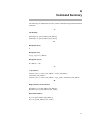
Error Codes
error 06D0: GT: Seek failed
This type of error occurs when a SCSI device is malfunctioning. Reset the system and
retry the command. If the error still occurs, suspect a device malfunction. Attempt to run
the I/O diagnostic programs and replace board(s) indicated.
error 06D1: GT: Load command failed
This type of error occurs when a SCSI device is malfunctioning. Reset the system and
retry the command. If the error still occurs, suspect a device malfunction. Attempt to run
the I/O diagnostic programs and replace board(s) indicated.
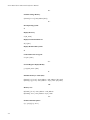
error 06D2: GT: Unload command failed
This type of error occurs when a SCSI device is malfunctioning. Reset the system and
retry the command. If the error still occurs, suspect a device malfunction. Attempt to run
the I/O diagnostic programs and replace board(s) indicated.
error 06D3: GT: Rewind command failed
This type of error occurs when a SCSI device is malfunctioning. Reset the system and
retry the command. If the error still occurs, suspect a device malfunction. Attempt to run
the I/O diagnostic programs and replace board(s) indicated.
error 06D4: GT: Space fwd file command failed
This type of error occurs when a SCSI device is malfunctioning. Reset the system and
retry the command. If the error still occurs, suspect a device malfunction. Attempt to run
the I/O diagnostic programs and replace board(s) indicated.
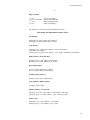
error 06D5: GT: Space back rec command failed
This type of error occurs when a SCSI device is malfunctioning. Reset the system and
retry the command. If the error still occurs, suspect a device malfunction. Attempt to run
the I/O diagnostic programs and replace board(s) indicated.
error 06D6: GT: Space fwd rec command failed
This type of error occurs when a SCSI device is malfunctioning. Reset the system and
retry the command. If the error still occurs, suspect a device malfunction. Attempt to run
the I/O diagnostic programs and replace board(s) indicated.
error 06D7: GT: Cannot seek to partition
This type of error occurs for an unexpected filemark or the End–Of–Valid–Data indicator
was hit during tape operations. Probable tape read error. Reset the system and retry the
command. If subsequent attempts also fail, secure a new tape and retry command. If, with
a new tape, the attempt fails, suspect the device is malfunctioning and should be replaced.
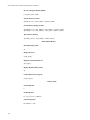
error 0972: CPU n failed interrupt reset: RHAC = X
Processor n could not reset all interrupt requests.
error 0973: CPU n IGA configuration ram xxx: expected xx
received xx
Processor n interrupt configuration RAM failed test.
B-11