1
Using 900MHz Wireless
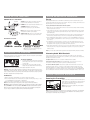
Connecting to an Audio Source
Using the Auxiliary Audio Input
Making a Direct Connection
Connecting to an A/V Receiver
1. Connect one end of the provided 3.5mm audio
in cable to the AUDIO IN jack on the bottom of
the speaker.
1. Plug the stereo plugs on the provided Y-adapter audio
cable into the AUDIO IN jacks on the back of the
transmitter (make sure to match the colors on the
plugs and jacks).
2. Connect the other end of the cable to the
headphone output on your MP3 player or other
portable audio device.
2. Plug the mini-plug end of the provided Y-adapter into
a mini-jack to RCA adapter (not included).
3. If the speaker isn’t already on, press and hold the
On-Off / RF-BT button to turn it on.
3. Connect the stereo plugs on the mini-jack to RCA
adapter to the corresponding left and right audio
outputs of your A/V receiver, amp, or other audio
source.
Note: The indicator light on the front of the
speaker does not change to show that you’re
using the direct connect audio input. It stays
the color of the wireless mode it’s in (Bluetooth
or 900MHz) even while you use the direct
connection.
Connecting to a Portable Audio Device
1. Plug the stereo plugs on the provided Y-adapter audio
cable into the AUDIO IN jacks on the back of the
transmitter.
2. Plug the mini-plug end of the provided Y-adapter into
the headphone output of your MP3 player or other
portable audio device.
4. To switch back to the speaker’s wireless
connection, disconnect the 3.5mm cable from the
AUDIO IN jack on the bottom of the speaker.
DC
IN
L
M
R
Warning: This product is designed to work with
line level outputs or headphone outputs only. DO
NOT connect it directly to speaker outputs as it will
permanently damage the speaker.
Streaming Audio with 900MHz Wireless Transmitter
1. Make sure the 900MHz transmitter is on and that there’s something playing on your audio
source. Turn your audio source up to at least 3/4 full volume.
2. If the speaker isn’t already on, press and hold the On-Off / RF-BT button for four seconds
to turn it on.
3. If the indicator light on the front of the speaker is blue (flashing or solid), press the On-Off
/ RF-BT button once to switch to 900MHz wireless mode. The indicator light starts flashing
green, which means the speaker is trying to link with the 900MHz wireless transmitter.
The indicator light turns solid green when the speaker is tuned to the 900MHz wireless
transmitter—you should hear sound coming from the speaker now.
Note: If the speaker is not linked to the 900MHz transmitter, or if the transmitter isn’t
connected properly, the indicator light will continue to blink. If this occurs, please see the
Troubleshooting section of this manual.
4. Adjust the volume on the speaker as desired. To switch back to Bluetooth wireless mode,
press the On-Off / RF-BT button. The speaker’s indicator light turns blue.
Notes: If you’re using a single speaker with this transmitter, keep the L/M/R switch on the
bottom of the speaker in the “M” position (for mono). If you’re using more than one speaker
with this transmitter, set the speakers to the “L” (left) or “R” (right) positions according to
their orientation to the listener.
Note: The 3.5mm audio direct connection suspends any Bluetooth or 900MHz wireless
streaming audio you’re listening to. The speaker plays only the direct connect audio when you
have something connected to the AUDIO IN jack on the speaker.
Turning the Speaker Off
1. Press and hold the On-Off / RF-BT button on the back of the speaker to turn the speaker off.
2. Confirm that the speaker is off by verifying that the indicator light on the speaker’s front
panel is no longer illuminated.
Troubleshooting
The following troubleshooting guide takes you through some of the more common problems
associated with the installation and/or operation of a wireless system. If the problem persists,
please call toll-free at 1-800-732-6866 or visit www.acoustic-research.com.
Issue:
Cause and solution:
No 900MHz
wireless sound
• Check that the transmitter AC power adapter is fully inserted into the wall outlet
and the power cord from the AC adapter is firmly connected to the transmitter
power input jack.
• If you’re using the speaker power adapter, confirm that it’s fully inserted into a wall
outlet and the adapter power cord is firmly connected to the power input jack on
the speaker.
The speaker automatically retunes if it loses the transmitter’s signal. You can also press the
Scan-RF / Pair-BT button on the back of the speaker to retune the speaker at any time.
• If you’re using batteries for the speaker, check that they are fresh and inserted
with correct polarity (+, –).
The transmitter turns off automatically if there is no audio signal present for a prolonged
period.
• Confirm that the speaker is in 900MHz wireless mode—the indicator light on the
front of the speaker should be either flashing or solid green. If the indicator light
is blue, press the ON-OFF / RF-BT button on the back of the speaker to switch to
900MHz mode.
Interference in the form of static and/or distortion can sometimes be heard. If this occurs,
confirm the transmitter/speaker adjustments and indicators. If the problem persists, refer to
the Troubleshooting section of this manual.
• Confirm that the speaker is turned on and tuned to the transmitter—the indicator
light on the front of the speaker should be solid green (not blinking).
• Check that the audio source component (stereo, MP3 player, etc.) is turned on and
transmitting sound as it normally should.
• Make sure the volume on your audio source is turned up.
• Check that the speaker volume is turned up.
• Make sure you have disconnected the 3.5 mm audio in cable from the AUDIO IN
jack.
T
•
•
•
•
•
•
*
e