1
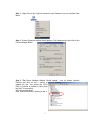
Step 1. Right Click on My Computer located on your Desktop or on your windows Start
Menu.
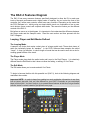
Step 2. System Properties window should appear; Click Hardware tab, then click on the
Device Manager Button.
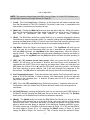
Step 3. The Device Manager Window Should Appear.
Devices and click on the + symbol to
expand the tree. You should see PCDJ
DAC-3 Controller # (number # varies from
the DAC-3’s connected).
Write this number down.
Now, close all windows by clicking on the X
3
Look for Human interface