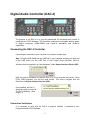
1
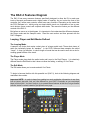
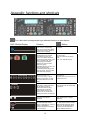
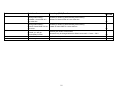
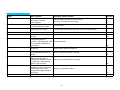
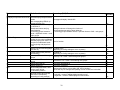
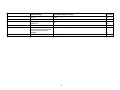
The DAC-3 Features Diagram
The DAC-3 has many awesome features specifically designed to allow the DJ to reach new
levels of dynamic performance and a higher realm of creativity. As you look at the front of this
controller you’ll notice many controls, which have many functions. Depending on the mode that
the PCDJ Software is in.. and by using one simple button touch or a combination of two or more
touch buttons, these controls will complete other tasks. This manual will show you the different
controls of the DAC-3.
But before we move on to the diagram, it is important to first understand the difference between
the Player mode and the Sampler mode. Read the next section and then proceed with the
DAC-3 diagram.
Looping, Player and Edit Modes Defined
The Looping Mode
A sampler is a device that copies a short piece of a larger audio track. These short pieces of
audio are technically known as “samples”. In the PCDJ Software these samples are called
“Loops”. A Loop, by definition, is a short length of sound that can be used to work into a mix for
creating greater effects of the music.
The Player Mode
The Player mode plays back the audio tracks and Loops in the Dual Players. It is selectively
different than the Edit Mode in that it does not allow the setting, or editing, of Cue Points.
The Edit Mode
The Edit mode allows you to create and edit Cue Points.
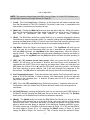
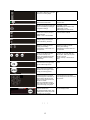
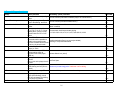
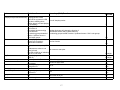
To begin to become familiar with this powerful tool (DAC-3), look at the following diagram and
read about the controls.
Important NOTE: In order to keep from getting too much subjective information at one time,
look at (touch, play with, feel, etc.) the features on your DAC-3 Controller as you read about
them in this section. You don’t have to try to operate these features at this time, but get familiar
with the “actual” controls instead of just pictures on a page.
14
9
1
2
6
13
8
10
4
5
7
11
4
12
3