1
Convey Notes Software User Manual
This guide will provide you with comprehensive
information on identifying software tools and
features, along with instructional lessons for using
the software itself.
For version 2.1.7 of Convey Notes Software
The information contained herein is subject to change without
notice. The only warranties for Dukane Products and services are
set forth in the express warranty statements accompanying such
products and services. Nothing herein should be construed as
constituting an additional warranty. Dukane shall not be liable
for technical or editorial errors or omissions contained herein.
Table of Contents
Chapter 1. Getting Started: A Guide to Your Toolbars
1
1.1 Installing and Starting your software………………………………………………………………………...........
1.2 Main toolbar definitions and descriptions…………………………………………………………………………. 2-5
1.2a-w Toolbar buttons outlined……………………………………………………………………………………….. 5
1.3 Functional Panel definitions and descriptions………………………………………………………………….. 6-8
1.3a Index………………………………………………………………………………………………………………………..…...
6
1.3b Setup(Interface)………………………………………………………………………………………………………….. 6
1.3c Setup (User Info)………………………………………………………………………………………………………..…7
1.3d User Manager………………………………………………………………………………………………………………. 7
1.3c External Resource……………………………………………………………………………………………………… 8
1.3d Geometry Pallet………………………………………………………………………………………………………….…..
8
Chapter 2. How To’s
2.1 How to insert media files………………………………………………………………………………………………... 9-10
2.2 How to add content to your Image Library………………………………………………………………………. 10-11
12
2.3 How to change users …………………………………………………………………………………………………………….
2.4 How to use the on-screen keyboard……………………………………………………………………………………13-14
2.5 How to annotate over slides, videos, & embed into Office files……………………………………...15-16
2.6 How to use your Tools………………………………………………………………………………………………………...16-21
2.6a Making a screen recording……………………………………………………………………………………………..16-17
2.6b Setting your Timer/Clock……………………………………………………………………………………………..17-18
18-19
2.6c Using your Spotlight function………………………………………………………………………………………….
2.6d Using Image Capture…………………………………………………………………………………………………… 19-20
2.6e Using your Wrap Screen………………………………………………………………………………………………….21
Convey v.2.1.7 Software for Windows
-1-
CHAPTER ONE- Getting Started: A Guide to Your Toolbars
1.1 Getting Started
Installation
Launching your Software
Go to the Start menu on the bottom left corner of your screen. Select the All Programs option
and navigate to the Dukane folder. Scroll to the Convey Notes program and select it to launch
the software.
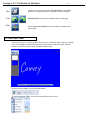
You will immediately be greeted by a blank screen that corresponds to the touch screen/active
area on your wireless tablet. On the bottom of the page, you will find your main toolbar.
Convey v.2.1.7 Software for Windows
-2-
1.2 MAIN TOOLBAR
1.2a
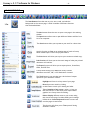
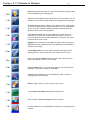
The Start Button allows the user to print, save, email, and edit the
background on the current page. It holds a number of different functions
that are detailed here:
The New button allows the user to open a new page in the existing
window.
The Open button allows one to open different folders and files from
his or her computer.
The Save buttons allow you to preserve your work for a later time.
Use this function to Close up an existing page of work as Convey
Notes remains open for the next project at hand.
The Print button will allow you to print your creation as a hard copy.
Print Preview will show you an electronic image of what your printed
document will look like.
The Export function will allow you to export picture, PowerPoint,
HTML, and PDF files.
Convey Notes allows you to Send your newly-created
document as an HHT, PDF, or PP attachment via email.
The Tools button is your window into a whole host of unique
options for your document creation:
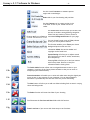
Highlight and focus in on key areas of your page.
Record your own movie by clicking
on this button to track your drawing and edits.
Take a Snapshot of any screen, region, or logo you
like with this tool. It will allow you to import those
graphics into Convey Notes for editing.
Hide or Display different areas on your screen using
this virtual cover page. Provides shading and coverage.
Utilize the on Screen Keyboard feature to enter text
onto the page via text boxes.
This function will allow you to Time yourself during
document creation.
Convey v.2.1.7 Software for Windows
-3-
Use this virtual Protractor to measure precise
angles and create designs.
Rulers aide in your line-drawing and precision.
Use the Compass tool to create precise circles
of all sizes- a click of your mouse controls its
radius.
The Switch User function allows you to shift from
one user to another among differing categories.
Select from any number of files to choose a
customized Background Picture for your page.
You can choose from an array of Color palettes
to tint your Convey Notes creation.
This function enables you to Erase your chosen
background picture with one click.
Information About the version number and
copyright can be found here.
System Setting will allow you to adjust certain
pen functions as you see fit: width, smoothness,
and transparency.
Selecting Exit will allow you to end your session
with Convey Notes. Be sure to save your
information before closing down.
1.2b
The Switch Mode function allows one to navigate between screens on your
computer- in and out of the Convey Notes software so that you can work on
multiple projects simultaneously.
1.2c
Screen Annotation will enable you to write and make notes using the digital pen
on any screen, in any program on your computer. You can then embed the
annotation to permanently save the text in the file you are annotating.
1.2d
The New button will allow you to add new slides including fresh screens in varying
colors and backgrounds.
1.2e
The Delete function will erase the slides of your choosing.
1.2f
1.2g
Scroll between the Previous and Next slides with this function.
Zoom in and out of your screen with these easy-to-use functions.
Convey v.2.1.7 Software for Windows
-4-
1.2h
Rover lets you pull the screen up, down, and all around to get the best
view and optimize your drawing space.
1.2i
The Pen is the straightforward writing device of Convey Notes- you can
choose your own color and line width as you navigate across the pages.
1.2j
1.2k
1.2l
The Brush lends an artist’s edge to your creations- short, swift strokes
for your more detailed work. Stroke width and color are customizable
for you. This tool is pressure sensitive and the stroke width will be
altered as more or less force is applied.
The Laser Pen enables you to bring attention to certain points of
interest on the screen with its draw and fade function. Ie: circle a
point of interest and the mark will fade away as you move your cursor
to another area of the screen.
Highlight text or pictures in any number of shades with Convey Notes
highlighter function- adjust the level of transparency and thickness of
the pen to your liking.
1.2m
The Intelligent Pen allows you to draw perfect shapes with its selfadjusting feature. Draw a swirl and it will create a circle for you.
1.2n
Insert text with the Text Box function- draw a box and type in your
text using any kind of font or color scheme.
1.2o
Using the Media function, you can insert pictures and video into your
document, along with a variety of multimedia.
1.2p
The Select tool enables you to choose different items or areas for
copying, pasting, and layering.
1.2q
1.2r
Erase by region, pixels, or you can clear it all at once.
You can Select Pen Width and thickness with this tool.
1.2s
Alter your pen’s Color and Texture with this function.
1.2t
Use this feature to set your Fill Color and texture for the shapes you’ve
created.
Convey v.2.1.7 Software for Windows
-5-
1.2u
Create your own recording with the File Recorder for immediate
playback or to display your work’s progress for a later showing.
1.2v
Undo and Redo buttons serve as simple editing of your page.
1.2w
Use the Stretch and Rotate function to expand or minimize the
main toolbar.
1.3 FUNCTIONAL PANEL
Look to the left on your Convey screen. You will notice a tab bordering the side of your page.
Click on that sidebar to expand the Functional Panel which includes your Index, External
Resource, Geometry Palette, Setup, and User Manager fields.
At the top of the sidebar, you’ll notice the header:
To navigate between fields, click on the flowered icon to the far left:
Convey v.2.1.7 Software for Windows
-6-
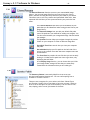
1.3a
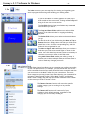
The Index serves as your one stop shop for viewing and organizing your
work-in-progress slides along with handling your editing needs:
If you’ve used Rover to create graphics on areas of the
slide outside of the screen area, clicking on Bird’s-Eye will
bring it all into view on one screen.
The Cut Slide function lets you eliminate any unwanted
work/slides as you see fit.
The Copy and Paste Slides enable one to select slides
directly in the Index window for copying and editing
purposes.
The Delete Slide allows you to select and erase slides as
you go.
Format the order of your slides using the Move to Top or
Bottom functions. Simply select the slide you’d like to be
listed first or last, click the corresponding key, and the
slides will be reorganized for you.
The Move to Upper and Lower keys allow you to select a
slide that you’d like to be moved higher or lower in the
cache. Just click these keys as many times as necessary to
continue to move up or down in the slide order.
Using Multi-Select Mode makes your editing a snap- it
enables you to select multiple slides at the same time in
order to make any changes you see fit.
1.3b
The Setup (Interface) allows you to customize your toolbars according
to your own preferences. For example, you may decide that one of the
tools/commands from the Start menu should be more accessible and thus
you can move it to the Main Toolbar for your convenience. There are
three categories you may choose from when selecting your commands for
relocation: Writing Mode Toolbar, Office Mode Toolbar, and Desktop
Mode Toolbar. Simply drag and drop the chosen command to the toolbar
on the screen you’d like to access it from.
The Restore Current function will return the specific
toolbar category you’re working in to its previous
settings.
The Restore All function will restore all of your
toolbars to their default settings, regardless of the
category you are currently working in.
Convey v.2.1.7 Software for Windows
1.3c
-7-
The Setup (User Info) allows you to change and edit your user
information, including password, icon, name, and background.
The Changing Icon function allows you to browse
through any files on your computer to locate an
icon that you feel suits your personality.
The Changing Password button allows you to
revise your password for security purposes.
Change and validate your User Name with this
key.
Set a default Background color or picture with
this function.
Set or check on your Default Save Path in this
area.
The Restore Current function will return the
specific user settings you’re working in to their
default setup.
The Restore All function will restore all of the
users saved in Convey to their default settings,
regardless of the specific user you are currently
working in.
1.3c
The User Manager allows you to monitor and organize the users
within the Convey software. You can add as many users as necessary, set
start-up defaults, and switch between users as you see fit. (Note:
Customized settings and saved data are password protected for each
user)
Add or Delete Users as necessary with these keys. (Note:
setup includes option of password protection)
Select the Switch Users function to move between fields
and to view the saved data or other accounts.
The Set as Startup User key allows you to set a user as a
default account that automatically loads with each startup
of the software.
Convey v.2.1.7 Software for Windows
-8-
1.3d
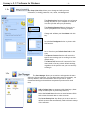
The External Resource function serves as your customizable Image
Library. You can save image files from any source into your Convey
Notes software and drag and drop them into your slides as you choose.
This allows you to craft very creative and specialized slides. Also, data
imported into this library is User-protected under your particular user
name.
The Favorite Resource tab allows you to bookmark any file
paths that you find beneficial when saving picture files to your
image library.
The Resource Manager lets you edit your default file paths
(note: file paths are your method for adding new images). You
can also move between your categorized image libraries within
the manager.
The Upwards function helps you navigate through the various
folders on your computer in order to add new image files.
Show/Hide Tree View controls how you view your computer
file paths.
Normal Mode displays your file paths on the left side of the
screen in the common tree view that most computer users are
accustomed to.
The Show Root key reveals the root file that you are currently
looking in- it hides the file path/tree view to get there, only
displaying the end folder.
In the Display Usage function, you can choose how you’d like
your image folders arranged so that they are most easily
viewed with the information that you are looking for.
1.3e
The Geometry Palette is extremely helpful as it serves as your
principal mathematical drawing tool. You can craft anything from a
rhombus to a Cosine function.
There are two categories for you to select tools from: Planar Figure
and Function. Simply click on the shape or function you want, and then
draw in the screen space as you would normally. You can control color,
size, shaping, and of course, placement of the item.
Convey v.2.1.7 Software for Windows
-9-
CHAPTER TWO- How To’s
2.1 How to Insert Media Files
Note: Convey Notes is compatible with the following media/image files:
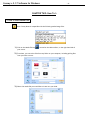
1.) Click on the Media File key
, located on the Main toolbar, on the right hand side of
your screen.
2.) From here, you can select files from any folder on your computer, including pulling files
from your User account:
3.) Select the media file you would like to insert into your slide.
Convey v.2.1.7 Software for Windows
- 10 -
4.) Once you have selected the image or media, click on your slide and use the cursor to
expand the size of your file. Once you are done with the sizing, your media file is ready
to play!
2.2 How to Add Content to your Image Library
Remember that you can pull image files from any source. You can access those images/pictures
through the External Resource tab in your Functional Panel (Using Tree View). The following will
show you how to add images specifically to your Image Library within the External Resource tab.
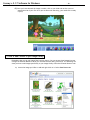
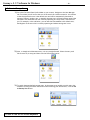
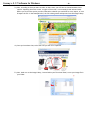
1.) Locate the image you’d like to add and right click on it. Select Save Picture As.
Convey v.2.1.7 Software for Windows
- 11 -
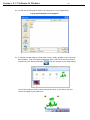
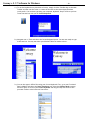
2.) You will use the following file path to save the picture in your Image Library:
C:\programfiles\Dukane/Convey\ImageLib
3.) To add the selected image to a slide within Convey, simply navigate to your Functional
Panel (Sidebar), click on the External Resource option, and click on the second button
from the left- your Resource Manager:
This will lead you to your Image Library.
Click on the image you’d like to insert and use the cursor in your slide to size and
format the image to your preference:
Convey v.2.1.7 Software for Windows
- 12 -
2.3 How to Change Users
1.) Go to the Functional Panel (left sidebar on your screen). Navigate to the User Manager
tab. From here you will notice that one of the users has a red box around it- this informs
us that that particular user is the default user and will be automatically launched at
startup of Convey. Another user, or possibly the same one, will have brackets around the
username. This delineates the user currently operating in Convey Notes, also known as
you. For example, in the tab below, you can see that Intermediate is the default user,
but Beginner is the user who is currently operating and whose settings are in use.
2.) Now, to simply switch between users, it is very straightforward. Select the user you’d
like to move to (ie: Amy) and then click the Switch User button:
3.) To switch between default startup users, do the same as you would to switch users, but
instead of clicking the Switch User button when selecting your desired user, click the Set
as Startup User button:
2.4 How to Use the On-Screen Keyboard
Convey v.2.1.7 Software for Windows
- 13 -
1.) To use the keyboard on a plain slide in Convey, simply click the Text Box key on the Main
Toolbar and then use the cursor to create the text box to the size and specifications
you’d prefer. You can then type using your computer keyboard. Step 2 will show you how
to use the text box with your on-Screen Keyboard.
2.) Navigate over to Tools and select the Screen Keyboard option. You are now ready to type
in the text box. You may use either your Wireless Tablet or mouse to do so.
3.) You can also type in Office files using your Screen Keyboard. First, go to your Functional
Panel (sidebar) and select the Setup (Interface) tab. Select the Desktop Mode category
and scroll down to click on your Screen Keyboard and drag and drop the function into
your Main Toolbar at the bottom of the screen:
Convey v.2.1.7 Software for Windows
- 14 -
4.) Open up a document in any Microsoft Office file and click on the keyboard icon in your
Desktop toolbar on the bottom of your screen. You will now be able to type anywhere
within the text fields.
2.5 How to Annotate Over Slides, Videos, & Embed into Office Files
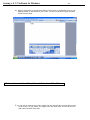
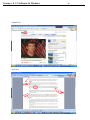
1.) If you wish to annotate over video, simply click the Annotate key and proceed to write
on the screen, via your tablet, as though it were any other slide. You can do this with
web videos and static files alike.
Convey v.2.1.7 Software for Windows
Dynamic File:
Static File:
- 15 -
Convey v.2.1.7 Software for Windows
- 16 -
2.) When making annotations, you may want to permanently mark and save your edits in the
documents you are working on. You can do this by embedding your annotations. Once
you’ve annotated on your document, click on the embed function on your Main Toolbar
at the bottom of your screen to permanently alter the document:
2.6 How to Use Your Tools
2.6a Making a Screen Recording
1.) Click on the File Recorder
lower part of the screen.
2.) Select the Record option:
, located on the right hand side of the Main Toolbar on the
Convey v.2.1.7 Software for Windows
- 17 -
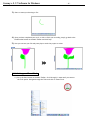
3.) Start to create your drawing or file:
4.) Once you have completed your work, or wish to finish your recording, simply go back to the
File Recorder button on the Main Toolbar and click Stop.
5.) Now you can save your file and press play to watch the project in action:
»
2.6b Setting your Timer/Clock
1.) Go to the Start button on the Main Toolbar. Scroll through it’s menu until you come to
the Tools option. Navigate through the Tools and click on Timer/Clock.
Convey v.2.1.7 Software for Windows
- 18 -
2.) The Timer/Clock is mobile and can be dragged around the screen until you find an
appropriate place to drop it. You may also choose to make it digital. Any Timer options
can be found by clicking on the clock itself.
3.) You can choose to put the tool in either clock or timer mode. In clock mode, the hours
are recorded in military time. In timer mode, you can decide whether you’d like to
simply time yourself, or to set a countdown time to control how long you spend
completing a task. The countdown can be set for any length of time between 5 and 60
minutes. Your options include Stop, Pause, and Reset. You may also alter the
transparence level of your timer/clock according to your preference.
2.6c Using your Spotlight Function
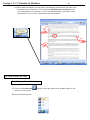
1.) You can highlight different areas of the page with the Spotlight function. To access this
key, navigate through your Start menu and head over to Tools. Select Spotlight and your
screen should change immediately:
Convey v.2.1.7 Software for Windows
- 19 -
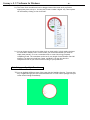
2.) To change the settings of your spotlight, click anywhere on the screen.
3.) You can edit the level of transparency, the color, and the shape of your moving Spotlight:
2.6d Using Image Capture
1.) Image Capture can be very helpful when importing pictures, logos, or media files into your slide
creations. Start out by finding the image you’d like to capture. This can be static (unmoving) or
dynamic (video). The video file, however, will only be captured in a freeze frame.
2.) Navigate through your Start menu, click on Tools, and select Image Capturer. The Capture Image
screen will appear:
Convey v.2.1.7 Software for Windows
- 20 -
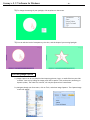
3.) Now, according to what you want to select on the screen, you will have to choose between three
options: Capturing the entire screen, a region of the screen, or an anomaly (hand-selected area).
Before you click on the option you want, first select whether you would like to save, import, or save
& import the file. In the example below, the file is being saved and imported into the Image Library:
4.) Once you have done that, select the area you wish to be captured.
5.) Now, head over to the Image Library, located within your Functional Panel, to use your image file in
your slides:
Convey v.2.1.7 Software for Windows
- 21 -
2.6e Using your Wrap Screen
1.) The Wrap Screen is slightly similar to the Spotlight feature, in that it can cover areas of the screen. The
Wrap Screen allows you to selectively show different areas of the screen, covering or shading othersvery useful for quizzes.
2.) Navigate through the Start panel to the Tools menu and select Wrap Screen.
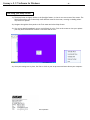
3.) Your screen should immediately turn to a solid block of color. Click on the screen to view your options:
your may alter the direction in which it can move and its color.
4.) Once your settings are in place, feel free to click on your wrap screen and move about your computer.
AS3 and Convey are registered trademarks of Dukane Corporation