1
Part V. Software Usage
< 5.1 > Initial Handle Configuration
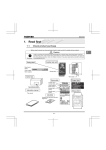
After hardware & software installation, please take the following steps to configure the handle.
( 1 ) Prepare the notebook computer installed with utilities software
( 2 ) Connect to the handle via the handle data input cable ( DLS-201 )
( 3 ) Make sure the handle in power ON status
( 4 ) Configure the handle according to the UI
( 5 ) After finish the handle configuration, please repeat the steps for other handles One by One
Handle Data Input Cable
DLS-201
To
USB port
To
handle data
connector
If the OS platform of the notebook computer is MS Windows 7, please take the following steps :
- Right Click Utilities , and then Select “ Properties “.
- Click the “ Compatibility “ tab.
- Tick the box “ Run this program as an administrator ”, and then Click “ OK ” .
If don’t take the above steps, the UI will not display properly.
Page 27
www.RackmountMart.com