1
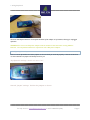
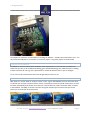
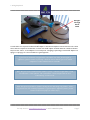
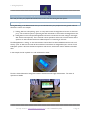
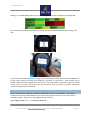
Adding Peripherals Introduction This document will explain the procedures necessary to add peripherals (scales, PIT-tag readers, etc) to the Digital Fish Science Application. For instructions on the use of the Application in general, download the “User Manual: DFS/2” from www.bigfinscientific.com. Background Peripherals which transmit and/or receive “serial” data can be connected to the Digital Fish Science Application. Examples of serial data protocols are: RS-232, RS-485, USB and Bluetooth Wireless, among others. The primary method by which to make the signal connection to the Digital Fish Science application is via Bluetooth, since this method requires the least amount of additional hardware (sometimes none). The other available method is via USB, in-conjunction with the Big Fin I/O Hub and possibly RS-232-to-USB adapters, depending on your hardware. This document will cover how to connect to your devices using Bluetooth, or BT for short. If your serial peripherals (a scale, for example) does not have BT built-in, we’ll use a USB or RS-232-to-Bluetooth adapter. Serial Settings For the DFS application, you’ll need to use the following serial settings (which are set on each of your peripheral devices): Data bits: 8 Parity: None Stop bits: 1 (one) Flow control: none Bits per second: 9600 Bluetooth Serial Adapters In this document, we’ll assume you have a scale which does *not* have Bluetooth built-in. In order to “BT-enable” your scale, we’ll use a Bluetooth “dongle” or adapter which makes the translation from RS-232 (wired serial) and BT (wireless serial). It translates in both directions. Bluetooth Adapter Description We use the following adapter: Microchip RN-270M (previously Roving Networks, now Microchip). Technical information on this adapter can be found here: http://ww1.microchip.com/downloads/en/DeviceDoc/rnbt-srl-um-1.0r.pdf For help, write to: [email protected] or call 512-808-0FIN (0346) Page 3