1
4.
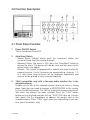
TALK
You must connect a microphone to the system before you can use this
button. This function can only be used in case of manual operation or in
the "alarm ON" mode. Select your channel and press the button. Press
the TALK button and speak if you only want to be able to address your
visitor. Use a camera with a two-way audio function if you want to be
able to converse with your visitor.
5.2 Troubleshooting
Incorrect use of the system may cause problems and may result in
malfunction. Before calling in a qualified technician, you should use the
following checklist first. You can still contact your dealer for a more
detailed inspection if the checklist is unabled to provide a solution.
The system does not come on even though the ON/OFF button is
pressed.
Check to see if the power cord is connected securely.
The picture is not clear.
Check the image controls (e.g. contrast, brightness, ...).
Everything is displayed in mirror image.
Check to see if there is a glass surface in front of the camera. If not, contact
your dealer for further examination.
No image is displayed.
Make sure the video cable and the camera are connected securely.
CAMSET6
12
GB