1
The Next Generation
SUPERLOG
ADVANCED ELECTRONIC NOTEBOOK
BY KSoft
Over the past two years, LOG Electronic Notebook has quietly been creating a revolution in personal information management. Designed to
emulate a familiar pencil and notebook, LOG Electronic Notebook can do for random infonnation what a spreadsheet program does for
numbers.
Now, even the best has been improved! KSoft is pleased to announce SUPERLOG, the next generation of the LOG family. SUPERLOG is
not a patch! It is a totally rewritten version of the original LOG concept, fully compatible with the LDOS 5.1.3 operating system currently
endorsed by Tandy.
SUPERLOG retains all of the versatile features of LOG while adding many new options requested by professional users: Floppy or hard
disk. Any number of LOG files per diskette. 1 to 32767 pages per file. Password protection and error checking. New text editing commands
include automatic text Wrap-Around. Expand and Delete for entire lines, a Page Copy command, and an Undo key to reverse editing
changes. Cursor motion is more flexible with new key commands plus a Forms simulator. The SEARCH function is greatly enhanced with a
Wild-Card character, case-independent search, and multiple word search at 10 pages/second.
Also Note: SUPERLOG is now fully interrupt activated; it may be accessed from practically any foreground task including LDOS Utilities,
LBASIC, LSCRIPT, EDAS, etc. with non-destructive return to the foreground program. No other information management program is this
versatile!
Write or call Today! We’ll be glad to tell you about SUPERLOG and what it can do for you!
SUPERLOG Specify Model I or Ill
$119.95
LDOS 5.1.3, 48K, and 2 Drives required.
(Model IV version to be offered soon.)
LOG
TRSDOS versions, Models, I,III still available.
KSoft
(601) 992-2239
318 Lakeside Drive
Mastercard and Visa accepted.
Brandon, MS 39042
Add $5.00 for shipping and handling.
(TRSDOS is a trademark of Tandy Corporation)
(LDOS is a trademark of Logical Systems Inc.)
THE LSI JOURNAL
OCTOBER 1983
Volume 2, Number 4
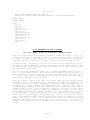
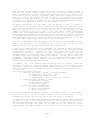
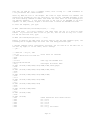
CONTENTS
INTRODUCTION FROM LSI:
ARTICLE SUBMISSION POLICY .................................................
VIEW FROM THE BOTTOM FLOOR ................................................
A CASE OF MIS-ALLOCATION ..................................................
NEW PRODUCT ANNOUNCEMENTS .................................................
Page 2
Page 3
Page 8
Page 14
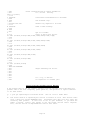
FROM OUR USERS:
The Electronic InBasket ................................................... Page 15
Fast Graphics for ’LC’ .................................................... Page 16
Using Interrupts and SVCs in FORTRAN ...................................... Page 19
REGULAR USER COLUMNS:
... er ... Earle Robinson at large ........................................ Page 28
* PARITY = ODD * Tim Daneliuk ............................................. Page 31
’C’ What’s Happening - Earl Terwilliger ................................... Page 34
FROM THE LDOS SUPPORT STAFF:
Items of General Interest ................................................. Page 38
updates, patches and clarifications
LET US ASSEMBLE - Rich learns yet more assembler .......................... Page 40
LDOS: HOW IT WORKS - Using non-relocatable code ........................... Page 50
"Foreign" machine code, and other stuff in high memory discussed
THE JCL CORNER - by Chuck (sort of) ....................................... Page 52
Automatic Chaining with JCL ............................................. Page 52
Letters from the Customer Service Mailbag ................................. Page 54
LDOS and SuperSCRIPSIT .................................................... Page 55
MAX-80 Memory Map ......................................................... Page 58
Performing DATE Conversions in BASIC ...................................... Page 60
LES INFORMATION - by Les Mikesell ......................................... Page 61
View From Below the Bottom Floor .......................................... Page 64
Copyright (c) 1983 by Logical Systems, Incorporated
8970 N. 55th Street P.O. Box 23956
Milwaukee, Wisconsin 53223
Main switchboard: (414) 355-5454
LDOS Hotline: (414) 355-4463
Page 1
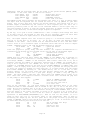
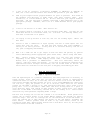
The LSI Journal policy on the submission and payment for articles is as follows:
Articles sent for consideration must be submitted in the following format:
1.
2.
A cover letter, summarizing the content and intent of the article
A printed hardcopy (lineprinted or typewritten) of the article. Desired
print effects and formatting should be indicated where necessary.
A diskette with--
3.
4.
5.
A ’plain vanilla’ ASCII text file containing the article. The text
should be free-form, but if any tables or other structured data is
present, the file should be formatted as 87 characters per line, and
62 lines per page, with no headers or footers. Do NOT send SuperSCRIPSIT
or Newscript files. Also, please do not embed print effects.
If the article involves assembly language programs, include both
the source code and the object code.
Any other necessary files or patches should also be supplied in
machine readable form.
Please do not send in printed text without a diskette, as it will NOT be considered for
publication. Payment will be made in the form of an LSI product, or $40 per published
page in the current LSI Journal format.
The size of the article will determine the
value of the LSI product available as payment.
Please include your name, address, telephone number and LDOS serial number with your
submission, firmly attached to your hardcopy printout, and affixed to the diskette you
submit.
LSI is extremely interested in seeing submissions from our users, and is open to
suggestions on any ideas for the LSI Journal
Submissions should be sent to:
The LSI Journal Editor
c/o Logical Systems, Inc.
8970 N. 55th Street
P.O. Box 23956
Milwaukee, Wisconsin 53223
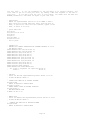
UNIX is a trademark of Bell Laboratories
MAX-80 is a trademark of LOBO Systems, Inc.
PC-DOS and IBM-PC are trademarks of IBM Corp.
TRSDOS is a trademark of Radio Shack/Tandy Corp.
MS-DOS and XENIX are trademarks of Microsoft, Corp.
WordStar is a trademark of MicroPro International Corp.
CP/M, CP/M-80, and CP/M-86 are trademarks of Digital Research, Inc.
The LSI Journal is copyrighted in its entirety. No material contained herein may be
duplicated in whole or in part for commercial or distribution purposes without the
express written consent of Logical Systems, Inc. and the article’s author.
Page 2
VIEW FROM THE BOTTOM FLOOR
by Bill Schroeder
Yes, there is now an LDOS 5.1.4!
OK, what did LSI do to 5.1.3 to make it 5.1.4? From the standpoint of the DOS itself,
5.1.4 is simply a needed change in the version number after a dozen or so patches.
This means that 5.1.4 contains all patches to date, some are VERY IMPORTANT, others are
less important, and some that are just plain arbitrary. New functions have been added
that make this a very valuable update for our LDOS users and a must for Model 4 users.
A BIG FEATURE OF LDOS 5.1.4 IS THAT THE ORIGINAL FED (LSI FILE ZAPPER) IS NOW INCLUDED
WITH THE LDOS 5.1.4, AT NO EXTRA CHARGE!!!
FED
is the famous LSI
utility that allows simple maintenance and updating of all
LDOS-type files. FED originally sold for $40 and was recently reduced to $19 with the
introduction of FED-II. Sure, there is an ulterior motive. First, I would like all of
our users to have the power of a FED-type program, and then again there is FED-II. I
believe that when our users find out how handy FED is, they will become purchasers of
our FED-II product. I may be wrong, but in any case, the LDOS user benefits.
A NEW HIGH SPEED BACKUP UTILITY (QFB) COMES WITH LDOS 5.1.4
I have often been asked if LSI could provide a FASTER method of creating a "mirrorimage" duplicate of an LDOS-type disk. Well, 5.1.4 has this feature in a new program
ca1led "QFB" (for Quick Format and Backup). This new utility will duplicate a disk in
about half (or less) of the time that a FORMAT/BACKUP sequence takes. QFB and its
documentation are provided at no additional charge with a 5.1.4 update. Please note
that QFB is for mirror-image backups of standard LDOS-formatted diskettes only.
IMPORTANT NOTE:
|===================================================|
| FED and QFB are NOT included with smal-LDOS 5.1.4 |
|===================================================|
The cost to update to 5.1.4 is just $10 ($5 with ESA). This is an important and
valuable update, so please send in your master disk (disks in the case of Model 1) and
let LSI update your system. The official date of 5.1.4 is September 1, 1983. There
are still many 5.1.3 systems available from LSI dealers and from Radio Shack and these
can and should be purchased without worry that they are not 5.1.4 versions. ANYONE WHO
PURCHASES THE FULL LDOS 5.1.3 SYSTEM AFTER AUGUST 1, 1983 IS ENTITLED TO A FREE 5.1.4
UPDATE AT ANY TIME! Note: Proof of purchase date is required and must accompany master
disks sent to LSI for this "FREE" update.
Another item worthy of comment is
the NEW name for the LDOS Quarterly. It is now
called the "LSI JOURNAL". The name change was necessary, because our publication will
be addressing many wide and varied topics in the future. For the present, LDOS and its
related products will
be the main thrust of this publication but in the future many
other topics and products will
be discussed. The new name more aptly describes the
future route of our publication. For those perceptive folks, you may realize that the
removal of the word QUARTERLY from the publication could mean that a more frequent rate
of publication may be in the offing. You never can tell ....
More "news" is that the cost to receive the LSI JOURNAL has been reduced.
Effective
immediately, a four issue subscription is just $14.95! Subscriptions to the LSI JOURNAL
are now available to ANYONE. That’s right, there is no requirement to be a registered
owner of any LSI product. LSI will continue to bring you this publication, full of
straight forward technical and user information, from professionals, and with very
little advertising material.
Page 3
The ESA program is no longer available but all existing ESA agreements will be HONORED
TO THE LETTER until expiration.
We have opened up the LDOS SIG (Special Interest Group) on microNET/CompuServe to the
public so that all LDOS and TRSDOS 6.x users, or anyone else for that matter, can now
access this bulletin board service. Note: You must be a current member of CompuServe
to use this service.
Occasionally, I get a letter from an LSI customer, who complains about LSI offering a
new generation of a product or a drop in the price of an existing product. I would like
to address this issue.
First of all, let’s discuss purchased products and updates. Updates are just that. They
are intended to correct defects or oversights in a released product. When we enhance a
product, it is not the same thing. For some reason, some software purchasers have
placed the software industry in a category previously unknown in a capitalistic
economy. An industry where a purchase by a customer creates a permanent responsibility
to provide future enhancements or version changes at little or no cost to that
customer. I can’t think of another industry that is ever expected to provide this type
of customer support or service.
There is no way that a non-cottage industry company
could function on this basis.
Witness the many, many software companies that are no
longer in business due to their attempts to satisfy these unrealistic expectations.
To bring the issue very close to home, look at the TRS-80 software industry.
I
guarantee you that as you look through the software you have purchased over the past
two years, you will
find that over half of the providers of those products are no
longer around to provide any type of support, enhancements, or upgrades. Tough industry
to stay afloat in-- don’t you think?
Now look elsewhere in the industry. I have purchased many printers for LSI, often to
find that within months (in one case days) that the manufacturer dropped the price,
enhanced the product, or in most cases did BOTH at the same time. Was I upset or did I
feel used or abused?
Of course not, things change, markets change, competition
changes, production costs and techniques change, and on and on. I want to see things
progress and I am quite willing to pay the price for that progress. The advancements
in computer hardware and software have to be paid for and the companies involved must
make a profit.
About nominal cost upgrade to new versions of a product I can only say... HOW?
Some
letters I receive indicate that an upgraded or enhanced version of a product should be
provided for free or at nominal cost because the customer supported the original effort
by purchasing the product. COME ON NOW! I purchased an MX-80 when it first came out. I
have also purchased a radar detector, pocket calculators, digital watches, 35mm
cameras, color TVs, air conditioners, new cars, FM personal radios, VCRs and dozens of
other items shortly after they were introduced for consumption. Within a year or so of
purchasing every one of these items, I could have bought a BETTER VERSION, FOR LESS
MONEY! Why? Simply because the manufacturer was able to continue to upgrade and enhance
the original product to create better, cheaper, more desirable versions of the product.
It should be clearly noted that NOT ONE of the companies that manufactured or sold me
these products offered any type of TRADE-IN, UPGRADE, UPDATE, or even a token discount
for support of their original version.
Nor would I have been so naive as to have
expected one.
I believe that I got what I paid for with every one of these products. I bought the
item as it was designed, for the price as marked. No one held a gun to my head or
forced me to buy the first, second or third generation of a product. When and what to
buy was MY choice. Yes, a later generation of a product is usually better and costs
less, but I had the use of the item for the ensuing time period until that next version
became available. I certainly did not expect the company to let me trade up to a new
VCR or SLR camera at a nominal update fee. If I wanted the newer model, I sold, gave
away or threw away the one I had and BOUGHT the NEW version.
However, whenever I
purchased a product that did not function as I was lead to believe, I insisted that it
Page 4
be repaired, replaced, upgraded or as a last resort that I be allowed to return it for
a full refund.
In all fairness though, I would only expect these options within a
reasonable time frame.
If one is not willing to accept progress in technology as the "way of things" then, it
would be safest to never buy anything, unless it has been out of production for ten or
more years. In that case, you probably won’t ever have a new version of the product to
feel bad about.
Which brings me to another point. The customer who decides to purchase a new, probably
incompatible computer. I own a VHS format video tape recorder. If I decide to go out
and buy a BETA recorder, knowing full well that these two formats are incompatible, I
certainly can’t tell
the stores were I bought my "VIDEO SOFTWARE" (tapes) that they
should or have to give me BETA-type copies of the movies at a nominal charge. I’d be
thrown out of the store.
Alternatively, if for some strange reason the store did do
this type of thing, it would soon be bankrupt.
In spite of this, some of our customers think LSI should "GIVE" them Model 4 versions
of our products. Why? Well, because they once bought the Model-III version.
Now I
ask you, did Radio Shack "GIVE" you a Model 4 computer on the basis that you have one
coming because two years ago you were nice to them and bought a Model-III? I doubt it.
Yet, with all this as common knowledge to ALL of the American consumers, there is still
a strange perception about software suppliers.
It’s almost as though some of our
customers think that writing software is a very simple process and, therefore, is worth
very little.
It is very expensive to design, write, test, debug, document, publish,
advertise, and support GOOD computer software! Many of the software suppliers have not
made the financial grade and are no longer around for disgruntled customers to complain
to. Maybe they should not have used as much of their resources providing upgrades to
working products, each of which lost them money.
It is your choice to buy a MAX-80 or a Model 4, or any other computer that LSI is
supporting or is going to support in the future. It is your choice to get CP/M or any
other OS, and yes, some of our products are coming out on CP/M, XENIX and MS-DOS. We
do not intend to offer upgrades or updates or trade-ins under these circumstances. LSI
policy will be to update ONLY the same product title, same product series for the same
computer and operating system.
These updates will be for ERROR corrections only.
Enhanced or second generation products and the same product for a different environment
must be purchased.
I often hear from customers and other people in the micro industry how terribly
profitable the software industry is. That is plain ignorance speaking (or maybe too
much belief in what Wayne Green has said in 80-Micro). If this industry was all a "bed
of roses" then I ask you, why is the failure rate of young software companies SO high?
It is not common for companies that are making high profits to go out of business, with
many unpaid debts. Watch the magazines. Watch the software companies come and go.
Better yet, if you are one of the people who thinks this industry is so easy to make
money in, you should take the Great American Alternative and start your own software
company, or try to make a living as a independent software author. The odds are very
much against success, but some will succeed and become financially strong. These are
the ones with FIRM, FAIR and PROFITABLE policies regarding their goods and services.
Take FED and FED-II as examples.
FED is one of LSI’s most popular utilities.
The
original FED sold hundreds of copies but has not yet even paid for its development.
FED-II cost over twice as much to develop. We priced the original FED at $40, when we
introduced FED-II we dropped the price of FED to $19 and offered the new version FEDII, at the $40 price. Yes, a better product for the same money! Now we have included
the original FED on LDOS 5.1.4 for (almost) FREE. Well and good, but all this does not
change the fact that FED and many of our other products are efforts to support our
operating systems and are not likely to become profitable products to LSI. Some day,
with our ongoing enhancements to FED and rewriting it in "C", for use on other
machines, LSI may break even on the product, or possibly even make some profit on it,
but I doubt it.
Page 5
The FED example is not unique. LSI has in the past and will in the future, invest tens
of thousands of dollars on
support items for our product lines. Some of these will
recover their costs, some will make a profit, but alas, most will be "losers" as stand
alone products. Many LSI
products are slated as non-profit products when they are
started.
They are created to support our products and our most valued asset, our
customers.
Software economics and the profitability of a software company is hard to understand
and/or control. Most software companies and customers have very close personal ties to
the computer industry in one fashion or another. Most are programmers and computer
enthusiasts first and business people second. Not a good ordering of things if the
company is going to be here some years from now.
LSI intends to be in this industry for a long time to come. We will be fair with our
policies, but not to the overall detriment of LSI. That would be a detriment to our
customers as well. The ULTIMATE in bad support is having the company you buy a product
from go out of business.
We doubt that this will happen at LSI, because we do not
intend to give away our products. Many software companies have failed for this reason,
and this reason alone.
I should make one thing very clear-- I do not believe that a defective product is the
responsibility of the customer. The software provider has a responsibility to provide
updates,
at a modest handling cost,
to repair defects found in any version of a
product. The customer has the right to expect that. But if the product is purchased by
the customer and it functions as advertised and documented at the time of purchase,
then the customer has gotten what he agreed to pay for at the time of purchase and
should not expect more.
I have had many questions about our software protection plans for the LSI 6.x products.
First of all,
I must say that we have no intention of changing our stated RIGHT TO
PROTECT OUR PROPERTY.
Those who disagree and feel that by purchasing an LSI product
they should have complete ownership rights to that product, with the right to duplicate
it whenever and for whomever they like, are morally, legally, and ethically incorrect.
Secondly, we do NOT have the intention at this time of protecting more than a selected
few of our products. We will be protecting products that we have found to be the most
likely to be pirated. We do get calls daily from thieves, some of them openly admit to
having pirated copies of our products, and justify this, with some assinine reason why
THEY have the right to STEAL FROM US. I for one am just plain sick of it. Most other
companies in this industry are taking a similar stand and with good reason. VISICORP,
MICROSOFT,
TANDY and many others are now protecting at least SOME of their products
from illegal duplication. So whether users like it or not, they will have to get used
to
it.
Even the much acclaimed and probably the most owned utility in the TRS-80
industry is FULLY BACKUP PROTECTED. This is of course SUPER UTILITY from Powersoft.
In the last issue I spoke of our plans to provide SOME of our products for the Model 4
(6.x OS) on disks that only allow a limited number of backups. This is certainly our
right and we are providing several items in this manner. We are under no obligation to
provide unlimited reproduction of our property. The number of backups that can be made
from these products will vary from 3 to 25 depending on the nature of the product and
how often someone offers to sell me a pirated copy of my own software. We are not going
to indicate when and if a product will be protected or the type of protection that will
be used.
The packaging of protected products will carry a clear warning (visible
without breaking the package seal) indicating the number of backups, if any, that can
be made from the master. If this is unacceptable to the customer, and the product has
not been opened, the product may be returned for an immediate refund.
At this time, only Model 4 products will be subject to limited backup protection.
Future LSI products (for all environments) may be provided on backup-proof media. If we
elect to take this step, we will provide two or three MASTER copies with each package.
Page 6
When you buy a computer, YOU GET ONE! At LSI we have many products which we purchase
for use on XENIX, CP/M, MS-DOS and LDOS, some of which are provided on backup-proof
media. We have no problem with this concept or the use of these products. We feel this
is the right of the software producer. Of course, it is the right of the customer not
to buy the product. If you enter the world of the IBM-PC, you will find that programs
on protected media are very common.
One decision that we are quite sure of is that LSI WILL BE SUPPORTING MS-DOS, CP/M and
XENIX with future products. This is a market of the future and LSI will be there.
We feel that many of our products and our superior after sale support make many LSI
products good bargains.
In the interest of fairness
to our customers, we wish to do something that most
retailers would never do, tell them well in advance of planned price increases.
Effective with our January 1984 catalog, you will see rises in the retail price of MOST
of our products. The increases will vary from little or nothing to as much as several
times
the present price.
You have plenty of time to take advantage of our present
pricing and acquire the items that are of interest to you. I recommend that you do so
now, because as of the first of next year, you can expect to pay more for those items.
LSI IS NOW LICENSING THE LDOS 6.x SYSTEM TO THIRD PARTY IMPLEMENTORS
As of September 1983, LSI began making available FULL licenses to the LDOS 6.x system!
LSI will provide COMPLETE LDOS 6.x SOURCE CODE to outside companies so that the LDOS
6.x system may be quickly made available on many diverse machines. Our licensing terms
are much more liberal
than those of other OS licensing companies, and a lot less
expensive. There are many, many details involved in these licenses and it would not be
appropriate to go into them at this time. But, if there is a computer that you think
the LDOS system "should" be on, let the manufacturer of that machine, and LSI know.
These implementations will all be media and software compatible with other LDOS 6.x
systems within the limits of the hardware. For instance, almost any Radio Shack Model 4
software should run on these other machine implementations, without change!
This is, of course, due to the nature of the 6.x SVC system. Any programmer writing for
the 6.x version need only use the SVC structure in the documented manner, and the
software will run on other systems with no problems. The beauty of the 6.x architecture
is that there are NO HARD ADDRESSES, STORAGE LOCATIONS or VECTORS, at all!
There are several
OEMs and some well known OS implementors either considering this
program or already in it. In the next issue of the LSI JOURNAL, I will be announcing
some of the machines being supported and the companies who are doing the
implementations. Many of our customers will be very pleasantly surprised.
ABOUT SOME NEW PRODUCTS (and SPECIALS)
By the time that you read this, you should be able to run down to your nearest Radio
Shack store and pick up a copy of the MODEL 4 TECHNICAL MANUAL, Catalog Number 262110. This is without a doubt one of the best manuals ever published by Radio Shack. We
have heard many negative comments about the superficial nature of the Model 4 user’s
manual.
The "USER’S" manual
was
intended as just that. No programming or system
interface information was provided (or intended). The release of this technical manual
should clear up all questions regarding the 6.x system and its functions. This document
is the ONLY TRSDOS 6.x (LDOS 6.x) official specification.
Every effort will be made to maintain full upward compatibility to this spec as the 6.x
system is expanded. Any use of the system in ANY WAY that is not stated in this spec
will cause program compatibility problems. There will be other publications that may
Page 7
provide incorrect information regarding things that we have every intention of
changing. So, beware! DO NOT USE ANY FUNCTION or SVC THAT IS NOT DOCUMENTED DIRECTLY
BY LSI or RADIO SHACK.
There are many changes planned for the future of our 6.x
product. Don’t become the victim of unofficial information. THINK! Get a copy of the
official Model 4 Tech Spec from Radio Shack and treat it as the "BIBLE TO 6.x". You’ll
be happier in the long run.
Now how about a year end special just for Model 4 owners? We have LS-FED II at $49,
LS-FM at $49, and LS-QFB/COMP at $39, for a total of $137. But from now until December
31, 1983, you can get all three for just $98. That’s right, for the price of LS-FM and
LS-FED II alone, you get the LS-QFB/COMP package thrown in. Don’t pass this one up.
Beat the price increases.
The savings amount to OVER 28% OFF the combined retail
prices. When ordering this special offer specify the "LSI MODEL 4, TOOLKIT SPECIAL" and
you will get all three products for just $98 plus $5 shipping and handling.
CP/M for your Model 4 is now available. CP/M 2.2 has been adapted to your Model 4 by a
company called MONTEZUMA MICRO. We have a copy here for review and it seems to be fully
functional.
For complete information or ordering this product, contact MONTEZUMA
MICRO, CP/M group, P.O. Box 32027, Dallas, TX 75232 or call (214) 339-5104 and ask for
John, John or John (I think you must be named JOHN to work for these people). With this
package your Model 4 will be able to function as a true CP/M machine. Why wait, and
wait, and wait, and wait... You can have CP/M now (if you need it).
The number one TRS-80 author, BILL BARDEN has outdone himself once again and produced a
book entitled, "HOW TO DO IT ON THE TRS-80". This is the ultimate in TRS-80 reference
material and covers the MODs 1,2,3,CoCo,etc. No TRS-80 owner, whether user, programmer,
or novice should be without this fantastic book. To this end, LSI has purchased a fair
quantity of these "fellers" and is making a special offer to our LDOS users. The book
normally sells for $29.95, but while supplies last (and we gots, lots) you can get this
great and USEFUL book for just $25 plus $4 shipping and handling if ordered alone, or
$20 plus $2 if ordered with more than fifty dollars worth of other LSI products. I am
so confident that you will agree that this book is the most valuable reference guide in
your library, that if you don’t agree, SEND IT BACK and we will cheerfully refund your
money.
By the end of 1983 LSI hopes to have released several of our products on PC/MS-DOS. We
have made a rather large commitment to enter and support the IBM-PC and MS-DOS
environment. We will bring to those products the quality and support that you have come
to expect from LSI products. We want to stress however, that we intend to continue our
support of the Z-80 market as we move into the 8088/86 and 68000 markets. We are going
to try very hard to continue in both the 8 and 16 bit machines.
A CASE OF MIS-ALLOCATION
by Bill Schroeder
Getting a file onto a diskette is not a simple process. Let’s take a closer look. When
an operating system is asked to create a file, it must first go to the directory and
establish a "directory entry". This is done by placing the filespec and other assorted
information into the directory.
Now that the file exists in the directory, data will probably be written to the file.
To write to a newly created file, the operating system must now find a piece of storage
area on the disk (a granule) at which to start writing the data.
Sounds simple so
far... well, maybe not.
There are many ways in which an operating system can select just where to start this
file. I will describe and discuss a few of them, starting with the method used in LDOS
5.1.3 and before.
Page 8
This method is to randomly select a cylinder on the disk in a fairly balanced pattern
ranging from the first cylinder on the disk (#0) through the highest numbered cylinder
on the disk. The first granule on the selected cylinder is examined. If the granule is
found to be in use or flawed, the system will begin to move upward through the
cylinders and through each cylinder’s set of granules (e.g. toward the inner tracks).
The system will check each granule on the way, looking for a vacant usable one. As soon
as an acceptable granule is found, it will be assigned in the GAT and in the file’s
directory entry as the first granule of that file.
Other variations on the above theme usually involve some type of weighted selection of
where to start looking for space on the disk. I will now refer to the random allocation
methods as the "RANDOM" method. The algorithm used to select this random location can
be written to force the selection to be a number, below the directory, above the
directory, on the lower 1/3 or 1/4 of the disk, and on and on. In the case of LDOS
5.1.3, the algorithm attempts to select a cylinder randomly from the entire disk.
Another method of selecting file space is very simple. I will call this method the
"CONTROLLED" allocation method. This method simply starts to search at a given spot on
the disk and progresses upward through the cylinder numbers until an acceptable space
is found.
Usually the search will
start at cylinder #0 or #1. Space will then be
allocated solidly from the low numbered cylinders (e.g. the outer tracks) to the high
numbered cylinders.
Now, some "systems analysts" have taken sides on exactly which method of space
allocation is most efficient and reliable for micro floppy disk usage. I must first
state that when I started to check out the "real world" implications to the user, I did
not think that it could make much of a difference one way or another. But after some
experimentation, significant results were obtained. Programs were written, and the
results were obtained from actual testing. It became quite apparent that one side of
this argument is totally wrong! One method is far superior to the other in all tested
cases.
Listed below are the main points that were posed to LSI in a letter from a prominent
systems programmer.
He is very much in favor of RANDOM allocation techniques. His
opinions have been very highly regarded by the TRS-80 user’s community. These points
were brought to LSI ’s attention as a result of our decision to alter the methods of
allocation used in current and future LSI operating system products.
No supportive
facts, mathematical analysis, or test results were provided to support this
individual’s position.
1) Random allocation provides more uniform wear of the media surface.
2) Random allocation minimizes the average access time across the media.
3) Random allocation minimizes the number of extents more so than most other methods.
4) Random allocation will cause the use of less directory records. Since the number of
extents that can be retained in each directory record is finite (four), a new
directory record (extended directory entry) must be used when the primary directory
entry is filled. In LDOS this happens when a file contains five or more extents.
The letter went on to strongly protest even the consideration of such a radical idea as
no longer having RANDOM allocation in LDOS OS products. It even stated this RANDOM
technique to be the HEART of the LDOS file handling system. After testing, analysis,
and careful consideration of these claims and assumptions, I now believe them to be
totally inaccurate.
Now let us review each of these claims for the RANDOM methods:
POINT #1, makes no sense at all. The reason is very simple. All operating systems that
do not retain the entire disk directory in memory MUST make frequent directory accesses
to locate, OPEN, CLOSE and access records in files. Also, with an overlay based system
like LDOS, the operating system itself must go to the directory every time it is
Page 9
necessary to change the overlay which is currently in memory. What all this points to
is simple. The directory cylinder will fail from wear long before any other cylinder on
the disk wears out.
To validate this statement, tests were performed to make actual
counts of the accesses of each cylinder on a disk under varying circumstances. These
tests proved that under all uses of the LDOS operating system the directory cylinder
was accessed five to fifty times more often than any other cylinder.
It is also known that the use of higher cylinder numbers (inner tracks) is much more
likely to cause disk faults such as parity or CRC errors. This is because the bits of
data are packed much closer together on the inner cylinders. The data density on the
inner tracks approaches the maximum reliable resolution that current floppy systems can
attain.
POINT #2. The concept of RANDOM placement has little bearing on file access timing. If
the file starts at a RANDOM cylinder on the disk it has the same probability of
starting at cylinder 0, as say, cylinder 39. It does not sound like faster access would
be attained on these files.
That’s just the beginning of the problem. If a file should start on one of the upper
cylinder numbers (say above 35 on a 40 track disk), it will have a very good chance of
wrapping around to a low numbered cylinder. This results in the file being broken and
another extent created. A similar action will occur every time a file needs to acquire
another gran and the next physical
gran on the disk
is unavailable. If RANDOM
allocation is beginning to sound a little silly, well hang on, IT GETS WORSE.
Because most user’s diskettes are between 60 and 80 percent filled with files, I must
assume that any allocation technique other than full RANDOM is better for rapid access.
A pure RANDOM technique has the possibility of using both extremes on a disk and
nothing near the directory. CONTROLLED allocation will progress toward the directory
until the disk is half full, then it will continue on the other side of the directory.
The two extremes (cylinders 0 and 39 used) cannot occur until the disk is almost 100%
filled.
It is very important that an operating system tries to keep a file as contiguous as
possible. Based on our actual testing, I have found that this could be a valid reason
to have RANDOM allocation... if there is only one file on a disk, and the file is not
very large, and the RANDOM starting granule is near the directory.
Just to verify these statements, I created files using a test program, using both the
RANDOM and CONTROLLED methods. Then I OPENed, READ and CLOSEd the files in a manner
which assured that a similar number of files were accessed and the same number of
records were read. Surprise! Here too, CONTROLLED access was consistently faster. In
general, the disk access time was about 15-20 percent faster.
POINT #3, a real bummer here.
My actual tests were quite conclusive in this regard.
The average number of file extents generated by the RANDOM method was about 2.0 extents
per file. The average from the controlled method was much better at about 1.3 extents
per file.
POINT #4, My answer to point number three said enough. However, certain other things
were tabulated during my tests. As pointed out earlier, a directory entry can only hold
a finite number of extents. In the case of LDOS 5.1, this is four. If the system needs
a fifth extent it must use an FXDE (extended directory entry). This entry will use up
an additional directory slot, and extended directory entries are very time consuming to
the system, under all conditions. Therefore, I counted the number of files that were
stored with five or more extents during the testing.
Again, the test results proved my contention that RANDOM allocation is not the best
method. When using RANDOM allocation, nineteen files (or more than 15%) required five
or more extents. The CONTROLLED allocation method, on the other hand, produced only one
file with five extents.
Page 10
In the spirit of fairness,
I would like to point out one condition under which the
RANDOM technique may be a better method. This is during a period of alternate extension
of two files that are open at the same time (or opened alternately). If this case
should arise with CONTROLLED allocation, the two files will occupy alternate granules
as they expand. This would be a very inefficient file layout. If a program does extend
files alternately, the RANDOM technique would serve this type of program better than
the CONTROLLED method.
However, most programs that use multiple large files tend to
capture large blocks of space at a time. "Space capture" techniques that are used by
well
written applications tend to eliminate this problem. This concept is generally
referred to as file pre-allocation. LDOS does make provision for pre-allocating files
(see the "CREATE" library command in your LDOS manual).
I do not find this point to be serious for three reasons. First, there are very few
programs that use a file creation procedure that would induce this problem. Second, if
this situation does occur, it is very easy to correct the space usage under CONTROLLED
allocation by a simple BACKUP $:S :D. This will cause any fragmented files to become
contiguous, providing the backup is to an empty disk. Last is the reliability factor. I
strongly believe that not utilizing the inner tracks on a floppy disk for as long as
possible is far more important than this benefit of RANDOM allocation.
If a disk full
of files has become badly fragmented, it can easily be put "back in
order" under CONTROLLED allocation. With a RANDOM system, good luck. Every time files
are written (backup by class and copy are no exceptions) the RANDOM technique is used.
Therefore, the disk will almost always have fragmented files no matter what is done.
With the CONTROLLED type of system, a simple backup by class will place all the files
on the disk into a minimum fragmentation state (the most efficient).
How many times does a PARITY ERROR or DATA RECORD NOT FOUND ERROR occur? In most cases,
this is the fault of the hardware,
and
is most likely to occur on the inner disk
cylinders. While is the fault of the hardware or media, the operating system could
help! If the OS uses CONTROLLED allocation starting at the low numbered cylinders and
proceeds inward, the use of the most error prone areas of a floppy disk is avoided. The
inner cylinders will be used only as the disk is almost full. If you have a drive that
is slightly out of alignment or a head with low output, it is possible not to fill the
disks over 3/4. This would keep all the files below track 30. This type of control is
not available in a RANDOM system.
Since we have begun using CONTROLLED allocation
(starting at track #1), we have had a marked decrease in the occurrence of disk faults!
This in itself is a perfectly valid reason for the change.
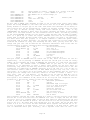
I have included my test results in chart format. For those of you who are ambitious, I
am making the test program itself available. If you are a die-hard believer in RANDOM,
don’t take my word for it. Examine the test program and run it yourself. I have the
results and will
never again allow the use a RANDOM allocation scheme in any LSI
operating system.
At LSI we try to do things correctly and pride ourselves in the technical accuracy of
our products. If we make a mistake, we will admit it and we will fix it. On the very
important concept of allocation, however, it seems that we did not take as much care in
deciding on a method as we should have. We fell for the hype that the RANDOM concept
was the greatest thing since the Z-80. For this oversight, I sincerely apologize. I
will make every effort to see to it that any future design decisions are made purely on
facts, and not on heresay or personal opinions or "guesses".
All 5.1.x MASTER duplication disks at LSI will be altered to incorporate the CONTROLLED
allocation method as of disks with FILE DATES of September 1, 1983. NOTE: See VIEW FROM
THE BOTTOM FLOOR for complete UPDATE details.
In TRSDOS 6.1 and any future LDOS 6.x or LDOS 5.x operating system, all allocation
searching will begin at track number 1. The patch to allocate from track number 1, on
all LDOS 5.1 products, is as follows:
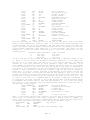
.PATCH TO ALLOCATE STARTING AT CYLINDER #1
. apply to SYS8/SYS.SYSTEM on LDOS 5.1.x
Page 11
D00,FE=2E 01 00 00 00 00
.
. EOP
This can be applied as a command line patch by entering the following at LDOS Ready:
PATCH SYS8/SYS.SYSTEM:0 (D0,FE=2E 01 00 00 00 00) <ENTER>
The ’01’ in the above patches is the track number at which all allocation searches will
begin.
If you have any intention of changing back and forth between allocation schemes (I
can’t see any reason for RANDOM, however) or might want to be changing the starting
track number that your system will use, then JCL is what you need. JCL will let you
create custom commands for your system. This one is fairly simple but shows the basic
ability of JCL. This JCL file will create a command that has the following syntax: ’DO
TK (RND)’ or ’DO TK (TK=nn)’ or just ’DO TK’. The ’nn’ is of course, a user selectable
track (TK) number.
. ALLOCATION SETTING JCL - FOR USE WITH LDOS 5.1 - 06/01/83
. Set SYS8/SYS to Allocate from track TK.
. If Tk is not specified it will be set to 01
.
//IF -TK
//ASSIGN TK=01
//END IF
.
. If RANDOM (RND) not requested then patch in CONTROLLED
//IF -RND
PATCH SYS8/SYS.SYSTEM:0 (D0,FE=2E #TK# 00 00 00 00)
//EXIT
//END IF
.
. If RND is specified, Allocation will be set to RANDOM.
.
PATCH SYS8/SYS.SYSTEM:0 (D0,FE=D5 CD 4E 44 D1 6C)
//EXIT
A test program was created to perform the test. The function of the program was to
create files as a user might and then kill them. The program is not really important
though,
as long as the same program is used to test each mode of allocation. The
program’s creation, deletion and access activities are not intended to duplicate the
wide variance of actual
system usage. Instead, they are intended to provide a yard
stick by which the two allocation methods can be compared
I DO NOT claim that this
program accurately represents ANY particular type of actual disk usage.
What I did was run the test program with the operating system set for RANDOM and then
again with the operating system set for CONTROLLED (SYS8 properly altered). The
computer was a stock Radio Shack Model
III.
The operating system was LDOS 5.1.3
(06/10/83). Scotch diskettes were used. The step rate of the test drive was set at 6ms.
For speed I SYSRESed overlays 2,3,8,10.
Note: Make sure that SYS8 is patched to the desired test method before SYSRESing it!
Patching SYS8 on the OS will not alter the one that is already resident in high memory.
It is also NOT advisable to SYSRES SYS8 if the ACCESS SPEED test is to be performed
because this will
alter results
in favor of the RANDOM mode. This is because more
extents and, therefore, additional accesses to SYS8 are likely to be required by the
RANDOM mode.
Speaking of using the SYSRES command, here is a simple /JCL to handle multiple SYSRESes
for you.
Page 12
. RES/JCL - 06/01/83 - Simple MULTI-SYSRES command
. To USE ENTER "DO RES (1,2,3... )<ENTER>"
. 1,2,3... etc. are the SYS modules to be "RESed"
//if 1
system (sysres=1)
//end if
//if 2
system (sysres=2)
//end if
//if 3
system (sysres=3)
//end if
//if 4
system (sysres=4)
//end if
//if 5
system (sysres=5)
//end if
//if 8
system (sysres=8)
//end if
//if 9
system (sysres=9)
//end if
//if 10
system (sysres=10)
//end if
//if 11
system (sysres=11)
//end if
//if 12
system (sysres=12)
//end if
Now back to the subject at hand. The maximum file size was set to 600 records for all
runs.
Each run was done THREE
times. The runs with the lowest and highest average
ratios were discarded.
This, in effect, tends to remove the extremes. The remaining
"median" runs are tabulated below.
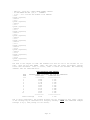
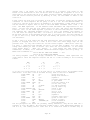
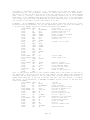
FILE ALLOCATION TEST RESULTS
TEST
RUN#
====
1
2
3
4
5
6
7
8
9
10
AVERAGE NUMBER OF EXTENTS PER FILE AT COMPLETION
RANDOM ALC.
CONTROLLED ALC.
===========
===============
1.818
1.397
1.945
1.367
1.794
1.342
2.145
1.275
1.950
1.315
1.867
1.262
2.075
1.288
2.347
1.386
1.895
1.365
2.212
1.325
===========
===============
Overall Average
2.005
1.333
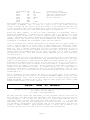
Due to space constraints, the program listings are not included in this issue. Copies
of the listings may be obtained for no charge by sending a LARGE self-addressed stamped
envelope (6 by 9, with postage for two ounces).
Page 13
N E W
P R O D U C T S
Many people have requested a high level HOST/TERMINAL environment to use with the 6.x
system. We have created such an
program, called FourTALK, which will be available
shortly. This package includes a complete HOST system that works in conjunction with
the TERMINAL portion of the package. The TERMINAL portion is set up look like a Radio
Shack DT-1, emulating an ADDS-25 terminal. Full cursor positioning, reverse video, etc.
are supported. Another feature of this program is the availability of all the features
of "COMM", to make the emulation of the ADDS much more powerful than just a terminal.
Full upload and download are available for file transfer as well as spooled printer
support and all
the other high level functions of COMM while maintaining an ADDS-25
protocol for the handling of the video and keyboard.
The HOST will allow you to remotely operate your Model 4, with full cursor positioning
in the ADDS-25 mode. With this package you can use a DT-1 as a remote work station to
your Model 4 or another Model 4 as an ADDS-25 terminal, for use with the Model 12/16
under XENIX, or as a terminal to a Model 4 running the HOST portion of the package.
The ever popular WordStar word processing system is now available for use on LDOS 5.1.
It is supplied on smal-LDOS, and is available for the Models 1 and 3 (or 4, in the 3
mode). The special introductory price of just $249 plus $5 shipping and handling will
be in effect until December 31, 1983. The regular price will be $395. If you always
wanted the power of WordStar on your TRS-80, then NOW IS THE TIME. Order W-37-010 for
Model 1, and W-37-020 for Model 3 and MAX-80. We are working on the popular MailMerge
option, and it should be available shortly.
The LDOS QUARTERLY ANTHOLOGY, LSI Catalog Number L-49-110, which contains all of Volume
#1 of the LDOS QUARTERLY
is now available for just $19 plus $3 for shipping and
handling. This is a complete reprint of all the issues in volume #1, just as they were
originally sent to our LDOS users. The anthology is provided "three hole drilled",
ready for placement in any standard three ring binder.
LS-TBA, LS-FEDII, LS-FM and LS-HELP for the Model 4 running under TRSDOS 6.x (LDOS 6.x)
are now being shipped.
DiskDISK is a brand-new package that we should be be shipping by the time you read
this. With this package, you can create a file on a disk that appears to the system to
be another disk drive! That’s right, if you have a double-sided 40 or 80 track drive,
or a hard drive, you can create "logical drive partitions" as files on the physical
drive. ALL system functions are available as though this file were an actual physical
drive. Now you can have a disk within a disk. These DiskDISKs can be used as though
they are just another disk drive. Even mirror-image backups function in a normally.
This concept is much more versatile and powerful than the use of "partitioned data set"
type files. There are no restrictions on reading and writing to these DiskDISK files as
there are with other concepts. You can now partition your hard drive as "logical"
floppy drives. This keeps groups of related files together, and makes backup and file
maintenance a breeze. DiskDISK is just $99 plus $3 shipping and handling. DiskDISK, LSI
Catalog Number L-35-211
is for LDOS 5.1 systems, and LS-DiskDISK (L-35-212) is for
LDOS/TRSDOS 6.x. For hard drive users this is a "MUST HAVE" item.
Another NEW PACKAGE for the Model 4 6.x system is LS-QFB/COMP 6.x. This is the new high
speed "Quick Format and Backup" utility and our popular disk and file compare utility
combined into one package for just $39 plus $3 shipping and handling. With COMP you can
compare two FILES or two DISKS and find out about every byte that does not match
between the two. Output is provided to the video or optionally to your printer. With
QFB you can create byte for byte duplicates in about half the time that format and
backup would do the same job.
This neat package will make your Model 4 even more
pleasant to use. Order LSI Catalog Number L-32-010. NOTE: QFB will NOT create copies of
backup limited or protected disks.
Page 14
THE ELECTRONIC INBASKET
by Gordon B. Thompson, 5 Bay Hill Ridge, Stittsville, Ontario, Canada K0A 3G0
Telephones: Voice (613) 836-3554 and Electronic Inbasket (613) 836-5578
The Electronic Inbasket is a
message collector. It sits
calls. Upon the detection of
banner,
and then collects
character. When the caller
appended to a disk file,
processor.
simple BASIC program that makes a Model I or III act as a
there, on the end of a modem, and waits for any incoming
carrier by the modem, the program responds with a suitable
the message and displays it on the screen, character by
disconnects and the carrier vanishes, the message is
all
formatted for printing out in your favourite word
This program makes use of the REFLEX filter, which appeared in "The Communicating
Micro" in the LDOS Quarterly for October 1982. With REFLEX, the INKEY$ instruction can
capture the data coming in over the modem. For this service, input must be character by
character with a check for carrier between each character to make the program safe from
hanging due to not receiving a carriage return character or logoff from the caller.
The use of REFLEX also allows the keyboard of the TRS-80 dedicated to this service to
be used while a message is being received, should one wish to communicate with the
sender in real time. No command is necessary, just start typing, and the local machine
running this program will act just like a half duplex terminal. The characters typed
this way are sent to the distant party by the REFLEX filter. The Electronic Inbasket
operates in half duplex, and does not echo the incoming data stream. If it were to echo
the incoming stream,
characters entered at the local keyboard would get sent twice,
once by REFLEX and once by the echo routine. The disk routine can be activated from the
local
keyboard by typing a "EOM" or CONTROL D, <SHIFT DWN ARROW><D>. This will not
cause the communications link
to sever, however, as no break signal is sent to the
caller’s modem.
Output to the communication line makes use of the device independent features of LDOS.
An OPEN statement is used to open the file "*SI", and all outgoing data is sent via the
PRINT # command to that "file". These two tricks, the use of REFLEX for incoming data,
and the OPEN"O",0,"*SI" statement, greatly simplify the handling of the communications
line in this particular case.
Because of differing screen formats, and other vagaries, the program is designed to put
its major output onto a disk along with the requisite print control statements so the
output can be formatted by a word processing package. My favourite word processor is
NEWSCRIPT,
so the ELECTRONIC INBASKET contains NEWSCRIPT’s control words. Other word
processors, like SCRIPSIT, would require other control sequences.
For stability purposes, the program only opens the disk file at the end of a message,
and then immediately closes it again, clears all variables, and returns to its waiting
state with a clean slate. Not all messages are short, or simple.
In normal use, a second telephone line is needed to run this service. A Model I, a
single disk drive and an auto-answer modem complete the hardware requirements. The
communication specification will be 300 baud, even parity and half duplex if the RS232
driver is set as indicated.
The new Model 100 is simply great at sending messages to the older Models I or III
running this ELECTRONIC INBASKET program, and the 100’s TELECOM specification should be
set to M7E1D for this purpose. However, not until we learn how to make the Model 100
detect the presence of carrier, as opposed to mere incoming data, and how to receive
that data character by character with an interleaving carrier detect routine, can the
100 replace its older brothers in this Electronic Inbasket service.
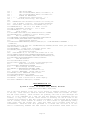
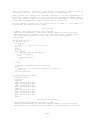
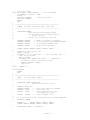
100 ’ * * * Electronic Inbasket * * *
110 ’ Note:
120 ’ Requires LDOS with the following configuration:
Page 15
130 ’
SET *KI KI(TYPE)
140 ’
SET *SI RS232R(DTR=Y,RTS=Y) for Model I, or
150 ’
SET *SI RS232T(DTR=Y,RTS=Y) for Model III.
160 ’
FILTER *KI REFLEX/FLT
170 ’ * * *
Communications Specification: * * *
180 ’
300 Baud, Even Parity, Half Duplex.
190
200 ’ REFLEX/FLT uses different locations for storing its
210 ’ flag in Models I and III. This routine determines
220 ’ which model, and then sets the REFLEX flag to on.
230 M=PEEK(&H125):’ See if it is a Model I or III.
240 IFM=73 POKE&H4413,1:GOTO270:’ It’s a three.
250 POKE&H401A,1:’ It’s a one.
260 ’
Setup routine.
270 CLS:CLEAR 5000:DIM C$(100):PRINT"Started at "+TIME$
280 PRINT"Waiting...":OPEN"O",1,"*SI":’ Reentry point.
290 ’
Main or Waiting Routine.
300 POKE&H3FFF,32:FORN=1TO50:NEXT:GOSUB460:IFB=0GOTO330
310 POKE &H3FFF,&H2A:FORN=1TO50: NEXT:GOTO300
320 ’
Opening Banner Routine.
330 FORN=1TO50:NEXTN:PRINT#1,CHR$(13)+CHR$(10)+"* * THE ELECTRONIC INBASKET *
*"+CHR$(10)
340 PRINT#1,"Date and time are: "+TIME$+CHR$(10):PRINT#1,"Please leave your message and
then disconnect."+CHR$(10)
350 PRINTTIME$:’ Screen print of message arrival time.
360 PRINT#1,CHR$(13)+CHR$(10)+">";:PRINT">";
370 ’
Get Character Routine.
380 ’ With REFLEX on, it can come from either *KI or *SI.
390 A$=INKEY$:GOSUB460:IFB<>0THENGOTO480ELSEIFA$=""GOTO390
400 PRINTA$;:B$=B$+A$:L=LEN(B$):IFA$=CHR$(8)B$=LEFT$(B$,L-2)
410 IFA$=CHR$(04)GOTO480ELSEIFA$<>CHR$(13)GOTO390
420 ’
Line End Routine.
430 C$(K)=B$+CHR$(13):K=K+1
440 A$="":B$="":GOTO360: ’ Go back for next message line.
450 ’
Modem Carrier Detect Subroutine.
460 A=INP(&HE8):B=AAND(&H20):RETURN
470 ’
End of Message and Disk Routine.
480 OPEN"E",2,"MESSAGE/TXT":PRINT#2,TIME$
490 ’
Word Processor commands are for
500 ’ Prosoft’s NEWSCRIPT. Change them to suit.
510 PRINT#2,".br":’ NEWSCRIPT control word.
520 FORL=0TOK:PRINT#2,C$(L);:NEXTL
530 PRINT#2,".sk 2":’ NEWSCRIPT Control Word.
540 PRINT:’ Insert a blank line on screen display.
550 CLOSE :CLEAR5000: DIMC$(100) :GOTO280
FAST GRAPHICS FOR ’LC’
by Scott A. Loomer, 315 Palomino Lane, Madison, WI 53705
(608)-233-7739 or MNet [70075,1033]
One of the fine features of the ’LC’ is its library of graphics routines. In addition
to the set, reset and test functions familiar in BASIC, there are routines for line,
box and circle drawing.
These routines are primarily the work of Karl Hessinger and
Karl
is to be commended for a fine job. The line drawing (and consequently the box
routine) is very fast, but the circle routine is slowed by its use of calls to the
floating point routines in ROM. This article introduces a circle routine which replaced
the LC
library circle routine in version 1.1. This routine is approximately twenty
times faster than the current one.
Note that there are no floating point math or
trancendental
functions used. Also presented is a routine that will fill in an area
that is continuously bounded. The FILL routine is non-recursive which means that it
Page 16
does not use calls to itself. It is very regular in the manner in which it fills an
area and is, therefore, more pleasing than the typical recursive approach.
These routines were adapted from algorithms presented in the book "Fundamentals of
Interactive Computer Graphics" by Foley and Van Dam (published by Addison Wesley,
1982). This book is a must for anyone interested in computer graphics. Most algorithms
in the book are demonstrated in Pascal which is easy to convert to ’C’.
The new graphics functions that are listed here may be added to a user library by
following the instructions in the LC manual.
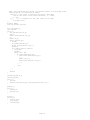
Circle Routine
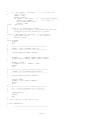
/* CIRCLE - fast circle plotting by Scott A. Loomer
Adapted from Fundamentals of Interactive Computer Graphics by Foley and Van Dam
This routine will plot circles using a fast, non-floating point algorithm. Syntax
and return codes are identical to the circle function in the LC IN/LIB. */
#option INLIB
circle(funcod,x1,y1,r1)
int funcod,x1,y1,r1;
{ int d,dx,dy;
if (funcod > 1 || funcod < 0) return(-3);
dx=0;
dy=r1;
d=3-2*dy;
while (dx<dy)
{ circlepoints(funcod,x1,y1,dx,dy);
if (d<0) d=d+4*dx+6;
else
{ d=d+4*(dx-dy)+10;
dy--;
}
dx++;
}
if (dx==dy) circlepoints(funcod,x1,y1,dx,dy);
d=r1/2;
if (((x1+r1)>127)||((x1-r1)<0)||((y1+d)>47)||((y1-d)<0))
return(-1);
else return(funcod);
}
circlepoints(funcod,x,y,dx,dy)
int funcod,x,y,dx,dy;
{ int tdy,ty;
tdy=dy/2;
pixel (funcod,x+dx,y+tdy);
pixel (funcod,x+dx,y-tdy);
pixel (funcod,x-dx,y-tdy);
pixel (funcod,x-dx,y+tdy);
tdy=dx/2;
pixel (funcod,x+dy,y+tdy);
pixel (funcod,x+dy,y-tdy);
pixel (funcod,x-dy,y-tdy);
pixel (funcod,x-dy,y+tdy);
return;
}
Non-recursive Fill Routine
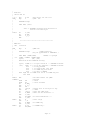
/* Non-recursive Fill Algorithm - by Scott A. Loomer
Adapted from Fundamentals of Interactive Computer Graphics by Foley and Van Dam
When given an x,y coordinate in an area bounded by contiguous border or the screen
Page 17
edge, this algorithm will change all internal pixels to the border value.
calling syntax: fill(funcod,x,y) where:
funcod - is the value of the fill character, which must
also be the value of the border character, 0 = reset,
1 = set
x,y
- is a coordinate in the area (must not be equal
to border char)
*/
#option INLIB
int top,sx[l28],sy[128];
fill (funcod,x,y)
char funcod;
int x,y;
{ int idx,max,min,xl,yl;
top=1;
while (test(funcod,++x,y))
{;}
push(--x,y);
while (pop(&x,&y))
{ max=x;
do pixel(funcod,x,y);
while (test(funcod,--x,y));
min=x++;
for (idx=1;idx>=-1;idx-=2)
{ yl=y+idx;
xl=max;
while (xl > mm)
{ if (test(funcod,xl,yl))
{ while(test(funcod,++xl,yl))
{;}
push(--xl,yl);
while(test(funcod,--xl,yl))
{;}
}
--xl;
}
}
}
return;
}
test(bord_char,x,y)
char bord_char;
int x,y;
{ int ret;
return(((ret=point(x,y))!=bord_char)&&(ret!=-1));
}
push(x,y)
int x,y;
{ sx[top]=x;
sy[top++]=y;
}
pop(x,y)
int *x,*y;
{ *x=sx[--top];
*y=sy[top];
return(top);
}
Page 18
Test Program
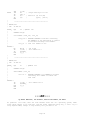
/* Test of the new CIRCLE and FILL routines
Assumes that CIRCLE and FILL have been placed in a library called USER/LIB
*/
#option INLIB
#option USERLIB
main()
{ int x,y;
pmode(1);
fill(1,0,0);
circle(0,0,0,24);
fill(0,5,5);
circle(0,96,24,24);
circle(0,96,24,12);
fill(0,96,15);
box(0,24,24,36,36);
fill(0,0,47)
fill(1,0,47);
exit(0);
}
Using INTERRUPTS and SVCs in FORTRAN
by J. Gary Bender, P0 Box 773, Los Alainos, New Mexico 87544
"WHY?" Why would anyone want to write an interrupt routine in Fortran... after all,
interrupt level stuff is certainly the realm of assembly language. Those were exactly
my initial
thoughts. On the other hand,
the more I can get done in a high level
language is usually the more that I get done ... period. So I was motivated to try it.
By using SVC calls from Fortran, you can do many things that may surprise you. You can,
for example, avoid the FORLIB I/O routines. The subject of this article is how to have
the LDOS interrupt handler execute a Fortran subroutine. A few other examples of SVC
use from Fortran are included.
SVC’s are not really required. A direct call to @ADTSK and @RMTSK would work just as
well ... for the moment. With all the potential new LDOS machines on the horizon, it is
time to make the SVC table a normal part of your system CONFIG. The SVC’s allow you to
get closer to the operating system than Fortran normally permits and still remain
compatible with the Model I, III, or Max 80.
There are occasions when you may need, or at least could use, an interrupt driven
subroutine in an application level program. The "dead man" timer in this example is one
of the more useful, yet simple, capabilities. Besides the timed input shown here, it
can permit you to write programs with uncluttered logic. I use it in an automatic
message exchange program that dials and communicates with a remote host. Every time an
expected "event" occurs,
such as receiving a character, the timer is reset. While
waiting for an event to occur, the timer is included in the loop. If it counts down
before something else happens, something went wrong and I can take some action to abort
the exchange. Most of the program does not have to be concerned with the multitude of
things that can go wrong during the exchange. Also, I am not confined to the primary
loop. I can wander off and do anything I want and have control over whether or not the
deadman timer resets,
stops,
or continues to countdown. The conventional Fortran
technique would require the use of do-loops -- all over the place -- to insure the
program did not make an 8 hour long distance phone call waiting for a crashed host to
respond.
Page 19
Let’s look at how this works from Fortran. The three elements of an interrupt procedure
are:
the routine itself,
a Task Control
Block that points to the routine, and a
facility to install/remove the routine in the LDOS interrupt task table.
The routine that does
"something"
upon interrupt is a standard Fortran SUBROUTINE
ending with a RETURN statement. It can call other Fortran subprograms. It should NEVER
access any routines in the "mainline" program. (Remember, you do not know when it will
execute. If it were to change a local value in the mainline, there is no telling what
could happen.) The subroutine is included with your other subroutines, but it is never
CALLed.
It will
execute independent of the mainline program, however, while it is
installed in the LDOS interrupt task table.
Since it is not directly called by the Fortran program, arguments cannot be used. That
means it must communicate with the rest of the program through COMMON. As long as the
routine is included with one of your Fortran source files, LINK-80 will load it, even
if it is not referenced. Actually, it is referenced as an EXTERNAL.
The TCB is easier to handle than may be apparent at first. All the TCB is is an
INTEGER*2 Fortran variable that contains the address of the interrupt subroutine. The
only problem is that you have no way of knowing where the subroutine will ultimately
reside in memory. Fear not, it is quite easy to determine the address of a subroutine
at runtime. Due to the calling conventions used by Microsoft FORTRAN-80, a SUBROUTINE
LOC (ARG) that does nothing but RETURN will return the address of the ARG argument
(regardless of ARG’s type) if it is accessed as an INTEGER*2 FUNCTION.
Shall I try that one again? This is what happens: a function reference such as IADDR =
LOC(DEADMN)
puts
the address of DEADMN in the HL register ... the first argument’s
ADDRESS is always passed in the HL register by convention. LOC itself does nothing at
all, it just returns. Also by convention, INTEGER*2 functions return their VALUE in the
HL register. Since the calling Fortran program thinks LOC is an integer function, it
uses the value in HL as the function value. The value in HL is the address the caller
just put there as the argument. It is a little roundabout, but it works.
To install and remove the interrupt subroutine, you need access to the @ADTSK and
@RMTSK SVCs. The interlude routine must be written in assembler, since Fortran cannot
directly call the routines with the proper register settings.
The following program demonstrates two other SVC calls. @KBD, similar to the INKEY$
function in Basic, and @DSP, which displays one character on the screen. The example
program checks for a character from the keyboard. If nothing happens in about 16
seconds, it times out. The deadman counts down in increments of 4 seconds because both
the Model I and Model III interrupts are very close to "even" if you count interrupts
for 4 seconds.
The Model I has 20 "ticks" and the Model III has about 15. For most
deadman type requirements you do not need exact timing, but if you tell the user there
is a 60 second timeout, don’t zap him in 45 seconds just because he is on a Model I.
A precaution must be observed when using interrupts: YOU MUST REMOVE THE TASK BEFORE
EXITING THE FORTRAN PROGRAM! You will almost certainly have a system crash if you leave
the Fortran program while the interrupt task is still running. If the Fortran program
bombs out without first removing the task, you should re-boot the system. If the
program is susceptible to abnormal, uncontrolled termination, you should install and
remove the interrupt task as needed.
Let me briefly discuss the individual routines in the example. I’ll start with the
assembly language SVC interlude routines. You must use MACRO-80 to assemble the
routines in order to have a LINK-80 formatted relocatable module.
DSP$ loads a character from a Fortran variable into the C register and calls the @DSP
SVC. It displays one character at a time at the current cursor position and advances
the cursor over one position. KDB$ (or INKEY$) does a little more work since LDOS
returns more information. My objective when writing KBD$ was to make all the
information easy to use (or ignore) at the Fortran level. Besides the character itself,
which is normally all that is needed, the first 4 bits of the INFO argument tell you
Page 20
everything you are apt to want to know about the input character. KDB$ does not wait
for a key. If there was no key depressed, INFO and ICHAR will both be zero. The routine
is set up so you can call it as a subroutine, an INTEGER*1 function, or an INTEGER*2
function. Either of the function calls will return the character (or zero).
ADTSK$ and RMTSK$ are the routines that install
or remove the interrupt driven
subroutine in LDOS’ interrupt table. ADTSK$ needs the address of the subroutine to be
executed by the interrupt handler and the slot number to assign it to. See the LDOS
manual for slot assignments. The example uses slot 0, a low priority slot that executes
5 times per second on the Model I. RMTSK$ only needs the slot number.
The Fortran subroutines
include a couple additional goodies. CLS clears the screen
using DSP$ and control characters. DISPL is a great time saver for me. It will display
a string enclosed in any pair of delimiters. An array can be used for the string, but
it must still include the delimiters. When using a string constant to call DISPL, as in
the example, remember to enclose everything, including the string delimiters, between
single quote marks. The single quotes tell the compiler it is a string, they are not
part of the string itself.
TINP$R is the Timed
INPut subroutine. The version I normally use returns a Ratfor
string, which is where the "$R" comes from. For this example there is no need to get
into an alternate string convention. TINP$R has six arguments which are documented
before the CALL
in the Main program. The routine displays a non-blinking cursor and
loops calling KBD$. When KBD$ indicates that a character was depressed, TINP$R first
checks that it was not an ENTER or BREAK key, puts the character into the INBUF array,
echos the character to the screen, and moves the underscore cursor over.
In a non-timed routine, this would go on until the maximum characters were typed, or an
ENTER or BREAK. The timed routine adds the deadman counter. When TINP$R is called, it
starts the DEADMN
interrupt routine by calling SETDM (.TRUE.,MAXSEC), i.e. turn the
deadman on and set it for MAXSEC. Each time through the loop it checks for a timeout.
Each time a character is typed, the deadman counter is reset to MAXSEC. When the input
loop is exited for any reason, the deadman is shut off. This also removes the task,
which is safer than waiting until the program ends.
DEADMN is just sitting there in the middle of the program and is never called by the
mainline program. When installed as an interrupt task, however, it will execute about 5
times per second. All that it does is count down 20 ticks (or 15) and then subtract 4
seconds from the main counter DMKONT. If everything gets counted down to zero, it stops
decrementing. It is up to the mainline program to check for a timeout by examining the
value in COMMON.
There is no reason that DEADMN cannot maintain several
counters or call other
subroutines. Just avoid using any subroutines in the "other program." Think of the
DEADMN task as a separate program running concurrently with the mainline and sharing
some of its memory.
SETDM will install or remove the DEADMN task depending on the truth of the first
argument (.TRUE. == ON) and initializes/resets the counter to the number of seconds
specified.
SETDM is part of the mainline program. It controls DEADMN by inserting
values into COMMON and by making the actual calls to add or remove the task. It does
not change the deadman counter when removing the task. That lets you remove the task
before you check for a timeout. Notice that all that is needed to get the address of
DEADMN are the statements EXTERNAL DEADMN and DMTCB = LOC (DEADMN). In a critical
application, it would be advisable to disable interrupts while SETDM is setting values
since a counter may be decremented midway through the setting process. For normal
applications it should not matter.
TIMEDO is an easy way to check for a timeout by using a logical function call. NTIMED
checks for a NOT timed out condition.
It cheats a little by just returning
.NOT.
TIMEDO.
Page 21
LOC is just what I promised before. A very handy "do-nothing" routine. I also use it to
have my Fortran programs use the @PARAM SVC --- command line options with LDOS doing
all the work!
All the Main program does is set up the demo, call TINP$R and tell you what happened.
Before using this program, you MUST have the SVC table installed: SYSTEM (SVC) is all
that is necessary.
If you use the names TIMEDI/FOR and TIMESUBS/MAC for your source
code, then the following will compile/assemble the program:
F80 TIMEDI=TIMEDI
M80 TIMESUBS=TIMESUBS
Link the program with:
L80 TIMEDI,TIMESUBS,TIMEDI-N-E
Do not be concerned if you have $IOERR and/or $LUNTB show up as unsatisfied references
after the link and load. The warning is extraneous and caused by FORLIB loading blocks
of code rather than individual routines.
Take a good look at the size of the program ... about 1600 bytes! You’ve written a
Fortran program that does I/O and used less than 6K!
Maybe there IS something
worthwhile in using SVCs from Fortran ....
When typing the following listing, do not include the "/*" comments. F80 does not
permit that style of comment.
C
C
C
C
TIMEDI/FOR
JG Bender
Demonstrate Interrupt driven timed input
24 Jul 83
PROGRAM
TIMEDI
INTEGER*2
BYTE
LOGICAL
LOGICAL
ACTCHR
SCRATC(64)
BROKE, TIMOUT
TINP$R
C
C
INTEGER*2
DMKONT, DMTPSS, DMSECS, DMTICS
COMMON /DEADCM/ DMKONT, DMTPSS, DMSECS, DMTICS
C
DATA DMKONT/0/, DMSECS/4/, DMTICS/0/
C
C
C
C
set the DeadMan increment counter (low priority ticks / 4 secs)
( for a Model III, set DMTPSS = 15 )
DMTPSS = 20
C
C
C
Announce the program
CALL CLS
CALL DSP$(X’0D’)
/* a carriage return
CALL DISPL (’/ You have 16 seconds to type something: /’)
C
C
C
C
C
C
C
C
In the following TINP$R call:
SCRATC <= buffer to receive input characters
1
=> maximum number of characters to accept.
16
=> number of seconds to wait
ACTCHR <= number of characters returned
BROKE
<= .TRUE. if user hit .BREAK. key
TIMOUT <= .TRUE. if user timeout during input
Page 22
CALL TINP$R (SCRATC,1,16,ACTCHR,BROKE,TIMOUT)
IF (TIMOUT) GOTO 700
IF (BROKE)
GOTO 800
C
CALL DSP$ (X’0D’)
CALL DISPL (’/You made it!/’)
GOTO 990
C
700
C
800
CALL DSP$ (X’0D’)
CALL DISPL (’/You took too long !/’)
GOTO 990
C
990
CALL DSP$ (X’0D’)
CALL DISPL (’/You QUIT/’)
GOTO 990
C
C
C
C
C
C
C
C
C
C
C
C
C
C
C
C
C
C
C
C
C
CONTINUE
END
=======================================================
=======================================================
SUBROUTINES
Contents:
CLS
DISPL
TINP$R
DEADMN
SETDM
TIMEDO
NTIMED
Clear screen
Display a delimited string, no CR.
Timed input
Dead Man countdown timer
Set DeadMan counter ON, and initialize count
Check if deadman counted down to 0
Check if deadman DID NOT timeout(== TIMEDO-)
=======================================================
CLS
Clear Screen
------------------------------------------------------SUBROUTINE CLS
C
C
Assume Model I/III control chars
CALL DSP$ (X’1C’)
CALL DSP$ (X’1F’)
RETURN
END
C
C
C
C
C
/*
/*
home cursor
clear to end-of-frame
=======================================================
DISPL
Display a delimited string on screen
------------------------------------------------------SUBROUTINE DISPL (DSTRNG)
C
C
C
C
C
all strings will be <= 127 chars
no carriage return for this routine
BYTE
DSTRNG(1), DELIM
INTEGER*1 I
the first character of the string is the delimiter
DELIM = DSTRNG(1)
C
C
C
the following is a ’FOR’ loop in RATFOR
Page 23
I = X’02’
23000 IF (DSTRNG(I) .EQ. DELIM .OR. I .GE. X’7E’) GOTO 23002
CALL DSP$ (DSTRNG(I))
I = I + X’01’
GOTO 23000
C
23002 CONTINUE
RETURN
END
C =======================================================
C
TINP$R
Timed Input
C ------------------------------------------------------C
LOGICAL FUNCTION TINP$R (INBUF,MAXCHR,MAXSEC,ACTCHR,BROKE,TIMOUT)
C
C
.TRUE. if input recvd, .FALSE. if timed out w/ no data
C
BYTE
INBUF(1), ICHAR
LOGICAL
BROKE, TIMOUT, NTIMED, TIMEDO
BYTE
KBLANK, KBSPAC
INTEGER*1 MAXCHR, I, IONE, I126, IMAX
INTEGER*2 MAXSEC, ACTCHR, INFO
C
DATA IONE/X’01’/, I126/X’7E’/
DATA KBLANK/X’20’/, KBSPAC/X’18’/
C
C
C
C
C
C
C
install the deadman interrupt routine
CALL SETDM (.TRUE.,MAXSEC)
BROKE = .FALSE.
TINP$R = .FALSE.
TIMOUT = .FALSE.
range check
IMAX = MAXCHR
IF (MAXCHR .LT. IONE) IMAX = I126
display an underscore and a backspace
CALL DSP$ (’_’)
CALL DSP$ (KBSPAC)
C
I = X’00’
23005 IF (TIMEDO(0) .OR. (I .GE. IMAX)) GOTO 23010 /* end loop
CALL KBD$ (ICHAR,INFO)
IF (INFO .EQ. 0) GOTO 23009
/*
no char -->
loop
TINP$R = .TRUE.
IF (ICHAR .EQ. X’0D’ .OR. ICHAR .EQ. X’01’) GOTO 23006
C
.CR.
.BREAK.
I = I + IONE
/* next char in string
INBUF(I) = ICHAR /* put the chr into string
GOTO 23008
/* --> loop
C
23006
IF (ICHAR .EQ. X’01’) BROKE = .TRUE.
GOTO 23010
/* end looping -->
C
C
reset deadman and display the character just typed
23008
CALL SETDM (.TRUE.,MAXSEC)
CALL DSP$ (ICHAR)
CALL DSP$ (’_’)
CALL DSP$ (KBSPAC)
C
bottom of loop
23009
GOTO 23005
Page 24
C
exit loop to here
23010 CALL SETDM (.FALSE.,MAXSEC) /*
kill the deadman
IF (TIMEDO(0)) TIMOUT = .TRUE.
ACTCHR = I
CALL DSP$ (KBLANK)
/*remove the cursor
CALL DSP$ (KBSPAC)
RETURN
END
C
C =======================================================
C
DEADMN
Dead Man, interrupt timer, count down
C ------------------------------------------------------C
SUBROUTINE DEADMN
C
ONLY called by the Interrupt driver
C
All set/reset of values must be done by
C
calling routine
C
Install in a low-priority task slot
C
INTEGER*2 DMKONT
/* number of seconds to countdown
INTEGER*2 DMTPSS
/* nr ticks before need decrement DMKONT
INTEGER*2 DMSECS
/* nr seconds per DMTPSS ticks
INTEGER*2 DMTICS
/* current tick countdown
C
COMMON /DEADCM/ DMKONT, DMTPSS, DMSECS, DMTICS
C
C
countdown a tick for each call
DMTICS = DMTICS - 1
IF (DMTICS .GT. 0) GOTO 23014 /* still counting ticks -->
C
reset local countdown
DMTICS = DMTPSS
IF (DMKONT .LE. DMSECS) GOTO 23012
/* TIMED OUT -->
C
decrement a chunk of seconds from timer
DMKONT = DMKONT - DMSECS
GOTO 23014
C
23012
DMKONT = 0
C
23014 CONTINUE
RETURN
END
C
C =======================================================
C
SETDM
Set up DeadMan counter
C ------------------------------------------------------C
SUBROUTINE SETDM (ONOFF,SECS)
C
# Install/remove D/M in slot 0
C
INTEGER*2 SECS, LOC
INTEGER*2 DMTCB
/*
Task Control Block for DeadMan
INTEGER*1 ISLOT
/*
task slot to use
LOGICAL
ONOFF
/*
caller instruction to turn
C
the deadman ON or OFF
LOGICAL
DMISON
/*
flag if DeadMan IS ON
C
C
it is necessary that this routine have the following EXTERNAL:
EXTERNAL DEADMN
C
INTEGER*2
DMKONT, DMTPSS, DMSECS, DMTICS
COMMON /DEADCM/ DMKONT, DMTPSS, DMSECS, DMTICS
C
DATA DMISON/.FALSE./, ISLOT/X’00’/
Page 25
C
IF (.NOT.(ONOFF)) GOTO 23016
/* .T. == turn it on
reset counters
DMKONT = SECS
DMTICS = DMTPSS
IF (DMISON) GOTO 23015
/*
task already running ?
DMTCB = LOC (DEADMN)
/*
no, install it
CALL ADTSK$(DMTCB,ISLOT)
DMISON = .TRUE.
23015
GOTO 23018
C
C
ONOFF is F., shutdown the deadman
C
DO NOT reset the DMKONT. A programmer may remove the
C
interrupt task before checking for a timeout.
C
23016 IF (.NOT.(DMISON)) GOTO 23018 /* is it running ?
CALL RMTSK$ (ISLOT)
/* yes, remove it
DMISON = .FALSE.
C
23018 CONTINUE
RETURN
END
C
C
==============================================
C
TIMEDO
Check if DEADMN timed out
C
==============================================
C
LOGICAL FUNCTION TIMEDO (IDUMMY)
C
C
INTEGER*2
DMKONT, DMTPSS, DMSECS, DMTICS
COMMON /DEADCM/ DMKONT, DMTPSS, DMSECS, DMTICS
C
TIMEDO = .FALSE.
IF (DMKONT .LE. 0)
RETURN
END
C
C
C
C
C
TIMEDO = .TRUE.
==============================================
NTIMED See if DEADMN did NOT timeout
---------------------------------------------LOGICAL FUNCTION NTIMED (IDUMMY)
C
LOGICAL TIMEDO
NTIMED = (.NOT. TIMEDO (IDUMMY))
RETURN
END
C
C
C
C
C
=============================================
LOC
return arg address as 1*2 function
--------------------------------------------SUBROUTINE LOC
RETURN
END
C
C
this is the end of the Fortran code.
; File: TIMESUBS/mac
;
;
******************************************
Page 26
;
; DSP$/mac
; JGB 25 Feb 83
;
S_V_C
EQU
X’28’
; RST vector for SVC call
DSP_
EQU
2
; @DSP SVC
;
;
FORTRAN usage:
;
;
CALL DSP$ (char)
;
;
char => FORTRAN variable with character to
;
send in low-order byte.
;
DSP$:: LD
C,(HL)
LD
A,DSP_
RST
S_V_C
RET
;
;
******************************************
;
; KBD$/mac
; JGB
14 Feb 83
;
KBD_
EQU
8
; @KBD SVC
;
;
FORTRAN usage:
( BYTE function )
;
( may be typed BYTE or INTEGER*2 )
;
;
CALL KBD$ (ICHAR,INFO)
INKEY$ == synonym
; -or- JCHAR = INKEY$ (ICHAR,INFO)
;
(byte)
{HL} {DE}
;
Returns K/B char WITHOUT waiting.
;
;
(byte) ICHAR <= 0 or byte from K/B -- FORTRAN variable
;
(I*2)
INFO <= 0 if no key pressed -- FORTRAN variable
;
bit:
0 if key pressed
;
bit:
1 if Control-key also down
;
bit:
2 if CLEAR key also down
;
bit:
3 if char == BREAK
;
Note high bit of ICHAR will be on if CLEAR key was
;
also down
;
KBD$:: NOP
; see LDOS manual for @KBD
INKEY$::
; synonym
PUSH
DE
; ->info
PUSH
HL
; ->char variable
LD
A,KBD_
RST
S_V_C
POP
HL
LD
(HL),A ; return char in Low byte of arg.
POP
HL
; ->INFO
LD
(HL),0 ; clear the INFO byte
JR
Z,KBD4 ; there was NO character -->
SET
0,(HL)
JR
NC,KBD2 ; no Shift-Down-Arrow -->
SET
1,(HL)
KBD2:
OR
A
; clear flags
BIT
7,A
JR
Z,KBD3 ; no CLEAR key
SET
2,(HL)
KBD3:
CP
X’01’
; == BREAK key ?
JR
NZ,KBD4
Page 27
KBD4:
SET
INC
LD
LD
LD
RET
3,(HL)
HL
(HL),0
H,0
L,A
; ->high order byte of info
; return in {A} and {HL}
;
[byte] [Int*2]
;
;
******************************************
;
; ADTSK$/mac
; JGB
25 Feb 83
ADTSK_ EQU
29 ; @ADTSK SVC
;
;
FORTRAN usage:
;
;
Call ADTSK$ (task_tcb, slot_no)
;
;
task_tcb => FORTRAN INTEGER*2 variable containing
;
the ADDRESS of the subroutine to install
;
in the LDOS interrupt task handler.
;
slot_no => task slot number to use
;
ADTSK$::
EX
DE,HL
; tcb in DE
LD
C,(HL) ; slot number in C
LD
A,ADTSK_
RST
S_V_C
RET
;
;
******************************************
;
; RMTSK$/mac
; JGB
26 Feb 83
;
RMTSK_ EQU
30
; @RMTSK SVC
;
;
FORTRAN usage:
;
;
CALL RMTSK$ (slot_no)
;
;
slot no => FORTRAN INTEGER*1 or INTEGER*2 variable
;
containing slot number to remove the
;
task from.
;
RMTSK$::
LD
C,(HL) ; slot number into C
LD
A,RMTSK_
RST
S_V_C
RET
END
---ER--by Earle Robinson, 300 Grenola, Pacific Palisades, CA 90272
As promised
last time, here are some remarks about the ’in’ operating system, UNIX.
Since there appear to be articles, and new books appearing every day, I won’t try to
fully explain UNIX, except to very briefly tell you what it is.
Page 28
UNIX is a multi-user and multi-task operating system which was originally developed for
the Digital Equipment PDP-7 by Bell Labs engineers. Written in assembly, it was later
re-written in a low level von Neumann language called C so it became somewhat more
portable between different machines than it had been. The origins of UNIX, in 1969, are
reflected in its somewhat difficult syntax. Remember that in those days teletypes were
used as terminals and every letter was precious in a command. Consequently, to get a
directory listing of files, you type ’ls’ plus any of the various switches which are
available.
Most other commands are equally confusing to the new user. And, if you think the LDOS
manual is long, try the 2 volume UNIX Programmers manuals! They total over 1000 pages!
The UNIX system itself is noteworthy for three main characteristics: a hierarchical
file structure, I/O redirection and Pipes. Under UNIX, the directory structure is like
an upside down tree with branches. From the so-called root directory you may create one
or more sub-directories, and each of these may have sub-directories, and each of those,
etc. etc.
As you can imagine, this will
permit you to have as many files in your
storage medium as memory will permit. Thus, with a hard drive, you are not obliged to
partition at all; the sub-directories provide their own dynamic partition. As for I/O
redirection, all LDOS users should be reasonably familiar with this feature; it is one
of the bases of the operating system. The device concept as implemented by the author
of LDOS’ precursor, VTOS, further refined and developed by LSI, was undoubtedly drawn
from UNIX itself. However, where UNIX really excels is in the use of pipes and filters.
This permits the concurrent processing of several tasks. For example, you could have a
file sorted, written to another file and finally printed out on your printer with a
single command line expression. UNIX makes full use of memory and creates temporary
files, erased at the end of the task processing, to accomplish this. As you can
imagine, such
intensive I/O using poor little 5 1/4" disk drives would be painfully
slow.
And, even with the use of hard disk, things can be slowed down a great deal,
especially if there are several users accessing the drive at the same time. Further,
the maximum memory on most 8 bit machines, 64 K, limits their ability to effectively
use UNIX.
One further constraint with UNIX is that it requires several megabytes, that is several
million bytes of accessible disk
storage to use it and the many utilities which
accompany it. As you may begin to imagine, UNIX is not a system that you are likely to
ever run on your Model I, III, MAX-80, or even the Model 4. These machines just do not
have sufficient RAM to handle such a bulky system. Whatever computer you may use, a
hard disk of at least 10 megabytes should be employed. Also, a minimum of 192 K of RAM
is required; in fact, most systems need at least 512 K.
Most of us are also confused when UNIX is discussed because of the myriad versions and
forms it may take. To begin with, would you imagine that System V was introduced after
Version 7,
and that there are still implementations using Version 6 and System III,
which itself appeared after Version 7? And, then there is the quarrel about whether one
should be using a true UNIX or a UNIX-compatible system. The latter are often cheaper
for the user because there are no license fees collected by Bell and can be better
supported with further extensions.
Most implementations are for multi-user systems
though some single-users ones are offered, too.
The final problem with UNIX in the micro world is that it is even less user-friendly
than CP/M,
LDOS or any other known system. For this reason, a ’shell’ is often put
around the operating system so that the user is faced with menus and sub-menus until he
reaches the application he intends to run. UNIX may be a programmer’s delight, but end
users will require a full scale shell implementation to use computers employing it. At
present, the Bourne shell appears the most widely used, though it still is confusing to
many unsophisticated users.
Whatever its strengths and weaknesses, you are likely to hear and see a lot about UNIX
in the next few years. And, if good enough shells are used, it may well survive as the
standard operating environment on 16 bit machines. Whatever the system is, however, one
thing is quite certain: operating systems, and most utilities, will be written in ’C’
or another high level language. Assembly language will be less and less used except for
Page 29
narrow uses where speed must be improved. This is because maintenance of programs will
be easier and portability obtained, not to mention the lower cost for software houses
in writing and debugging.
I have been having a wonderful time with the new version of FED, called FED II. It has
many new features and is faster. I only regret that I don’t have such a program for my
IBM PC, too. I have also had a great deal of fun using the latest version of Super
Utility Plus V.3 on my MAX-80.
This is a terrifically useful utility program. The
manual
is well-written and quite clear.
But,
I suppose that most of you have it
already.
Speaking of the IBM, you may be interested in some initial comments about the machine
which is sweeping most of the competition into Chapter XI, or at least into some steep
operating losses.
Hardware-wise, the PC is superbly built. There were a few design
flaws, however. There are too few slots in the mother board and the power supply is
barely adequate.
The XT version, which contains a hard drive, has rectified those
problems. The keyboard is controversial. You either like it or detest it. As for the
monochrome monitor, it is a beauty, the easiest to read and use that I have seen on a
micro.
Software? Well, that
is another story.
Let’s begin with the 2 principal operating
systems offered,
PC-DOS and CP/M-86.
The former, called MS-DOS on IBM compatible
machines, is a creation of Microsoft, and was originally very close to CP/M (ugh!). The
latest version, 2.0, is already a big improvement and is approaching Xenix, little by
little. There are hierarchical directories, I/O redirection, and Pipes and Filters. It
is not as fast as LDOS, and in some ways more cumbersome. As for CP/M-86, it appears to
have lost out in this market, partly because IBM pushed the Microsoft DOS more. Market
studies show that DOS has over 95% of the market. CP/M-86 has some nice features, but
it is more cumbersome to use,
perhaps because it is still so much like CP/M, its
antecedent. It was also reported to be full of bugs, at least in the initial releases.
Most of the original software offered for the PC was merely CP/M stuff which was cross
compiled to the 8088 microprocessor used in the IBM machines and its copies. Alas, this
meant that the code was far from optimized and ran even slower than on 8 bit machines.
However, since the market has grown so much, virtually everyone is rushing to introduce
products. There are now literally dozens of word processing packages, several spread
sheet programs, and much more. When you see the massive advertising for some of these
programs you can understand that the stakes are high in the IBM world, and that large
capital is required to obtain a market share. The two major magazines, PC Magazine, and
PC World, are the thickness of a large city’s telephone book. They are so full of ads
that it is hard to find the editorial matter.
In the realm of utilities for the PC, there is still surprising little, certainly
nothing like the products offered by LSI and others for the Radio Shack line. On the
other hand, there is a wonderful choice in programming languages, nearly a dozen full
implementations of C, a couple of Pascals, Lisp, Modula 2, and others.
Many people criticize the Intel chip used in the IBM and its so-called clones because
it is not as powerful as the 16 bit offered by Motorola or National Semiconductor. They
cite the need to use segmented addressing and the fact that IBM uses the 8088 rather
than the 8086 and that the former uses only an 8 bit data bus which slows everything
down. Naturally, the Tandy 16 & the Fortune 16/32 are faster and more elegant machines.
But, there are probably a million or more IBM’s and its clones already out there while
I doubt that more than 100,000 of all the Motorola based machines have been sold. What
the IBM lacks today is multiuser and multitasking capabilities. This will come,
probably when
IBM uses a newer version than the 8088 from Intel, and when Xenix or
IBM’s in house operating system is finally put on the market.
You may not know it yet,
but you can now have a telex number and send and receive
telexes without getting one of those awful
teletypes, and without any outlay at
all........if you already have a modem and half-way decent communications program. In
fact, Lcomm will serve very nicely. Here’s how. RCA will be glad to give you a telex
number which will permit sending telexes direct to either RCA or Western Union
Page 30
terminals, send overseas telexes and telegrams. It is not necessary have a line and a
computer tied up either. You have incoming messages routed to RCA’s store and forward
memory bank. Then, you merely have to dial an 800 number to retrieve messages whenever
you wish. And, you send telexes from your computer using an 800 number, too. I do not
recommend tying up a line & computer for another reason than the obvious one. To
receive messages directly on-line your program must be designed to respond to a Ctrl-E
sent from RCA (and Western Union uses the same), i.e. the ASCII ENQ character. You have
one (1) second to return the answer back when requested by the Ctrl-E. Otherwise, the
line is dropped immediately. I also find that it is very economical to compose messages
off-line, using Scripsit, LED, or another text editing program of your choice, then to
upload it when the recipient’s terminal
replies. If any of you are interested in
further details, drop me a line.
A couple of people at LSI have made a bet whether I would ever do an article without
mentioning printers or word-processing programs. So, I shall NOT mention I recently
heard that Harv Pennington has written
(himself!!) an IBM PC version of Electric
Pencil. I shall also NOT mention that..........
**** Parity=Odd ****
by Tim Daneluik, 4927 N. Rockwell St., Chicago, IL 60625
© 1983 T&R Communications Associates
RUMORS DEPT.
Fall is upon us, and as always I have more products to look at than time to do it in!
Not only is there more new software coming out every week, but a whole host of new
machines are expected to be announced this quarter. Herewith is a list of completely
UNSUBSTANTIATED rumors that I've heard, but my sources are impeccable (I know a janitor
at the Tandy towers!):
RUMOR #1 - The IBM "PEANUT" is supposed to be using an INTEL IAPX 186 (80186) as its
main processor.
This processor is a real
power-house with built in
programmable timers,
DMA controller, and has true 16 bit capability. The
rumor mill also has it that the PEANUT will come with 64 K of memory, 1
floppy drive, and a keyboard for under $800! If all this comes true, you can
bet that PC
sales will fall off, since about the only thing the older
machine will offer is more expandability (i.e. the PC-XT for example).
Personally, I hope IBM builds a little performance into the PEANUT, because
the PC is way too slow to justify its $3000+ price tag. They certainly have
the processor it takes to do this. The 8086 family of machines isn't as
elegant perhaps as a 68000 or one of its derivatives, but the Intel machines
are plenty powerful in their own right. The poor performance of the PC is
more a function of the "hurry up and get it done" mentality of its
designers, than it is the basic choice of processor.
RUMOR #2 - Tandy is supposedly working on a version of the Model 4 with a built-in 5
Meg. hard disk. That's no big surprise, and makes a lot of sense for the
market the 4 is directed at. Given today's pricing structure, the machine
ought to sell for about $3000 - $3500. I've been playing with a Model 4 on
and off, and with a hard disk in it, I may even buy one myself!
RUMOR #3 - This one isn't so much rumor as it is a not yet released product.
A
replacement printed circuit board for the TRS-80 Model I will shortly be
available which turns your trusty old 'I' into a Model III! EVERYTHING is
built into this board including the disk controller and expansion edges, so
you don't even need an expansion interface! The whole business fits inside
the Model I keyboard housing, and uses the Model I power supply and video
display.
I've gotten a look at the thing, and it is VERY well built probably better than the original Tandy Model III electronics. Hopefully,
by the time the next issue of this magazine appears, I will have one here
Page 31
for review, and will be able to tell you more about it.
The company
producing this appears to be a real business, not a "maw and paw" garage
operation, so it looks like this might be a big seller.
By the way, the
price should be under $400 retail for this goodie!
LOBO, THE LX-80, AND WHY YOU CAN’T RUN ALL YOUR SOFTWARE
The Model I is apparently far from dead! I’ve gotten several letters from people asking
me to devote a whole column to the LX-80.
Unfortunately, there weren’t THAT many
letters. However, a few comments are in order. LOBO, the people who build the LX-80,
have always taken the position that their designs should outperform the Tandy hardware
they replace.
The MAX-80 computer,
for example, has no rivals in performance or
reliability in the 8-bit line of Radio Shack machines. (For that matter, the MAX-80 has
NO 8-bit peers that I’ve found under about $4000-$5000!)
For those of you new to the TRS-80, the LX-80 is a high performance interface unit
designed for the Model
I computer as a replacement for the infamous Expansion
Interface. In many ways, the LX-80 had a lot to do with LDOS coming into being. LOBO
designed the interface to have many features not normally present in a standard EI.
They included double-density, 5" and 8" drive interfaces, two RS-232C ports, and a
built-in power supply. In short, the LX-80 overcame every deficiency ever present in
the Radio Shack interface. Unfortunately, the price paid in the design, was that the
LX-80 was not hardware compatible with the EI. This meant that many of the device
dependent portions of the operating system for the Model I had to be rewritten. LOBO
decided to also offer a new DOS for their interface, and contracted someone to write
LDOS. Unfortunately, that someone never finished the job....so, LOBO came to Galactic
Software (now LSI) and contracted them to finish the job. In the process, LSI came into
being, and eventually ended up owning LDOS. The rest, most of you know. Bill Schroeder
and his bunch of "not-ready-for-prime-time programmers" went hog-wild and wrote LDOS
not just for the LX-80, but for the Model I and the new Model III as well!
The net result of all this is that the LX-80/Model I system runs LDOS just fine, but
some existing pieces of software won’t work. This software falls into three general
categories:
1)
2)
3)
The
The
The
the
software
software
software
hardware
is "self-booting" and uses no operating system.
is written specifically for a DOS other than LDOS.
ignores the DOS and tries to do physical I/O (Input/Output) to
itself.
Software in the first category usually consists of things like games, utilities (SuperUtility, for example), and almost all forms of protected media. The LX-80 has its own
special "boot ROM"
(Read Only Memory) that is used to initially load the operating
system. This ROM is substantially different than the ROM used when booting a "standard"
Radio Shack interface.
This
is because the LX-80 supports things like booting in
double-density, booting from an 8" disk, or even booting from a hard disk, and these
special procedures have to be implemented in the boot ROM. Self-booting media expects
to use a standard boot procedure, and invariably fails to work when used in an LX-80
environment. Even if you could get the program to boot on the LOBO interface, it
probably still wouldn’t work. These programs typically use no operating system, and
access the hardware directly. Since the "innards" of an LX-80 are different than the
EI, many self-booting programs, especially those involving disk I/O, CRASH on an LX-80.
Little needs to be said about programs in the second category. Programs specific to
another DOS usually can be modified to run under LDOS, and therefore the LX-80.
However, this requires some ability on your part, and is not always a simple thing to
do. Now that LDOS is an accepted standard within Radio Shack, hopefully this kind of
software will cease to be written (or at least purchased!).
Those of you who read this column regularly (all four of you) will remember my soapbox
some time ago on software which does its own physical I/O. To repeat, very rarely if
EVER should applications software deal with the hardware itself. The LX-80 is a perfect
Page 32
example of why.
So long as software uses LDOS to "talk" to hardware, the operating
system is able to accommodate differences in the hardware itself. Once the application
bypasses the DOS, there is no guarantee that it will be able to run on other TRS-80
compatible systems. For example,
the printer port on the LX-80 returns slightly
different status bits than a regular EI does, even though the printer interface on the
LX-80 is still mapped to X’37E8’. An application which uses LDOS calls to print data
works just fine on the LX-80. An application which goes directly to X’37E8’ may or may
not work. Again, some patching may get this kind of software to work, but it is usually
more trouble than it is worth.
Here then, is a short and by no means complete listing of software which will/will not
work on the LX-80:
WILL NOT WORK
Any DOS other than LDOS
Stand-Alone Machine Language Monitors
Almost all self-booting disks
Disk-drive timing programs
Disk-drive diagnostic programs
WILL WORK
SNAPP Extended BASIC
SCRIPSIT w/LSI patches
Microsoft EDTASM+ for disk
MACRO-80
POSTMAN
FORTRAN-80
discatER
BASCOM
ALCOR PASCAL
ZCAT
MACRO-MON (mostly, some minor problems)
POWER-MAIL
LSI and MYSOSIS utilities/languages
LDOS TOOL BOX
LAZY-WRITER (mostly, some functions like directories, and RS232 won’t work)
ELECTRIC-PENCIL 2.0 (mostly, some functions don’t work right, like getting directories)
One final thing, you cannot "Un-Repair" an LDOS disk on an LX-80 so that the disk will
be readable under TRS-DOS 2.3. This is because of the Floppy Disk Controller chip used
in the interface. If any of you LX-80 owners out there have patches for software to
make it LDOS/LX-80 compatible,
please send it to me. I’ll publish them here, for
everyone’s benefit - besides, you get your name in print that way!
MODEL 4 / TRSDOS 6.0 CORNER
Although the Model
4 is relatively new,
several
pieces of software are already
available for it. Logical Systems has both FM and FED in 6.0 formats. (Don’t forget LSTechnical Help 6.x! ed.)
FM is a sophisticated file backup and purge utility which
will be of special interest to those of you with hard disks (whenever Tandy gets around
to putting the hard disk on the Model 4!). FEDII is the latest iteration of the most
useful utility a machine language programmer can have. It is made to edit any sector,
or any file on an LDOS disk directly. You can make changes in ASCII or hex, and many
search features are also supported. FEDII lets you step through /CMD files by load
module (forward and backward),
and has an in-line disassembler built in. You can
disassemble byte-by-byte, or an instruction at a time. As with the original FED, FEDII
has on-line help in the form of a command menu. Be aware of the fact that many LSI
products for the 6.x operating systems are "limited backup masters". This means that
there is a limit to the number of copies of the product you can get from the
distribution diskette.
The products I have seen provide for 25 total copies, which
seems adequate for almost everyone.
Misosys has also released many of their products to run under TRSDOS/LDOS 6.0. So far,
I’ve seen 6.0 versions of EDAS, DSMBLR III, PDS, MEMDIR, PARMDIR, and DOCONFIG. The
last three are included in one package similar to the MSP-01 package for LDOS 5.1.3. A
new program, SWAP, is included in this package. SWAP allows you interchange any two
Page 33
logical drives in the system. For example, SWAP :1 :2 exchanges the DCT (Drive Code
Table) information for logical drives 1 and 2.
PowerSoft in Dallas is also introducing several products for the Model 4. Power-Mail,
which is just about the best mailing list program I’ve ever used, is available now, and
other products will follow.
As you’ve probably noticed,
all
these products are versions of existing LDOS 5.1
software packages. This means, that for the first time, a generally popular personal
computer is being
supported with mature second-generation software. Even though LDOS
has gone through a major new implementation, the general design and concept of the
system survives! If I were betting on the market, I’d say Tandy is gonna sell a LOT of
Model 4s, and that this machine is going to have some of the best and most compatible
software ever seen
in this
industry.
If this does happen, it will be in no small
measure because Tandy chose to adopt the most powerful DOS in the 8-bit market as their
new standard........
THE "C" LANGUAGE (Part IV)
by Earl ’C’ Terwilliqer Jr. 647 N. Hawkins Ave. Akron, Ohio 44313
Hello! Nice to ’C’ you again! The topic for PART IV is logic, control and flow. The
specific C language vocabulary words that will be used in this part are:
for
switch
while
break
if
continue
else
do
goto
In previous parts, statements and blocks were mentioned. In conjunction with the above
logic,
control
and flow vocabulary words,
statements and blocks of statements
accomplish the tasks designed into a C program. Let’s take a look at these C vocabulary
words and their use in a C program.
But first, a quick reminder about (expressions) statements and blocks! Remember, a C
statement is an expression followed by a semicolon. For examples:
a = 24;
c = getchar();
printf("%d \n";e-18);
These are all examples of C statements. Each expression is ended with a semicolon. It
is used in C as a statement terminator rather than a separator. (You might also note in
the above example with the printf() function a general rule in C. Wherever it is
permitted to use the value of some type of variable, it is also permitted to use an
expression of that type. Hence the e-18 expression is used instead of having to assign
it to some intermediate variable. You can save a lot of coding using this rule, but be
careful! You can also make your program confusing!)
Whenever it
is necessary to group statements (declarations, etc.) and treat them as
one, they can be enclosed in braces {}. This creates a "block" or "compound statement".
This block enclosed by the {} braces is not followed by a semicolon even though the
enclosed statements are treated as one. The need for blocks or compound statements will
be seen as the C logic, control and flow vocabulary words are explained. Shall we begin
as K&R does with the if statement?
The general format (syntax) of the if statement is:
if (expression)
else
(You will note
expression!) The
statement_1
statement_2
the importance of differentiating between a
if-else statement is used to make decisions.
Page 34
statement and
The expression
an
is
evaluated. If it is true (i.e., has a non-zero value) then statement_1 is executed. The
else is optional. If it is present and the expression is false (i.e., has a zero value)
then statement_2 is executed. Since the else is optional and can be omitted, you could
be confused by the following:
if (a == 2)
if (c == 2)
d = 2;
else
d = 4;
The rule in C is that the else is associated with the closest previous else-less if.
The way the above compound if statement is indented you may be led to falsely believe
that the else should be paired with the if it is aligned with. Another important point
to mention here deals with indentation. It is generally practiced to have the else
aligned with the if to which it belongs. Thus the following is more readable:
if (a == 2)
if (c == 2)
d= 2;
else
d= 4;
If the else was in actuality to be paired with the first if, then the {} can be used to
force the proper association as follows:
if (a == 2) {
if (c == 2)
d = 2;
}
else
d = 4;
The else is thus paired with the first if. The second if is contained in a "block" and
is the statement_1 referenced in the general format of the if statement. Of some note
also is the placement or "style" of placing the {} and their alignment in the above if
else statement. Each C programmer develops a way of placing and or aligning if-else,
else-if and the {} braces. Consider the following two examples:
/*
EXAMPLE 1
*/
if
(expression) statement
else if (expression) statement
else if (expression) statement
else
statement
/*
if
EXAMPLE 2
*/
(expression)
statement
else if (expression)
statement
else if (expression)
statement
else
statement
Both examples work the same but are of
common style (used in the K&R book) is
may look nice too, but consider how long
If they are quite long, the style of
(method) you choose, it is a good rule to
different styles. Perhaps the most popular or
represented via the second example. Example 1
the actual expressions and statements may be.
example 2 may appear nicer. Whichever style
be consistent.
If you noticed,
the above two examples demonstrate a generalized way of writing a
multi-way decision. If any expression is true, its associate statement is executed and
Page 35
the whole else-if chain
is ended.
If none of the expressions are true then the
statement after the last else is executed. This represents the "default case". Any of
the statements can be a block of statements in the {} braces. The last else could also
be missing and there would be no default statement executed.
Another way of making a multi-decision in C is with the switch statement. The syntax
for the switch statement is:
switch (expression) {
case
constant:
statement
break;
case
constant:
case
constant:
statement
break;
case
constant:
statement
break;
default:
statement
break;
}
(Notice again the style used to place the {} braces!) The switch statement is followed
by an
integer expression and a block enclosed in braces. The logic of the switch
statement is to evaluate the integer expression and compare its value to the constant
case values. Each case is "labeled" by a constant expression (usually an integer or
character constant). If a case matches the value of the expression, that case begins
the execution. Statements after that case are then executed. If a break statement is
encountered the switch statement (block within {} braces) is exited. If no cases match
the expression then the default case begins the execution. The default case is
optional.
The cases and default can occur in any order, but the cases must all be
different. If no cases match and no default case is present, nothing happens at all.
(Nothing happening at all has been described as "the sound of one hand clapping"). It
is good programming practice to put the break statement at the end of a case. If a
break is not present, execution "falls through" to the statements which follow. This
may not be the desired action! An example of the switch statement follows:
switch (answer) {
case ’y’:
case ’Y’:
printf("The answer was YES!");
break;
case ’n
case ’N’:
printf("The answer was NO! ");
break;
default:
printf("Enter only Y or N! ");
break;
}
The above switch statement could possibly be used to test for a Y<es> or N<o> reply.
Note that it uses a case for the upper or lower case possible responses. You are no
doubt asking what happens if the default case is executed and you want to allow another
response until
Y or N is entered? Well, you could use the C statements which allow
looping!
Looping
(executing a statement or groups of statements a given number of
times) can be accomplished in C via four basic ways: for, while, do-while and goto.
The syntax of the while statement is:
while
(expression) {
Page 36
statement
}
If the expression after evaluation is true, the statement is executed. The expression
is then re-evaluated and if true statement is executed again. This process is repeated
until expression is false (zero).
The syntax of the for statement is:
for (expression_1; expression_2; expression_3) {
statement
}
Expression_1
expression_2
expression).
and expression_3 are typically assignments
is an expression to be evaluated as true
or
or
function
false (a
calls and
relational
Another way to write the for statement using while is shown as follows:
expression_1;
while (expression_2) {
statement
expression_3;
}
From the explanation of the while, you can see how the for statement works. In the for
statement the expressions could be multiple expressions separated by commas. For
example:
for (i=0,j=0; (s[i] != 0); ++i) {
if (s[i] == ’a’) ++j;
}
Whether you use the while or the for statement is just a matter of choice. Typically
the for is used for simple initialization and re-initialization. It is analogous to the
FORTRAN DO loop or BASIC for-next statements.
The syntax of the do-while
is
do
statement
while (expression);
The difference between the do-while and while is a subtle one. With the do-while, the
statement is always executed at least once. The expression is evaluated at the bottom
of the loop instead of at the top.
Remember the break
do-while to exit.
does not exit from
the enclosing loop
statement from the switch? It can also be used in the for, while or
Another statement, the continue statement is related to break. It
a for, while or do-while statement but causes the next iteration of
to happen. An illustration for you to ponder:
for (i=0,j=0; (s[i]); ++i) {
if (s[i] == ’a’) continue;
if (s[i] == ’\n’) break;
++j;
}
/* Skip this character */
/* Exit for if new line */
In the above for statement, the only ways for it to end are if s[i] equals 0 or the new
line character. Note that the relational expression is (s[i] != 0) but it can be and is
shortened in this example to (s[i]).
Page 37
With
the above new C language commands, you can perform various logic patterns, and
control
the flow of a C program. Another flow control C statement is the goto. The
object of the goto
is a label. A label has the same form as a variable name but is
followed by a full colon. The goto and the label to go to must be in the same function.
The use of the goto
is not recommended, except for possibly branching out of some
heavily nested logic.
Next time, in PART V, the topic will be initialization, more on blocks, pointers and
arrays. C you next time!
GENERAL INTEREST
It has been reported that the "Active Variable Analyzer" in the last issue works as
listed only with the old "Memory Size" Model 1 ROMs. Mr. C. E. Clayes reports that if
the 9B at the 21st row down,
and the 18th column across in the BINHEX listing is
changed to a 7C, the resulting program will work on the new "MEM SIZE" ROMs. Another
LDOS user reports that a change to 6F should work on both ROM types.
Some people have been reporting difficulties with the Radio Shack Double Density
adapter. Remember-- the RS DDen unit requires at least LDOS 5.1.3,and will not function
with any earlier releases.
Also, the proper driver to use is RDUBL, not PDUBL.
Lastly, this adapter should only be installed by a competent computer technician, as it
requires alignment when it is installed. If you just "plug it in", it may seem to work,
but reliability of disk I/O will be questionable.
In regards to "Fix that SOLE GAT error" in the April ’83 LDOS Quarterly, Mr. R. D.
Greet reports that there is an easier method. He has supplied the following patch:
. Patch for SOLE2/CMD
. This patch modifies SOLE2 so that Directory ’fix’ programs
. do not generate a GAT error for track 0 on DDen boot disks
X’53D5’=CD CB 57
X’57CB’=3C 32 17 58 3A 01 58 CB FF 32 01 58 C9
. END OF PATCH
Mr. Greet has a Percom-type DDen adapter. This patch may work with the RS-type also.
He also has supplied the following patch to correct existing directories. If you patch
DIR/SYS, you must use REPAIR :d (ALIEN) or the extended debugger to re-write the system
DAM on the directory track. Do NOT work on a disk in drive 0.
PATCH DIR/SYS.SYSTEM (D02,02=80:D02,17=02)
The following are mandatory patches to LSI products:
In 5.1.4, the Date and Time prompts were changed to accept a wide range of delimiters
between digits,
rather than just "/" and ":". However, the Time prompt will now NOT
accept a colon (oops). To remedy that, apply the following patch to SYS0:
. Patch SYS0/SYS.SYSTEM - MOD 3 ONLY!
D0E,A5=3B
. EOP
. Patch SYS0/SYS.SYSTEM - MODEL 1 ONLY!
D0E,63=3B
. EOP
. FMA/FIX - 07/14/83
. This patch is to the 5.1 version of FM to correct problems in moving system files
D19,62=" a"
D01,09=11 80 58 C3 DE 66
D0E,3C=CD C8 59
D01,0F=11 40 58 7E E6 50 FE 50 C0 F1 C3 7D 5E
D05,B2=CD CE 59
Page 38
D01,1C=CD 90 5A 36 22 C9
D27,A3=C3 DB 59
. EOP
. TBA51B/FIX - 07/22/83
. This patch is to the LDOS 5.1 version of The BASIC Answer
. It fixes the local variable DC problem.
D06,B0=EB 1A CD 6E 6C BE 20 04 23 C3 C6
D06,CF=13 10 DF 22 41 5F C3 B3 5F
D05,64=04 48 7E CD 07 5E 10 FA
D05,05=C3 0E 5E CD 6E 6C 12 23 13 C9
D1B,9D="b"
. EOP
The following are optional patches
. MAXPR - Auto LF patch to SYS0
. This patch is for SYS0/SYS on the MAX-80. It provides for permanent
. linefeed after carriage return for use with printers that need this,
. and eliminates the need to set the PR/FLT (ADDLF).
X’0401’=CD 09 01
X’0109’=DD 34 05 FE 0D C0 CD 22 04 20 FB 3E 0A 32 E8 37 C9
. EOP
The following patch has been requested. This patch will "back-off" the patch to Model 3
LDOS that allows use of the faster clock rate of the Model 4. This should only be used
on Model 3 machines with speed-up kits. The resulting configuration will match the
information published in the Jan ’83 article on speed-up kits.
. Reverse of Mod 4/3 mode clock patch. This patch is for Model 3 LDOS ONLY!.
. Patch SYS7/SYS and also apply the SYS0/SYS patch.
D0D,A2=3A A0 42 F6 01
D0D,AE=3A A0 42 E6 FE 32 A0 42 D3 FE
. end of patch
. Reverse of Mod 4/3 mode clock patch. This patch is for Model 3 LDOS ONLY!.
. Patch SYS0/SYS and also apply the SYS7/SYS patch.
D0F,66=FE 01 21 A0
. end of patch
The following patch was supplied by Mr. W. Fields
High/Fix - This
pause at the end
will prevent the
in high memory.
.
.
.
.
.
.
.
.
.
.
.
.
modification to the HIGH utility from Utility Disk #1 causes HIGH to
of each screen and prompt the user to press any key to continue. This
information from scrolling off the screen if more than six modules are
This patch will also correct a bug in the display of "UNKNOWN’s.
HIGH/FIX
This fix is for the version of HIGH
that has a modification date of
16-FEB-83. (Version 1.0.1 in output
headings)
William Fields
Post Office Box 1120
Glendale Heights, Ill 60137
First we patch each significant call
to @dsply to go instead to the patch
Page 39
. area code first.
.
X’5207’=9D 53
X’521F’=A1 53
X’5233’=A5 53
X’528C’=A5 53
X’52B1’=D0 53
.
. Now free up a byte for a counter.
.
X’5312’=10 04 DD E1 C9 00
.
. Patch area code here.
.
. The following code creates the screen pauses
.
X’539D’=3E 04 18
X’53A0’=06 3E 02 18 02 3E 01 F5 CD 67 44 F1 21 17
X’53B0’=FE 0E 30 04 32 17 53 C9 21 D7 53 CD 67 44
X’53C0’=00 CD C9 01 21 4A 53 3E 00 32 17 53 CD 9D
X’53D0’=CD 33 00 3E 01 18 D5
X’53D7’="Press any key to continue."
X’53F0’=03
.
. The following code corrects the address display
x’5283’=C3 F2 53
x’53F2’=E5 2B EB CD E5 52 C3 88 52
.END OF PATCH
53 86
CD 49
53 C9
for "UNKNOWN’s"
LET US ASSEMBLE
by Rich Hilliard
Welcome back! Last time we discussed various cutesy screen displays of famous sorts.
While no criticism from you was apparent, we may have moved too quickly into the land
of nod. Keep in mind that the purpose of this column is to be of assistance to you, the
viewer. Therefore, if you want something specific discussed, please write in and tell
me and we will work on it. So far, we have had a very interesting suggestion from Mr.
Woodson of Atlanta, which is an assembler program to compute moving averages. This type
of program takes a long time in BASIC. We will start the preliminary work on this
project next time.
By the way, this is exactly the type of subject which is ideal for learning assembler.
If you have a BASIC program of your own which lasts as long as an an all day sucker,
why not submit it?
And now on to the task
at hand,
number base conversion. Oh no! Not number base
conversion ... anything but base conversion .... please, please get us out of this!!!
Holy bovine fecal matter, batman, calm down. Conversions
are our friends (just like
dogs and fire, however, they can do us harm if abused). Actually, they are not bad at
all. Amaze your friends, write a conversion program for LDOS.
Number base conversion is often present in assembler programming because the stupid
computer can only calculate in binary. Meaningful numbers (decimal) must be obtained
from the ten-digit monkey running the machine, converted so that the stupid two-digit
computer can deal with it, and then the result converted back to monkey. The three most
used number bases in our little corner of the universe are (in alphabetical order):
binary, decimal, and hexadecimal which are respectively the computer’s, ours, and our
method of looking at the computer’s.
Page 40
Base conversion is very simple in itself but we have (of course) a further problem to
deal with. The computer is quite content to honk along without ever telling us what is
going on. Furthermore, it has no use whatsoever for English. After all we made all that
up in order to get fed (and keep from being a meal). Since most computers do not eat,
they have no use for our language. The need does exist for us to know what our little
inventions are doing, and from time to time, to send this information to other devices
or computers. To do this, a standard (ho, ho, ho) code was established called ASCII.
Like every other standard that I know of in this industry, it isn’t.
The purpose behind ASCII is so that when a byte (in English) is sent to a printer or
another machine, the character sent is understood at the other end. Where this breaks
down is as follows: ASCII only accounts for seven bits out of the eight bits in a byte.
This means that while the values 0 through 127 are more or less accounted for, the
numbers 128 through 255 are up for grabs. In fact, even within a single manufacturers
product line, that manufacturer seldom is sooth (this last for D & D fans) regarding
their purpose. As an example, in a Model III, 128-191 are used for graphics, and 192 to
255 are space compression codes. An "alternate set" can be switched in which wipes out
space compression and gives you the greek alphabet and other assorted junk. (On the Mod
4, reverse video occupies these codes as yet a third alternative.)
This puts an additional conversion sequence into any code because the number "3" when
typed at the keyboard is not represented by the value 0000 0011, but by the value
0011 0011 (ASCII). (Can you guess what must be done to convert it?)
I want you to understand that these conversions are standard in every applications
program written in assembler that obtains input. Therefore, let us establish a series
of subroutines necessary to convert all
this stuff. BASIC handles much of this
automatically (see "&H"),
especially the ASCII conversion. But consider, when the
statement INPUT A is encountered, BASIC already knows that the information coming from
the keyboard will be ASCII decimal numbers only (English - you see), and it rejects any
non-decimal characters. A better appreciation of our problem is seen by the statement
LINEINPUT A$.
Now BASIC merely accepts a character stream until the <ENTER> key is
pressed or 255 characters have been received.
In assembler, all of our keyboard inputs are exactly like that. We have no idea what
characters are coming in, so we must examine every character for its relevance and act
accordingly.
Most of the needed conversion routines can be found in a program which
takes in a number of any of the mentioned bases, and displays the converted results in
all three bases.
Let’s define the program in English:
1. Take in an ASCII binary, decimal, or hexadecimal number.
A. A number with suffix "B" is binary
B. A number with suffix "H" is hex
C. A number with no suffix or suffix "D" is decimal
2. Convert the input from ASCII to binary.
A. ASCII-binary to binary
B. ASCII-decimal to binary
C. ASCII-hex to binary
3. Display the ASCII representations.
A. Binary to ASCII-binary
B. Binary to ASCII-decimal
C. Binary to ASCII-hex
Rather than duplicate this process in BASIC, I will simply include it in the comments.
To make life easy on
us, we will demand suffixes for the declared number. I do NOT
recommend doing things "the easy way", but we must walk before we decathalon.
It can be seen that we need a main line program which takes a number from the keyboard
and whips it to one of three subroutines to get it into binary. We could then write
code which determines which was input and not convert it, but why bother? The results
are calculated so quickly that little (if any) time will be lost. Therefore, we will
simply convert the number through all three "back to ASCII" routines, one of which,
Page 41
admittedly, need not have been done. We are going to use system vectors @KEYIN, @EXIT,
and @DSPLY. So the first lines of code are as follows:
00100 @EXIT
EQU
0402DH
;Normal Exit vector
00110 @DSPLY EQU
04467H
;PRINT subroutine
00120 @KEYIN EQU
00040H
;LINEINPUT routine
00130
ORG
05200H
;start code at X’5200’
The @KEYIN system vector requires the HL register pair point to a spot in memory where
the input from the keyboard will be stored (be sure to look up @KEYIN in your LDOS
manual that you may know what secrets are written therein). This buffer will be of a
maximum length as determined by the contents of the B register plus one. Let’s set a
perfectly arbitrary limit to the size of the converted number to be two bytes long. If
this were entered in binary it would be sixteen characters in length. Finally we need a
suffix of one character, so the buffer length required is eighteen.
By the way, it is good to write (communication - what a concept!) down things that need
to be done later in the program so that they are not forgotten. Right now write down
that we need to define an input buffer of 18 characters named NBUFFER.
Now, the stupid computer won’t tell us what is going on - so we better inform the user
what he is in and what to do about
it.
To do that, we print the message labeled
"SIGNON" to the video.
This routine will be labeled because we will come here until
told to leave or if an erroneous input is detected. Write down that we need to compose
SIGNON. Remember lesson 1 and code the message printing as follows:
00140 START
LD
HL,SIGNON
;greet the masses
00150
CALL
@DSPLY
;print it
Since the program is quick, dirty and user hostile, our complete "documentation" is
contained in the message we just printed and we can now take in the desired input:
00160
LD
B,17
;maximum chars allowed
00170
LD
HL,NBUFFER
;stick them in memory
00180
CALL
@KEYIN
;GOSUB LINEINPUT
@KEYIN does not come back until either the <BREAK> or the <ENTER> key is pressed. If
the maximum number of characters is reached, @KEYIN will not allow any other keys to
work except <BREAK>,
<ENTER> or the backspace. When control comes back to us, the B
register contains the number of characters received and if <BREAK> was pressed the C
flag of the F register is set. <BREAK> will be our signal to stop executing. This is
somewhat of a PROBLEM because if the user has set SYSTEM (BREAK=N) or CMD"B","OFF" from
LBASIC, then we simply never leave our program. A way to prevent the hang-up would be
to alter our routine to examine for some other key, or to make certain that the system
does handle <BREAK> by checking in
the SFLAG$ vector, but as I said this is user
hostile. Anyway, you can always blame the user because running with the <BREAK> key
disabled in ALL
software is not a good plan. Anyway, we check C flag and jump to
@EXIT. One other thing-- some putz will always press the <ENTER> key by itself so we
will check that the B register contains a not-zero value. Let’s be kind and jump back
to the prompt if this happens.
00l90
JP
C,@EXIT
;leave if <BREAK> pressed
00200
INC
B
;TEST for zero characters
00210
DEC
B
;If B was zero this sets Z
00220
JR
Z,START
;& we start over
Okay- we got something
in
the input buffer! We must determine which of our three
conversion SUBS to CALL. Remember that we needed an "H", "B", or "D" at the end of our
input. We are also assuming that if no "H" or "B" is present that "D" is assumed. HL is
still
pointing to the front of the character string we called NBUFFER. Well sir, we
know the length of the string and where it starts so all we have to do is point HL at
the last character,
load
it into A and do a mess of compares. We need to find the
equivalent of MID$(NBUFFER,LEN(NBUFFER)-1,1). Then we look for the suffix. If it is
there we must also lop it off before going to the subroutines. This is done by
decreasing the length by one. We will point HL to the proper location by placing the
length of NBUFFER (from B) into the DE pair and adding it to HL. It would be slick if
we could add B directly but such luck is not with us:
00230
LD
E,B
;put B contents into DE pr
00240
LD
D,0
;note the order
00250
DEC
E
;adjust for zero
00260
PUSH
HL
;save first char
Page 42
00270
ADD
HL,DE
;HL => last char
00280
LD
A,(HL)
;put pointed to in A
00290
RES
5,A
;Convert to upper
00300
CP
’B’
;Binary suffix?
003l0
JR
NZ,TESTH
;GOTO TESTH line if <>
00320
DEC
B
;ELSE drop the "B"
00330
POP
HL
;update pointer
00340
CALL
ASCBIN
;GOSUB ASCBIN
00350
JR
PRINTEM
;and GOTO PRINTEM
00360 TESTH
CP
’H’
;Hex suffix?
00370
JR
NZ,TESTD
;GOTO TESTD if <> "H"
00380
DEC
B
;loose the "H"
00390
POP
HL
;update pointer
00400
CALL
ASCHEX
;GOSUB ASCHEX
004l0
JR
PRINTEM
;and GOTO PRINTEM
00420 TESTD
CP
’D’
;decimal suffix?
00430
JR
NZ,TESTD1
;remove ’D’ if present
00440
DEC
B
00450 TESTD1 POP
HL
;update pointer
00460
CALL
ASCDEC
;GOSUB ASCDEC
Well that certainly was a boatload. You can see that it only gets to one of the three
ASCII to binary subroutines. Actually, there is no reason to have three different subs
in this instance, but if we stay universal, the same three subs can be used again and
again. Save them as separate modules and then merge them into any program. In line 290,
notice the RES instruction. This resets bit 5 of the A register. The reason for this
manipulation is that the suffix received may be in lower case. Observe bit 5 in the
following chart:
Character Upper case ASCII
Lower case ASCII
B
0100 0010
0110 0010
D
0100 0100
0110 0100
H
0100 1000
0110 1000
You will note that the bit pattern for upper and lower case is identical except for bit
5, which is set for lower case alphabetic characters. Therefore, to force upper case
RES bit 5, or to force lower case SET bit 5 of the byte in question. Our program
converts any lower case character in the A register to upper case. Otherwise, to be
user friendly, we would have had to make six compares instead of three. If any of "BDH"
is the last character of the string note that the length of the string is decreased so
that there is no interpretation of the last character. The subroutines will have to be
written to detect characters outside the allowable range for the type of conversion
being done. If such an illicit character is encountered, we will print an error and
start over. The purpose of saving HL with PUSH and then POPping it back is so that the
leftmost character of the string is pointed to by HL when entering each subroutine. The
ASCII-binary to binary routine allows two characters 48 (X’30’ or 0011 0000 or 0) and
49 (X’31’ or 0011 0001 or 1). Remember where HL is? Thanks to judicious forethought it
is pointing at the first character of the string because when we decreased the length
we remembered the pointer. What if some wise guy punched B, D, or H as the only thing?
Don’t worry, we will blow him away with range checking! First let’s write the rest of
the main body of the program.
00470 PRINTEM LD
HL,(NBUFFER)
;get binary number
00480
CALL
BINASC
;convert Binary to ASCII
00490
CALL
HEXASC
;convert hex
00500
CALL
DECASC
;convert decimal
00510
LD
HL,PBUFFER
;show results to video
00520
CALL
@DSPLY
00530
JR
START
;& back to the top
Well, if you’ve been writing notes correctly, you know that we must define two buffer
areas, write six subroutines, and compose a message - imagine trying to remember all
that! Since all that follows will be subroutines, why not finish the this section with
our messages and buffers and headers (lions and tigers and bears, oh my).
00540 ERROR
LD
HL,ERRMESS
;say bad job
00550
CALL
@DSPLY
00560
JR
START
00570 SIGNON DB
0AH,’Itty Bitty Base Converter :’,0AH
Page 43
00580
DB
’Enter number to convert - end hex in H - binary in B’,0AH
00590
DB
’and decimal in D - - press <BREAK> to quit’,13
00600 ERRMESS DB
0AH,’Number out of correct Range’,13
00610 NBUFFER DS
18
00620 PBUFFER DB
0AH,’
Binary
Hex
Decimal’,0AH
00630 BBUFFER DB
’0000 0000 0000 0000
’
00640 HBUFFER DB
’0000
’
00650 DBUFFER DB
’00000
’,13
We will jump to ERROR (540) whenever an input or out of range error occurs. This simply
prints the string ERRMESS to the video and starts over. DS is an EDAS psuedo-op which
merely defines an 18 byte gap in the code. This means that whatever was in memory at
that location will not be overwritten by loading our program. Strange stuff can occur
if you rely on default strings coming from areas created by DS.
That is why
[BHD]BUFFERs are defined as ASCII zeros and spaces. Defining the buffer in this manner
allows us to use these buffers for the conversion back to ASCII, and then by pointing
to the string PBUFFER include all four strings (lines 620-650) with one CALL to @DSPLY.
This
is a quick way to format the output. Remember that tabs are not recognized by
either @DSP or @DSPLY. We must either format our own spaces our write a tab generator.
For small stuff like this program, it is cheaper codewise to imbed the spaces within
the program code as above. Obviously, for variable text formatting or long outputs this
would be the ultimate in tacky (not including the IRS). Well, you may cross out a few
things from your list. Now we need the six conversion subroutines. Here is the code for
the ASCII-binary to binary conversion which we have named ASCBIN:
00660 ASCBIN LD
DE,0
;DE will hold the binary
00670 ABLOOP LD
A,(HL)
;char into A
00680
CP
30H
;is A < ASCII 0?
00690
JP
C,ERROR
;IF yes THEN GOTO ERROR
00700
JP
Z,AGAIN
;If A=0 TGEN GOTO Again
007l0
CP
31H
;= ASCII 1?
00720
JP
NZ,ERROR
;see 520
00730
LD
C,1
;store 1 the one in C
The byte values in NBUFFER must be either 30H or 31H, which are ASCII "0" and "1"
respectively. HL is pointing to NBUFFER. We will use the DE pair to hold our binary
number. We will examine the string in NBUFFER one character at a time until the string
is exhausted.
The maximum width of NBUFFER when we get here is 16 characters.
Therefore, it is impossible to enter a binary value beyond our two byte limit. To
effectively trap errors, we need only check that the digits are either zero or one. The
accumulator is loaded with an NBUFFER character in 670. We test for a "0" in 680. If
the character found is LESS than "0", we GOTO ERROR and quit (tsk, tsk, tsk - more on
this later). If it equals "0" we do nothing with it. Why? Remember that all 16 bits in
the DE pair are already zero (line 660). There is no need to convert a "zero"
to a
real zero, that is the default. If the byte is not "0" then it MUST BE a "1" or
somebody typed a "B" suffix by accident. Therefore, error city. Now that we know we
must ignite a bit somewhere in DE, which bit do we flip? We will manipulate the bit
position in C. We start by loading it with one and process thusly:
00740
LD
A,B
;determine placeholder
00750
DEC
A
;adjust
00760
CP
8
;determine high or low byte
00770
JR
C,INTOE
;if A <= 8 then E register
00780
PUSH
BC
;save the counter in B
00790
SUB
8
;reset bit position
00800
JR
Z,SKIP1
;do not rotate last bit
00810
LD
B,A
;set up inner loop
00820 ABLOOP1 SLA
C
;shift C left, B times
00830
DJNZ
ABLOOP1
;for B times
The B register contains the count. Whatever B’s value is the bit position in DE which
must be set to one. Note that bits are numbered l5-0 (left to right) and that the count
in B will be 16 to 1 (garbage odds) so that we must adjust by subtracting one. We load
A with B (740) and then DEC A (A=A-1). Now the value in A is the bit position which we
want to set to 1. We cannot deal with the DE pair on a bit level, but we can deal with
either D or E on a bit level. We must determine which register the desired bit is in.
If A is 15 through 8, we deal with D. If A is 7 through 0, we deal with E. Lines 760
and 770 determine which path. Obviously, the D register alone does not have a bit
Page 44
greater than 7. We adjust for this by subtracting 8. A special case arises if the
result of the subtraction is zero. We do not wish to adjust the C register at all so we
skip right to the "stuff the bit in D" gizmo located at SKIP1. Otherwise we get the bit
into the correct relative position by shifting it left, for the number of times of the
value in A.
A neat little one byte loop is possible in Z-80 code. It involves looping by the number
contained in the B register. We are going to use it a lot. Put the desired number of
loops in B, and set up the junk to do between it by establishing a label where you want
the the routine to repeat. This is akin to the first BASIC statement after a FOR ... TO
line.
The NEXT equivalent
is the mnemonic DJNZ (Decrement and Jump-relative if Not
Zero). In this case line 820 will repeat until B is zero. SLA (Shift Left Arithmetic)
moves all bits in the named register 1 position to the left and then puts a zero into
the rightmost bit. (Anything dropping off bit 7 is lost.) For example, the contents of
C at the start are always 0000 0001. If A were 4, the result in C would be 0001 0000.
We now have the bit in the desired position (bit 4, you will note). All that remains is
to get it into D or E, fetch the next byte from memory and process for as long as there
are characters.
To get C into D or E we cannot use the load instructions. This is because we are in the
process of flipping bits one at a time. A LD in this case would simply wipe out the
previous work. To flip the correct bit we use boolean algebra - WAIT! Don’t throw up.
I’m sorry I used that term. Besides you use it all the time in BASIC. It’s just that
nobody ever buzzed you with it before. (For those who are interested - it was named
after George Boole.)
(Buzz off, George.
I
hate people who name things after
themselves). In BASIC, it is sometimes called Hilliardian algebra (but not by many). In
BASIC such statements as:
IF A=0 AND B=1 THEN GOTO BLAZES ... and
IF A=0 OR B=1 THEN GOSUB MARINE
are really balgebra (stick it, George) statements. In assembler, these operations are
often used to alter the register con{ents one bit at a time according to the following
tables:
AND
0 | 1
----0: 0 | 0
1: 0 | 1
OR
0 | 1
----0: 0 | 1
1: 1 | 1
XOR
0 | 1
----0: 0 | 1
1: 1 | 0
So to set D or E with the bit in C we will OR D,C. It would be nice, but balgebra works
ONLY with A. So we xfer C into A and then OR away. Here is the rest of ASCBIN:
00840 SKIP1
LD
A,C
;place bit into A
00850
OR
D
;merge with current D
00860
LD
D,A
;update D
00870
POP
BC
;recover count from 780
00880
JR
AGAIN
;& goto AGAIN
00900 INTOE
PUSH
BC
;save the counter in B
00890
CP
0
;If bit zero, skip
00910
JR
Z,SKIP2
;it and do another
00920
LD
B,A
;set up inner loop
00930 ABLOOP2 SLA
C
;Shift C left
00940
DJNZ
ABLOOP2
;for B times
00950 SKIP2
LD
A,C
;bit is in A
00960
OR
E
;merge with E
00970
LD
E,A
;update E
00980
POP
BC
;recover count from 0
00990 AGAIN
INC
HL
;point to next char
01000
DJNZ
ABLOOP
;and do it again
01010
LD
(NBUFFER),DE
;store conversion
01020
RET
;exit subroutine
Now the perceptive out there are probably asking themselves, "why did we need the C
register at all?" We didn’t. We could have loaded A with 1 after determining whether to
use D or E, and loading the bit count into B. It would have saved us another step in
Page 45
lines 840 and 950. I simply thought that the method we did use was less confusing. Note
that we end the loop by reloading NBUFFER with the converted binary value and then
RETurning.
This program is interesting to watch under DEBUG. Set the display to 52F3 and single
step with various values. To watch the output conversion, set the display to 5332. By
the way, when the PC points to CD 40 00, do a C (not an I) and enter the number you
wish to convert. I suggest we finish the program first, however.
With the ASCHEX subroutine we also start with the leftmost character and again store
the converted result in DE.
Our binary input could only deal with a bit at a time.
Every hex digit, however, represents 4 bits (called a nibble - which is half a byte).
This means that four operations on D and E will convert the whole mess. We do have
another problem. Hex digits are comprised of the arabic numerals 0-9 (ASCII 30H to 39H)
and the letters A-F (ASCII 41H to 46H). Note that they are not contiguous. This means
we have to check two ranges for valid characters. Also, the values represented by A-F
hex are not reached by simply ignoring the high nibble (sounds like the leader of some
rubber-chicken club)
as we can do for the digits 0-9. A common way to convert the
decimal numbers is to subtract 30H from their ASCII value. The A-F’s are converted by
subtracting 37H. Since we are learning balgebra, we will use AND to strip off the high
nibble. Now here is ASCHEX:
01030 ASCHEX LD
DE,0
;reset DE
01040
LD
A,B
;test for >= 5 digits
01050
CP
5
01060
JP
NC,ERROR
;too many
01070
CP
0
;test for 0
01080
JP
Z,ERROR
01090 AHLOOP LD
A,(HL)
;get character
01100
CP
30H
;A < 0
01110
JP
C,ERROR
01120
CP
3AH
;A < 9
01130
JR
NC,CONAF
;convert if <= 9
01140
JR
STUFFIN
01150 CONAF
RES
5,A
;convert to upper
01160
CP
’A’
; A < 65?
01170
JP
C,ERROR
01180
CP
’G’
; A >= G?
01190
JP
NC,ERROR
01200
SUB
7
;convert from alpha
01210 STUFFIN AND
0FH
;mask high nibble
01220
LD
C,A
;save value
01230
LD
A,B
;determine which nibble
01240
CP
3
; 4 & 3 go in D
01250
JR
C,INTE
01260
PUSH
BC
;save ’iteration
01270
BIT
0,A
;if zero lsn
01280
JR
NZ,LOWN
;else msn
01290
LD
B,4
01300 AHLOOP1 SLA
C
;shift C left 1 bit
01310
DJNZ
AHLOOP1
;for four times
01320 LOWN
LD
A,C
01330
OR
D
;put into D
01340
LD
D,A
01350
POP
BC
;restore count
01360
INC
HL
01370
DJNZ
AHLOOP
;do another
01380 INTE
PUSH
BC
;save iteration
01390
BIT
0,A
;if zero lsn
01400
JR
NZ,LOWN1
;else msn
01410
LD
B,4
01420 AHLOOP2 SLA
C
;shift C left 1 bit
01430
DJNZ
AHLOOP2
;for four times
01440 LOWN1
LD
A,C
Page 46
01450
OR
E
;put into D
01460
LD
E,A
01470
POP
BC
;restore count
01480
INC
HL
01490
DJNZ
AHLOOP
;get another
01500
LD
(NBUFFER),DE
;store result
01510
RET
No new concepts are in ASCHEX. Note that the BIT tests in lines 1270 and 1390 are used
to determine whether A is odd or even. This will deal with the high nibbles if even or
low nibbles if odd. Note the use of AND in line 1210. Since 1 AND 0 results in zero,
this type of maneuver is called a mask. The byte 0FH looks like this 0000 1111. The
contents of A are altered. Anything that WAS in bits 7-4 of A is reset to zero (1 AND 0
= 0). If the bits 3-0 were one, they remain one and if they were zero they remain zero.
You can see that the high nibble was "masked" off. What is left in the low nibble
(after adjusting for A-F) is the value of the ASCII representation.
ASCDEC presents us with much of the same approach but we have more math to do. Since
both binary and hex are conducive to shifting and shafting we could zip around in nib
fashion slipping and sliding bits and nibbles about with a certain audacity and flair
indicative of a bon vivant attitude.
This is not a big surprise. Multiplying and
dividing by 10 in a decimal
system involves slipping and sliding the decimal point
around in exactly the same fashion. Now, however, we not only convert from ASCII to a
real value, but from base ten to base two.
We will do this by starting from the left of the string, converting the ASCII value to
binary.
If there is another decimal number, we first multiply the old number by 10,
because we know that its value is ten times the next number. Then we add the old number
(how old is it?) to the value of the new number so that the last digit read is always
the least significant (which reminds me of this explanation). For example, say that the
string in NBUFFER is "2345". We will store the transient numbers in IX which has an
initial value of zero. OK, here goes ; multiply IX by ten [10 * 0 = 0] ; add the first
value (2) to IX which now equals 2 (0010). If the string were only one character long
we would be finished.
Since there is another character we loop through the routine
again. Multiply IX by ten [ 10 * 2 = 20] ; then add the 3, IX now equals 23. Note that
the 2 became the "tens" digit.
(IX is really 0001 0111). There is another digit.
Multiply IX by ten [ 10 * 23 = 230] ; then add the 4, IX now equals 234 (1110 1010).
There is another digit. (You are in a maze of twisty passages, all alike). Multiply IX
by 10 [10 * 234 = 2340] ; then add the 5, IX now equals 2345 (0000 1001 0010 1001).
Wallah! As you can see, the process can be carried through all 16 bits of IX.
Two really minor problems.
(I
knew it.)
The Z-80 has no multiply function. Wait!
There’s more. Multiplication is actually only shorthand addition. The A, HL, IX and IY
registers are the ones capable of math. A can do it all, but is only eight bits wide.
HL can add and subtract but can do nothing else. IX and IY can only add. HL is being
used to fetch our string, so that leaves IX and IY for the 16 bit arithmetic. Ten is
not a very handy binary number, but two is. Can we think of a good method of using two
in succession to exploit the power of two and still be ten? Would I bother writing all
of this broohaha if there weren’t? When we add a number to itself, we get that number
doubled ( X + X = 2 * X ). We now have multiply by two. Remember that. Add the result
to itself and we have 4 * X. Add that result to itself and we have 8 * X. (Almost
there!) Add that to itself and we’ve gone too far but - I say but - if we "memorized"
the first doubling (2 * X) we can add it to the third doubling (8 * X) and we have TEN
times the original number! We did it! (the crowd roars)
Here is the uncensored text for ASCDEC:
01520 ASCDEC LD
DE,0
01530
LD
IX,0
01540
LD
A,B
0l550
CP
6
01560
JP
NC,ERROR
01570
CP
0
01580
JP
Z,ERROR
01590 ADLOOP LD
A,(HL)
Page 47
;reset DE
;reset IX
;test for >= 6 characters
;test for zero char
;get char
01600
CP
30H
;test for < 0
01610
JP
C,ERROR
01620
CP
3AH
;test >-- ":"
01630
JP
NC,ERROR
01640
AND
0FH
;mask high nibble
01650
ADD
IX,IX
;multiply IX by two
01660
JP
C,ERROR
01670
PUSH
IX
;save product
01680
ADD
IX,IX
;IX = IX*2 (4 * start)
01690
JP
C,ERROR
01700
ADD
IX,IX
;IX = IX*2 (8 * start)
01710
JP
C,ERROR
;>65535
01720
POP
DE
;retrieve doubled IX
01730
ADD
IX,DE
;IX = IX * 10 from start
01740
JP
C,ERROR
;>65535
01750
LD
D,0
;put amt into IX
01760
LD
E,A
;picked up digit into IX
01770
ADD
IX,DE
;add into buffer
01780
JP
C,ERROR
;>65535
01790
INC
HL
01800
DJNZ
ADLOOP
;do another if necessary
01810
LD
(NBUFFER),IX
;stuff in buffer
01820
RET
Notice all the jumps to ERROR. This is because the carry flag is set if a bit falls off
bit 15 of IX. Since this can happen in so many places, there are many checks. It means
that the decimal number entered was greater than 65535. The other error traps involve
range checking for the digits 0-9. Actually, nothing fatal happens if all the JP
C,ERROR statements from 1660 on, are removed. Entry of numbers 65536 through 99999 will
return a modulo 65535 result.
Well , where are we? We now have any number input from the keyboard into NBUFFER in a
binary state. Using NBUFFER we now convert back to ASCII for each of the three bases.
No new concepts.
Here is
the rest of the code in subroutines DECASC, HEXASC, and
BINASC:
01830 DECASC PUSH
HL
;save for next one
01840
LD
DE,DBUFFER
;point to decimal in mem
01850
LD
BC,10000
;# of ten-thousands
01860
CALL
DECASC1
;GOSUB find decasc1
01870
LD
BC,1000
;# of thousands
01880
CALL
DECASC1
01890
LD
BC,100
;# of hundreds
01900
CALL
DECASC1
01910
LD
BC,10
;# of tens
01920
CALL
DECASC1
01930
LD
BC,1
;# of. ones
01940
CALL
DECASC1
01950
POP
HL
;recover nbuffer
01960
RET
01970 DECASC1 XOR
A
;cheap way to ld a,0
01980 ALOOP
OR
A
;clear carry flag
01990
SBC
HL,BC
;find how many times BC is
02000
JR
C,ADD
;in hl, if neg put it back
02010
INC
A
;place count in accumulator
02020
JR
ALOOP
02030 ADD
ADD
HL,BC
;restore the one too far
02040
ADD
A,30H
;make it ASCII
02050
LD
(DE),A
;put digit in buffer
02060
INC
DE
;point to next place
02070
RET
We simply take the number in HL (NBUFFER) and subtract the highest possible multiple of
ten that could be in it. We set BC to 10000 and subtract. If the subtraction results in
a positive number (NC), we subtract again. When the result is negative, we have gone
too far, so we ADD back the last minuend to restore the positive value. We also counted
Page 48
the number of successful subtracts in A. The number in A is then the number of tenthousands that was in the original number. To convert this value to an ASCII number,
ADD 30H or OR 30H. You know that we can print the contents of A to the video through
@DSP.
Here is
the best
illustration of our problem. Assume A has 6. If we CALLed
@DSP with 6 in A, NOTHING would print because the ASCII value for 6 is an unprintable
(not obscene) character used to ACKnowledge in serial communications. To get the number
"6" to print on the video, we must first modify it to 36H.
In DECASC, we use DBUFFER to build the string of ASCII characters one byte at a time.
Returning from the sub DECASCi, we try each diminutive power of ten until the number is
0. At that time, DECASC returns to the main body which calls HEXASC:
02080 HEXASC PUSH
HL
;save count
02090
LD
DE,HBUFFER
;point to buffer with DE
02100
LD
A,H
;convert high half of H
02110
AND
0F0H
;mask off bits 3-0
02120
CALL
SHIFT
;shift it down to lsnibble
02130
CALL
CONASC
;make it ASCII
02140
LD
A,H
;convert low nibble of H
02150
AND
0FH
;mask off 7-4
02160
CALL
CONASC
02170
LD
A,L
;convert L as we did H
02180
AND
0F0H
02190
CALL
SHIFT
02200
CALL
CONASC
02210
LD
A,L
02220
AND
0FH
02230
CALL
CONASC
02240
POP
HL
02250
RET
02260 SHIFT
LD
B,4
;loop 4 times
02270 SHLOOP SRL
A
;shift right 1 bit
02280
DJNZ
SHLOOP
02290
RET
02300 CONASC ADD
A,30H
;make it an ASCII
02310
CP
3AH
;does it surpass arabic
02320
JR
C,OK1
;IF no THEN oki ELSE
02330
ADD
A,7
;offset for A-F range
02340 OK1
LD
(DE),A
;stuff in buffer
02350
INC
DE
;point to next position
02360
RET
This is the easiest because it just involves adding 30H to the values 0-9 and 37H to
the values A-F (10-15) for each of the four nibbles. The sub SHIFT moves information
obtained from the high nibble to the low nibble that it might undergo the services of
CONASC which adds 30H. If the sum is greater than 39H ("9") then another 7 is added.
The string
is concantenated
in HBUFFER and HEXASC returns control to the main body
which calls BINASC.
02370 BINASC PUSH
HL
;save HL
02380
EX
DE,HL
; DE <==> HL
02390
LD
HL,BBUFFER
;point to buffer
02400
LD
B,2
;establish loop of 2 bytes
02410 BLOOP
LD
A,0H
;set up bit marker in A
02420 BLOOP2 LD
(HL),30H
;set bit to zero
02430
PUSH
AF
;save bit position
02440
AND
D
;see if position is set
02450
JR
Z,ZEROD
;if not - skip it
02460
LD
(HL),31H
;ELSE put a "1" in buffer
02470 ZEROD
INC
HL
;point to next "bit"
02480
POP
AF
;restore bit position
02490
SRL
A
;shift it right
02500
PUSH
AF
;save it
02510
BIT
3,A
;test for nibble’s end
02520
JR
Z,NOSKIP
02530
INC
HL
;skip over space
Page 49
02540 NOSKIP POP
AF
;restore bit position
02550
JR
NZ,BLOOP2
;go til nibble is depleted
02560
INC
HL
;skip space between bytes
02570
LD
D,E
;place E’s pattern in D
02580
DJNZ
BLOOP
;do the other byte
02590
POP
HL
02600
RET
02610
END
5200H
This routine tests each bit to see if it is on or off. It always writes an ASCII "0" to
the String in BBUFFER. Then it tests for 1 and if it is a one, writes 31H to the
string. It writes the zero first to alter the contents of any residual string left from
a prior conversion. Also, this procedure skips a space every 5th character to bust up
the 16 character string into 4 four character segments for readability.
Notice the error trapping
in the last three subroutines is non-existent. This is
because the information
is coming from the computer, and is not subject to an error
which the program can deal with. (You try to program around a dead RAM bank or a power
glitch.) Extensive error work is mandatory whenever getting information from a monkey
(Monkeys like to type between the keys). Always remember that most operators are merely
incompetent or inadequate but be prepared to deal with the sadistic.
Start by assuming that whatever instructions you provide will be ignored except in
crisis.
Then be prepared to be the object of abuse because your instructions simply
tell the operator what to do and not every possible combination of what NOT to do.
Above all
else a friendly program must not rely on written instructions in lieu of
error traps because if you tell somebody that such and such a thing will produce bad
results, then that is EXACTLY what they are going to proceed to do in order to observe
the disastrous results. (It’s kind of like saying, "Whatever you do, don’t ever press
that red button".)
The problem with the error traps employed in the six routines above is that eventually
a system crash would occur if enough errors were repeatedly made. Why? All of the error
traps are in subroutines. A CALL instruction PUSHes the return address onto the stack.
A RET POPs the address back into the PC. You can see that we JP out of a sub back to
the start of code. This leaves an address on the stack which is in deplorable taste. If
enough litter was dumped on the stack (which continues to build down in memory), it
eventually starts overwriting things
it shouldn’t because it has finite space to
operate in. These kinds of problems are really up to the programmer to solve. It would
be unlikely, in fact, it would almost have to be deliberate (see sadist) for this to be
encountered, but....
The JP to @EXIT by the way, restores the stack to its correct level, so if we make it
back to LDOS Ready we’re OK. And now for the LET US ASSEMBLE CONTEST: correct the stack
problem mentioned. (hint : see if LD SP,HL and LD (xx),SP can help) Secondly, rewrite
ASCBIN and ASCHEX to eliminate use of the C register. Three people will receive a FREE
Technical HELP package, for correct replies.
LDOS: HOW IT WORKS
Configuring with non-relocatable code on floppy and hard disk discussed
or--- What’s up there anyway?
by Joseph J. Kyle-Dipietropaolo
The LDOS operating system uses high memory for many different reasons. That does not
mean, however, that LDOS always uses high memory. The "base" LDOS system does not use
any high memory,
but also does not allow the use of special LDOS features. Many of
these LDOS special features (the KI/DVR, Hard Disk operation, KSM, ... ), do use some
high memory. Each item that uses high memory can relocate itself to any available area
of high memory. Unfortunately, many programs that are not distributed by LSI were not
written to these standards.
These programs require a certain area of memory to be
available, and this may not be the case for any given LDOS configuration.
Page 50
Does this mean
that such a program can’t be used on LDOS? Not necessarily-- if the
program is otherwise compatible with LDOS, the solution is relatively simple. Within
LDOS, there is provision to tell the system not to use a specified area of memory. This
area can then be used by whatever program requires it.
Let’s look at a specific example. Suppose you have a program that requires the memory
from X’E700’
to the top of memory (you may insert the appropriate address from your
program).
1)
Boot up your system with the <clear> key held down. This will prevent any existing
configuration file from loading.
2)
Use the MEMORY command to protect the area to be used by your program. In this
example, you would type "MEMORY (HIGH=X’E700’)". LDOS will now "avoid" this area.
3)
Add any LDOS features you may wish to use at this time (KI/DVR, PDUBL, RDUBL,
...).
4)
Use the "SYSTEM
(SYSGEN)" command to save this configuration on disk. It will
automatically load each time you boot up this diskette.
If you are running a hard-disk system, things are a bit more difficult. At this point,
you must set-up your hard disk drivers. This example will show how to set-up the RS 5
Meg hard disk, but the principles will be the same for any system.
1)
Use the SYSTEM (DRIVE=n,DRIVER,... command to set up the system.
2)
To do so, remember the following facts:
a) The primary disk drive is I/O select #1
b) Logical drives 0-3 will be heads 1-4
3)
Type the following "SYSTEM (DRIVE=1,DRIVER,DISABLE)". The driver is "TRSHD3", and
the I/O select is 1. There are 153 cylinders on this drive. Number of heads for
the partition is 1, and starting head number is 2.
4)
same, but DRIVE=2. Starting head number is 3.
5)
same, but DRIVE=3. Starting head number is 4.
6)
same, but DRIVE=4. Starting head number is 1. The hard disk is now set-up, but
drive 0 is still the floppy. The following sequence will finish things up.
7)
Enter "SYSTEM (SYSTEM=4)". Floppy disk #0 will now be logical drive #4, and the
hard disk is drives 0-3. If you have two floppies, use the following command to
set-up the second drive. "SYSTEM (DRIVE=5,DRIVER)", and the driver is MOD3 (or
MOD1). Physical I/O drive select is #2.
8)
Use SYSTEM (SYSGEN) to store this set-up on the hard drive, and COPY
CONFIG/SYS.CCC:0 :4 to move this configuration from the hard disk to the boot-up
floppy.
Errata:
In the last issue,
this column indicated that 14 + 9 = 25. Please note that 14 + 9
actually equals 23, not 25. I’m sure that nobody is interested in the long and twisted
chain of events that led to this error.
In the April ’83 Quarterly,
the LDOS topic was moving files between DOSes. Super
Utility Plus version 3.x will move files between various different operating systems
with little or no trouble (on single-sided diskettes). If you have a lot of files to
move, the savings in effort alone could easily be worth $79, not counting future use of
the program.
Page 51
THE JCL CORNER
by Chuck (sort of)
This month’s Corner will be a bit different than most, in that I’m not going to write
it (except for this part, of course). Instead, a guest author will be presented. But
first, here is the correct answer to, and the delayed announcement of the winners of
the last JCL contest, held in the April issue.
The point that the JCL question was trying to make is that a label will be found even
if it is in the middle of a false //IF conditional block. There are several different
things that can be done to correct it, but they all boil down to putting the label
somewhere else.
The three winners drawn out of the bag were Byron Nate of Alberta,
Robert Wright of Georgia,
and Mark Vasoll of Oklahoma. Congrats on the luck of the
draw!
Ever hear the phrase "only limited by your imagination"? Well, to show that this is
truly the case with JCL, read the following article by Jim Kyle. By the way, I’d like
to see more articles of this kind for inclusion here, so if you have a favorite JCL
procedure, send it in now! If worse comes to worse, I may even someday include our JCL
(sort of) procedure used to build SYS0 for the MAX-80.
AUTOMATIC CHAINING WITH JCL
by Jim Kyle, 12101 Western View, Oklahoma City, OK 73132
CIS 73105,1650
(405) 728-3312
LDOS JCL
has uses limited only by your imagination. Here’s one more way to use it.
Perform the same editing operations on a whole set of files with only one line of
keyboard entry.
The task which spawned this idea was to convert a number of rather large files into
EDAS-compatible source language.
The files themselves were generated by a mix of
Fortran, Macro-80, and EDAS modules, and variables were not named consistently in the
original source programs. Therefore I used DSMBLR-III to disassemble each of the large
files into a set of EDAS source files -- but this lost the mnemonic names completely.
To restore the mnemonic names, and at the same time introduce total consistency of
names across the whole set of file sets, I created a simple JCL file which took as its
input argument the name of the file to be edited, then invoked EDAS, loaded the file,
globally changed each of the desired references, wrote the file back in its original
position, and //EXITed. It worked perfectly, but when one original file expanded to 6
or more *GET files during disassembly it required constant attention to invoke the JCL
for the next file in sequence. Enter the brainstorm.
Years ago, I was working with an interpreter which passed arguments from function to
function, and developed a means of passing a set of arguments one at a time: If the
function actually worked with ARG1, I made it accept a sequence such as "ARG1, ARG2,
ARG3,... ARGN", then ended it with a call back to itself which passed only "ARG2,
ARG3,... ARGN". At the entry, it checked for ARG1="", and if no ARG1 was present,
assumed the job was complete and therefore quit. The effect was that by typing the
whole set of arguments on the first call, they were processed one at a time and each
one that had not yet been processed moved over one place on the next call. (You’ll see
a resemblance to normal recursive-calling techniques here; that’s what led to the idea
in the first place.)
The same thing works with LDOS JCL. The //IF - //ELSE - //END construct provides a
filter which determines how many arguments were passed to this invocation. When the
filter detects that six arguments were passed to DO this time, for instance, it then
generates a DO to the same /JCL file, passing only the last five of the arguments to
the new DO (the first one has already been used by now and is no longer required). The
filter is created by nesting another IF-ELSE-END construct inside the ELSE clause of
Page 52
this one; you wind up, for a 7-argument filter, with a string of 7 //END statements in
a row just before the //EXIT statement.
Here’s my EDIT/JCL file as the example. The items in angle brackets are comments and
should not be included in your JCL. Note that I also use the //INCLUDE statement to get
the actual editing commands for EDAS. This makes the outer shell JCL work unchanged for
any editing sequence;
I just pass the name of the file to be INCLUDEd as one more
argument. It does, however, require a second filter to remove the INCLUDE file name.
To start the sequence, just type:
DO EDIT (INCL=editfile,FI=filename,A=a,B=b,......G=g)
and stand back.
It’s fully automatic from there until the set of 8 files has been
edited. If you have more than 8 files in your set, this JCL will do only 8 at a time.
For the 9th and later ones, type:
DO EDIT (FI=filename,FS=H,A=I,B=J,......G=O)
There’s no need for the INCL since you won’t need to copy the edit sequence again, and
including the FS argument keeps the first file from being processed again.
I welcome comments and/or constructive criticism. You can find me on the LDOS SIG of
CIS most any night; if I’m not there, leave a message
...jim...
//. EDIT/JCL - July 12, 1983
//if -fi
<error check for filename>
//. Must define base file name FI=
//quit
//end
//if incl
<then copy new INCLUDE file>
copy #incl#/edt md/edt
//if g
<and repeat DO without INCL>
do edit (fi=#fi#,a=#a#,b=#b#,c=#c#,d=#d#,e=#e#,f=#f#,g=#g#)
//else
//if f
do edit (fi=#fi#,a=#a#,b=#b#,c=#c#,d=#d#,e=#e#,f=#f#)
//else
//if e
do edit (fi=#fi#,a=#a#,b=#b#,c=#c#,d=#d#,e=#e#)
//else
//if d
do edit (fi=#fi#,a=#a#,b=#b#,c=#c#,d=#d#)
//else
//if c
do edit (fi=#fi#,a=#a#,b=#b#,c=#c#)
//else
//if b
do edit (fi=#fi#,a=#a#,b=#b#)
//else
//if a
do edit (fi=#fi#,a=#a#)
//else
do edit (fi=#fi#)
//end
<these unwind the first nested filter>
//end
<of //if b>
//end
<of //if c>
//end
<of //if d>
//end
<of //if e>
//end
<of //if f>
//end
<of //if g, and filter>
Page 53
//exit
<never reached because DO redoes SYSTEM/JCL>
//end
<of //IF incl nesting>
edas (jcl,abort)
//if fs
L #fi##fs#
<concatenate FilenameSuffix to Filename>
//else
L #fi#
<use Filename only>
//end
//include incl/edt
<enables any sequence to be used>
//if fs
W #fi##fs#
<same as when Loading>
//else
W #fi#
//end
b
<get out of EDAS>
I/if g
<start of shift-over filter>
do edit (fi=#fi#,fs=#a#,a=#b#,b=#c#,c=#d#,d=#e#,e=#f#,f=#g#)
//else
//if f
do edit (fi=#fi#,fs=#a#,a=#b#,b=#c#,c=#d#,d=#e#,e=#f#)
//else
//if e
do edit (fi=#fi#,fs=#a#,a=#b#,b=#c#,c=#d#,d=#e#)
//else
//if d
do edit (fi=#fi#,fs=#a#,a=#b#,b=#c#,c=#d#)
//else
//if c
do edit (fi=#fi#,fs=#a#,a=#b#,b=#c#)
//else
//if b
do edit (fi=#fi#,fs=#a#,a=#b#)
//else
//if a
do edit (fi=#fi#,fs=#a#)
//else
. EDIT RUN COMPLETE
//end
<begin unwinding the filter>
//end
//end
//end
//end
//end
//end
<of //if g, as before>
//exit
<at completion of stacked jobs>
Letters from the Customer Service Mailbag
A new feature here in the LSI Journal, Letters from the Customer Service Mailbag will
present some of the most frequently posed questions, and questions of topical interest
to all LDOS owners.
Q:
I just got SuperScripsit from Radio Shack.
A:
The latest version of SuperScripsit from RS is version 01.02.00 This version comes
with a disk file called "HARDDISK/JCL". Performing this "DO" file will apply the
necessary LDOS patches.
If this file is not on your diskette, or you have the
Model 1 version, contact your vendor to get the proper version and/or complain.
Also, see the article on SuperSCRIPSIT later in this issue.
Page 54
How can I use it under LDOS?
Q:
I want to use my (Scripsit) or Microsoft (FORTRAN) or (MACRO-80) or (BASCOM) on
LDOS, but I can’t find the version that matches the patches on your "FIX Disk".
A:
Send us your original master program diskette for proof of purchase. This would be
the diskette from Microsoft or Radio Shack, with their original label.
Also
include $10, or a blank diskette and $5. We will send back your original diskette
unaltered, and also send back a diskette containing a LDOS-compatible copy of the
appropriate package. Remember, that’s $10 or a blank diskette and $5 (per program
package).
Q:
I want to use Profile 3+ on LDOS.
A:
The original version of Profile 3+ will not function under LDOS. You must get the
"Hard Disk Profile 3+" from Radio Shack, Cat. # 26-1593. For existing owners, Cat.
#700-6203 is available as an update.
Q:
I’m trying to run my Profile 3+ with JCL, and it’s not working right.
deal here?
A:
Profile 3+ uses a combination of input systems, and most of these inputs will not
accept data from JCL files.
We have had some success here using "TYPEIN", a
utility on our Utility Disk #1. Utility Disk #1 is available directly from LSI for
$39, plus $3 shipping and handling.
Q:
When I do a LINK *DO *PR to get output on both the video and printer, my printer
starts underlining/(insert appropriate print effect here). What’s wrong with LDOS?
A:
Well,
there’s nothing really wrong with LDOS, it’s just that your printer is
responding to the normal
video display control codes.
One solution is use the
PR/FLT, with a parameter of XLATE=X’0F00’.
This will effectively remove the
control code that causes the problem. If you have an application requiring more
sophisticated and/or multiple translations, see our Filter Disks #1 and #2. The
Filter disks are available for $29 each plus $3 shipping and handling per disk.
What should I do?
What’s the
LDOS and SuperSCRIPSIT
by Joseph J. Kyle-DiPietropaolo
LDOS and SuperScripsit is a powerful combination, but some preparation is necessary to
ensure success. First, make sure that you have the latest version of SuperScripsit
(henceforth known as "SS"). As of 09/10/83, this was version 01.02.00 For the Model 3,
this version includes the LDOS patches for SS in a file called HARDDISK/JCL. DOing this
JCL file will
apply the patches to SS. As of 09/10/83, Radio Shack has not issued
patches for the Model 1 version of SS. Some testing has been done, and it seems to work
pretty well
as-is on the Model 1 under LDOS. The first listing below is a patch to
allow directory query from inside SS when running on LDOS. Please don’t call asking
about use of the Model 3 Dictionary, because LSI is not working on it. Contact Radio
Shack with any other questions regarding Model 1 usage.
The next four listings are for the use of Model 3 SS on the MAX-80. These patches will
"point" the SS printer driver to the proper MAX-80 address, and provide for special
character usage. The last two listings are for the modification of the DW2 driver to
allow the limited use of LDOS drivers and filters on the *PR device, including the
RS232 driver.
Similar patches could be made to any other driver, based on the
information given here. These patches should work on both Mod 1 and 3 SS, but they have
only been tested on the Mod 3 version.
Page 55
One last note-if you are attempting to use the ASCII to SS convert function, and
can’t seem to get SS to read your file, try adding a HEX 0D00 sequence to the end of
your file.
If you don’t have any sort of file editor, use BUILD with the HEX and
APPEND parameters to add these two bytes to your text file.
. SCR17M1/FIX
. PATCH for SuperSCRIPSIT version 01.02.00 MODEL 1 ONLY!!
. This patch will provide directory query from the main SS
. menu, as option <D>. This will not, however, appear on the
. menu, as there is no room.
.
. patch SCR17/CTL
D00,36=38
D00,3C=D6 30 4F 06 00
D00,42=63
D00,D0=37
D02,4C="LDOS "
D02,A2=44 50 8D
. end of patch
. SSFIXES/JCL
. PATCHES TO CORRECT SUPERSCRIPSIT PRINTER DRIVERS 01.02.00
. FOR MAX-80 ONLY!!
PATCH DMP2100/CTL (D01,06=32 E8 37)
PATCH DMP2100/CTL (D02,95=3A E8 37)
PATCH DW2/CTL (D02,21=32 E8 37)
PATCH DW2/CTL (D03,35=32 E8 37)
PATCH DW2/CTL (D02,03=3A E8 37)
PATCH DWP410/CTL (D03,11=32 E8 37)
PATCH DWP410/CTL (D03,25=32 E8 37)
PATCH DWP410/CTL (D01,F3=3A E8 37)
PATCH LP4/CTL (D00,D0=32 E8 37)
PATCH LP4/CTL (D01,C4=3A E8 37)
PATCH LP8/CTL USING LP8/FIX
PATCH DMP400/CTL USING DMP400/FIX
. all 32 E8 37 sequences are replacing D3 F8 00
.
3A E8 37
DB F8 00
. LP8/FIX
. Patch for LP8/CTL SuperSCRIPSIT printer driver 01.02.00
. TO RUN ON MAX-80 ONLY!!!!
.
. CORRECT FOR NEW TOP OF DRIVER POINTER
D00,A4=22 BE
. PATCH IN VECTOR TO OUTPUT DATA
D00,EF=C3 1E BE
. ALTER STATUS INPUT TO PROPER LOCATION
D01,E6=3A E8 37
. ADD NEW OUTPUT CODE
X’BE1E’=32 E8 37 C9
. DMP400/FIX
. Patch for DMP400/CTL SuperSCRIPSIT printer driver 01.02.00
. TO RUN ON MAX-80 ONLY!!!!
.
. CORRECT FOR NEW TOP OF DRIVER POINTER
D00,A4=46 BE
. PATCH IN VECTOR TO OUTPUT DATA
Page 56
D00,FD=C3 1E BE
. ALTER STATUS INPUT TO PROPER LOCATION
D01,F4=3A E8 37
. ADD NEW OUTPUT CODE
X’BE42’=32 E8 37 C9
. Patch to MAX-80 SYS0/SYS for 5.1
. This patch will change certain graphic characters to the
. special characters used by Mod 3 SuperSCRIPSIT. These graphic
. characters will no longer be available for normal use, so only
. patch a special disk for use with SuperSCRIPSIT.
.
. insert "delta"
D06,9F=00 00 08 14 22 7F 00 00
D08,A4=00 00 00 00 00 00 00 00
.
"copyright"
D06,EF=3C 42 9D A1 A1 9D 42 3C
D08,F7=00 00 00 00 00 00 00 00
.
"paragraph"
D06,FF=3E 4A 4A 3A 0A 0A 0A 0A
D09,07=00 00 00 00 00 00 00 00
.
"-(?)"
D07,5B=FF E3 DD F3 F7 FF F7 FF
D09,63=00 00 00 00 00 00 00 00
. ROM/JCL
. This JCL will create an additional driver that uses the
. *PR DCB vector to allow limited use of LDOS DRIVERS and
. FILTERS. Main use is to capture a "PRINTER IMAGE FILE".
. Invoke with "DO ROM".
COPY DW2/CTL TO ROM/CTL
PATCH ROM/CTL USING ROM/FIX
//EXIT
. ROM/FIX
. Patches to SuperScripsit 1.2 DW2 printer driver
. these changes make the DW2 driver use the system
. printer driver call to provide the ’hooks’ into
. the system.
.
. Correct for new top of driver, as SuperScripsit
. maintains this pointer at load address X’BB73’
D0,8D=3D BF
. previous contents were 35 BF
.
.
Ignore printer ready check, as system driver will wait
.
on printer not ready, and we don’t want mass quantities
.
of zeros in disk files. This will cause the system
.
to hang on *PR device not ready
D02,03=3E 30 00
.
previous contents were DB F8 00
.
.
Insert calls to patch area. This driver happens to have
.
two output sequences.
D03,21=CD 35 BF
D03,35=CD 35 BF
.
previous contents were D3 F8 00
(in both cases)
.
.
Now let’s add the call to @PRT. This is an X-PATCH so
.
that it extends the file. The address will depend on
.
the value found in the pointer at X’BB73’, here is the
Page 57
. correct address for the DW2/CTL driver.
.
X’BF35’=D5 F5 CD 3B 00 F1 D1 C9
. end of patch
To create a disk file of ASCII output--ROUTE *PR to FILESPEC/EXT
enter SuperScripsit...
print the document (proportional will function, but if used
the destination printer must also be a DW2, and the file
will be inordinately large.)
Now, you may exit to LDOS and RESET *PR
This patched driver could be in place at all times, but then the system would hang on
printer not ready. Don’t forget to "block-adjust" if changing drivers.
MAX-80 MEMORY MAP - by Chuck
or "Hey... where’d that go??"
The primary design criteria of LDOS for the MAX-80 was to emulate a Model III running
LDOS. Therefore, all of the documented system entry points and storage areas HAD to
remain in the same place as on the Model III. This included the places in the Model III
ROM, even though that area is RAM on the MAX-80. Many of you have asked where we put
things,
and
if there are "safe" areas of memory still unused by the system and
available to the user.
This article should describe where things are, where they
aren’t, and where there is nothing.
To make things easier, let’s define a couple of terms to indicate the different areas
of memory on the MAX. LOWROM will mean the area of memory from 0 to 2FFFH. This is the
area normally occupied by the I/O drivers and the BASIC code on a Model I or III.
HIROM will mean 3000H to 3BFFH. On a Model III, this is used for various things. On a
Model I, this area was partially unused, with certain memory mapped addresses defined
here and there.
VIDRAM is the area from 3C00H to 3FFFH, and represents the memory
mapped video on both the TRS0’s and the MAX-80 (more on this later). SYSRES will refer
to the area from 4000H to 4DFFH.
To start things off, hardly anything was changed in LOWROM from 0708H to 2FFBH, as this
area contained the BASIC code licensed from Microsoft. The only thing done was to
change the cassette I/O entry points to provide an immediate return. However, the area
from 0000H to 707H (containing all the I/O drivers, SET and RESET, and some other small
routines) was radically changed,
because this area in the Models I and III ROM is
copyrighted by Tandy. Suffice it to say that we put the necessary code in the right
places to make the machine work like a Model III.
Currently,
there are scattered areas
in the LOWROM area that are not used by the
system. However, these cannot be documented because they are the most likely areas to
be changed from version to version, and were during the development that produced the
current 09/01/83 master.
Anyone (other than us) that attempts to use these areas is
crazy.
The interesting part of the MAX-80 is the HIROM area. Since we didn’t need to worry
about keeping anything in any particular place, there was almost 2.5K of useable memory
available for us to play around with. Ecstasy! Wild dreaming! What to do with all that
RAM?? Well, here is what came about.
3000H-30FFH
This area contains all the routines to access the hardware clock/calendar in the MAX.
Near the very beginning is a short vector table to handle the entries to the keyboard
driver, @DATE and @TIME. The LBASIC TIME$ code is at the very end of this area.
Page 58
3100H-31FFH
This area contains about half of the floppy disk driver. The other half is up in the
normal place, starting around 4585H, just like on a Model III. The code does not go all
the way to the end, but it come so close that there is not really any spare RAM that
should be considered available for users.
3200H-35FFH
Here lives the keyboard driver, the type-ahead and the JKL screen print, plus the typeahead buffer. This is why no extra memory is used when KI/DVR is set on the MAX-80.
There is spare memory near the end of this block. The type-ahead buffer stops around
35BFH. This leaves approximately 64 bytes available.
3600H-36FFH
This is an area that is unused by the system, except for two bytes at 36FEH and 36FFH.
It is normal RAM, available for the user up to 36FDH.
3700H-37FFH
This is "slow" RAM, and contains the memory mapped I/O locations as documented in the
MAX-80 technical manual. None of the non-I/O locations in this area are used by the
system.
3800H-38FFH
As defined in the MAX-80 technical manual, this area represents the keyboard matrix,
and is used as such. This area is the same as the Models I and III, except for the
additional keys provided on the MAX-80.
3900H-3A6CH, 3A6DH-3BFFH
The first part of this area is sort of strange. It is used during booting, but can
later be used as regular RAM. It is not used by the system once the boot has finished.
The second half starting at 3A6DH holds the driver for the LOBO hard disk controller.
It appears that the safe spare areas still available for the user are from around 35C0H
to 36FDH, and from 3900H to 3A6CH. However, be cautioned that if any patches to the
routines in the HIROM area need to be done, any patch code that has to be added will go
in this free area. Also,
there have already been some utilities written by MAX-80
owners that use this region, such as MEMDISK programs. If you are using one of these
utilities, check with the author before putting your own code in this region.
Now comes the large gray area referred to as SYSRES. This is an all encompassing area
that contains the LDOS resident system and areas used by BASIC and LBASIC. Very little
had to be changed in this area on the MAX-80. Most of what is different deals with the
interrupt handling. Like the Models I and III, there is NO free space in this area.
One special
area on the MAX-80 is the first area of HIROM, from 3000H to 33FFH.
Although this is normal RAM under 5.1.3, it is also the same location that the second
half of video memory occupies. This video memory is not used in LDOS, because the 16x64
format of the screen only requires 1K of video RAM, and 3C00H to 3FFFH can be used.
When using an 80x24 video driver, the real RAM must be temporarily switched out and the
extra video memory switched in to access the screen. From the earlier description of
what normally is kept there by LDOS, you can see the conflict. Those writing their own
drivers should take this into consideration.
Page 59
Performing DATE conversions in BASIC
by Dick Konop
There have been several requests to discuss date conversions in BASIC. In particular,
converting a date in the form MM/DD/YY to its corresponding day of the year. The
following routine will
accomplish this type of date conversion. It will also take a
julian date (in the form -YY/DDD) and convert it to the corresponding date in the form
MM/DD/YY.
The routine is relatively straight-forward,
and the Remark statements serve as
documentation. For those of you who are not interested in a full blown date conversion
process, consider lines 210 and 220. These two lines will determine the day of the year
using the RAM Storage assignment of DAY$. Note that this date determination process is
only valid on LDOS-5.1, while the other date routine can be used with any version of
LDOS.
10 ’This is the init routine. It must be run prior to using the date subroutine.
20 ’
30 DIM D(12):D(0)=0:D(l)=3l:D(2)=28:D(3)=3l:D(4)=30:D(5)=3l:D(6)=30
40 D(7)=3l:D(8)=3l:D(9)=30:D(10)=3l:D(11)=30:D(l2)=3l
l50 ’
200 ’Routine to compute current julian date; DC=day of the year. This date is taken
202 ’directly from the system. Note that Model I owners should use the addresses
203 ’ X’4047’ and X’4048’
204 ’
2l0 IF(PEEK(&H4418) AND 1) THEN DC=256 ELSE DC=0
220 DC=DC+PEEK(&H4417)
230 ’
232 ’The following routine replaces the ever popular CMD"J" command. The source value
236 ’is passed in the variable JD$. It may be in the form "mm/dd/yy", in which case the
238 ’day of the year will be passed back from the subroutine. It may also assume the
240 ’form "-yy/ddd", in which case the subroutine will pass back the date in the form
242 ’MM/DD/YY. Note that the value passed to the subroutine must adhere to the syntax
244 ’rules, otherwise the subroutine will return the string "*".
252 ’The value of the subroutine (or error value) will be returned in the variable JC$
254 ’
262 ’To use this subroutine, the following sequence of commands can be used:
265
270 LINEINPUT"Enter date string (either MM/DD/YY or -yy/ddd) ";JD$
275 GOSUB 300
280 PRINT JC$:END
285 ’
300 ’The first thing that is needed is to determine the type of value being processed
302 ’ (i.e. mm/dd/yy or -yy/ddd)
305 LY=0 ’reset leap year to "off"
3l0 IF LEFT$(JD$,1)<>"-" THEN 500 ’goto 500 if mm/dd/yy
311 ’
312 ’Lines 320 - 370 check to see that a valid date string was passed to the
314 ’subroutine, and return an asterisk (*) if a proper date string is not passed.
315 ’
320 IF MID$(JD$,4,1)<>"/" THEN JC$="*":RETURN
325 IF LEN(JD$)<5 THEN JC$="*":RETURN
330 YR$=MID$(JD$,2,2):CK$=YR$:GOSUB 1000
340 IF CK=-1 THEN JC$="*":RETURN
350 DY$=MID$(JD$,5):CK$=DY$:GOSUB 1000
360 IF CK=-1 THEN JC$="*":RETURN
365 IF INT(VAL(YR$)/4)=VAL(YR$)/4 THEN LY=1
370 IF VAL(DY$)=0 OR VAL(DY$)>365+LY THEN JC$="*":RETURN
371 ’
372 ’LY=1 if leap year. February (D(2)) must be adjusted accordingly
373 ’
Page 60
375 D(2)=D(2)+LY
380 DY=VAL(DY$)
381 ’
382 ’DY contains the day of the year passed to the subroutine. The month is determined
383 ’by subtracting the number of days in each month from this value until it is less
385 ’than or equal to the number of days in the next month. DY will contain the day of
386 ’the month, while L represents the month.
387 ’
389 FOR L=1 TO 12
390 IF DY<=D(L) THEN 400
395 DY=DY-D(L):NEXT L
396 ’
397 ’Lines 400-450 form the date string given the year (YR$), the month (L), and the
398 ’day of the month (DY).
399 ’
400 JC$=" / / "
405 MID$(JC$,7)=YR$
410 VT$=MID$(STR$(L),2):IF LEN(VT$)=1 THEN VT$="0"+VT$
420 MID$(JC$,1)=VT$
430 VT$=MID$(STR$(DY),2):IF LEN(VT$)=1 ThEN VT$="0"+VT$
440 MID$(JC$,4)=VT$
445 D(2)=28
450 RETURN
455 ’
460 ’Lines 500-630 determine the day of the year given the date in the form MM/DD/YY.
470 ’
472 ’Lines 500-600 perform a check to see that a valid date string was passed to the
476 ’subroutine, and return an asterisk (*) if an improper date value was passed.
478 ’
500 IF LEN(JD$)<>8 THEN JC$="*":RETURN
510 FOR L=3 TO 6 STEP 3:IF MID$(JD$,L,1)<>"/" THEN JC$="*":RETURN
520 NEXT L
530 MM$=MID$(JD$,1,2):DD$=MID$(JD$,4,2):YY$=MID$(JD$,7)
540 CK$=MM$:GOSUB1000:IF CK=-1 THEN JC$="*":RETURN
550 MM=VAL(MM$):IF MM<1 OR MM>12 THEN JC$="*":RETURN
560 CK$=YY$:GOSUB1000:IF CK=-1 THEN JC$="*":RETURN
570 IF INT(VAL(YY$)/4)=VAL(YY$)14 THEN LY=1
580 D(2)=D(2)+LY
590 CK$=DD$:GOSUB1000:IF CK=-1 THEN D(2)=D(2)-LY:JC$="*":RETURN
600 DD=VAL(DD$):IF DD<1 OR DD>D(MM) THEN D(2)=D(2)-LY:JC$="*":RETURN
602 ’
603 ’After checking is done, day of the year is calculated, and returned in var JC$
605 ’
610 JC=0:FOR L=0 TO MM-1:JC=JC+D(L):NEXT L
620 JC=JC+DD:JC$=MID$(STR$(JC),2)
630 D(2)=D(2)-LY:RETURN
890 ’
900 ’This routine checks to see if all characters in a string are numeric, and returns
910 ’a -1 in CK if non-numeric characters are found.
1000 CK=0:FOR LL=1 TO LEN(CK$)
1010 A=ASC(MID$(CK$,LL,1)):IF A<48 OR A>57 THEN CK=-1:RETURN
1020 NEXT LL:RETURN
LES INFORMATION
by Les Mikesell
This column will cover the differences the @PARAM function between LDOS 5.1 and
TRSDOS/LDOS 6.x, and also explain a few details about how the system accesses a disk
drive the first time when the system is powered up.
Page 61
Under LDOS 5.1, the system parameter scanner (@PARAM) will read a list of input values,
typically from the command line,
and store the parsed value of each input at a
specified location. The use of the function is as follows:
HL => opening parenthesis of input list
DE => table of parameters
CALL @PARAM
The Z flag will be set if successful.
The input list is in the familiar syntax of all LDOS command parameters, the parameter
name optionally followed by an ’equals’ sign and a value. Numeric values may either be
decimal numbers or hex values using the X’ notation. The values ON, Y, YES, (or the
name with no value specified) return an X’FFFF’ or TRUE for the response. OFF, N, or NO
will return 0 as the response. String values enclosed in quotes return the address of
the first character of the string. If a parameter is not given, the value stored for
the response is unchanged.
The table of parameters is arranged in the following manner:
Parameter name (Uppercase and padded to 6 characters with spaces)
Address to store response value (2 bytes)
....repeat for all parameters...
X’00’ at end of list
TRSDOS/LDOS 6.x versions will also support an identical type of @PARAM using the SVC
functions.
HL => inputs
DE => table
LD A,@PARAM
RST 28H
The 6.x version can also use a different type of parameter table structure which can be
more compact and gives more information about the type of input. If the first byte of
the parameter table is X’80, the alternate structure is used:
X’80 indicate alternate structure
-------Type and length byte:
bits 5-7 indicate type of response desired
bit 4 if set, accept abbreviated response
bits 0-3 indicate length of parameter name
parameter name follows (uppercase)
Response byte - filled by parameter scanner
Bit 7 set indicates numeric value found
Bit 6 set indicates flag parameter found (yes/no/on/off)
Bit 5 set indicates string parameter found
Bits 0-4 = length of parameter found
2 byte address to store the parameter value
--------------repeat for all parameters
X’00 to indicate end of list
The setting of bits 5-7 in the type and length byte will not cause an error if the
wrong type of input is given, but does form a convenient mask to test the response byte
after the @PARAM SVC is executed. Using the newer type of parameter table allows the
program to determine the type of input given at run-time, which means that numeric
values of 0 and X’FFFF can be distinguished from the ’flag’ type of response, and a
Page 62
program can be made to handle string or numeric inputs for the same parameter. The
’accept abbreviation’ bit in the type byte means that the entry does not have to be
repeated to allow an abbreviated form of the same entry, and the ’length’ field avoids
the wasted space of padding the entries to a fixed number of characters. The bit fields
of the type and length byte are easily constructed using the logical ’OR’ function of
an assembler to merge the fields.
For example,
to accept a numeric value for
abbreviation, the assembler listing could be:
ABB
MUM
TABLE
SRESP
;
SPARM
a
parameter
EQU
EQU
DB
DB
DM
DB
DW
DB
10H
; define bit 4 for abbreviation
80H
; define bit 7 for numeric input
80H
; <=indicate start of table
NUM.OR.ABB.OR.4 ;construct type & length byte
’SIZE’
0
; <-response type byte
SPARM ; <= address to store response value
0
; <=indicate end of table
DW
0
called
SIZE,
and
allow
; <-response value will be placed here
The above syntax is for the EDAS assembler; others may use different notation for the
’OR’ function. After using the @PARAM SVC, the program can check the contents of SRESP.
If bit 7 is set (indicating a numeric response), then SPARM will contain the value that
was given. If anything other than the parameter SIZE (or an abbreviation) and its value
is found in the input list, an error will be generated and the function will return
with the Z flag reset.
Careful
observers may note that the first access to a disk drive (other than drive
zero) is generally much slower than subsequent accesses. The reason for this effect
lies in the fact that the disk controller must be told the current head position as
well as the desired destination track in order to position the head for a read or
write. The head position for each drive is one of the values stored in the system drive
code table (DCT). However, on the first access to a drive after the system has been
re-booted, there is no way to determine the current head location. Thus, the controller
will generally be given the wrong information, and will not find the requested sector
on the first attempt.
When this occurs,
the disk driver will automatically issue a RESTORE command to the
disk controller, which will
force the head to go to track zero, regardless of the
current position. Then, once the actual position is established, the controller is able
to calculate the correct number of steps to reach the desired track on the next try. An
addition complication is introduced by the auto-density recognition built into the disk
drivers.
This is accomplished by performing re-tries after an error in alternating
densities. Thus, the first attempt after establishing the head position may be done in
the wrong density, and another re-try will be required. The correct settings are logged
into the DCT, so subsequent accesses will be correct.
The TRSDOS 6.0 system attempts to avoid this problem by issuing the RESTORE command to
each drive that is enabled when the system is booted. (This may be made optional in
later releases.)
This ensures that the current head position is known at all times.
However, the RESTORE command takes a significant amount of time to complete if it is
issued for a drive that is not actually connected. Since the default setting for the
system is to have 4 drives enabled, and most machines are only equipped with 2, there
is a very noticeable delay as the system is booted. This is easily avoided by using the
SYSTEM (drive=d,disable) command to disable the drives which are not available. Then
SYSGEN this setting
(along with any other desired configuration), and boot-up will
occur without the delay. Disabling the unused drives will also speed up global searches
where a drive number is not specified for a file.
Page 63
View From Below the Bottom Floor
Since we did not write the TRSDOS 6.x manual ourselves, it turns out that there are
several undocumented features that users may be interested in. We’ll throwing in some
other optional patches to the newer TRSDOS 6.1 release at the same time. Also, a patch
for the 5.1.4 disk driver, as explained later.
To start things off, 6.x has a built-in Repeat Last DOS Command. <CTRL><R> will reissue
the last DOS command. This is only valid at the DDS Ready prompt.
Want to do a directory display of more than one drive, but not all drives? With 6.x,
try the syntax:
DIR :2Show all drives 2 or higher.
DIR :1-:3 Show drives 1, 2, and 3.
DIR -:1
Show drives 0 and 1.
Here is a patch to the FDC driver for both 6.1 and 5.1.4 that will help alleviate the
300 RPM sync problem, and give smoother disk I/O. However, it disables the interrupts
longer, so things like type-ahead, LCOMM, and the spooler will not work quite the same
during disk I/O. For TRSDOS 6.1 ONLY, NOT for the original 6.0 release!
. Patch BOOT/SYS.LSIDOS
D0C,7D=F3 DB F0 A3 28 FB
F0C,7D=DB F0 A3 28 FB ED
D0D,D1=F3 DB F0 A3 28 FB
F0D,D1=DB F0 A3 28 FB ED
. EOP
ED
A2
ED
A3
A4
F3
A3
F3
For 5.1.4 for the Model III, use the following:
. Patch SYS0/SYS.SYSTEM
D05,5B=F3
. EOP
This patch will correct the FREE map display for TRSDOS 6.x when viewing a hard drive:
. Patch SYS7/SYS.LSIDOS
D05,38=C5 CD 4F 26
F05,38=CD 4F 26 C5
This patch to TRSDOS 6.1 will lengthen the drive check timing to be sure of finding a
specified file on the first pass of a drive:
. Patch SYS2/SYS.LSIDOS
D00,E6=1F
F00,E6=15
For those of you who would like TRSDOS 6.1 to normally display the directory in the
allocation (wide) format, use the following patch to SYS6:
. Patch SYS6/SYS.LSIDOS
D04,B0=FF FF
F04,B0=00 00
And last but not least... We have had many requests for a patch to change the REMOVE
Library command back to the old familiar KILL. For all you do, this patch’s for you:
. Patch SYS1/SYS.LSIDOS
D01,CB=48 49 4C 4C 20 20
F01,CB=52 45 4D 4F 56 45
Page 64
THE WAIT IS OVER
CP/M
®
EXCLUSIVELY FOR THE
®
TRS-80
Model 4
Now, for the first time, unleash the powerful features resident in your Model 4 computer. Open up the vast store of CP/M
software such as Wordstar®, dBASE II and Multiplan™, along with thousands of others.
• Includes INTERCHANGE™, a utility that allows
reading,
writing
and
copying
20
different
manufacturer's disk formats such as IBM, KAYPRO,
OSBORNE, XEROX, etc.
• Includes MODEM7, a powerful public domain
communications program for file transfer and remote
data base access such as Compuserve and the
Source.
• Includes MEMLINK™, a unique feature that uses the
optional 64K RAM memory as a fast disk drive.
• Supports 80 x 24 video, reverse video, direct cursor
addressing and more.
• Complete with all these CP/M utilities: ASM, DDT,
DUMP, ED, LOAD, PIP, STAT and SYSGEN.
• Utilizes the Model 4 function keys and allows user
defined keys.
• Operates at the 4Mhz clock in the standard Model 4
mode.
• Auto Execute command for turnkey applications.
• NO HARDWARE MODIFICATIONS. Just insert the disk
and boot.
• NO COPY PROTECTION. Backups may be made for
your own use and protection.
• The CONFIGURATION program supports a full range of
5-1/4" disk drives: 35, 40, 77 and 80 tracks, single and
dual sided in any combination as well as the standard
Model 4 drives.
• FORMAT utility permits up to 52 disk formats to be
constructed, all menu driven.
• Fast backup routine with verify for mirror image
copies.
• All support programs are menu driven for ease of use.
• Ready to run in the standard 64K Model 4. The
additional, extra cost, 64K RAM upgrade not required.
• Complete with over 250 pages of comprehensive user
documentation.
AVAILABLE NOW FOR IMMEDIATE SHIPMENT ........................................................... $199.95
The full line of MicroPro software is now available for the Model 4 using our CP/M. Each disk is already configured and ready to run. Just
install the printer of your choice and go.
WordStar ® Fast Memory-mapped version.................... $250
MailMerge ® Multi-purpose file merging program............. 125
SpellStar ® 20,000 word proofreader on a disk ................ 125
StarIndex ® Creates index and table of contents ............... 95
WordStar Professional. All the above for only.................. 450
InfoStar ® Advanced DBMS........................................................ $250
ReportStar ® Report generator & file manipulator ........................ 175
DataStar ® Data entry and retrieval package ............................... 150
SuperSort ® Fast and flexible sorting is yours.............................. 125
CalcStar ® Advanced electronic spreadsheet ................................ 95
ORDER INFORMATION
Call now and your order will be shipped at once from
our Dallas warehouse. We accept American Express,
MasterCard, Visa and most any other form of
payment known to man. Credit cards are not charged
until your order is shipped. Add $4 UPS surface
shipping and handling on orders within the 48 states.
No State Sales Tax on software or shipments
delivered outside of Texas. No refunds. Defective
items are replaced upon return, postpaid.
128K MEMORY UPGRADE
ORDER NOW … TOLL FREE
800-527-0347
800-442-1310
Our upgrade includes 64K of 150 nsec RAM, genuine
PAL® chip and instructions for installation. This kit
will upgrade your 64K Model 4 to 128K and allow the
use of our MEMLINK and TRSDOS 6.x MEMDISK.
Comes with a full 1 year warranty.
A BARGAIN AT ONLY $99.95
The Toll Free lines are for orders only.
Specifications subject to change without notice.
©Copyright Montezuma Micro 1983
CP/M is a Trademark of Digital Research, Inc.; Interchange and Memlink are Trademarks of Montezuma Micro; TRS-80 is a trademark of the Tandy Corporation; WordStar,
MailMerge, SpellStar, StarIndex, InfoStar, ReportStar, DataStar, SuperSort and CalcStar are Trademarks of MicroPro International Corporation. Multiplan is a Trademark of
Microsoft.