1
OPERATION
USING THE T 748 – SETUP MENU
ENGLISH
FRANÇAIS
ESPAÑOL
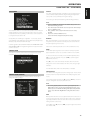
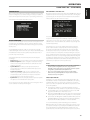
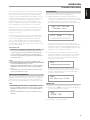
When devices that support HDMI Control (CEC) are connected, the
following modes of operation can be executed via the T 748 or the external
device using any of the device’s remote control.
Source (On/Off): At “On” setting, the T 748 will automatically switch
sources if another CEC device requests a Source change.
For example, if PLAY is pressed on a BD Player with CEC, the T 748
and TV with CEC will automatically switch to their respective input
connections – the T 748 switching to the HDMI input where the BD
Player is connected while the TV will switch to its input where the
T 748’s HDMI MONITOR OUT is connected. This completes the autoconfiguration – the BD Player is automatically played back using the
T 748 and TV.
Power (On/Off): At “On” setting, the T 748 will automatically go to
standby mode if it receives a CEC standby command. On the other
hand, if the T 748 receives a CEC power up command, the T 748 will
correspondingly switch ON from standby mode.
Volume (On/Off): At “On” setting, the T 748 will respond to CEC volume
and mute commands.
PORTUGUÊS
For the above Control modes, the T 748 will not respond to any CEC
command if the particular mode is set to “Off”.
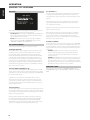
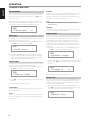
HDMI AUDIO OUT
Amp: HDMI Audio stream is sent to the T 748. Audio output is manifested
through the T 748’s speakers.
TV: HDMI Audio stream is sent to the TV. Audio output is manifested
through the TV’s speakers.
ITALIANO
HDMI ARC
HDMI ARC stands for HDMI Audio Return Channel. HDMI ARC function
enables an HDMI-ARC compatible TV to send audio data stream to the
T 748. Audio output is manifested through the T 748’s speakers.
• HDMI ARC is enabled only with “Volume” setting set to “On”. If
“Volume” is set to “Off”, HDMI ARC is automatically set to “Off”.
• “HDMI ARC” is shown in the VFD when it is set to “On” and active.
LISTENING MODES
The audio format as detected by the selected Source can be automatically
configured and processed through the following options:
DOLBY DIGITAL
Dolby Digital is the multi-channel digital signal format developed in the
Dolby laboratories. Discs bearing the Dolby Digital (double-D symbol) logo
were recorded with up to 5.1 channels of digital signals, reproducing a
much better sound quality, with dynamic and spatial sound sensations that
are much better than in the previous Dolby Surround.
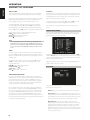
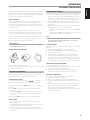
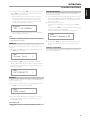
A Dolby Digital audio input can be configured relative to its format as
follows
Stereo: If the detected audio is of Dolby stereo format, you can default
it to one of the following settings - Stereo, PLIIx Movie, PLIIx Music, PLIIx
Game, Neo:6 Cinema or Neo:6 Music.
Surround: If the detected audio is of Dolby Surround format, you can
default it to one of the following settings - Stereo, PLIIx Movie, PLIIx
Music, Dolby D Ex,Neo:6 Cinema or None.
None: If “None” is selected, the Dolby Digital signal will be defaulted
to the “Stereo” or “Surround” settings set forth at the “PCM” option. See
discussion below about “PCM”.
DOLBY DIGITAL SURROUND MODES
The following are further descriptions of Dolby Digital surround modes.
DEUTSCH
IMPORTANT NOTES
• The CEC or HDMI ARC response among the devices may vary or may not
be achieved as expected. This may depend upon the other devices’ setup
configuration, compatibility or capability.
• Audio and video will continuously stream from the HDMI source with
CEC to the TV with CEC even if the T 748 is at standby mode.
NEDERLANDS
LISTENING MODE SETUP
DOLBY DIGITAL PLUS
Dolby Digital Plus is the next-generation audio technology for all highdefinition programming and media. It combines the efficiency to meet
future broadcast demands with the power and flexibility to realize the full
audio potential expected in the upcoming high-definition era. Built on
Dolby Digital, the multi-channel audio standard for DVD and HD broadcasts
worldwide, Dolby Digital Plus was designed for the next-generation A/V
receivers but remains fully compatible with all current A/V receivers.
SVENSKA
Dolby Digital Plus delivers multi-channel audio programs of up to 7.1
channels and supports multiple programs in a single encoded bitstream
with the maximum bit rate potential of up to 6 Mbps and the maximum bit
rate performance of up to 3 Mbps on HD DVD and 1.7 Mbps on Blu-ray Disc.
It outputs Dolby Digital bitstreams for playback on existing Dolby Digital
systems. Dolby Digital Plus can accurately reproduce the sound originally
intended by directors and producers.
РУССКИЙ
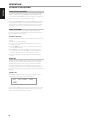
The T 748 has various listening mode options and is mostly configurable.
These are provided to reproduce a variety of sound effects depending upon
the content of the source to be played. Use a combination of [ A/S/D/F ] to
configure the following settings.
22
It also features multi-channel sound with discrete channel output,
interactive mixing and streaming capability in advanced systems.
Supported by High-Definition Media Interface (HDMI), a single-cable digital
connection is possible for high-definition audio and video.