1
LIME is also available from CoSBi:
http://www.cosbi.eu/index.php/prototypes/lime
The first step is to create the LIME source file, which should be a plain text file. Any basic
text editor such as Notepad or Wordpad will suffice.
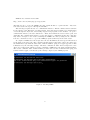
The next steps require the use of a command line interface. This is a window that is available
in all versions of the Windows operating system. The user interacts with it by entering lines
of text through the keyboard, and reading output from programs on the monitor. To open a
command line interface, the user clicks Start → Run, enters cmd in the text box that opens, and
clicks OK. The command line interface opens, and awaits a command from the user. The user
may want to navigate to the folder containing the LIME source file by using the cd command.
It is also convenient to have a copy of the LIME program (lime.exe) in the same folder.
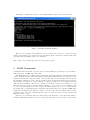
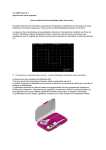
To compile a LIME source file and produce the two BlenX files, the user types lime followed
by the name of the source file. The convention is that whatever the name of the source file is, the
two BlenX files begin with the same name, with the suffixes .prog and .types appended. This
is illustrated by the following example. The first command cd lime files changes the active
directory to lime files, which is a folder containing a LIME source file named lotkavolterra.
The second command lime lotkavolterra produces the two files lotkavolterra.prog and
lotkavolterra.types, as indicated by the message output by the LIME program.
Figure 2: Invoking LIME
2