1
Operating the projector
Displaying a list of channels
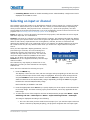
All available channels are listed in the Channel Setup menu, which describes how each channel
can be accessed and provides access for editing, copying and deleting channels.
1. Press Menu from the presentation level to display the Main menu.
2. To display the Channel Setup menu, press 3, or move the highlight to the Channel Setup
option and press Enter.
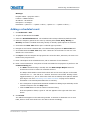
Channel Setup
01
02
A
A
1,2 iSVid 15.73kHz- i59.94-Hz4,1 pDig 33.72kHz+ p29.07-Hz+
Slot, Input
Signal Horizontal
Type Frequency
Vertical
Frequency
i-Interlaced
p-Progressive
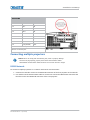
Channel Setup Icons
An unlocked auto-source that appears in the channel list.
A locked auto-source that appears in the channel list.
3. Use Up Arrow Key and Down Arrow Key to see the remaining channels not visible in the
initial display of channels.
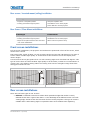
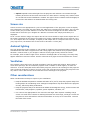
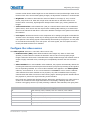
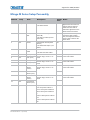
The channel setup icons list all defined channels. The far left column lists channel numbers defined.
The values in the far right columns indicate horizontal and vertical frequencies or if there is a
defined name for a channel, it appears here. The H and V frequencies do not appear if a name has
been defined for the channel; instead the name is only seen. The H and V frequencies are inserted
as, the name when the channel is first created. The vertical frequency is displayed with the sync
polarity. The remaining columns pertain to each signal type; such as, input number, slot location, a
variety of icons indicating access to each channel, and an abbreviated description of each signal
type.
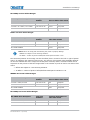
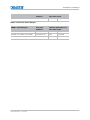
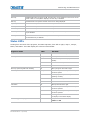
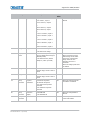
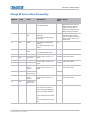
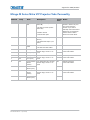
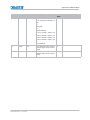
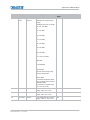
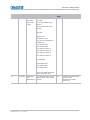
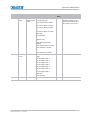
The channel list or the Channel Setup menu identifies signal types abbreviations as defined in the
following table. Composite Sync on the H/C input or the V input (four-wire). These abbreviations
are preceded by either an ‘i’ (interlaced signals) or ‘p’ (progressive signal).
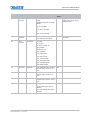
The first five items in this table are analog RGB with various sync combinations indicating Sync
Source when editing the channel:
Abbreviation
Signal types
—
No Sync
4WH
Composite (four wire) on HC input
4WV
Composite (four wire) on V input
SG
Sync-on-green (four wire)
5W
Separate H,V (five-wire)
5WR
Separate H,V swapped (five-wire)
SVid
S-Video
CVid
Composite Video
Dig
Digital
Mirage M Series User Manual
020-101942-01 Rev. 1 (07-2015)
66